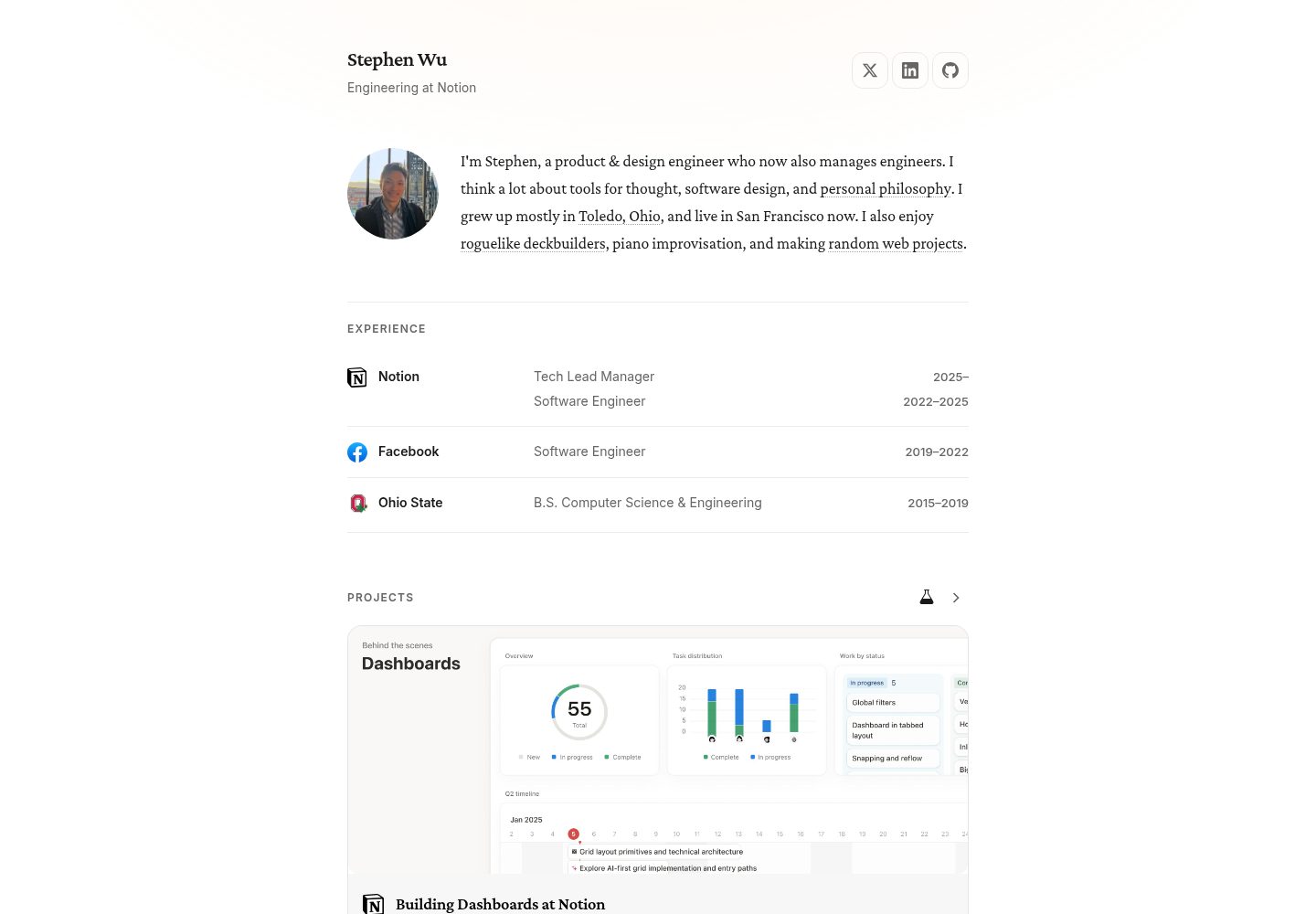
按 Articles、Projects、Notes 三类标签组织内容,各自有独立路由与倒序列表
HTML作品集
me-ghost — HTML 作品集模板
作者 wustep
me-ghost 是 wustep 为个人站点 wustep.me 开发的 Ghost 主题,用 HTML 与 Handlebars 模板组织首页、文章、项目与笔记四类内容。
看看你的网站会是什么样
浏览真实页面截图,比较内容排版与手机效果。点击下方缩略图切换,放大查看整页细节。
全部页面与视图 3
截图用于了解视觉与布局,交互效果请以实际项目为准。
采集于 2026-10-11查看来源
值得关注的模板亮点
从已有项目资料中,快速了解它的特点。
首页读取 URL 为 home 的页面,并展示每类最新两条内容与 Read More 按钮
导航栏依据 Ghost Navigation 设置自动左右分组,移动端为下拉菜单,社交链接带图标
支持 Commento 评论与 Applause 点赞,可通过 Code Injection 变量在单篇关闭
提供 [#Tag]、[!Button] 等自定义语法,转换为 Bulma 标签与按钮样式
使用 gulp 完成 SCSS 编译、代码检查、压缩与部署打包,gulp deploy 调用 gscan 校验
模板详细介绍
me-ghost 是作者在 wustep.me 上使用的个人 Ghost 主题,仓库以 MIT 许可公开。它把站点内容分成 Articles、Projects、Notes 三类,分别按创建时间倒序展示,并路由到 /articles/{slug}、/projects/{slug}、/notes/{slug};未打这三类主标签的文章则回到根路径。首页读取 URL 为 home 的页面内容,并列出每类最新两条条目。导航栏根据 Ghost 后台 Navigation 设置生成,Home、Projects、Articles、Notes 靠左,其他链接靠右,移动端为下拉形式,Facebook、Twitter、GitHub、LinkedIn 会显示图标。
主题依赖对 Ghost 核心代码的若干修改:在 has.js 中为标签判断增加 label 属性以支持导航左右分组;用仓库内的 routes.yaml 替换默认路由,把 tag/projects 等改为 projects 等;在主题配置中新增 use-commento 与 use-applause 开关;并注释掉 ghost_head.js 中的 RSS 输出,因为作者说明当时 RSS 未正确填充。这些改动意味着它并非开箱即用的标准主题,安装时需要同步修改 Ghost 服务端文件。
功能层面还包含:文章页按编辑器样式排版,支持标题、链接、引用、代码块、图片与画廊、视频嵌入;作者署名带图标、姓名、简介与个人网站链接;文章卡片列表显示标题、摘要与标签,不显示特色图,优先展示 featured 内容,分页由 package.json 的 posts-per-page 控制;自定义 404 页面;通过 Commento 提供评论、通过 Applause 提供点赞,均可在 Code Injection 中设置 window.disableCommento 或 window.disableApplause 关闭;额外脚本引入 jQuery、Highlight.js 语法高亮、外链新标签打开,以及把 [#Tag] 与 [!Button] 语法转成 Bulma 标签和按钮。构建使用 gulp,负责 SCSS 编译、JSHint 与 Sass-lint 检查、CSS/JS 压缩并生成 source map,gulp deploy 会打包 zip 并用 gscan 校验。
作者列出若干未完成或降优先级的事项:订阅弹窗只搭好表单与结构,未接表单动作与错误处理;多作者署名、完善的 RSS 订阅源、以及把主题抽成通用 Bulma + Ghost 主题都尚未做。自动摘要算法也被认为效果不佳,作者建议改为只取第一个段落。
HTML作品集
适合你的项目吗?
适用场景
- 为个人站点搭建以文章、项目、笔记为分类的 Ghost 博客
- 需要首页展示个人简介页面并汇总各类最新内容的场景
- 希望在文章页使用 Commento 评论与 Applause 点赞并可按篇关闭
- 需要把 [#Tag]、[!Button] 等标记转换为 Bulma 组件样式的写作流程
适合人群
- 使用 Ghost 并愿意修改核心文件以配合主题路由与配置的用户
- 以文章、项目、笔记三类内容为主的个人站点作者
- 熟悉 Handlebars、SCSS 与 gulp 构建流程,能自行调整模板的开发者
上手与定制指南
结合仓库当前版本的说明,按下面的资料检查内容、配置与运行要求。
- 1
需先安装 Ghost,并按 README 修改核心文件:has.js 增加 label 判断、替换 routes.yaml、在主题配置中加入 use-commento 与 use-applause、注释 ghost_head.js 中的 RSS 输出
- 2
将仓库克隆到 /content/themes,执行 npm install 后用 gulp 开发,或用 gulp deploy 生成 zip 并在 Settings -> Design 上传
- 3
在 Settings -> Navigation 添加 Home -> /、Articles -> /articles/、Projects -> /projects/、Notes -> /notes/,可选添加社交链接
- 4
创建 URL 为 /home 的页面作为首页内容,并为文章打上 Projects、Articles 或 Notes 标签
- 5
评论需注册 Commento 账号;点赞与评论也可选择自建服务端
授权与来源资料
使用条件与限制
免费使用 · 保留许可声明本次收录的是公开仓库中采用 MIT 许可的免费版本;免费范围为该版本代码,不代表外部服务或第三方素材免费。
使用时需要遵守
- 允许免费使用、修改、商用和分发该版本代码。
- 分发代码副本或实质性部分时,保留原作者版权声明和完整 MIT 许可声明。
- 代码按现状提供;担保与责任限制以原许可证及适用法律为准。
额外费用与待核对事项
- 演示图片、字体、图标及其他第三方素材需按各自许可核对,不能仅凭代码的 MIT 许可判断。
- 域名、托管、数据库、支付或 AI 等外部服务可能另外收费。
- 评论功能依赖 Commento 服务,需自行注册 Commento 账号并配置后才能使用。
- 点赞与评论可自建服务端,意味着默认需依赖外部服务,自建则需自行部署服务器。
- 主题通过 CDN 引入 jQuery v3.4,运行时依赖外部 CDN 资源。
- 联系按钮需借助 Typeform 等第三方表单服务实现,非主题内置功能。
- 订阅按钮功能尚未完成,目前只能借助 Typeform 等外部表单替代。
- RSS 订阅源当前无法正确填充,作者建议注释掉 Ghost 默认的 RSS 输出。
- 自动摘要效果不佳,会拼接多行且缺少正确间距,需自行修改摘要算法。
- 主题需同步修改 Ghost 核心代码(has.js、routes.yaml、主题配置、ghost_head.js)才能正常工作,并非开箱即用。
查看原文依据
Permission is hereby granted, free of charge
许可证原文
Set up [Commento](https://commento.io/) account for comments.
README 原文
You can choose to [host your own server of Applause](https://github.com/ColinEberhardt/applause-button-server) and [Commento](https://docs.commento.io/getting-started/self-hosting/).
README 原文
Add [jQuery v3.4](https://jquery.com/) via CDN
README 原文
Use a service like Typeform to add a "Contact" button to the `home` page.
README 原文
(This isn't completed yet! In the meantime, you can use Typeform forms.)
README 原文
At the moment, RSS feeds are not populated properly.
README 原文
TODO: Automatic excerpts, by default, tend to be a poor result and concatenate multiple lines together without proper spacing.
README 原文
https://github.com/wustep/me-ghost/blob/master/LICENSEhttps://github.com/wustep/me-ghost/blob/master/README.mdSome minor mods were made to the Ghost code, particularly:
README 原文
DeepSeek 根据仓库许可证和 README 整理 ·2026-10-11。结果仅覆盖已读取资料,依赖、图片、字体及后续条款变更以各自原文为准。
项目核对记录与介绍依据
模板资料
- 来源平台
- GitHub
- 资料与维护参考分
- 资料一般 · 68 / 100
- 技术栈
- HTML
- 网站类型
- 作品集
这个分数如何计算
本站按许可资料(最高30分)、演示链接(12分)、预览图(10分)、Star数(15分)、记录的维护时间(15分)、描述完整度(8分)、功能记录(5分)和分类资料(5分)计算。它不是代码、安全或性能测试,也不是 Google 评分;有链接不代表已实测可用。
这个项目需要核对什么
- 记录的仓库更新时间
- 2022-12-09
- 截图检查日期
- 2026-10-11
已收录演示链接。请用你的内容与屏幕尺寸检查;有演示不代表表单、认证或支付已经可用。
目录记录的主要技术栈是 HTML。请通过依赖清单和锁文件核对实际版本与托管要求。这些说明基于收录资料,不代表代码审计或部署实测。
查看具体选型方法 →介绍的制作与核对状态
介绍由 AI 辅助整理目录与仓库资料。仓库作者不等于这篇介绍的审核者。
审核声明: [email protected] · 2026-10-13
查看当时使用的来源资料
SHA-256: 1ca3c966b3e1bf8b3e376fdc0cbd2cd4088a4d215f647d83bad90acdf796956c
2026-10-11T19:01:49.126Z
来源文件 / 仓库# Me
👻 This is my personal [Ghost](https://ghost.org) theme used on [wustep.me](https://wustep.me).
## Features
- ✔️ Home page
- ✔️ Content card from page with URL `home`
- ✔️ Add 2 most recent Articles, Projects, and Notes
- ✔️ "Read More" buttons linking to pages
- ✔️ Articles
- ✔️ These should be posts tagged `Articles` first
- ✔️ Articles will be loaded by creation date desc
- ✔️ Articles are routed to `/articles/{slug}`
- ✔️ Projects
- ✔️ These should be posts tagged `Projects` first
- ✔️ Set `/projects` to route to `/tags/projects`
- ✔️ Projects will be loaded by creation date desc
- ✔️ Projects are routed to `/projects/{slug}`
- ✔️ Hide day for datetime published
- ✔️ Notes
- ✔️ These should be posts tagged `Notes` first
- ✔️ Set `/notes` to route to `/tags/notes`
- ✔️ Notes will be loaded by creation date desc
- ✔️ Notes are routed to `/notes/{slug}`
- ✔️ Hide day for datetime published
- ✔️ Posts that are not primarily tagged `Articles` or `Projects` or `Notes` will be routed to `/`
- ✔️ Dynamic navigation bar
- ✔️ Based on the items in Settings > Navigation:
- ✔️ "Home", "Projects", "Articles", and "Notes" will be on the left side
- ✔️ Any other link will be on the right side
- ✔️ Mobile-friendly dropdown
- ✔️ Facebook, Twitter, GitHub, and LinkedIn will add icons
- ✔️ Tags category pages: `/tag/[tag]` and author page: `/author/[author]`
- ✔️ Dedicated post webpages
- ✔️ Proper formatting--match editor styles
- ✔️ Headings, links, paragraphs, bold, italics, blockquotes, bullets, code blocks, images, galleries
- Videos / embeds
- ✔️ Author byline with icon, name, and bio
- ✔️ Links to author's website
- ✔️ Post Cards (loop)
- ✔️ with title, excerpt, tags
- ✔️ (These will not have feature images)
- Loads `featured` first
- Use package.json property `posts-per-page` with pagination
- ([Ran into some issues with pagination related to #get](https://github.com/TryGhost/Ghost/issues/9011))
- ✔️ Custom 404 page with 404-porcupine
- ✔️ Commenting with [Commento](https://commento.io/)
- ✔️ Disable on any post by setting `window.disableCommento` to `true` in Code Injection
- Restyle to be more Bulma-like
- Add syntax highlighting?
- ✔️ Claps with [Applause](https://applause-button.com/)
- Disable on any page by setting `window.disableApplause` to `true`
- ✔️ Additional scripts:
- ✔️ Add [jQuery v3.4](https://jquery.com/) via CDN
- ✔️ [Syntax highlighting](https://github.com/highlightjs/highlight.js/blob/master/README.md) for programming code blocks with Highlight.js
- ✔️ Convert external links to open in new tab
- ✔️ Tagify [#Tags] and [!Buttons] with Bulma tags and buttons
- ✔️ `[##TagName]` will be turned into dark tags of #TagName with `.is-primary-label`
- ✔️ `[##!TagName]` will get the same treatment but with anchor link
- ✔️ `[#TagName]` will be turned into grey tags of #TagName with `.is-secondary-label`
- ✔️ Lines that start and end in `[#Tags]` will be given `.label-collection`
- ✔️ `[!<a href...>Button Text</a>]` will be given `a.button.is-primary`
- ✔️ `[!(classes)<a href...>Button Text</a>]` will be given `a.button` with space-separated `classes`
- ✔️ Build tools:
- ✔️ `gulp` for development and `gulp deploy` for deployment
- ✔️ Compile SCSS to CSS
- ✔️ JSHint (error-checking) and Sass-lint (style-checking)
- ✔️ Minify CSS and JavaScript with source maps
**De-prioritized:**
- Subscribe modal
- ✔️ Set up modal and form
- Set up form action and errors
- Multi-author byline support
- Proper RSS feeds
- Fork into generic Bulma + Ghost theme
## Development
- With [npm](https://www.npmjs.com/get-npm) installed, install `gulp` globally with `npm install -g gulp`.
- `gulp`: compiles with Sass, Autoprefixer, Sass-lint, JSHint, Minify, watching for changes.
- Ghost reloads `.hbs` changes by default, but new partials will require a `ghost restart`.
- `gulp deploy`: recompile everything, create `.zip` for production and uses `gscan` to validate.
- To run Ghost: `ghost start`, `ghost restart`, or `ghost run [session-name] --development` for logs
## Setup
0. [Install Ghost](https://docs.ghost.org/setup/) and complete modifications noted below.
1. Clone this repo to `/content/themes`, then (`npm install`) and (use `gulp`) or (`gulp deploy` and upload zip file to **Settings -> Design**).
1. Under **Settings -> Navigation**: add:
```javascript
Home -> /
Articles -> /articles/
Projects -> /projects/
Notes -> /notes/
(optional)
LinkedIn, Twitter, GitHub, Facebook
```
3. Create a **page** with URL `/home`. This will be shown on the home page.
4. Write **posts** that are tagged `Projects`, `Articles`, or `Notes`!
5. Set up [Commento](https://commento.io/) account for comments.
### Modifications to Ghost
Some minor mods were made to the Ghost code, particularly:
#### 1. \#has tag for labels
This is used for the navigation bar, to have `Home`, `Projects`, and `Articles` be on the left-aligned and any other link to be right-aligned.
- In ghost folder: `core/server/helpers/has.js`, add `label` to `validAttrs` and add to `checks` object (line 140ish):
```javascript
label: function() {
return (
(attrs.label && evaluateTagList(attrs.label, [self.label], true)) ||
false
);
},
```
#### 2. Routes
Routes were modified to change `tag/projects` -> `projects`, `tag/articles` -> `articles`, and `tag/notes` -> `notes` and have the user-created page `/home` -> `/`.
- Replace your `content/settings/routes.yaml` with the `routes.yaml` in this repository, modifying as desired.
#### 3. Add `use-commento` and `use-applause` config properties.
We added two config properties to let users enable or disable [commento](https://commento.io/) / [applause](https://applause-button.com/). Edit `package.json` if you want these enabled or disabled.
- In ghost folder: `core/server/services/themes/config/index.js`.
Add `use-commento` and `use-applause` to `allowedKeys`.
- In ghost folder: `core/server/services/themes/middleware.js`
Add `use-commento` and `use-applause` to `updateGlobalTemplateOptions` in same format:
```javascript
const themeData = {
posts_per_page: activeTheme.get().config("posts_per_page"),
image_sizes: activeTheme.get().config("image_sizes"),
use_commento: activeTheme.get().config("use_commento"),
use_applause: activeTheme.get().config("use_applause")
};
```
#### 4. Hide RSS feed.
At the moment, RSS feeds are not populated properly. By default, Ghost adds a feed to the `<head>` tag.
To remove it, go to `core/server/helpers/ghost_head.js` and comment out the lines:
```javascript
head.push(
'<link rel="alternate" type="application/rss+xml" title="' +
escapeExpression(metaData.blog.title) +
'" href="' +
escapeExpression(metaData.rssUrl) +
'" />'
);
```
#### 5. (Optional) Change excerpt algorithm
TODO: Automatic excerpts, by default, tend to be a poor result and concatenate multiple lines together without proper spacing. Optionally, revise the `excerpt` code to catch only the first `<p>` block instead of carrying on.
### Other Optional Changes
#### 1. Add more internal pages
By default, only "Home", "Projects", "Articles", and "Ideas" are in the left side of the nav. To add more internal pages to the nav bar, edit `partials/navigation.hbs` and make sure the new label is listed in the `#has` and `^has` statements.
#### 2. Contact button
Use a service like Typeform to add a "Contact" button to the `home` page.
Edit the button to use Bulma, with class `button` and `is-success` (or [another color](https://bulma.io/documentation/overview/colors/))!
Example:
```html
<a class="typeform-share button is-success" ...>Contact Me</a>
```
#### 3. Subscribe button
(This isn't completed yet! In the meantime, you can use Typeform forms.)
Add a subscribe button somewhere with classes `subscribe-button button is-primary`:
```html
<a
class="button subscribe-button is-primary"
data-target="subscribe-modal"
href="#subscribe"
>
Subscribe
</a>
```
#### 4. Syntax highlighting changes
I added syntax highlighting through `highlight.js` for a limited number of languages that I felt I might use (including `[JavaScript, Python, Java, SQL, JSON, Markdown, HTTP, CSS, SCSS, ...]`).
I excluded many common ones, like `[C#, C++, Ruby, Makefiles, Apache]`, and there's tons more that can be added.
If you'd like to replace this library, [build your own package at highlightjs.org](https://highlightjs.org/download/) and replace `assets/lib/highlight.pack.js`.
To change the theme, follow the instructions in `assets/css/highlight.scss`.
#### 5. Host Applause or Commento
You can choose to [host your own server of Applause](https://github.com/ColinEberhardt/applause-button-server) and [Commento](https://docs.commento.io/getting-started/self-hosting/).
#### 6. Hide Commento
To hide comments on any post, use `window.disableCommento` via Code Injection to `{{ghost_foot}}` in the Ghost panel:
```html
<script>
window.disableCommento = true;
</script>
```
## Resources
#### Documentation
- [Ghost Themes API](https://docs.ghost.org/api/handlebars-themes/)
- [Bulma](https://bulma.io/)
- [SCSS](https://sass-lang.com/guide)
- [Handlebars](https://handlebarsjs.com/)
- [Gulp](https://gulpjs.com/)
- [Highlight.js](https://highlightjs.org)
- [Applause Button](https://applause-button.com/)
- [Commento](https://commento.io/)
#### Templates
- [Ghost-Theme-Template](https://github.com/thoughtbot/ghost-theme-template): Starting templates
- [Gulma](https://github.com/simply-fiete/Gulma): Ghost + Bulma theme
- [Casper](https://github.com/TryGhost/Casper): Default Ghost theme
- [Blog](https://github.com/TryGhost/Blog): Official Ghost blog theme
看看同类模板
对比同技术栈与用途的模板,找到更适合的视觉与内容结构。

simplefolio
⚡️ A minimal portfolio template for Developers
HTML · 作品集

Freelancer
Freelancer 是 Start Bootstrap 出品的单页作品集模板,专为自由职业者、设计师和小型工作室设计。 页面结构清晰,包含多个内容区块、响应式作品集网格,每个作品项目配有模态窗口展示详情。
HTML · 作品集

Resume
Resume 是 Start Bootstrap 推出的简历与 CV 主题,基于 Bootstrap 构建,采用固定侧边栏加内容区块的结构。
HTML · 作品集

Creative
Creative 是 Start Bootstrap 团队维护的一款单页营销模板,定位明确:为创意机构或产品服务提供一个以作品展示和行动号召为核心的落地页。
HTML · 企业官网

Grayscale
Grayscale 是 Start Bootstrap 出品的深色系单页 HTML 模板,基于 Bootstrap 构建。 它的视觉重心放在大尺寸首屏和清晰的内容分区上,整体氛围偏暗,适合摄影、活动或品牌叙事类网站。
HTML · 企业官网

startbootstrap-stylish-portfolio
Stylish Portfolio 是 Start Bootstrap 维护的单页作品集主题,基于 Bootstrap 构建,采用多个内容区块加离屏导航菜单的结构。
HTML · 作品集