内容集中在 src/data/resume.tsx 单文件,便于替换个人信息、技能、项目与社交链接
Next.jsReact作品集启动器
dev-portfolio-template — Next.js 作品集模板
作者 yethikrishna
由 Mynd Labs 维护、采用 MIT 许可的开发者个人作品集启动模板,基于 Next.js 与 React,内容集中在单个数据文件,附带博客、项目展示、Uses 页与终端式 CLI 模式。
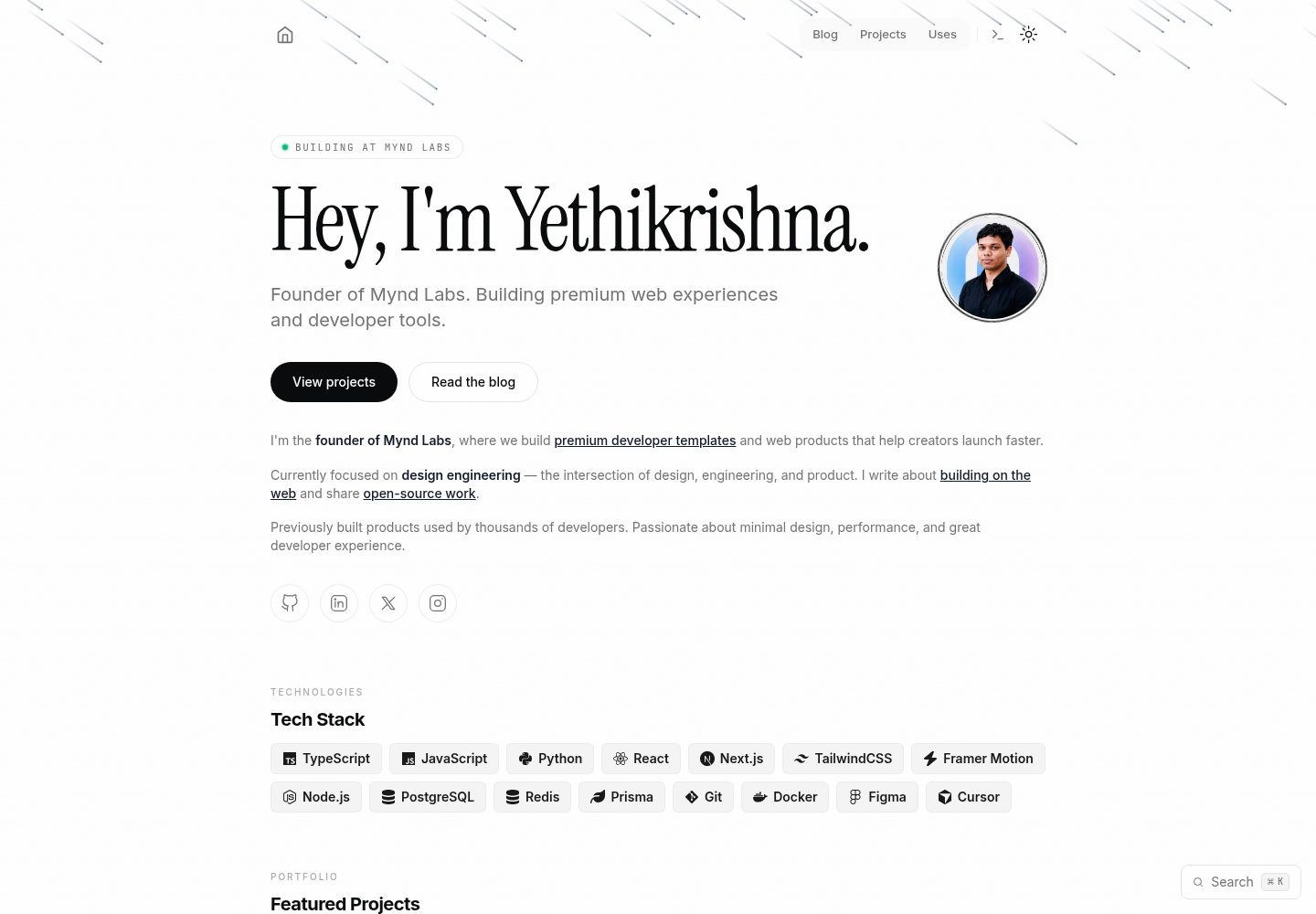
看看你的网站会是什么样
浏览真实页面截图,比较内容排版与手机效果。点击下方缩略图切换,放大查看整页细节。
全部页面与视图 3
截图用于了解视觉与布局,交互效果请以实际项目为准。
采集于 2026-10-04查看来源
值得关注的模板亮点
从已有项目资料中,快速了解它的特点。
内置 MDX 博客,支持代码高亮、阅读时长与 RSS 输出
提供项目展示页与 Uses 页,分别展示作品和硬件软件配置
包含 /cli 终端式交互模式与 Cmd+K / Ctrl+K 命令面板
支持深色、浅色与跟随系统三种主题,并带可开关的界面音效
自带 sitemap、robots.txt、RSS、OpenGraph、JSON-LD 与动态 OG 图片等 SEO 配置
模板详细介绍
这是一个面向开发者、创始人和创意工作者的个人作品集启动模板,仓库位于 GitHub(yethikrishna/dev-portfolio-template),由 Mynd Labs 制作,采用 MIT 许可。技术栈为 Next.js 与 React,并使用 TypeScript、Tailwind CSS、Framer Motion、Radix UI 与 MDX。
模板的主要用途是快速搭建个人站点:首页包含 hero、技能、项目、工作经历与联系方式;另有博客列表与文章页、完整项目展示页、硬件软件配置的 Uses 页,以及终端风格的 /cli 交互模式。内容定制集中在 src/data/resume.tsx 一个文件中,博客文章以 MDX 文件放在 content/ 目录,Uses 页数据在 src/data/products.ts,主题颜色在 tailwind.config.ts 中调整。
模板自带 SEO 相关配置,包括 sitemap、robots.txt、RSS、OpenGraph 与 Twitter Card 元标签、JSON-LD 结构化数据,以及通过 /api/og 动态生成 OG 图片。README 说明无需任何环境变量即可运行全部功能,部署方式以 Vercel 为主。
使用限制方面:仓库星标数较少,属于较新的模板;演示图片、字体、图标等第三方素材的许可需单独核对,不能仅凭代码的 MIT 许可判断;域名、托管等外部服务可能产生费用。README 中提到的性能与无障碍特性属于模板自述,未在本资料中独立验证。
Next.jsReact作品集启动器
适合你的项目吗?
适用场景
- 开发者搭建个人作品集网站,需要首页、项目页与博客的组合
- 希望用单个数据文件维护个人信息,减少多文件改动
- 想以 MDX 撰写技术文章并输出 RSS 订阅
- 需要一个带终端风格彩蛋页面或命令面板的个性化站点
- 准备部署到 Vercel 并希望开箱带有 SEO 与社交分享元数据
适合人群
- 熟悉 Next.js 与 React、能自行修改 TypeScript 与 Tailwind 配置的开发者
- 需要快速起步的个人作品集项目,而非长期维护的复杂内容平台
- 接受以 Vercel 为主要部署目标的用户
- 希望以 MIT 许可自由修改和分发代码的个人或团队
上手与定制指南
结合仓库当前版本的说明,按下面的资料检查内容、配置与运行要求。
- 1
克隆仓库后执行 npm install 安装依赖,再用 npm run dev 启动本地开发服务器
- 2
主要定制入口是 src/data/resume.tsx,博客文章放在 content/ 目录,Uses 页数据在 src/data/products.ts
- 3
主题颜色在 tailwind.config.ts 中调整,favicon 与品牌素材替换 public/favicons/ 和 public/assets/ 下的文件
- 4
README 说明无需环境变量即可使用全部功能;部署到 Vercel 时平台会自动识别 Next.js
- 5
演示图片、字体、图标等第三方素材的许可需自行核对,域名与托管等外部服务可能另外收费
授权与来源资料
使用条件与限制
免费使用 · 保留许可声明本次收录的是公开仓库中采用 MIT 许可的免费版本;免费范围为该版本代码,不代表外部服务或第三方素材免费。
使用时需要遵守
- 允许免费使用、修改、商用和分发该版本代码。
- 分发代码副本或实质性部分时,保留原作者版权声明和完整 MIT 许可声明。
- 代码按现状提供;担保与责任限制以原许可证及适用法律为准。
额外费用与待核对事项
- 演示图片、字体、图标及其他第三方素材需按各自许可核对,不能仅凭代码的 MIT 许可判断。
- 域名、托管、数据库、支付或 AI 等外部服务可能另外收费。
查看原文依据
https://github.com/yethikrishna/dev-portfolio-template/blob/main/LICENSEhttps://github.com/yethikrishna/dev-portfolio-template/blob/main/README.mdPermission is hereby granted, free of charge
许可证原文
DeepSeek 根据仓库许可证和 README 整理 ·2026-10-04。结果仅覆盖已读取资料,依赖、图片、字体及后续条款变更以各自原文为准。
项目核对记录与介绍依据
模板资料
- 来源平台
- GitHub
- 资料与维护参考分
- 资料较完整 · 88 / 100
- 技术栈
- Next.js · React
- 网站类型
- 作品集 · 启动器
这个分数如何计算
本站按许可资料(最高30分)、演示链接(12分)、预览图(10分)、Star数(15分)、记录的维护时间(15分)、描述完整度(8分)、功能记录(5分)和分类资料(5分)计算。它不是代码、安全或性能测试,也不是 Google 评分;有链接不代表已实测可用。
这个项目需要核对什么
- 记录的仓库更新时间
- 2026-10-04
- 截图检查日期
- 2026-10-04
已收录演示链接。请用你的内容与屏幕尺寸检查;有演示不代表表单、认证或支付已经可用。
目录记录的主要技术栈是 Next.js。请通过依赖清单和锁文件核对实际版本与托管要求。这些说明基于收录资料,不代表代码审计或部署实测。
查看具体选型方法 →介绍的制作与核对状态
介绍由 AI 辅助整理目录与仓库资料。仓库作者不等于这篇介绍的审核者。
审核声明: [email protected] · 2026-10-04
查看当时使用的来源资料
SHA-256: 3e29ab79bbd71ee068286427d50cfaf85773b12ede3e84a0d4dc7698ee0069cd
2026-10-04T10:12:27.677Z
来源文件 / 仓库# Dev Portfolio Template
[](https://vercel.com/new/clone?repository-url=https://github.com/yethikrishna/dev-portfolio-template&project-name=my-portfolio&repository-name=my-portfolio)
**Live demo:** [portfolio.myndlabs.tech](https://portfolio.myndlabs.tech)
A premium developer portfolio starter template built with Next.js 14, TypeScript, Tailwind CSS, and Framer Motion. Designed for developers, founders, and creatives who want a polished, production-ready personal website.
**Template by [Mynd Labs](https://myndlabs.tech)**
## Features
- **One-File Customization** — all content lives in `src/data/resume.tsx`
- **Blog with MDX** — syntax highlighting, reading time, and RSS feed
- **Projects Showcase** — animated project cards with tech stack badges
- **Uses Page** — hardware and software setup with filtering
- **Interactive CLI Mode** — terminal-style portfolio at `/cli`
- **Command Palette** — quick navigation with `Cmd+K` / `Ctrl+K`
- **Dark / Light / System Theme** — seamless theme switching
- **Sound Effects** — optional UI sounds (toggleable)
- **Smooth Cursor** — custom animated cursor with reduced-motion support
- **SEO Suite** — sitemap, robots.txt, OpenGraph, Twitter Cards, JSON-LD, RSS
- **Dynamic OG Images** — auto-generated OpenGraph images via edge runtime
- **Accessibility** — keyboard navigation, focus states, ARIA labels
- **Performance** — image optimization, code splitting, lazy loading
- **Responsive** — looks great on mobile, tablet, and desktop
## Tech Stack
| Technology | Purpose |
|-----------|---------|
| [Next.js 14](https://nextjs.org/) | React framework with App Router |
| [TypeScript](https://www.typescriptlang.org/) | Type-safe development |
| [Tailwind CSS](https://tailwindcss.com/) | Utility-first styling |
| [Framer Motion](https://www.framer.com/motion/) | Animations and transitions |
| [Radix UI](https://www.radix-ui.com/) | Accessible UI primitives |
| [MDX](https://mdxjs.com/) | Markdown with components for blog |
| [Vercel](https://vercel.com/) | Deployment platform |
## Quick Start
1. Clone or fork the repository:
```bash
git clone https://github.com/myndlabs/dev-portfolio-template
cd dev-portfolio-template
```
2. Install dependencies:
```bash
npm install
```
3. Start the development server:
```bash
npm run dev
```
4. Open [http://localhost:3000](http://localhost:3000) in your browser.
## Customization
### One-File Setup
Edit `src/data/resume.tsx` to customize everything:
```typescript
export const DATA = {
name: "Your Name",
initials: "YN",
url: "https://yoursite.com",
location: "Your City, Country",
description: "Your tagline here.",
summary: "Your about text here. Supports **markdown**.",
avatarUrl: "/assets/your-avatar.png",
// Skills, projects, work experience, education,
// social links, tools — all in this one file.
} as const;
```
### Blog Posts
Create MDX files in the `content/` directory:
```mdx
---
title: "Your Post Title"
publishedAt: "2026-01-15"
summary: "Brief description of your post."
tags: ["tag1", "tag2"]
---
Your content here. Markdown and code blocks supported.
```
### Uses Page
Edit `src/data/products.ts` to showcase your hardware and software.
### Theme Colors
Customize colors in `tailwind.config.ts`:
```typescript
theme: {
extend: {
colors: {
primary: { ... },
},
},
},
```
### Favicon and Brand Assets
Replace files in `public/favicons/` and `public/assets/` with your own.
## Project Structure
```
├── content/ # Blog posts (MDX)
├── public/
│ ├── assets/ # Logo, avatar, OG images
│ └── favicons/ # Favicon variants and manifest
├── src/
│ ├── app/ # Next.js App Router pages
│ │ ├── api/ # API routes (OG images, revalidate)
│ │ ├── blog/ # Blog listing and post pages
│ │ ├── cli/ # Interactive CLI mode
│ │ ├── projects/ # Projects showcase
│ │ ├── uses/ # Hardware and software setup
│ │ ├── layout.tsx # Root layout with providers
│ │ ├── page.tsx # Homepage
│ │ ├── sitemap.ts # Auto-generated sitemap
│ │ ├── robots.ts # Robots.txt
│ │ └── rss.xml/ # RSS feed route
│ ├── components/ # React components
│ │ ├── magicui/ # Animation components
│ │ ├── ui/ # shadcn/ui components
│ │ └── ...
│ ├── data/ # Data files (resume, blog, products)
│ ├── hooks/ # Custom React hooks
│ └── lib/ # Utility functions
├── next.config.mjs # Next.js configuration
├── tailwind.config.ts # Tailwind configuration
└── package.json
```
## Deployment
### Deploy to Vercel
1. Push your repository to GitHub.
2. Go to [vercel.com/new](https://vercel.com/new) and import your repository.
3. Vercel will auto-detect Next.js — no configuration needed.
4. Click **Deploy**.
Your site will be live at `https://your-project.vercel.app`.
### Environment Variables
This template works without any environment variables. All features are available out of the box.
## Scripts
| Command | Description |
|---------|-------------|
| `npm run dev` | Start development server |
| `npm run build` | Build for production |
| `npm run start` | Start production server |
| `npm run lint` | Run ESLint |
## Pages
| Route | Description |
|-------|-------------|
| `/` | Homepage with hero, skills, projects, work, and contact |
| `/blog` | Blog post listing |
| `/blog/[slug]` | Individual blog post |
| `/projects` | Full projects showcase |
| `/uses` | Hardware and software setup |
| `/cli` | Interactive terminal mode |
## Accessibility
- Full keyboard navigation
- Focus-visible states on all interactive elements
- ARIA labels on icon-only buttons
- `prefers-reduced-motion` support
- Semantic HTML structure
- Color contrast meets WCAG AA
## SEO
- Automatic sitemap generation at `/sitemap.xml`
- Robots.txt at `/robots.txt`
- RSS feed at `/rss.xml`
- OpenGraph and Twitter Card meta tags
- JSON-LD structured data (Person, WebSite, BlogPosting schemas)
- Dynamic OG image generation at `/api/og`
- Canonical URLs on all pages
## Browser Support
- Chrome / Edge (latest)
- Firefox (latest)
- Safari (latest)
- Mobile Safari (iOS 15+)
- Chrome Android (latest)
## License
MIT License — see [LICENSE](LICENSE) for details.
## Credits
**Template by [Mynd Labs](https://myndlabs.tech)**
Built and maintained by [Yethikrishna R](https://github.com/yethikrishna).
### Acknowledgments
- [Next.js](https://nextjs.org/) — React framework
- [Tailwind CSS](https://tailwindcss.com/) — Styling
- [Framer Motion](https://www.framer.com/motion/) — Animations
- [Radix UI](https://www.radix-ui.com/) — Accessible primitives
- [shadcn/ui](https://ui.shadcn.com/) — Component patterns
- [Lucide Icons](https://lucide.dev/) — Icon library
- [Vercel](https://vercel.com/) — Hosting and deployment
---
<p align="center">
<a href="https://myndlabs.tech">myndlabs.tech</a>
</p>
<p align="center">
Built with care by Mynd Labs. Fork it, ship it, make it yours.
</p>
看看同类模板
对比同技术栈与用途的模板,找到更适合的视觉与内容结构。

ai-website-cloner-template
Clone any website with one command using AI coding agents
Next.js · 启动器

Next.js SaaS Starter
Next.js SaaS Starter 是 Next.js 官方维护的 SaaS 起点模板,定位介于学习资源和可直接部署的脚手架之间。
Next.js · SaaS

Next.js Commerce
Next.js Commerce 是 Vercel 团队维护的电商启动模板,基于 Next.js App Router 构建,采用服务端渲染、React Server Components、Server Actions …
Next.js · 电商

Next-js-Boilerplate
Next-js-Boilerplate 是一个面向 Next.js 16、Tailwind CSS 4 和 TypeScript 的启动器,核心定位是开发者体验优先。
Next.js · 启动器

tailwind-nextjs-starter-blog
tailwind-nextjs-starter-blog 是一个面向个人技术博客的 Next.js 与 Tailwind CSS 启动模板,其 v2 版本基于 App Router 与 React Server Comp…
Next.js · 博客

next-forge
Production-grade Turborepo template for Next.js apps.
Next.js · 启动器