Content is centralized in the single file src/data/resume.tsx, making it easy to replace personal information, skills, projects, and social links
Next.jsReactPortfolioStarter
dev-portfolio-template — Next.js Portfolio Template
By yethikrishna
An MIT-licensed developer portfolio starter template maintained by Mynd Labs, built on Next.js and React, with content centralized in a single data file and including a blog, project showcase, Uses page, and a terminal-style CLI mode.
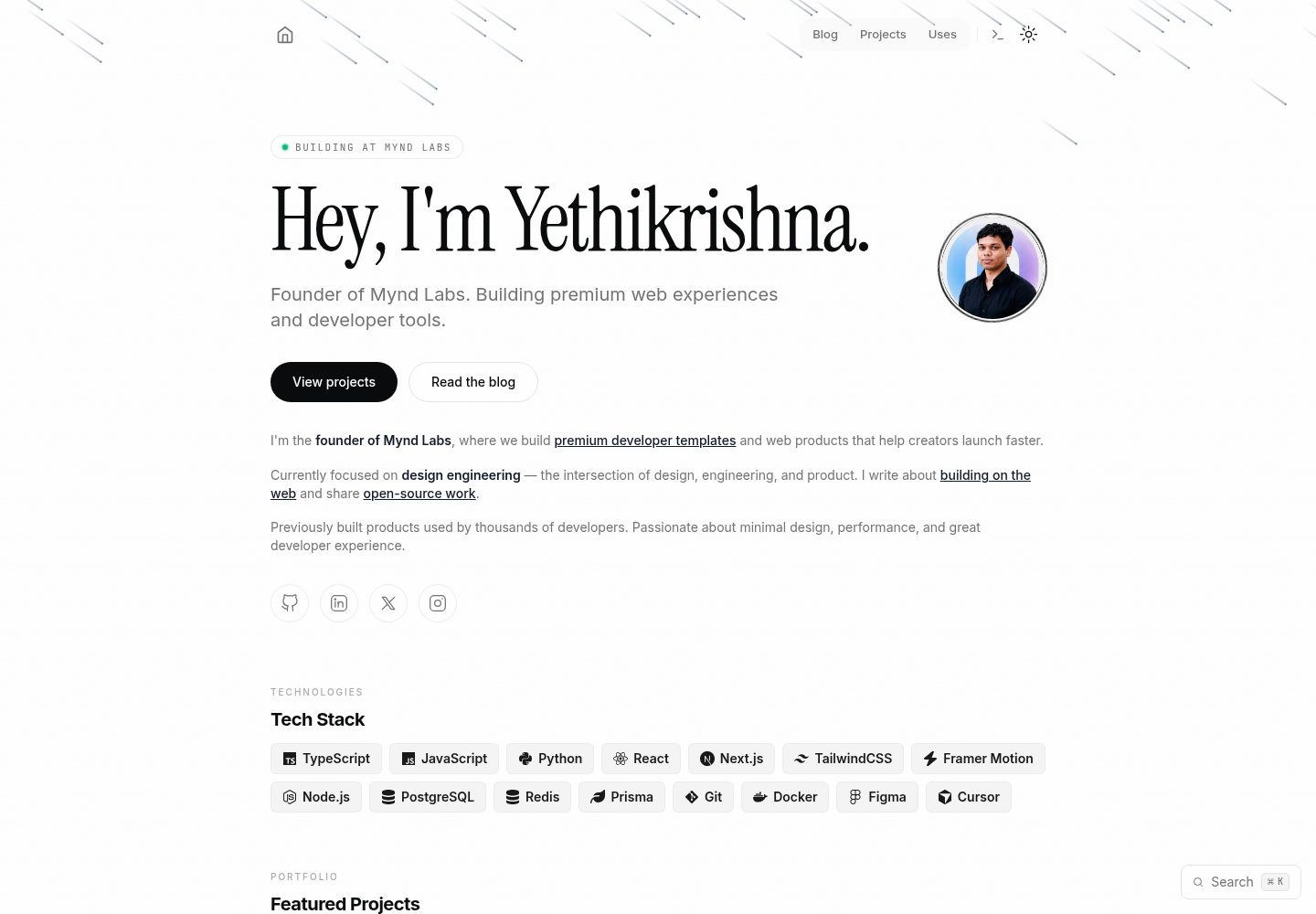
Explore the design
Compare the page layouts and mobile experience. Open any screenshot for a closer look.
Desktop homepage1 / 3
Desktop captureTop of page
Actual screenshot captured by the server browser.
All pages & views 3
Screenshots show visual appearance; interactive behavior may differ.
Recorded 2026-10-04View source
What stands out
A quick read of the recorded project description.
Built-in MDX blog with code highlighting, reading time, and RSS output
Provides a project showcase page and a Uses page for displaying work and hardware/software setup respectively
Includes a terminal-style /cli interactive mode and a Cmd+K / Ctrl+K command palette
Supports dark, light, and system-following themes, with toggleable interface sound effects
Comes with SEO configuration including sitemap, robots.txt, RSS, OpenGraph, JSON-LD, and dynamic OG images
Template Details
This is a personal portfolio starter template for developers, founders, and creative professionals. The repository is on GitHub (yethikrishna/dev-portfolio-template), made by Mynd Labs, and licensed under MIT. The stack is Next.js and React, with TypeScript, Tailwind CSS, Framer Motion, Radix UI, and MDX.
The template's main purpose is to quickly set up a personal site: the homepage includes a hero, skills, projects, work experience, and contact information; there are also a blog list and article pages, a full project showcase page, a Uses page for hardware and software setup, and a terminal-style /cli interactive mode. Content customization is centralized in a single file, src/data/resume.tsx; blog posts are MDX files in the content/ directory; Uses page data is in src/data/products.ts; and theme colors are adjusted in tailwind.config.ts.
The template includes SEO-related configuration, such as sitemap, robots.txt, RSS, OpenGraph and Twitter Card meta tags, JSON-LD structured data, and dynamically generated OG images via /api/og. The README states that all features run without any environment variables, and deployment is primarily targeted at Vercel.
Usage limitations: the repository has relatively few stars and is a newer template; the licenses for third-party assets such as demo images, fonts, and icons must be checked separately and cannot be judged solely by the code's MIT license; external services such as domains and hosting may incur costs. The performance and accessibility features mentioned in the README are the template's own claims and have not been independently verified in this material.
Next.jsReactPortfolioStarter
Is it right for your project?
Use Cases
- Developers building a personal portfolio site who need a combination of homepage, project pages, and blog
- Those who want to maintain personal information in a single data file to reduce changes across multiple files
- Those who want to write technical articles in MDX and output an RSS feed
- Those who need a personalized site with a terminal-style easter egg page or command palette
- Those preparing to deploy to Vercel and wanting SEO and social sharing metadata out of the box
Suitable For
- Developers familiar with Next.js and React who can modify TypeScript and Tailwind configuration themselves
- Personal portfolio projects that need a quick start rather than a complex, long-term content platform
- Users who accept Vercel as the primary deployment target
- Individuals or teams who want to freely modify and distribute the code under the MIT license
Getting started & customization
Use these recorded setup notes alongside the repository instructions for your chosen version.
- 1
After cloning the repository, run npm install to install dependencies, then npm run dev to start the local development server
- 2
The main customization entry point is src/data/resume.tsx; blog posts go in the content/ directory, and Uses page data is in src/data/products.ts
- 3
Theme colors are adjusted in tailwind.config.ts; replace favicon and brand assets under public/favicons/ and public/assets/
- 4
The README states that all features can be used without environment variables; when deploying to Vercel, the platform automatically detects Next.js
- 5
The licenses for third-party assets such as demo images, fonts, and icons must be checked independently; external services such as domains and hosting may incur additional charges
License & source material
Usage conditions & limitations
Free to use · keep license noticeThis entry covers the free version in the public repository under the MIT license; the free scope applies to that version's code and does not mean external services or third-party assets are free.
Must comply with when using
- The code of this version may be used, modified, used commercially, and distributed free of charge.
- When distributing copies or substantial portions of the code, retain the original author's copyright notice and the full MIT license notice.
- The code is provided as is; warranties and limitations of liability are governed by the original license and applicable law.
Additional costs & items to verify
- Demo images, fonts, icons, and other third-party assets must be checked against their respective licenses and cannot be judged solely by the code's MIT license.
- External services such as domains, hosting, databases, payments, or AI may incur additional charges.
View Original Text Basis
https://github.com/yethikrishna/dev-portfolio-template/blob/main/LICENSEhttps://github.com/yethikrishna/dev-portfolio-template/blob/main/README.mdPermission is hereby granted, free of charge
Original License Text
Compiled by DeepSeek based on repository license and README ·2026-10-04. Results only cover the materials read; dependencies, images, fonts, and subsequent term changes are subject to their respective original texts.
Project checks & description sources
Template Information
- Source platforms
- GitHub
- Documentation and maintenance reference score
- More documented · 88 / 100
- Technologies
- Next.js · React
- Website type
- Portfolio · Starter
How this score is calculated
Our heuristic uses license records (up to 30), a demo link (12), a preview (10), stars (15), recorded maintenance (15), description completeness (8), feature records (5) and classification data (5). It is not a code, security or performance test, or a Google score. A link does not establish tested functionality.
What to verify for this project
- Repository update recorded
- 2026-10-04
- Screenshot last checked
- 2026-10-04
A demo link is listed. Check it with your own content and viewport sizes; its presence does not confirm that forms, authentication or payments work.
The catalog identifies Next.js as the primary stack. Check the actual dependency manifest and lockfile for versions and hosting requirements. These notes use recorded metadata, not a code audit or a deployment test.
Use a selection guide →How this description was prepared
AI-assisted description based on catalog records and repository material. Repository authors are not automatically the reviewers of this description.
Review declaration: [email protected] · 2026-10-04
Inspect the recorded source material
SHA-256: 3e29ab79bbd71ee068286427d50cfaf85773b12ede3e84a0d4dc7698ee0069cd
2026-10-04T10:12:27.677Z
Source file / repository# Dev Portfolio Template
[](https://vercel.com/new/clone?repository-url=https://github.com/yethikrishna/dev-portfolio-template&project-name=my-portfolio&repository-name=my-portfolio)
**Live demo:** [portfolio.myndlabs.tech](https://portfolio.myndlabs.tech)
A premium developer portfolio starter template built with Next.js 14, TypeScript, Tailwind CSS, and Framer Motion. Designed for developers, founders, and creatives who want a polished, production-ready personal website.
**Template by [Mynd Labs](https://myndlabs.tech)**
## Features
- **One-File Customization** — all content lives in `src/data/resume.tsx`
- **Blog with MDX** — syntax highlighting, reading time, and RSS feed
- **Projects Showcase** — animated project cards with tech stack badges
- **Uses Page** — hardware and software setup with filtering
- **Interactive CLI Mode** — terminal-style portfolio at `/cli`
- **Command Palette** — quick navigation with `Cmd+K` / `Ctrl+K`
- **Dark / Light / System Theme** — seamless theme switching
- **Sound Effects** — optional UI sounds (toggleable)
- **Smooth Cursor** — custom animated cursor with reduced-motion support
- **SEO Suite** — sitemap, robots.txt, OpenGraph, Twitter Cards, JSON-LD, RSS
- **Dynamic OG Images** — auto-generated OpenGraph images via edge runtime
- **Accessibility** — keyboard navigation, focus states, ARIA labels
- **Performance** — image optimization, code splitting, lazy loading
- **Responsive** — looks great on mobile, tablet, and desktop
## Tech Stack
| Technology | Purpose |
|-----------|---------|
| [Next.js 14](https://nextjs.org/) | React framework with App Router |
| [TypeScript](https://www.typescriptlang.org/) | Type-safe development |
| [Tailwind CSS](https://tailwindcss.com/) | Utility-first styling |
| [Framer Motion](https://www.framer.com/motion/) | Animations and transitions |
| [Radix UI](https://www.radix-ui.com/) | Accessible UI primitives |
| [MDX](https://mdxjs.com/) | Markdown with components for blog |
| [Vercel](https://vercel.com/) | Deployment platform |
## Quick Start
1. Clone or fork the repository:
```bash
git clone https://github.com/myndlabs/dev-portfolio-template
cd dev-portfolio-template
```
2. Install dependencies:
```bash
npm install
```
3. Start the development server:
```bash
npm run dev
```
4. Open [http://localhost:3000](http://localhost:3000) in your browser.
## Customization
### One-File Setup
Edit `src/data/resume.tsx` to customize everything:
```typescript
export const DATA = {
name: "Your Name",
initials: "YN",
url: "https://yoursite.com",
location: "Your City, Country",
description: "Your tagline here.",
summary: "Your about text here. Supports **markdown**.",
avatarUrl: "/assets/your-avatar.png",
// Skills, projects, work experience, education,
// social links, tools — all in this one file.
} as const;
```
### Blog Posts
Create MDX files in the `content/` directory:
```mdx
---
title: "Your Post Title"
publishedAt: "2026-01-15"
summary: "Brief description of your post."
tags: ["tag1", "tag2"]
---
Your content here. Markdown and code blocks supported.
```
### Uses Page
Edit `src/data/products.ts` to showcase your hardware and software.
### Theme Colors
Customize colors in `tailwind.config.ts`:
```typescript
theme: {
extend: {
colors: {
primary: { ... },
},
},
},
```
### Favicon and Brand Assets
Replace files in `public/favicons/` and `public/assets/` with your own.
## Project Structure
```
├── content/ # Blog posts (MDX)
├── public/
│ ├── assets/ # Logo, avatar, OG images
│ └── favicons/ # Favicon variants and manifest
├── src/
│ ├── app/ # Next.js App Router pages
│ │ ├── api/ # API routes (OG images, revalidate)
│ │ ├── blog/ # Blog listing and post pages
│ │ ├── cli/ # Interactive CLI mode
│ │ ├── projects/ # Projects showcase
│ │ ├── uses/ # Hardware and software setup
│ │ ├── layout.tsx # Root layout with providers
│ │ ├── page.tsx # Homepage
│ │ ├── sitemap.ts # Auto-generated sitemap
│ │ ├── robots.ts # Robots.txt
│ │ └── rss.xml/ # RSS feed route
│ ├── components/ # React components
│ │ ├── magicui/ # Animation components
│ │ ├── ui/ # shadcn/ui components
│ │ └── ...
│ ├── data/ # Data files (resume, blog, products)
│ ├── hooks/ # Custom React hooks
│ └── lib/ # Utility functions
├── next.config.mjs # Next.js configuration
├── tailwind.config.ts # Tailwind configuration
└── package.json
```
## Deployment
### Deploy to Vercel
1. Push your repository to GitHub.
2. Go to [vercel.com/new](https://vercel.com/new) and import your repository.
3. Vercel will auto-detect Next.js — no configuration needed.
4. Click **Deploy**.
Your site will be live at `https://your-project.vercel.app`.
### Environment Variables
This template works without any environment variables. All features are available out of the box.
## Scripts
| Command | Description |
|---------|-------------|
| `npm run dev` | Start development server |
| `npm run build` | Build for production |
| `npm run start` | Start production server |
| `npm run lint` | Run ESLint |
## Pages
| Route | Description |
|-------|-------------|
| `/` | Homepage with hero, skills, projects, work, and contact |
| `/blog` | Blog post listing |
| `/blog/[slug]` | Individual blog post |
| `/projects` | Full projects showcase |
| `/uses` | Hardware and software setup |
| `/cli` | Interactive terminal mode |
## Accessibility
- Full keyboard navigation
- Focus-visible states on all interactive elements
- ARIA labels on icon-only buttons
- `prefers-reduced-motion` support
- Semantic HTML structure
- Color contrast meets WCAG AA
## SEO
- Automatic sitemap generation at `/sitemap.xml`
- Robots.txt at `/robots.txt`
- RSS feed at `/rss.xml`
- OpenGraph and Twitter Card meta tags
- JSON-LD structured data (Person, WebSite, BlogPosting schemas)
- Dynamic OG image generation at `/api/og`
- Canonical URLs on all pages
## Browser Support
- Chrome / Edge (latest)
- Firefox (latest)
- Safari (latest)
- Mobile Safari (iOS 15+)
- Chrome Android (latest)
## License
MIT License — see [LICENSE](LICENSE) for details.
## Credits
**Template by [Mynd Labs](https://myndlabs.tech)**
Built and maintained by [Yethikrishna R](https://github.com/yethikrishna).
### Acknowledgments
- [Next.js](https://nextjs.org/) — React framework
- [Tailwind CSS](https://tailwindcss.com/) — Styling
- [Framer Motion](https://www.framer.com/motion/) — Animations
- [Radix UI](https://www.radix-ui.com/) — Accessible primitives
- [shadcn/ui](https://ui.shadcn.com/) — Component patterns
- [Lucide Icons](https://lucide.dev/) — Icon library
- [Vercel](https://vercel.com/) — Hosting and deployment
---
<p align="center">
<a href="https://myndlabs.tech">myndlabs.tech</a>
</p>
<p align="center">
Built with care by Mynd Labs. Fork it, ship it, make it yours.
</p>
Explore similar templates
Compare previews and descriptions within the same stack and category.

Next.js SaaS Starter
The official Next.js SaaS starter template, integrating email/password authentication, Stripe Checkout subscriptions, a dashboard with user/team CRUD, basic Owner/Member RBAC, and activity logging.
Next.js · SaaS

Next.js Commerce
Vercel's officially maintained Next.js App Router ecommerce starter with deep Shopify integration, offering a complete product catalog, cart, and checkout flow. Core logic is modular for swapping backends, and community provider versions exist for BigCommerce, Medusa, and Saleor.
Next.js · E-commerce

Next-js-Boilerplate
A developer-first Next.js 16 starter with Tailwind CSS 4 and TypeScript, supporting both App Router and Page Router.
Next.js · Starter

tailwind-nextjs-starter-blog
A Next.js and Tailwind CSS blog starter template using Contentlayer for Markdown/MDX, with built-in SEO, code highlighting, and tags. It targets personal technical blogs and migration from Jekyll/Hugo to React, and supports one-click Vercel deployment.
Next.js · Blog

next-forge
next-forge is a Turborepo-based Next.js template maintained by Vercel, positioned as a starting point for SaaS products.
Next.js · Starter

SaaS-Boilerplate
SaaS-Boilerplate is an open-source SaaS starter template built with Next.js App Router, React 19, TypeScript, Tailwind CSS, and Shadcn UI.
Next.js · SaaS