基于 Bootstrap 5 构建,使用原生 JavaScript,不依赖 jQuery
HTML后台
AdminLTE — HTML 后台模板
作者 yourkarma6788
AdminLTE 是基于 Bootstrap 5 的免费开源后台管理面板 HTML 模板,提供响应式布局、深色模式与多套演示页面,采用 MIT 许可。
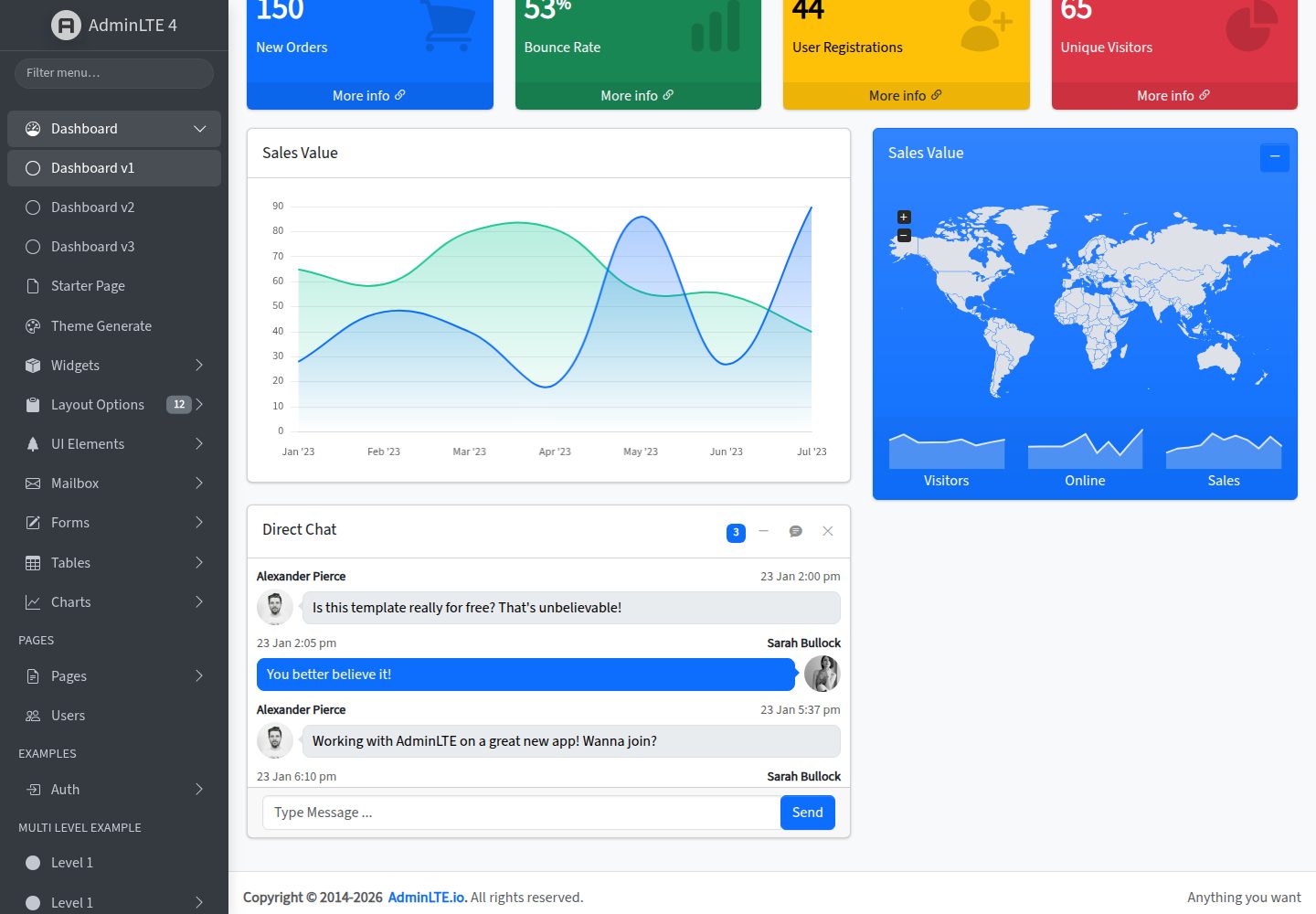
看看你的网站会是什么样
浏览真实页面截图,比较内容排版与手机效果。点击下方缩略图切换,放大查看整页细节。
全部页面与视图 3
截图用于了解视觉与布局,交互效果请以实际项目为准。
采集于 2026-10-12查看来源
值得关注的模板亮点
从已有项目资料中,快速了解它的特点。
提供响应式布局,适配移动端到桌面端,并支持深色模式与 RTL
包含 18 个演示页面,覆盖日历、看板、聊天、邮件、数据表格等常见后台场景
可通过 CDN、npm 或 Composer 安装,仓库内提供开发服务器与构建脚本
采用 MIT 许可,允许免费使用、修改、商用和分发该版本代码
模板详细介绍
AdminLTE 是一个后台管理面板模板,核心为 HTML / Bootstrap 版本,使用原生 JavaScript,不依赖 jQuery。模板基于 Bootstrap 5 构建,提供响应式布局,可适配从手机到桌面的屏幕尺寸,并支持深色模式与 RTL。
仓库包含 18 个演示页面,覆盖日历、看板、聊天、文件管理、邮件、项目、向导表单、Tabulator 数据表格、个人资料、设置、发票、定价、FAQ 以及 404、500、维护页等。文档涵盖入门、定制与主题、RTL、从 v3 迁移、布局蓝图、部署等内容。
使用方式上,可通过 CDN 直接引入样式与脚本,也可通过 npm 或 Composer 安装。仓库本身使用 npm 脚本进行开发与构建,提供开发服务器和构建命令。
该模板是 UI 模板,不包含后端逻辑或数据服务;部署时需自行准备应用文件,并仅发布编译后的生产资源。演示图片、字体、图标等第三方素材需单独核对许可。
HTML后台
适合你的项目吗?
适用场景
- 搭建后台管理系统的界面框架与页面布局
- 作为需要 Bootstrap 5 与原生 JavaScript 技术栈的管理面板起点
- 参考其演示页面实现日历、看板、邮件、数据表格等后台功能界面
- 在需要深色模式或 RTL 支持的管理后台项目中使用
适合人群
- 使用 HTML 与 Bootstrap 构建后台界面的开发者
- 需要免费、MIT 许可后台模板的项目
- 希望避免 jQuery 依赖、采用原生 JavaScript 的团队
- 需要快速查看多种后台页面示例以确定布局方案的人员
上手与定制指南
结合仓库当前版本的说明,按下面的资料检查内容、配置与运行要求。
- 1
可通过 CDN 直接引入 adminlte.min.css 与 adminlte.min.js,无需构建步骤
- 2
也可使用 npm install admin-lte@4 或 Composer 安装
- 3
仓库内开发需先运行 npm install,再使用 npm start 启动开发服务器,npm run build 构建资源
- 4
部署时仅发布编译后的 dist 生产资源与自己的应用文件
- 5
演示图片、字体、图标等第三方素材需按各自许可单独核对
授权与来源资料
使用条件与限制
免费使用 · 保留许可声明本次收录的是公开仓库中采用 MIT 许可的免费版本;免费范围为该版本代码,不代表外部服务或第三方素材免费。
使用时需要遵守
- 允许免费使用、修改、商用和分发该版本代码。
- 分发代码副本或实质性部分时,保留原作者版权声明和完整 MIT 许可声明。
- 代码按现状提供;担保与责任限制以原许可证及适用法律为准。
额外费用与待核对事项
- 演示图片、字体、图标及其他第三方素材需按各自许可核对,不能仅凭代码的 MIT 许可判断。
- 域名、托管、数据库、支付或 AI 等外部服务可能另外收费。
- AdminLTE 仅为 UI 模板,部署时只能发布编译后的生产资源(dist 下的 min.js 与 min.css)及自己的应用文件,不得部署 node_modules、演示 HTML 页面或 src 目录。
- AdminLTE.io 保留更改未来版本许可证的权利,因此当前 MIT 授权仅适用于本版本,后续版本可能采用不同许可。
- README 指向 SECURITY.md 以获取详细指南、身份验证要求与最佳实践,使用前需查阅该文件了解额外安全要求。
查看原文依据
Permission is hereby granted, free of charge
许可证原文
AdminLTE is a **UI template**. Deploy only the compiled production assets (`dist/js/adminlte.min.js`, `dist/css/adminlte.min.css`) and your own application files — never `node_modules/`, the demo HTML pages, or the `src/` directory.
README 原文
AdminLTE.io reserves the right to change the license of future releases.
README 原文
https://github.com/yourkarma6788/AdminLTE/blob/master/LICENSEhttps://github.com/yourkarma6788/AdminLTE/blob/master/README.mdFor detailed guidelines, authentication requirements, and best practices, see [SECURITY.md](SECURITY.md).
README 原文
DeepSeek 根据仓库许可证和 README 整理 ·2026-10-12。结果仅覆盖已读取资料,依赖、图片、字体及后续条款变更以各自原文为准。
项目核对记录与介绍依据
模板资料
- 来源平台
- GitHub
- 资料与维护参考分
- 资料较完整 · 80 / 100
- 技术栈
- HTML
- 网站类型
- 后台
这个分数如何计算
本站按许可资料(最高30分)、演示链接(12分)、预览图(10分)、Star数(15分)、记录的维护时间(15分)、描述完整度(8分)、功能记录(5分)和分类资料(5分)计算。它不是代码、安全或性能测试,也不是 Google 评分;有链接不代表已实测可用。
这个项目需要核对什么
- 记录的仓库更新时间
- 2026-06-11
- 截图检查日期
- 2026-10-12
已收录演示链接。请用你的内容与屏幕尺寸检查;有演示不代表表单、认证或支付已经可用。
目录记录的主要技术栈是 HTML。请通过依赖清单和锁文件核对实际版本与托管要求。这些说明基于收录资料,不代表代码审计或部署实测。
查看具体选型方法 →介绍的制作与核对状态
介绍由 AI 辅助整理目录与仓库资料。仓库作者不等于这篇介绍的审核者。
审核声明: [email protected] · 2026-10-13
查看当时使用的来源资料
SHA-256: ac9c0e8bfdd0884b6264d0c493557f05e47ebd6823156f3148988979250f0910
2026-10-12T16:50:33.630Z
来源文件 / 仓库# [AdminLTE — Bootstrap 5 Admin Dashboard](https://adminlte.io)
[](https://www.npmjs.com/package/admin-lte)
[](https://packagist.org/packages/almasaeed2010/adminlte)
[](https://www.jsdelivr.com/package/npm/admin-lte)
[](https://opensource.org/licenses/MIT)
[](https://discord.gg/jfdvjwFqfz)
[](https://app.netlify.com/sites/adminlte-v4/deploys)
**AdminLTE** is the most popular open-source admin dashboard template — fully responsive,
built on **[Bootstrap 5.3](https://getbootstrap.com/)** with vanilla JavaScript (no jQuery),
highly customizable, and easy to use. It fits every screen from small mobile devices to
large desktops, and it's MIT-licensed.
**[Live Demo](https://adminlte.io/themes/v4/)** ·
**[Documentation](https://adminlte.io/themes/v4/docs/introduction.html)** ·
**[Framework Editions](#framework-editions)** ·
**[Premium Templates](#premium-templates)**
<p align="center">
<a href="https://adminlte.io/themes/v4/">
<img alt="AdminLTE 4 dashboard — light mode" src=".github/assets/dashboard-light.png" width="49%">
</a>
<a href="https://adminlte.io/themes/v4/">
<img alt="AdminLTE 4 dashboard — dark mode" src=".github/assets/dashboard-dark.png" width="49%">
</a>
</p>
## Framework editions
The same AdminLTE 4 dashboard, officially integrated for the framework you know best —
you're looking at the **HTML / Bootstrap** core:
<p align="center">
<a href="https://github.com/ColorlibHQ/adminlte-react"><img height="36" alt="React" src="https://img.shields.io/badge/React-20232A?style=for-the-badge&logo=react&logoColor=61DAFB"></a>
<a href="https://github.com/ColorlibHQ/adminlte-react"><img height="36" alt="Next.js" src="https://img.shields.io/badge/Next.js-000000?style=for-the-badge&logo=nextdotjs&logoColor=white"></a>
<a href="https://github.com/ColorlibHQ/adminlte-vue"><img height="36" alt="Vue" src="https://img.shields.io/badge/Vue.js-35495E?style=for-the-badge&logo=vuedotjs&logoColor=4FC08D"></a>
<a href="https://github.com/ColorlibHQ/adminlte-vue"><img height="36" alt="Nuxt" src="https://img.shields.io/badge/Nuxt-00DC82?style=for-the-badge&logo=nuxt&logoColor=white"></a>
<a href="https://github.com/ColorlibHQ/adminlte-laravel"><img height="36" alt="Laravel" src="https://img.shields.io/badge/Laravel-FF2D20?style=for-the-badge&logo=laravel&logoColor=white"></a>
<a href="https://github.com/ColorlibHQ/adminlte-django"><img height="36" alt="Django" src="https://img.shields.io/badge/Django-092E20?style=for-the-badge&logo=django&logoColor=white"></a>
</p>
| Edition | Repository | Live demo | Install |
|---|---|---|---|
| **HTML / Bootstrap** (this repo) | [AdminLTE](https://github.com/ColorlibHQ/AdminLTE) | [themes/v4](https://adminlte.io/themes/v4/) | `npm install admin-lte` |
| **React & Next.js** — 30+ typed components, RSC-ready, ⌘K palette | [adminlte-react](https://github.com/ColorlibHQ/adminlte-react) | [themes/next-react](https://adminlte.io/themes/next-react/) | see repo |
| **Vue 3 & Nuxt** — 45+ typed components, composables, SSR-safe theming | [adminlte-vue](https://github.com/ColorlibHQ/adminlte-vue) | [themes/vue-nuxt](https://adminlte.io/themes/vue-nuxt/) | see repo |
| **Laravel** — Blade components, config-driven menu, auth scaffolding | [adminlte-laravel](https://github.com/ColorlibHQ/adminlte-laravel) | [laravel.adminlte.io](https://laravel.adminlte.io/) | `composer require colorlibhq/adminlte-laravel` |
| **Django** — reusable app, menu filter pipeline, themed admin | [adminlte-django](https://github.com/ColorlibHQ/adminlte-django) | [django.adminlte.io](https://django.adminlte.io/) | `pip install django-adminlte4` |
Every edition ships the full AdminLTE 4 design — Bootstrap 5.3, dark mode, RTL — with
idiomatic integrations for its stack (components, routing, auth, theming).
## Quick start
**CDN** — no build step:
```html
<link rel="stylesheet" href="https://cdn.jsdelivr.net/npm/admin-lte@4/dist/css/adminlte.min.css">
<script src="https://cdn.jsdelivr.net/npm/admin-lte@4/dist/js/adminlte.min.js"></script>
```
**npm:**
```bash
npm install admin-lte@4
```
**Composer:**
```bash
composer require almasaeed2010/adminlte
```
Then start from the [Getting Started guide](https://adminlte.io/themes/v4/docs/introduction.html)
or copy one of the demo pages.
### Developing AdminLTE itself
1. **Install dependencies:** `npm install`
2. **Start the dev server:** `npm start` *(opens http://localhost:3000 with live reload)*
3. **Build:** `npm run build` — or `npm run production` for the full lint + optimize + bundlewatch pipeline
<details>
<summary>All npm scripts</summary>
- `npm start` — development server with file watching
- `npm run build` — build all assets for development
- `npm run production` — full production build with linting and bundlewatch
- `npm run lint` — run all linters (JS, CSS, docs, lockfile)
- `npm run css` — build CSS only
- `npm run js` — build JavaScript only
</details>
## What's new in v4
The v4 line is a ground-up rewrite on Bootstrap 5.3 with **no jQuery**: 18 new demo pages
(Calendar, Kanban, Chat, File Manager, Mailbox, Wizard, Tabulator data tables, and more),
a documentation overhaul, and major dependency upgrades. See the
[CHANGELOG](CHANGELOG.md) for full details.
<details>
<summary>Highlights</summary>
**18 new demo pages**
- Apps: Calendar (FullCalendar), Kanban (SortableJS), Chat, File Manager, Projects, Mailbox (Inbox / Read / Compose)
- Forms: Wizard (4-step with validation)
- Tables: Data Tables (Tabulator — jQuery-free)
- Pages: Profile, Settings, Invoice, Pricing, FAQ
- Errors: 404, 500, Maintenance
**Documentation overhaul**
- New pages: Getting Started, Customization & Theming, RTL Support, Migration from v3, Layout Blueprint, Recipes, Deployment & Performance, Recommended Integrations, JavaScript Plugins Overview
- Rewritten Introduction with four labelled install paths (CDN / npm / source / Composer)
- FAQ rebuilt with hero, live search, section chips, and an accordion of 19 questions
- Split sidebar navigation: dashboard demo and docs each have their own nav
**Major dependency upgrades**
- ESLint 10, TypeScript 6, Stylelint 17, Astro 6.3, Bootstrap 5.3.8, Node 22 LTS in CI
- `npm install` runs clean with **0 vulnerabilities**
</details>
<details>
<summary>Breaking changes from v3</summary>
- Class renames: `.wrapper` → `.app-wrapper`, `.main-header` → `.app-header`, `.main-sidebar` → `.app-sidebar`, `.content-wrapper` → `.app-main`
- Data attributes: `data-toggle` → `data-bs-toggle`, `data-widget="pushmenu"` → `data-lte-toggle="sidebar"`, `data-widget="treeview"` → `data-lte-toggle="treeview"`
- Dark mode: `.dark-mode` body class → `data-bs-theme="dark"` attribute (Bootstrap 5.3 native)
- jQuery no longer required; plugins are vanilla TypeScript
See the dedicated [Migration from v3](https://adminlte.io/themes/v4/docs/migration.html) guide.
</details>
## Premium templates
AdminLTE will always be free and open source. When a project needs more —
app-ready pages, framework-native codebases, dedicated support — our team
hand-picks premium dashboards at **[adminlte.io/premium](https://adminlte.io/premium)**,
including editions built for the same stacks AdminLTE integrates with:
<table>
<tr>
<td align="center" width="50%">
<a href="https://dashboardpack.com/theme-details/admindek-html/?utm_source=github&utm_medium=readme&utm_campaign=adminlte">
<img src=".github/assets/premium/admindek.png" alt="Admindek — feature-rich Bootstrap 5 dashboard with dark mode" width="100%">
</a>
<br>
<a href="https://dashboardpack.com/theme-details/admindek-html/?utm_source=github&utm_medium=readme&utm_campaign=adminlte"><strong>Admindek</strong></a>
<br>
<sub>The natural next step from AdminLTE: Bootstrap 5 + vanilla JS, 100+ components, dark/light modes, RTL, 10 color presets.<br>
Also for <a href="https://dashboardpack.com/theme-details/admindek-dashboard-laravel/?utm_source=github&utm_medium=readme&utm_campaign=adminlte">Laravel</a> ·
<a href="https://dashboardpack.com/theme-details/admindek-nextjs/?utm_source=github&utm_medium=readme&utm_campaign=adminlte">Next.js</a> ·
<a href="https://dashboardpack.com/theme-details/admindek-dashboard-angular/?utm_source=github&utm_medium=readme&utm_campaign=adminlte">Angular</a></sub>
</td>
<td align="center" width="50%">
<a href="https://dashboardpack.com/theme-details/apex-dashboard-nextjs/?utm_source=github&utm_medium=readme&utm_campaign=adminlte">
<img src=".github/assets/premium/apex.png" alt="Apex Dashboard — admin template available for Next.js, Laravel, Django and Angular" width="100%">
</a>
<br>
<a href="https://dashboardpack.com/theme-details/apex-dashboard-nextjs/?utm_source=github&utm_medium=readme&utm_campaign=adminlte"><strong>Apex Dashboard</strong></a>
<br>
<sub>5 dashboard variants, 20+ app pages, 125+ routes, full CRUD — in your backend's native stack.<br>
For <a href="https://dashboardpack.com/theme-details/apex-dashboard-nextjs/?utm_source=github&utm_medium=readme&utm_campaign=adminlte">Next.js</a> ·
<a href="https://dashboardpack.com/theme-details/apex-dashboard-laravel/?utm_source=github&utm_medium=readme&utm_campaign=adminlte">Laravel</a> ·
<a href="https://dashboardpack.com/theme-details/apex-dashboard-django/?utm_source=github&utm_medium=readme&utm_campaign=adminlte">Django</a> ·
<a href="https://dashboardpack.com/theme-details/apex-dashboard-angular/?utm_source=github&utm_medium=readme&utm_campaign=adminlte">Angular</a></sub>
</td>
</tr>
<tr>
<td align="center" width="50%">
<a href="https://dashboardpack.com/theme-details/zenith-dashboard-django/?utm_source=github&utm_medium=readme&utm_campaign=adminlte">
<img src=".github/assets/premium/zenith.png" alt="Zenith — ultra-minimal admin dashboard, Django edition" width="100%">
</a>
<br>
<a href="https://dashboardpack.com/theme-details/zenith-dashboard-django/?utm_source=github&utm_medium=readme&utm_campaign=adminlte"><strong>Zenith Dashboard — Django</strong></a>
<br>
<sub>Achromatic, ultra-minimal design as a ready-to-run Django project: 50+ pages, 6 dashboards, live theme customizer.</sub>
</td>
<td align="center" width="50%">
<a href="https://dashboardpack.com/theme-details/haze-dashboard-nuxt/?utm_source=github&utm_medium=readme&utm_campaign=adminlte">
<img src=".github/assets/premium/haze.png" alt="Haze — Nuxt 4 admin dashboard with 92+ pages and 5 dashboards" width="100%">
</a>
<br>
<a href="https://dashboardpack.com/theme-details/haze-dashboard-nuxt/?utm_source=github&utm_medium=readme&utm_campaign=adminlte"><strong>Haze — Nuxt</strong></a>
<br>
<sub>Nuxt 4 + Nuxt UI v4 + Tailwind CSS v4. 92+ pages, 7 layouts, 5 dashboards, RTL, i18n, mock API layer.</sub>
</td>
</tr>
</table>
<p align="center">
<a href="https://adminlte.io/premium"><strong>View all premium templates →</strong></a>
</p>
## Browser & platform support
AdminLTE supports the latest versions of all modern browsers (Chrome, Firefox, Safari,
Edge) via Bootstrap 5.3.8. The build scripts run cross-platform — Windows (CMD,
PowerShell, Git Bash), macOS and Linux — using cross-platform npm utilities throughout.
## Security & production deployment
AdminLTE is a **UI template**. Deploy only the compiled production assets
(`dist/js/adminlte.min.js`, `dist/css/adminlte.min.css`) and your own application files —
never `node_modules/`, the demo HTML pages, or the `src/` directory.
> **About CVE-2021-36471:** this CVE is **disputed** and does not represent a
> vulnerability in AdminLTE — it refers to demo pages being accessible when example
> files are incorrectly deployed to production. AdminLTE v4 cleanly separates
> development demos from production assets.
For detailed guidelines, authentication requirements, and best practices, see
[SECURITY.md](SECURITY.md).
## Sponsorship
Support AdminLTE development by becoming a sponsor or donor.
<p align="center">
<a href="https://github.com/sponsors/danny007in">
<img src="https://img.shields.io/static/v1?label=Sponsor&message=%E2%9D%A4&logo=GitHub&color=%23fe8e86" alt="Sponsor on GitHub" />
</a>
<a href="https://www.paypal.me/daniel007in">
<img src="https://img.shields.io/static/v1?label=Donate&message=%E2%9D%A4&logo=PayPal&color=%2300457C" alt="Donate via PayPal" />
</a>
</p>
### Our sponsors
<p align="center">
<a href="https://github.com/spizzo14"><img src="https://unavatar.io/github/spizzo14?fallback=https%3A%2F%2Fraw.githubusercontent.com%2FJamesIves%2Fgithub-sponsors-readme-action%2Fdev%2F.github%2Fassets%2Fplaceholder.png" width="50" height="50" alt="User avatar: spizzo14" loading="lazy" /></a>
<a href="https://github.com/tomhappyblock"><img src="https://unavatar.io/github/tomhappyblock?fallback=https%3A%2F%2Fraw.githubusercontent.com%2FJamesIves%2Fgithub-sponsors-readme-action%2Fdev%2F.github%2Fassets%2Fplaceholder.png" width="50" height="50" alt="User avatar: tomhappyblock" loading="lazy" /></a>
<a href="https://github.com/stefanmorderca"><img src="https://unavatar.io/github/stefanmorderca?fallback=https%3A%2F%2Fraw.githubusercontent.com%2FJamesIves%2Fgithub-sponsors-readme-action%2Fdev%2F.github%2Fassets%2Fplaceholder.png" width="50" height="50" alt="User avatar: stefanmorderca" loading="lazy" /></a>
<a href="https://github.com/tito10047"><img src="https://unavatar.io/github/tito10047?fallback=https%3A%2F%2Fraw.githubusercontent.com%2FJamesIves%2Fgithub-sponsors-readme-action%2Fdev%2F.github%2Fassets%2Fplaceholder.png" width="50" height="50" alt="User avatar: tito10047" loading="lazy" /></a>
<a href="https://github.com/sitchi"><img src="https://unavatar.io/github/sitchi?fallback=https%3A%2F%2Fraw.githubusercontent.com%2FJamesIves%2Fgithub-sponsors-readme-action%2Fdev%2F.github%2Fassets%2Fplaceholder.png" width="50" height="50" alt="User avatar: sitchi" loading="lazy" /></a>
<a href="https://github.com/npreee"><img src="https://unavatar.io/github/npreee?fallback=https%3A%2F%2Fraw.githubusercontent.com%2FJamesIves%2Fgithub-sponsors-readme-action%2Fdev%2F.github%2Fassets%2Fplaceholder.png" width="50" height="50" alt="User avatar: npreee" loading="lazy" /></a>
<a href="https://github.com/isaacmorais"><img src="https://unavatar.io/github/isaacmorais?fallback=https%3A%2F%2Fraw.githubusercontent.com%2FJamesIves%2Fgithub-sponsors-readme-action%2Fdev%2F.github%2Fassets%2Fplaceholder.png" width="50" height="50" alt="User avatar: isaacmorais" loading="lazy" /></a>
</p>
<p align="center">
<a href="https://github.com/sponsors/danny007in">Your avatar here? Become a sponsor</a>
</p>
## Contributing
Contributions are highly welcome:
1. Install [Node.js](https://nodejs.org/) (LTS) and clone this repository (`master` branch).
2. `npm install`, then `npm start` to run the dev server.
3. Make your changes (run `npm run lint` before committing) and open a PR against `master`.
## License
AdminLTE is an open source project by [AdminLTE.io](https://adminlte.io) licensed under
[MIT](https://opensource.org/licenses/MIT). AdminLTE.io reserves the right to change
the license of future releases.
## Image credits
[Pixeden](http://www.pixeden.com/psd-web-elements/flat-responsive-showcase-psd),
[Graphicsfuel](https://www.graphicsfuel.com/2013/02/13-high-resolution-blur-backgrounds/),
[Pickaface](https://pickaface.net/),
[Unsplash](https://unsplash.com/),
[Uifaces](http://uifaces.com/),
[Unavatar](https://unavatar.io/)
看看同类模板
对比同技术栈与用途的模板,找到更适合的视觉与内容结构。

gentelella
Free admin dashboard template — vanilla JS, SCSS, Vite 8. No Bootstrap, no jQuery.
HTML · 后台

coreui-free-bootstrap-admin-template
Free Bootstrap Admin & Dashboard Template Built for AI-Assisted Development
HTML · 后台

dashboards
Responsive dashboard templates 📊✨
HTML · 后台

SB Admin 2
SB Admin 2 是 Start Bootstrap 推出的开源后台模板,基于 Bootstrap 构建,整体风格偏向经典管理界面。
HTML · 后台

Adminator-admin-dashboard
Adminator is easy to use and well design admin dashboard template with dark mode for web apps, websites, servi…
HTML · 后台

SB Admin
SB Admin 是 Start Bootstrap 推出的开源后台管理模板,基于 Bootstrap 构建,定位是简洁、实用的管理界面。
HTML · 后台