基于 Jekyll 与 Just the Docs 主题扩展
HTML企业官网
education-template — HTML 企业官网模板
作者 Yu-Dylan
基于 Jekyll 与 Just the Docs 主题的课程网站模板,用于快速搭建带公告、日历、人员与周课表的教学站点。
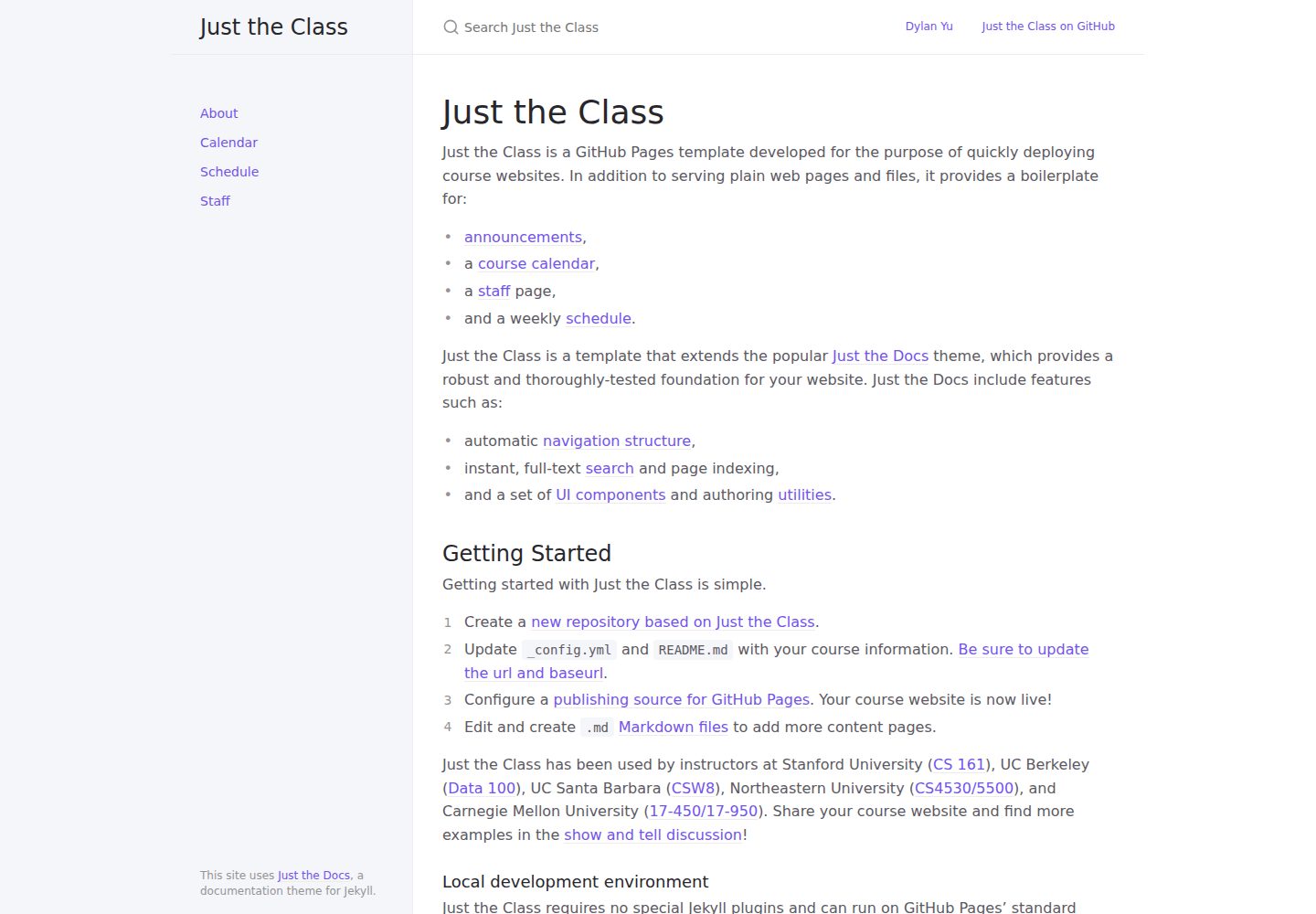
看看你的网站会是什么样
浏览真实页面截图,比较内容排版与手机效果。点击下方缩略图切换,放大查看整页细节。
全部页面与视图 3
截图用于了解视觉与布局,交互效果请以实际项目为准。
采集于 2026-10-03查看来源
值得关注的模板亮点
从已有项目资料中,快速了解它的特点。
内置公告、课程日历、教学人员与周课表页面样板
无需特殊 Jekyll 插件,可在 GitHub Pages 标准编译器上运行
通过 Markdown 文件维护内容页
采用 MIT 许可,允许免费使用、修改、商用和分发
模板详细介绍
education-template 是一个面向课程场景的 GitHub Pages 网站模板,README 中称其为 Just the Class。它扩展自 Just the Docs 主题,除普通网页和文件外,还提供公告、课程日历、教学人员页面和周课表的样板结构。
模板依赖 GitHub Pages 的标准 Jekyll 编译器,不需要特殊插件,可通过克隆仓库并在本地按 GitHub 文档测试站点。使用流程包括基于模板创建新仓库、修改 _config.yml 与 README.md 中的课程信息(含 url 与 baseurl)、配置 GitHub Pages 发布源,再通过 Markdown 文件增删内容页。
资料未提供模板的具体视觉风格、组件细节或性能表现,也未说明除上述页面类型外的其他功能。
HTML企业官网
适合你的项目吗?
适用场景
- 高校或培训机构发布课程信息与教学安排
- 教师搭建包含公告、日历和周课表的课程主页
- 在 GitHub Pages 上托管静态教学站点
- 需要展示教学人员名单与课程日程的教学项目
适合人群
- 熟悉 Markdown 与 GitHub Pages 的课程教师或助教
- 需要快速部署课程网站的教学团队
- 以 Jekyll 静态站点方式维护教学内容的项目
上手与定制指南
结合仓库当前版本的说明,按下面的资料检查内容、配置与运行要求。
- 1
基于模板创建新仓库,并修改 _config.yml 与 README.md 中的课程信息
- 2
更新 _config.yml 中的 url 与 baseurl
- 3
在仓库中配置 GitHub Pages 的发布源
- 4
本地开发可参照 GitHub 文档使用 Jekyll 测试站点
- 5
演示图片、字体、图标等第三方素材需单独核对其许可
授权与来源资料
使用条件与限制
免费使用 · 保留许可声明本次收录的是公开仓库中采用 MIT 许可的免费版本;免费范围为该版本代码,不代表外部服务或第三方素材免费。
使用时需要遵守
- 允许免费使用、修改、商用和分发该版本代码。
- 分发代码副本或实质性部分时,保留原作者版权声明和完整 MIT 许可声明。
- 代码按现状提供;担保与责任限制以原许可证及适用法律为准。
额外费用与待核对事项
- 演示图片、字体、图标及其他第三方素材需按各自许可核对,不能仅凭代码的 MIT 许可判断。
- 域名、托管、数据库、支付或 AI 等外部服务可能另外收费。
查看原文依据
https://github.com/Yu-Dylan/education-template/blob/main/LICENSEhttps://github.com/Yu-Dylan/education-template/blob/main/README.mdPermission is hereby granted, free of charge
许可证原文
DeepSeek 根据仓库许可证和 README 整理 ·2026-10-03。结果仅覆盖已读取资料,依赖、图片、字体及后续条款变更以各自原文为准。
项目核对记录与介绍依据
模板资料
- 来源平台
- GitHub
- 资料与维护参考分
- 资料一般 · 57 / 100
- 技术栈
- HTML
- 网站类型
- 企业官网
这个分数如何计算
本站按许可资料(最高30分)、演示链接(12分)、预览图(10分)、Star数(15分)、记录的维护时间(15分)、描述完整度(8分)、功能记录(5分)和分类资料(5分)计算。它不是代码、安全或性能测试,也不是 Google 评分;有链接不代表已实测可用。
这个项目需要核对什么
- 记录的仓库更新时间
- 2022-07-18
- 截图检查日期
- 2026-10-03
已收录演示链接。请用你的内容与屏幕尺寸检查;有演示不代表表单、认证或支付已经可用。
目录记录的主要技术栈是 HTML。请通过依赖清单和锁文件核对实际版本与托管要求。这些说明基于收录资料,不代表代码审计或部署实测。
查看具体选型方法 →介绍的制作与核对状态
介绍由 AI 辅助整理目录与仓库资料。仓库作者不等于这篇介绍的审核者。
已完成服务器许可规则与 AI 来源核对;未经过人工编辑审核。
查看当时使用的来源资料
SHA-256: f3c0b2d6afea72928d00af51f897a201c96a4375dcb5263391492c2969506e33
2026-10-03T08:04:22.467Z
来源文件 / 仓库--- layout: home title: Just the Class nav_exclude: true permalink: index.html seo: type: Course name: Just the Class --- # Just the Class Just the Class is a GitHub Pages template developed for the purpose of quickly deploying course websites. In addition to serving plain web pages and files, it provides a boilerplate for: - [announcements](announcements.md), - a [course calendar](calendar.md), - a [staff](staff.md) page, - and a weekly [schedule](schedule.md). Just the Class is a template that extends the popular [Just the Docs](https://github.com/just-the-docs/just-the-docs) theme, which provides a robust and thoroughly-tested foundation for your website. Just the Docs include features such as: - automatic [navigation structure](https://just-the-docs.github.io/just-the-docs/docs/navigation-structure/), - instant, full-text [search](https://just-the-docs.github.io/just-the-docs/docs/search/) and page indexing, - and a set of [UI components](https://just-the-docs.github.io/just-the-docs/docs/ui-components) and authoring [utilities](https://just-the-docs.github.io/just-the-docs/docs/utilities). ## Getting Started Getting started with Just the Class is simple. 1. Create a [new repository based on Just the Class](https://github.com/kevinlin1/just-the-class/generate). 1. Update `_config.yml` and `README.md` with your course information. [Be sure to update the url and baseurl](https://mademistakes.com/mastering-jekyll/site-url-baseurl/). 1. Configure a [publishing source for GitHub Pages](https://help.github.com/en/articles/configuring-a-publishing-source-for-github-pages). Your course website is now live! 1. Edit and create `.md` [Markdown files](https://guides.github.com/features/mastering-markdown/) to add more content pages. Just the Class has been used by instructors at Stanford University ([CS 161](https://stanford-cs161.github.io/winter2021/)), UC Berkeley ([Data 100](https://ds100.org/fa21/)), UC Santa Barbara ([CSW8](https://ucsb-csw8.github.io/s22/)), Northeastern University ([CS4530/5500](https://neu-se.github.io/CS4530-CS5500-Spring-2021/)), and Carnegie Mellon University ([17-450/17-950](https://cmu-crafting-software.github.io/)). Share your course website and find more examples in the [show and tell discussion](https://github.com/kevinlin1/just-the-class/discussions/categories/show-and-tell)! ### Local development environment Just the Class requires no special Jekyll plugins and can run on GitHub Pages' standard Jekyll compiler. To setup a local development environment, clone your template repository and follow the GitHub Docs on [Testing your GitHub Pages site locally with Jekyll](https://docs.github.com/en/pages/setting-up-a-github-pages-site-with-jekyll/testing-your-github-pages-site-locally-with-jekyll).
看看同类模板
对比同技术栈与用途的模板,找到更适合的视觉与内容结构。

mazer
Free and Open-source Bootstrap 5 Admin Dashboard Template and Landing Page
HTML · 后台

Freelancer
Freelancer 是 Start Bootstrap 出品的单页作品集模板,专为自由职业者、设计师和小型工作室设计。 页面结构清晰,包含多个内容区块、响应式作品集网格,每个作品项目配有模态窗口展示详情。
HTML · 作品集

Creative
Creative 是 Start Bootstrap 团队维护的一款单页营销模板,定位明确:为创意机构或产品服务提供一个以作品展示和行动号召为核心的落地页。
HTML · 企业官网

startbootstrap-agency
Agency 是 Start Bootstrap 维护的单页代理商作品集主题,基于 Bootstrap 构建,MIT 许可。
HTML · 企业官网

startbootstrap-landing-page
这是 Start Bootstrap 系列中一款通用型落地页模板,基于 Bootstrap 构建,定位是给产品或服务做单页推广。
HTML · 企业官网

Landing-Page
Tailwind CSS Starter Template - Landing Page
HTML · 企业官网