深色模式:自动检测并支持手动切换,切换过程无闪烁
Astro启动器
tempalate-militarywebsite — Astro 启动器模板
作者 Zyrexnn
基于 Astro 的军事/机构主题启动器模板,内置深色模式、印尼语与英语双语切换、滚动显现动画与集中式内容数据文件。
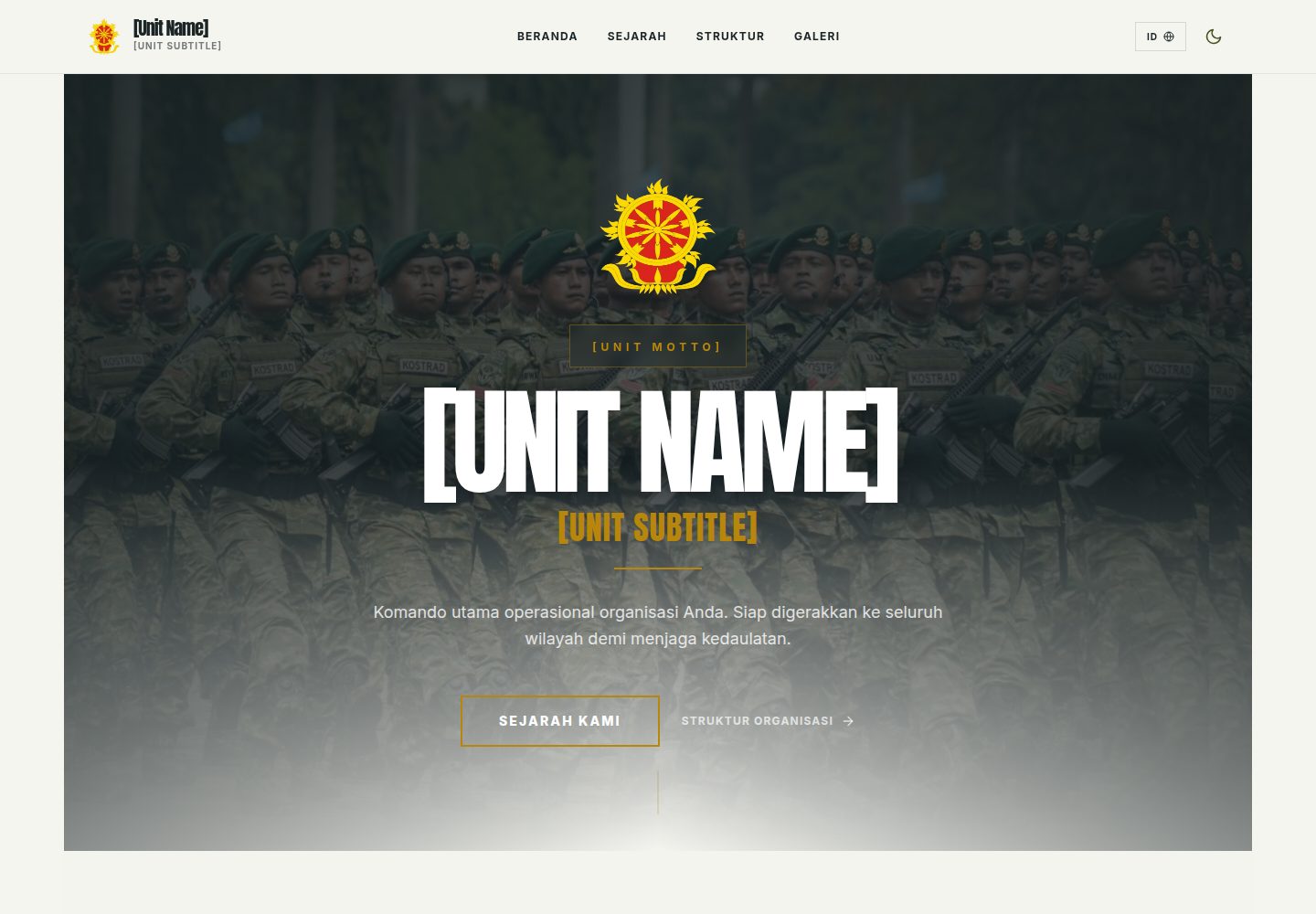
看看你的网站会是什么样
浏览真实页面截图,比较内容排版与手机效果。点击下方缩略图切换,放大查看整页细节。
全部页面与视图 2
截图用于了解视觉与布局,交互效果请以实际项目为准。
采集于 2026-10-03查看来源
值得关注的模板亮点
从已有项目资料中,快速了解它的特点。
内置印尼语与英语双语翻译,提供一键语言切换
军事风格设计系统:配色、字体与组件统一在 global.css 的 @theme 与 .dark 中定义
内容集中管理:站点配置与页面内容分别放在 src/data/siteConfig.ts 与 src/data/content.ts
滚动显现动画:提供淡入、滑动与缩放效果
SEO 支持:动态 meta 标签、Open Graph 与语义化 HTML
模板详细介绍
该模板面向军事单位、政府机构与机构组织类站点,采用 Astro 静态优先架构,默认不输出 JavaScript。页面包含首页、历史(sejarah)、组织结构(struktur)与图库(galeri)四个路由,组件涵盖导航栏、Hero、卡片、时间线、图库、页脚、深色模式切换与语言切换。
内容与配置集中在 src/data/siteConfig.ts(站点名称、副标题、格言、地址、SEO 元数据)和 src/data/content.ts(Hero 文案、部门卡片、时间线事件、图库图片、历史章节、统计数据、指挥官信息)。双语字符串位于 src/i18n/translations.js,每个键包含 id 与 en 两个值。样式与设计令牌定义在 src/styles/global.css,通过 @theme 与 .dark 分别管理浅色与深色模式。
使用限制:模板自带示例图片与占位内容,需替换为自有素材;演示图片、字体、图标等第三方素材的许可需单独核对,不能仅凭代码的 MIT 许可判断;域名、托管等外部服务可能另行收费。
Astro启动器
适合你的项目吗?
适用场景
- 搭建军事单位或部队的对外展示站点
- 为政府机构或公共部门制作信息发布页面
- 制作包含历史沿革时间线与组织结构图的机构官网
- 建立带图库与双语切换的机构宣传站点
适合人群
- 需要印尼语与英语双语站点的机构团队
- 希望以集中式数据文件维护内容的 Astro 使用者
- 需要深色模式与军事风格视觉的展示型项目
- 接受替换示例图片与占位内容的开发者
上手与定制指南
结合仓库当前版本的说明,按下面的资料检查内容、配置与运行要求。
- 1
克隆仓库后执行 npm install 安装依赖,npm run dev 启动本地开发服务器(默认 localhost:4321)
- 2
编辑 src/data/siteConfig.ts 设置站点名称、副标题、格言、地址与 SEO 元数据
- 3
编辑 src/data/content.ts 更新 Hero 文案、部门卡片、时间线、图库、历史章节与统计数据
- 4
替换 src/assets/ 中的示例图片,并更新 public/favicon.svg 与 public/favicon.ico
- 5
在 src/i18n/translations.js 中维护 id 与 en 双语字符串,在 src/styles/global.css 中调整颜色令牌
授权与来源资料
使用条件与限制
免费使用 · 保留许可声明本次收录的是公开仓库中采用 MIT 许可的免费版本;免费范围为该版本代码,不代表外部服务或第三方素材免费。
使用时需要遵守
- 允许免费使用、修改、商用和分发该版本代码。
- 分发代码副本或实质性部分时,保留原作者版权声明和完整 MIT 许可声明。
- 代码按现状提供;担保与责任限制以原许可证及适用法律为准。
额外费用与待核对事项
- 模板自带示例图片仅为占位素材,需替换为自有图片;示例图片、字体、图标等第三方素材的许可需单独核对,不能仅凭代码的 MIT 许可推断其可自由使用。
- 需自行替换 public/favicon.svg 与 public/favicon.ico 图标文件,模板提供的图标不保证可用于生产站点。
- 部署到 Vercel 或 Netlify 等外部托管服务需自行注册账号,相关服务可能产生费用,不属于模板免费范围。
- 演示图片、字体、图标及其他第三方素材需按各自许可核对,不能仅凭代码的 MIT 许可判断。
- 域名、托管、数据库、支付或 AI 等外部服务可能另外收费。
查看原文依据
Permission is hereby granted, free of charge
许可证原文
Replace the sample images in **`src/assets/`** with your own
README 原文
Replace `public/favicon.svg` and `public/favicon.ico` with your own icons.
README 原文
https://github.com/Zyrexnn/tempalate-militarywebsite/blob/main/LICENSEhttps://github.com/Zyrexnn/tempalate-militarywebsite/blob/main/README.mdOr connect your GitHub repo to [Vercel](https://vercel.com) for automatic deployments.
README 原文
DeepSeek 根据仓库许可证和 README 整理 ·2026-10-03。结果仅覆盖已读取资料,依赖、图片、字体及后续条款变更以各自原文为准。
项目核对记录与介绍依据
模板资料
- 来源平台
- Astro Themes
- 资料与维护参考分
- 资料较完整 · 83 / 100
- 技术栈
- Astro
- 网站类型
- 启动器
这个分数如何计算
本站按许可资料(最高30分)、演示链接(12分)、预览图(10分)、Star数(15分)、记录的维护时间(15分)、描述完整度(8分)、功能记录(5分)和分类资料(5分)计算。它不是代码、安全或性能测试,也不是 Google 评分;有链接不代表已实测可用。
这个项目需要核对什么
- 记录的仓库更新时间
- 2026-02-15
- 截图检查日期
- 2026-10-03
已收录演示链接。请用你的内容与屏幕尺寸检查;有演示不代表表单、认证或支付已经可用。
目录记录的主要技术栈是 Astro。请通过依赖清单和锁文件核对实际版本与托管要求。这些说明基于收录资料,不代表代码审计或部署实测。
查看具体选型方法 →介绍的制作与核对状态
介绍由 AI 辅助整理目录与仓库资料。仓库作者不等于这篇介绍的审核者。
审核声明: [email protected] · 2026-10-04
查看当时使用的来源资料
SHA-256: 18ac7e7d38f8357886193059dea4615c5305216fe1d24522ec174dfe4737d720
2026-10-03T23:03:35.556Z
来源文件 / 仓库# 🎖️ Astro Military Theme
A premium, dark-mode-ready Astro starter template designed for **military units, government agencies, and institutional organizations**. Features a tactical design system, bilingual i18n support, scroll-reveal animations, and a fully responsive layout.



## ✨ Features
- **🌓 Dark Mode** — Automatic detection + manual toggle with no flash
- **🌍 i18n (ID/EN)** — Built-in Indonesian & English translations with one-click toggle
- **🎯 Tactical Design System** — Military-inspired color palette, typography, and components
- **📱 Fully Responsive** — Mobile-first design optimized for all screen sizes
- **✨ Scroll Reveal Animations** — Fade, slide, and scale effects on scroll
- **🔍 SEO Ready** — Dynamic meta tags, Open Graph, and semantic HTML
- **📂 Centralized Data** — All content in `src/data/` for easy customization
- **⚡ Fast** — Static-first Astro architecture with zero JS by default
## 📁 Project Structure
```
├── public/
│ ├── camo-pattern.svg # Background pattern
│ └── favicon.svg # Site favicon
├── src/
│ ├── assets/ # Images (replace with your own)
│ ├── components/
│ │ ├── Card.astro # Division/department card
│ │ ├── DarkModeToggle.astro
│ │ ├── Footer.astro
│ │ ├── Gallery.astro # Photo gallery grid
│ │ ├── Hero.astro # Landing hero section
│ │ ├── LangToggle.astro # Language switcher
│ │ ├── Navbar.astro # Sticky navigation
│ │ └── Timeline.astro # Historical timeline
│ ├── data/
│ │ ├── siteConfig.ts # ⭐ Site name, address, SEO
│ │ └── content.ts # ⭐ All page content
│ ├── i18n/
│ │ └── translations.js # ID/EN string translations
│ ├── layouts/
│ │ └── Layout.astro # Base HTML layout
│ ├── pages/
│ │ ├── index.astro # Home page
│ │ ├── sejarah.astro # History page
│ │ ├── struktur.astro # Organization structure
│ │ └── galeri.astro # Photo gallery
│ └── styles/
│ └── global.css # Design system & animations
├── astro.config.mjs
├── package.json
└── tsconfig.json
```
## 🚀 Quick Start
```bash
# Clone the repository
git clone https://github.com/your-username/astro-military-theme.git
cd astro-military-theme
# Install dependencies
npm install
# Start dev server
npm run dev
```
The site will be available at `http://localhost:4321`.
## 🎨 Customization Guide
### Step 1: Update Site Config
Edit **`src/data/siteConfig.ts`** to set your organization's name, subtitle, motto, address, and SEO metadata:
```ts
export const siteConfig = {
siteName: "Your Unit Name",
siteSubtitle: "Your Subtitle",
siteMotto: "Your Motto",
siteDescription: "A brief description for SEO.",
address: {
line1: "Your City, Region",
line2: "Your Country",
},
// ...
};
```
### Step 2: Replace Content
Edit **`src/data/content.ts`** to update:
- Hero section text
- Division/department cards (title, location, description)
- Timeline events (years, titles, descriptions)
- Gallery images
- History page chapters
- Statistics
- Commander/leader information
### Step 3: Replace Images
Replace the sample images in **`src/assets/`** with your own:
- Hero background image
- Organization logo
- Gallery photos
- History chapter photos
### Step 4: Update Translations
Edit **`src/i18n/translations.js`** to update all bilingual strings. Each key has an `id` (Indonesian) and `en` (English) value.
### Step 5: Customize Colors
Edit the CSS custom properties in **`src/styles/global.css`** under `@theme` (light mode) and `.dark` (dark mode):
```css
@theme {
--color-primary: #4b5320; /* Main brand color */
--color-secondary: #1c2526; /* Dark backgrounds */
--color-accent: #b8860b; /* Highlights & accents */
/* ... see global.css for all tokens */
}
```
### Step 6: Update Favicon
Replace `public/favicon.svg` and `public/favicon.ico` with your own icons.
## 🚢 Deployment
### Vercel
```bash
npm run build
# Then deploy the `dist/` folder
```
Or connect your GitHub repo to [Vercel](https://vercel.com) for automatic deployments.
### Netlify
```bash
npm run build
# Deploy the `dist/` folder
```
Or connect your GitHub repo to [Netlify](https://netlify.com) with:
- **Build command:** `npm run build`
- **Publish directory:** `dist`
## 🛠 Commands
| Command | Action |
| :---------------- | :----------------------------------- |
| `npm install` | Install dependencies |
| `npm run dev` | Start dev server at `localhost:4321` |
| `npm run build` | Build production site to `./dist/` |
| `npm run preview` | Preview production build locally |
## 📄 License
This project is licensed under the [MIT License](LICENSE). You are free to use, modify, and distribute this template.
---
Built with [Astro](https://astro.build) + [Tailwind CSS](https://tailwindcss.com)
看看同类模板
对比同技术栈与用途的模板,找到更适合的视觉与内容结构。

astrowind
⭕️ AstroWind: A free template using Astro v7 and Tailwind CSS v4. Astro starter theme.
Astro · 博客
accessible-astro-starter
Accessible Astro Starter 是一个以无障碍为核心理念的 Astro 6 启动模板,由 incluud 团队维护。
Astro · 博客

astro-erudite
An opinionated, unstyled static blogging template built with Astro and native CSS.
Astro · 作品集

astro-shopify
astro-shopify 是一个面向开发者的轻量级电商启动模板,用于构建基于 Shopify 的无头店面。
Astro · 电商

brutal
A neobrutalism Astro starter theme
Astro · 启动器

qwind
⭕️ Qwind: A template to make your website using Qwik + Tailwind CSS.
Astro · 工具站