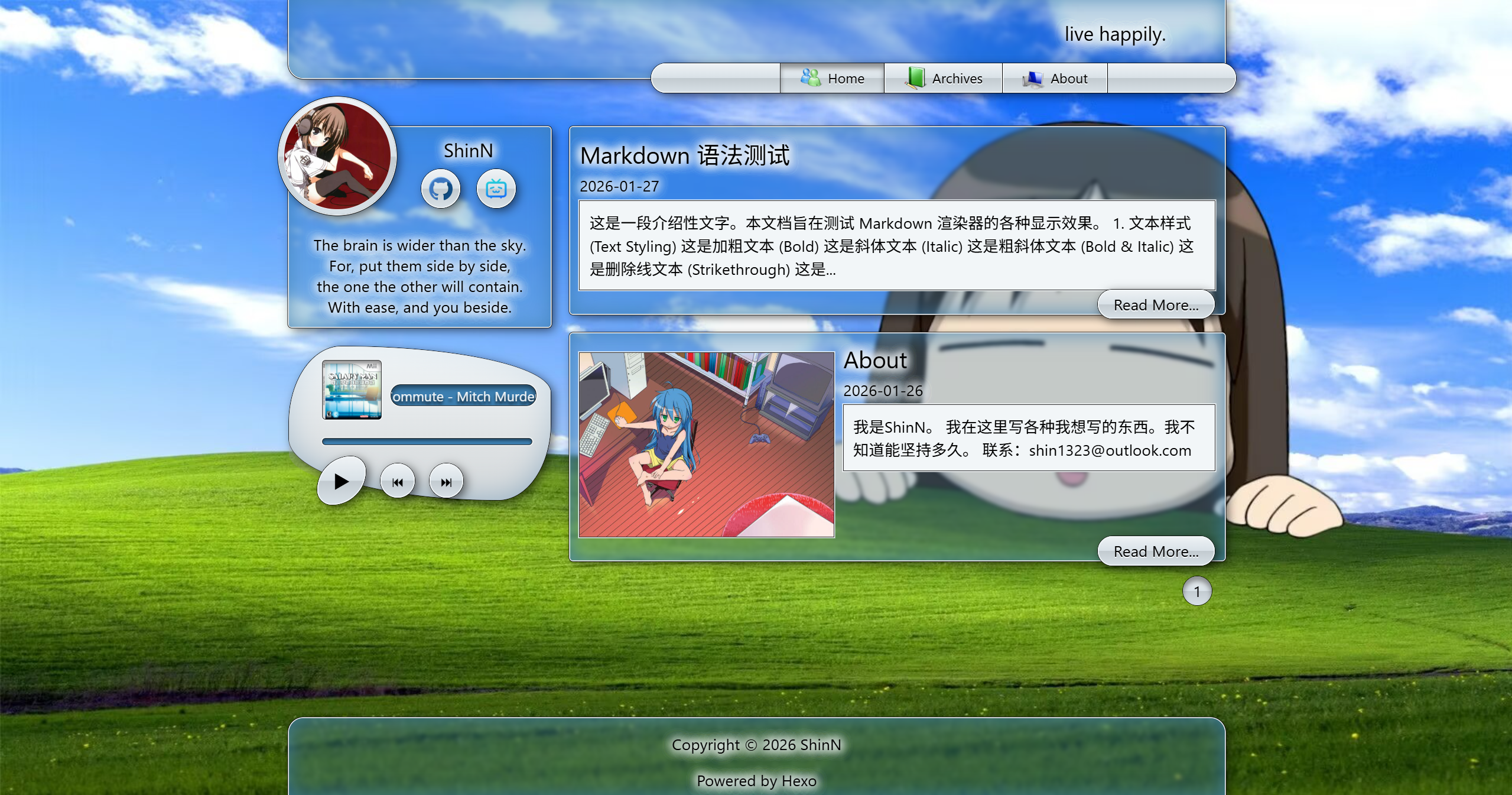
Frutiger Aero visual style, inspired by interfaces such as Windows Vista and Windows 7
HexoBlog
hexo-theme-aero — Hexo Blog Template
By 5h1nnN
hexo-theme-aero is a blog theme for Hexo that adopts a Frutiger Aero visual style, with design inspiration from interfaces such as Windows Vista and Windows 7.
Explore the design
Compare the page layouts and mobile experience. Open any screenshot for a closer look.
Author preview
Author-provided preview
Preview provided in the project README.
One original preview is available. Open the full image to inspect the design.
Screenshots show visual appearance; interactive behavior may differ.
Recorded 2026-10-01View source
What stands out
A quick read of the recorded project description.
Supports responsive layout, adapting to different screen sizes
Supports code highlighting; requires enabling highlight and hljs in the site _config.yml
Renders LaTeX formulas via MathJax; requires enabling mathjax in the post front-matter
Includes music playback and uses PJAX to optimize page loading
Theme colors and wallpapers can be customized in source/css/_variables.scss
Template Details
hexo-theme-aero is a Hexo blog theme with an overall Frutiger Aero style; the README states that its design is inspired by system interfaces such as Windows Vista and Windows 7. The theme is released under the MIT license, and the author provides a demo site and screenshots.
In terms of features, the theme supports responsive layout, code highlighting, LaTeX formula rendering via MathJax, music playback, and PJAX loading optimization, and allows customizing theme colors and wallpapers in source/css/_variables.scss. Code highlighting requires enabling highlight and hljs in the site root _config.yml; MathJax requires adding mathjax: enable to the post front-matter.
For usage, after cloning the theme via git clone into themes/aero, set theme: aero in the site _config.yml, and configure social media links, music playback, etc. in the theme directory's _config.yml. For dependencies, install hexo-renderer-sass and replace hexo-renderer-marked with hexo-renderer-markdown-it. The README mentions that some style designs reference the 7.css project.
HexoBlog
Is it right for your project?
Use Cases
- Building a personal blog with Hexo and wanting a Frutiger Aero style appearance
- Blog posts need to display code snippets with syntax highlighting enabled
- Posts contain LaTeX math formulas that require MathJax rendering
- Wanting to add music playback to blog pages
Suitable For
- Users using Hexo as a static blog generator
- Blog authors who prefer the visual style of the Windows Vista and Windows 7 era
- Technical blogs that need code highlighting and LaTeX formula rendering
- Users willing to manually install dependencies and modify configuration files according to the README
Getting started & customization
Use these recorded setup notes alongside the repository instructions for your chosen version.
- 1
Run git clone https://github.com/5h1nnN/hexo-theme-aero.git themes/aero in the blog root directory
- 2
Set theme: aero in the site _config.yml, and configure title, subtitle, description, etc.
- 3
Install hexo-renderer-sass, and replace hexo-renderer-marked with hexo-renderer-markdown-it
- 4
For code highlighting, enable highlight and set hljs: true in the root _config.yml
- 5
Go to themes/aero to modify social media links, music playback, and other configurations in the theme _config.yml
License & source material
Usage conditions & limitations
Free to use · keep license noticeThis entry covers the free version under the MIT license in the public repository; the free scope is the code of this version and does not mean that external services or third-party assets are free.
Must comply with when using
- Allows free use, modification, commercial use, and distribution of this version's code.
- When distributing copies or substantial portions of the code, retain the original author's copyright notice and the complete MIT license notice.
- The code is provided as is; warranties and limitations of liability are governed by the original license and applicable law.
Additional costs & items to verify
- Using this theme requires installing additional dependency plugins yourself: hexo-renderer-sass and replacing hexo-renderer-marked with hexo-renderer-markdown-it; otherwise the theme will not render properly.
- Code highlighting is not available out of the box; it must be manually enabled by turning on highlight and setting hljs: true in the site root _config.yml.
- LaTeX formula rendering is enabled only when mathjax: enable is explicitly added to each post's front-matter; formulas are not rendered by default.
- Some style designs reference the third-party project 7.css; the licensing status of that external project is not stated in the README, and users must verify its license terms themselves.
- Demo images, fonts, icons, and other third-party assets must be checked against their respective licenses and cannot be judged solely by the code's MIT license.
- External services such as domains, hosting, databases, payments, or AI may incur additional charges.
View Original Text Basis
Permission is hereby granted, free of charge
Original License Text
本主题需要安装以下插件:
Original README
需在根目录`_config.yml`中增加:
Original README
需在文章前加上`mathjax: enable`
Original README
https://github.com/5h1nnN/hexo-theme-aero/blob/main/LICENSEhttps://github.com/5h1nnN/hexo-theme-aero/blob/main/README.md部分样式设计参考https://github.com/khang-nd/7.css
Original README
Compiled by DeepSeek based on repository license and README ·2026-10-01. Results only cover the materials read; dependencies, images, fonts, and subsequent term changes are subject to their respective original texts.
Project checks & description sources
Template Information
- Source platforms
- GitHub
- Documentation and maintenance reference score
- More documented · 75 / 100
- Technologies
- Hexo
- Website type
- Blog
How this score is calculated
Our heuristic uses license records (up to 30), a demo link (12), a preview (10), stars (15), recorded maintenance (15), description completeness (8), feature records (5) and classification data (5). It is not a code, security or performance test, or a Google score. A link does not establish tested functionality.
What to verify for this project
- Repository update recorded
- 2026-02-02
- Screenshot last checked
- 2026-10-01
No demo link is recorded. Use the repository instructions to evaluate the project locally; the screenshot alone cannot establish interactive behavior.
The catalog identifies Hexo as the primary stack. Check the actual dependency manifest and lockfile for versions and hosting requirements. These notes use recorded metadata, not a code audit or a deployment test.
Use a selection guide →How this description was prepared
AI-assisted description based on catalog records and repository material. Repository authors are not automatically the reviewers of this description.
Automatically checked against source and license rules; no manual editorial review.
Inspect the recorded source material
SHA-256: cb782565e9ec526d7a502ed031ee0eade3eb5a28c8d42ef9f43a666fec1faf4c
2026-10-01T03:29:55.842Z
Source file / repository# hexo-theme-aero
[[English](README_en.md)|中文]
## 简介
一个Frutiger Aero风格的Hexo博客主题,灵感来自Windows Vista、Windows 7等的设计风格
演示网站:[ShinN's Blog](https://sh1nn.top)

## 特性
- 支持响应式布局
- 支持代码高亮
- 需在根目录`_config.yml`中增加:
```yaml
highlight:
enable: true
hljs: true
```
- 使用MathJax渲染LaTeX公式
- 需在文章前加上`mathjax: enable`
- 音乐播放功能
- 使用PJAX优化加载
- 自定义主题颜色
- 可在`source/css/_variables.scss`中更改主题颜色和壁纸
## 使用
建站参考[Hexo官方文档](https://hexo.io/zh-cn/docs/)
在博客根目录下运行:
```bash
git clone https://github.com/5h1nnN/hexo-theme-aero.git themes/aero
```
在博客根目录的`_config.yml`中进行主题配置
```yaml
# _config.yml
theme: aero
# 页面标题
title: ShinN's Blog
# 博客标题
subtitle: live happily.
# 签名
description: >
The brain is wider than the sky.<br>
For, put them side by side, <br>
the one the other will contain.<br>
With ease, and you beside.
```
进入`theme/aero`文件夹,在主题`_config.yml`中修改社交媒体链接、音乐播放等配置
## 依赖项
本主题需要安装以下插件:
```bash
# SCSS 渲染器
npm install hexo-renderer-sass --save
# Markdown 渲染器
npm uninstall hexo-renderer-marked
npm install hexo-renderer-markdown-it --save
```
## 其他
部分样式设计参考https://github.com/khang-nd/7.css
Explore similar templates
Compare previews and descriptions within the same stack and category.

hexo-theme-matery
hexo-theme-matery is a Material Design, responsive Hexo blog theme with homepage carousel, waterfall post list, timeline archive, word cloud tags, radar chart categories, and an about page.
Hexo · Blog

hexo-theme-cactus
Cactus is a responsive Hexo theme for personal websites and blogs, maintained by probberechts. It offers four color schemes (dark, light, white, classic), configurable navigation, homepage post lists, project lists, social links, and copyright year ranges.
Hexo · Blog

hexo-theme-volantis
Volantis is a blog theme for Hexo, distributed as the npm package hexo-theme-volantis and enabled by setting theme to volantis in the Hexo site's _config.yml. It requires Hexo 7.3+, hexo-cli 4.3+, Node.js 22.x LTS+, and npm 10.x LTS+.
Hexo · Blog

hexo-theme-aurora
Hexo Theme Aurora is a futuristic Hexo blog theme built around aurora gradients and a magazine-style grid layout.
Hexo · Blog

hexo-theme-Claudia
Claudia is a Hexo blog theme focused on a clean look and easy configuration. It automatically follows the device's dark mode and claims a 90+ Lighthouse score.
Hexo · Blog

hexo-theme-A4
hexo-theme-A4 is a minimalist Hexo blog theme that mimics the texture of A4 paper, emphasizing simplicity, small size, and minimal configuration.
Hexo · Blog