
Minimalist visual style that mimics the texture of A4 paper
HexoBlog
hexo-theme-A4 — Hexo Blog Template
By HiNinoJay
hexo-theme-A4 is a minimalist Hexo blog theme that mimics the texture of A4 paper, focusing on simplicity, small size, and minimal configuration so readers can concentrate on the text.
Explore the design
Compare the page layouts and mobile experience. Open any screenshot for a closer look.
Desktop homepage1 / 3
Desktop captureTop of page
Actual screenshot captured by the server browser.
All pages & views 3
Screenshots show visual appearance; interactive behavior may differ.
Recorded 2026-10-01View source
What stands out
A quick read of the recorded project description.
Provides basic blog functions such as archives, tags, categories, and table of contents
Homepage can be turned into a resume or word-style document with customizable content
Articles can be individually configured to hide, toggle comments, toggle the table of contents, and pin
Global color scheme is customizable, with two built-in palettes: gray-white and green-gold
Comment module uses Waline, with preset CSS styles available for Markdown
Template Details
hexo-theme-A4 is a blog theme for Hexo that visually imitates A4 paper and follows a minimalist approach; the README summarizes it as "simple, small in size, and low in configuration." The theme provides the basic functions of a blog site, including archives, tags, categories, and a table of contents, and supports turning the homepage into a resume or word-style document with customizable content. The page header and footer can also be customized.
At the article level, the theme supports per-article configuration to hide an article, toggle comments, toggle the table of contents, and pin articles, and it can implement mathematical formulas and encrypted article access through plugins. The global color scheme is customizable, with two built-in palettes—gray-white (default) and green-gold—and you can also create your own. The comment module uses Waline, and the theme also includes preset CSS styles available for Markdown.
There are two installation methods: npm and git. Personalized configuration is centralized in the _config.a4.yml file in the site root directory. Note that the homepage and article list page need to be generated manually by running hexo new page index and hexo new page list. The theme uses the MIT license, allowing free use, modification, commercial use, and distribution of this version of the code, but third-party assets such as demo images, fonts, and icons must be checked against their respective licenses, and external services such as domains and hosting may incur additional charges.
HexoBlog
Is it right for your project?
Use Cases
- Building a personal blog focused on text reading with Hexo
- Sites that want the homepage to present resume or document-style content
- Writing scenarios that need per-article control over comments, table of contents, and pinning
- Blogs that want to adjust the global color scheme through a configuration file
Suitable For
- Bloggers who use Hexo and prefer minimalist typography
- Writers focused on long-form reading and text output
- Theme users who want fewer configuration items and a low learning curve
Getting started & customization
Use these recorded setup notes alongside the repository instructions for your chosen version.
- 1
First create a site with hexo init, and set the theme to A4 in the site _config.yml
- 2
Two installation methods are available: npm install hexo-theme-a4@latest or git clone into themes/A4
- 3
Create _config.a4.yml in the site root directory, copy the contents of the theme repository's _config.yml, and then personalize the configuration
- 4
The homepage and article list page need to be generated manually by running hexo new page index and hexo new page list
- 5
After updating, check the GitHub releases to see whether configuration files have new or changed items
License & source material
Usage conditions & limitations
Free to use · keep license noticeThis entry covers the free version under the MIT license in the public repository; the free scope applies to this version of the code and does not mean that external services or third-party assets are free.
Must comply with when using
- Free use, modification, commercial use, and distribution of this version of the code are permitted.
- When distributing copies or substantial portions of the code, retain the original author's copyright notice and the full MIT license notice.
- The code is provided as is; warranties and limitations of liability are governed by the original license and applicable law.
Additional costs & items to verify
- The sponsorship/buy-me-a-coffee links in the README are voluntary donations and are not a prerequisite for using this theme; free use is unaffected.
- The comment feature depends on the third-party Waline service; you need to deploy or register a Waline backend and configure the corresponding service, which may involve external accounts and hosting costs.
- The theme references external CDN resources by default; in actual deployment, you need to confirm the availability and licensing of these third-party CDNs, and it may be affected by external services.
- Demo images, fonts, icons, and other third-party assets must be checked against their respective licenses; the MIT license of the code alone is not sufficient to determine this.
- External services such as domains, hosting, databases, payments, or AI may incur additional charges.
View Original Text Basis
Permission is hereby granted, free of charge
Original License Text
如果觉得我做的不错,请给该项目一个star,或者[请我喝杯咖啡☕️](https://ninojay.top/supportbymoney/)
Original README
采用最美评论模块waline
Original README
https://github.com/HiNinoJay/hexo-theme-A4/blob/main/LICENSEhttps://github.com/HiNinoJay/hexo-theme-A4/blob/main/README.md自带CDN加速国内访问速度
Original README
Compiled by DeepSeek based on repository license and README ·2026-10-01. Results only cover the materials read; dependencies, images, fonts, and subsequent term changes are subject to their respective original texts.
Project checks & description sources
Template Information
- Source platforms
- GitHub
- Documentation and maintenance reference score
- More documented · 91 / 100
- Technologies
- Hexo
- Website type
- Blog
How this score is calculated
Our heuristic uses license records (up to 30), a demo link (12), a preview (10), stars (15), recorded maintenance (15), description completeness (8), feature records (5) and classification data (5). It is not a code, security or performance test, or a Google score. A link does not establish tested functionality.
What to verify for this project
- Repository update recorded
- 2026-03-17
- Screenshot last checked
- 2026-10-01
A demo link is listed. Check it with your own content and viewport sizes; its presence does not confirm that forms, authentication or payments work.
The catalog identifies Hexo as the primary stack. Check the actual dependency manifest and lockfile for versions and hosting requirements. These notes use recorded metadata, not a code audit or a deployment test.
Use a selection guide →How this description was prepared
AI-assisted description based on catalog records and repository material. Repository authors are not automatically the reviewers of this description.
Automatically checked against source and license rules; no manual editorial review.
Inspect the recorded source material
SHA-256: 44f7e57620a6d570f3c8b51c206c5d8f421fd9346f79e3bf3e18f8d7a03e054a
2026-10-01T03:22:12.475Z
Source file / repository# hexo-theme-A4 <div align="right"> <a title="zh-CN" href="/"><img src="https://img.shields.io/badge/-简体中文-24292f?style=for-the-badge" alt="简体中文" /></a> <a title="EN" href="README-EN.md"> <img src="https://img.shields.io/badge/-English-ffffff?style=for-the-badge" alt="English"></a> <a title="zh-TW" href="README_zh-TW.md"><img src="https://img.shields.io/badge/-繁体中文-ffffff?style=for-the-badge" alt="繁体中文"></a> </div> <div align="center" > <a href="https://ninojay.top"> <img width=200px height=200px src="./source/img/A4-favicon.png" alt="A4" /> </a> </div> <div align="center"> 模仿A4纸张的一个hexo极简主题。主打一个简洁,体积小,配置少。 []() [](https://hexo.io/zh-cn/index.html) [](https://nodejs.org/en) 「让读者专注于阅读文字,写者专注于写作。」➡️ [效果展示](https://ninojay.top) ➡️ [使用文档](https://doc.ninojay.top) _右上角一个star,更快更新功能_ </div> [](https://github.com/HiNinoJay/hexo-theme-A4) ## 🏹️特点 - [x] 博客网站基本功能:归档/标签/分类/目录 - [x] 首页简历化,word化,内容自定义化 - [x] 页面的页脚页眉自定义 - [x] 文章可单独配置:隐藏文章、开关评论、开关目录、文章置顶、[数学公式支持](https://ninojay.top/hexoplugin/hexo-filter-mathjax/)、[文章加密访问](https://ninojay.top/hexoplugin/hexo-blog-encrypt/) - [x] [**全局色调可自定义配置,预览多种配色**](https://ninojay.top/hexoplugin/A4-color-change/) - [x] 采用最美评论模块waline - [x] 预置md可使用的css样式 - [x] 自带CDN加速国内访问速度 - [x] [可压缩图片/css/js资源大幅度提升网站访问速度](https://ninojay.top/hexoplugin/hexo-all-minifier/) - [x] [详细的使用文档](https://doc.ninojay.top) - [x] [经过作者验证可支持的hexo插件](https://ninojay.top/tags/hexoPlugin/) - [x] [mathjax 数学公式](https://ninojay.top/hexoplugin/hexo-filter-mathjax/) - [x] [encrypt 特定文章加密访问](https://ninojay.top/hexoplugin/hexo-blog-encrypt/) - [x] [github-emojis 语法支持](https://ninojay.top/hexoplugin/hexo-filter-github-emojis/) - [x] [reference 脚标支持](https://ninojay.top/hexoplugin/hexo-reference/) - [x] [minifier 压缩网站图片/css/js等资源](https://ninojay.top/hexoplugin/hexo-all-minifier/) ## 🔥效果展示 ### 多种主题配色 #### 灰白配色(默认)  #### 绿金配色(已预置|可一键启用)  `颜色搭配是一门学问`,除A4推荐的两种配色外,你可以自行调色,并把颜色方案分享给大家。更多配色请看:[预览](https://ninojay.top/hexoplugin/A4-color-change/)。 ### 首页  ### 文章列表  ### 文章标签和分类信息  ### 评论  ## 👋如何使用 - 确认已通过命令`hexo init`创建好了文件夹,这里举例你的文件夹名为`website` - `命令行`进入到`website`文件夹路径下 - 将`website`文件夹下的`_config.yml`文件中将主题设置为A4 - 接下来正式安装`a4主题`,有两种方式,任选其一 ### npm方式(推荐) - 执行命令 `npm install hexo-theme-a4@latest` - 在`website`文件夹路径下创建`_config.a4.yml`文件,将[这里的内容](https://github.com/HiNinoJay/hexo-theme-A4/blob/main/_config.yml)复制进去 - 对主题的所有个性化配置都将在`_config.a4.yml`文件中进行,可按照文件中的注释自行配置 - 执行命令:`hexo s` 运行项目查看效果 ### git方式 - 执行命令:`git clone [email protected]:HiNinoJay/hexo-theme-A4.git themes/A4` - 在`website`文件夹路径下创建`_config.a4.yml`文件,将[这里的内容](https://github.com/HiNinoJay/hexo-theme-A4/blob/main/_config.yml) 复制进去 - 对主题的所有个性化配置都将在`_config.a4.yml`文件中进行,可按照文件中的注释自行配置 - 执行命令:`hexo s` 运行项目查看效果 ## ⚠️必读配置 首页和文章列表页需要手动生成,执行以下命令即可: ```shell hexo new page index hexo new page list ``` 其他详细配置请看: ➡️ [使用文档](https://doc.ninojay.top),已上线。 ## ⬆️如何更新 根据你`安装`的方式,选择`对应的`更新方式。 ### npm方式 命令行进入到你的博客网站`根目录`下 执行命令: ```shell npm install hexo-theme-a4@latest ``` ### git方式 命令行进入到`themes/A4`目录下 执行命令: ```shell git pull ``` --- ### 注意 以上两种方式更新后,请去该[github页面](https://github.com/HiNinoJay/hexo-theme-A4/releases)查看最新的版本,作者会告诉配置文件有无新增/修改。 如果有,则需要复制最新的[该文件](https://github.com/HiNinoJay/hexo-theme-A4/blob/main/_config.yml)对应到你的`_config.a4.yml`新增/修改的部分。 ## ☕️支持 欢迎提交 pull request 或 issue,请提交至dev分支。 其他任何想交流的事,可发送邮件至:[email protected] 如果觉得我做的不错,请给该项目一个star,或者[请我喝杯咖啡☕️](https://ninojay.top/supportbymoney/) ## 💗感谢 由衷感谢A4支持者们:https://github.com/HiNinoJay/hexo-theme-A4/blob/main/DONATION.md ## Stargazers over time [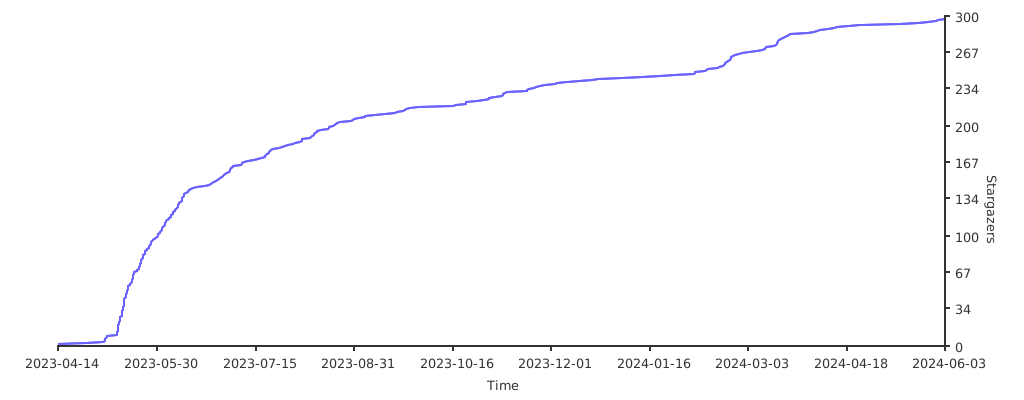](https://starchart.cc/HiNinoJay/hexo-theme-A4)
Explore similar templates
Compare previews and descriptions within the same stack and category.

hexo-theme-matery
hexo-theme-matery is a Material Design, responsive Hexo blog theme with homepage carousel, waterfall post list, timeline archive, word cloud tags, radar chart categories, and an about page.
Hexo · Blog

hexo-theme-cactus
Cactus is a responsive Hexo theme for personal websites and blogs, maintained by probberechts. It offers four color schemes (dark, light, white, classic), configurable navigation, homepage post lists, project lists, social links, and copyright year ranges.
Hexo · Blog

hexo-theme-volantis
Volantis is a blog theme for Hexo, distributed as the npm package hexo-theme-volantis and enabled by setting theme to volantis in the Hexo site's _config.yml. It requires Hexo 7.3+, hexo-cli 4.3+, Node.js 22.x LTS+, and npm 10.x LTS+.
Hexo · Blog

hexo-theme-aurora
Hexo Theme Aurora is a futuristic Hexo blog theme built around aurora gradients and a magazine-style grid layout.
Hexo · Blog

hexo-theme-Claudia
Claudia is a Hexo blog theme focused on a clean look and easy configuration. It automatically follows the device's dark mode and claims a 90+ Lighthouse score.
Hexo · Blog
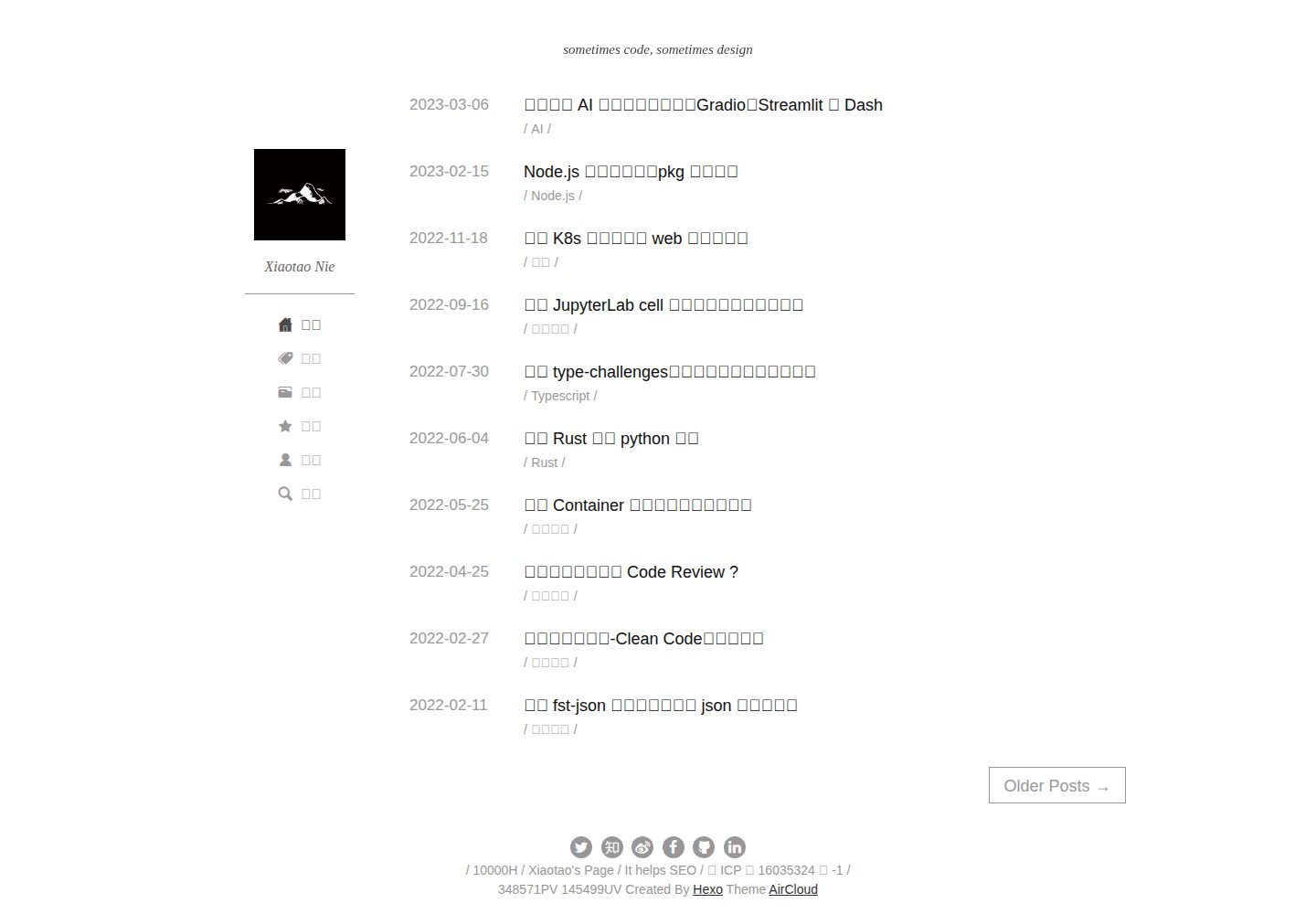
hexo-theme-aircloud
Hexo-Theme-AirCloud is a concise Hexo blog theme centered on post content, under the MIT license.
Hexo · Blog