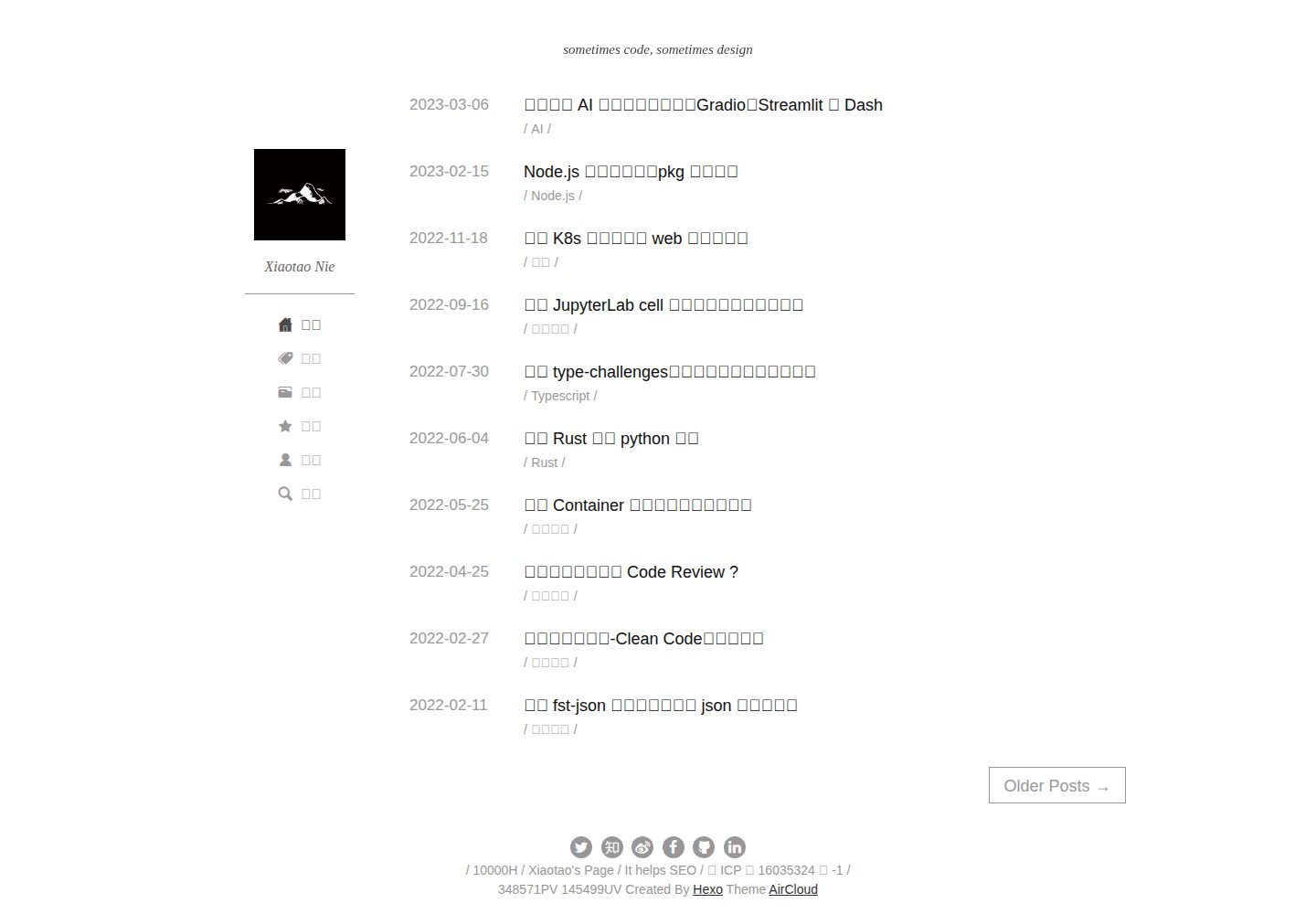
Centered on post content, by default no theme color blocks or images are laid out, and each post does not require an image
HexoBlog
hexo-theme-aircloud — Hexo Blog Template
By aircloud
Hexo-Theme-AirCloud is a concise Hexo blog theme centered on post content, released under the MIT license, supporting global search highlighting, comments such as giscus, post table of contents, visit statistics, and Chinese-English language switching.
Explore the design
Compare the page layouts and mobile experience. Open any screenshot for a closer look.
Desktop homepage1 / 3
Desktop captureTop of page
Actual screenshot captured by the server browser.
All pages & views 3
Screenshots show visual appearance; interactive behavior may differ.
Recorded 2026-10-09View source
What stands out
A quick read of the recorded project description.
By default, no post excerpts are generated, avoiding incomplete expression caused by truncating the main text
Global search with highlighting of search content
Post detail pages provide a table of contents
Built-in giscus comment support, and can be configured for gitment, disqus, LiveRe
Provides overall UV/PV and per-page PV visit statistics, supports Chinese-English language switching
Template Details
Hexo-Theme-AirCloud is a blog theme for Hexo, designed to focus on the articles themselves: by default, it does not use large-scale theme color blocks or image layouts, nor does it require each post to have an image; by default, it does not generate post excerpts, avoiding incomplete expression caused by truncating the main text. The theme provides global search with highlighting of search results, a table of contents on post detail pages, visit statistics (overall UV/PV and per-page PV), and Chinese-English language switching. The comment feature has built-in support for giscus, and can also be configured for gitment, disqus, and LiveRe. Usage is consistent with other Hexo themes: place the theme in the themes directory and configure it in _config.yml; search, tags page, about page, comments, etc. require corresponding plugin or page configuration according to the documentation, otherwise related features may not work properly.
HexoBlog
Is it right for your project?
Use Cases
- Building a personal blog primarily focused on text content with Hexo
- Writing scenarios where the blog by default does not rely on images and does not generate excerpts
- Blogs that need a table of contents, global search highlighting, and visit statistics
- Integrating comments into posts via comment systems such as giscus
- Hexo sites that need Chinese-English interface switching
Suitable For
- Bloggers who use Hexo and prefer concise text layout
- Developers who do not often prepare images for each post
- Blog authors who need a table of contents, search highlighting, and visit statistics
- Hexo users who want to use comment systems such as giscus and disqus
Getting started & customization
Use these recorded setup notes alongside the repository instructions for your chosen version.
- 1
Clone or download the theme, copy it into the themes folder of the Hexo project, and refer to the official DEMO to configure _config.yml, otherwise features may be missing.
- 2
To enable search, install the hexo-generator-search plugin and configure the path and field of search in _config.yml.
- 3
The tags page and about page need to be created via hexo new page tags and hexo new page about, and their layouts set to tags and about respectively.
- 4
The comment feature requires corresponding configuration in the comment section of _config.yml according to the chosen type (giscus, gitment, disqus, LiveRe).
- 5
The favicon should be placed under /source/img in the blog root directory, not inside the theme folder; posts should avoid skipping heading levels to prevent affecting the table of contents display.
License & source material
Usage conditions & limitations
Free to use · keep license noticeThis entry covers the free version under the MIT license in the public repository; the free scope is the code of this version and does not mean that external services or third-party assets are free.
Must comply with when using
- Free use, modification, commercial use, and distribution of this version's code are permitted.
- When distributing copies or substantial portions of the code, retain the original author's copyright notice and the full MIT license notice.
- The code is provided as is; warranties and limitations of liability are governed by the original license and applicable law.
Additional costs & items to verify
- Demo images, fonts, icons, and other third-party assets need to be checked against their respective licenses and cannot be judged solely by the code's MIT license.
- External services such as domains, hosting, databases, payments, or AI may incur additional charges.
- Before enabling the global search feature, the hexo-generator-search plugin must be installed, otherwise search will not work.
- The tags page and about page do not exist by default; you need to create the corresponding folders and pages under source yourself, otherwise these two pages are unavailable.
- Using giscus comments requires first completing configuration on giscus.app and obtaining the script tag, which is an external service dependency.
- Using disqus comments requires first registering an account on disqus.com and creating a site, which is an external service and account dependency.
- The LiveRe comment plugin has a free city version and a paid premium version; free use is limited to the city version, and higher needs require a paid upgrade.
- The favicon must be placed under /source/img in the blog root directory, not inside the theme folder, otherwise the configuration will not take effect.
- The social platform links at the bottom only support a few built-in ones; adding other social platforms requires modifying the theme template code.
- Post heading levels must not skip levels, otherwise it may cause Hexo parsing errors and affect the post table of contents display.
- Paragraphs are indented by two characters by default, and content after a line break within a paragraph cannot be indented; for multi-line indentation, use multiple paragraphs or lists instead.
View Original Text Basis
Permission is hereby granted, free of charge
Original License Text
为了使用搜索功能,首先需要安装下列插件:
Original README
如果是新项目,默认是没有`标签`页面和`关于`页面的,需要在`source`文件夹下建立`tags`文件夹和`about`文件夹。
Original README
只需要在 https://giscus.app 配置好,然后把对应的 script 标签复制
Original README
disqus 是一个使用比较广泛的评论系统,我们需要先在[官方网站](https://disqus.com)注册一个账号。
Original README
该插件分为city和premium两个版本,其中city版是适合所有人使用的免费版本,有更高需求的可以考虑premium版本。
Original README
项目的 favicon 默认在你的博客根目录的 `/source/img` 下面,在 `/source/img` 下面添加 favicon.ico 即可,不要添加在主题文件夹内。
Original README
目前暂不支持在不改动模版代码的前提下新增社交平台
Original README
文章不要有跳级目录,比如一个`###`三级目录下是一个`#####`五级目录,然后又有一个`###`三级目录,这样有可能导致 hexo 解析出错,从而影响文章目录部分的展示。
Original README
https://github.com/aircloud/hexo-theme-aircloud/blob/master/LICENSEhttps://github.com/aircloud/hexo-theme-aircloud/blob/master/readme.md文章的段落(p)都有默认的两个字符的首行缩进,虽然能识别 markdown 段落中的换行,但是无法对换行后的内容进行缩进
Original README
Compiled by DeepSeek based on repository license and README ·2026-10-09. Results only cover the materials read; dependencies, images, fonts, and subsequent term changes are subject to their respective original texts.
Project checks & description sources
Template Information
- Source platforms
- GitHub
- Documentation and maintenance reference score
- Partly documented · 68 / 100
- Technologies
- Hexo
- Website type
- Blog
How this score is calculated
Our heuristic uses license records (up to 30), a demo link (12), a preview (10), stars (15), recorded maintenance (15), description completeness (8), feature records (5) and classification data (5). It is not a code, security or performance test, or a Google score. A link does not establish tested functionality.
What to verify for this project
- Repository update recorded
- 2023-05-15
- Screenshot last checked
- 2026-10-09
A demo link is listed. Check it with your own content and viewport sizes; its presence does not confirm that forms, authentication or payments work.
The catalog identifies Hexo as the primary stack. Check the actual dependency manifest and lockfile for versions and hosting requirements. These notes use recorded metadata, not a code audit or a deployment test.
Use a selection guide →How this description was prepared
AI-assisted description based on catalog records and repository material. Repository authors are not automatically the reviewers of this description.
Review declaration: [email protected] · 2026-10-10
Inspect the recorded source material
SHA-256: 87d56d91662d2f44c1c18724de4bc2e7f8a7762dc78b62c84b4377c19d544653
2026-10-09T17:08:44.629Z
Source file / repository## Hexo-Theme-AirCloud: 一个简洁轻量的 hexo 博客主题
> [English Document](./readme-en.md) | [预览地址](http://niexiaotao.cn/)
## 功能简介
Hexo-Theme-AirCloud 是一个简洁轻量的 hexo 博客主题,旨在将中心放在博文本身,因此:
* 默认没有大范围的主题色块、图片铺排等,也不要求每片博文配图,一方面这并不是我们记录知识的重点,另外一方面可能程序员群体并没有足够的素材,容易造成主题纠纷。
* 建议通过不冗余的内容进行传达,比如默认没有博文摘要,因为不少开发者写博客的时候没有写博文摘要,如果从博客前一部分截取往往不能表达完整思想。
另外,该主题主要实现的功能有:
* 全局搜索功能,并对搜索内容进行高亮。
* 博客评论功能:内置了针对 https://giscus.app/ 的支持
* 文章详情页文章目录功能
* 访问量统计(总体UV、PV,单页PV)
* 语言切换能力,目前支持中文和英文
## 起步
> 我在"常见问题"中总结了该项目之前被提及的一些问题,如果你在使用过程中遇到了问题,可以在"常见问题"中寻找答案,如果没能解决,欢迎提[issue](https://github.com/aircloud/hexo-theme-aircloud/issues),我会保证回复。
注意,如果你不按照"功能适配"部分的内容进行操作,可能会导致相关提及的功能无法正常使用。
* [基本使用](https://github.com/aircloud/hexo-theme-aircloud#%E5%9F%BA%E6%9C%AC%E4%BD%BF%E7%94%A8)
* [功能适配](https://github.com/aircloud/hexo-theme-aircloud#%E5%8A%9F%E8%83%BD%E9%80%82%E9%85%8D)
* [搜索功能](https://github.com/aircloud/hexo-theme-aircloud#%E6%90%9C%E7%B4%A2%E5%8A%9F%E8%83%BD)
* [`标签`页面 & `关于`页面](https://github.com/aircloud/hexo-theme-aircloud#%E6%A0%87%E7%AD%BE%E9%A1%B5%E9%9D%A2--%E5%85%B3%E4%BA%8E%E9%A1%B5%E9%9D%A2)
* [评论功能](https://github.com/aircloud/hexo-theme-aircloud#%E8%AF%84%E8%AE%BA%E5%8A%9F%E8%83%BD)
* [favicon 的配置](https://github.com/aircloud/hexo-theme-aircloud#%E6%A0%87%E7%AD%BE%E9%A1%B5%E9%9D%A2--%E5%85%B3%E4%BA%8E%E9%A1%B5%E9%9D%A2)
* [底部自定义](https://github.com/aircloud/hexo-theme-aircloud#%E5%BA%95%E9%83%A8%E8%87%AA%E5%AE%9A%E4%B9%89)
* [站长统计](https://github.com/aircloud/hexo-theme-aircloud#%E7%AB%99%E9%95%BF%E7%BB%9F%E8%AE%A1)
* [高级自定义](https://github.com/aircloud/hexo-theme-aircloud#%E9%A6%96%E8%A1%8C%E7%BC%A9%E8%BF%9B)
* [首行缩进](https://github.com/aircloud/hexo-theme-aircloud#%E9%A6%96%E8%A1%8C%E7%BC%A9%E8%BF%9B)
* [常见问题](https://github.com/aircloud/hexo-theme-aircloud#%E5%B8%B8%E8%A7%81%E9%97%AE%E9%A2%98)
* [如何取消赞赏功能?](https://github.com/aircloud/hexo-theme-aircloud#%E5%A6%82%E4%BD%95%E5%8F%96%E6%B6%88%E8%B5%9E%E8%B5%8F%E5%8A%9F%E8%83%BD)
* [一些注意事项](https://github.com/aircloud/hexo-theme-aircloud#%E4%B8%80%E4%BA%9B%E6%B3%A8%E6%84%8F%E4%BA%8B%E9%A1%B9)
## 基本使用
**建议:参考 [DEMO](https://github.com/aircloud/hexo-aircloud-blog) 进行配置,尤其是 _config.yml 部分,否则可能会造成功能缺失**
同其他博客主题使用方式相同,直接 clone 或者下载本项目,复制粘贴到 themes 文件夹下即可。
具体的 _config.yml 自定义配置,请参考[DEMO](https://github.com/aircloud/hexo-aircloud-blog)。
## 功能适配
### 搜索功能
为了使用搜索功能,首先需要安装下列插件:
```shell
npm i hexo-generator-search --save
```
然后在 _config.yml 中进行配置,可以参考如下配置:
```
search:
path: search.json
field: post
```
### `标签`页面 & `关于`页面
如果是新项目,默认是没有`标签`页面和`关于`页面的,需要在`source`文件夹下建立`tags`文件夹和`about`文件夹。
>注:建议不要直接新建文件,而是采用 hexo 的 `hexo new page tags` 和 `hexo new page about` 的方式新建文件,这样可以被 hexo 索引到。
其中`tags`文件夹中新建`index.md`并写入:
```
---
layout: "tags"
title: "Tags"
---
```
`about`文件夹下`index.md`为一篇支持 markdown 格式的文件,需要在开头添加:
```
---
layout: "about"
title: "About"
date: 2016-04-21 04:48:33
comments: true
---
```
### 评论功能
目前,本博客支持以下评论功能:
- [giscus](https://giscus.app/) 推荐目前使用
- [gitment](https://imsun.net/posts/gitment-introduction/)(gitment 经常会出现限频或者 404 等错误,其作者已关闭github认证转发服务)
- [disqus](https://disqus.com)
- [LiveRe](https://www.livere.com)
#### giscus
只需要在 https://giscus.app 配置好,然后把对应的 script 标签复制,参考下面的配置在 _config.yml 里面配置即可。
[DEMO](https://github.com/aircloud/hexo-aircloud-blog) 目前就是使用了这个评论功能,建议直接参考(但请勿直接复制下面的内容)。
```
comment:
type: giscus
script: |
<script src="https://giscus.app/client.js"
data-repo="aircloud/hexo-aircloud-blog"
data-repo-id="MDEwOlJlcG9zaXRvcnkxMjkwNDgyNjg="
data-category="Announcements"
data-category-id="DIC_kwDOB7EezM4COhKJ"
data-mapping="title"
data-reactions-enabled="1"
data-emit-metadata="0"
data-input-position="bottom"
data-theme="light"
data-lang="zh-CN"
crossorigin="anonymous"
async>
</script>
```
#### gitment
建议先在[gitment](https://imsun.net/posts/gitment-introduction/)进行了解,然后参考[DEMO](https://github.com/aircloud/hexo-aircloud-blog)进行配置,其中一些相关项目如下:
```
comment:
type: gitment
id: your-id-created-by-https://github.com/settings/applications/new
secret: your-secret-created-by-https://github.com/settings/applications/new
owner: aircloud
repo: hexo-aircloud-blog
```
#### disqus
disqus 是一个使用比较广泛的评论系统,我们需要先在[官方网站](https://disqus.com)注册一个账号。
登录后,点击首页的 GET STARTED 按钮,之后选择 I want to install Disqus on my site 选项,填写相关内容,值得注意的是,`Website Name` 需要全网唯一,而且,一般情况,假设你的 `Website Name` 填写的是 example,那么下文 `script` 字段就可以写 `'https://example.disqus.com/embed.js'`。
当然,你也可以在下一步 -> 选择 basic 免费套餐 -> 选择最后的 "I don't see my platform listed, installed manually with universal code" -> 找到代码中的 `s.src = 'https://xxxx.disqus.com/embed.js';
` , 从而找到 script 地址。(无需插入 disqus 给出的脚本,只需按照这里的说明配置即可)
之后,你需要在 `_config.yml` 中配置如下内容:
```
comment:
type: disqus
script: 'https://example.disqus.com/embed.js'
```
当然,你也可以配置`url` 和 `identifier`, 但是这个就属于高级内容了,对于我们一般的 hexo 博客网站来说必要性不大,如果你需要配置这些内容,可能你已经是一个高级玩家了,可以在 `themes/aircloud/layout/layout.ejs` 的相关代码的基础上进行改动。
>注意: 目前,直接嵌入 disqus 的代码可能会加载失败,你也可以考虑将相关代码放在自己的博客下引入:在 public 文件夹下新建文件放入代码,跟随发布即可(放入 source 文件夹下可能会由于 hexo 的处理变得有错误),并同时更改 `_config.yml` 中的配置。
#### LiveRe
LiveRe 是一款来自韩国的支持中文且没有被墙LiveRe评论插件,重点是使用无需翻墙。
该插件分为city和premium两个版本,其中city版是适合所有人使用的免费版本,有更高需求的可以考虑premium版本。
注册之后,选择 安装 -> 选 city版本,按提示操作进入到管理页面,系统会给出一段嵌入代码,找到其中的data-id和data-uid。
之后,你需要在`_config.yml`中配置如下内容
```
comment:
type: livere
livere_id: 'city'
livere_uid:
```
`livere_id` 和 `livere_uid`就是注册后获得的 data-id和data-uid。
### favicon 的配置
项目的 favicon 默认在你的博客根目录的 `/source/img` 下面,在 `/source/img` 下面添加 favicon.ico 即可,不要添加在主题文件夹内。
### 底部自定义
大家如果访问提供的预览链接,会发现我们的博客底部是提供一些内容的:一些社交平台的个人主页链接、友情链接、PV、UV 与 本模版链接。
一般情况下,大家无需改动底部的代码,直接在 `_config.yml` 中配置即可。
配置社交平台主页的样例代码:
```
# SNS settings
# 一些社交平台地址,支持以下几种:
weibo_username: 3286578617
zhihu_username: ai-er-lan-xue-da
github_username: AirCloud
twitter_username: iconie_alloy
facebook_username: xiaotao.nie.5
linkedin_username: 小涛-聂-80964aba
```
如果不想包括某些社交平台,直接注释或删除相关代码即可(目前暂不支持在不改动模版代码的前提下新增社交平台)。
配置友情链接的样例代码:
```
# Friends
# 友情链接
friends: [
{
title: "10000H",
href: "https://www.10000h.top"
},{
title: "Xiaotao's Page",
href: "https://niexiaotao.com"
},{
title: "It helps SEO",
href: "#"
}
]
```
最底部的 PV、UV 和模版地址,无需配置。
### 站长统计
如果不想包括某些统计平台,直接注释或删除相关代码即可。
```yml
analytics:
google:
# https://search.google.com
site_verification:
# https://analytics.google.com
gtag_id:
bing:
# https://www.bing.com/webmasters
site_verification:
baidu:
# https://ziyuan.baidu.com/site/index
site_verification:
# https://tongji.baidu.com
id:
# https://ziyuan.baidu.com/college/courseinfo?id=156&page=4#h2_article_title1
disable_transformation: false
cloudflare:
# https://dash.cloudflare.com
token:
umami:
# https://umami.is/
host:
id:
```
## 高级自定义
### 首行缩进
目前可以配置是否在博客页面带有首行缩进两个汉字的效果,默认是有首行缩进的效果的,但是也可以通过下面的配置代码进行关闭:
```
post_style:
indent: 0
```
### 头像圆角
```
avatar_style:
radius: true
```
## 常见问题
### 如何取消赞赏功能?
目前网站的赞赏功能做的比较鸡肋,缺乏一定的丰富度,如果你想取消这个功能,只需取消注释或者删除掉赞赏部分的相关配置即可:
```
donate:
img: img/donate.jpg
content: 感谢鼓励
```
另外,如果你对赞赏部分有用户体验较好并且通用型比较好的设计,也可以提 issue,我会考虑实现。
## 一些注意事项
由于一些hexo的历史遗留问题等,为了避免给用户在使用过程中带来太多麻烦(比如需要改动主题代码甚至hexo源码),建议用户使用过程中遵循一些规范:
* 文章不要有跳级目录,比如一个`###`三级目录下是一个`#####`五级目录,然后又有一个`###`三级目录,这样有可能导致 hexo 解析出错,从而影响文章目录部分的展示。
* 文章的段落(p)都有默认的两个字符的首行缩进,虽然能识别 markdown 段落中的换行,但是无法对换行后的内容进行缩进,所以这里需要注意样式问题(如果需要多行缩进,建议使用多个段落或者做成列表)。
Explore similar templates
Compare previews and descriptions within the same stack and category.

hexo-theme-matery
hexo-theme-matery is a Material Design, responsive Hexo blog theme with homepage carousel, waterfall post list, timeline archive, word cloud tags, radar chart categories, and an about page.
Hexo · Blog

hexo-theme-cactus
Cactus is a responsive Hexo theme for personal websites and blogs, maintained by probberechts. It offers four color schemes (dark, light, white, classic), configurable navigation, homepage post lists, project lists, social links, and copyright year ranges.
Hexo · Blog

hexo-theme-volantis
Volantis is a blog theme for Hexo, distributed as the npm package hexo-theme-volantis and enabled by setting theme to volantis in the Hexo site's _config.yml. It requires Hexo 7.3+, hexo-cli 4.3+, Node.js 22.x LTS+, and npm 10.x LTS+.
Hexo · Blog

hexo-theme-aurora
Hexo Theme Aurora is a futuristic Hexo blog theme built around aurora gradients and a magazine-style grid layout.
Hexo · Blog

hexo-theme-Claudia
Claudia is a Hexo blog theme focused on a clean look and easy configuration. It automatically follows the device's dark mode and claims a 90+ Lighthouse score.
Hexo · Blog

hexo-theme-A4
hexo-theme-A4 is a minimalist Hexo blog theme that mimics the texture of A4 paper, emphasizing simplicity, small size, and minimal configuration.
Hexo · Blog