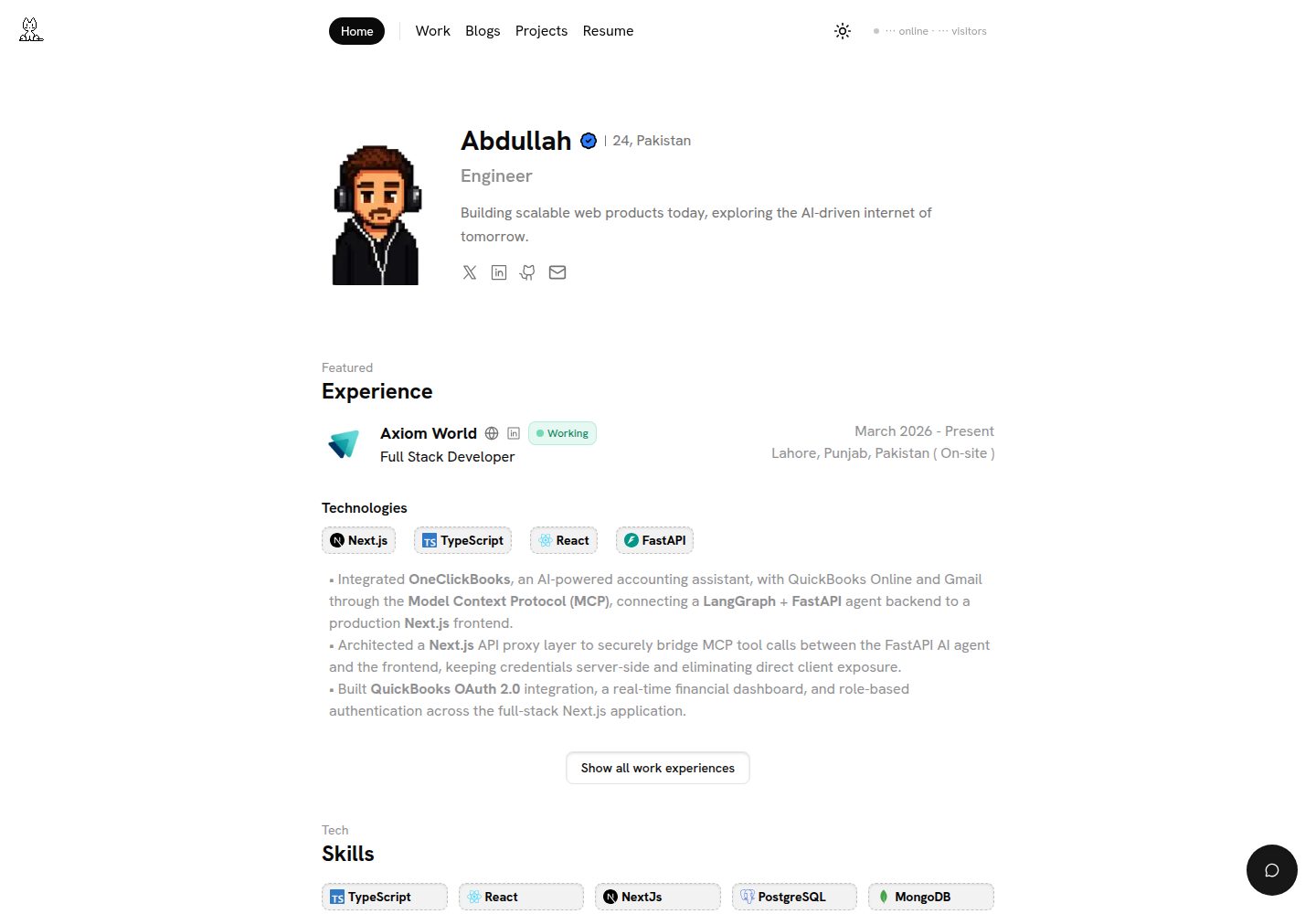
Content is centralized in configuration files under src/config; replacing personal information, experience, and navigation requires no changes to component code
Next.jsReactPortfolio
portfolio (Abdullah-dev0) — Next.js Portfolio Template
By Abdullah-dev0
A personal portfolio template built on Next.js and React, managing personal information, experience, and projects through configuration files, with optional features including an MDX blog, dark mode, and AI chat.
Explore the design
Compare the page layouts and mobile experience. Open any screenshot for a closer look.
Desktop homepage1 / 3
Desktop captureTop of page
Actual screenshot captured by the server browser.
All pages & views 3
Screenshots show visual appearance; interactive behavior may differ.
Recorded 2026-10-11View source
What stands out
A quick read of the recorded project description.
Projects and blogs are written in MDX, and the blog cover image is required in the frontmatter
Built-in dark mode switching and font size adjustment, using next-themes and Lenis smooth scrolling
Optional integrations include Gemini AI chat, PostHog analytics, Upstash Redis rate limiting, and giscus comments
Includes page structures for homepage, about, work experience, projects, blog, Gears, and resume
Uses the MIT license, permitting free use, modification, commercial use, and distribution
Template Details
This is a Next.js template for developer personal portfolios, built with React and TypeScript, styled with Tailwind CSS, and using interface components from shadcn/ui and Radix UI. The template centralizes personal information, about, work experience, navigation, footer, SEO metadata, resume links, and other content in configuration files under the src/config directory. Modifying these files replaces the demo content without changing component code. Projects and blog content are stored as MDX files in the content/projects and content/blogs directories, and the blog cover image is required in the frontmatter.
Functionally, the template includes pages for the homepage Hero, about, work experience, project showcase, blog, Gears (a list of devices and software), and resume, and integrates Lenis smooth scrolling, next-themes dark mode switching, and font size adjustment. Optional capabilities include Gemini-based AI chat, PostHog analytics, Upstash Redis rate limiting, a GitHub contribution calendar, Cal.com booking embed, and giscus blog comments, all of which require configuring the corresponding environment variables or third-party accounts.
Regarding usage limitations, features such as AI chat, rate limiting, and online status depend on external services, requiring you to apply for keys yourself and potentially incurring costs; third-party assets such as demo images, fonts, and icons must be checked separately under their respective licenses. The repository uses the MIT license, allowing free use, modification, and distribution, but the copyright and license notice must be retained. The framework version numbers given in the README differ from the template metadata; the repository dependency manifest is authoritative.
Next.jsReactPortfolio
Is it right for your project?
Use Cases
- Developers building a personal portfolio website to showcase projects, work experience, and blog posts in one place
- Scenarios requiring MDX to maintain project case studies and blog content with type-safe content
- Personal sites where demo content needs to be replaced quickly and customization is done through configuration files
- Portfolio pages that need basic interactive experiences such as dark mode, smooth scrolling, and font size adjustment
Suitable For
- Developers familiar with Next.js and React who are willing to configure environment variables and third-party services themselves
- Frontend or full-stack engineers who need an integrated personal portfolio and blog
- Individual users who accept maintaining content via MDX and configuration files
- Users planning to deploy to Vercel or other platforms supporting Node.js
Getting started & customization
Use these recorded setup notes alongside the repository instructions for your chosen version.
- 1
Requires Node.js 18+ or Bun, and Git
- 2
Copy .env.example to .env and fill in required variables such as NEXT_PUBLIC_URL, GEMINI_API_KEY, KV_REST_API_URL, and KV_REST_API_TOKEN
- 3
PostHog, Lanyard, giscus, and others are optional variables, configured as needed
- 4
AI chat, rate limiting, and online status depend on external services; you must apply for keys yourself and note potential costs
- 5
Third-party assets such as demo images, fonts, and icons must be checked separately under their respective licenses
License & source material
Usage conditions & limitations
Free to use · keep license noticeThis entry covers the free version under the MIT license in the public repository; the free scope is the code of this version and does not mean external services or third-party assets are free.
Must comply with when using
- Free use, modification, commercial use, and distribution of this version's code are permitted.
- When distributing copies or substantial portions of the code, retain the original author's copyright notice and the complete MIT license notice.
- The code is provided as is; warranties and limitations of liability are governed by the original license and applicable law.
Additional costs & items to verify
- Demo images, fonts, icons, and other third-party assets must be checked under their respective licenses and cannot be judged solely by the code's MIT license.
- External services such as domains, hosting, databases, payments, or AI may incur additional charges.
- The AI chat feature requires applying for and configuring a Google Gemini API key yourself and is an external service dependency.
- The rate limiting feature depends on Upstash Redis, requiring you to create a database and provide a connection URL.
- The rate limiting feature requires configuring an Upstash Redis access token, which is an external service credential.
- Using AI chat requires applying for a Gemini API key at Google AI Studio and may involve third-party service terms and fees.
- The rate limiting feature requires creating a database on Upstash, which may incur costs beyond the free tier.
- Enabling PostHog analytics requires registering a PostHog account and is an optional external service.
- The AI chat feature lists the Gemini API key as a required environment variable; without it, the feature cannot be used.
- The rate limiting feature lists the Upstash Redis URL as a required environment variable and depends on an external service.
- The rate limiting feature lists the Upstash Redis token as a required environment variable, which you must apply for yourself.
- PostHog analytics is an optional feature and requires you to provide a key.
- Discord online status display is an optional feature and requires a Lanyard user ID.
- Blog comments are an optional feature and require configuring giscus repository information.
View Original Text Basis
Permission is hereby granted, free of charge
Original License Text
GEMINI_API_KEY=your_gemini_api_key
Original README
KV_REST_API_URL=your_upstash_redis_url
Original README
KV_REST_API_TOKEN=your_upstash_token
Original README
- **Gemini API**: [Get API key from Google AI Studio](https://makersuite.google.com/app/apikey)
Original README
- **Upstash Redis**: [Create free database at Upstash](https://upstash.com/)
Original README
- **PostHog**: [Sign up for free at PostHog](https://posthog.com/)
Original README
`GEMINI_API_KEY` | ✅ | Google Gemini API key for AI chat
Original README
`KV_REST_API_URL` | ✅ | Upstash Redis URL for rate limiting
Original README
`KV_REST_API_TOKEN` | ✅ | Upstash Redis token
Original README
`NEXT_PUBLIC_POSTHOG_KEY` | ❌ | PostHog analytics key (optional)
Original README
`LANYARD_USER_ID` | ❌ | Discord user ID for presence (optional)
Original README
https://github.com/Abdullah-dev0/portfolio/blob/main/LICENSEhttps://github.com/Abdullah-dev0/portfolio/blob/main/README.md`NEXT_PUBLIC_GISCUS_REPO` | ❌ | giscus repo for blog comments (optional)
Original README
Compiled by DeepSeek based on repository license and README ·2026-10-11. Results only cover the materials read; dependencies, images, fonts, and subsequent term changes are subject to their respective original texts.
Project checks & description sources
Template Information
- Source platforms
- GitHub
- Documentation and maintenance reference score
- More documented · 88 / 100
- Technologies
- Next.js · React
- Website type
- Portfolio
How this score is calculated
Our heuristic uses license records (up to 30), a demo link (12), a preview (10), stars (15), recorded maintenance (15), description completeness (8), feature records (5) and classification data (5). It is not a code, security or performance test, or a Google score. A link does not establish tested functionality.
What to verify for this project
- Repository update recorded
- 2026-10-11
- Screenshot last checked
- 2026-10-11
A demo link is listed. Check it with your own content and viewport sizes; its presence does not confirm that forms, authentication or payments work.
The catalog identifies Next.js as the primary stack. Check the actual dependency manifest and lockfile for versions and hosting requirements. These notes use recorded metadata, not a code audit or a deployment test.
Use a selection guide →How this description was prepared
AI-assisted description based on catalog records and repository material. Repository authors are not automatically the reviewers of this description.
Review declaration: [email protected] · 2026-10-11
Inspect the recorded source material
SHA-256: e5990dfaf97d6182a3fdc5e98a4d2b2122b9fab258311cb39399ba0574905a06
2026-10-11T12:20:21.405Z
Source file / repository# 🚀 Portfolio
A modern, customizable portfolio template built with **Next.js 15**, **React 19**, and **TypeScript**. Features a sleek design with smooth animations, dark mode support, and easy customization through configuration files.
[](https://nextjs.org/)
[](https://react.dev/)
[](https://www.typescriptlang.org/)
[](https://tailwindcss.com/)
## ✨ Features
### 🎨 Design & UX
- **Smooth Animations**: Powered by Lenis for buttery smooth scrolling
- **Dark Mode**: Built-in theme switching with `next-themes`
- **Responsive Design**: Fully responsive across all devices
- **Font Size Controls**: Accessibility-first with adjustable font sizes
- **Modern UI**: Using shadcn/ui components and Radix UI primitives
### 📝 Content Management
- **MDX-Powered Blog**: Write blog posts in MDX with full React component support
- **Project Showcase**: Dedicated project pages with detailed case studies
- **Work Experience**: Display your professional journey
- **Dynamic Content**: Powered by `@content-collections` for type-safe content
### 🛠️ Developer Experience
- **TypeScript**: Fully typed for better DX and fewer bugs
- **Configuration-Driven**: Easy customization through config files
- **Component-Based**: Modular and reusable components
- **Linting & Formatting**: ESLint and Prettier configured out of the box
### 🚀 Performance & Analytics
- **PostHog Integration**: Track user behavior and analytics
- **Rate Limiting**: Built-in rate limiting with Upstash Redis
- **Image Optimization**: Automatic image optimization with Next.js
- **Fast Builds**: Optimized build process with Turbopack support
### 💬 Interactive Features
- **AI Chat**: Gemini AI-powered chat assistant
- **GitHub Activity**: Display your GitHub contribution calendar
- **Cal.com Integration**: Embedded booking calendar
## 📦 Tech Stack
- **Framework**: [Next.js 15](https://nextjs.org/) with App Router
- **UI Library**: [React 19](https://react.dev/)
- **Styling**: [Tailwind CSS 4](https://tailwindcss.com/)
- **TypeScript**: Type-safe development
- **Content**: [Content Collections](https://www.content-collections.dev/) for MDX
- **Components**: [shadcn/ui](https://ui.shadcn.com/) + [Radix UI](https://www.radix-ui.com/)
- **Analytics**: [PostHog](https://posthog.com/)
- **Database**: [Upstash Redis](https://upstash.com/)
- **Forms**: React Hook Form + Zod validation
- **Animations**: Lenis smooth scrolling
## 🚀 Quick Start
### Prerequisites
- Node.js 18+ or Bun
- Git
### Installation
1. **Clone the repository**
```bash
git clone https://github.com/Abdullah-dev0/portfolio.git
cd portfolio
```
2. **Install dependencies**
```bash
bun install
```
3. **Set up environment variables**
Copy `.env.example` to `.env` and fill in your values:
```env
# Required
NEXT_PUBLIC_URL=http://localhost:3000
GEMINI_API_KEY=your_gemini_api_key
KV_REST_API_URL=your_upstash_redis_url
KV_REST_API_TOKEN=your_upstash_token
# Optional
NEXT_PUBLIC_POSTHOG_KEY=your_posthog_key
NEXT_PUBLIC_POSTHOG_HOST=https://us.i.posthog.com
LANYARD_USER_ID=your_discord_user_id
```
4. **Run the development server**
```bash
bun run dev
```
5. **Open your browser**
Visit [http://localhost:3000](http://localhost:3000) to see your portfolio!
## 🎨 Customization Guide
This portfolio is designed to be easily customizable through configuration files. No need to dig through component code!
### 1. Personal Information & Hero Section
Edit `src/config/Hero.tsx`:
```typescript
export const heroConfig = {
name: "Your Name",
title: "Your Title",
avatar: "/assets/your-avatar.png",
location: "City, Country",
bio: "Your short bio or tagline.",
rotatingTitles: ["Engineer", "Developer", "Builder"], // Animated title variants
};
export const socialLinks = [
{
name: "X",
href: "https://x.com/your-handle",
icon: X, // Component reference (e.g., from lucide-react or svgs)
},
{
name: "Email",
label: "Your Name",
href: "mailto:[email protected]",
icon: Mail,
},
// Add more: LinkedIn, Github, etc.
];
```
### 2. About Section
Edit `src/config/About.tsx`:
```typescript
import { SKILLS } from "./technologies";
export const about = {
name: "Your Name",
description: `Your bio and introduction...`,
skills: [...SKILLS], // Or define your own skill icons
};
```
### 3. Work Experience
Edit `src/config/Experience.tsx`:
```typescript
export const experiences: Experience[] = [
{
company: "Company Name",
position: "Your Position",
location: "Location",
image: "/company/logo.png",
description: ["Achievement 1", "Achievement 2"],
startDate: "Month Year",
endDate: "Month Year",
website: "https://company-website.com",
technologies: ["Next.js", "TypeScript", "React"], // Array of tech names
isCurrent: false,
linkedin: "https://linkedin.com/company/...",
github: "https://github.com/...",
},
];
```
### 4. Projects
Add your projects as MDX files in `content/projects/`. `image` and `video` are optional.
```mdx
---
title: "Project Name"
description: "Project description"
image: "/project/image.png"
link: "https://project-url.com"
technologies: ["Next.js", "TypeScript", "Tailwind CSS"]
github: "https://github.com/username/repo"
live: "https://live-url.com"
timeline: "2024"
role: "Your Role"
status: "completed"
featured: true
isPublished: true
isWorking: true
---
# Project Title
Your project content in MDX...
```
### 5. Blog Posts
Add blog posts as MDX files in `content/blogs/`. `image` is **required** for blogs.
```mdx
---
title: "Blog Post Title"
description: "Post description"
image: "/blog/cover.png"
tags: ["React", "TypeScript", "Tutorial"]
date: "2024-01-01"
isPublished: true
---
# Your Blog Content
Write your blog post content here...
```
### 6. Gears (Setup)
The Setup section on the landing page links to `/gears`. Edit `src/config/Gears.tsx`:
```typescript
export const devices = [
{
name: 'Device Name',
icon: <Icon className="size-4" />,
},
];
export const webExtensions = [
{ name: 'Extension Name', href: 'url' },
];
export const software = [
{ name: 'Software Name', href: 'url' },
];
```
### 6a. Additional Config Files
- **`src/config/Navbar.tsx`** – Nav links: `{ label, href }[]`
- **`src/config/CTA.tsx`** – Call-to-action: `profileImage`, `calLink`, `linkText`, `preText`
- **`src/config/Footer.tsx`** – Footer: `developer`, `copyright`, `location`
- **`src/config/Github.tsx`** – GitHub activity: `username`, theme, labels
- **`src/config/ChatPrompt.ts`** – AI chat system prompt
- **`src/config/technologies.tsx`** – Technology icons used in About and Experience
### 7. SEO & Metadata
Edit `src/config/Meta.tsx`:
```typescript
export const siteConfig = {
name: "Your Name",
title: "Your Portfolio",
description: "Your description",
url: process.env.NEXT_PUBLIC_URL || "http://localhost:3000",
ogImage: "/meta/opengraph-image.png",
author: {
name: "Your Name",
twitter: "@yourusername",
github: "yourusername",
linkedin: "yourusername",
email: "[email protected]",
},
keywords: ["portfolio", "developer", "your keywords"],
};
```
### 8. Resume
Update `src/config/Resume.ts`:
```typescript
export const resumeConfig = {
url: "https://drive.google.com/file/d/YOUR_FILE_ID/preview", // Or path to PDF
};
```
## 🖼️ Adding Assets
### Images
Place your images in the `public` directory:
- `/public/assets/` - Personal assets (avatar, logos)
- `/public/company/` - Company logos
- `/public/project/` - Project images
- `/public/blog/` - Blog cover images
- `/public/meta/` - OG images for SEO
### Technology Icons
Add custom technology icons in `src/components/technologies/`. Follow the existing pattern:
```typescript
const YourTech = () => {
return (
<svg>
{/* Your SVG icon */}
</svg>
);
};
export default YourTech;
```
## 🚀 Deployment
### Vercel (Recommended)
1. Push your code to GitHub
2. Visit [vercel.com](https://vercel.com)
3. Import your repository
4. Add environment variables
5. Deploy!
[](https://vercel.com/new)
### Other Platforms
This is a standard Next.js app and can be deployed to:
- Netlify
- Railway
- AWS Amplify
- Any platform supporting Node.js
## 📝 Scripts
```bash
# Development
bun run dev # Start dev server with Turbopack
# Production
bun run build # Build for production
bun run start # Start production server
# Code Quality
bun run lint # Run ESLint
bun run format # Format code with Prettier
bun run format:check # Check formatting without changes
bun run type:check # Run TypeScript check
```
## 🔧 Environment Variables
| Variable | Required | Description |
| -------------------------------- | -------- | ----------------------------------------- |
| `NEXT_PUBLIC_URL` | ✅ | Your site URL |
| `GEMINI_API_KEY` | ✅ | Google Gemini API key for AI chat |
| `KV_REST_API_URL` | ✅ | Upstash Redis URL for rate limiting |
| `KV_REST_API_TOKEN` | ✅ | Upstash Redis token |
| `NEXT_PUBLIC_POSTHOG_KEY` | ❌ | PostHog analytics key (optional) |
| `NEXT_PUBLIC_POSTHOG_HOST` | ❌ | PostHog host URL (optional) |
| `LANYARD_USER_ID` | ❌ | Discord user ID for presence (optional) |
| `KV_REST_API_READ_ONLY_TOKEN` | ❌ | Upstash read-only token (optional) |
| `LANYARD_API_KEY` | ❌ | Lanyard API key (optional) |
| `NEXT_PUBLIC_GISCUS_REPO` | ❌ | giscus repo for blog comments (optional) |
| `NEXT_PUBLIC_GISCUS_REPO_ID` | ❌ | giscus repository ID (optional) |
| `NEXT_PUBLIC_GISCUS_CATEGORY` | ❌ | giscus Discussions category (optional) |
| `NEXT_PUBLIC_GISCUS_CATEGORY_ID` | ❌ | giscus Discussions category ID (optional) |
### Getting API Keys
- **Gemini API**: [Get API key from Google AI Studio](https://makersuite.google.com/app/apikey)
- **Upstash Redis**: [Create free database at Upstash](https://upstash.com/)
- **PostHog**: [Sign up for free at PostHog](https://posthog.com/)
## 📂 Project Structure
```
portfolio/
├── content/ # Content files
│ ├── blogs/ # Blog posts (MDX)
│ └── projects/ # Project case studies (MDX)
├── public/ # Static assets
│ ├── assets/ # General assets
│ ├── company/ # Company logos
│ ├── project/ # Project images
│ └── meta/ # OG images
├── src/
│ ├── app/ # Next.js app directory
│ │ ├── api/ # API routes (chat, presence)
│ │ ├── blog/ # Blog pages
│ │ ├── gears/ # Gears/setup page
│ │ ├── projects/ # Project pages
│ │ ├── work-experience/# Work experience page
│ │ └── resume/ # Resume page
│ ├── components/ # React components
│ │ ├── blog/ # Blog components
│ │ ├── common/ # Shared components
│ │ ├── landing/ # Landing page sections
│ │ ├── projects/ # Project components
│ │ └── technologies/ # Tech icons
│ ├── config/ # Configuration files
│ │ ├── Hero.tsx # Hero section
│ │ ├── About.tsx # About section
│ │ ├── Experience.tsx # Work experience
│ │ ├── Gears.tsx # Gears/setup
│ │ ├── Meta.tsx # SEO metadata
│ │ ├── Navbar.tsx # Nav links
│ │ ├── CTA.tsx # Call-to-action
│ │ ├── Footer.tsx # Footer
│ │ ├── Github.tsx # GitHub activity
│ │ └── Resume.ts # Resume URL
│ ├── hooks/ # Custom React hooks
│ ├── lib/ # Utility functions
│ └── types/ # TypeScript types
└── content-collections.ts # Content schema
```
## 🤝 Contributing
Contributions are welcome! Please see [CONTRIBUTING.md](CONTRIBUTING.md) for details.
## 📄 License
This project is open source and available under the [MIT License](LICENSE).
## 💬 Support
If you have any questions or need help, feel free to:
- Open an [issue on GitHub](https://github.com/Abdullah-dev0/portfolio/issues)
- Reach out on [Twitter/X](https://x.com/Abdul_ah14)
- Contact via email: [email protected]
## 🙏 Acknowledgments
- Built with [Next.js](https://nextjs.org/)
- UI components from [shadcn/ui](https://ui.shadcn.com/)
- Icons from [Lucide](https://lucide.dev/)
- Smooth scrolling by [Lenis](https://lenis.studiofreight.com/)
---
**Made with ❤️ by [Abdullah](https://github.com/Abdullah-dev0)**
⭐ Star this repo if you find it helpful!
Explore similar templates
Compare previews and descriptions within the same stack and category.

react-resume-template
A personal resume website template for software developers, built with Next.js, React, and TypeScript and styled with Tailwind CSS. Site content is driven by a single data file at /src/data/data.tsx, with types in dataDef.ts and images in src/images/.
Next.js · Portfolio

nxt-lnk
nxt-lnk is a Next.js-based bio link page template that manages personal information and links via BioData.js and LinksData.js, positioned as a self-hosted alternative to Linktree. It groups links by type, supports enabling/disabling individual links, and offers hexagonal or oval avatars.
Next.js · Portfolio

sylph
Sylph is a minimal portfolio and blog template built on Next.js, supporting MDX/Markdown writing, light/dark themes, and automatic OG image generation. It includes sitemap, robots.txt, metadata, and syntax highlighting, with automatic blog timestamps.
Next.js · Portfolio

sleek-portfolio
A modern, responsive portfolio template built with Next.js 15, TypeScript, Tailwind CSS, and Shadcn UI. It includes an MDX blog, project showcase, work experience timeline, and a contact form that receives messages via Telegram Bot.
Next.js · Portfolio

research-website-template
A React + Next.js template for research personal websites, aimed at PhD students and researchers. It centralizes publications, projects, and other content in src/data as arrays of objects, with optional fields automatically generating UI components.
Next.js · Portfolio

shadcn-portfolio
A developer portfolio template built with Next.js 15, shadcn/ui, Tailwind CSS, and Framer Motion, featuring an MDX blog, light and dark modes, responsive design, and SEO meta tags.
Next.js · Portfolio