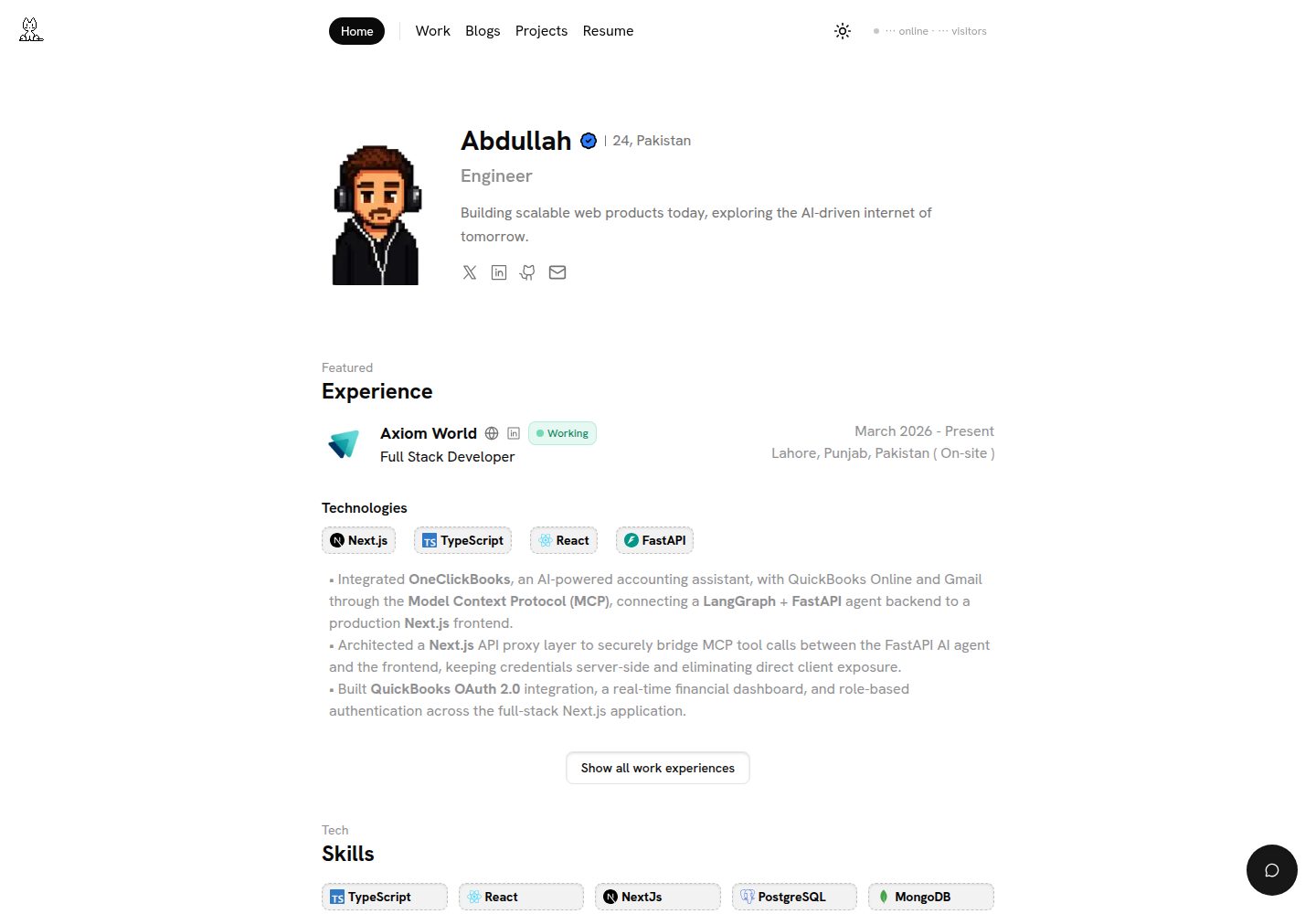
内容集中在 src/config 下的配置文件,替换个人信息、经历与导航无需修改组件代码
Next.jsReact作品集
portfolio (Abdullah-dev0) — Next.js 作品集模板
作者 Abdullah-dev0
基于 Next.js 与 React 的个人作品集模板,通过配置文件管理个人信息、经历与项目,支持 MDX 博客、暗色模式和 AI 聊天等可选功能。
看看你的网站会是什么样
浏览真实页面截图,比较内容排版与手机效果。点击下方缩略图切换,放大查看整页细节。
全部页面与视图 3
截图用于了解视觉与布局,交互效果请以实际项目为准。
采集于 2026-10-11查看来源
值得关注的模板亮点
从已有项目资料中,快速了解它的特点。
项目与博客使用 MDX 编写,博客封面图在 frontmatter 中为必填项
内置暗色模式切换与字号调节,使用 next-themes 与 Lenis 平滑滚动
可选集成 Gemini AI 聊天、PostHog 分析、Upstash Redis 限流与 giscus 评论
包含首页、关于、工作经历、项目、博客、Gears 与简历等页面结构
采用 MIT 许可,允许免费使用、修改、商用与分发
模板详细介绍
这是一个面向开发者个人作品集的 Next.js 模板,使用 React 与 TypeScript 构建,样式基于 Tailwind CSS,界面组件来自 shadcn/ui 与 Radix UI。模板把个人信息、关于、工作经历、导航、页脚、SEO 元数据、简历链接等内容集中在 src/config 目录下的配置文件中,修改这些文件即可替换演示内容,无需改动组件代码。项目与博客内容以 MDX 文件形式放在 content/projects 和 content/blogs 目录,博客封面图在 frontmatter 中为必填项。
功能层面,模板包含首页 Hero、关于、工作经历、项目展示、博客、Gears(设备与软件清单)、简历等页面,并集成 Lenis 平滑滚动、next-themes 暗色模式切换和字号调节。可选能力包括基于 Gemini 的 AI 聊天、PostHog 分析、Upstash Redis 限流、GitHub 贡献日历、Cal.com 预约嵌入以及 giscus 博客评论,这些都需要配置对应的环境变量或第三方账号。
使用限制方面,AI 聊天、限流与在线状态等功能依赖外部服务,需自行申请密钥并可能产生费用;演示图片、字体、图标等第三方素材需按各自许可单独核对。仓库采用 MIT 许可,可免费使用、修改与分发,但需保留版权与许可声明。README 中给出的框架版本号与模板元数据存在差异,实际以仓库依赖清单为准。
Next.jsReact作品集
适合你的项目吗?
适用场景
- 开发者搭建个人作品集网站,集中展示项目、工作经历与博客文章
- 需要以 MDX 维护项目案例与博客内容,并希望内容类型安全的场景
- 希望快速替换演示内容、通过配置文件完成个性化定制的个人站点
- 需要暗色模式、平滑滚动和字号调节等基础交互体验的作品集页面
适合人群
- 熟悉 Next.js 与 React、愿意自行配置环境变量和第三方服务的开发者
- 需要个人作品集与博客一体化的前端或全栈工程师
- 接受以 MDX 和配置文件方式维护内容的个人用户
- 计划部署到 Vercel 或其他支持 Node.js 平台的用户
上手与定制指南
结合仓库当前版本的说明,按下面的资料检查内容、配置与运行要求。
- 1
需要 Node.js 18+ 或 Bun,以及 Git
- 2
复制 .env.example 为 .env,并填写 NEXT_PUBLIC_URL、GEMINI_API_KEY、KV_REST_API_URL 与 KV_REST_API_TOKEN 等必填变量
- 3
PostHog、Lanyard、giscus 等为可选变量,按需配置
- 4
AI 聊天、限流与在线状态依赖外部服务,需自行申请密钥并注意可能产生的费用
- 5
演示图片、字体、图标等第三方素材需按各自许可单独核对
授权与来源资料
使用条件与限制
免费使用 · 保留许可声明本次收录的是公开仓库中采用 MIT 许可的免费版本;免费范围为该版本代码,不代表外部服务或第三方素材免费。
使用时需要遵守
- 允许免费使用、修改、商用和分发该版本代码。
- 分发代码副本或实质性部分时,保留原作者版权声明和完整 MIT 许可声明。
- 代码按现状提供;担保与责任限制以原许可证及适用法律为准。
额外费用与待核对事项
- 演示图片、字体、图标及其他第三方素材需按各自许可核对,不能仅凭代码的 MIT 许可判断。
- 域名、托管、数据库、支付或 AI 等外部服务可能另外收费。
- AI 聊天功能需要自行申请并配置 Google Gemini API 密钥,属于外部服务依赖。
- 限流功能依赖 Upstash Redis,需要自行创建数据库并提供连接地址。
- 限流功能需要配置 Upstash Redis 访问令牌,属于外部服务凭据。
- 使用 AI 聊天需前往 Google AI Studio 申请 Gemini API 密钥,可能涉及第三方服务条款与费用。
- 限流功能需在 Upstash 创建数据库,免费额度之外可能产生费用。
- 启用 PostHog 分析需注册 PostHog 账号,属于可选的外部服务。
- AI 聊天功能将 Gemini API 密钥列为必填环境变量,未配置则无法使用该功能。
- 限流功能将 Upstash Redis 地址列为必填环境变量,依赖外部服务。
- 限流功能将 Upstash Redis 令牌列为必填环境变量,需自行申请。
- PostHog 分析为可选功能,需自行提供密钥。
- Discord 在线状态展示为可选功能,需提供 Lanyard 用户 ID。
- 博客评论为可选功能,需配置 giscus 仓库信息。
查看原文依据
Permission is hereby granted, free of charge
许可证原文
GEMINI_API_KEY=your_gemini_api_key
README 原文
KV_REST_API_URL=your_upstash_redis_url
README 原文
KV_REST_API_TOKEN=your_upstash_token
README 原文
- **Gemini API**: [Get API key from Google AI Studio](https://makersuite.google.com/app/apikey)
README 原文
- **Upstash Redis**: [Create free database at Upstash](https://upstash.com/)
README 原文
- **PostHog**: [Sign up for free at PostHog](https://posthog.com/)
README 原文
`GEMINI_API_KEY` | ✅ | Google Gemini API key for AI chat
README 原文
`KV_REST_API_URL` | ✅ | Upstash Redis URL for rate limiting
README 原文
`KV_REST_API_TOKEN` | ✅ | Upstash Redis token
README 原文
`NEXT_PUBLIC_POSTHOG_KEY` | ❌ | PostHog analytics key (optional)
README 原文
`LANYARD_USER_ID` | ❌ | Discord user ID for presence (optional)
README 原文
https://github.com/Abdullah-dev0/portfolio/blob/main/LICENSEhttps://github.com/Abdullah-dev0/portfolio/blob/main/README.md`NEXT_PUBLIC_GISCUS_REPO` | ❌ | giscus repo for blog comments (optional)
README 原文
DeepSeek 根据仓库许可证和 README 整理 ·2026-10-11。结果仅覆盖已读取资料,依赖、图片、字体及后续条款变更以各自原文为准。
项目核对记录与介绍依据
模板资料
- 来源平台
- GitHub
- 资料与维护参考分
- 资料较完整 · 88 / 100
- 技术栈
- Next.js · React
- 网站类型
- 作品集
这个分数如何计算
本站按许可资料(最高30分)、演示链接(12分)、预览图(10分)、Star数(15分)、记录的维护时间(15分)、描述完整度(8分)、功能记录(5分)和分类资料(5分)计算。它不是代码、安全或性能测试,也不是 Google 评分;有链接不代表已实测可用。
这个项目需要核对什么
- 记录的仓库更新时间
- 2026-10-11
- 截图检查日期
- 2026-10-11
已收录演示链接。请用你的内容与屏幕尺寸检查;有演示不代表表单、认证或支付已经可用。
目录记录的主要技术栈是 Next.js。请通过依赖清单和锁文件核对实际版本与托管要求。这些说明基于收录资料,不代表代码审计或部署实测。
查看具体选型方法 →介绍的制作与核对状态
介绍由 AI 辅助整理目录与仓库资料。仓库作者不等于这篇介绍的审核者。
审核声明: [email protected] · 2026-10-11
查看当时使用的来源资料
SHA-256: e5990dfaf97d6182a3fdc5e98a4d2b2122b9fab258311cb39399ba0574905a06
2026-10-11T12:20:21.405Z
来源文件 / 仓库# 🚀 Portfolio
A modern, customizable portfolio template built with **Next.js 15**, **React 19**, and **TypeScript**. Features a sleek design with smooth animations, dark mode support, and easy customization through configuration files.
[](https://nextjs.org/)
[](https://react.dev/)
[](https://www.typescriptlang.org/)
[](https://tailwindcss.com/)
## ✨ Features
### 🎨 Design & UX
- **Smooth Animations**: Powered by Lenis for buttery smooth scrolling
- **Dark Mode**: Built-in theme switching with `next-themes`
- **Responsive Design**: Fully responsive across all devices
- **Font Size Controls**: Accessibility-first with adjustable font sizes
- **Modern UI**: Using shadcn/ui components and Radix UI primitives
### 📝 Content Management
- **MDX-Powered Blog**: Write blog posts in MDX with full React component support
- **Project Showcase**: Dedicated project pages with detailed case studies
- **Work Experience**: Display your professional journey
- **Dynamic Content**: Powered by `@content-collections` for type-safe content
### 🛠️ Developer Experience
- **TypeScript**: Fully typed for better DX and fewer bugs
- **Configuration-Driven**: Easy customization through config files
- **Component-Based**: Modular and reusable components
- **Linting & Formatting**: ESLint and Prettier configured out of the box
### 🚀 Performance & Analytics
- **PostHog Integration**: Track user behavior and analytics
- **Rate Limiting**: Built-in rate limiting with Upstash Redis
- **Image Optimization**: Automatic image optimization with Next.js
- **Fast Builds**: Optimized build process with Turbopack support
### 💬 Interactive Features
- **AI Chat**: Gemini AI-powered chat assistant
- **GitHub Activity**: Display your GitHub contribution calendar
- **Cal.com Integration**: Embedded booking calendar
## 📦 Tech Stack
- **Framework**: [Next.js 15](https://nextjs.org/) with App Router
- **UI Library**: [React 19](https://react.dev/)
- **Styling**: [Tailwind CSS 4](https://tailwindcss.com/)
- **TypeScript**: Type-safe development
- **Content**: [Content Collections](https://www.content-collections.dev/) for MDX
- **Components**: [shadcn/ui](https://ui.shadcn.com/) + [Radix UI](https://www.radix-ui.com/)
- **Analytics**: [PostHog](https://posthog.com/)
- **Database**: [Upstash Redis](https://upstash.com/)
- **Forms**: React Hook Form + Zod validation
- **Animations**: Lenis smooth scrolling
## 🚀 Quick Start
### Prerequisites
- Node.js 18+ or Bun
- Git
### Installation
1. **Clone the repository**
```bash
git clone https://github.com/Abdullah-dev0/portfolio.git
cd portfolio
```
2. **Install dependencies**
```bash
bun install
```
3. **Set up environment variables**
Copy `.env.example` to `.env` and fill in your values:
```env
# Required
NEXT_PUBLIC_URL=http://localhost:3000
GEMINI_API_KEY=your_gemini_api_key
KV_REST_API_URL=your_upstash_redis_url
KV_REST_API_TOKEN=your_upstash_token
# Optional
NEXT_PUBLIC_POSTHOG_KEY=your_posthog_key
NEXT_PUBLIC_POSTHOG_HOST=https://us.i.posthog.com
LANYARD_USER_ID=your_discord_user_id
```
4. **Run the development server**
```bash
bun run dev
```
5. **Open your browser**
Visit [http://localhost:3000](http://localhost:3000) to see your portfolio!
## 🎨 Customization Guide
This portfolio is designed to be easily customizable through configuration files. No need to dig through component code!
### 1. Personal Information & Hero Section
Edit `src/config/Hero.tsx`:
```typescript
export const heroConfig = {
name: "Your Name",
title: "Your Title",
avatar: "/assets/your-avatar.png",
location: "City, Country",
bio: "Your short bio or tagline.",
rotatingTitles: ["Engineer", "Developer", "Builder"], // Animated title variants
};
export const socialLinks = [
{
name: "X",
href: "https://x.com/your-handle",
icon: X, // Component reference (e.g., from lucide-react or svgs)
},
{
name: "Email",
label: "Your Name",
href: "mailto:[email protected]",
icon: Mail,
},
// Add more: LinkedIn, Github, etc.
];
```
### 2. About Section
Edit `src/config/About.tsx`:
```typescript
import { SKILLS } from "./technologies";
export const about = {
name: "Your Name",
description: `Your bio and introduction...`,
skills: [...SKILLS], // Or define your own skill icons
};
```
### 3. Work Experience
Edit `src/config/Experience.tsx`:
```typescript
export const experiences: Experience[] = [
{
company: "Company Name",
position: "Your Position",
location: "Location",
image: "/company/logo.png",
description: ["Achievement 1", "Achievement 2"],
startDate: "Month Year",
endDate: "Month Year",
website: "https://company-website.com",
technologies: ["Next.js", "TypeScript", "React"], // Array of tech names
isCurrent: false,
linkedin: "https://linkedin.com/company/...",
github: "https://github.com/...",
},
];
```
### 4. Projects
Add your projects as MDX files in `content/projects/`. `image` and `video` are optional.
```mdx
---
title: "Project Name"
description: "Project description"
image: "/project/image.png"
link: "https://project-url.com"
technologies: ["Next.js", "TypeScript", "Tailwind CSS"]
github: "https://github.com/username/repo"
live: "https://live-url.com"
timeline: "2024"
role: "Your Role"
status: "completed"
featured: true
isPublished: true
isWorking: true
---
# Project Title
Your project content in MDX...
```
### 5. Blog Posts
Add blog posts as MDX files in `content/blogs/`. `image` is **required** for blogs.
```mdx
---
title: "Blog Post Title"
description: "Post description"
image: "/blog/cover.png"
tags: ["React", "TypeScript", "Tutorial"]
date: "2024-01-01"
isPublished: true
---
# Your Blog Content
Write your blog post content here...
```
### 6. Gears (Setup)
The Setup section on the landing page links to `/gears`. Edit `src/config/Gears.tsx`:
```typescript
export const devices = [
{
name: 'Device Name',
icon: <Icon className="size-4" />,
},
];
export const webExtensions = [
{ name: 'Extension Name', href: 'url' },
];
export const software = [
{ name: 'Software Name', href: 'url' },
];
```
### 6a. Additional Config Files
- **`src/config/Navbar.tsx`** – Nav links: `{ label, href }[]`
- **`src/config/CTA.tsx`** – Call-to-action: `profileImage`, `calLink`, `linkText`, `preText`
- **`src/config/Footer.tsx`** – Footer: `developer`, `copyright`, `location`
- **`src/config/Github.tsx`** – GitHub activity: `username`, theme, labels
- **`src/config/ChatPrompt.ts`** – AI chat system prompt
- **`src/config/technologies.tsx`** – Technology icons used in About and Experience
### 7. SEO & Metadata
Edit `src/config/Meta.tsx`:
```typescript
export const siteConfig = {
name: "Your Name",
title: "Your Portfolio",
description: "Your description",
url: process.env.NEXT_PUBLIC_URL || "http://localhost:3000",
ogImage: "/meta/opengraph-image.png",
author: {
name: "Your Name",
twitter: "@yourusername",
github: "yourusername",
linkedin: "yourusername",
email: "[email protected]",
},
keywords: ["portfolio", "developer", "your keywords"],
};
```
### 8. Resume
Update `src/config/Resume.ts`:
```typescript
export const resumeConfig = {
url: "https://drive.google.com/file/d/YOUR_FILE_ID/preview", // Or path to PDF
};
```
## 🖼️ Adding Assets
### Images
Place your images in the `public` directory:
- `/public/assets/` - Personal assets (avatar, logos)
- `/public/company/` - Company logos
- `/public/project/` - Project images
- `/public/blog/` - Blog cover images
- `/public/meta/` - OG images for SEO
### Technology Icons
Add custom technology icons in `src/components/technologies/`. Follow the existing pattern:
```typescript
const YourTech = () => {
return (
<svg>
{/* Your SVG icon */}
</svg>
);
};
export default YourTech;
```
## 🚀 Deployment
### Vercel (Recommended)
1. Push your code to GitHub
2. Visit [vercel.com](https://vercel.com)
3. Import your repository
4. Add environment variables
5. Deploy!
[](https://vercel.com/new)
### Other Platforms
This is a standard Next.js app and can be deployed to:
- Netlify
- Railway
- AWS Amplify
- Any platform supporting Node.js
## 📝 Scripts
```bash
# Development
bun run dev # Start dev server with Turbopack
# Production
bun run build # Build for production
bun run start # Start production server
# Code Quality
bun run lint # Run ESLint
bun run format # Format code with Prettier
bun run format:check # Check formatting without changes
bun run type:check # Run TypeScript check
```
## 🔧 Environment Variables
| Variable | Required | Description |
| -------------------------------- | -------- | ----------------------------------------- |
| `NEXT_PUBLIC_URL` | ✅ | Your site URL |
| `GEMINI_API_KEY` | ✅ | Google Gemini API key for AI chat |
| `KV_REST_API_URL` | ✅ | Upstash Redis URL for rate limiting |
| `KV_REST_API_TOKEN` | ✅ | Upstash Redis token |
| `NEXT_PUBLIC_POSTHOG_KEY` | ❌ | PostHog analytics key (optional) |
| `NEXT_PUBLIC_POSTHOG_HOST` | ❌ | PostHog host URL (optional) |
| `LANYARD_USER_ID` | ❌ | Discord user ID for presence (optional) |
| `KV_REST_API_READ_ONLY_TOKEN` | ❌ | Upstash read-only token (optional) |
| `LANYARD_API_KEY` | ❌ | Lanyard API key (optional) |
| `NEXT_PUBLIC_GISCUS_REPO` | ❌ | giscus repo for blog comments (optional) |
| `NEXT_PUBLIC_GISCUS_REPO_ID` | ❌ | giscus repository ID (optional) |
| `NEXT_PUBLIC_GISCUS_CATEGORY` | ❌ | giscus Discussions category (optional) |
| `NEXT_PUBLIC_GISCUS_CATEGORY_ID` | ❌ | giscus Discussions category ID (optional) |
### Getting API Keys
- **Gemini API**: [Get API key from Google AI Studio](https://makersuite.google.com/app/apikey)
- **Upstash Redis**: [Create free database at Upstash](https://upstash.com/)
- **PostHog**: [Sign up for free at PostHog](https://posthog.com/)
## 📂 Project Structure
```
portfolio/
├── content/ # Content files
│ ├── blogs/ # Blog posts (MDX)
│ └── projects/ # Project case studies (MDX)
├── public/ # Static assets
│ ├── assets/ # General assets
│ ├── company/ # Company logos
│ ├── project/ # Project images
│ └── meta/ # OG images
├── src/
│ ├── app/ # Next.js app directory
│ │ ├── api/ # API routes (chat, presence)
│ │ ├── blog/ # Blog pages
│ │ ├── gears/ # Gears/setup page
│ │ ├── projects/ # Project pages
│ │ ├── work-experience/# Work experience page
│ │ └── resume/ # Resume page
│ ├── components/ # React components
│ │ ├── blog/ # Blog components
│ │ ├── common/ # Shared components
│ │ ├── landing/ # Landing page sections
│ │ ├── projects/ # Project components
│ │ └── technologies/ # Tech icons
│ ├── config/ # Configuration files
│ │ ├── Hero.tsx # Hero section
│ │ ├── About.tsx # About section
│ │ ├── Experience.tsx # Work experience
│ │ ├── Gears.tsx # Gears/setup
│ │ ├── Meta.tsx # SEO metadata
│ │ ├── Navbar.tsx # Nav links
│ │ ├── CTA.tsx # Call-to-action
│ │ ├── Footer.tsx # Footer
│ │ ├── Github.tsx # GitHub activity
│ │ └── Resume.ts # Resume URL
│ ├── hooks/ # Custom React hooks
│ ├── lib/ # Utility functions
│ └── types/ # TypeScript types
└── content-collections.ts # Content schema
```
## 🤝 Contributing
Contributions are welcome! Please see [CONTRIBUTING.md](CONTRIBUTING.md) for details.
## 📄 License
This project is open source and available under the [MIT License](LICENSE).
## 💬 Support
If you have any questions or need help, feel free to:
- Open an [issue on GitHub](https://github.com/Abdullah-dev0/portfolio/issues)
- Reach out on [Twitter/X](https://x.com/Abdul_ah14)
- Contact via email: [email protected]
## 🙏 Acknowledgments
- Built with [Next.js](https://nextjs.org/)
- UI components from [shadcn/ui](https://ui.shadcn.com/)
- Icons from [Lucide](https://lucide.dev/)
- Smooth scrolling by [Lenis](https://lenis.studiofreight.com/)
---
**Made with ❤️ by [Abdullah](https://github.com/Abdullah-dev0)**
⭐ Star this repo if you find it helpful!
看看同类模板
对比同技术栈与用途的模板,找到更适合的视觉与内容结构。

react-resume-template
A personal resume website template built with React.js, Typescript, Next.js, and styled with Tailwind css
Next.js · 作品集

nxt-lnk
Custom bio links for creatives who love coding. A perfect custom alternative for linktree, bio and other short…
Next.js · 作品集

sylph
A minimal portfolio template.
Next.js · 作品集

sleek-portfolio
sleek-portfolio 是一个面向开发者个人品牌展示的现代作品集模板,基于 Next.js 15、TypeScript、Tailwind CSS 和 Shadcn UI 构建。
Next.js · 作品集

research-website-template
React + Next.js template for research websites (for PhD students, researchers, etc)
Next.js · 作品集

shadcn-portfolio
shadcn-portfolio 是一个面向开发者的作品集模板,技术栈为 Next.js 15、shadcn/ui、Tailwind CSS 和 Framer Motion。
Next.js · 作品集