Preconfigured Service Worker, offline support, and manifest file; PWA foundations are ready
Next.jsSolidJSReactHTMLStarter
nextjs-pwa-template — Next.js Starter Template
By AjayKanniyappan
A Next.js-based PWA starter template with preconfigured Service Worker, offline support, and manifest, plus a basic layout, routing, light/dark themes, and code quality tools.
Explore the design
Compare the page layouts and mobile experience. Open any screenshot for a closer look.
Desktop homepage1 / 2
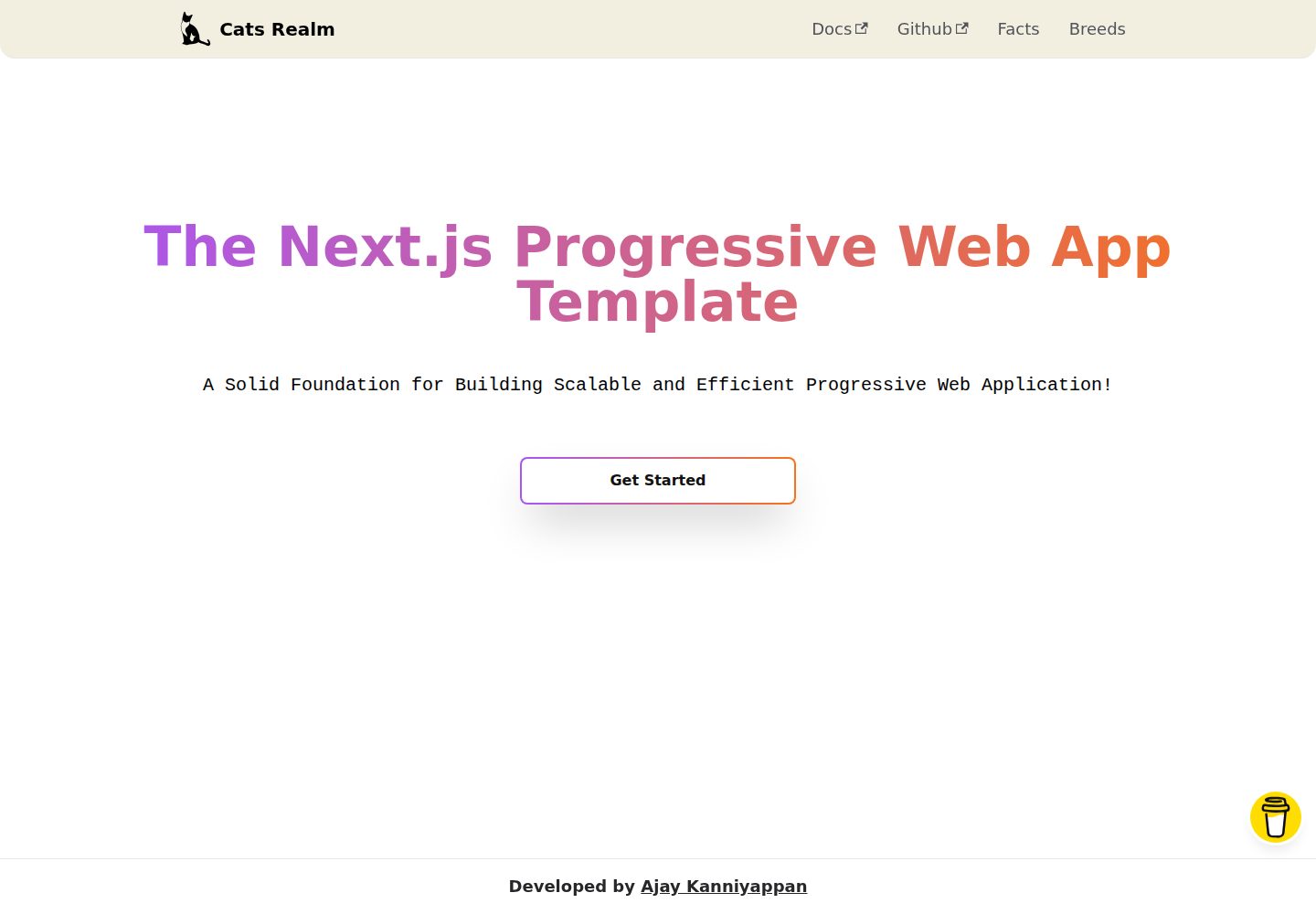
Desktop captureTop of page
Actual screenshot captured by the server browser.
All pages & views 2
Screenshots show visual appearance; interactive behavior may differ.
Recorded 2026-10-02View source
What stands out
A quick read of the recorded project description.
Provides a basic layout, routing system, and a set of basic components and styles
Built-in light and dark themes, with interfaces adapted for both desktop and mobile
Integrates Prettier, ESLint (Airbnb rules), and Tailwind CSS to unify code style
README lists development aids such as VSCode debugging and hot module replacement (HMR)
Uses the MIT license, allowing free use, modification, commercial use, and distribution
Template Details
This template is a Next.js starter for Progressive Web Applications (PWAs), with the repository named nextjs-pwa-template and a demo site themed "Cats Realm." It prepares common PWA configurations in advance: Service Worker, offline support, and a manifest file, so developers can write business code directly on the existing structure instead of building these foundations from scratch.
The template includes a basic layout and routing system, and provides a set of basic components and styles; it also has built-in light and dark themes, with corresponding interfaces for desktop and mobile. At the code level, it integrates Prettier, ESLint (with Airbnb rules), and Tailwind CSS to unify formatting and style. The README also mentions that the template provides end-to-end type safety and lists development aids such as VSCode debugging and hot module replacement (HMR).
For usage, the template requires Git and Node.js (the README states Node.js 14 or higher) and npm to be installed locally. You can obtain the code via git clone or by downloading a zip, then run npm install or yarn install to install dependencies. For deployment, the README provides two paths: Vercel and self-hosting. The repository uses the MIT license, allowing free use, modification, commercial use, and distribution, but third-party assets such as demo images, fonts, and icons need separate license verification, and external services such as domains and hosting may incur costs.
Next.jsSolidJSReactHTMLStarter
Is it right for your project?
Use Cases
- As a starting point when you need to quickly launch a Next.js Progressive Web Application project
- When you want to skip building PWA foundations such as Service Worker, offline caching, and manifest
- When you need a Next.js frontend skeleton with built-in light/dark themes, basic layout, and routing
- When you want to unify Prettier, ESLint, and Tailwind CSS code standards from the start of a project
- For PWA prototypes that need to cover both desktop and mobile display effects
Suitable For
- Developers familiar with React and Next.js who want to skip PWA foundation setup
- Individuals or small teams that need to quickly validate a PWA idea and build a runnable prototype
- Frontend or full-stack projects that prefer Tailwind CSS and ESLint/Prettier standards
- Early-stage applications that need light/dark themes and mobile-adapted interfaces
Getting started & customization
Use these recorded setup notes alongside the repository instructions for your chosen version.
- 1
Git and Node.js (the README states version 14 or higher) and npm must be installed first
- 2
Obtain the code via git clone or by downloading a zip, then run npm install or yarn install to install dependencies
- 3
The README provides two deployment paths: Vercel and self-hosting
- 4
Third-party assets such as demo images, fonts, and icons must be checked against their respective licenses; the code's MIT license alone is not sufficient
License & source material
Usage conditions & limitations
Free to use · keep license noticeThis entry covers the free version under the MIT license in a public repository; the free scope applies to that version's code and does not mean external services or third-party assets are free.
Must comply with when using
- The code of this version may be used, modified, used commercially, and distributed for free.
- When distributing copies or substantial portions of the code, retain the original author's copyright notice and the full MIT license notice.
- The code is provided as is; warranties and limitations of liability are governed by the original license and applicable law.
Additional costs & items to verify
- Using this template requires Node.js 14 or higher and the npm package manager installed locally; otherwise dependencies cannot be installed and development/build scripts cannot be run.
- The README recommends deploying to production on the Vercel platform; Vercel is a third-party hosting service that may involve account registration and paid plans, which are external service costs and not a code license restriction.
- Self-hosted deployment requires the target host to support a Node.js runtime; you must prepare the server and operations yourself, which may incur hosting costs.
- The README includes a donation entry, which is voluntary support and does not affect free use of the code; it is not a usage restriction.
- Demo images, fonts, icons, and other third-party assets must be checked against their respective licenses; the code's MIT license alone is not sufficient.
- External services such as domains, hosting, databases, payments, or AI may incur separate charges.
View Original Text Basis
Permission is hereby granted, free of charge
Original License Text
NOTE: This project requires NodeJS (version 14 or later) and NPM.
Original README
The easiest way to deploy Next.js to production is to use the [Vercel](https://vercel.com/home?utm_source=next-site&utm_medium=banner&utm_campaign=learn_basics_deploying-nextjs-app_deploy) platform developed by the creators of Next.js.
Original README
[Next.js PWA Template](https://github.com/AjayKanniyappan/nextjs-pwa-template) can be deployed to any hosting provider that supports Node.js.
Original README
https://github.com/AjayKanniyappan/nextjs-pwa-template/blob/main/LICENSEhttps://github.com/AjayKanniyappan/nextjs-pwa-template/blob/main/README.mdDonations will help us to ensure the following:
Original README
Compiled by DeepSeek based on repository license and README ·2026-10-02. Results only cover the materials read; dependencies, images, fonts, and subsequent term changes are subject to their respective original texts.
Project checks & description sources
Template Information
- Source platforms
- GitHub
- Documentation and maintenance reference score
- More documented · 77 / 100
- Technologies
- Next.js · SolidJS · React · HTML
- Website type
- Starter
How this score is calculated
Our heuristic uses license records (up to 30), a demo link (12), a preview (10), stars (15), recorded maintenance (15), description completeness (8), feature records (5) and classification data (5). It is not a code, security or performance test, or a Google score. A link does not establish tested functionality.
What to verify for this project
- Repository update recorded
- 2023-02-23
- Screenshot last checked
- 2026-10-02
A demo link is listed. Check it with your own content and viewport sizes; its presence does not confirm that forms, authentication or payments work.
The catalog identifies Next.js as the primary stack. Check the actual dependency manifest and lockfile for versions and hosting requirements. These notes use recorded metadata, not a code audit or a deployment test.
Use a selection guide →How this description was prepared
AI-assisted description based on catalog records and repository material. Repository authors are not automatically the reviewers of this description.
Automatically checked against source and license rules; no manual editorial review.
Inspect the recorded source material
SHA-256: c72a3b2e7a8f97087f67b4478fddb5d10a7eaae47e2c6de701b32ca1091ade45
2026-10-02T20:46:12.985Z
Source file / repository<div align="center">
<!-- PROJECT LOGO -->
<a href="https://nextjs-pwa-template-repo.vercel.app">
<img src="https://user-images.githubusercontent.com/108562458/218249242-eae38eaa-c41c-4ab3-87d6-58eabdee6adb.png" height="150px" alt="Cats Realm" />
</a>
<!-- PROJECT NAME -->
<h1><b>Cats Realm 🐾</b></h1>
<!-- PROJECT DESCRIPTION -->
<p>A Solid Foundation for Building Scalable and Efficient Progressive Web Application!</p>
<!-- PROJECT URL -->
<h3 href="https://nextjs-pwa-template-repo.vercel.app"><a href="https://nextjs-pwa-template-repo.vercel.app">🚀 Live Demo</a></h3>
</div>
<div align="center">
<!-- BADGES -->
<a href="https://github.com/AjayKanniyappan/nextjs-pwa-template#readme" target="_blank">
<img alt="Documentation" src="https://img.shields.io/badge/Documentation-yes-brightgreen.svg" />
</a>
<img alt="Version" src="https://img.shields.io/badge/Version-1.0.0-blue.svg?cacheSeconds=2592000" />
<a href="https://github.com/AjayKanniyappan/nextjs-pwa-template/blob/main/LICENSE" target="_blank">
<img alt="License: MIT" src="https://img.shields.io/badge/License-MIT-yellow.svg" />
</a>
<a href="https://web.dev/measure">
<img alt="100% lighthouse scores" src="https://img.shields.io/badge/lighthouse-100%25-845EF7.svg?logo=lighthouse&logoColor=red&style=flat-square" />
</a>
<a href="https://github.com/prettier/prettier" target="_blank">
<img alt="prettier" src="https://img.shields.io/badge/Code_style-prettier-ff69b4.svg?style=flat-square" />
</a>
</div>
<!-- TABLE OF CONTENTS -->
## ⏩ Table of contents
- [📖 About the Project](#-about-the-project)
- [📷 Gallery](#-gallery)
- [🖥️ Desktop](#%EF%B8%8F-desktop)
- [📱 Mobile](#mobile)
- [🔍 Features](#-features)
- [🗼 Lighthouse Performance](#-features)
- [🛠 Built With](#-built-with)
- [🏃♂️ Getting Started](#%EF%B8%8F-getting-started)
- [📚 Before You Begin](#-before-you-begin)
- [🖥️ Prerequisites](#%EF%B8%8F-prerequisites)
- [🛫 Quick Start](#-quick-start)
- [🌀 Cloning The GitHub Repository](#-cloning-the-github-repository)
- [🗃️ Downloading The Repository Zip File](#%EF%B8%8F-downloading-the-repository-zip-file)
- [🧰 Quick Install](#-quick-install)
- [📂 Directory Structure](#-directory-structure)
- [👨💻 Starting Development](#-starting-development)
- [🏃 Running Your Application](#-running-your-application)
- [🛬 Change Port Number](#-change-port-number)
- [🆚 Vscode Debugging](#-vscode-debugging)
- [🧹 Clean Cache](#-clean-cache)
- [💈 Style your Code](#-style-your-code)
- [🛰️ Git Commits](#%EF%B8%8F-git-commits)
- [🚢 Deploy your own](#-deploy-your-own)
- [🔼 Vercel](#-vercel)
- [👻 Self-Hosting](#-self-hosting)
- [🤝 Contributing](#-contributing)
- [💖 Show your support](#-show-your-support)
- [☕ Donate](#-donate)
- [🛠️ Author](#%EF%B8%8F-author)
- [📝 License](#-license)
## 📖 About the Project

**Next.js PWA template** 🐾 is a starter template that provides a comprehensive setup for building a progressive web app (PWA) using the Next.js framework. Don't worry about the configuration 🔨 this template will take care of that, focus on your codes⌨️ and project ideas💡
This template includes a pre-configured setup for service workers, offline support, and manifest files, making it easy for developers to create a high-performing PWA with minimal setup. The template also includes a basic layout and routing system, along with some basic components and styles, to help developers get started quickly. This template give you the **end to end type safety**. Additionally, it includes a range of popular libraries and tools, such as Prettier, ESLint, and Tailwind CSS, to ensure that the code is well-formatted and follows best practices. With the help of this template, developers can easily create a fast and reliable PWA that can work seamlessly across all devices.
## 📷 Gallery
<h3 align="center"><b>🖥️ Desktop</b></h3>
🌑 Dark mode
<p align="center">
<img alt="Dark" src="https://user-images.githubusercontent.com/114384910/220697501-78dae21e-a975-4f44-bccc-e9360cae8086.png" width="45%">
<img alt="Dark" src="https://user-images.githubusercontent.com/114384910/220702513-5cbcef63-1f57-44ce-9877-b20b17eef2a3.png" width="45%">
</p>
🔦 Light mode
<p align="center">
<img alt="Light" src="https://user-images.githubusercontent.com/114384910/220698670-404dce66-2242-4aaf-b3ae-81c4d3694dea.png" width="45%">
<img alt="Light" src="https://user-images.githubusercontent.com/114384910/220704769-e0f4c110-f643-47c7-8400-19c0403d3bca.png" width="45%">
</p>
<h3 align="center"><b>📱Mobile</b></h3>
🌑 Dark mode
<p align="center">
<img alt="Dark" src="https://user-images.githubusercontent.com/114384910/220707485-5ab58dca-238c-4101-ab75-29b4c5c006e9.jpg" width="45%">
<img alt="Dark" src="https://user-images.githubusercontent.com/114384910/220707462-926a0b05-0366-4e57-a706-479aba6ec295.jpg" width="45%">
</p>
🔦 Light mode
<p align="center">
<img alt="Dark" src="https://user-images.githubusercontent.com/114384910/220707248-b9006934-fc64-48d7-b61f-cbca7ba757fa.jpg" width="45%">
<img alt="Dark" src="https://user-images.githubusercontent.com/114384910/220706912-fe36667a-2927-42bf-9218-fb0a2dc5d52f.jpg" width="45%">
</p>
## 🔍 Features
- 🐾 **Cats Realm** PWA using Next 13
- 🌗 Awesome dark/light themes
- 📱 Native like mobile experience
- 🎯 Make Development simple
- 🐞 Vscode debugging
- 🔥 Hot Module Replacement(HMR)
- 💪 Eslint, Prettier and Airbnb make your code stronger
- 🖥 Build your application for multi-platform
## 🗼 Lighthouse Performance
The [Next.js PWA Template](https://github.com/AjayKanniyappan/nextjs-pwa-template) achieve a 100% score in Google Lighthouse

## 🛠 Built With
**Next.js PWA Template** Built With
- <img src="https://img.shields.io/badge/next.js-000000?style=for-the-badge&logo=nextdotjs&logoColor=white"/>
- <img src="https://img.shields.io/badge/React%20-%2361DAFB.svg?&style=for-the-badge&logo=React&logoColor=white"/>
<br/>
- <img src="https://img.shields.io/badge/Tailwind_CSS-38B2AC?style=for-the-badge&logo=tailwind-css&logoColor=white"/>
<br/>
- <img src="https://img.shields.io/badge/postcss-DD3A0A?style=for-the-badge&logo=postcss&logoColor=white"/>
<br/>
- <img src="https://img.shields.io/badge/Node.js%20-%23339933.svg?&style=for-the-badge&logo=Node.js&logoColor=white"/>
<br/>
- <img src="https://img.shields.io/badge/Prettier%20-%23F7B93E.svg?&style=for-the-badge&logo=Prettier&logoColor=white"/>
<br/>
- <img src="https://img.shields.io/badge/ESLint%20-%234B32C3.svg?&style=for-the-badge&logo=ESLint&logoColor=white"/>
<br/>
- <img src="https://img.shields.io/badge/Airbnb%20-%23FF5A5F.svg?&style=for-the-badge&logo=Airbnb&logoColor=white"/>
<br/>
- <img src="https://img.shields.io/badge/HTML5%20-%23E34F26.svg?&style=for-the-badge&logo=HTML5&logoColor=white"/>
<br/>
- <img src="https://img.shields.io/badge/CSS3%20-%231572B6.svg?&style=for-the-badge&logo=CSS3&logoColor=white"/>
<br/>
- <img src="https://img.shields.io/badge/JavaScript%20-%23F7DF1E.svg?&style=for-the-badge&logo=JavaScript&logoColor=white"/>
<br/>
- <img src="https://img.shields.io/badge/TypeScript%20-%233178C6.svg?&style=for-the-badge&logo=TypeScript&logoColor=white"/>
## 🏃♂️ Getting Started
These instructions will get you a copy of the [Next.js PWA Template](https://github.com/AjayKanniyappan/nextjs-pwa-template) and running on your local machine for development and testing purposes. See [Deploy](#-deploy-your-own) for notes on how to lunch your PWA app in live.
### 📚 Before You Begin
Before you begin i recommend you read about the basic building blocks that assemble a **Next.js PWA Template**:
- **React.js** - React's [Official Website](https://reactjs.org/) is a great starting point. You can also use [W3Schools Popular Guide](https://www.w3schools.com/REACT/DEFAULT.ASP), and [Egghead Videos](https://egghead.io/).
- **Next.js** - The best way to understand Next.js is through its [Official Website](https://nextjs.org), which has a [Getting Started](https://nextjs.org/docs/getting-started) guide, You can also go through this [TutorialsPoint Guide](https://www.tutorialspoint.com/nextjs/index.htm) for more resources.
- **TypeScript** - Go through [TypeScript Official Website](https://www.typescriptlang.org/) and proceed to their [Official Manual](https://www.typescriptlang.org/docs/), which should help you understand TypeScript better.
- **Node.js** - Start by going through [Node.js Official Website](http://nodejs.org/) and this [StackOverflow Thread](http://stackoverflow.com/questions/2353818/how-do-i-get-started-with-node-js), which should get you going with the Node.js platform in no time.
### 🖥️ Prerequisites
Make sure you have installed all of the following prerequisites on your development machine:
- **Git** - [Download & Install Git](https://git-scm.com/downloads). OSX and Linux machines typically have this already installed.
- **Node.js** - [Download & Install Node.js](https://nodejs.org/en/download/) and the npm package manager. If you encounter any problems, you can also use this [GitHub Gist](https://gist.github.com/isaacs/579814) to install Node.js.
NOTE: This project requires NodeJS (version 14 or later) and NPM.
[Node](http://nodejs.org/) and [NPM](https://npmjs.org/) are really easy to install.
## 🛫 Quick Start
There are several ways you can get the Next.js PWA Template:
### 🌀 Cloning The GitHub Repository
The recommended way to get Next.js PWA Template is to use git to directly clone the repository:
```bash
# Clone the project
git clone https://github.com/AjayKanniyappan/nextjs-pwa-template.git <your-project-name>
# Enter the project directory
cd <your-project-name>
```
This will clone the latest version of the Next.js PWA Template repository to a **nextjs-pwa-template** folder.
### 🗃️ Downloading The Repository Zip File
Another way to use the Next.js PWA Template is to download a zip copy from the [main branch on GitHub](https://github.com/AjayKanniyappan/nextjs-pwa-template/archive/refs/heads/main.zip). You can also do this using the `wget` command:
```sh
wget https://github.com/AjayKanniyappan/nextjs-pwa-template/archive/refs/heads/main.zip -O nextjs-pwa-template-main.zip; unzip nextjs-pwa-template-main.zip; rm nextjs-pwa-template-main.zip
```
Don't forget to rename nextjs-pwa-template-main after your project name.
### 🧰 Quick Install
Once you've downloaded the Template and installed all the prerequisites, you're just a few steps away from starting to develop your Progressive Web App using Next.js.
The Template comes pre-bundled with a `package.json` file that contain the list of modules you need to start your application.
To install the dependencies, run this in the application folder from the command-line:
```bash
# Install dependency
npm install
```
Or if you prefer using Yarn:
```bash
# Install dependency
yarn install
```
This command does a few things:
- First it will install the dependencies needed for the application to run.
- If you're running in a development environment, it will then also install development dependencies needed for testing and running your application.
## 📂 Directory Structure
**Next.js PWA Template** files and folder structure.
```diff
+├── .husky Automate your git commits
├── .next Contains the minimized version of the source code
+├── .vscode vscode debug folder and extension support
│
+├── public Project assets folder
│ ├── icons Icon sets folder
│ │ └── NxN.png Different pixel png's
│ └── manifest.json Manifest for PWA application
│
+├── src Source code folder
│ ├── common It contains common data
│ ├── components This folder consists of a collection of UI components
│ ├── constants It contains constant urls and data
│ ├── hooks It contains custom hooks for all pages
│ ├── layouts It contains page layout
│ ├── pages Pages and indicate the routes
+│ │ └── index.tsx Starting point of the application
│ ├── services It contains API Services
│ ├── styles It contains css styles
│ ├── svg It contains SVG Vectors
│ ├── types Typescript types declaration folder
│ └── utils It contains a set of utility functions
│
├── .editorconfig EditorConfig for defining coding styles
├── .eslintrc.json Eslint configurations
├── .prettierrc prettier code formatter
+├── next.config.js Next.js PWA configurations
+├── package.json Package.json for development
|── postcss.config.js Post CSS configurations
+├── tailwind.config.js Tailwind CSS configurations
├── tsconfig.json TypeScript Configuration
+└── tsconfig.node.json TypeScript paths
```
## 👨💻 Starting Development
Use your favorite JavaScript Package Managers **npm** or **yarn** or **pnpm**
### 🏃 Running Your Application
**Run your application using npm:**
```sh
npm run dev
```
Or if you prefer using Yarn:
```sh
yarn dev
```

Your **Next.js** application should run on port 5050 with the development environment configuration, so in your browser just go to http://localhost:5050
That's it! Your application should be running. To proceed with your development, check the other sections in this documentation. If you encounter any problems, Feel free to check [issues page](https://github.com/AjayKanniyappan/nextjs-pwa-template/issues).
### 🛬 Change Port Number
If the localhost 5050 port number already in use! or if you like to change your **Next.js application number.**
Go to 👉 package.json and change the port number 5050 to **your-port-number**
<p align="center"><img src="https://user-images.githubusercontent.com/114384910/219876224-ffb8dd05-dd26-49e5-9004-f8581d1a889a.png" alt="port" /></p>
### 🆚 Vscode Debugging
This guide goes over how to start **VSCode debugging** your **Next.js, react** Project.
you can easily debug this [nextjs-pwa-template](https://github.com/AjayKanniyappan/nextjs-pwa-template).
To bring up the Run and Debug view, select the Run and Debug icon in the Activity Bar on the side of VS Code. You can also use the keyboard shortcut `Ctrl+Shift+D`.
<p align="center"><img src="https://user-images.githubusercontent.com/114384910/219876453-b5c3b52e-34a7-454e-8ce8-36dda95e930b.png" /></p>
Click the button or press `F5` to start debugging
<p align="center"><img src="https://user-images.githubusercontent.com/114384910/219877945-bc135396-5f05-410b-be7b-15cef4a411a1.png" /></p>

### 🧹 Clean Cache
If you want clean the cache files and node_modules cache run this below command 👇:
```sh
npm run clean
```
NOTE: It will remove your **node_module** folder, **build** files and **env** files.
### 💈 Style your Code
The [Next.js PWA Template](https://github.com/AjayKanniyappan/nextjs-pwa-template) has [Eslint](https://eslint.org/), [Prettier](https://prettier.io/) and [Airbnb](https://airbnb.io/javascript/react/) Configurations, this will help you to Style your code and syntax check and more.
[Eslint](https://eslint.org/) will check syntax, find problems, and enforce code style of your code.
[Prettier](https://prettier.io/) will format your code style.
All you have to do is run this below command 👇:
```sh
npm run lint
```
NOTE: This command show you the warnings and errors in your code.
### 🛰️ Git Commits
Automate your [Git](https://git-scm.com/) commits using Husky, and don't commit or push the bad code in git.
Husky improves your commits and more, You can use it to lint your commit messages, run tests, lint code, etc... when you commit or push. Husky supports [all Git hooks](https://git-scm.com/docs/githooks).
Run below command 👇 to prepare Husky:
```sh
npm run prepare
```
See docs and more about [Husky](https://typicode.github.io/husky/#/?id=features).
That's it! Your application should be running. To proceed with your development, check the other sections in this documentation. If you encounter any problems, Feel free to check [issues page](https://github.com/AjayKanniyappan/nextjs-pwa-template/issues).
## 🚢 Deploy your own
Congratulations, you are ready to deploy your [Next.js PWA Template](https://github.com/AjayKanniyappan/nextjs-pwa-template) to production. This document will teach how to deploy vercel or self-hosted.
### 🔼 Vercel
The easiest way to deploy Next.js to production is to use the [Vercel](https://vercel.com/home?utm_source=next-site&utm_medium=banner&utm_campaign=learn_basics_deploying-nextjs-app_deploy) platform developed by the creators of Next.js.
NOTE: If you want to read more about [vercel](https://vercel.com/home?utm_source=next-site&utm_medium=banner&utm_campaign=learn_basics_deploying-nextjs-app_deploy), kindly read this 🙏 [Documentation](https://nextjs.org/learn/basics/deploying-nextjs-app/deploy).
### 👻 Self-Hosting
[Next.js PWA Template](https://github.com/AjayKanniyappan/nextjs-pwa-template) can be deployed to any hosting provider that supports Node.js.
If you’ve followed the instructions so far, your package.json should have the following build and start scripts:
```json
"scripts": {
"build": "next build",
"clean": "git clean -dfX",
"dev": "next dev -p 5050",
"lint": "next lint --fix --max-warnings 0 .",
"prepare": "husky install",
"start": "next start -p 5050"
}
```
```sh
npm run build
```
In your own hosting provider, run the build script once, which builds the production application in the `.next` folder.
After building, the start script starts a Node.js server that supports hybrid pages, serving both statically generated and server-side rendered pages, and API Routes.
```sh
npm run start
```
NOTE: If you want to read more about deployment, kindly read this 🙏 [Documentation](https://github.com/vercel/next.js/blob/canary/docs/deployment.md).
## 🤝 Contributing
Contributions, issues and feature requests are welcome! Just be sure to read the [contributing](https://github.com/AjayKanniyappan/nextjs-pwa-template/blob/main/CONTRIBUTING.md) document to get started. Feel free to check [issues page](https://github.com/AjayKanniyappan/nextjs-pwa-template/issues).
## 💖 Show your support
**I hope 🙏 it will helped you! Give a ⭐️ to support this project!**
If you like 💗 the project, there is other way to support us
- Tweet about it
- Refer this project in your project's readme
- Mention the project at local meetups and tell your friends/colleagues
## ☕ Donate
Donations will help us to ensure the following:
- ⚡ Quick responses to issues, bug reports and help requests
- ➕ Adding new features
- ⚒️ Long term maintenance of the project
<a href="https://www.buymeacoffee.com/ajaykanniyappan">
<img height="40" width="150" src="https://cdn.buymeacoffee.com/buttons/v2/default-yellow.png">
</a>
## 🛠️ Author
👨💻 **Ajay Kanniyappan**
- Website: https://ajaykanniyappan.com
- Twitter: [@AjayKanniyappan](https://twitter.com/AjayKanniyappan)
- Github: [AjayKanniyappan](https://github.com/AjayKanniyappan)
- LinkedIn: [Ajay Kanniyappan](https://in.linkedin.com/in/ajaykanniyappan)
## 📝 License
[MIT License](https://github.com/AjayKanniyappan/nextjs-pwa-template/blob/main/LICENSE) © Ajay Kanniyappan
Explore similar templates
Compare previews and descriptions within the same stack and category.

Next.js SaaS Starter
The official Next.js SaaS starter template, integrating email/password authentication, Stripe Checkout subscriptions, a dashboard with user/team CRUD, basic Owner/Member RBAC, and activity logging.
Next.js · SaaS

Next.js Commerce
Vercel's officially maintained Next.js App Router ecommerce starter with deep Shopify integration, offering a complete product catalog, cart, and checkout flow. Core logic is modular for swapping backends, and community provider versions exist for BigCommerce, Medusa, and Saleor.
Next.js · E-commerce

Next-js-Boilerplate
A developer-first Next.js 16 starter with Tailwind CSS 4 and TypeScript, supporting both App Router and Page Router.
Next.js · Starter

tailwind-nextjs-starter-blog
A Next.js and Tailwind CSS blog starter template using Contentlayer for Markdown/MDX, with built-in SEO, code highlighting, and tags. It targets personal technical blogs and migration from Jekyll/Hugo to React, and supports one-click Vercel deployment.
Next.js · Blog

next-forge
next-forge is a Turborepo-based Next.js template maintained by Vercel, positioned as a starting point for SaaS products.
Next.js · Starter

SaaS-Boilerplate
SaaS-Boilerplate is an open-source SaaS starter template built with Next.js App Router, React 19, TypeScript, Tailwind CSS, and Shadcn UI.
Next.js · SaaS