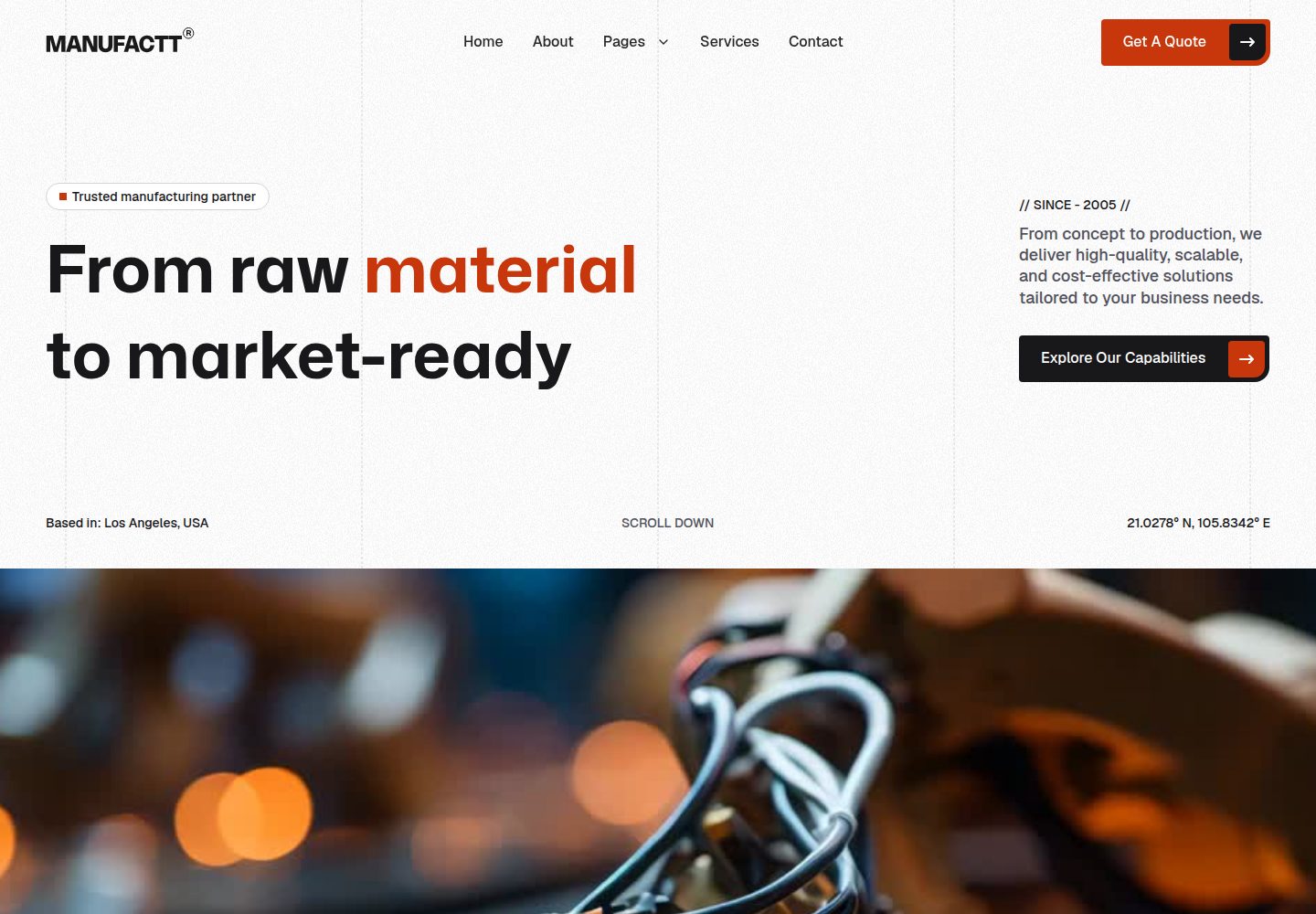
Built on TailwindCSS 4 and Vite 7, with development and build commands documented in the README
ViteHTMLStarter
fabrica — Vite Starter Template
By akajdid-mostafa
Fabrica is a TailwindCSS 4 website template for manufacturing and industrial businesses, built on Vite 7, with 11 prebuilt pages and Handlebars partials.
Explore the design
Compare the page layouts and mobile experience. Open any screenshot for a closer look.
Desktop homepage1 / 3
Desktop captureTop of page
Actual screenshot captured by the server browser.
All pages & views 3
Screenshots show visual appearance; interactive behavior may differ.
Recorded 2026-10-18View source
What stands out
A quick read of the recorded project description.
Includes 11 prebuilt pages covering home, about, services, products, case studies, blog, contact, FAQ, privacy policy and 404
Uses Handlebars partials to reuse the header, footer and meta tags, with page content written directly in HTML
The README states support for mobile, tablet and desktop responsive layouts, and includes dark/light sections
Integrates AOS animations, smooth scrolling, an interactive gallery and the Iconify icon library
Licensed under MIT; customization is possible by modifying the CSS theme configuration and replacing image assets
Template Details
Fabrica is a website template for manufacturing companies, factories, industrial businesses and engineering services; the README positions it as a modern, responsive and customizable TailwindCSS 4 template. The template provides 11 prebuilt pages: the home page includes a hero, services, products, customer testimonials and a CTA; there are also about, services, a product catalog (with filtering), case studies, blog list, blog detail, contact, FAQ, privacy policy and 404 pages. In terms of code structure, page content is written directly in HTML files, while the header, footer and meta tags are reused through Handlebars partials under src/partials/; styles, scripts and images are placed in the css, js and images directories of src/assets/ respectively. The README states that colors, fonts and spacing can be adjusted by modifying the TailwindCSS theme configuration under src/assets/css/, and that when replacing images you should keep the file names unchanged or update the HTML references accordingly. Development uses Node.js 16 or later and Yarn; yarn dev starts at http://localhost:5173, and yarn build outputs to dist/. The README does not provide a form submission backend, CMS integration, SEO configuration details or accessibility support information, and does not document how the template performs in a production environment.
ViteHTMLLauncher
Is it right for your project?
Use Cases
- Building a static website for a manufacturing company or factory that presents services and a product catalog
- Creating a multi-page corporate site for an industrial business with case studies, blog and contact pages
- Using it as a reference for page structure and partials in TailwindCSS 4 and Vite projects
- Quickly replacing copy and images to produce a website prototype for the industrial/engineering services field
Suitable For
- Corporate websites for manufacturing companies, factories and industrial businesses
- Showcase websites for engineering and industrial service providers
- Customization by front-end developers familiar with HTML, TailwindCSS and Vite
- Static site projects that need a multi-page structure (services, products, blog, FAQ)
Getting started & customization
Use these recorded setup notes alongside the repository instructions for your chosen version.
- 1
Requires Node.js 16 or later and Yarn
- 2
After cloning the repository, run yarn install to install dependencies, then yarn dev to start the development server (default http://localhost:5173)
- 3
Run yarn build to generate production files in dist/; yarn preview can be used to preview the build result
- 4
Modify the TailwindCSS theme configuration under src/assets/css/ to adjust colors, fonts and spacing
- 5
Edit page copy directly in the HTML files; reusable content such as the header and footer is in src/partials/; after replacing images, keep the file names or update the references
License & source material
Usage conditions & limitations
Free to use · keep license noticeThis listing covers the free version under the MIT license in the public repository; the free scope is the code of this version and does not mean external services or third-party assets are free.
Must comply with when using
- Free use, modification, commercial use and distribution of this version's code are permitted.
- When distributing copies or substantial portions of the code, retain the original author's copyright notice and the full MIT license notice.
- The code is provided as is; warranties and limitations of liability are governed by the original license and applicable law.
Additional costs & items to verify
- Demo images, fonts, icons and other third-party assets must be checked against their respective licenses; the code's MIT license alone is not sufficient to judge them.
- External services such as domains, hosting, databases, payments or AI may incur separate charges.
View Original Text Basis
https://github.com/akajdid-mostafa/fabrica/blob/main/LICENSEhttps://github.com/akajdid-mostafa/fabrica/blob/main/README.mdPermission is hereby granted, free of charge
Original License Text
Compiled by DeepSeek based on repository license and README ·2026-10-18. Results only cover the materials read; dependencies, images, fonts, and subsequent term changes are subject to their respective original texts.
Project checks & description sources
Template Information
- Source platforms
- GitHub
- Documentation and maintenance reference score
- More documented · 85 / 100
- Technologies
- Vite · HTML
- Website type
- Starter
How this score is calculated
Our heuristic uses license records (up to 30), a demo link (12), a preview (10), stars (15), recorded maintenance (15), description completeness (8), feature records (5) and classification data (5). It is not a code, security or performance test, or a Google score. A link does not establish tested functionality.
What to verify for this project
- Repository update recorded
- 2026-08-17
- Screenshot last checked
- 2026-10-18
A demo link is listed. Check it with your own content and viewport sizes; its presence does not confirm that forms, authentication or payments work.
The catalog identifies Vite as the primary stack. Check the actual dependency manifest and lockfile for versions and hosting requirements. These notes use recorded metadata, not a code audit or a deployment test.
Use a selection guide →How this description was prepared
AI-assisted description based on catalog records and repository material. Repository authors are not automatically the reviewers of this description.
Review declaration: codex-user-requested-batch-review-20261018 · 2026-10-18
Inspect the recorded source material
SHA-256: 47c249c1599035dff4d123162c2403372bbd1f230e9ff208383708ccbc041f01
2026-10-18T00:26:14.541Z
Source file / repository<div align="center"> # Fabrica ### Manufacturing Services Website — TailwindCSS 4 Template A modern, responsive, and fully customizable website template designed for manufacturing companies, factories, industrial businesses, and engineering services. [](https://tailwindcss.com/) [](https://vitejs.dev/) [](./LICENSE) </div> --- ## Features - Built with **TailwindCSS 4** and **Vite 7** - Fully responsive — mobile, tablet, and desktop - 11 pre-built pages (Home, About, Services, Products, Blog, Contact, etc.) - Dark/light sections with modern UI patterns - Smooth scroll, animations (AOS), and interactive galleries - Iconify icons library included - Clean and modular code structure with Handlebars partials - Easy to customize and extend ## Pages | Page | Description | |------|-------------| | `index.html` | Homepage with hero, services, products, testimonials, CTA | | `about.html` | Company story, team, stats, values | | `services.html` | Service listings and details | | `products.html` | Product catalog with filtering | | `case-studies.html` | Portfolio / case studies | | `blog.html` | Blog listing page | | `blog-detail.html` | Single blog post | | `contact.html` | Contact form and info | | `faqs.html` | Frequently asked questions | | `privacy-policy.html` | Privacy policy page | | `error-404.html` | 404 error page | ## Getting Started ### Prerequisites - **Node.js** >= 16 — [Download](https://nodejs.org/) - **Yarn** — [Docs](https://classic.yarnpkg.com/en/) ### Installation ```bash # Clone the repository git clone https://github.com/your-username/fabrica.git cd fabrica # Install dependencies yarn install # Start development server yarn dev ``` The dev server runs at `http://localhost:5173`. ### Build ```bash # Build for production yarn build # Preview the production build yarn preview ``` The production output is generated in the `dist/` folder. ## Project Structure ``` Fabrica/ ├── src/ │ ├── assets/ │ │ ├── css/ # Stylesheets │ │ ├── js/ # JavaScript files │ │ └── images/ # Images, icons, media │ ├── partials/ # Handlebars partials (header, footer, meta) │ ├── index.html # Homepage │ ├── about.html │ ├── services.html │ ├── products.html │ ├── blog.html │ ├── blog-detail.html │ ├── case-studies.html │ ├── contact.html │ ├── faqs.html │ ├── privacy-policy.html │ └── error-404.html ├── Docs/ # Documentation ├── dist/ # Production build output ├── package.json ├── vite.config.js └── README.md ``` ## Customization ### Colors & Theme Edit the TailwindCSS theme configuration in the CSS files under `src/assets/css/` to change colors, fonts, and spacing. ### Content All page content is directly in the HTML files. Edit the text, images, and sections as needed. Handlebars partials (`src/partials/`) are reused across pages for header, footer, and meta tags. ### Images Replace images in `src/assets/images/` with your own. Keep the same filenames or update the references in the HTML files. ## Browser Support - Chrome (Windows, macOS, Linux) - Firefox (Windows, macOS, Linux) - Safari (macOS) - Microsoft Edge - Other modern WebKit-based browsers ## Support If you have any questions or issues, feel free to reach out: - **Website:** [akajdidm.vercel.app](https://akajdidm.vercel.app/) - **Email:** [[email protected]](mailto:[email protected]) ## License This project is licensed under the **MIT License** — see the [LICENSE](./LICENSE) file for details. --- <div align="center"> Built with care by [Mostafa Akajdid](https://akajdidm.vercel.app/) </div>
Explore similar templates
Compare previews and descriptions within the same stack and category.

cove
Cove is a minimal TanStack Start starter template maintained by mugnavo, integrating React, TanStack Router/Query, Tailwind CSS, shadcn/ui, Drizzle ORM with PostgreSQL, Better Auth, Vite Plus, and Nitro.
Vite · SaaS

vite-react-boilerplate
A production-ready Vite + React starter template with TypeScript, Tailwind CSS, TanStack Router/Query/Table, Storybook, React Hook Form + Zod, Vitest and Playwright testing, plus Husky/Commitizen/Commitlint commit conventions.
Vite · Starter

vital
Vital is a Vite-based React starter template using TypeScript and Tailwind CSS, with an Atomic Design component directory, path aliases and Hero Icons.
Vite · Starter

react-vite-admin
A backend management starter built on Vite and React, integrating Recoil, React Query, TypeScript, and Axios, with Ant Design-style interface screenshots. Suitable as a starting point for management-side projects, licensed under MIT, with Chinese documentation and common scripts.
Vite · Admin dashboard

typescript-react_best_practices-vite_template
A Vite + React + TypeScript starter template by CodelyTV, preconfigured with Jest and React Testing Library unit tests, Cypress end-to-end tests, ESLint and Prettier using Codely's shared configuration, GitHub Actions workflows, a Makefile, and Sass.
Vite · Starter

cloudflare-starter-kit
A Cloudflare Workers project scaffolding template maintained by kriasoft, using Vite and TypeScript, with three built-in workspaces: api, app, and edge, and preconfigured local testing, multiple environments, and a GitHub Actions deployment workflow.
Vite · Starter