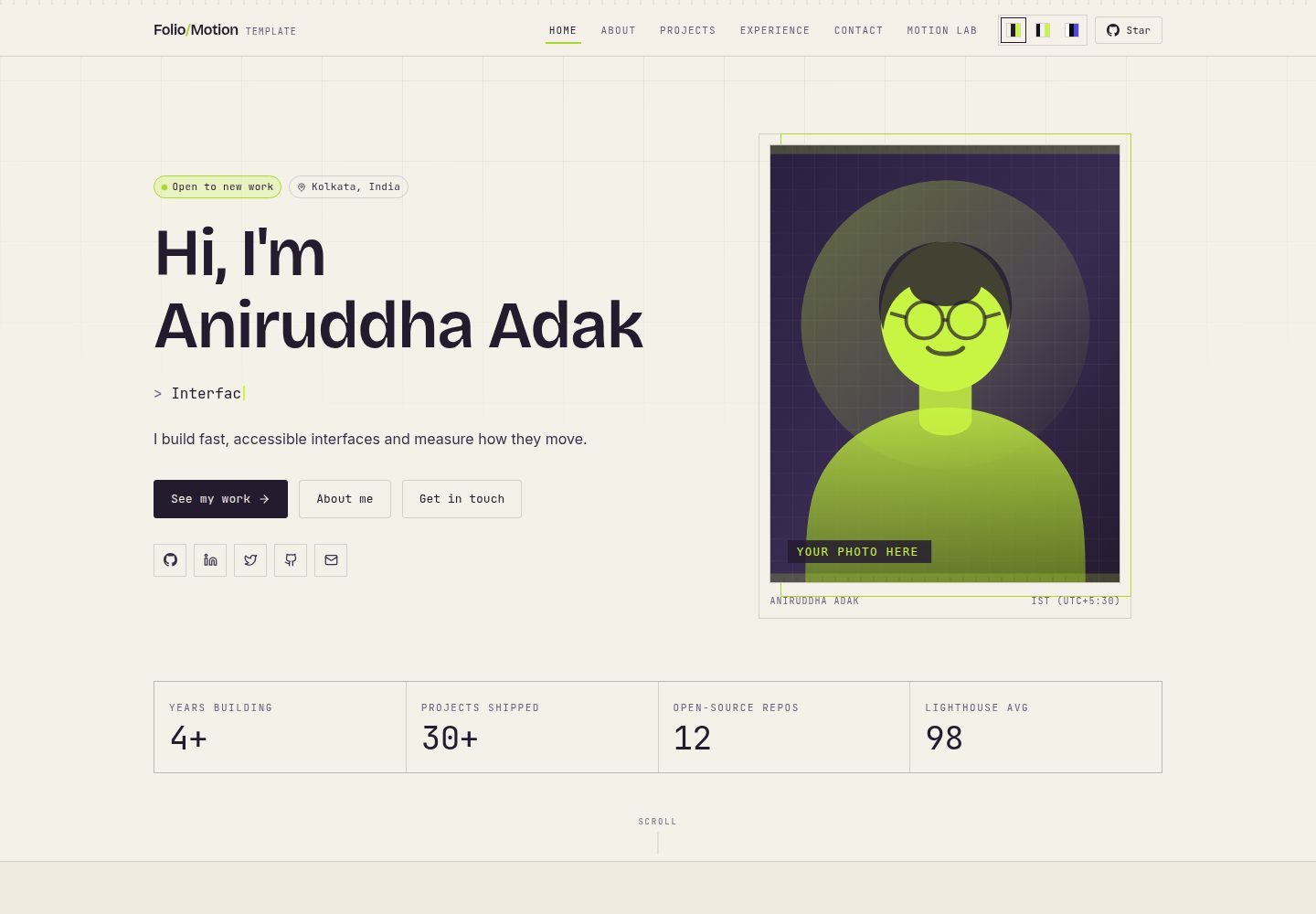
All personal content is centralized in a single file, src/config/portfolio.ts; editing it updates the entire site
Next.jsReactPortfolio
Folio-Motion — Next.js Portfolio Template
By aniruddhaadak80
Folio-Motion is a portfolio template built on Next.js and React, with all content centralized in a single configuration file, plus a measurable motion engine, a real backend, and an AI agent API.
Explore the design
Compare the page layouts and mobile experience. Open any screenshot for a closer look.
Desktop homepage1 / 3
Desktop captureTop of page
Actual screenshot captured by the server browser.
All pages & views 3
Screenshots show visual appearance; interactive behavior may differ.
Recorded 2026-10-03View source
What stands out
A quick read of the recorded project description.
Project detail pages are generated automatically from the configuration, including URLs, sitemap entries, and meta descriptions
The motion lab uses fixed-step integration of spring equations to measure settling time and overshoot and export them as CSS
Built-in MCP tool API lets AI assistants read and write content via JSON-RPC 2.0
Local defaults to embedded PGlite; production can switch to Postgres, with tables created automatically on first run
Includes unit tests and desktop/mobile browser tests; console errors cause tests to fail
Template Details
Folio-Motion is a website template for personal portfolios, built with Next.js and React. Its content organization differs from typical static portfolios: name, bio, projects, skills, experience, and links are all centralized in a single file, src/config/portfolio.ts. Editing that file replaces the entire site's content, with no CMS or database required. The template provides pages for home, about, project list, project detail, experience, and contact; project detail pages are generated automatically from each project in the configuration.
The template also includes a motion lab (/lab) that uses fixed-step integration of spring equations to measure animation settling time and overshoot, and can export the results as CSS; the /method page explains how the motion engine works and its limitations. On the backend, production uses Postgres, while local defaults to embedded PGlite; tables and indexes are created automatically on first run, with no migration step. The template also provides an MCP tool API based on JSON-RPC 2.0, allowing AI assistants to read and write content.
The contact form validates by default, but when no email service is configured it does not pretend to send successfully; instead it indicates that it is not configured and provides a mailto link. To actually send email, you need to set environment variables such as RESEND_API_KEY. In production, the database refuses to start if a connection string is missing, preventing data loss after cold starts. The template includes unit tests and browser tests; tests fail when errors appear in the console.
Usage limitations: third-party assets such as demo images, fonts, and icons require separate license verification; external services such as domain, hosting, database, email, or AI may incur additional costs.
Next.jsReactPortfolio
Is it right for your project?
Use Cases
- Developers who need to quickly build a personal portfolio and manage content centrally
- Job seekers who want project detail pages generated automatically from configuration for easy sharing and indexing
- Front-end developers who want to study or demonstrate spring motion measurement and CSS export
- Users who need to connect AI assistant read/write capabilities to their portfolio
- Portfolio projects that need real backend CRUD rather than static JSON
Suitable For
- Individual developers or designers building a portfolio website
- Users who want to maintain the entire site's content with a single configuration file
- Front-end projects that need motion parameter measurement and export
- Template users who need zero-config local startup and production-ready Postgres
Getting started & customization
Use these recorded setup notes alongside the repository instructions for your chosen version.
- 1
Requires Node.js 20.9 or newer; local startup needs no .env, database, or API keys
- 2
Run npm install, then npm run dev, and visit http://localhost:3000
- 3
The contact form does not send email by default; set variables such as RESEND_API_KEY in the deployment environment
- 4
When using Postgres in production, set DATABASE_URL or POSTGRES_URL
- 5
Third-party assets such as demo images, fonts, and icons require separate license verification under their respective licenses
License & source material
Usage conditions & limitations
Free to use · keep license noticeThis entry covers the free version under the MIT license in the public repository; the free scope is the code of that version and does not mean external services or third-party assets are free.
Must comply with when using
- You may use, modify, commercialize, and distribute the code of this version for free.
- When distributing copies or substantial portions of the code, retain the original author's copyright notice and the full MIT license notice.
- The code is provided as is; warranties and limitations of liability are governed by the original license and applicable law.
Additional costs & items to verify
- The contact form does not send email by default; it only validates and indicates that it is not configured. To actually send email, you must configure environment variables such as the API key for a third-party email service (e.g., Resend), which may incur external service fees.
- Local defaults to embedded PGlite, and data does not persist across deployments; if you need persistent data in production, you must install and configure an external Postgres (e.g., Neon) connection string, which may incur additional costs.
- In production, the application refuses to start if a database connection string is missing, so production deployment must provide Postgres connection configuration and cannot rely solely on the default embedded database.
- When using remote image URLs, you must manually add the corresponding host to images.remotePatterns in next.config.ts; by default only images.unsplash.com is allowed.
- Demo images, fonts, icons, and other third-party assets require license verification under their respective licenses; the code's MIT license alone is not sufficient to judge.
- External services such as domain, hosting, database, payment, or AI may incur additional charges.
View Original Text Basis
Permission is hereby granted, free of charge
Original License Text
To make it actually send, add one environment variable on Vercel:
Original README
If you want data to survive between deploys, install
Original README
The app **refuses to start in production without a connection string** rather
Original README
https://github.com/aniruddhaadak80/Folio-Motion/blob/main/LICENSEhttps://github.com/aniruddhaadak80/Folio-Motion/blob/main/README.mdAdd the host to > `images.remotePatterns` in `next.config.ts`.
Original README
Compiled by DeepSeek based on repository license and README ·2026-10-03. Results only cover the materials read; dependencies, images, fonts, and subsequent term changes are subject to their respective original texts.
Project checks & description sources
Template Information
- Source platforms
- GitHub
- Documentation and maintenance reference score
- More documented · 92 / 100
- Technologies
- Next.js · React
- Website type
- Portfolio
How this score is calculated
Our heuristic uses license records (up to 30), a demo link (12), a preview (10), stars (15), recorded maintenance (15), description completeness (8), feature records (5) and classification data (5). It is not a code, security or performance test, or a Google score. A link does not establish tested functionality.
What to verify for this project
- Repository update recorded
- 2026-09-30
- Screenshot last checked
- 2026-10-03
A demo link is listed. Check it with your own content and viewport sizes; its presence does not confirm that forms, authentication or payments work.
The catalog identifies Next.js as the primary stack. Check the actual dependency manifest and lockfile for versions and hosting requirements. These notes use recorded metadata, not a code audit or a deployment test.
Use a selection guide →How this description was prepared
AI-assisted description based on catalog records and repository material. Repository authors are not automatically the reviewers of this description.
Review declaration: [email protected] · 2026-10-04
Inspect the recorded source material
SHA-256: 044ca375adc3594ec8cb0152f15d5eb62d834a4c9b5131aa876faa71e1459db6
2026-10-03T16:59:17.363Z
Source file / repository<div align="center">
# Folio Motion
### A portfolio template that measures its own animation.
[](https://folio-motion.vercel.app)
[](https://github.com/aniruddhaadak80/Folio-Motion/stargazers)
[](https://github.com/aniruddhaadak80/Folio-Motion/network/members)
[](#license)
[](https://nextjs.org)
[](https://react.dev)
[](https://tailwindcss.com)
[](https://github.com/advisories)
**A nextjs portfolio template with a real backend, an AI agent API, and a
motion engine that measures animation instead of guessing at it.**
[Live demo](https://folio-motion.vercel.app) · [Fork it](https://github.com/aniruddhaadak80/Folio-Motion/fork) · [Report an issue](https://github.com/aniruddhaadak80/Folio-Motion/issues)
</div>
---
## Why this one
Almost every portfolio template is a static page with a JSON file of your jobs.
It looks fine until someone asks *"can I add a case study?"* and you discover the
project grid is hardcoded in a component.
Folio Motion is built the other way round:
| | |
| --- | --- |
| **All your content in one file** | `src/config/portfolio.ts`. Name, photo, bio, projects, skills, experience, links. Edit it and the whole site is yours. No CMS, no database, no rebuild. |
| **Real pages, not one long scroll** | Home, About, Projects, per-project case studies, Experience, Contact — plus a working Motion Lab. |
| **A real backend** | Postgres in production, an embedded database locally. Full CRUD through the UI, not a form that fakes success. |
| **An AI agent API** | Eight MCP tools over JSON-RPC 2.0, so an AI assistant can read and write your content. |
| **A motion engine that measures** | The spring equation integrated at a fixed 240Hz step. Real settle time, real overshoot, exported as CSS. |
| **Tests, not vibes** | 76 unit tests and 42 browser tests (desktop + mobile) that fail on any console error. |
| **0 known vulnerabilities** | Was 89 Dependabot alerts before the 2.0 rewrite. |
| **Three colour themes** | Swap palettes with one click. Add your own with a few lines of CSS. |
---
## Quick start
You need [Node.js](https://nodejs.org) 20.9 or newer. That's the only
requirement — **no `.env` file, no database setup, no API keys.**
```bash
# 1. Fork it on GitHub (the Fork button, top right), then:
git clone https://github.com/YOUR-USERNAME/Folio-Motion.git
cd Folio-Motion
npm install
npm run dev
```
Open <http://localhost:3000>. Done.
The database starts automatically in memory. If you want it to persist between
restarts, see [Database](#database).
---
## Make it yours
**Everything below happens in `src/config/portfolio.ts`.** That is the only file
you need to touch to have a complete, personal portfolio.
### 1. Your name, role and photo
```ts
export const personal = {
name: "Aniruddha Adak",
shortName: "Aniruddha",
role: "Full-Stack Developer",
tagline: "I build fast, accessible interfaces and measure how they move.",
// Rotates in the hero, one phrase at a time.
rotatingRoles: ["Full-Stack Developer", "Interface Engineer"],
// Your photo. Put a file in public/images/ and point at it.
avatar: "/images/avatar.svg",
portrait: "/images/portrait.svg",
location: "Kolkata, India",
email: "[email protected]",
// Shows a green "open to work" dot in the hero.
availableForWork: true,
// Link to a PDF in public/. Set to null to hide the button.
resume: null,
};
```
#### Replacing the photo
The template ships illustrated placeholders so nothing ever looks broken.
```bash
# Drop your own photo in (a square-ish 4:5 crop works best)
cp ~/Pictures/me.jpg public/images/avatar.jpg
```
Then change one line:
```ts
avatar: "/images/avatar.jpg",
portrait: "/images/avatar.jpg", // or a different photo
```
Nothing else. No import, no sizing, no config — the component already handles
cropping, borders and the caption.
> **Using a photo from a URL instead?** Add the host to
> `images.remotePatterns` in `next.config.ts`. `images.unsplash.com` is already
> allowed.
### 2. Your bio
```ts
// One or two sentences. Used on the home page.
shortBio: "I design and build web products end to end...",
// Longer version. Each array entry becomes a paragraph on /about.
longBio: [
"First paragraph.",
"Second paragraph.",
"Third paragraph.",
],
```
### 3. Your projects
Add an entry, and a page is created for it automatically — including the URL,
the sitemap entry, and the meta description.
```ts
export const projects: Project[] = [
{
slug: "my-app", // → /projects/my-app
title: "My App",
summary: "One line for the card.",
description: [
"A paragraph for the case study page.",
"Another paragraph.",
],
image: "/images/projects/my-app.svg", // or .jpg / .png
tech: ["Next.js", "TypeScript", "Postgres"],
year: "2026",
status: "live", // live | building | archived
featured: true, // bigger, at the top of the home page
links: {
live: "https://my-app.com",
repo: "https://github.com/you/my-app",
},
highlights: ["What made it interesting", "Another point"],
proudest: "The part you're happiest to talk about.",
},
];
```
**Want project screenshots?** Just use an image file:
```ts
image: "/images/projects/my-app.png",
```
Any format `next/image` handles: `.png`, `.jpg`, `.webp`, `.avif`, `.svg`.
### 4. Your skills
Grouped by category, with a level from 0–100. Set them honestly — this is a
portfolio, and an inflated bar helps nobody.
```ts
export const skillGroups: SkillGroup[] = [
{
title: "Languages",
icon: Code2, // any icon from lucide-react
skills: [
{ name: "TypeScript", level: 92, note: "Daily driver" },
{ name: "Python", level: 78 },
],
},
];
```
### 5. Your experience
```ts
export const experience: ExperienceEntry[] = [
{
role: "Senior Engineer",
company: "Acme",
period: "2024 - Present",
location: "Remote",
summary: "One or two sentences on the role.",
highlights: [
"A specific thing you did, with a number in it",
"Another, ideally measurable",
],
tech: ["Next.js", "TypeScript"],
status: "current", // highlights the entry in the timeline
},
];
```
### 6. Your links
```ts
export const socials = [
{ label: "GitHub", href: "https://github.com/you", primary: true },
{ label: "LinkedIn", href: "https://linkedin.com/in/you", primary: true },
{ label: "Email", href: "mailto:[email protected]" },
];
```
Any `href` starting with `http` opens in a new tab automatically. The icon comes
from the `label`; for anything not in the built-in map it falls back to the text.
### 7. Your theme
Three themes ship with the template — **Bench** (default), **Ink** and
**Paper** — switchable from the header. The choice is remembered.
To add your own, copy a block in `src/app/globals.css`:
```css
:root[data-theme="ocean"] {
--color-paper: #0d1b2a;
--color-paper-2: #11243a;
--color-ink: #e0f2fe;
--color-ink-2: #b6d6ee;
--color-ink-3: #6f93ad;
--color-signal: #38bdf8;
--color-signal-2: #0ea5e9;
--color-signal-ink: #04121d;
--color-ruby: #f87171;
--color-cobalt: #7dd3fc;
--color-violet: #a78bfa;
--color-line: color-mix(in oklab, #e0f2fe 20%, transparent);
--color-line-soft: color-mix(in oklab, #e0f2fe 11%, transparent);
--color-grid: color-mix(in oklab, #e0f2fe 7%, transparent);
--color-panel: color-mix(in oklab, #0d1b2a 92%, #e0f2fe);
--shadow-bench: 0 14px 34px -18px rgba(0, 0, 0, 0.8);
color-scheme: dark;
}
```
Then add it to the switcher:
```ts
// src/components/theme-switcher.tsx
{ id: "ocean", label: "Ocean", swatch: ["#0d1b2a", "#e0f2fe", "#38bdf8"] },
```
That's it. Every button, border, panel and shadow follows.
### 8. Removing sections you don't want
The home page is an ordered list. Delete a line to drop a section:
```tsx
// src/app/page.tsx
export default function HomePage() {
return (
<>
<Hero /> {/* keep */}
<About /> {/* keep */}
<Services /> {/* delete this line to remove "What I do" */}
<Skills />
<FeaturedWork />
<Experience />
<LabTeaser /> {/* the motion lab band */}
<Contact />
</>
);
}
```
Reorder them by moving lines. There is no config flag for this on purpose — the
file *is* the config.
---
## Pages
| Route | What it is |
| --- | --- |
| `/` | Everything: hero, about, services, skills, work, experience, lab, contact |
| `/about` | The long bio, plus services and skills |
| `/projects` | All projects, filterable by tag (filter is in the URL, so it can be shared) |
| `/projects/[slug]` | A case study, generated from your config for every project |
| `/experience` | The full timeline |
| `/contact` | A working contact form |
| `/lab` | **The motion lab** — tune a spring, watch it measured in real time |
| `/method` | Exactly how the motion engine works, and its limits |
| `/agent` | A live console for the MCP tool API |
| `/verify` | Replay the audit chain |
Project pages are prerendered at build time from your config, so they're fast
and indexable.
---
## The contact form
Out of the box the form validates correctly and then tells you, honestly, that
email delivery is not configured — and offers a `mailto:` link so the visitor is
never stuck at a dead end. It never pretends to have sent a message.
To make it actually send, add one environment variable on Vercel:
| Variable | Required | What it does |
| --- | --- | --- |
| `RESEND_API_KEY` | for sending | Your [Resend](https://resend.com) API key |
| `CONTACT_FROM_EMAIL` | no | Verified sender, e.g. `Portfolio <[email protected]>` |
Then deploy. The form starts sending immediately — no code change.
<details>
<summary><b>Prefer a different email provider?</b></summary>
Open `src/app/api/contact/route.ts` and replace the `sendEmail()` function with
your provider's HTTP call. It receives a validated object and returns
`{ ok: true }` or `{ ok: false, error }`. Nothing else needs to change.
</details>
---
## Database
**You do not need one.** Without configuration the app uses an embedded PGlite
Postgres that starts with the process, so `npm run dev` and a fresh Vercel
deploy both work immediately.
If you want data to survive between deploys, install
[Neon](https://neon.tech) (or any Postgres) and set one variable:
| Variable | Required | What it does |
| --- | --- | --- |
| `DATABASE_URL` | in production | Your Postgres connection string |
| `POSTGRES_URL` | fallback | Used automatically if `DATABASE_URL` is unset — this is what the Vercel Neon integration provides |
| `DATABASE_SCHEMA` | no | Put your tables in a named schema when sharing one database with another app. Bare identifier only. |
The app **refuses to start in production without a connection string** rather
than silently losing your data on the next cold start. That is deliberate.
Schema and indexes are created automatically on first run. There is no
migration step to forget.
---
## The motion lab
This is the part that makes the template worth having.
Animation is usually chosen by feel. Drag the **damping** dial down and this
lab tells you what you just built: it settles in `1246ms` instead of `371ms`,
overshoots by `47%`, and scores 31/100 with the reason next to every number.
Nothing is a lookup table. `src/lib/engine.ts` integrates
```
x'' = (−k·x − c·v) / m
```
with a fixed-step symplectic Euler solver at 240Hz, and solves cubic beziers
the same way a browser does. The preview box is moved by that same
integration, which is why the curve, the animation and the score always agree.
**The bug worth knowing about.** The obvious way to detect rest — "close enough
to the target" — is wrong. An under-damped spring passes *through* the target
at speed several times before it stops, so that approach reports **zero
overshoot for violently bouncing motion**. This repo requires a velocity
condition as well, and ships a regression test for it.
From here you can export production-ready CSS, a Framer Motion module, an SVG of
the real curve, or a Markdown report.
The [agent console](/agent) exposes the same engine over MCP, so an AI can
compare curves and write specs for you.
---
## Project structure
```
src/
├── config/
│ └── portfolio.ts ← YOUR CONTENT. Edit this.
├── app/
│ ├── page.tsx ← home page = an ordered list of sections
│ ├── about/ ← /about
│ ├── projects/ ← /projects and /projects/[slug]
│ ├── experience/ ← /experience
│ ├── contact/ ← /contact
│ ├── lab/ method/ agent/ verify/ ← the motion lab
│ └── api/ ← REST + MCP endpoints
├── components/
│ ├── sections/ ← hero, about, projects, experience, contact
│ ├── motion-primitives.tsx ← every animation on the site
│ ├── live-spring-preview.tsx ← the physics-driven box
│ ├── curve-chart.tsx ← the measured curve
│ ├── score-meter.tsx ← the explainable score
│ ├── theme-switcher.tsx ← three palettes
│ └── site-header.tsx site-footer.tsx
└── lib/
├── engine.ts ← the physics. Pure, tested, deterministic.
├── integrity.ts ← SHA-384 audit chain
├── repository.ts ← all SQL
├── service.ts ← one code path for every mutation
└── feed.ts ← live npm registry data
public/images/ ← your photo and project covers
tests/ ← 76 unit tests
e2e/ ← 42 browser tests (desktop + mobile)
```
### Where to change what
| I want to… | Edit |
| --- | --- |
| Change my name, bio, photo | `src/config/portfolio.ts` → `personal` |
| Add a project | `src/config/portfolio.ts` → `projects` |
| Change the skills | `src/config/portfolio.ts` → `skillGroups` |
| Change my jobs | `src/config/portfolio.ts` → `experience` |
| Add or remove a home page section | `src/app/page.tsx` |
| Change the colours | `src/app/globals.css` → `[data-theme]` blocks |
| Add a nav link | `src/config/portfolio.ts` → `navigation` |
| Change the fonts | `src/app/layout.tsx` → the `next/font` calls |
| Change an animation's physics | `src/components/motion-primitives.tsx` |
---
## Scripts
| Command | What it does |
| --- | --- |
| `npm run dev` | Dev server |
| `npm run build` | Production build |
| `npm run typecheck` | `tsc --noEmit` |
| `npm run lint` | ESLint |
| `npm test` | 76 unit tests |
| `npm run test:e2e` | 42 browser tests (21 each, desktop + mobile) |
| `npm run check` | Typecheck, lint, test, build — in order |
Deploying to Vercel needs nothing. Other platforms work too; it's a standard
Next.js app.
---
## Accessibility
Not a checkbox — it's in the build.
- Every animation has a static equivalent under `prefers-reduced-motion`.
- The typewriter and live preview are hidden from screen readers; the full text
is read once instead.
- Semantic landmarks, a skip link, visible focus rings, and labelled form
errors wired with `aria-describedby`.
- The project filter is a real list with a live count, and the state lives in
the URL.
- Charts carry a text `aria-label` describing the measurement.
---
## Customising further
<details>
<summary><b>Change the fonts</b></summary>
```ts
// src/app/layout.tsx
import { Inter, Space_Grotesk, JetBrains_Mono } from "next/font/google";
const display = Space_Grotesk({ subsets: ["latin"], variable: "--font-bricolage" });
```
Then update the three `--font-*` variables in the `@theme` block of
`globals.css` to point at your variable names. Or skip `next/font` and use any
CSS font stack.
</details>
<details>
<summary><b>Add a new page</b></summary>
Create `src/app/my-page/page.tsx`:
```tsx
import type { Metadata } from "next";
import { PageHeader } from "@/components/page-header";
export const metadata: Metadata = { title: "My page" };
export default function MyPage() {
return (
<>
<PageHeader eyebrow="Section" title="My page" lede="A sentence about it." />
<section className="mx-auto max-w-3xl px-4 py-16">…</section>
</>
);
}
```
Then add `{ label: "My page", href: "/my-page" }` to `navigation`.
</details>
<details>
<summary><b>Use your own components instead of the built-in ones</b></summary>
Everything is in `src/components/sections/`. Swap the file's contents and keep
the same export name and the home page keeps working.
</details>
<details>
<summary><b>Remove the motion lab entirely</b></summary>
Delete `src/app/lab/`, `src/app/method/`, `src/app/agent/`, `src/app/verify/`,
`src/app/signals/`, and the lab's API routes. Then remove `<LabTeaser />` from
`src/app/page.tsx` and the Motion Lab entry from `navigation`. The portfolio
does not depend on any of it.
</details>
<details>
<summary><b>Change the SEO metadata</b></summary>
It all comes from `seo` in `src/config/portfolio.ts` — the title, description,
keywords, and the `siteUrl` used for canonical URLs and the sitemap. Set
`siteUrl` to your real domain before you launch.
</details>
---
## Deploying
**Vercel (easiest):** push to GitHub and import the repo. Add
`RESEND_API_KEY` if you want the contact form to send. Done.
**Anywhere else:** it's a standard Next.js app.
```bash
npm run build
npm start
```
---
## Contributing
Issues and pull requests are welcome. Read
[`CONTRIBUTING.md`](CONTRIBUTING.md) first — the project has a few conventions
worth knowing before you touch the engine.
Security reports: [`SECURITY.md`](SECURITY.md). Please don't open a public
issue for a vulnerability.
---
## License
[MIT](LICENSE) © 2026 Aniruddha Adak
Fork it, make it yours. If you build something good with it, a star is a nice
way to say thanks.
Explore similar templates
Compare previews and descriptions within the same stack and category.

react-resume-template
A personal resume website template for software developers, built with Next.js, React, and TypeScript and styled with Tailwind CSS. Site content is driven by a single data file at /src/data/data.tsx, with types in dataDef.ts and images in src/images/.
Next.js · Portfolio

nxt-lnk
nxt-lnk is a Next.js-based bio link page template that manages personal information and links via BioData.js and LinksData.js, positioned as a self-hosted alternative to Linktree. It groups links by type, supports enabling/disabling individual links, and offers hexagonal or oval avatars.
Next.js · Portfolio

sylph
Sylph is a minimal portfolio and blog template built on Next.js, supporting MDX/Markdown writing, light/dark themes, and automatic OG image generation. It includes sitemap, robots.txt, metadata, and syntax highlighting, with automatic blog timestamps.
Next.js · Portfolio

sleek-portfolio
A modern, responsive portfolio template built with Next.js 15, TypeScript, Tailwind CSS, and Shadcn UI. It includes an MDX blog, project showcase, work experience timeline, and a contact form that receives messages via Telegram Bot.
Next.js · Portfolio

research-website-template
A React + Next.js template for research personal websites, aimed at PhD students and researchers. It centralizes publications, projects, and other content in src/data as arrays of objects, with optional fields automatically generating UI components.
Next.js · Portfolio

shadcn-portfolio
A developer portfolio template built with Next.js 15, shadcn/ui, Tailwind CSS, and Framer Motion, featuring an MDX blog, light and dark modes, responsive design, and SEO meta tags.
Next.js · Portfolio