所有个人内容集中在 src/config/portfolio.ts 一个文件,修改后整站生效
Next.jsReact作品集
Folio-Motion — Next.js 作品集模板
作者 aniruddhaadak80
Folio-Motion 是一个基于 Next.js 和 React 的作品集模板,内容集中在一个配置文件,并包含可测量的动效引擎、真实后端与 AI 代理 API。
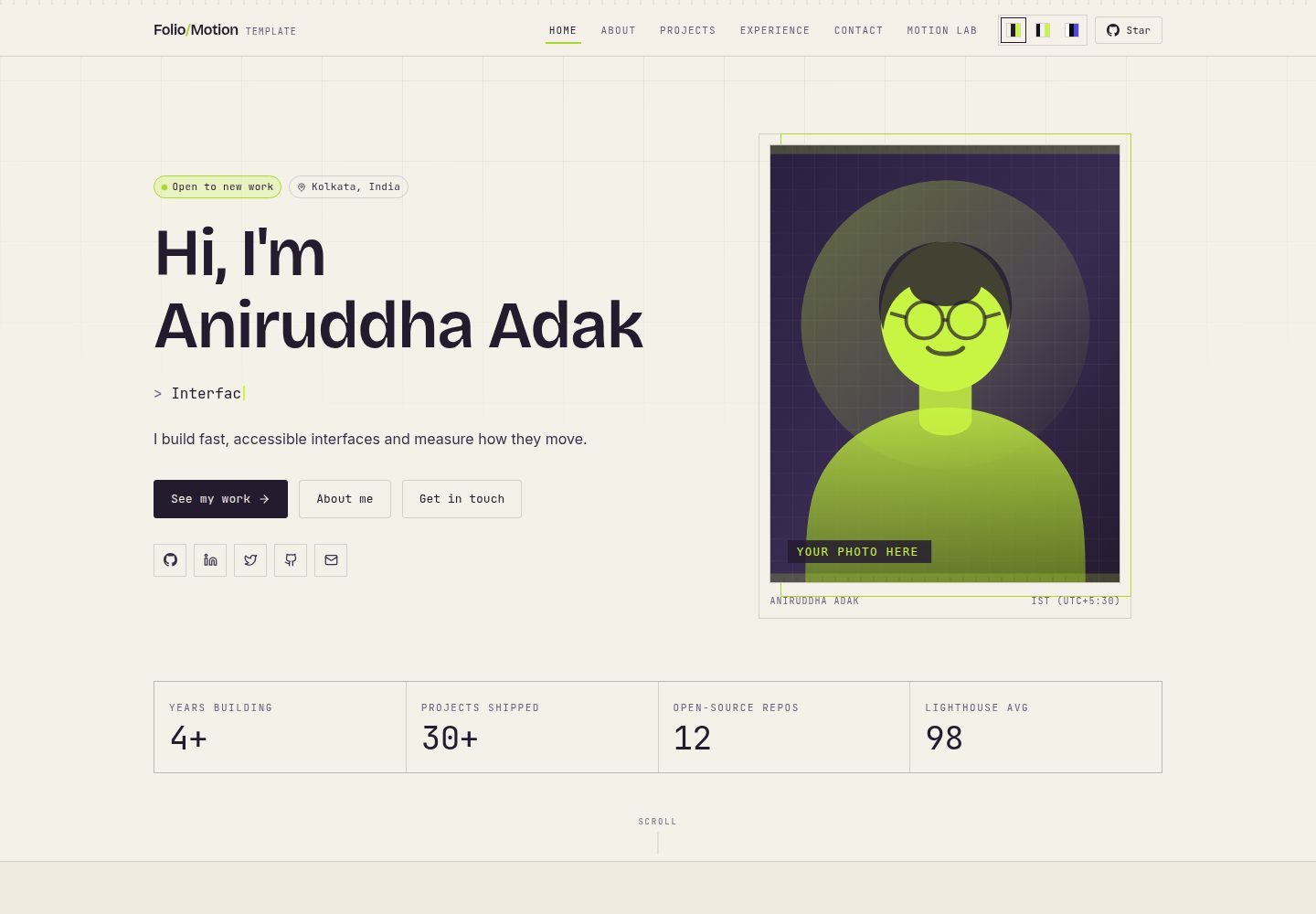
看看你的网站会是什么样
浏览真实页面截图,比较内容排版与手机效果。点击下方缩略图切换,放大查看整页细节。
全部页面与视图 3
截图用于了解视觉与布局,交互效果请以实际项目为准。
采集于 2026-10-03查看来源
值得关注的模板亮点
从已有项目资料中,快速了解它的特点。
项目详情页根据配置自动生成,包含 URL、站点地图条目和元描述
动效实验室用固定步长积分弹簧方程,测量稳定时间与过冲并导出为 CSS
内置 MCP 工具 API,通过 JSON-RPC 2.0 让 AI 助手读写内容
本地默认使用内嵌 PGlite,生产环境可切换 Postgres,首次运行自动建表
附带单元测试与桌面/移动端浏览器测试,控制台报错会导致测试失败
模板详细介绍
Folio-Motion 是一个面向个人作品集场景的网站模板,使用 Next.js 与 React 构建。它的内容组织方式与常见静态作品集不同:姓名、简介、项目、技能、经历和链接等全部集中在 src/config/portfolio.ts 一个文件里,修改该文件即可替换整站内容,不需要 CMS 或数据库。模板提供首页、关于、项目列表、项目详情页、经历、联系等页面,项目详情页会根据配置中的每个项目自动生成。
模板还包含一个动效实验室(/lab),用固定步长积分弹簧方程来测量动画的稳定时间与过冲,并可将结果导出为 CSS;/method 页面说明该动效引擎的工作方式与限制。后端方面,生产环境使用 Postgres,本地默认使用内嵌的 PGlite,首次运行自动建表和索引,无需迁移步骤。模板还提供基于 JSON-RPC 2.0 的 MCP 工具 API,供 AI 助手读写内容。
联系表单默认会进行校验,但在未配置邮件服务时不会假装发送成功,而是提示未配置并提供 mailto 链接。要真正发送邮件,需要设置 RESEND_API_KEY 等环境变量。数据库在生产环境缺少连接字符串时会拒绝启动,避免数据在冷启动后丢失。模板附带单元测试和浏览器测试,测试会在控制台出现错误时失败。
使用限制:演示图片、字体、图标等第三方素材需单独核对许可;域名、托管、数据库、邮件或 AI 等外部服务可能产生额外费用。
Next.jsReact作品集
适合你的项目吗?
适用场景
- 需要快速搭建个人作品集并集中管理内容的开发者
- 希望项目详情页能按配置自动生成、便于分享和索引的求职者
- 想研究或演示弹簧动效测量与 CSS 导出的前端开发者
- 需要为作品集接入 AI 助手读写内容能力的用户
- 需要真实后端 CRUD 而非静态 JSON 的作品集项目
适合人群
- 个人开发者或设计师搭建作品集网站
- 希望用单一配置文件维护整站内容的用户
- 对动效参数测量和导出有需求的前端项目
- 需要本地零配置启动、生产可接 Postgres 的模板使用者
上手与定制指南
结合仓库当前版本的说明,按下面的资料检查内容、配置与运行要求。
- 1
需要 Node.js 20.9 或更新版本,无需 .env、数据库或 API 密钥即可本地启动
- 2
运行 npm install 后执行 npm run dev,访问 http://localhost:3000
- 3
联系表单默认不发送邮件,需在部署环境设置 RESEND_API_KEY 等变量
- 4
生产环境使用 Postgres 时需设置 DATABASE_URL 或 POSTGRES_URL
- 5
演示图片、字体、图标等第三方素材需按各自许可单独核对
授权与来源资料
使用条件与限制
免费使用 · 保留许可声明本次收录的是公开仓库中采用 MIT 许可的免费版本;免费范围为该版本代码,不代表外部服务或第三方素材免费。
使用时需要遵守
- 允许免费使用、修改、商用和分发该版本代码。
- 分发代码副本或实质性部分时,保留原作者版权声明和完整 MIT 许可声明。
- 代码按现状提供;担保与责任限制以原许可证及适用法律为准。
额外费用与待核对事项
- 联系表单默认不发送邮件,仅做校验并提示未配置;要真正发送邮件,必须自行配置第三方邮件服务(如 Resend)的 API 密钥等环境变量,可能产生外部服务费用。
- 本地默认使用内嵌 PGlite,数据不跨部署持久化;若需生产环境持久保存数据,需自行安装并配置外部 Postgres(如 Neon)连接字符串,可能产生额外费用。
- 生产环境缺少数据库连接字符串时应用会拒绝启动,因此生产部署必须提供 Postgres 连接配置,不能仅依赖默认内嵌数据库。
- 使用远程图片 URL 时需在 next.config.ts 的 images.remotePatterns 中手动添加对应主机,默认仅允许 images.unsplash.com。
- 演示图片、字体、图标及其他第三方素材需按各自许可核对,不能仅凭代码的 MIT 许可判断。
- 域名、托管、数据库、支付或 AI 等外部服务可能另外收费。
查看原文依据
Permission is hereby granted, free of charge
许可证原文
To make it actually send, add one environment variable on Vercel:
README 原文
If you want data to survive between deploys, install
README 原文
The app **refuses to start in production without a connection string** rather
README 原文
https://github.com/aniruddhaadak80/Folio-Motion/blob/main/LICENSEhttps://github.com/aniruddhaadak80/Folio-Motion/blob/main/README.mdAdd the host to > `images.remotePatterns` in `next.config.ts`.
README 原文
DeepSeek 根据仓库许可证和 README 整理 ·2026-10-03。结果仅覆盖已读取资料,依赖、图片、字体及后续条款变更以各自原文为准。
项目核对记录与介绍依据
模板资料
- 来源平台
- GitHub
- 资料与维护参考分
- 资料较完整 · 92 / 100
- 技术栈
- Next.js · React
- 网站类型
- 作品集
这个分数如何计算
本站按许可资料(最高30分)、演示链接(12分)、预览图(10分)、Star数(15分)、记录的维护时间(15分)、描述完整度(8分)、功能记录(5分)和分类资料(5分)计算。它不是代码、安全或性能测试,也不是 Google 评分;有链接不代表已实测可用。
这个项目需要核对什么
- 记录的仓库更新时间
- 2026-09-30
- 截图检查日期
- 2026-10-03
已收录演示链接。请用你的内容与屏幕尺寸检查;有演示不代表表单、认证或支付已经可用。
目录记录的主要技术栈是 Next.js。请通过依赖清单和锁文件核对实际版本与托管要求。这些说明基于收录资料,不代表代码审计或部署实测。
查看具体选型方法 →介绍的制作与核对状态
介绍由 AI 辅助整理目录与仓库资料。仓库作者不等于这篇介绍的审核者。
审核声明: [email protected] · 2026-10-04
查看当时使用的来源资料
SHA-256: 044ca375adc3594ec8cb0152f15d5eb62d834a4c9b5131aa876faa71e1459db6
2026-10-03T16:59:17.363Z
来源文件 / 仓库<div align="center">
# Folio Motion
### A portfolio template that measures its own animation.
[](https://folio-motion.vercel.app)
[](https://github.com/aniruddhaadak80/Folio-Motion/stargazers)
[](https://github.com/aniruddhaadak80/Folio-Motion/network/members)
[](#license)
[](https://nextjs.org)
[](https://react.dev)
[](https://tailwindcss.com)
[](https://github.com/advisories)
**A nextjs portfolio template with a real backend, an AI agent API, and a
motion engine that measures animation instead of guessing at it.**
[Live demo](https://folio-motion.vercel.app) · [Fork it](https://github.com/aniruddhaadak80/Folio-Motion/fork) · [Report an issue](https://github.com/aniruddhaadak80/Folio-Motion/issues)
</div>
---
## Why this one
Almost every portfolio template is a static page with a JSON file of your jobs.
It looks fine until someone asks *"can I add a case study?"* and you discover the
project grid is hardcoded in a component.
Folio Motion is built the other way round:
| | |
| --- | --- |
| **All your content in one file** | `src/config/portfolio.ts`. Name, photo, bio, projects, skills, experience, links. Edit it and the whole site is yours. No CMS, no database, no rebuild. |
| **Real pages, not one long scroll** | Home, About, Projects, per-project case studies, Experience, Contact — plus a working Motion Lab. |
| **A real backend** | Postgres in production, an embedded database locally. Full CRUD through the UI, not a form that fakes success. |
| **An AI agent API** | Eight MCP tools over JSON-RPC 2.0, so an AI assistant can read and write your content. |
| **A motion engine that measures** | The spring equation integrated at a fixed 240Hz step. Real settle time, real overshoot, exported as CSS. |
| **Tests, not vibes** | 76 unit tests and 42 browser tests (desktop + mobile) that fail on any console error. |
| **0 known vulnerabilities** | Was 89 Dependabot alerts before the 2.0 rewrite. |
| **Three colour themes** | Swap palettes with one click. Add your own with a few lines of CSS. |
---
## Quick start
You need [Node.js](https://nodejs.org) 20.9 or newer. That's the only
requirement — **no `.env` file, no database setup, no API keys.**
```bash
# 1. Fork it on GitHub (the Fork button, top right), then:
git clone https://github.com/YOUR-USERNAME/Folio-Motion.git
cd Folio-Motion
npm install
npm run dev
```
Open <http://localhost:3000>. Done.
The database starts automatically in memory. If you want it to persist between
restarts, see [Database](#database).
---
## Make it yours
**Everything below happens in `src/config/portfolio.ts`.** That is the only file
you need to touch to have a complete, personal portfolio.
### 1. Your name, role and photo
```ts
export const personal = {
name: "Aniruddha Adak",
shortName: "Aniruddha",
role: "Full-Stack Developer",
tagline: "I build fast, accessible interfaces and measure how they move.",
// Rotates in the hero, one phrase at a time.
rotatingRoles: ["Full-Stack Developer", "Interface Engineer"],
// Your photo. Put a file in public/images/ and point at it.
avatar: "/images/avatar.svg",
portrait: "/images/portrait.svg",
location: "Kolkata, India",
email: "[email protected]",
// Shows a green "open to work" dot in the hero.
availableForWork: true,
// Link to a PDF in public/. Set to null to hide the button.
resume: null,
};
```
#### Replacing the photo
The template ships illustrated placeholders so nothing ever looks broken.
```bash
# Drop your own photo in (a square-ish 4:5 crop works best)
cp ~/Pictures/me.jpg public/images/avatar.jpg
```
Then change one line:
```ts
avatar: "/images/avatar.jpg",
portrait: "/images/avatar.jpg", // or a different photo
```
Nothing else. No import, no sizing, no config — the component already handles
cropping, borders and the caption.
> **Using a photo from a URL instead?** Add the host to
> `images.remotePatterns` in `next.config.ts`. `images.unsplash.com` is already
> allowed.
### 2. Your bio
```ts
// One or two sentences. Used on the home page.
shortBio: "I design and build web products end to end...",
// Longer version. Each array entry becomes a paragraph on /about.
longBio: [
"First paragraph.",
"Second paragraph.",
"Third paragraph.",
],
```
### 3. Your projects
Add an entry, and a page is created for it automatically — including the URL,
the sitemap entry, and the meta description.
```ts
export const projects: Project[] = [
{
slug: "my-app", // → /projects/my-app
title: "My App",
summary: "One line for the card.",
description: [
"A paragraph for the case study page.",
"Another paragraph.",
],
image: "/images/projects/my-app.svg", // or .jpg / .png
tech: ["Next.js", "TypeScript", "Postgres"],
year: "2026",
status: "live", // live | building | archived
featured: true, // bigger, at the top of the home page
links: {
live: "https://my-app.com",
repo: "https://github.com/you/my-app",
},
highlights: ["What made it interesting", "Another point"],
proudest: "The part you're happiest to talk about.",
},
];
```
**Want project screenshots?** Just use an image file:
```ts
image: "/images/projects/my-app.png",
```
Any format `next/image` handles: `.png`, `.jpg`, `.webp`, `.avif`, `.svg`.
### 4. Your skills
Grouped by category, with a level from 0–100. Set them honestly — this is a
portfolio, and an inflated bar helps nobody.
```ts
export const skillGroups: SkillGroup[] = [
{
title: "Languages",
icon: Code2, // any icon from lucide-react
skills: [
{ name: "TypeScript", level: 92, note: "Daily driver" },
{ name: "Python", level: 78 },
],
},
];
```
### 5. Your experience
```ts
export const experience: ExperienceEntry[] = [
{
role: "Senior Engineer",
company: "Acme",
period: "2024 - Present",
location: "Remote",
summary: "One or two sentences on the role.",
highlights: [
"A specific thing you did, with a number in it",
"Another, ideally measurable",
],
tech: ["Next.js", "TypeScript"],
status: "current", // highlights the entry in the timeline
},
];
```
### 6. Your links
```ts
export const socials = [
{ label: "GitHub", href: "https://github.com/you", primary: true },
{ label: "LinkedIn", href: "https://linkedin.com/in/you", primary: true },
{ label: "Email", href: "mailto:[email protected]" },
];
```
Any `href` starting with `http` opens in a new tab automatically. The icon comes
from the `label`; for anything not in the built-in map it falls back to the text.
### 7. Your theme
Three themes ship with the template — **Bench** (default), **Ink** and
**Paper** — switchable from the header. The choice is remembered.
To add your own, copy a block in `src/app/globals.css`:
```css
:root[data-theme="ocean"] {
--color-paper: #0d1b2a;
--color-paper-2: #11243a;
--color-ink: #e0f2fe;
--color-ink-2: #b6d6ee;
--color-ink-3: #6f93ad;
--color-signal: #38bdf8;
--color-signal-2: #0ea5e9;
--color-signal-ink: #04121d;
--color-ruby: #f87171;
--color-cobalt: #7dd3fc;
--color-violet: #a78bfa;
--color-line: color-mix(in oklab, #e0f2fe 20%, transparent);
--color-line-soft: color-mix(in oklab, #e0f2fe 11%, transparent);
--color-grid: color-mix(in oklab, #e0f2fe 7%, transparent);
--color-panel: color-mix(in oklab, #0d1b2a 92%, #e0f2fe);
--shadow-bench: 0 14px 34px -18px rgba(0, 0, 0, 0.8);
color-scheme: dark;
}
```
Then add it to the switcher:
```ts
// src/components/theme-switcher.tsx
{ id: "ocean", label: "Ocean", swatch: ["#0d1b2a", "#e0f2fe", "#38bdf8"] },
```
That's it. Every button, border, panel and shadow follows.
### 8. Removing sections you don't want
The home page is an ordered list. Delete a line to drop a section:
```tsx
// src/app/page.tsx
export default function HomePage() {
return (
<>
<Hero /> {/* keep */}
<About /> {/* keep */}
<Services /> {/* delete this line to remove "What I do" */}
<Skills />
<FeaturedWork />
<Experience />
<LabTeaser /> {/* the motion lab band */}
<Contact />
</>
);
}
```
Reorder them by moving lines. There is no config flag for this on purpose — the
file *is* the config.
---
## Pages
| Route | What it is |
| --- | --- |
| `/` | Everything: hero, about, services, skills, work, experience, lab, contact |
| `/about` | The long bio, plus services and skills |
| `/projects` | All projects, filterable by tag (filter is in the URL, so it can be shared) |
| `/projects/[slug]` | A case study, generated from your config for every project |
| `/experience` | The full timeline |
| `/contact` | A working contact form |
| `/lab` | **The motion lab** — tune a spring, watch it measured in real time |
| `/method` | Exactly how the motion engine works, and its limits |
| `/agent` | A live console for the MCP tool API |
| `/verify` | Replay the audit chain |
Project pages are prerendered at build time from your config, so they're fast
and indexable.
---
## The contact form
Out of the box the form validates correctly and then tells you, honestly, that
email delivery is not configured — and offers a `mailto:` link so the visitor is
never stuck at a dead end. It never pretends to have sent a message.
To make it actually send, add one environment variable on Vercel:
| Variable | Required | What it does |
| --- | --- | --- |
| `RESEND_API_KEY` | for sending | Your [Resend](https://resend.com) API key |
| `CONTACT_FROM_EMAIL` | no | Verified sender, e.g. `Portfolio <[email protected]>` |
Then deploy. The form starts sending immediately — no code change.
<details>
<summary><b>Prefer a different email provider?</b></summary>
Open `src/app/api/contact/route.ts` and replace the `sendEmail()` function with
your provider's HTTP call. It receives a validated object and returns
`{ ok: true }` or `{ ok: false, error }`. Nothing else needs to change.
</details>
---
## Database
**You do not need one.** Without configuration the app uses an embedded PGlite
Postgres that starts with the process, so `npm run dev` and a fresh Vercel
deploy both work immediately.
If you want data to survive between deploys, install
[Neon](https://neon.tech) (or any Postgres) and set one variable:
| Variable | Required | What it does |
| --- | --- | --- |
| `DATABASE_URL` | in production | Your Postgres connection string |
| `POSTGRES_URL` | fallback | Used automatically if `DATABASE_URL` is unset — this is what the Vercel Neon integration provides |
| `DATABASE_SCHEMA` | no | Put your tables in a named schema when sharing one database with another app. Bare identifier only. |
The app **refuses to start in production without a connection string** rather
than silently losing your data on the next cold start. That is deliberate.
Schema and indexes are created automatically on first run. There is no
migration step to forget.
---
## The motion lab
This is the part that makes the template worth having.
Animation is usually chosen by feel. Drag the **damping** dial down and this
lab tells you what you just built: it settles in `1246ms` instead of `371ms`,
overshoots by `47%`, and scores 31/100 with the reason next to every number.
Nothing is a lookup table. `src/lib/engine.ts` integrates
```
x'' = (−k·x − c·v) / m
```
with a fixed-step symplectic Euler solver at 240Hz, and solves cubic beziers
the same way a browser does. The preview box is moved by that same
integration, which is why the curve, the animation and the score always agree.
**The bug worth knowing about.** The obvious way to detect rest — "close enough
to the target" — is wrong. An under-damped spring passes *through* the target
at speed several times before it stops, so that approach reports **zero
overshoot for violently bouncing motion**. This repo requires a velocity
condition as well, and ships a regression test for it.
From here you can export production-ready CSS, a Framer Motion module, an SVG of
the real curve, or a Markdown report.
The [agent console](/agent) exposes the same engine over MCP, so an AI can
compare curves and write specs for you.
---
## Project structure
```
src/
├── config/
│ └── portfolio.ts ← YOUR CONTENT. Edit this.
├── app/
│ ├── page.tsx ← home page = an ordered list of sections
│ ├── about/ ← /about
│ ├── projects/ ← /projects and /projects/[slug]
│ ├── experience/ ← /experience
│ ├── contact/ ← /contact
│ ├── lab/ method/ agent/ verify/ ← the motion lab
│ └── api/ ← REST + MCP endpoints
├── components/
│ ├── sections/ ← hero, about, projects, experience, contact
│ ├── motion-primitives.tsx ← every animation on the site
│ ├── live-spring-preview.tsx ← the physics-driven box
│ ├── curve-chart.tsx ← the measured curve
│ ├── score-meter.tsx ← the explainable score
│ ├── theme-switcher.tsx ← three palettes
│ └── site-header.tsx site-footer.tsx
└── lib/
├── engine.ts ← the physics. Pure, tested, deterministic.
├── integrity.ts ← SHA-384 audit chain
├── repository.ts ← all SQL
├── service.ts ← one code path for every mutation
└── feed.ts ← live npm registry data
public/images/ ← your photo and project covers
tests/ ← 76 unit tests
e2e/ ← 42 browser tests (desktop + mobile)
```
### Where to change what
| I want to… | Edit |
| --- | --- |
| Change my name, bio, photo | `src/config/portfolio.ts` → `personal` |
| Add a project | `src/config/portfolio.ts` → `projects` |
| Change the skills | `src/config/portfolio.ts` → `skillGroups` |
| Change my jobs | `src/config/portfolio.ts` → `experience` |
| Add or remove a home page section | `src/app/page.tsx` |
| Change the colours | `src/app/globals.css` → `[data-theme]` blocks |
| Add a nav link | `src/config/portfolio.ts` → `navigation` |
| Change the fonts | `src/app/layout.tsx` → the `next/font` calls |
| Change an animation's physics | `src/components/motion-primitives.tsx` |
---
## Scripts
| Command | What it does |
| --- | --- |
| `npm run dev` | Dev server |
| `npm run build` | Production build |
| `npm run typecheck` | `tsc --noEmit` |
| `npm run lint` | ESLint |
| `npm test` | 76 unit tests |
| `npm run test:e2e` | 42 browser tests (21 each, desktop + mobile) |
| `npm run check` | Typecheck, lint, test, build — in order |
Deploying to Vercel needs nothing. Other platforms work too; it's a standard
Next.js app.
---
## Accessibility
Not a checkbox — it's in the build.
- Every animation has a static equivalent under `prefers-reduced-motion`.
- The typewriter and live preview are hidden from screen readers; the full text
is read once instead.
- Semantic landmarks, a skip link, visible focus rings, and labelled form
errors wired with `aria-describedby`.
- The project filter is a real list with a live count, and the state lives in
the URL.
- Charts carry a text `aria-label` describing the measurement.
---
## Customising further
<details>
<summary><b>Change the fonts</b></summary>
```ts
// src/app/layout.tsx
import { Inter, Space_Grotesk, JetBrains_Mono } from "next/font/google";
const display = Space_Grotesk({ subsets: ["latin"], variable: "--font-bricolage" });
```
Then update the three `--font-*` variables in the `@theme` block of
`globals.css` to point at your variable names. Or skip `next/font` and use any
CSS font stack.
</details>
<details>
<summary><b>Add a new page</b></summary>
Create `src/app/my-page/page.tsx`:
```tsx
import type { Metadata } from "next";
import { PageHeader } from "@/components/page-header";
export const metadata: Metadata = { title: "My page" };
export default function MyPage() {
return (
<>
<PageHeader eyebrow="Section" title="My page" lede="A sentence about it." />
<section className="mx-auto max-w-3xl px-4 py-16">…</section>
</>
);
}
```
Then add `{ label: "My page", href: "/my-page" }` to `navigation`.
</details>
<details>
<summary><b>Use your own components instead of the built-in ones</b></summary>
Everything is in `src/components/sections/`. Swap the file's contents and keep
the same export name and the home page keeps working.
</details>
<details>
<summary><b>Remove the motion lab entirely</b></summary>
Delete `src/app/lab/`, `src/app/method/`, `src/app/agent/`, `src/app/verify/`,
`src/app/signals/`, and the lab's API routes. Then remove `<LabTeaser />` from
`src/app/page.tsx` and the Motion Lab entry from `navigation`. The portfolio
does not depend on any of it.
</details>
<details>
<summary><b>Change the SEO metadata</b></summary>
It all comes from `seo` in `src/config/portfolio.ts` — the title, description,
keywords, and the `siteUrl` used for canonical URLs and the sitemap. Set
`siteUrl` to your real domain before you launch.
</details>
---
## Deploying
**Vercel (easiest):** push to GitHub and import the repo. Add
`RESEND_API_KEY` if you want the contact form to send. Done.
**Anywhere else:** it's a standard Next.js app.
```bash
npm run build
npm start
```
---
## Contributing
Issues and pull requests are welcome. Read
[`CONTRIBUTING.md`](CONTRIBUTING.md) first — the project has a few conventions
worth knowing before you touch the engine.
Security reports: [`SECURITY.md`](SECURITY.md). Please don't open a public
issue for a vulnerability.
---
## License
[MIT](LICENSE) © 2026 Aniruddha Adak
Fork it, make it yours. If you build something good with it, a star is a nice
way to say thanks.
看看同类模板
对比同技术栈与用途的模板,找到更适合的视觉与内容结构。

react-resume-template
A personal resume website template built with React.js, Typescript, Next.js, and styled with Tailwind css
Next.js · 作品集

nxt-lnk
Custom bio links for creatives who love coding. A perfect custom alternative for linktree, bio and other short…
Next.js · 作品集

sylph
A minimal portfolio template.
Next.js · 作品集

sleek-portfolio
sleek-portfolio 是一个面向开发者个人品牌展示的现代作品集模板,基于 Next.js 15、TypeScript、Tailwind CSS 和 Shadcn UI 构建。
Next.js · 作品集

research-website-template
React + Next.js template for research websites (for PhD students, researchers, etc)
Next.js · 作品集

shadcn-portfolio
shadcn-portfolio 是一个面向开发者的作品集模板,技术栈为 Next.js 15、shadcn/ui、Tailwind CSS 和 Framer Motion。
Next.js · 作品集