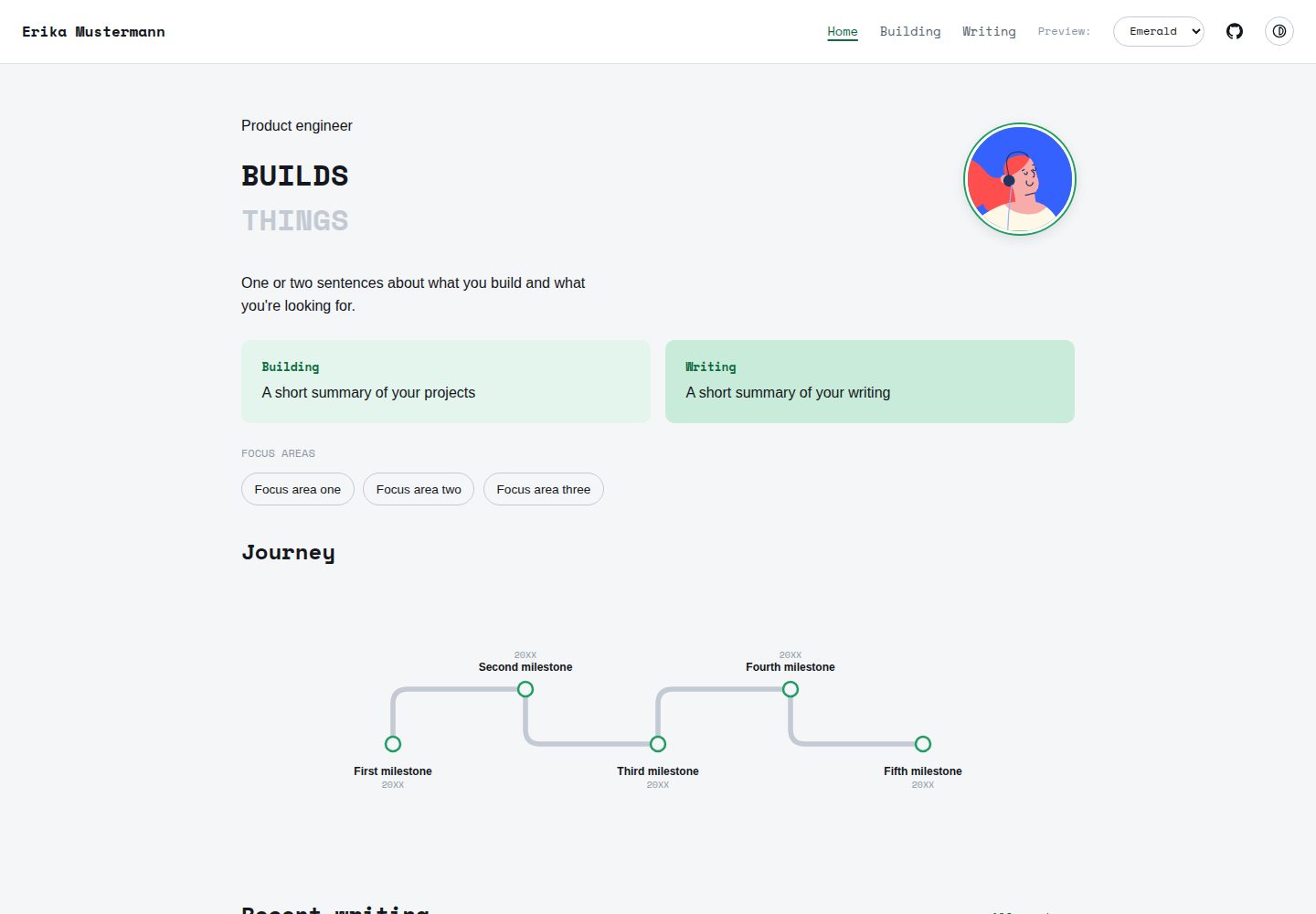
Site structure information is centralized in src/config.ts, where name, homepage copy, timeline, projects, and footer links are edited
AstroPortfolio
pinefold — Astro Portfolio Template
By anoopsmn
Pinefold is a minimal Astro portfolio theme that keeps site content in a single config file and a Markdown writing directory, with six built-in palettes, light and dark modes, and content collections.
Explore the design
Compare the page layouts and mobile experience. Open any screenshot for a closer look.
Desktop homepage1 / 3
Desktop captureTop of page
Actual screenshot captured by the server browser.
All pages & views 3
Screenshots show visual appearance; interactive behavior may differ.
Recorded 2026-10-13View source
What stands out
A quick read of the recorded project description.
Writing content is placed as Markdown in src/content/writing/ with typed frontmatter fields, requiring no routing changes
Six built-in palettes are switched via site.palette in config.ts, all adapting to light and dark modes
The homepage timeline curve is generated from data at build time, with shape and spacing adjusting automatically when entries are added or removed
Drafts are visible in the development server and automatically excluded from production builds, with previous/next navigation generated automatically
SEO tags such as Open Graph, Twitter Card, canonical links, and a sitemap are already integrated
Template Details
Pinefold is a minimal portfolio theme built with Astro. Its design approach is to centralize site data in one place: name, homepage copy, timeline entries, projects, focus areas, and footer links are all written in src/config.ts, while writing content is stored as Markdown files in src/content/writing/, so adding an article requires no changes to routing or configuration. The theme does not depend on a CMS or database, and the build command is simply astro build.
The theme provides six built-in palettes (emerald, warm, slate, mono, ink, forest), switched by setting site.palette in config.ts, and each palette adapts to the built-in light/dark mode toggle. The homepage timeline curve is generated at build time from data by src/lib/timelinePath.ts; when entries are added or removed, the shape, node spacing, and label wrapping adjust accordingly. The writing section uses content collections with typed frontmatter fields (title, description, date, draft, tags); drafts are visible in the development server and automatically excluded from production builds, and previous/next navigation between articles is generated automatically. Mobile navigation is a pure CSS collapsible menu with no client-side routing or JavaScript framework. For SEO, Open Graph, Twitter Card, canonical links, and a sitemap are already integrated.
Before use, note the following: the footer Resume link points to public/resume.pdf, but the theme does not include that file, so you need to add your own PDF or remove the item from footerLinks in config.ts. The placeholder avatar in the demo screenshots comes from a third-party avatar project, and third-party assets such as demo images, fonts, and icons must be checked against their respective licenses. The theme outputs static files and can be deployed to any platform that serves static files; the README mentions that Vercel, Netlify, and Cloudflare Pages can be deployed with default configurations.
AstroPortfolio
Is it right for your project?
Use Cases
- Personal portfolios and personal homepages showcasing projects, focus areas, and timeline experience
- A writing section for publishing technical or essay articles, with content managed in Markdown
- Static sites that need light/dark mode and quick switching between multiple palettes
- Deployment to static hosting platforms such as Vercel, Netlify, or Cloudflare Pages
Suitable For
- Individual developers or writers who want to maintain site content with a single config file
- Users who prefer writing in Markdown and do not want to introduce a CMS or database
- Static site projects using Astro that need portfolio and writing modules
Getting started & customization
Use these recorded setup notes alongside the repository instructions for your chosen version.
- 1
After cloning the repository, run npm install, then use npm run dev to start the development server at localhost:4321
- 2
The footer Resume link requires you to place a PDF at public/resume.pdf yourself, or remove the item from footerLinks in config.ts
- 3
To add an article, simply add a Markdown file in src/content/writing/ with frontmatter containing title, description, date, draft, and tags
- 4
To add a seventh palette, copy a palette block from src/styles/palettes.css and name it, then add the name to the type union in config.ts
- 5
The build command is npm run build, which first performs type checking and outputs to dist/; drafts are not included in production builds
License & source material
Usage conditions & limitations
Free to use · keep license noticeThis entry covers the free version under the MIT license in the public repository; the free scope is the code of that version and does not mean external services or third-party assets are free.
Must comply with when using
- You may use, modify, commercialize, and distribute the code of this version for free.
- When distributing copies or substantial portions of the code, retain the original author's copyright notice and the full MIT license notice.
- The code is provided as is; warranties and limitations of liability are governed by the original license and applicable law.
Additional costs & items to verify
- Demo images, fonts, icons, and other third-party assets must be checked against their respective licenses and cannot be judged solely by the code's MIT license.
- External services such as domains, hosting, databases, payments, or AI may incur separate charges.
- The footer Resume link points to public/resume.pdf, but the theme does not include that file; you need to add your own PDF or remove the item from footerLinks in config.ts.
- The placeholder avatar comes from the third-party project Alohe's Avatars; using that asset requires following its own license, not the theme's MIT license.
View Original Text Basis
Permission is hereby granted, free of charge
Original License Text
The footer's "Resume" link expects a file at `public/resume.pdf` — the theme doesn't ship one, so add your own PDF there (or remove that entry from `footerLinks` in `config.ts` if you don't want a resume link at all).
Original README
https://github.com/anoopsmn/pinefold/blob/main/LICENSEhttps://github.com/anoopsmn/pinefold/blob/main/README.mdThe placeholder avatar is from [Alohe's Avatars](https://alohe.github.io/avatars/).
Original README
Compiled by DeepSeek based on repository license and README ·2026-10-13. Results only cover the materials read; dependencies, images, fonts, and subsequent term changes are subject to their respective original texts.
Project checks & description sources
Template Information
- Source platforms
- GitHub
- Documentation and maintenance reference score
- More documented · 80 / 100
- Technologies
- Astro
- Website type
- Portfolio
How this score is calculated
Our heuristic uses license records (up to 30), a demo link (12), a preview (10), stars (15), recorded maintenance (15), description completeness (8), feature records (5) and classification data (5). It is not a code, security or performance test, or a Google score. A link does not establish tested functionality.
What to verify for this project
- Repository update recorded
- 2026-07-28
- Screenshot last checked
- 2026-10-13
A demo link is listed. Check it with your own content and viewport sizes; its presence does not confirm that forms, authentication or payments work.
The catalog identifies Astro as the primary stack. Check the actual dependency manifest and lockfile for versions and hosting requirements. These notes use recorded metadata, not a code audit or a deployment test.
Use a selection guide →How this description was prepared
AI-assisted description based on catalog records and repository material. Repository authors are not automatically the reviewers of this description.
Review declaration: [email protected] · 2026-10-13
Inspect the recorded source material
SHA-256: 72da979e859ad8c508ac6ed371bffd7f87a104bfbc5dddbf430c40c68af0e62f
2026-10-13T00:33:20.675Z
Source file / repository# Pinefold


A minimal Astro portfolio theme built around one idea: your data lives in
a single config file and a folder of markdown posts, and nothing else
needs to be touched to make the site yours. No CMS, no database, no
build step beyond `astro build`.
**[Live demo →](https://pinefold.vercel.app)**
<img src="./docs/screenshot-pages.png" alt="Pinefold — Home, Building, Writing, and a post" width="800" />
## Features
- Six built-in color palettes, switchable with one line in config <img src="./docs/palette-demo.gif" alt="Switching palettes live" width="600" />
- Light/dark mode, no flash of the wrong theme on load, persisted across visits
- A timeline component that generates its own curve from your data — add or remove milestones and the shape adjusts, nothing is hand-drawn
- Content collections for writing, with typed frontmatter (title, description, date, draft, tags)
- Draft posts stay visible while you're running the dev server and disappear from the production build automatically
- Prior/next post navigation, generated from your post list, no manual linking
- Mobile navigation with a CSS-only collapsible menu — no JavaScript framework, no client-side router
- SEO tags (Open Graph, Twitter Card, canonical URL, sitemap) wired up out of the box
- Every color in every component reads from CSS variables — there is no hardcoded hex value anywhere outside the palette definitions themselves
## Project structure
```
/
├── public/
│ └── favicon.svg
├── src/
│ ├── components/
│ │ ├── Nav.astro
│ │ ├── ThemeToggle.astro
│ │ ├── BackToTop.astro
│ │ ├── ToolCard.astro
│ │ └── Timeline.astro
│ ├── content/
│ │ └── writing/ # your posts live here, one markdown file each
│ ├── content.config.ts # the writing collection's schema
│ ├── layouts/
│ │ └── Layout.astro
│ ├── lib/
│ │ └── timelinePath.ts # the curve-generation math behind Timeline.astro
│ ├── pages/
│ │ ├── index.astro
│ │ ├── building.astro
│ │ └── writing/
│ ├── styles/
│ │ ├── global.css
│ │ └── palettes.css # all six color palettes live here
│ └── config.ts # the one file to edit — see below
├── astro.config.mjs
└── package.json
```
## Make it yours
Everything structural lives in **`src/config.ts`**: your name, hero copy,
timeline milestones, projects, focus areas, and footer links.
```typescript
export const site = {
name: "Your Name",
url: "https://yourname.github.io",
palette: "warm", // see Palettes below
};
```
The footer's "Resume" link expects a file at `public/resume.pdf` — the
theme doesn't ship one, so add your own PDF there (or remove that entry
from `footerLinks` in `config.ts` if you don't want a resume link at all).
### Adding a blog post
Drop a markdown file into `src/content/writing/` — no route or config
change needed, it's picked up automatically:
```markdown
---
title: "Your post title"
description: "One sentence for the post list and SEO."
date: 2026-01-01
draft: false
tags: ["example"]
---
Your post content here.
```
### Palettes
Six built-in options, set via `site.palette` in `config.ts`:
| Name | Feel |
|---|---|
| `emerald` | Cool, clean, technical |
| `warm` | Warm paper tone, terracotta accent |
| `slate` | Indigo-blue, conventional/professional |
| `mono` | Black and white, no color |
| `ink` | Dark-first, amber accent |
| `forest` | Muted green, cream paper |
Each works correctly with the built-in light/dark toggle. To add a
seventh, copy any block in `src/styles/palettes.css`, give it a new
`[data-palette="..."]` name, and add that name to the type union in
`config.ts`.
### Timeline curve
The rounded route on the homepage timeline is generated from your data
at build time, not hand-drawn — the shape, node spacing, and label
wrapping all adjust automatically as you add or remove entries. The
generator lives in `src/lib/timelinePath.ts`, independent of Astro, if
you ever want to reuse it elsewhere.
## Running locally
```bash
git clone https://github.com/anoopsmn/pinefold.git
cd pinefold
npm install
npm run dev
```
| Command | Action |
|---|---|
| `npm install` | Install dependencies |
| `npm run dev` | Start the dev server at `localhost:4321`, drafts visible |
| `npm run build` | Type-check and build the production site to `dist/`, drafts excluded |
| `npm run preview` | Preview the production build locally before deploying |
## Deploying
Static output — works anywhere that serves static files. Connect the
repo to Vercel, Netlify, or Cloudflare Pages and deploy with the
defaults, no extra configuration needed.
## Feedback
Found a bug or have a suggestion? Open an issue.
## Credits
The placeholder avatar is from [Alohe's Avatars](https://alohe.github.io/avatars/).
## License
MITExplore similar templates
Compare previews and descriptions within the same stack and category.

astro-theme-cactus
Astro Cactus is an Astro-based blog and portfolio theme that uses Markdown/MDX content collections to manage posts, notes, and tags, with frontmatter type-checked by a schema.
Astro · Portfolio

astrofy
Astrofy is a free and open-source personal portfolio website template built with Astro and TailwindCSS, with built-in blog, CV timeline, project showcase, store, and RSS feed modules.
Astro · Portfolio

astro-nano
Astro Nano is a static, minimalist portfolio and blog template built with Astro, Tailwind, and TypeScript without frontend frameworks. It includes light/dark themes, animated UI, automatic sitemap and RSS feed generation, and Markdown/MDX support with component imports.
Astro · Portfolio

astro-erudite
astro-erudite is an opinionated, unstyled static blog template built with Astro and native CSS, with no UI or CSS framework and minimal dependencies.
Astro · Portfolio

astro-sphere
Astro Sphere is a static, minimalist portfolio and blog theme maintained by markhorn-dev, built mainly with Astro, Tailwind, and TypeScript, with a small amount of SolidJS for stateful components.
Astro · Portfolio

astro-micro
Astro Micro is a framework-free blog and portfolio theme for Astro, forked from Astro Nano. It adds Pagefind search and Giscus comments while retaining type safety, sitemap, RSS, Markdown and MDX support, and TailwindCSS with system, light, and dark themes.
Astro · Portfolio