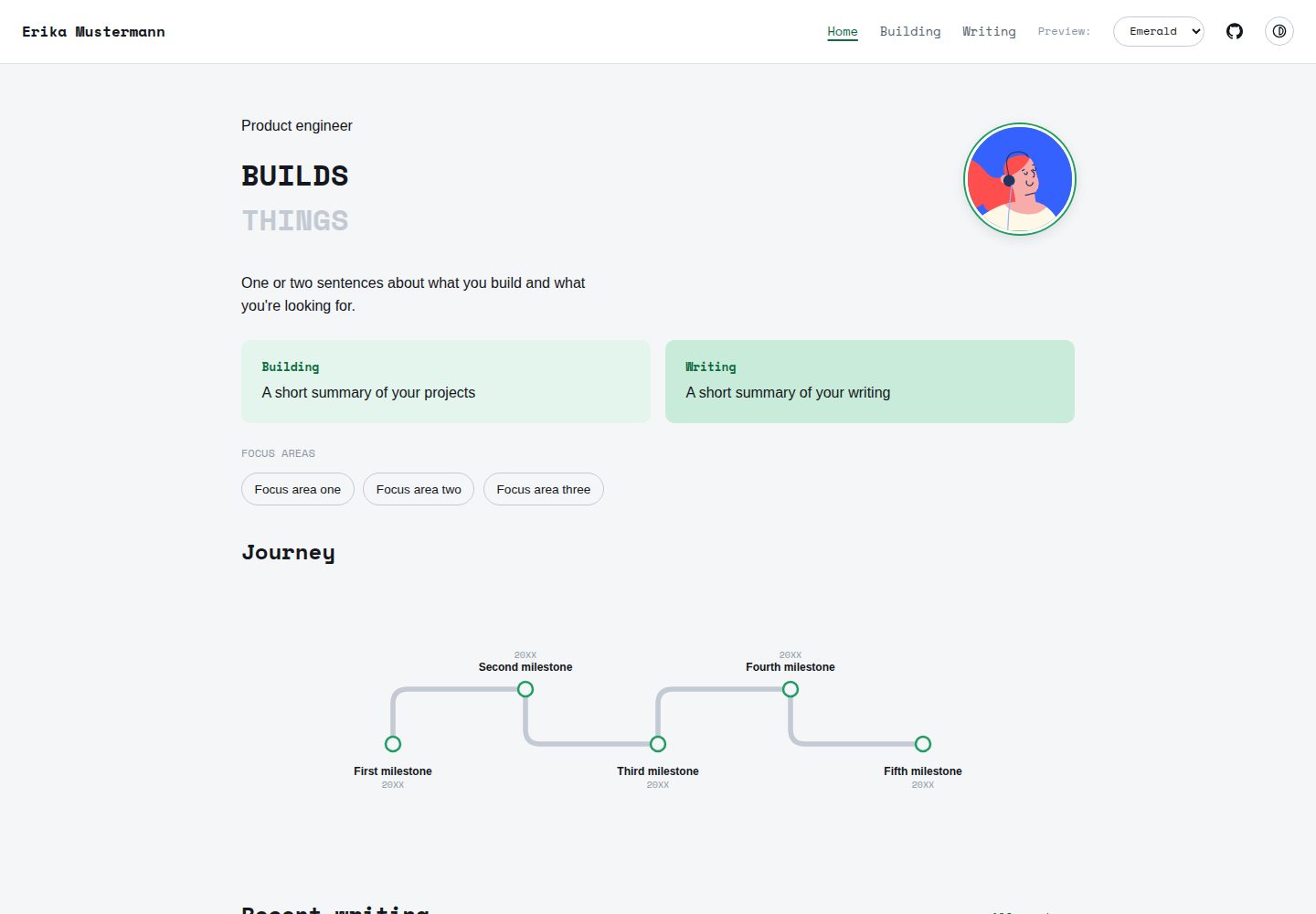
站点结构信息集中在 src/config.ts,姓名、首页文案、时间线、项目与页脚链接都在此修改
Astro作品集
pinefold — Astro 作品集模板
作者 anoopsmn
Pinefold 是一个基于 Astro 的极简作品集主题,站点内容集中在单个配置文件与 Markdown 写作目录中,内置六套配色、明暗模式与内容集合。
看看你的网站会是什么样
浏览真实页面截图,比较内容排版与手机效果。点击下方缩略图切换,放大查看整页细节。
全部页面与视图 3
截图用于了解视觉与布局,交互效果请以实际项目为准。
采集于 2026-10-13查看来源
值得关注的模板亮点
从已有项目资料中,快速了解它的特点。
写作内容以 Markdown 放入 src/content/writing/,使用带类型的前言字段,无需改动路由
内置六套配色,通过 config.ts 的 site.palette 切换,均适配明暗模式
首页时间线曲线在构建时由数据生成,增删节点后形状与间距自动调整
草稿在开发服务器可见、生产构建自动排除,并自动生成上一篇/下一篇导航
已接入 Open Graph、Twitter Card、规范链接与站点地图等 SEO 标签
模板详细介绍
Pinefold 是一个以 Astro 构建的极简作品集主题。它的设计思路是把站点数据集中到一处:姓名、首页文案、时间线节点、项目、关注领域和页脚链接都写在 src/config.ts 中,写作内容则以 Markdown 文件形式放在 src/content/writing/ 目录,新增文章无需改动路由或配置。主题不依赖 CMS 或数据库,构建命令就是 astro build。
主题提供六套内置配色(emerald、warm、slate、mono、ink、forest),通过在 config.ts 中设置 site.palette 切换,每套配色都适配内置的明暗模式切换。首页时间线的曲线由 src/lib/timelinePath.ts 在构建时根据数据生成,增删节点时形状、节点间距与标签换行会随之调整。写作部分使用内容集合与带类型的前言字段(title、description、date、draft、tags),草稿在开发服务器中可见,在生产构建中自动排除;文章之间会自动生成上一篇/下一篇导航。移动端导航为纯 CSS 折叠菜单,不引入客户端路由或 JavaScript 框架。SEO 方面已接入 Open Graph、Twitter Card、规范链接与站点地图。
使用前需注意:页脚的 Resume 链接指向 public/resume.pdf,主题本身不附带该文件,需要自行放入 PDF 或从 config.ts 的 footerLinks 中移除该项。演示截图中的占位头像来自第三方头像项目,演示图片、字体、图标等第三方素材需按各自许可核对。主题为静态输出,可部署到任何提供静态文件服务的平台,README 提到 Vercel、Netlify 和 Cloudflare Pages 可用默认配置部署。
Astro作品集
适合你的项目吗?
适用场景
- 个人作品集与个人主页,展示项目、关注领域与时间线经历
- 发布技术或随笔文章的写作栏目,用 Markdown 管理内容
- 需要明暗模式和多种配色快速切换的静态站点
- 部署到 Vercel、Netlify 或 Cloudflare Pages 等静态托管平台
适合人群
- 希望用单个配置文件维护站点内容的个人开发者或写作者
- 偏好 Markdown 写作、不想引入 CMS 或数据库的用户
- 使用 Astro 并需要作品集与写作模块的静态站点项目
上手与定制指南
结合仓库当前版本的说明,按下面的资料检查内容、配置与运行要求。
- 1
克隆仓库后执行 npm install,再用 npm run dev 在 localhost:4321 启动开发服务器
- 2
页脚 Resume 链接需要自行在 public/resume.pdf 放置 PDF,或从 config.ts 的 footerLinks 中删除该项
- 3
新增文章只需在 src/content/writing/ 添加 Markdown 文件,前言包含 title、description、date、draft、tags
- 4
添加第七套配色需复制 src/styles/palettes.css 中的配色块并命名,再把名称加入 config.ts 的类型联合
- 5
构建命令为 npm run build,会先做类型检查并输出到 dist/,草稿不会进入生产构建
授权与来源资料
使用条件与限制
免费使用 · 保留许可声明本次收录的是公开仓库中采用 MIT 许可的免费版本;免费范围为该版本代码,不代表外部服务或第三方素材免费。
使用时需要遵守
- 允许免费使用、修改、商用和分发该版本代码。
- 分发代码副本或实质性部分时,保留原作者版权声明和完整 MIT 许可声明。
- 代码按现状提供;担保与责任限制以原许可证及适用法律为准。
额外费用与待核对事项
- 演示图片、字体、图标及其他第三方素材需按各自许可核对,不能仅凭代码的 MIT 许可判断。
- 域名、托管、数据库、支付或 AI 等外部服务可能另外收费。
- 页脚 Resume 链接指向 public/resume.pdf,主题不附带该文件,需自行放入 PDF,或从 config.ts 的 footerLinks 中移除该项。
- 占位头像来自第三方项目 Alohe's Avatars,使用该素材需遵循其自身许可,而非本主题的 MIT 许可。
查看原文依据
Permission is hereby granted, free of charge
许可证原文
The footer's "Resume" link expects a file at `public/resume.pdf` — the theme doesn't ship one, so add your own PDF there (or remove that entry from `footerLinks` in `config.ts` if you don't want a resume link at all).
README 原文
https://github.com/anoopsmn/pinefold/blob/main/LICENSEhttps://github.com/anoopsmn/pinefold/blob/main/README.mdThe placeholder avatar is from [Alohe's Avatars](https://alohe.github.io/avatars/).
README 原文
DeepSeek 根据仓库许可证和 README 整理 ·2026-10-13。结果仅覆盖已读取资料,依赖、图片、字体及后续条款变更以各自原文为准。
项目核对记录与介绍依据
模板资料
- 来源平台
- GitHub
- 资料与维护参考分
- 资料较完整 · 80 / 100
- 技术栈
- Astro
- 网站类型
- 作品集
这个分数如何计算
本站按许可资料(最高30分)、演示链接(12分)、预览图(10分)、Star数(15分)、记录的维护时间(15分)、描述完整度(8分)、功能记录(5分)和分类资料(5分)计算。它不是代码、安全或性能测试,也不是 Google 评分;有链接不代表已实测可用。
这个项目需要核对什么
- 记录的仓库更新时间
- 2026-07-28
- 截图检查日期
- 2026-10-13
已收录演示链接。请用你的内容与屏幕尺寸检查;有演示不代表表单、认证或支付已经可用。
目录记录的主要技术栈是 Astro。请通过依赖清单和锁文件核对实际版本与托管要求。这些说明基于收录资料,不代表代码审计或部署实测。
查看具体选型方法 →介绍的制作与核对状态
介绍由 AI 辅助整理目录与仓库资料。仓库作者不等于这篇介绍的审核者。
审核声明: [email protected] · 2026-10-13
查看当时使用的来源资料
SHA-256: 72da979e859ad8c508ac6ed371bffd7f87a104bfbc5dddbf430c40c68af0e62f
2026-10-13T00:33:20.675Z
来源文件 / 仓库# Pinefold


A minimal Astro portfolio theme built around one idea: your data lives in
a single config file and a folder of markdown posts, and nothing else
needs to be touched to make the site yours. No CMS, no database, no
build step beyond `astro build`.
**[Live demo →](https://pinefold.vercel.app)**
<img src="./docs/screenshot-pages.png" alt="Pinefold — Home, Building, Writing, and a post" width="800" />
## Features
- Six built-in color palettes, switchable with one line in config <img src="./docs/palette-demo.gif" alt="Switching palettes live" width="600" />
- Light/dark mode, no flash of the wrong theme on load, persisted across visits
- A timeline component that generates its own curve from your data — add or remove milestones and the shape adjusts, nothing is hand-drawn
- Content collections for writing, with typed frontmatter (title, description, date, draft, tags)
- Draft posts stay visible while you're running the dev server and disappear from the production build automatically
- Prior/next post navigation, generated from your post list, no manual linking
- Mobile navigation with a CSS-only collapsible menu — no JavaScript framework, no client-side router
- SEO tags (Open Graph, Twitter Card, canonical URL, sitemap) wired up out of the box
- Every color in every component reads from CSS variables — there is no hardcoded hex value anywhere outside the palette definitions themselves
## Project structure
```
/
├── public/
│ └── favicon.svg
├── src/
│ ├── components/
│ │ ├── Nav.astro
│ │ ├── ThemeToggle.astro
│ │ ├── BackToTop.astro
│ │ ├── ToolCard.astro
│ │ └── Timeline.astro
│ ├── content/
│ │ └── writing/ # your posts live here, one markdown file each
│ ├── content.config.ts # the writing collection's schema
│ ├── layouts/
│ │ └── Layout.astro
│ ├── lib/
│ │ └── timelinePath.ts # the curve-generation math behind Timeline.astro
│ ├── pages/
│ │ ├── index.astro
│ │ ├── building.astro
│ │ └── writing/
│ ├── styles/
│ │ ├── global.css
│ │ └── palettes.css # all six color palettes live here
│ └── config.ts # the one file to edit — see below
├── astro.config.mjs
└── package.json
```
## Make it yours
Everything structural lives in **`src/config.ts`**: your name, hero copy,
timeline milestones, projects, focus areas, and footer links.
```typescript
export const site = {
name: "Your Name",
url: "https://yourname.github.io",
palette: "warm", // see Palettes below
};
```
The footer's "Resume" link expects a file at `public/resume.pdf` — the
theme doesn't ship one, so add your own PDF there (or remove that entry
from `footerLinks` in `config.ts` if you don't want a resume link at all).
### Adding a blog post
Drop a markdown file into `src/content/writing/` — no route or config
change needed, it's picked up automatically:
```markdown
---
title: "Your post title"
description: "One sentence for the post list and SEO."
date: 2026-01-01
draft: false
tags: ["example"]
---
Your post content here.
```
### Palettes
Six built-in options, set via `site.palette` in `config.ts`:
| Name | Feel |
|---|---|
| `emerald` | Cool, clean, technical |
| `warm` | Warm paper tone, terracotta accent |
| `slate` | Indigo-blue, conventional/professional |
| `mono` | Black and white, no color |
| `ink` | Dark-first, amber accent |
| `forest` | Muted green, cream paper |
Each works correctly with the built-in light/dark toggle. To add a
seventh, copy any block in `src/styles/palettes.css`, give it a new
`[data-palette="..."]` name, and add that name to the type union in
`config.ts`.
### Timeline curve
The rounded route on the homepage timeline is generated from your data
at build time, not hand-drawn — the shape, node spacing, and label
wrapping all adjust automatically as you add or remove entries. The
generator lives in `src/lib/timelinePath.ts`, independent of Astro, if
you ever want to reuse it elsewhere.
## Running locally
```bash
git clone https://github.com/anoopsmn/pinefold.git
cd pinefold
npm install
npm run dev
```
| Command | Action |
|---|---|
| `npm install` | Install dependencies |
| `npm run dev` | Start the dev server at `localhost:4321`, drafts visible |
| `npm run build` | Type-check and build the production site to `dist/`, drafts excluded |
| `npm run preview` | Preview the production build locally before deploying |
## Deploying
Static output — works anywhere that serves static files. Connect the
repo to Vercel, Netlify, or Cloudflare Pages and deploy with the
defaults, no extra configuration needed.
## Feedback
Found a bug or have a suggestion? Open an issue.
## Credits
The placeholder avatar is from [Alohe's Avatars](https://alohe.github.io/avatars/).
## License
MIT看看同类模板
对比同技术栈与用途的模板,找到更适合的视觉与内容结构。

astro-theme-cactus
A simple Astro theme. Use it to create your blog or website.
Astro · 作品集

astrofy
Astrofy is a free and open-source template for your Personal Portfolio Website built with Astro and TailwindCS…
Astro · 作品集

astro-nano
Astro Nano is a static, minimalist, lightweight, lightning fast portfolio and blog.
Astro · 作品集

astro-erudite
An opinionated, unstyled static blogging template built with Astro and native CSS.
Astro · 作品集

astro-sphere
Astro Sphere is a static, minimalist, lightweight, lightning fast portfolio and blog.
Astro · 作品集

astro-micro
Blog theme for Astro with search and comments built-in. Zero frameworks.
Astro · 作品集