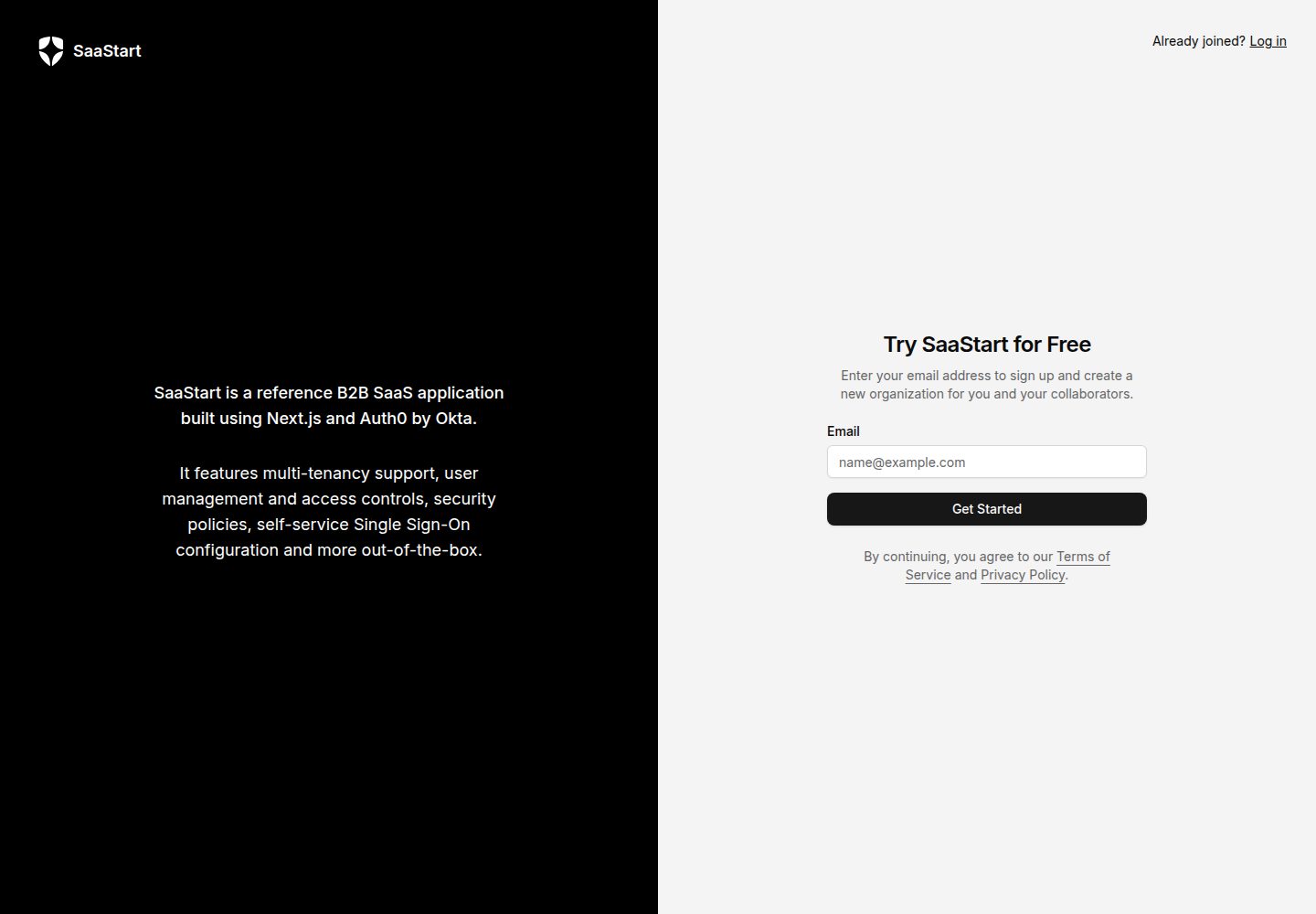
A full-stack sample application based on Next.js and Radix UI, with code that can be used directly as a B2B SaaS starting point
Next.jsReactSaaSStarter
auth0-b2b-saas-starter — Next.js SaaS Template
By auth0-developer-hub
An official Auth0 sample project that builds a B2B SaaS starter application with Next.js and Radix UI, including built-in multi-tenancy, organization member management, and SSO configuration identity capabilities.
Explore the design
Compare the page layouts and mobile experience. Open any screenshot for a closer look.
Desktop homepage1 / 2
Desktop captureTop of page
Actual screenshot captured by the server browser.
All pages & views 2
Screenshots show visual appearance; interactive behavior may differ.
Recorded 2026-10-01View source
What stands out
A quick read of the recorded project description.
Supports multi-tenancy: users share the same user store, and an organization can be created during registration
Organization member management: invite users, assign roles, and delete users
Self-service enterprise SSO configuration, supporting OIDC and SAML, with optional SCIM directory synchronization
Configurable MFA security policies, including MFA factor selection and email domain exemptions
Provides an Auth0 CLI bootstrap script that automatically configures the Auth0 tenant and generates local environment variables
Template Details
SaaStart is a B2B SaaS starter sample provided by Auth0, built with Next.js and Radix UI, used to demonstrate how to integrate Auth0's identity capabilities into products aimed at enterprise customers. It provides interfaces and flows for creating an organization during registration, inviting members, role and permission management, self-service SSO configuration, MFA security policies, and organization switching, helping developers skip the initial setup work of SaaS identity management.
The project uses an Auth0 CLI bootstrap script to automatically create applications, roles, Actions, email and login templates in a new Auth0 tenant and enable MFA factors, then generates a local environment variable file. The README explicitly requires using a brand-new Auth0 tenant to avoid conflicts with existing configurations.
Note that some capabilities are marked as "coming soon" in the README, such as API client self-service management, session lifetime, and administrator break-glass access; these features are not yet available in the current version.
Next.jsSaaSStarter
Is it right for your project?
Use Cases
- Build an identity foundation with organization and member management for a B2B SaaS product
- Demonstrate or verify how to integrate Auth0 multi-tenancy, SSO, and MFA policies
- Run and modify the sample code locally as a starting point for a self-built SaaS application
- Deploy the sample with one click on Vercel to quickly see how it runs in practice
Suitable For
- Developers building B2B SaaS who need multi-tenant identity capabilities
- Teams that want to reference the official Auth0 sample to integrate organizations, SSO, and MFA
- Engineers who need a runnable, modifiable Next.js identity management starter project
Getting started & customization
Use these recorded setup notes alongside the repository instructions for your chosen version.
- 1
Requires Node.js v20 or higher, and a package manager such as npm
- 2
A new Auth0 tenant must be created; the bootstrap script writes configuration, and using an existing tenant may cause conflicts
- 3
The Auth0 CLI must be installed and logged in, granting permissions such as updating tenant settings, creating connections, and client grants during login
- 4
Run npm run auth0:bootstrap to automatically configure the tenant and generate .env.local, then run npm run dev to start the local service
- 5
The code uses the MIT license, but third-party assets such as demo images, fonts, and icons, as well as external services, require separate verification of licensing and costs
License & source material
Usage conditions & limitations
Free to use · keep license noticeThis entry covers the free version under the MIT license in the public repository; the free scope is the code of this version and does not mean that external services or third-party assets are free.
Must comply with when using
- Allows free use, modification, commercial use, and distribution of this version of the code.
- When distributing copies or substantial portions of the code, retain the original author's copyright notice and the complete MIT license notice.
- The code is provided as is; warranties and limitations of liability are governed by the original license and applicable law.
Additional costs & items to verify
- A new Auth0 tenant must be created before use; the bootstrap script writes configuration, and running it on an existing tenant may cause configuration conflicts or alter existing settings.
- Local running requires installing Node.js v20 or higher and a package manager such as npm yourself.
- The Auth0 CLI must additionally be installed and logged in; the bootstrap script depends on it to create tenant resources.
- When logging in to the Auth0 CLI, administrative permissions such as updating tenant settings, creating connections and client grants, creating email templates, and updating MFA factors must be granted.
- The bootstrap command can only be executed on a new tenant; otherwise it will modify or pollute the configuration of an existing Auth0 tenant.
- API client self-service creation/deletion is marked as coming soon and is not yet available in the current version.
- Session lifetime configuration is marked as coming soon and is not yet available in the current version.
- Administrator break-glass access is marked as coming soon and is not yet available in the current version.
- When testing transactional emails or email verification flows, you need to integrate an external email platform yourself, which may incur additional services and costs.
- Demo images, fonts, icons, and other third-party assets must be checked against their respective licenses and cannot be judged solely by the code's MIT license.
- External services such as domains, hosting, databases, payments, or AI may incur separate charges.
View Original Text Basis
Permission is hereby granted, free of charge
Original License Text
Create a new Auth0 tenant. **This is important!** Using a new Auth0 tenant for this sample application ensures you don't encounter any conflicts due to existing configuration in an existing tenant.
Original README
You must have [`npm`](https://docs.npmjs.com/downloading-and-installing-node-js-and-npm) or a comparable package manager installed in your development environment.
Original README
You will need to install the Auth0 CLI. It will be used by the bootstrap script to create the resources needed for this sample in your Auth0 tenant.
Original README
auth0 login --scopes "update:tenant_settings,create:connections,create:client_grants,create:email_templates,update:guardian_factors"
Original README
Only run the following command on a newly created tenant to avoid changing existing configuration or introducing conflicting elements to your existing Auth0 tenants!
Original README
API client management with self-service create/delete capabilities _(coming soon)_
Original README
Session lifetime _(coming soon)_
Original README
Break-glass access for admin roles _(coming soon)_
Original README
https://github.com/auth0-developer-hub/auth0-b2b-saas-starter/blob/main/LICENSEhttps://github.com/auth0-developer-hub/auth0-b2b-saas-starter/blob/main/README.mdUsing an email platform for testing transactional emails (or different workflows that require email verification)
Original README
Compiled by DeepSeek based on repository license and README ·2026-10-01. Results only cover the materials read; dependencies, images, fonts, and subsequent term changes are subject to their respective original texts.
Project checks & description sources
Template Information
- Source platforms
- GitHub
- Documentation and maintenance reference score
- More documented · 96 / 100
- Technologies
- Next.js · React
- Website type
- SaaS · Starter
How this score is calculated
Our heuristic uses license records (up to 30), a demo link (12), a preview (10), stars (15), recorded maintenance (15), description completeness (8), feature records (5) and classification data (5). It is not a code, security or performance test, or a Google score. A link does not establish tested functionality.
What to verify for this project
- Repository update recorded
- 2026-08-11
- Screenshot last checked
- 2026-10-01
A demo link is listed. Check it with your own content and viewport sizes; its presence does not confirm that forms, authentication or payments work.
The catalog identifies Next.js as the primary stack. Check the actual dependency manifest and lockfile for versions and hosting requirements. These notes use recorded metadata, not a code audit or a deployment test.
Use a selection guide →How this description was prepared
AI-assisted description based on catalog records and repository material. Repository authors are not automatically the reviewers of this description.
Automatically checked against source and license rules; no manual editorial review.
Inspect the recorded source material
SHA-256: 051761f79b67d9f7122c93b3af472e747ccf5e9a6b5df65a6114d36c233349bb
2026-10-01T01:14:45.506Z
Source file / repository# **SaaStart** from Auth0 A secure and high-performance starting point for building modern B2B SaaS web applications. ## Jump to a section * [Target Use Case](#target-use-case) * [Deploy to Vercel](#deploy-to-vercel-in-one-click) * [Installation for Local Development](#installation-for-local-development) * [B2B Identity Features to Explore](#b2b-identity-features-to-explore) * [Advanced Topics](#advanced-topics) * [Learn More](#advanced-topics) * [Contributing](#contributing) ## Overview  > [!TIP] > Ready to begin? Jump ahead to the [Getting Started](#getting-started) section. This sample application provides developers with a solid foundation to kickstart their journey into building a business-to-business software-as-a-service (B2B SaaS) application. With a carefully selected stack of well-documented and widely adopted technologies, along with seamless integration with Auth0 for identity and login management, this starter kit aims to streamline the development process and enable developers to focus on building out their core product instead of worrying about the complexities of SaaS identity management and secure customer onboarding. It incorporates best practices and industry-standard technologies to provide a robust and scalable solution for building secure software, with all the capabilities needed to be competitive, resilient, and scalable. The project includes the architecture and components you need to get started, authentication and authorization powered by Auth0, and deployment instructions that make it easy to move to staging or production when you're ready. ## Target Use Case Use this to bootstrap a SaaS application with the following commonly needed capabilities: - Multi-tenancy with a single pool of users in a shared user database (see: [Multiple Organization Architecture](https://auth0.com/docs/get-started/architecture-scenarios/multiple-organization-architecture#users-shared-between-organizations)) - Sign up with tenant ([Organization](https://auth0.com/docs/manage-users/organizations)) creation - Logged in / Logged out product landing page experience - User management with invitation workflows, create/delete user capabilities, and RBAC roles - Self-service user profile management, password reset, and MFA configuration - Self-service Enterprise Single Sign-On (SSO) configuration using - OIDC - SAML - Ability for end-users to verify domain ownership before associating their email domains with [home realm discovery](https://auth0.com/docs/authenticate/login/auth0-universal-login/identifier-first#define-home-realm-discovery-identity-providers) - Just-in-time user provisioning OR automatic directory sync with SCIM - API client management with self-service create/delete capabilities _(coming soon)_ - Configurable security policies: - Enforce MFA - Session lifetime _(coming soon)_ - Break-glass access for admin roles _(coming soon)_ ## Deploy to Vercel [](https://vercel.com/new/clone?repository-url=https://github.com/auth0-developer-hub/auth0-b2b-saas-starter&repository-name=auth0-saas-starter&external-id=b2b-saas-starter-template&integration-ids=oac_7V7TGP5JUHCpSncpiy3XWwL0) ## Installation for Local Development ### Prerequisites 1. Node.js v20 or later is required to run the bootstrapping process. We recommend using [`nvm`](https://github.com/nvm-sh/nvm) to manage node versions in your development environment. Click these links to [learn how to install nvm](https://github.com/nvm-sh/nvm?tab=readme-ov-file#install--update-script) or [how to use nvm](https://github.com/nvm-sh/nvm?tab=readme-ov-file#usage) to make sure you're using Node 20+ in your development environment. 2. You must have [`npm`](https://docs.npmjs.com/downloading-and-installing-node-js-and-npm) or a comparable package manager installed in your development environment. These instructions assume that you're using `npm`, which is automatically included as part of the Node.js installation from prerequisite 1. 3. Create a new Auth0 tenant. **This is important!** Using a new Auth0 tenant for this sample application ensures you don't encounter any conflicts due to existing configuration in an existing tenant. The tenant you create will be configured automatically by our bootstrapping command during the installation process. You can sign up for a free Auth0 account at [https://auth0.com/signup](https://auth0.com/signup?utm_source=github&utm_medium=thirdpartyutm_campaign=saastart). See [Create Tenants](https://auth0.com/docs/get-started/auth0-overview/create-tenants) in the Auth0 docs if you need help. Once you've created a tenant, nothing else needs to be done inside Auth0 - you can return to this README.md and begin completing the steps below. ### Step One: Clone and install dependencies 1. Clone this repo to your development environment. To do this, navigate to a directory where you want to work in a terminal program, and run the following command: ```shell git clone https://github.com/auth0-developer-hub/auth0-b2b-saas-starter.git ``` 2. Navigate into the directory by typing the following command: ```shell cd auth0-b2b-saas-starter ``` 3. Install dependencies for the project using your favorite package manager. For example, if you're using npm, check that you're on the correct version of node: ```shell node -v ``` This should return a version number higher than v20. If you have an earlier version installed, return to the prerequisites and follow step 1. Otherwise, continue: ```shell npm install ``` ### Step Two: Install and log in with the Auth0 CLI This project uses the [Auth0 CLI](https://github.com/auth0/auth0-cli) to make setting up your tenant a lot easier, by scripting away as much manual work as possible. If you want to familiarize yourself with the Auth0 CLI, read [Auth0 CLI Basics](https://developer.auth0.com/resources/labs/tools/auth0-cli-basics). 1. You will need to install the Auth0 CLI. It will be used by the bootstrap script to create the resources needed for this sample in your Auth0 tenant. Instructions for installation are available at the [Auth0 CLI github repo](https://github.com/auth0/auth0-cli). **For example**, users on **Linux or OSX** using [Homebrew](https://brew.sh/) can run the following command to install the CLI: ```shell brew tap auth0/auth0-cli && brew install auth0 ``` **For example**, users on **Windows** using [Scoop](https://scoop.sh/) can run the following commands to install the CLI: ```powershell scoop bucket add auth0 https://github.com/auth0/scoop-auth0-cli.git ``` ```powershell scoop install auth0 ``` You can confirm whether or not the CLI is correctly installed by running the following command: ```shell auth0 --version ``` A successful installation will result in a response with the CLI version number printed out, like this: ```shell auth0 version 1.4.0 54e9a30eeb58a4a7e40e04dc19af6869036bfb32 ``` 2. Log in by entering the following command and following the instructions to choose a specific tenant to authenticate with: ```shell auth0 login --scopes "update:tenant_settings,create:connections,create:client_grants,create:email_templates,update:guardian_factors" ``` This will take you through a flow that will securely retrieve a Management API token for your Auth0 tenant. > [!WARNING] > At the **Authorize App** step, be sure to select the same NEW tenant that you created in the prerequisites. Whatever you choose during this step will be the tenant that will be bootstrapped in the next steps, so it's important to make sure it's a newly created tenant without existing configuration. ### Step Three: Bootstrap the Auth0 tenant This step will create and update entities in your Auth0 tenant. The provided script will use the Auth0 CLI to provision the resources required for this sample application: - Creating the appropriate clients (called Applications in Auth0) - Creating admin and member roles, - Creating actions for setting roles and security policies - Creating email and login templates - Enabling MFA factors Finally, it will save environment variables for your tenant in the application directory. > [!WARNING] > Only run the following command on a newly created tenant to avoid changing existing configuration or introducing conflicting elements to your existing Auth0 tenants! > If you are creating a new Auth0 tenant at this point in the process, go back to step 2 in order to ensure you're logged into the correct Auth0 tenant. Run the following command: ```shell npm run auth0:bootstrap ``` Once the script has successfully completed, a `.env.local` file containing the environment variables will be written to the root of your project directory. ### Step Four: Run the sample application 1. Run the development server: `npm run dev` 2. Open [http://localhost:3000](http://localhost:3000) with your browser to see the result. > Note: If you're running the application on a different port, adjust the provided localhost URL accordingly. You can proceed to interact with the app as if you were a user: create an account, navigate to the settings, explore the identity capabilities. Now you're ready to start editing to build your own SaaS application! To see this in action, modify `app/page.tsx` in some way and save the file. The browser will hot-reload to show any changes you've made each time you save. --- ## B2B Identity Features to Explore By clicking through the application's front-end, you can explore the management experience that your customers would have. This sample application comes preconfigured with key identity workflows that are crucial for anyone that wants their application to be adopted by business customers, so that you can focus on coding your own functionality instead. ### Sign up with Organziations Each user that creates an account from scratch will be prompted to enter an organization name as part of their sign-up flow. Once an organization is created, users with admin roles can invite additional users who will automatically be added to the organization. ### User Management Invite additional users, change users' roles (and thus what they have permission to do in the application), and delete users. You'll notice as you perform these operations in SaaStart, you're changing the user database and organizations in your Auth0 tenant. ### Connections Use the SSO tab in the settings section to connect an external IDP (eg, Okta WIC, Google Workforce, Azure AD, etc) via SAML or OIDC. This allows your business customers to set up their own Single Sign On connections right in your application. You can also optionally enable SCIM provisioning using the same connections. ### Security Policies Configure multi-factor authentication (MFA) policies for your organization, including a selection of which MFA providers (eg, One-time Password, or Security Keys) your users are allowed to use. Optionally, you can configure email domains for which users be exempted from having to MFA in your app. This is useful when using SSO, and users are already completing MFA when they sign in to their workforce identity provider, so that they won't be prompted for a second MFA when they log in to your application. ### Organization Switching Users can be invited to a company organization, but can also create their own hobby or personal organizations. This allows your app to handle scenarios like when contractors or external collaborators need to belong to multiple organizations, or when employees want to have their own personal accounts for experimentation or side projects. Switching contexts is easy. ### User Profile and Security Your users can set their own user profile settings, set and reset their own passwords, and manage their own multi-factor authentication (MFA) enrollments. They can also manage and delete their own account data. --- ## Advanced Topics Reference the [README-ADVANCED.md](README-ADVANCED.md) instructions to learn about: * Enabling https:// and production-like URLs while you iterate from within your personal development environment * Using an email platform for testing transactional emails (or different workflows that require email verification) --- ## Learn More To learn more about Auth0, take a look at the following resources: - [Understand how Auth0 Organizations Work](https://auth0.com/docs/manage-users/organizations/organizations-overview) - learn about how this project achieves multi-tenancy - [Customize](https://auth0.com/docs/customize) - learn how to brand and internationalize all Auth0 interactions with your end-users ## Contributing See [CONTRIBUTING](./CONTRIBUTING.md) for information. Questions? Feedback? Drop us a line in the [Auth0 Community](https://community.auth0.com/t/saastart-b2b-saas-reference-app/136654)
Explore similar templates
Compare previews and descriptions within the same stack and category.

Next.js SaaS Starter
The official Next.js SaaS starter template, integrating email/password authentication, Stripe Checkout subscriptions, a dashboard with user/team CRUD, basic Owner/Member RBAC, and activity logging.
Next.js · SaaS

Next.js Commerce
Vercel's officially maintained Next.js App Router ecommerce starter with deep Shopify integration, offering a complete product catalog, cart, and checkout flow. Core logic is modular for swapping backends, and community provider versions exist for BigCommerce, Medusa, and Saleor.
Next.js · E-commerce

Next-js-Boilerplate
A developer-first Next.js 16 starter with Tailwind CSS 4 and TypeScript, supporting both App Router and Page Router.
Next.js · Starter

tailwind-nextjs-starter-blog
A Next.js and Tailwind CSS blog starter template using Contentlayer for Markdown/MDX, with built-in SEO, code highlighting, and tags. It targets personal technical blogs and migration from Jekyll/Hugo to React, and supports one-click Vercel deployment.
Next.js · Blog

next-forge
next-forge is a Turborepo-based Next.js template maintained by Vercel, positioned as a starting point for SaaS products.
Next.js · Starter

SaaS-Boilerplate
SaaS-Boilerplate is an open-source SaaS starter template built with Next.js App Router, React 19, TypeScript, Tailwind CSS, and Shadcn UI.
Next.js · SaaS