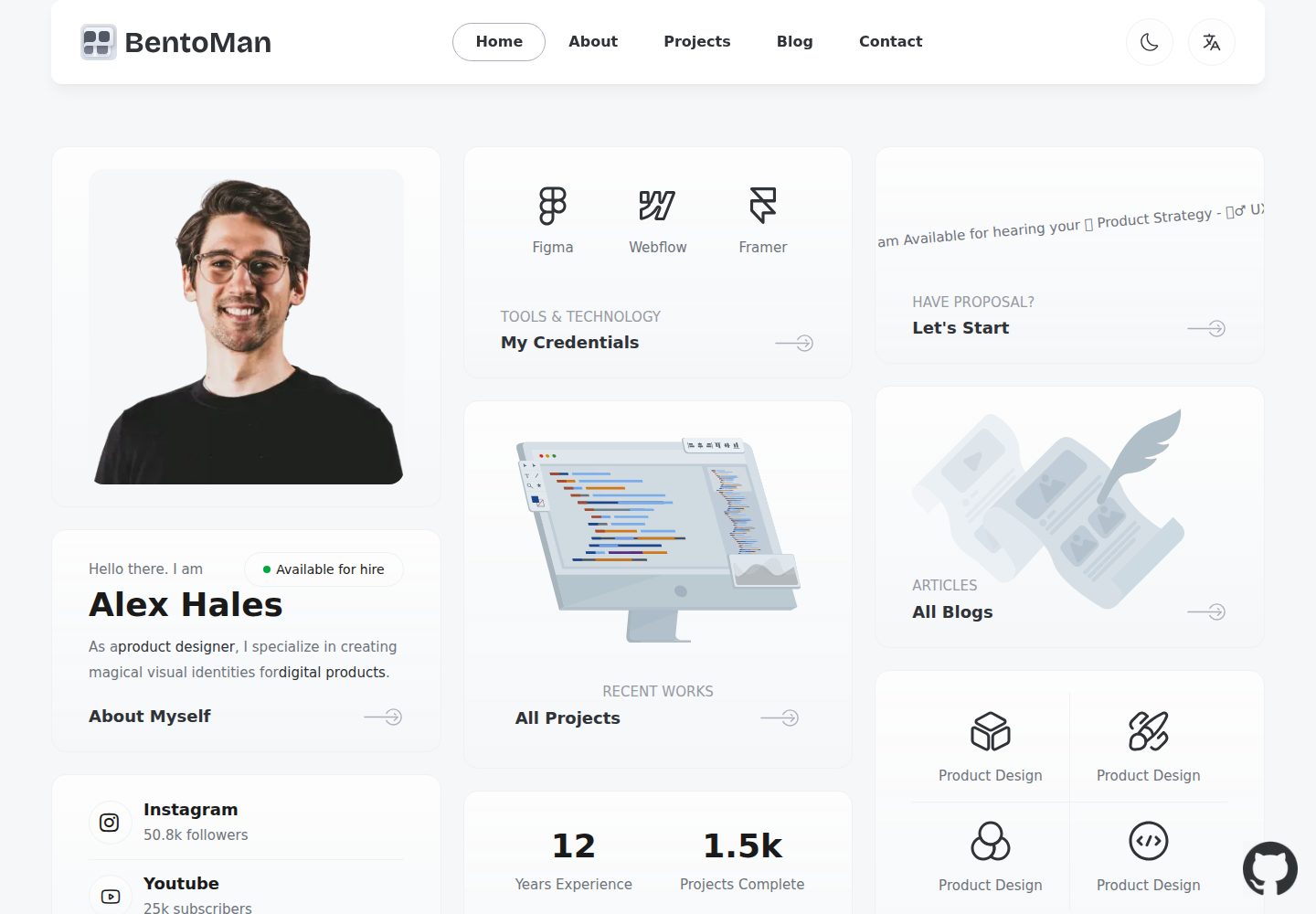
Based on Next.js App Router, TypeScript, and Tailwind CSS, with a free minimalist theme
Next.jsReactPortfolioStarter
nextjs-boilerplate-personal-website — Next.js Portfolio Template
By benguo-dev
A personal resume and portfolio website template based on Next.js App Router, Tailwind CSS, and TypeScript, with built-in Clerk authentication, Drizzle ORM, i18n, and a complete testing and code quality toolchain.
Explore the design
Compare the page layouts and mobile experience. Open any screenshot for a closer look.
Desktop homepage1 / 3
Desktop captureTop of page
Actual screenshot captured by the server browser.
All pages & views 3
Screenshots show visual appearance; interactive behavior may differ.
Recorded 2026-10-02View source
What stands out
A quick read of the recorded project description.
Integrates Clerk authentication, covering sign-up, sign-in, MFA, social login, and Passkey flows
Uses Drizzle ORM for type-safe database access, compatible with PostgreSQL, SQLite, and MySQL
Built-in testing and component development toolchain with Vitest, Testing Library, Playwright, and Storybook
Provides code quality and commit convention configuration including ESLint, Prettier, Husky, Lint-Staged, and Commitlint
Includes SEO metadata, JSON-LD, Open Graph, sitemap.xml, and robots.txt
Template Details
This template targets personal resume and portfolio website scenarios. It is built on Next.js App Router, uses TypeScript and Tailwind CSS for the interface, and includes a free minimalist theme. For developer experience, the project integrates ESLint, Prettier, Husky, Lint-Staged, Commitlint, Commitizen, Vitest, Testing Library, Playwright, Storybook, and VSCode configuration, while also providing SEO metadata, JSON-LD, Open Graph, sitemap.xml, and robots.txt.
Functionally, it includes Clerk authentication (sign-up, sign-in, sign-out, forgot password, reset password, Magic Link, MFA, social login, Passkey, and user impersonation), type-safe database access via Drizzle ORM (compatible with PostgreSQL, SQLite, and MySQL, with PGlite for local offline development), multilingual support via next-intl and Crowdin, T3 Env environment variable validation, React Hook Form form handling, and Zod validation. It also integrates Sentry error monitoring, Pino.js logging, PostHog analytics, Arcjet security protection, Codecov coverage, Checkly monitoring as code, and optional Percy visual testing.
Usage constraints: the template requires Node.js 20+ and npm; production builds require DATABASE_URL to be defined, along with Clerk's NEXT_PUBLIC_CLERK_PUBLISHABLE_KEY and CLERK_SECRET_KEY. External services such as Sentry and Codecov require separate registration and corresponding keys. The code is MIT licensed and can be used, modified, commercialized, and distributed for free, but third-party assets such as demo images, fonts, and icons must be checked under their respective licenses, and external services such as domains, hosting, and databases may incur additional costs.
Next.jsPortfolioStarter
Is it right for your project?
Use Cases
- Building a personal resume or portfolio website with built-in authentication and a database layer
- Needing a frontend project starter structure that includes testing, linting, and commit conventions
- Adding multilingual support to a personal site and planning to manage translations via Crowdin
- Developing offline locally with PGlite, then switching to PostgreSQL, SQLite, or MySQL
Suitable For
- Developers familiar with Next.js and TypeScript who want to quickly launch a personal site
- Personal projects that need complete infrastructure such as authentication, database, and internationalization
- Development teams or individuals who value testing, code quality, and commit conventions
Getting started & customization
Use these recorded setup notes alongside the repository instructions for your chosen version.
- 1
Requires Node.js 20+ and npm. Clone the repository, run npm install, then start the local service with npm run dev
- 2
Before production builds, DATABASE_URL must be defined; the build process automatically runs database migrations
- 3
Using Clerk authentication requires configuring NEXT_PUBLIC_CLERK_PUBLISHABLE_KEY and CLERK_SECRET_KEY
- 4
External services such as Sentry and Codecov require account registration and corresponding keys or DSNs
- 5
Use a global search for FIXME: to locate configuration items that need replacing, such as AppConfig.ts, BaseTemplate.tsx, and favicon
License & source material
Usage conditions & limitations
Free to use · keep license noticeThis entry covers the free version under the MIT license in the public repository; the free scope is the code of this version and does not mean external services or third-party assets are free.
Must comply with when using
- The code of this version may be used, modified, commercialized, and distributed for free.
- When distributing copies or substantial portions of the code, retain the original author's copyright notice and the full MIT license notice.
- The code is provided as is; warranties and limitations of liability are governed by the original license and applicable law.
Additional costs & items to verify
- Runtime requirements: Node.js 20 or higher must be used, and dependencies installed via npm.
- Before production builds, DATABASE_URL must be defined in environment variables; otherwise, database migrations during the build process cannot run.
- Using Clerk authentication requires registering a Clerk account and configuring the NEXT_PUBLIC_CLERK_PUBLISHABLE_KEY and CLERK_SECRET_KEY environment variables.
- Using Sentry error monitoring in production requires registering a Sentry account, creating a project, and filling in the DSN and other configuration.
- Enabling Codecov code coverage reports requires registering a Codecov account, linking GitHub, and configuring CODECOV_TOKEN.
- Production log management relies on Better Stack; you need to register an account, create a source, and put the token into LOGTAIL_SOURCE_TOKEN.
- Using Checkly monitoring as code requires registering a Checkly account and configuring CHECKLY_API_KEY and CHECKLY_ACCOUNT_ID.
- Enabling Arcjet security and bot protection requires registering an account to obtain an API key and configuring the ARCJET_KEY environment variable.
- Deploying to the Sevalla platform as documented requires registering a Sevalla account and creating a database and application.
- Percy visual testing is optional, disabled by default locally, runs only in GitHub Actions, and requires separate configuration.
- Demo images, fonts, icons, and other third-party assets must be checked under their respective licenses and cannot be judged solely by the code's MIT license.
- External services such as domains, hosting, databases, payments, or AI may incur additional costs.
View Original Text Basis
Permission is hereby granted, free of charge
Original License Text
Node.js 20+ and npm
Original README
you must define `DATABASE_URL` in your environment variables
Original README
define the environment variables `NEXT_PUBLIC_CLERK_PUBLISHABLE_KEY` and `CLERK_SECRET_KEY` from your Clerk account
Original README
you'll need to create a Sentry account and a new project
Original README
To enable Codecov, create a Codecov account and connect it to your GitHub account.
Original README
To use Better Stack, you need to create a [Better Stack](https://betterstack.com/?utm_source=github&utm_medium=sponsorship&utm_campaign=next-js-boilerplate) account and create a new source
Original README
To use Checkly, you must first create an account on [their website](https://www.checklyhq.com/?utm_source=github&utm_medium=sponsorship&utm_campaign=next-js-boilerplate).
Original README
To set up Arcjet, [create a free account](https://launch.arcjet.com/Q6eLbRE) and get your API key.
Original README
First, create an account on [Sevalla](https://sevalla.com).
Original README
https://github.com/benguo-dev/nextjs-boilerplate-personal-website/blob/main/LICENSEhttps://github.com/benguo-dev/nextjs-boilerplate-personal-website/blob/main/README.mdvisual testing is disabled, and the terminal will display the message `[percy] Percy is not running, disabling snapshots.`
Original README
Compiled by DeepSeek based on repository license and README ·2026-10-02. Results only cover the materials read; dependencies, images, fonts, and subsequent term changes are subject to their respective original texts.
Project checks & description sources
Template Information
- Source platforms
- GitHub
- Documentation and maintenance reference score
- More documented · 82 / 100
- Technologies
- Next.js · React
- Website type
- Portfolio · Starter
How this score is calculated
Our heuristic uses license records (up to 30), a demo link (12), a preview (10), stars (15), recorded maintenance (15), description completeness (8), feature records (5) and classification data (5). It is not a code, security or performance test, or a Google score. A link does not establish tested functionality.
What to verify for this project
- Repository update recorded
- 2025-04-09
- Screenshot last checked
- 2026-10-02
A demo link is listed. Check it with your own content and viewport sizes; its presence does not confirm that forms, authentication or payments work.
The catalog identifies Next.js as the primary stack. Check the actual dependency manifest and lockfile for versions and hosting requirements. These notes use recorded metadata, not a code audit or a deployment test.
Use a selection guide →How this description was prepared
AI-assisted description based on catalog records and repository material. Repository authors are not automatically the reviewers of this description.
Automatically checked against source and license rules; no manual editorial review.
Inspect the recorded source material
SHA-256: cbf94e3b8c398212c01bbab33d6eab1919fd390f3fa808737e37139ef4d487dc
2026-10-02T23:05:37.156Z
Source file / repository# Boilerplate and Starter for Next.js 15+, Tailwind CSS 4, and TypeScript with popular personal website template. <p align="center"> <a href="https://personal-website-template-eosin.vercel.app/"><img width="100%" src="public/assets/images/home.png?raw=true" alt="Home page for personal website"></a> </p> <p align="center"> <a href="README-nextjs-boilerplate.md"><img width="100%" src="public/assets/images/nextjs-starter-banner.png?raw=true" alt="Next js starter banner"></a> </p> 🚀 Boilerplate and Starter for Next.js with App Router, Tailwind CSS, and TypeScript ⚡️ Prioritizing developer experience first: Next.js, TypeScript, ESLint, Prettier, Husky, Lint-Staged, Vitest (replacing Jest), Testing Library, Playwright, Commitlint, VSCode, Tailwind CSS, Authentication with [Clerk](https://clerk.com?utm_source=github&utm_medium=sponsorship&utm_campaign=nextjs-boilerplate), Database with DrizzleORM (PostgreSQL, SQLite, and MySQL), Error Monitoring with [Sentry](https://sentry.io/for/nextjs/?utm_source=github&utm_medium=paid-community&utm_campaign=general-fy25q1-nextjs&utm_content=github-banner-nextjsboilerplate-logo), Logging with Pino.js and Log Management, Monitoring as Code, Storybook, Multi-language (i18n), AI-powered code reviews with [CodeRabbit](https://app.coderabbit.ai/login?grsf=remi-wg-2qs2l9), Secure with [Arcjet](https://launch.arcjet.com/Q6eLbRE) (Bot detection, Rate limiting, Attack protection, etc.) and more. Thanks for GitHub open source project: [Next-js-Boilerplate](https://github.com/ixartz/Next-js-Boilerplate) ### Demo **Live demo: [Template for personal website](https://personal-website-template-eosin.vercel.app/)** ### Features Developer experience first, extremely flexible code structure and only keep what you need: - ⚡ [Next.js](https://nextjs.org) with App Router support - 🔥 Type checking [TypeScript](https://www.typescriptlang.org) - 💎 Integrate with [Tailwind CSS](https://tailwindcss.com) - ✅ Strict Mode for TypeScript and React 19 - 🔒 Authentication with [Clerk](https://clerk.com?utm_source=github&utm_medium=sponsorship&utm_campaign=nextjs-boilerplate): Sign up, Sign in, Sign out, Forgot password, Reset password, and more. - 👤 Passwordless Authentication with Magic Links, Multi-Factor Auth (MFA), Social Auth (Google, Facebook, Twitter, GitHub, Apple, and more), Passwordless login with Passkeys, User Impersonation - 📦 Type-safe ORM with DrizzleORM, compatible with PostgreSQL, SQLite, and MySQL - 💽 Offline and local development database with PGlite - 🌐 Multi-language (i18n) with [next-intl](https://next-intl-docs.vercel.app/) and [Crowdin](https://l.crowdin.com/next-js) - ♻️ Type-safe environment variables with T3 Env - ⌨️ Form handling with React Hook Form - 🔴 Validation library with Zod - 📏 Linter with [ESLint](https://eslint.org) (default Next.js, Next.js Core Web Vitals, Tailwind CSS and Antfu configuration) - 💖 Code Formatter with [Prettier](https://prettier.io) - 🦊 Husky for Git Hooks - 🚫 Lint-staged for running linters on Git staged files - 🚓 Lint git commit with Commitlint - 📓 Write standard compliant commit messages with Commitizen - 🦺 Unit Testing with Vitest and React Testing Library - 🧪 Integration and E2E Testing with Playwright - 👷 Run tests on pull request with GitHub Actions - 🎉 Storybook for UI development - 🐰 AI-powered code reviews with [CodeRabbit](https://app.coderabbit.ai/login?grsf=remi-wg-2qs2l9) - 🚨 Error Monitoring with [Sentry](https://sentry.io/for/nextjs/?utm_source=github&utm_medium=paid-community&utm_campaign=general-fy25q1-nextjs&utm_content=github-banner-nextjsboilerplate-logo) - ☂️ Code coverage with [Codecov](https://about.codecov.io/codecov-free-trial/?utm_source=github&utm_medium=paid-community&utm_campaign=general-fy25q1-nextjs&utm_content=github-banner-nextjsboilerplate-logo) - 📝 Logging with Pino.js and Log Management with [Better Stack](https://betterstack.com/?utm_source=github&utm_medium=sponsorship&utm_campaign=next-js-boilerplate) - 🖥️ Monitoring as Code with [Checkly](https://www.checklyhq.com/?utm_source=github&utm_medium=sponsorship&utm_campaign=next-js-boilerplate) - 🔐 Security and bot protection ([Arcjet](https://launch.arcjet.com/Q6eLbRE)) - 📊 Analytics with PostHog - 🎁 Automatic changelog generation with Semantic Release - 🔍 Visual testing with Percy (Optional) - 💡 Absolute Imports using `@` prefix - 🗂 VSCode configuration: Debug, Settings, Tasks and Extensions - 🤖 SEO metadata, JSON-LD and Open Graph tags - 🗺️ Sitemap.xml and robots.txt - ⌘ Database exploration with Drizzle Studio and CLI migration tool with Drizzle Kit - ⚙️ [Bundler Analyzer](https://www.npmjs.com/package/@next/bundle-analyzer) - 🌈 Include a FREE minimalist theme - 💯 Maximize lighthouse score Built-in feature from Next.js: - ☕ Minify HTML & CSS - 💨 Live reload - ✅ Cache busting ### Philosophy - Nothing is hidden from you, allowing you to make any necessary adjustments to suit your requirements and preferences. - Dependencies are regularly updated on a monthly basis - Start for free without upfront costs - Easy to customize - Minimal code - Unstyled template - SEO-friendly - Production-ready ### Requirements - Node.js 20+ and npm ### Getting started Run the following command on your local environment: ```shell git clone --depth=1 https://github.com/benguo-dev/nextjs-boilerplate-personal-website.git my-project-name cd my-project-name npm install ``` Once all dependencies installed then you can start the application locally: ```shell npm run dev ``` Open http://localhost:3000 with your favorite browser to see your project. ### Project structure ```shell . ├── README.md # README file ├── .github # GitHub folder ├── .husky # Husky configuration ├── .storybook # Storybook folder ├── .vscode # VSCode configuration ├── migrations # Database migrations ├── public # Public assets folder ├── src │ ├── app # Next JS App (App Router) │ ├── components # React components │ ├── libs # 3rd party libraries configuration │ ├── locales # Locales folder (i18n messages) │ ├── models # Database models │ ├── styles # Styles folder │ ├── templates # Templates folder │ ├── types # Type definitions │ ├── utils # Utilities folder │ └── validations # Validation schemas ├── tests │ ├── e2e # E2E tests, also includes Monitoring as Code │ └── integration # Integration tests ├── tailwind.config.js # Tailwind CSS configuration └── tsconfig.json # TypeScript configuration ``` ### Customization You can easily configure Next js Boilerplate by searching the entire project for `FIXME:` to make quick customizations. Here are some of the most important files to customize: - `public/apple-touch-icon.png`, `public/favicon.ico`, `public/favicon-16x16.png` and `public/favicon-32x32.png`: your website favicon - `src/utils/AppConfig.ts`: configuration file - `src/templates/BaseTemplate.tsx`: default theme - `next.config.ts`: Next.js configuration - `.env`: default environment variables You have full access to the source code for further customization. The provided code is just an example to help you start your project. The sky's the limit. ### Testing All unit tests are located alongside the source code in the same directory, making them easier to find. The project uses Vitest and React Testing Library for unit testing. You can run the tests with the following command: ```shell npm run test ``` ### Integration & E2E Testing The project uses Playwright for integration and end-to-end (E2E) testing. You can run the tests with the following commands: ```shell npx playwright install # Only for the first time in a new environment npm run test:e2e ``` In the local environment, visual testing is disabled, and the terminal will display the message `[percy] Percy is not running, disabling snapshots.`. By default, visual testing only runs in GitHub Actions. ### Deploy to production During the build process, database migrations are automatically executed, so there's no need to run them manually. However, you must define `DATABASE_URL` in your environment variables. Then, you can generate a production build with: ```shell $ npm run build ``` It generates an optimized production build of the boilerplate. To test the generated build, run: ```shell $ npm run start ``` This command starts a local server using the production build. You can now open http://localhost:3000 in your preferred browser to see the result. ### Deploy to Sevalla You can deploy a Next.js application along with its database on a single platform. First, create an account on [Sevalla](https://sevalla.com). After registration, you will be redirected to the dashboard. From there, navigate to `Database > Create a database`. Select PostgreSQL and and use the default settings for a quick setup. For advanced users, you can customize the database location and resource size. Finally, click on `Create` to complete the process. Once the database is created and ready, return to the dashboard and click `Application > Create an App`. After connecting your GitHub account, select the repository you want to deploy. Keep the default settings for the remaining options, then click `Create`. Next, connect your database to your application by going to `Networking > Connected services > Add connection` and select the database you just created. You also need to enable the `Add environment variables to the application` option, and rename `DB_URL` to `DATABASE_URL`. Then, click `Add connection`. Go to `Environment variables > Add environment variable`, and define the environment variables `NEXT_PUBLIC_CLERK_PUBLISHABLE_KEY` and `CLERK_SECRET_KEY` from your Clerk account. Click `Save`. Finally, initiate a new deployment by clicking `Overview > Latest deployments > Deploy now`. If everything is set up correctly, your application will be deployed successfully with a working database. ### Error Monitoring The project uses [Sentry](https://sentry.io/for/nextjs/?utm_source=github&utm_medium=paid-community&utm_campaign=general-fy25q1-nextjs&utm_content=github-banner-nextjsboilerplate-logo) to monitor errors. In the development environment, no additional setup is needed: Next.js Boilerplate is pre-configured to use Sentry and Spotlight (Sentry for Development). All errors will automatically be sent to your local Spotlight instance, allowing you to experience Sentry locally. For production environment, you'll need to create a Sentry account and a new project. Then, in `next.config.mjs`, you need to update the `org` and `project` attributes in `withSentryConfig` function. Additionally, add your Sentry DSN to `sentry.client.config.ts`, `sentry.edge.config.ts` and `sentry.server.config.ts`. ### Code coverage Next.js Boilerplate relies on [Codecov](https://about.codecov.io/codecov-free-trial/?utm_source=github&utm_medium=paid-community&utm_campaign=general-fy25q1-nextjs&utm_content=github-banner-nextjsboilerplate-logo) for code coverage reporting solution. To enable Codecov, create a Codecov account and connect it to your GitHub account. Your repositories should appear on your Codecov dashboard. Select the desired repository and copy the token. In GitHub Actions, define the `CODECOV_TOKEN` environment variable and paste the token. Make sure to create `CODECOV_TOKEN` as a GitHub Actions secret, do not paste it directly into your source code. ### Logging The project uses Pino.js for logging. In the development environment, logs are displayed in the console by default. For production, the project is already integrated with [Better Stack](https://betterstack.com/?utm_source=github&utm_medium=sponsorship&utm_campaign=next-js-boilerplate) to manage and query your logs using SQL. To use Better Stack, you need to create a [Better Stack](https://betterstack.com/?utm_source=github&utm_medium=sponsorship&utm_campaign=next-js-boilerplate) account and create a new source: go to your Better Stack Logs Dashboard > Sources > Connect source. Then, you need to give a name to your source and select Node.js as the platform. After creating the source, you will be able to view and copy your source token. In your environment variables, paste the token into the `LOGTAIL_SOURCE_TOKEN` variable. Now, all logs will automatically be sent to and ingested by Better Stack. ### Checkly monitoring The project uses [Checkly](https://www.checklyhq.com/?utm_source=github&utm_medium=sponsorship&utm_campaign=next-js-boilerplate) to ensure that your production environment is always up and running. At regular intervals, Checkly runs the tests ending with `*.check.e2e.ts` extension and notifies you if any of the tests fail. Additionally, you have the flexibility to execute tests from multiple locations to ensure that your application is available worldwide. To use Checkly, you must first create an account on [their website](https://www.checklyhq.com/?utm_source=github&utm_medium=sponsorship&utm_campaign=next-js-boilerplate). After creating an account, generate a new API key in the Checkly Dashboard and set the `CHECKLY_API_KEY` environment variable in GitHub Actions. Additionally, you will need to define the `CHECKLY_ACCOUNT_ID`, which can also be found in your Checkly Dashboard under User Settings > General. To complete the setup, update the `checkly.config.ts` file with your own email address and production URL. ### Arcjet security and bot protection The project uses [Arcjet](https://launch.arcjet.com/Q6eLbRE), a security as code product that includes several features that can be used individually or combined to provide defense in depth for your site. To set up Arcjet, [create a free account](https://launch.arcjet.com/Q6eLbRE) and get your API key. Then add it to the `ARCJET_KEY` environment variable. Arcjet is configured with two main features: bot detection and the Arcjet Shield WAF: - [Bot detection](https://docs.arcjet.com/bot-protection/concepts) is configured to allow search engines, preview link generators e.g. Slack and Twitter previews, and to allow common uptime monitoring services. All other bots, such as scrapers and AI crawlers, will be blocked. You can [configure additional bot types](https://docs.arcjet.com/bot-protection/identifying-bots) to allow or block. - [Arcjet Shield WAF](https://docs.arcjet.com/shield/concepts) will detect and block common attacks such as SQL injection, cross-site scripting, and other OWASP Top 10 vulnerabilities. Arcjet is configured with a central client at `src/libs/Arcjet.ts` that includes the Shield WAF rules. Additional rules are applied when Arcjet is called in `middleware.ts`. ### Useful commands #### Bundle Analyzer Next.js Boilerplate includes a built-in bundle analyzer. It can be used to analyze the size of your JavaScript bundles. To begin, run the following command: ```shell npm run build-stats ``` By running the command, it'll automatically open a new browser window with the results. #### Database Studio The project is already configured with Drizzle Studio to explore the database. You can run the following command to open the database studio: ```shell npm run db:studio ``` Then, you can open https://local.drizzle.studio with your favorite browser to explore your database. ### VSCode information (optional) If you are VSCode user, you can have a better integration with VSCode by installing the suggested extension in `.vscode/extension.json`. The starter code comes up with Settings for a seamless integration with VSCode. The Debug configuration is also provided for frontend and backend debugging experience. With the plugins installed in your VSCode, ESLint and Prettier can automatically fix the code and display errors. The same applies to testing: you can install the VSCode Vitest extension to automatically run your tests, and it also shows the code coverage in context. Pro tips: if you need a project wide-type checking with TypeScript, you can run a build with <kbd>Cmd</kbd> + <kbd>Shift</kbd> + <kbd>B</kbd> on Mac. ### License Licensed under the MIT License, Copyright © 2025 See [LICENSE](LICENSE) for more information.
Explore similar templates
Compare previews and descriptions within the same stack and category.

Next.js SaaS Starter
The official Next.js SaaS starter template, integrating email/password authentication, Stripe Checkout subscriptions, a dashboard with user/team CRUD, basic Owner/Member RBAC, and activity logging.
Next.js · SaaS

Next.js Commerce
Vercel's officially maintained Next.js App Router ecommerce starter with deep Shopify integration, offering a complete product catalog, cart, and checkout flow. Core logic is modular for swapping backends, and community provider versions exist for BigCommerce, Medusa, and Saleor.
Next.js · E-commerce

Next-js-Boilerplate
A developer-first Next.js 16 starter with Tailwind CSS 4 and TypeScript, supporting both App Router and Page Router.
Next.js · Starter

tailwind-nextjs-starter-blog
A Next.js and Tailwind CSS blog starter template using Contentlayer for Markdown/MDX, with built-in SEO, code highlighting, and tags. It targets personal technical blogs and migration from Jekyll/Hugo to React, and supports one-click Vercel deployment.
Next.js · Blog

next-forge
next-forge is a Turborepo-based Next.js template maintained by Vercel, positioned as a starting point for SaaS products.
Next.js · Starter

SaaS-Boilerplate
SaaS-Boilerplate is an open-source SaaS starter template built with Next.js App Router, React 19, TypeScript, Tailwind CSS, and Shadcn UI.
Next.js · SaaS