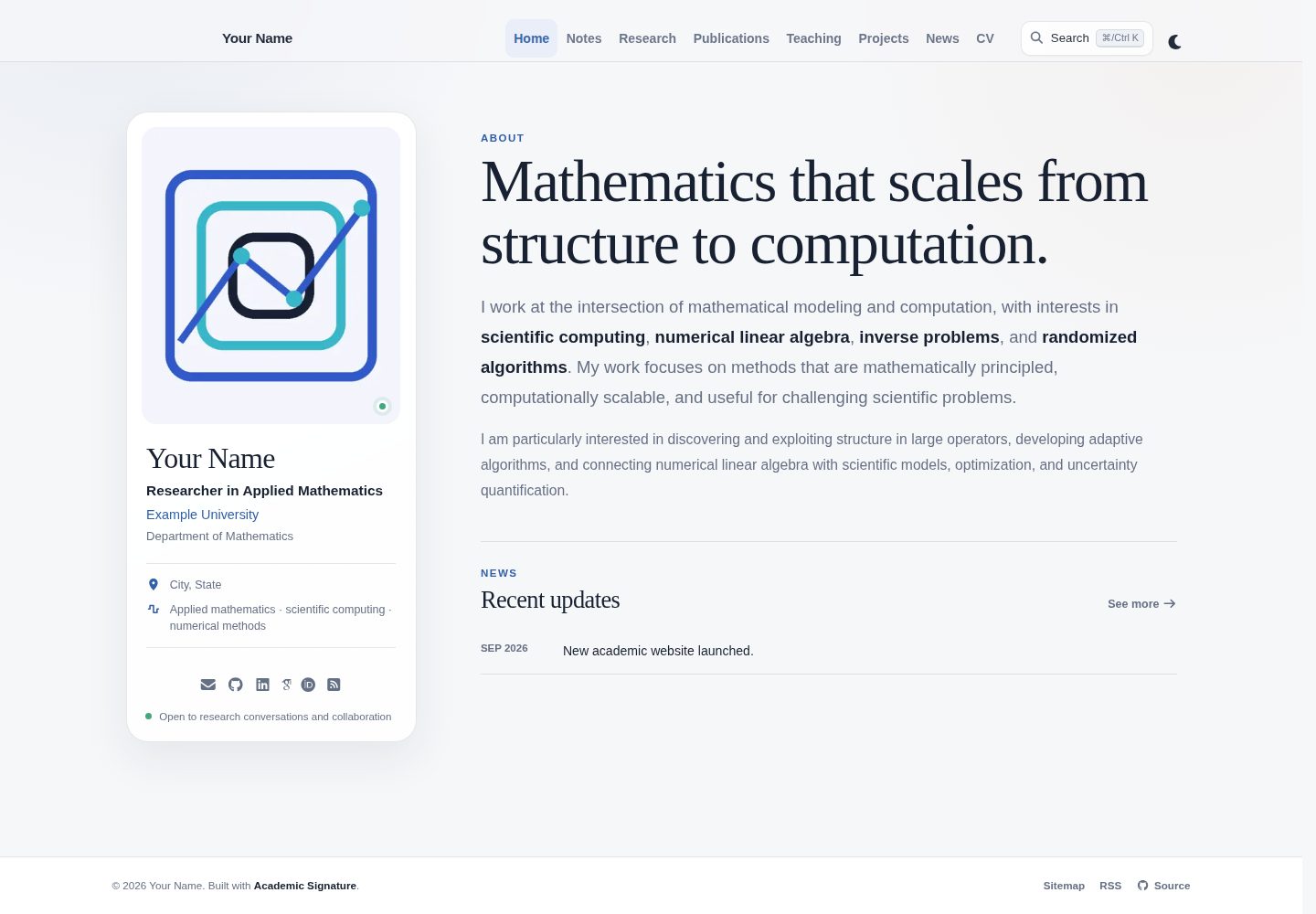
Built on al-folio and Jekyll, featuring a responsive academic layout centered on personal profiles, with support for light and dark themes
JekyllPortfolio
academic-signature — Jekyll Portfolio Template
By BhattHarshit
Academic Signature is an academic website template built on al-folio and Jekyll, featuring a profile-centric layout, light and dark themes, and management of personal information, papers, teaching, projects, and news through YAML and Markdown files.
Explore the design
Compare the page layouts and mobile experience. Open any screenshot for a closer look.
Desktop homepage1 / 3
Desktop captureTop of page
Actual screenshot captured by the server browser.
All pages & views 3
Screenshots show visual appearance; interactive behavior may differ.
Recorded 2026-10-15View source
What stands out
A quick read of the recorded project description.
Integrates BibTeX paper lists through Jekyll Scholar, and provides compact paper and teaching views suitable for longer academic records
Provides site-wide search with support for match highlighting and keyboard navigation
CV supports two display methods: embedding the official PDF, or using RenderCV to generate a web version of the CV while also providing download and open PDF options
Includes features such as mathematical formulas, charts, responsive images, repository cards, RSS, sitemap, SEO/OpenGraph, and comments
Provides automated validation and a GitHub Pages deployment workflow
Template Details
Academic Signature is an academic website template built on al-folio and Jekyll, featuring a profile-centric page design. The README explains that its content is maintained through several conventional directories: name, affiliation, links, site URL, and CV settings are placed in `_data/profile.yml`; the homepage and main pages are in `_pages/`; papers use `_bibliography/papers.bib`; teaching, projects, and news are placed in `_teachings/`, `_projects/`, and `_news/` respectively; notes or blog posts are in `_posts/`; the web version of the CV uses `_data/cv.yml`; and the avatar and official CV are placed in `assets/img/profile.png` and `assets/pdf/` respectively.
The template's CV display can be configured in `_data/cv.yml`: when `website_view` is set to `false`, the official PDF is embedded and Download CV is shown; when set to `true`, the web version of the CV is displayed, with Download CV and Open PDF provided. The README also lists features such as a responsive profile layout, light and dark themes, a BibTeX paper list based on Jekyll Scholar, compact paper and teaching views, site-wide search (including match highlighting and keyboard navigation), mathematical formulas, charts, responsive images, repository cards, RSS, sitemap, SEO/OpenGraph, and comments.
Regarding deployment, the README's quick start steps are: create a new repository on GitHub using this template named `your_Github_username.github.io`, set Source to GitHub Actions in Settings → Pages, modify and commit `data/profile.yml`, and the site will be accessible at `https://your_Github_username.github.io/`. The README does not describe deployment methods other than GitHub Pages, nor does it provide specific version numbers in the dependency list.
JekyllPortfolio
Is it right for your project?
Use Cases
- Scholars or researchers building a personal academic homepage to centrally display personal information, papers, teaching, and projects
- Academic personal sites that need to provide both an official PDF resume and a web version of the CV
- Displaying academic records with papers maintained in BibTeX, where compact paper and teaching views are desired
- Personal sites intended to be automatically deployed to GitHub Pages via GitHub Actions
Suitable For
- Scholars and researchers who use GitHub and want to quickly create an academic personal homepage using a template
- Academic users who already manage papers with BibTeX and need Jekyll Scholar integration for display
- Authors of academic sites who need light and dark themes, site-wide search, and SEO/OpenGraph support
- Users who want to maintain site content with YAML and Markdown files rather than relying on a database or admin backend
Getting started & customization
Use these recorded setup notes alongside the repository instructions for your chosen version.
- 1
On GitHub, click Use this template to create a new repository named `your_Github_username.github.io`
- 2
In the repository's Settings → Pages under Build and deployment, set Source to GitHub Actions
- 3
Modify and commit `data/profile.yml`, or manually trigger deployment via Actions → Deploy Hugo site to GitHub Pages → Run workflow
- 4
After the site is published, it can be accessed at `https://your_Github_username.github.io/`
- 5
Edit `data/profile.yml`, `data/cv.yml`, and the materials in `assets/` as needed, and refer to the README table to update each content directory
License & source material
Usage conditions & limitations
Free to use · keep license noticeThis entry covers the free version under the MIT license in the public repository; the free scope is the code of this version and does not mean that external services or third-party materials are free.
Must comply with when using
- The code of this version may be used, modified, used commercially, and distributed for free.
- When distributing copies or substantial portions of the code, retain the original author's copyright notice and the complete MIT license notice.
- The code is provided as is; warranties and limitations of liability are governed by the original license and applicable law.
Additional costs & items to verify
- Demo images, fonts, icons, and other third-party materials must be checked against their respective licenses; they cannot be judged solely by the code's MIT license.
- External services such as domains, hosting, databases, payments, or AI may incur separate charges.
View Original Text Basis
https://github.com/BhattHarshit/academic-signature/blob/main/LICENSEhttps://github.com/BhattHarshit/academic-signature/blob/main/README.mdPermission is hereby granted, free of charge
Original License Text
Compiled by DeepSeek based on repository license and README ·2026-10-15. Results only cover the materials read; dependencies, images, fonts, and subsequent term changes are subject to their respective original texts.
Project checks & description sources
Template Information
- Source platforms
- GitHub
- Documentation and maintenance reference score
- More documented · 80 / 100
- Technologies
- Jekyll
- Website type
- Portfolio
How this score is calculated
Our heuristic uses license records (up to 30), a demo link (12), a preview (10), stars (15), recorded maintenance (15), description completeness (8), feature records (5) and classification data (5). It is not a code, security or performance test, or a Google score. A link does not establish tested functionality.
What to verify for this project
- Repository update recorded
- 2026-10-14
- Screenshot last checked
- 2026-10-15
A demo link is listed. Check it with your own content and viewport sizes; its presence does not confirm that forms, authentication or payments work.
The catalog identifies Jekyll as the primary stack. Check the actual dependency manifest and lockfile for versions and hosting requirements. These notes use recorded metadata, not a code audit or a deployment test.
Use a selection guide →How this description was prepared
AI-assisted description based on catalog records and repository material. Repository authors are not automatically the reviewers of this description.
Review declaration: codex-user-requested-batch-review-20261015 · 2026-10-15
Inspect the recorded source material
SHA-256: 3803a6c91e323f57e99fc0619e6108953e67316799972a27dd0fc0bfff004dd0
2026-10-15T01:40:05.648Z
Source file / repository# Academic Signature
An academic website template build on [al-folio](https://github.com/alshedivat/al-folio) and [Jekyll](https://jekyllrb.com/) with a distinct profile-led design!
<p align="center">
<a href="https://bhattharshit.github.io/academic-signature/">
<img src="assets/img/demo.gif" alt="Academic Signature website demo" width="900">
</a>
</p>
<p align="center">
<a href="https://bhattharshit.github.io/academic-signature/"><strong>View Live Demo →</strong></a>
</p>
## Quick start
1. Create a GitHub account if you don't have one and login with that.
2. Click **Use this template** on the top right corner.
3. Create a **new repository** and name it: `your_Github_username.github.io`
4. Open **Settings → Pages** and under **Build and deployment**, set **Source** to **GitHub Actions**.
5. Edit `data/profile.yml` slightly and commit changes. (OR, Open **Actions → Deploy Hugo site to GitHub Pages → Run workflow**.)
6. Your website will be available at: `https://your_Github_username.github.io/`
7. Edit `data/profile.yml` and `data/cv.yml` to update your information and update your data inside `assets/`.
## What you normally edit
| Content | Location |
|---|---|
| Name, affiliation, links, site URL, CV settings | `_data/profile.yml` |
| Home and main pages | `_pages/` |
| Publications | `_bibliography/papers.bib` |
| Teaching | `_teachings/` |
| Projects | `_projects/` |
| News | `_news/` |
| Notes/blog | `_posts/` |
| Web CV | `_data/cv.yml` |
| Profile image | `assets/img/profile.png` |
| Official CV | `assets/pdf/` |
### CV display
```yaml
cv:
pdf: /assets/pdf/demo-cv.pdf
website_view: false
```
- `false` embeds the official PDF and shows **Download CV**.
- `true` shows the web CV and provides **Download CV** and **Open PDF**.
## Highlights
- responsive profile-led academic layout with light and dark themes
- BibTeX publications with Jekyll Scholar
- compact publication and teaching views for longer academic records
- full-site search with highlighted matches and keyboard navigation
- embedded PDF CV or RenderCV-based web CV
- math, diagrams, charts, responsive images, repository cards, RSS, sitemap, SEO/OpenGraph, and comments
- automated validation and GitHub Pages deployment
## Contributing
Contributions are welcome. For substantial features or design changes, please open an issue first.
See [`.github/CONTRIBUTING.md`](.github/CONTRIBUTING.md) for the contribution workflow.
## Credits
Academic Signature directly builds on or uses:
- [al-folio](https://github.com/alshedivat/al-folio) — academic website foundation and plugin ecosystem, MIT License.
- [Jekyll](https://github.com/jekyll/jekyll) — static site generator, MIT License.
- [Jekyll Scholar](https://github.com/inukshuk/jekyll-scholar) — BibTeX bibliography integration, MIT License.
- [RenderCV](https://github.com/rendercv/rendercv) — optional web CV rendering, MIT License.
- [Font Awesome Free](https://github.com/FortAwesome/Font-Awesome) and [Academicons](https://github.com/jpswalsh/academicons) — interface and academic icons under their respective open-source licenses.
See [`NOTICE.md`](NOTICE.md) for attribution and license notes. Other dependencies are declared in the repository configuration files.
## Author and license
Academic Signature is created and maintained by [Harshit Bhatt](https://bhattharshit.github.io/).
The project is released under the MIT License. See [`LICENSE`](LICENSE) and [`NOTICE.md`](NOTICE.md). GitHub also reads [`CITATION.cff`](CITATION.cff) and provides a **Cite this repository** option.
Explore similar templates
Compare previews and descriptions within the same stack and category.

al-folio
A Jekyll academic homepage theme for scholars and researchers, with a clean responsive design and out-of-the-box support for publication lists, project showcases, CVs, and blogs.
Jekyll · Portfolio

minimal-mistakes
Minimal Mistakes is a two-column Jekyll theme for personal sites, blogs, project documentation, or portfolios.
Jekyll · Portfolio

Beautiful Jekyll
Beautiful Jekyll is a mature, easy-to-use Jekyll blog theme maintained by Dean Attali since 2015, with over 50,000 users.
Jekyll · Blog

So Simple
A minimal reading-oriented Jekyll theme by Michael Rose for personal blogs, portfolios, and long-form reading. It offers multiple layouts, microformat markup, Disqus comments, Google Analytics, Jekyll SEO Tag, three skins, and aggregation by year, category, and tag with a grid view.
Jekyll · Blog
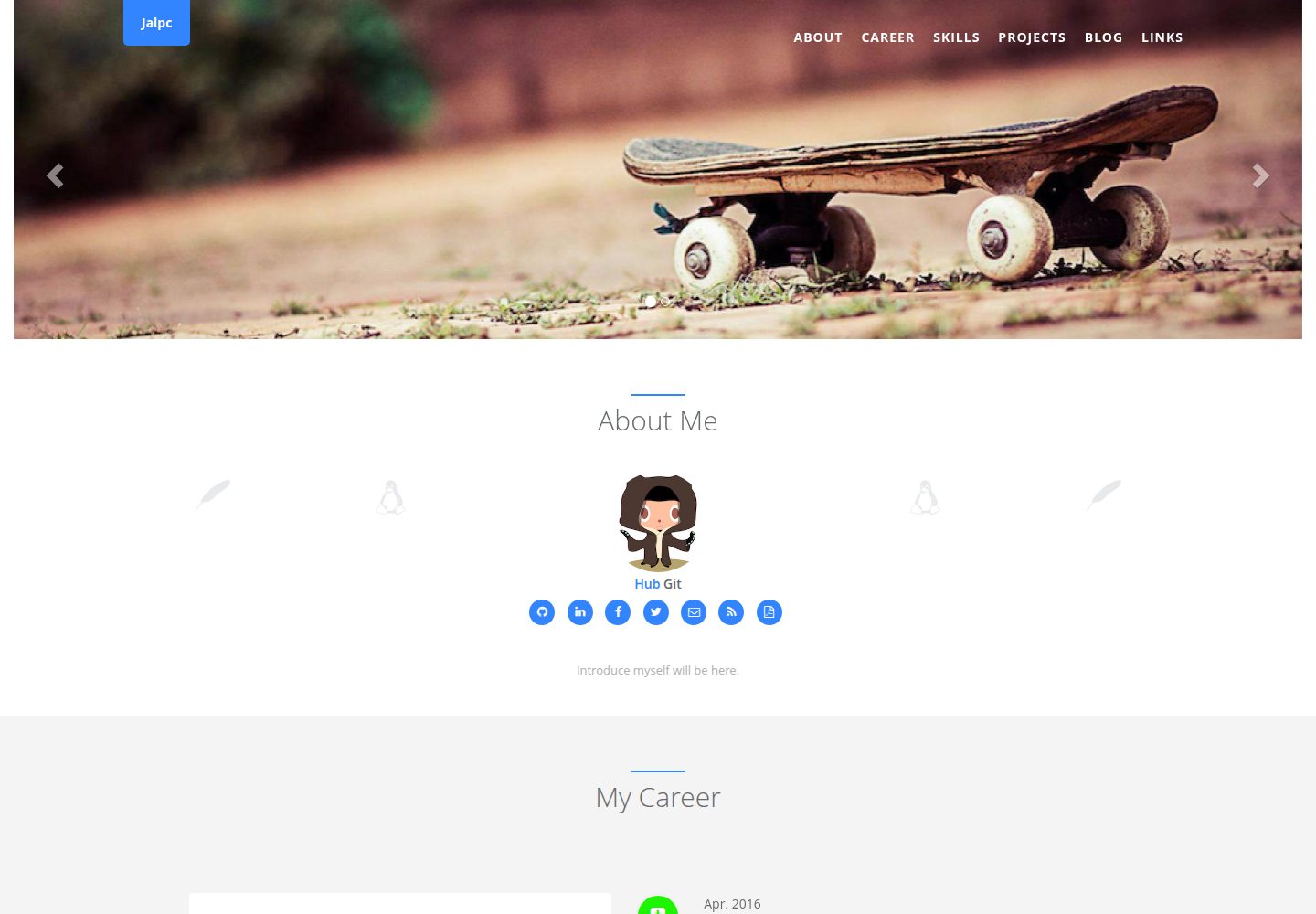
Jalpc
Jalpc is a Jekyll theme for a combined personal homepage and blog. The homepage is split into sections driven by YAML files under _data, so content changes usually do not require editing HTML.
Jekyll · Portfolio
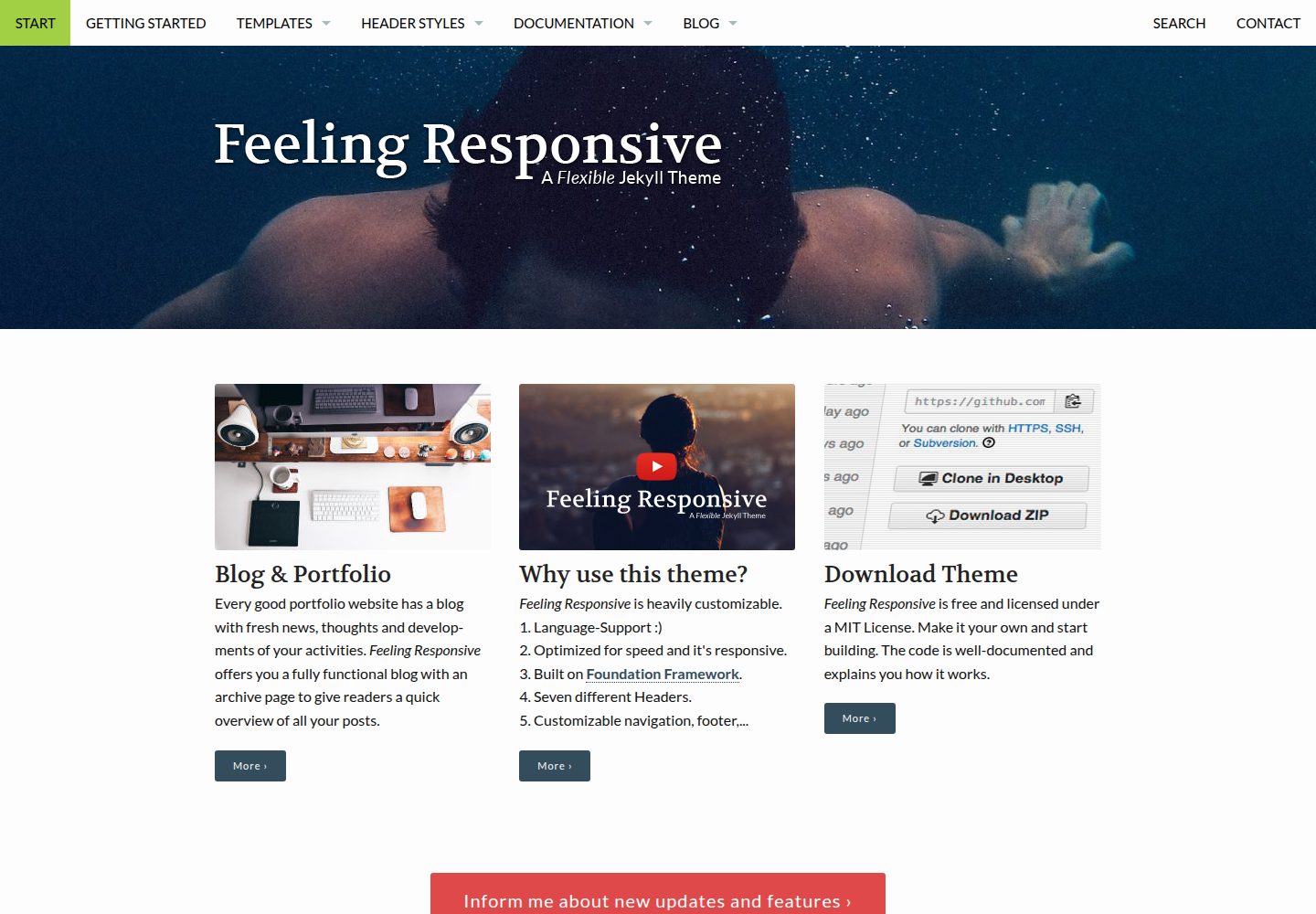
feeling-responsive
A free responsive Jekyll theme built on the Foundation framework, suitable for company sites, portfolios, or blogs. It offers language support, six header styles, customizable navigation and footer, plus documentation and an online demo.
Jekyll · Portfolio