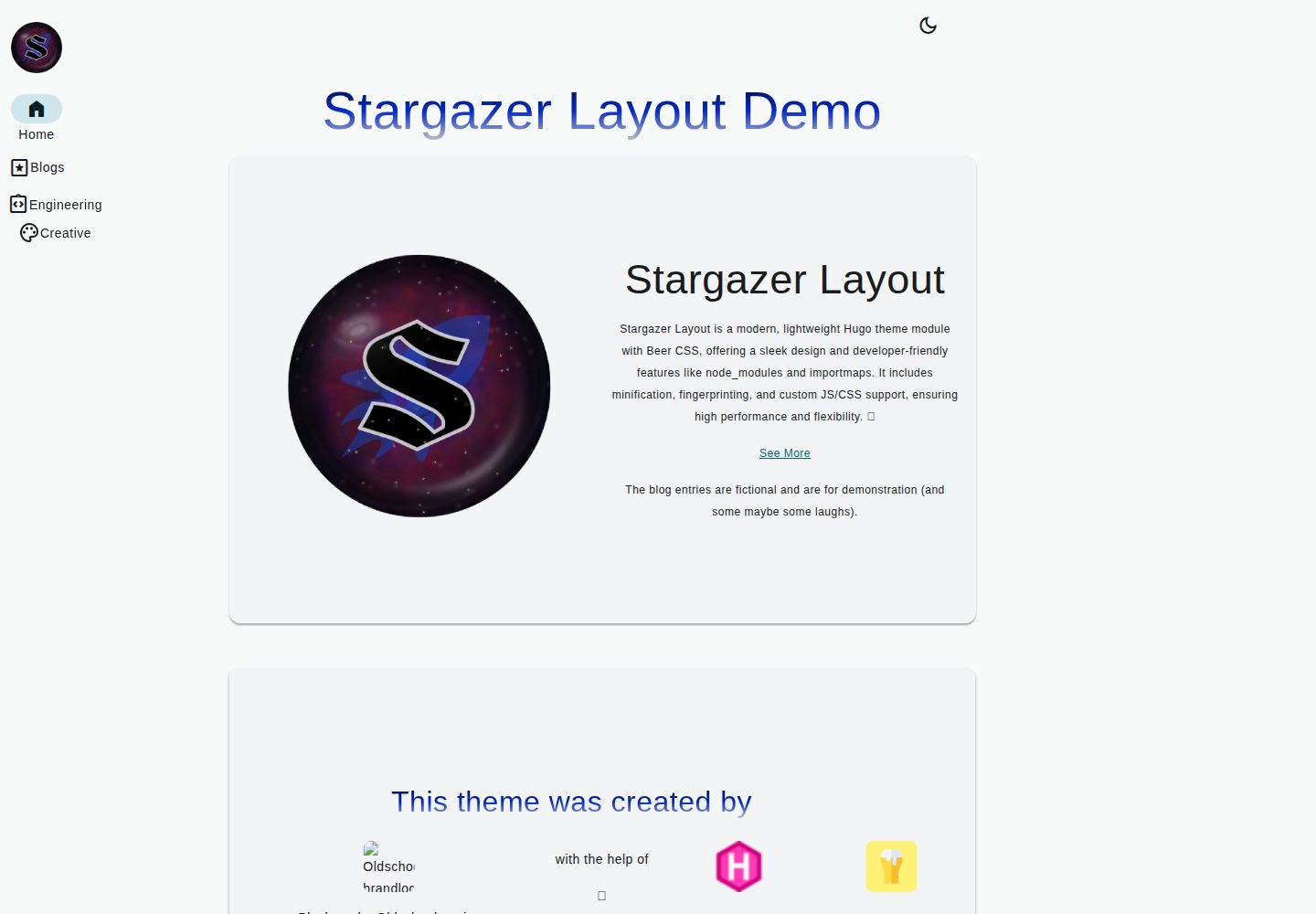
Uses Beer CSS as the default style, providing a Material Design look
HugoStarter
stargazer-layout — Hugo Starter Template
By Blackstareye
Stargazer Layout is a Hugo theme module styled with Beer CSS, supporting node_modules and importmaps, and providing minification, fingerprinting, and custom JS/CSS integration.
Explore the design
Compare the page layouts and mobile experience. Open any screenshot for a closer look.
Desktop homepage1 / 2
Desktop captureTop of page
Actual screenshot captured by the server browser.
All pages & views 2
Screenshots show visual appearance; interactive behavior may differ.
Recorded 2026-10-04View source
What stands out
A quick read of the recorded project description.
Supports node_modules and importmaps, allowing ES modules to be imported in custom modules
Automatically performs minification and fingerprinting during prod builds
Allows adding custom CSS, JS, TS, and SCSS via configuration
Includes built-in dark/light mode toggle and themeColor parameter for theme colors
Provides translations for en and de
Template Details
Stargazer Layout is a Hugo theme module that centralizes layout-related files and functions. It can be used independently or as a bundled component of Stargazer (the latter is not yet released). Styling defaults to Beer CSS, with both node_modules and importmaps enabled, allowing ES modules to be imported in custom modules.
In terms of features, the theme performs minification and fingerprinting during prod builds, supports adding custom CSS, JS, TS, and SCSS via configuration, and allows referencing modules in the vendor directory using importmaps. It includes built-in pagination, dark/light mode toggle, theme color generation via the themeColor parameter, and translations for en and de. The blog structure includes a homepage grid of recent posts, list pages, single pages, and tag pages.
Configuration options cover SEO canonical link toggles, toggles for demo content and branding elements, menu definitions, content type disabling, brand logo and title, regex matching for custom asset paths, importmap mappings, and log display control by error/warning/info/debug levels. The README notes that the logging feature currently lacks the hierarchy of traditional logging frameworks and requires manually enabling or disabling each level.
Installation involves cloning the repository or adding it as a Git submodule to themes/stargazer-layout, running npm install in the theme directory, and declaring the theme in the Hugo configuration. The license is MIT, permitting free use, modification, commercial use, and distribution, but third-party assets such as demo images, fonts, and icons require separate license verification.
HugoStarter
Is it right for your project?
Use Cases
- Building a blog with Hugo that requires a Beer CSS style and a homepage grid of recent posts
- Wanting to use ES modules via importmaps in a Hugo project and manage vendor dependencies
- Needing to control development log display by level to assist debugging of the theme or custom modules
- Sites requiring multilingual support (en/de) and dark/light mode toggle
Suitable For
- Developers familiar with Hugo configuration and theme module mechanisms
- Personal blogs using Beer CSS or wanting to try a Material Design style
- Front-end projects that need to integrate node_modules and importmaps in Hugo
- Users who accept the MIT license and verify third-party asset licenses themselves
Getting started & customization
Use these recorded setup notes alongside the repository instructions for your chosen version.
- 1
Clone the repository or add it as a Git submodule to themes/stargazer-layout, and run npm install in the theme directory
- 2
Declare the theme as stargazer-layout in the Hugo configuration; it can be used alongside other themes
- 3
Set the theme color via the themeColor parameter, and configure logo, title, and owner via the brand configuration
- 4
When using importmaps, ensure file paths correspond to the assets directory, e.g., assets/js/foo/bar.js should be written as js/foo/bar.js
- 5
Log levels have no hierarchy by default; manually enable or disable error, warning, info, and debug in show_infos
License & source material
Usage conditions & limitations
Free to use · keep license noticeThis entry covers the free version under the MIT license from the public repository; the free scope applies to this version's code and does not imply that external services or third-party assets are free.
Must comply with when using
- Free use, modification, commercial use, and distribution of this version's code are permitted.
- When distributing copies or substantial portions of the code, retain the original author's copyright notice and the full MIT license notice.
- The code is provided as-is; warranties and limitations of liability are governed by the original license and applicable law.
Additional costs & items to verify
- Demo images, fonts, icons, and other third-party assets must be checked against their respective licenses; they cannot be assumed to be covered solely by the code's MIT license.
- External services such as domains, hosting, databases, payments, or AI may incur separate charges.
View Original Text Basis
https://github.com/Blackstareye/stargazer-layout/blob/master/LICENSEhttps://github.com/Blackstareye/stargazer-layout/blob/master/README.mdPermission is hereby granted, free of charge
Original License Text
Compiled by DeepSeek based on repository license and README ·2026-10-04. Results only cover the materials read; dependencies, images, fonts, and subsequent term changes are subject to their respective original texts.
Project checks & description sources
Template Information
- Source platforms
- Hugo Themes
- Documentation and maintenance reference score
- More documented · 81 / 100
- Technologies
- Hugo
- Website type
- Starter
How this score is calculated
Our heuristic uses license records (up to 30), a demo link (12), a preview (10), stars (15), recorded maintenance (15), description completeness (8), feature records (5) and classification data (5). It is not a code, security or performance test, or a Google score. A link does not establish tested functionality.
What to verify for this project
- Repository update recorded
- 2025-05-23
- Screenshot last checked
- 2026-10-04
A demo link is listed. Check it with your own content and viewport sizes; its presence does not confirm that forms, authentication or payments work.
The catalog identifies Hugo as the primary stack. Check the actual dependency manifest and lockfile for versions and hosting requirements. These notes use recorded metadata, not a code audit or a deployment test.
Use a selection guide →How this description was prepared
AI-assisted description based on catalog records and repository material. Repository authors are not automatically the reviewers of this description.
Review declaration: [email protected] · 2026-10-04
Inspect the recorded source material
SHA-256: 191d33c230496784a88aafcfb7b7bc6929aa82332f4c81a35635d551743a007e
2026-10-04T00:45:03.612Z
Source file / repository# 🌟 Stargazer Layout




[](https://ko-fi.com/H2H096MU7)
A Product made by Blackeye
([Oldschoolmanier](https://oldschoolmanier.de))

👉 [DEMO](https://blackstareye.github.io/stargazer-layout/)
## Description
Stargazer Layout is a hugo theme module that uses [beer
css](https://www.beercss.com/) for styling and supports `node_modules`
and `importmaps`. It offers features like minification, fingerprinting,
and custom JS/CSS integration.
It uses `beercss` as default styling. It also enables node_modules and
importmaps. Also custom js and css is available.
This is the theme module that contains all layout specific files and
functions. It can be used as a standalone or as a bundle with Stargazer
(coming soon).
## 🚀 Features
- minify and fingerprint on `prod` 🚀 build
- add css and js as you like
- enable node module support with vendor folders
- discover [beer css](https://www.beercss.com/) - full material design
ahead!
- add **js es-modules** with and use it in your own modules with the
**importmap**
- ✅ works also with `fingerprint and minify`
- 🔨💻 logging functionality integrated, control it with
info,warning,debug,error flags :\>
- pagination with [beer css](https://www.beercss.com/) 🍺
- languages: **en** and **de** available and already translated 🌍\
- 🌗 dark and light mode toggle included\
- choose your theme using a **Color** with the param `themeColor` 🎨\
- responsive pages and views -- a beautiful blog experience on
desktop, tablet, and mobile 📱💻🖥️
### Blogging
[Demo](https://blackstareye.github.io/stargazer-layout/)
- home page contains `recent posts`, and organizes content in a
beutiful grid
- all what you need: `list` , `single` , `tags`, `home` page is
created
### Soon
- **soon:** includes
[snippets](https://code.visualstudio.com/docs/editor/userdefinedsnippets)
for vs code
- for logging with `logging`
- **soon:** autodetect scss,ts,js and css in your asset folder
## Screenshots
### Homepage

### Posts

### Recent Posts

## ⚙️ Configuration
### 🔍 SEO
Canonical Link:
[Wiki](https://en.wikipedia.org/wiki/Canonical_link_element)
``` yaml
# If enabled, the website sets a canonical link
# <link rel="canonical" href="http://example.com/">
useCanonify: True
```
And the usual [Hugo
configurations](https://gohugo.io/getting-started/configuration/#configuration-file)
apply.
### 🚫 Deactivate Demo Content
``` yaml
demo:
beer: false
branding: false
```
### 🎨 Set Theme
Define the primary color and generate a complete theme:
``` yaml
themeColor: '#44d8f1'
```
### 📝 Define Menus
For more details, check out the [Hugo Menu
documentation](https://gohugo.io/templates/menu/).
``` yaml
# Example config/menus.yaml
main:
- name: Home
pageRef: /
pre: <i> Home </i>
weight: 10
- name: Blogs
pre: <i> Pages </i>
weight: 20
identifier: blog_parent
- name: Technical
pre: <i> Integration Instructions </i>
parent: blog_parent
pageRef: /technique
weight: 10
identifier: blog_technique
- name: Creative
pre: <i> Palette </i>
pageRef: /creative
parent: blog_parent
weight: 20
identifier: blog_creative
```
### ❌ Disable Content Types
Prevent specific content types from appearing in `recent posts`,
`related posts`, and `categories` pages.
``` yaml
disabled:
sections:
- testing
- _index
```
### 🚀 Set Your Brand
``` yaml
brand:
# Logo settings (image src and alt text)
logo:
src: "images/logo/stargazer/stargazer_layout_big.png"
alt: "brand_logo"
# Brand title (displayed on tablet and mobile view)
title: Demo-Manier
# will be displayed in the Footer in the Copyright tag if set
owner: FooMaker
```
### Set the owner
### 🎭 Custom SCSS / CSS / JS / TS
`node_modules` are automatically included with the wildcard below.\
For finer control, adjust the wildcard or specify files explicitly.
⚠️ **Do not modify sections marked with `!!!`**
``` yaml
regex_folders:
your_site:
vendor: #!!!
js: # !!!
- "vendorlibs/**/dist/**/*.min.js" # Mounted in assets
# Explicit files
- "vendorlibs/my-explicit-file.js"
css: # !!!
- "vendorlibs/**/dist/**/*.min.css"
custom: # !!!
# Custom CSS
css: # !!!
- "css/*.css"
- "scss/main.scss"
# Custom JS
js: # !!!
- "ts/*.ts"
- "js/*.js"
```
### 🛋️ Importmap - Using Modules in Your Custom Module
Use modules just like in other frameworks.
Example: Vue web app with a `ChildComp` component
``` yaml
importmap: # !!!
your_site:
# Vue
vue: /vendorlibs/vue/dist/vue.esm-browser.prod.js
# Component
compact_child: "js/ChildComp.js"
```
``` js
import * from "compact_child";
```
> 🔥 **Important:**\
> Ensure the file exists at the configured path.\
> If your JS file is in `assets/js/foo/bar.js`, then the path should be
> `js/foo/bar.js`.
### 🛠️ Control Logging
> 📝 **Note:**\
> This feature helps with development and provides a structured logging
> system.
Enable debugging with this snippet:
``` go
{{ partial "logging/show_info" (dict "level" "debug" "pre" "Debug Message" "inner" (debug.Dump .) }}
```
#### 🔹 Parameters
- `level`: The logging level\
- *(optional)* `pre`: A prefix before the debug message (helps in
locating logs)\
- `inner`: The actual message
#### 🛠️ Configure Log Visibility
Control which messages are displayed with:
``` yaml
show_infos:
error: True
warning: True
info: True
debug: False # "debug" messages are hidden
```
> ⚠️ **Important for Devs:**\
> Currently, there's no **logging hierarchy** as in traditional logging
> frameworks.\
> You must manually enable/disable log levels as needed.
## 🎯 Installation
### ⏫ Quickstart
Just copy and paste this into your working directory:
``` sh
hugo new site my-site
cd my-site
echo "theme=[\"stargazer-layout\"]" >> hugo.toml
git clone https://github.com/Blackstareye/stargazer-layout themes/stargazer-layout
cd themes/stargazer-layout
npm install
cd ../..
hugo serve
```
### 🚀 Install Theme
#### As a Git Submodule
Inside your Hugo site folder, run:
``` sh
git submodule add https://github.com/Blackstareye/stargazer-layout themes/stargazer-layout
# Go to the theme directory
cd themes/stargazer-layout
npm install
```
#### Add Theme to Config
Include this in your Hugo config:
``` yaml
theme:
- stargazer-layout
```
Or, if you are using multiple themes:
``` yaml
theme:
- your-theme
- stargazer-layout
```
For **TOML** users:
``` toml
theme=["stargazer-layout"]
```
For more details, check out Hugo's official [Quick
Start](https://gohugo.io/getting-started/quick-start/) guide.
That's it! You're all set. 🙌
### 🌟 Run It
``` sh
hugo serve
```
## 🛠️ Tech-Stack
- HTML,JS,SCSS,TS,CSS
- [Hugo](https://gohugo.io/getting-started/quick-start/)
## 📄 LICENSE
this project is under the MIT License, see
[LICENSE](https://github.com/Blackstareye/stargazer-layout/blob/master/LICENSE)
## 🙏 Credits
inspired by those great themes (check them also out 💚):
- [Gohugo Theme
Anananke](https://github.com/theNewDynamic/gohugo-theme-ananke)
- [Hugo Profile](https://github.com/gurusabarish/hugo-profile)
## 📬 Contact
- **GitHub**: [@blackstareye](https://github.com/Blackstareye)
- **Website** for Freelancing:
[Oldschoolmanier](https://oldschoolmanier.de)
## Star History
<a href="https://star-history.com/#Blackstareye/stargazer-layout&Date">
<picture>
<source media="(prefers-color-scheme: dark)" srcset="https://api.star-history.com/svg?repos=Blackstareye/stargazer-layout&type=Date&theme=dark" />
<source media="(prefers-color-scheme: light)" srcset="https://api.star-history.com/svg?repos=Blackstareye/stargazer-layout&type=Date" />
<img alt="Star History Chart" src="https://api.star-history.com/svg?repos=Blackstareye/stargazer-layout&type=Date" />
</picture>
</a>
## Support
[](https://ko-fi.com/H2H096MU7)
If you enjoy the work I do and would like to support me, I would be
truly grateful for any donations. Your contribution doesn't just help
keep this project going --- it enables me to pursue new ideas, work on
exciting future projects, and continue creating content that I'm
passionate about. Every donation, no matter how big or small, makes a
real difference and helps me dedicate more time and energy to what I
love doing. Your support enables me doing exactly that, thank you 💚.
*Made with ❤️ by Blackeye
([Oldschoolmanier](https://oldschoolmanier.de))*
Explore similar templates
Compare previews and descriptions within the same stack and category.

hugo-xmin
hugo-xmin is an extremely minimal Hugo theme written by Yihui Xie for template beginners. HTML and CSS total about 140 lines, with no external dependencies, and it uses the MIT license.
Hugo · Starter

hugo-theme-gallery
A Hugo Extended photo gallery theme that organizes images with Page Bundles, automatically generating album lists and gallery pages with a Justified layout and PhotoSwipe lightbox.
Hugo · Starter

reveal-hugo
reveal-hugo is a Hugo theme that converts Markdown content into Reveal.js-based HTML presentations. It supports slide separation with `---`, shortcodes for fragments, slides, sections, notes, Markdown, and MathJax, and organizes content as root or section presentations with order controlled by weight.
Hugo · Starter

anatole
Anatole is a minimalistic two-column Hugo theme ported from farbox-theme-Anatole, featuring dark mode, multilingual and RTL support, and optional portfolio, comments, analytics, KaTeX, and Mermaid integrations. It suits personal blogs, portfolios, or documentation sites built with Hugo.
Hugo · Starter

hugo-theme-diary
A Hugo diary-style theme ported from the Hexo theme Journal, with a grid homepage for essays and daily notes. It supports six languages, dark mode, table-of-contents scroll positioning, reading time, code highlighting, and configurable sidebar, fonts, and colors.
Hugo · Starter

risotto
risotto is a minimalist, responsive Hugo theme inspired by terminal ricing aesthetics. It uses semantic HTML and pure CSS with no JavaScript, and its layout relies on CSS Grid for native responsiveness without manual breakpoints.
Hugo · Starter