使用 Beer CSS 作为默认样式,提供 Material Design 风格
Hugo启动器
stargazer-layout — Hugo 启动器模板
作者 Blackstareye
Stargazer Layout 是一个基于 Hugo 的主题模块,使用 Beer CSS 进行样式设计,支持 node_modules 与 importmap,并提供压缩、指纹和自定义 JS/CSS 集成。
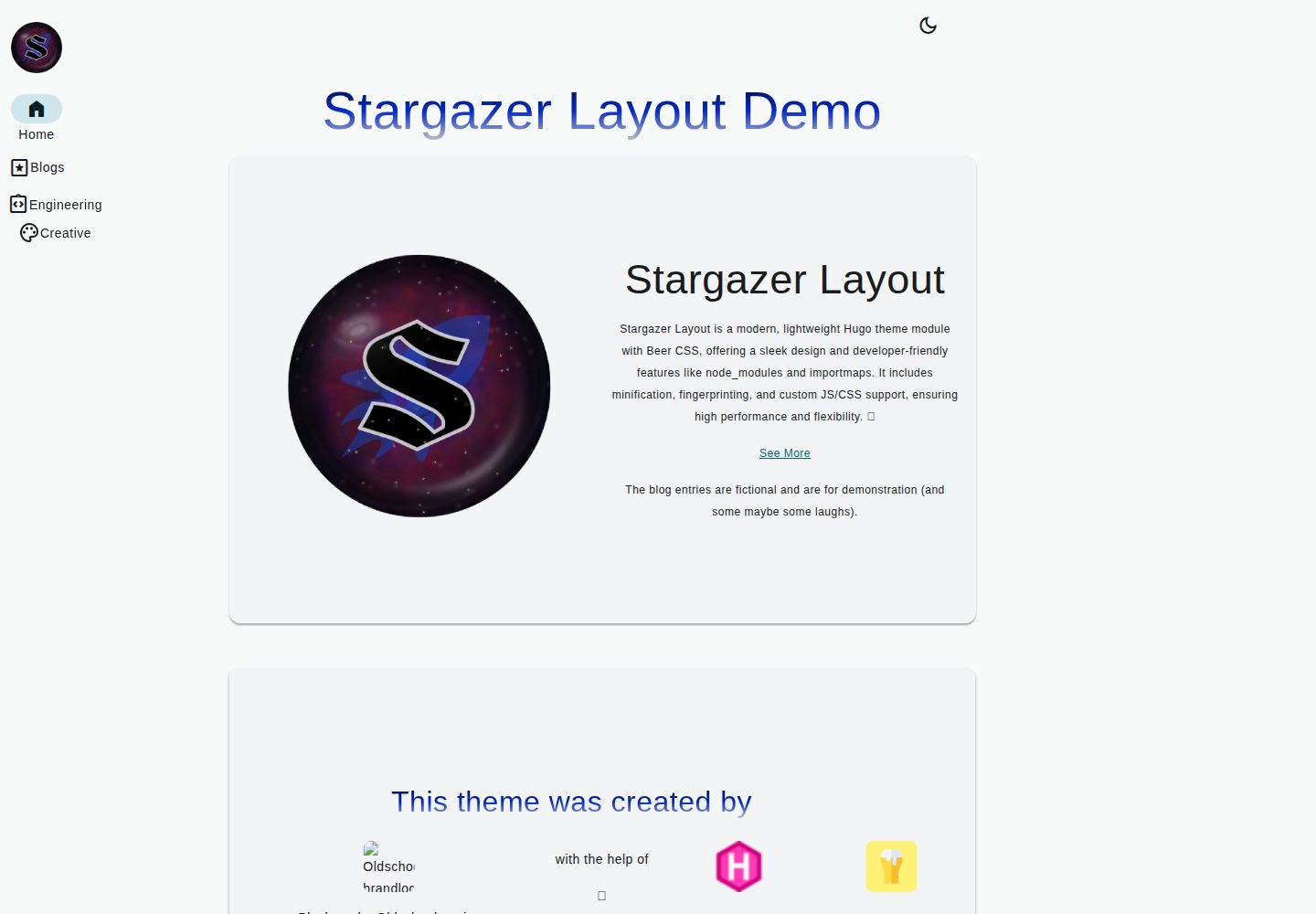
看看你的网站会是什么样
浏览真实页面截图,比较内容排版与手机效果。点击下方缩略图切换,放大查看整页细节。
全部页面与视图 2
截图用于了解视觉与布局,交互效果请以实际项目为准。
采集于 2026-10-04查看来源
值得关注的模板亮点
从已有项目资料中,快速了解它的特点。
支持 node_modules 与 importmap,可在自定义模块中引入 ES 模块
prod 构建时自动压缩与指纹处理
可通过配置添加自定义 CSS、JS、TS 与 SCSS
内置深色/浅色模式切换与 themeColor 主题色参数
已提供 en 和 de 两种语言翻译
模板详细介绍
Stargazer Layout 是一个 Hugo 主题模块,集中存放布局相关的文件与函数,可独立使用,也可作为 Stargazer 的捆绑组件(后者尚未发布)。样式默认采用 Beer CSS,同时启用 node_modules 与 importmap,允许在自定义模块中引入 ES 模块。
功能方面,该主题在 prod 构建时执行压缩与指纹处理,支持通过配置添加自定义 CSS、JS、TS 与 SCSS,并可用 importmap 引用 vendor 目录中的模块。内置分页、深色/浅色模式切换、通过 themeColor 参数生成主题色,以及 en 和 de 两种语言翻译。博客结构包含首页最近文章网格、列表页、单页与标签页。
配置项涵盖 SEO 的 canonical 链接开关、演示内容与品牌元素的开关、菜单定义、内容类型禁用、品牌 logo 与标题、自定义资源路径的正则匹配、importmap 映射,以及按 error/warning/info/debug 分级控制日志显示。README 提到日志功能目前没有传统日志框架的层级结构,需要手动启用或禁用各级别。
安装方式为将仓库克隆或添加为 Git 子模块到 themes/stargazer-layout,进入主题目录执行 npm install,并在 Hugo 配置中声明主题。许可证为 MIT,允许免费使用、修改、商用和分发,但演示图片、字体、图标等第三方素材需单独核对许可。
Hugo启动器
适合你的项目吗?
适用场景
- 使用 Hugo 搭建博客,需要 Beer CSS 风格与最近文章网格首页
- 希望在 Hugo 项目中通过 importmap 使用 ES 模块并管理 vendor 依赖
- 需要按级别控制开发日志显示,辅助调试主题或自定义模块
- 需要多语言(en/de)与深色/浅色模式切换的站点
适合人群
- 熟悉 Hugo 配置与主题模块机制的开发者
- 使用 Beer CSS 或希望尝试 Material Design 风格的个人博客
- 需要在 Hugo 中集成 node_modules 与 importmap 的前端项目
- 接受 MIT 许可并自行核对第三方素材授权的使用者
上手与定制指南
结合仓库当前版本的说明,按下面的资料检查内容、配置与运行要求。
- 1
将仓库克隆或添加为 Git 子模块到 themes/stargazer-layout,并进入主题目录执行 npm install
- 2
在 Hugo 配置中声明 theme 为 stargazer-layout,可与其他主题并列使用
- 3
通过 themeColor 参数设置主题色,通过 brand 配置 logo、标题与 owner
- 4
使用 importmap 时确保文件路径与 assets 目录对应,例如 assets/js/foo/bar.js 应写为 js/foo/bar.js
- 5
日志级别默认无层级结构,需在 show_infos 中手动启用或禁用 error、warning、info、debug
授权与来源资料
使用条件与限制
免费使用 · 保留许可声明本次收录的是公开仓库中采用 MIT 许可的免费版本;免费范围为该版本代码,不代表外部服务或第三方素材免费。
使用时需要遵守
- 允许免费使用、修改、商用和分发该版本代码。
- 分发代码副本或实质性部分时,保留原作者版权声明和完整 MIT 许可声明。
- 代码按现状提供;担保与责任限制以原许可证及适用法律为准。
额外费用与待核对事项
- 演示图片、字体、图标及其他第三方素材需按各自许可核对,不能仅凭代码的 MIT 许可判断。
- 域名、托管、数据库、支付或 AI 等外部服务可能另外收费。
查看原文依据
https://github.com/Blackstareye/stargazer-layout/blob/master/LICENSEhttps://github.com/Blackstareye/stargazer-layout/blob/master/README.mdPermission is hereby granted, free of charge
许可证原文
DeepSeek 根据仓库许可证和 README 整理 ·2026-10-04。结果仅覆盖已读取资料,依赖、图片、字体及后续条款变更以各自原文为准。
项目核对记录与介绍依据
模板资料
- 来源平台
- Hugo Themes
- 资料与维护参考分
- 资料较完整 · 81 / 100
- 技术栈
- Hugo
- 网站类型
- 启动器
这个分数如何计算
本站按许可资料(最高30分)、演示链接(12分)、预览图(10分)、Star数(15分)、记录的维护时间(15分)、描述完整度(8分)、功能记录(5分)和分类资料(5分)计算。它不是代码、安全或性能测试,也不是 Google 评分;有链接不代表已实测可用。
这个项目需要核对什么
- 记录的仓库更新时间
- 2025-05-23
- 截图检查日期
- 2026-10-04
已收录演示链接。请用你的内容与屏幕尺寸检查;有演示不代表表单、认证或支付已经可用。
目录记录的主要技术栈是 Hugo。请通过依赖清单和锁文件核对实际版本与托管要求。这些说明基于收录资料,不代表代码审计或部署实测。
查看具体选型方法 →介绍的制作与核对状态
介绍由 AI 辅助整理目录与仓库资料。仓库作者不等于这篇介绍的审核者。
审核声明: [email protected] · 2026-10-04
查看当时使用的来源资料
SHA-256: 191d33c230496784a88aafcfb7b7bc6929aa82332f4c81a35635d551743a007e
2026-10-04T00:45:03.612Z
来源文件 / 仓库# 🌟 Stargazer Layout




[](https://ko-fi.com/H2H096MU7)
A Product made by Blackeye
([Oldschoolmanier](https://oldschoolmanier.de))

👉 [DEMO](https://blackstareye.github.io/stargazer-layout/)
## Description
Stargazer Layout is a hugo theme module that uses [beer
css](https://www.beercss.com/) for styling and supports `node_modules`
and `importmaps`. It offers features like minification, fingerprinting,
and custom JS/CSS integration.
It uses `beercss` as default styling. It also enables node_modules and
importmaps. Also custom js and css is available.
This is the theme module that contains all layout specific files and
functions. It can be used as a standalone or as a bundle with Stargazer
(coming soon).
## 🚀 Features
- minify and fingerprint on `prod` 🚀 build
- add css and js as you like
- enable node module support with vendor folders
- discover [beer css](https://www.beercss.com/) - full material design
ahead!
- add **js es-modules** with and use it in your own modules with the
**importmap**
- ✅ works also with `fingerprint and minify`
- 🔨💻 logging functionality integrated, control it with
info,warning,debug,error flags :\>
- pagination with [beer css](https://www.beercss.com/) 🍺
- languages: **en** and **de** available and already translated 🌍\
- 🌗 dark and light mode toggle included\
- choose your theme using a **Color** with the param `themeColor` 🎨\
- responsive pages and views -- a beautiful blog experience on
desktop, tablet, and mobile 📱💻🖥️
### Blogging
[Demo](https://blackstareye.github.io/stargazer-layout/)
- home page contains `recent posts`, and organizes content in a
beutiful grid
- all what you need: `list` , `single` , `tags`, `home` page is
created
### Soon
- **soon:** includes
[snippets](https://code.visualstudio.com/docs/editor/userdefinedsnippets)
for vs code
- for logging with `logging`
- **soon:** autodetect scss,ts,js and css in your asset folder
## Screenshots
### Homepage

### Posts

### Recent Posts

## ⚙️ Configuration
### 🔍 SEO
Canonical Link:
[Wiki](https://en.wikipedia.org/wiki/Canonical_link_element)
``` yaml
# If enabled, the website sets a canonical link
# <link rel="canonical" href="http://example.com/">
useCanonify: True
```
And the usual [Hugo
configurations](https://gohugo.io/getting-started/configuration/#configuration-file)
apply.
### 🚫 Deactivate Demo Content
``` yaml
demo:
beer: false
branding: false
```
### 🎨 Set Theme
Define the primary color and generate a complete theme:
``` yaml
themeColor: '#44d8f1'
```
### 📝 Define Menus
For more details, check out the [Hugo Menu
documentation](https://gohugo.io/templates/menu/).
``` yaml
# Example config/menus.yaml
main:
- name: Home
pageRef: /
pre: <i> Home </i>
weight: 10
- name: Blogs
pre: <i> Pages </i>
weight: 20
identifier: blog_parent
- name: Technical
pre: <i> Integration Instructions </i>
parent: blog_parent
pageRef: /technique
weight: 10
identifier: blog_technique
- name: Creative
pre: <i> Palette </i>
pageRef: /creative
parent: blog_parent
weight: 20
identifier: blog_creative
```
### ❌ Disable Content Types
Prevent specific content types from appearing in `recent posts`,
`related posts`, and `categories` pages.
``` yaml
disabled:
sections:
- testing
- _index
```
### 🚀 Set Your Brand
``` yaml
brand:
# Logo settings (image src and alt text)
logo:
src: "images/logo/stargazer/stargazer_layout_big.png"
alt: "brand_logo"
# Brand title (displayed on tablet and mobile view)
title: Demo-Manier
# will be displayed in the Footer in the Copyright tag if set
owner: FooMaker
```
### Set the owner
### 🎭 Custom SCSS / CSS / JS / TS
`node_modules` are automatically included with the wildcard below.\
For finer control, adjust the wildcard or specify files explicitly.
⚠️ **Do not modify sections marked with `!!!`**
``` yaml
regex_folders:
your_site:
vendor: #!!!
js: # !!!
- "vendorlibs/**/dist/**/*.min.js" # Mounted in assets
# Explicit files
- "vendorlibs/my-explicit-file.js"
css: # !!!
- "vendorlibs/**/dist/**/*.min.css"
custom: # !!!
# Custom CSS
css: # !!!
- "css/*.css"
- "scss/main.scss"
# Custom JS
js: # !!!
- "ts/*.ts"
- "js/*.js"
```
### 🛋️ Importmap - Using Modules in Your Custom Module
Use modules just like in other frameworks.
Example: Vue web app with a `ChildComp` component
``` yaml
importmap: # !!!
your_site:
# Vue
vue: /vendorlibs/vue/dist/vue.esm-browser.prod.js
# Component
compact_child: "js/ChildComp.js"
```
``` js
import * from "compact_child";
```
> 🔥 **Important:**\
> Ensure the file exists at the configured path.\
> If your JS file is in `assets/js/foo/bar.js`, then the path should be
> `js/foo/bar.js`.
### 🛠️ Control Logging
> 📝 **Note:**\
> This feature helps with development and provides a structured logging
> system.
Enable debugging with this snippet:
``` go
{{ partial "logging/show_info" (dict "level" "debug" "pre" "Debug Message" "inner" (debug.Dump .) }}
```
#### 🔹 Parameters
- `level`: The logging level\
- *(optional)* `pre`: A prefix before the debug message (helps in
locating logs)\
- `inner`: The actual message
#### 🛠️ Configure Log Visibility
Control which messages are displayed with:
``` yaml
show_infos:
error: True
warning: True
info: True
debug: False # "debug" messages are hidden
```
> ⚠️ **Important for Devs:**\
> Currently, there's no **logging hierarchy** as in traditional logging
> frameworks.\
> You must manually enable/disable log levels as needed.
## 🎯 Installation
### ⏫ Quickstart
Just copy and paste this into your working directory:
``` sh
hugo new site my-site
cd my-site
echo "theme=[\"stargazer-layout\"]" >> hugo.toml
git clone https://github.com/Blackstareye/stargazer-layout themes/stargazer-layout
cd themes/stargazer-layout
npm install
cd ../..
hugo serve
```
### 🚀 Install Theme
#### As a Git Submodule
Inside your Hugo site folder, run:
``` sh
git submodule add https://github.com/Blackstareye/stargazer-layout themes/stargazer-layout
# Go to the theme directory
cd themes/stargazer-layout
npm install
```
#### Add Theme to Config
Include this in your Hugo config:
``` yaml
theme:
- stargazer-layout
```
Or, if you are using multiple themes:
``` yaml
theme:
- your-theme
- stargazer-layout
```
For **TOML** users:
``` toml
theme=["stargazer-layout"]
```
For more details, check out Hugo's official [Quick
Start](https://gohugo.io/getting-started/quick-start/) guide.
That's it! You're all set. 🙌
### 🌟 Run It
``` sh
hugo serve
```
## 🛠️ Tech-Stack
- HTML,JS,SCSS,TS,CSS
- [Hugo](https://gohugo.io/getting-started/quick-start/)
## 📄 LICENSE
this project is under the MIT License, see
[LICENSE](https://github.com/Blackstareye/stargazer-layout/blob/master/LICENSE)
## 🙏 Credits
inspired by those great themes (check them also out 💚):
- [Gohugo Theme
Anananke](https://github.com/theNewDynamic/gohugo-theme-ananke)
- [Hugo Profile](https://github.com/gurusabarish/hugo-profile)
## 📬 Contact
- **GitHub**: [@blackstareye](https://github.com/Blackstareye)
- **Website** for Freelancing:
[Oldschoolmanier](https://oldschoolmanier.de)
## Star History
<a href="https://star-history.com/#Blackstareye/stargazer-layout&Date">
<picture>
<source media="(prefers-color-scheme: dark)" srcset="https://api.star-history.com/svg?repos=Blackstareye/stargazer-layout&type=Date&theme=dark" />
<source media="(prefers-color-scheme: light)" srcset="https://api.star-history.com/svg?repos=Blackstareye/stargazer-layout&type=Date" />
<img alt="Star History Chart" src="https://api.star-history.com/svg?repos=Blackstareye/stargazer-layout&type=Date" />
</picture>
</a>
## Support
[](https://ko-fi.com/H2H096MU7)
If you enjoy the work I do and would like to support me, I would be
truly grateful for any donations. Your contribution doesn't just help
keep this project going --- it enables me to pursue new ideas, work on
exciting future projects, and continue creating content that I'm
passionate about. Every donation, no matter how big or small, makes a
real difference and helps me dedicate more time and energy to what I
love doing. Your support enables me doing exactly that, thank you 💚.
*Made with ❤️ by Blackeye
([Oldschoolmanier](https://oldschoolmanier.de))*
看看同类模板
对比同技术栈与用途的模板,找到更适合的视觉与内容结构。

hugo-xmin
eXtremely Minimal Hugo theme: about 140 lines of code in total, including HTML and CSS (with no dependencies)
Hugo · 启动器

hugo-theme-gallery
Gallery Theme for Hugo
Hugo · 启动器

reveal-hugo
📽️ Create rich HTML-based presentations with Hugo and Reveal.js
Hugo · 启动器

anatole
Anatole is a minimalistic two-column theme for Hugo.
Hugo · 启动器

hugo-theme-diary
Moments piled up. A Hugo theme ported from SumiMakito/hexo-theme-Journal.
Hugo · 启动器

risotto
A minimalist, responsive hugo theme inspired by terminal ricing aesthetics.
Hugo · 启动器