
Block-based page building: declare blocks in the front matter blocks array and render the corresponding partials in order
HugoStarter
hugo-theme-blunix — Hugo Starter Template
By Blunix-GmbH
A Hugo theme for consulting and service-oriented companies that assembles pages via a blocks array in front matter, with built-in English and German bilingual support and responsive Tailwind CSS styles.
Explore the design
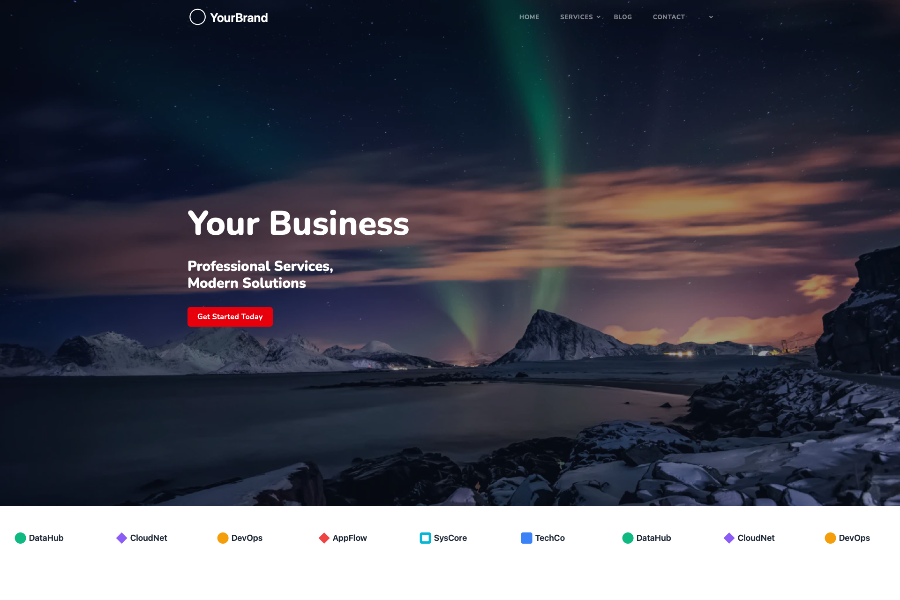
Compare the page layouts and mobile experience. Open any screenshot for a closer look.
Author preview
Author-provided preview
Preview provided in the project README.
One original preview is available. Open the full image to inspect the design.
Screenshots show visual appearance; interactive behavior may differ.
Recorded 2026-10-03View source
What stands out
A quick read of the recorded project description.
14 built-in blocks covering hero, text-image, feature grid, process timeline, FAQ, pricing tabs, partner scroller, and CTA
Built-in English and German translation files; templates retrieve strings via the i18n function and can be extended in the site directory
Tailwind CSS styles are precompiled, so Node.js or npm is not required
Provides OpenGraph, Twitter Cards, and semantic markup
Includes an exampleSite example site and supports three installation methods: Hugo Modules, Git Submodule, and local themes directory
Template Details
hugo-theme-blunix is a Hugo theme developed and open-sourced by Blunix GmbH for its own website www.blunix.com, positioned as a corporate site for consulting and service-oriented companies. Its core mechanism is block-based page layout: blocks are declared in order in the blocks array in page front matter, each block's block field corresponds to a partial under layouts/partials/blocks/, and additional parameters are passed to that partial for rendering. The theme currently provides 14 blocks, including hero, hero-breadcrumb, banner, about, text-image, text-image-bg, features-grid, process-timeline, faq, pricing-tabs, ethics-accordion, partners-scroller, contact-standard, and cta, covering common corporate page sections such as hero, text-image introductions, feature grids, process timelines, pricing tables, FAQs, and contact information.
For languages, the theme includes en.yaml and de.yaml in the i18n/ directory, uses the i18n function in templates to retrieve strings, and sites can extend translations in their own i18n/ directory. Styling is based on Tailwind CSS, but the CSS is precompiled in static/css/, so Node.js or npm is not required; the runtime requires Hugo Extended and Go, the latter for Hugo Modules. The theme also includes OpenGraph, Twitter Cards, and semantic markup, as well as blog-related templates and custom shortcodes.
There are several usage limitations to note: blocks can only be selected from the 14 types already provided by the theme; adding new blocks requires writing your own partial under the site's layouts/partials/blocks/. The theme is released under the MIT license, but third-party assets in the repository such as demo images, fonts (Nunito, EB Garamond), and icons require separate license verification. The repository provides exampleSite/ as a runnable complete example, and installation supports Hugo Modules, Git Submodule, or placing it directly in the themes/ directory.
HugoStarter
Is it right for your project?
Use Cases
- Building a corporate website for a consulting firm or service-oriented company, using blocks to assemble service introduction, process, and pricing pages
- Projects requiring an English and German bilingual site, directly reusing the theme's built-in i18n files
- Hugo sites that want to use Tailwind CSS styles without introducing a Node.js build chain
- Using exampleSite as a starting point to quickly validate block-based layout, then replacing it with your own content and brand assets
Suitable For
- Developers using Hugo and familiar with front matter and partial override mechanisms
- Corporate site projects that need block-based page composition rather than fixed page templates
- Teams with English and German bilingual content requirements
- Teams that want to use the theme under the MIT license and maintain the theme code themselves
Getting started & customization
Use these recorded setup notes alongside the repository instructions for your chosen version.
- 1
Requires Hugo Extended and Go; CSS is precompiled, so Node.js or npm is not required
- 2
Recommended installation via Hugo Modules: after hugo mod init, add the theme path to module.imports in hugo.toml and run hugo mod get -u; in this case the theme field does not need to be set
- 3
You can also use git submodule or clone directly into the themes/ directory and set theme = "hugo-theme-blunix" in the configuration
- 4
Site parameters (logo, footer_logo, featured_image, contact list) are written in config/_default/params.toml, and multilingual settings in languages.toml
- 5
When overriding templates or styles, copy the corresponding file from the theme to the same path in the site to take effect; adding new blocks requires creating a partial under the site's layouts/partials/blocks/
License & source material
Usage conditions & limitations
Free to use · keep license noticeThis entry covers the free version in the public repository under the MIT license; the free scope is the code of that version and does not mean external services or third-party assets are free.
Must comply with when using
- Free use, modification, commercial use, and distribution of this version's code are permitted.
- When distributing copies or substantial portions of the code, retain the original author's copyright notice and the full MIT license notice.
- The code is provided as is; warranties and limitations of liability are governed by the original license and applicable law.
Additional costs & items to verify
- The theme's Tailwind CSS is precompiled, so Node.js or npm is not required; however, if you need to modify styles yourself, you must edit static/css/style.css directly rather than through a Tailwind build process.
- Using this theme requires Hugo Extended version 0.120.0 or higher; standard Hugo is not supported.
- If using the recommended Hugo Modules installation method, Go 1.21 or higher must be installed; Go is not required when using Git Submodule or a local directory.
- The theme only provides the 14 blocks listed in the README and cannot directly use other blocks; if you need new layouts, you must write your own partial under the site's layouts/partials/blocks/ directory.
- Adding new blocks requires creating a partial yourself in the site's layouts/partials/blocks/ directory; the theme itself does not provide this functionality.
- Feedback and contributions require contacting Blunix GmbH or submitting an issue in the theme repository; there are no other official support channels.
- Demo images, fonts, icons, and other third-party assets must be checked against their respective licenses and cannot be judged solely by the code's MIT license.
- External services such as domains, hosting, databases, payments, or AI may incur additional charges.
View Original Text Basis
Permission is hereby granted, free of charge
Original License Text
No Node.js or npm required — CSS is pre-compiled.
Original README
- **Hugo Extended** (v0.120.0 or later) — [Installation guide](https://gohugo.io/installation/)
Original README
- **Go** (v1.21 or later) — Required for Hugo Modules — [Installation guide](https://go.dev/doc/install)
Original README
This streamlined theme build includes the following blocks:
Original README
Create new blocks in your site's `layouts/partials/blocks/` directory. They'll be available alongside theme blocks.
Original README
https://github.com/Blunix-GmbH/hugo-theme-blunix/blob/main/LICENSEhttps://github.com/Blunix-GmbH/hugo-theme-blunix/blob/main/README.mdFor issues, questions, or contributions, please contact Blunix GmbH or open an issue in the theme repository.
Original README
Compiled by DeepSeek based on repository license and README ·2026-10-03. Results only cover the materials read; dependencies, images, fonts, and subsequent term changes are subject to their respective original texts.
Project checks & description sources
Template Information
- Source platforms
- Hugo Themes
- Documentation and maintenance reference score
- More documented · 75 / 100
- Technologies
- Hugo
- Website type
- Starter
How this score is calculated
Our heuristic uses license records (up to 30), a demo link (12), a preview (10), stars (15), recorded maintenance (15), description completeness (8), feature records (5) and classification data (5). It is not a code, security or performance test, or a Google score. A link does not establish tested functionality.
What to verify for this project
- Repository update recorded
- 2026-02-06
- Screenshot last checked
- 2026-10-03
No demo link is recorded. Use the repository instructions to evaluate the project locally; the screenshot alone cannot establish interactive behavior.
The catalog identifies Hugo as the primary stack. Check the actual dependency manifest and lockfile for versions and hosting requirements. These notes use recorded metadata, not a code audit or a deployment test.
Use a selection guide →How this description was prepared
AI-assisted description based on catalog records and repository material. Repository authors are not automatically the reviewers of this description.
Review declaration: [email protected] · 2026-10-04
Inspect the recorded source material
SHA-256: b71f08de2a29b1172aea39fbda6fde8111cd05ea47b22d607a4117c7a0f0f6bf
2026-10-03T23:38:03.804Z
Source file / repository# Hugo Theme Blunix
A professional, clean Hugo theme designed for consulting and service-based businesses. Features a flexible block-based page layout system, multilingual support, and modern responsive design.
## Preview

## Features
- **Block-based page builder** — Compose pages from reusable content blocks
- **Multilingual support** — Built-in i18n with English and German translations
- **Responsive design** — Mobile-first with Tailwind CSS
- **SEO optimized** — OpenGraph, Twitter Cards, and semantic markup
- **Service business focused** — Pricing tables, contact sections, and FAQ blocks
- **Clean codebase** — Modular partials and well-organized templates
## Prerequisites
- **Hugo Extended** (v0.120.0 or later) — [Installation guide](https://gohugo.io/installation/)
- **Go** (v1.21 or later) — Required for Hugo Modules — [Installation guide](https://go.dev/doc/install)
No Node.js or npm required — CSS is pre-compiled.
## Installation
### As a Hugo Module (Recommended)
Initialize your site as a Hugo Module (if not already):
```bash
hugo mod init github.com/<your-username>/<your-site>
```
Add the theme to your `hugo.toml` (or `config/_default/hugo.toml`):
```toml
[module]
[[module.imports]]
path = "github.com/Blunix-GmbH/hugo-theme-blunix"
```
Then download the module:
```bash
hugo mod get -u
```
> **Note:** When using Hugo Modules, you do **not** need to set `theme = "..."` in your config. The module import replaces that directive.
### As a Git Submodule
From your Hugo site root:
```bash
git submodule add https://github.com/Blunix-GmbH/hugo-theme-blunix.git themes/hugo-theme-blunix
```
Then activate the theme in your `config.toml` or `config/_default/config.toml`:
```toml
theme = "hugo-theme-blunix"
```
### As a Local Theme Folder (No Modules/Submodules)
Copy or clone the theme directly into your site's `themes/` directory:
```bash
mkdir -p themes
git clone https://github.com/Blunix-GmbH/hugo-theme-blunix.git themes/hugo-theme-blunix
```
Then set the theme in your config:
```toml
theme = "hugo-theme-blunix"
```
### Cloning a Site That Uses This Theme as a Submodule
```bash
git clone --recurse-submodules <your-site-repo>
```
Or if you've already cloned without submodules:
```bash
git submodule update --init --recursive
```
## Configuration
### Basic Configuration
Minimum required in `config/_default/config.toml`:
```toml
baseURL = 'https://example.com/'
languageCode = 'en'
title = 'Your Company Name'
```
### Parameters
Configure site parameters in `config/_default/params.toml`:
```toml
logo = '/images/logo.svg'
footer_logo = '/images/logo-full.svg'
featured_image = 'featured.webp'
[[contact]]
name = "[email protected]"
icon = "fa-solid fa-envelope"
link = "mailto:[email protected]"
[[contact]]
name = "+1 234 567 890"
icon = "fa-solid fa-phone"
link = "tel:+1234567890"
```
### Multilingual Setup
Configure languages in `config/_default/languages.toml`:
```toml
[en]
languageName = "English"
languageCode = "en-us"
contentDir = "content/en"
title = "Your Company"
weight = 1
[de]
languageName = "Deutsch"
languageCode = "de"
contentDir = "content/de"
title = "Ihr Unternehmen"
weight = 2
```
See the `exampleSite/` directory for a complete working example.
## Block-Based Page Layout
Pages are composed from reusable "blocks" defined in front matter. The theme loops through the `blocks` array and renders each block partial.
### How It Works
1. Define blocks in your page's front matter under the `blocks` key
2. Each block must have a `block` field matching a partial name in `layouts/partials/blocks/`
3. Blocks render in the order they appear in the array
4. Additional parameters are passed to the block partial
### Example Page
```yaml
---
title: "Our Services"
description: "Professional consulting services"
blocks:
- block: hero-breadcrumb
title: "Services"
subtitle: "Expert Solutions for Your Business"
background: "/images/services/hero.webp"
breadcrumb: "Services"
- block: text-image
title: "Custom Solutions"
text: "We provide tailored consulting services..."
image:
src: "/images/services/consulting.webp"
alt: "Consulting services"
reverse: false
- block: features-grid
title: "What We Offer"
items:
- icon: "fa-solid fa-server"
title: "Infrastructure"
description: "Scalable server solutions"
- icon: "fa-solid fa-shield"
title: "Security"
description: "Enterprise-grade protection"
- block: cta
title: "Ready to Get Started?"
text: "Contact us today for a consultation"
button:
text: "Get in Touch"
link: "/contact/"
---
```
## Available Blocks
This streamlined theme build includes the following blocks:
- **`hero`** — Full-width hero section with image background
- **`hero-breadcrumb`** — Hero with breadcrumb navigation
- **`banner`** — Simple banner section
- **`about`** — About section with image and text columns
- **`text-image`** — Text alongside image (left/right configurable)
- **`text-image-bg`** — Text with image and section background styling
- **`features-grid`** — Grid of features with icons
- **`process-timeline`** — Process steps timeline
- **`faq`** — Accordion-style FAQ
- **`pricing-tabs`** — Tabbed pricing tables
- **`ethics-accordion`** — Expandable ethics/values section
- **`partners-scroller`** — Scrolling partner logos
- **`contact-standard`** — Contact information section
- **`cta`** — Call-to-action section
## Multilingual Support
The theme includes translation files in `i18n/`:
- `en.yaml` — English
- `de.yaml` — German
Use translations in templates:
```go-html-template
{{ i18n "read_more" }}
{{ i18n "contact_us" }}
```
Add custom translations by extending these files in your site's `i18n/` directory.
## Theme Structure
```
hugo-theme-blunix/
├── archetypes/ # Content templates
│ └── default.md
├── assets/ # Assets for Hugo Pipes processing
│ └── images/ # Theme images (logo, icons)
├── exampleSite/ # Demo site
│ ├── config/
│ └── content/
├── i18n/ # Translation files
│ ├── en.yaml
│ └── de.yaml
├── layouts/
│ ├── _default/ # Default templates
│ │ ├── baseof.html
│ │ ├── single.html
│ │ ├── list.html
│ │ └── _markup/ # Custom render hooks
│ ├── blog/ # Blog-specific templates
│ ├── partials/
│ │ ├── blocks/ # Block components (14 blocks)
│ │ ├── components/ # Reusable UI components
│ │ ├── helpers/ # Helper partials
│ │ ├── _funcs/ # Utility functions
│ │ ├── head.html
│ │ ├── header.html
│ │ └── footer.html
│ └── shortcodes/ # Custom shortcodes
├── static/ # Static assets
│ ├── css/ # Compiled CSS
│ ├── js/ # JavaScript (Alpine.js, Prism.js)
│ ├── fonts/ # Web fonts (Nunito, EB Garamond)
│ ├── libs/ # Third-party libraries
│ └── images/ # Static images
├── go.mod # Hugo Modules definition
├── hugo.toml # Module configuration
├── theme.toml # Theme metadata
└── LICENSE
```
## Updating the Theme
### Hugo Modules
```bash
hugo mod get -u github.com/Blunix-GmbH/hugo-theme-blunix
```
To pin to a specific version:
```bash
hugo mod get github.com/Blunix-GmbH/[email protected]
```
### Git Submodule
```bash
git submodule update --remote --merge themes/hugo-theme-blunix
git add themes/hugo-theme-blunix
git commit -m "Update theme to latest version"
```
## Development
### Running the Example Site
```bash
cd exampleSite
hugo server --themesDir ../..
```
### Production Build
```bash
hugo --minify
```
Output goes to `public/` directory.
## Customization
### Override Templates
To customize a theme template, copy it from the theme's `layouts/` to your site's `layouts/` directory with the same path. Your version will take precedence.
```bash
mkdir -p layouts/partials
cp themes/hugo-theme-blunix/layouts/partials/footer.html layouts/partials/footer.html
```
### Override Styles
To customize styles, copy `static/css/style.css` to your site's `static/css/` directory and modify it. Your version will take precedence.
### Add Custom Blocks
Create new blocks in your site's `layouts/partials/blocks/` directory. They'll be available alongside theme blocks.
## Linux Support
For issues, questions, or contributions, please contact Blunix GmbH or open an issue in the theme repository.
Author information: [Blunix Ansible Role - Apache2](https://github.com/Blunix-GmbH/ansible-role-apache2?tab=readme-ov-file#author-information)
## License
MIT License - See [LICENSE](LICENSE) file for details.
## Credits
Developed and maintained by [Blunix GmbH](https://www.blunix.com)
Explore similar templates
Compare previews and descriptions within the same stack and category.

hugo-xmin
hugo-xmin is an extremely minimal Hugo theme written by Yihui Xie for template beginners. HTML and CSS total about 140 lines, with no external dependencies, and it uses the MIT license.
Hugo · Starter

hugo-theme-gallery
A Hugo Extended photo gallery theme that organizes images with Page Bundles, automatically generating album lists and gallery pages with a Justified layout and PhotoSwipe lightbox.
Hugo · Starter

reveal-hugo
reveal-hugo is a Hugo theme that converts Markdown content into Reveal.js-based HTML presentations. It supports slide separation with `---`, shortcodes for fragments, slides, sections, notes, Markdown, and MathJax, and organizes content as root or section presentations with order controlled by weight.
Hugo · Starter

anatole
Anatole is a minimalistic two-column Hugo theme ported from farbox-theme-Anatole, featuring dark mode, multilingual and RTL support, and optional portfolio, comments, analytics, KaTeX, and Mermaid integrations. It suits personal blogs, portfolios, or documentation sites built with Hugo.
Hugo · Starter

hugo-theme-diary
A Hugo diary-style theme ported from the Hexo theme Journal, with a grid homepage for essays and daily notes. It supports six languages, dark mode, table-of-contents scroll positioning, reading time, code highlighting, and configurable sidebar, fonts, and colors.
Hugo · Starter

risotto
risotto is a minimalist, responsive Hugo theme inspired by terminal ricing aesthetics. It uses semantic HTML and pure CSS with no JavaScript, and its layout relies on CSS Grid for native responsiveness without manual breakpoints.
Hugo · Starter