
块式页面构建:在 front matter 的 blocks 数组中声明区块,按顺序渲染对应 partial
Hugo启动器
hugo-theme-blunix — Hugo 启动器模板
作者 Blunix-GmbH
面向咨询与服务型企业的 Hugo 主题,通过 front matter 中的 blocks 数组组合页面,内置英德双语与 Tailwind CSS 响应式样式。
看看你的网站会是什么样
浏览真实页面截图,比较内容排版与手机效果。点击下方缩略图切换,放大查看整页细节。
目前有 1 张原始预览,可打开完整图片查看设计细节。
截图用于了解视觉与布局,交互效果请以实际项目为准。
采集于 2026-10-03查看来源
值得关注的模板亮点
从已有项目资料中,快速了解它的特点。
内置 14 个区块,涵盖 hero、图文、功能网格、流程时间线、FAQ、定价标签页、合作伙伴滚动与 CTA
内置英语与德语翻译文件,模板通过 i18n 函数取词,可在站点目录扩展
Tailwind CSS 样式已预编译,无需 Node.js 或 npm
提供 OpenGraph、Twitter Cards 与语义化标记
附带 exampleSite 示例站点,支持 Hugo Modules、Git Submodule 与本地 themes 目录三种安装方式
模板详细介绍
hugo-theme-blunix 是 Blunix GmbH 为自家官网 www.blunix.com 开发并开源的 Hugo 主题,定位是咨询与服务型企业的公司站点。它的核心机制是块式页面布局:在页面 front matter 的 blocks 数组中按顺序声明区块,每个区块的 block 字段对应 layouts/partials/blocks/ 下的一个 partial,附加参数再传给该 partial 渲染。主题当前提供 14 个区块,包括 hero、hero-breadcrumb、banner、about、text-image、text-image-bg、features-grid、process-timeline、faq、pricing-tabs、ethics-accordion、partners-scroller、contact-standard 和 cta,覆盖首屏、图文介绍、功能网格、流程时间线、定价表、常见问题与联系方式等常见企业页面段落。
语言方面,主题在 i18n/ 目录内置 en.yaml 与 de.yaml,模板中通过 i18n 函数取词,站点可在自己的 i18n/ 目录扩展翻译。样式基于 Tailwind CSS,但 CSS 已预编译放在 static/css/,因此不需要 Node.js 或 npm;运行环境要求 Hugo Extended 与 Go,后者用于 Hugo Modules。主题还包含 OpenGraph、Twitter Cards 与语义化标记,以及 blog 相关模板和自定义 shortcodes。
使用上有几点限制需要留意:区块只能在主题已提供的 14 种里选择,新增区块需要自己在站点的 layouts/partials/blocks/ 下编写 partial;主题以 MIT 许可发布,但仓库中的演示图片、字体(Nunito、EB Garamond)、图标等第三方素材需单独核对其许可。仓库提供 exampleSite/ 作为可运行的完整示例,安装方式支持 Hugo Modules、Git Submodule 或直接放入 themes/ 目录。
Hugo启动器
适合你的项目吗?
适用场景
- 为咨询公司或服务型企业搭建公司官网,用区块拼装服务介绍、流程与定价页面
- 需要英语与德语双语站点的项目,直接复用主题内置的 i18n 文件
- 希望在不引入 Node.js 构建链的前提下使用 Tailwind CSS 样式的 Hugo 站点
- 以 exampleSite 为起点快速验证块式布局,再替换为自有内容与品牌素材
适合人群
- 使用 Hugo 并熟悉 front matter 与 partial 覆盖机制的开发者
- 需要块式页面组合而非固定页面模板的企业站点项目
- 有英德双语内容需求的团队
- 希望以 MIT 许可使用并自行维护主题代码的团队
上手与定制指南
结合仓库当前版本的说明,按下面的资料检查内容、配置与运行要求。
- 1
需要 Hugo Extended 与 Go,CSS 已预编译,无需 Node.js 或 npm
- 2
推荐以 Hugo Modules 方式安装:hugo mod init 后在 hugo.toml 的 module.imports 中加入主题路径并执行 hugo mod get -u,此时无需再设置 theme 字段
- 3
也可用 git submodule 或直接克隆到 themes/ 目录,并在配置中设置 theme = "hugo-theme-blunix"
- 4
站点参数(logo、footer_logo、featured_image、contact 列表)写在 config/_default/params.toml,多语言写在 languages.toml
- 5
覆盖模板或样式时,把主题中对应文件复制到站点同路径下即可生效;新增区块需在站点的 layouts/partials/blocks/ 下创建 partial
授权与来源资料
使用条件与限制
免费使用 · 保留许可声明本次收录的是公开仓库中采用 MIT 许可的免费版本;免费范围为该版本代码,不代表外部服务或第三方素材免费。
使用时需要遵守
- 允许免费使用、修改、商用和分发该版本代码。
- 分发代码副本或实质性部分时,保留原作者版权声明和完整 MIT 许可声明。
- 代码按现状提供;担保与责任限制以原许可证及适用法律为准。
额外费用与待核对事项
- 主题的 Tailwind CSS 已预编译,因此无需 Node.js 或 npm;但若需自行修改样式,则需直接编辑 static/css/style.css,而非通过 Tailwind 构建流程。
- 使用该主题必须安装 Hugo Extended 版本 0.120.0 或更高版本,普通版 Hugo 不受支持。
- 若采用推荐的 Hugo Modules 安装方式,必须安装 Go 1.21 或更高版本;使用 Git Submodule 或本地目录方式则不需要 Go。
- 该主题仅提供 README 中列出的 14 种区块,无法直接使用其他区块;如需新布局,必须自行在站点的 layouts/partials/blocks/ 目录下编写 partial。
- 新增区块需自行在站点的 layouts/partials/blocks/ 目录中创建 partial,主题本身不提供该功能。
- 问题反馈与贡献需联系 Blunix GmbH 或在主题仓库中提交 issue,无其他官方支持渠道。
- 演示图片、字体、图标及其他第三方素材需按各自许可核对,不能仅凭代码的 MIT 许可判断。
- 域名、托管、数据库、支付或 AI 等外部服务可能另外收费。
查看原文依据
Permission is hereby granted, free of charge
许可证原文
No Node.js or npm required — CSS is pre-compiled.
README 原文
- **Hugo Extended** (v0.120.0 or later) — [Installation guide](https://gohugo.io/installation/)
README 原文
- **Go** (v1.21 or later) — Required for Hugo Modules — [Installation guide](https://go.dev/doc/install)
README 原文
This streamlined theme build includes the following blocks:
README 原文
Create new blocks in your site's `layouts/partials/blocks/` directory. They'll be available alongside theme blocks.
README 原文
https://github.com/Blunix-GmbH/hugo-theme-blunix/blob/main/LICENSEhttps://github.com/Blunix-GmbH/hugo-theme-blunix/blob/main/README.mdFor issues, questions, or contributions, please contact Blunix GmbH or open an issue in the theme repository.
README 原文
DeepSeek 根据仓库许可证和 README 整理 ·2026-10-03。结果仅覆盖已读取资料,依赖、图片、字体及后续条款变更以各自原文为准。
项目核对记录与介绍依据
模板资料
- 来源平台
- Hugo Themes
- 资料与维护参考分
- 资料较完整 · 75 / 100
- 技术栈
- Hugo
- 网站类型
- 启动器
这个分数如何计算
本站按许可资料(最高30分)、演示链接(12分)、预览图(10分)、Star数(15分)、记录的维护时间(15分)、描述完整度(8分)、功能记录(5分)和分类资料(5分)计算。它不是代码、安全或性能测试,也不是 Google 评分;有链接不代表已实测可用。
这个项目需要核对什么
- 记录的仓库更新时间
- 2026-02-06
- 截图检查日期
- 2026-10-03
目前没有记录演示链接。请依据仓库说明在本地评估;仅凭截图无法确认交互行为。
目录记录的主要技术栈是 Hugo。请通过依赖清单和锁文件核对实际版本与托管要求。这些说明基于收录资料,不代表代码审计或部署实测。
查看具体选型方法 →介绍的制作与核对状态
介绍由 AI 辅助整理目录与仓库资料。仓库作者不等于这篇介绍的审核者。
审核声明: [email protected] · 2026-10-04
查看当时使用的来源资料
SHA-256: b71f08de2a29b1172aea39fbda6fde8111cd05ea47b22d607a4117c7a0f0f6bf
2026-10-03T23:38:03.804Z
来源文件 / 仓库# Hugo Theme Blunix
A professional, clean Hugo theme designed for consulting and service-based businesses. Features a flexible block-based page layout system, multilingual support, and modern responsive design.
## Preview

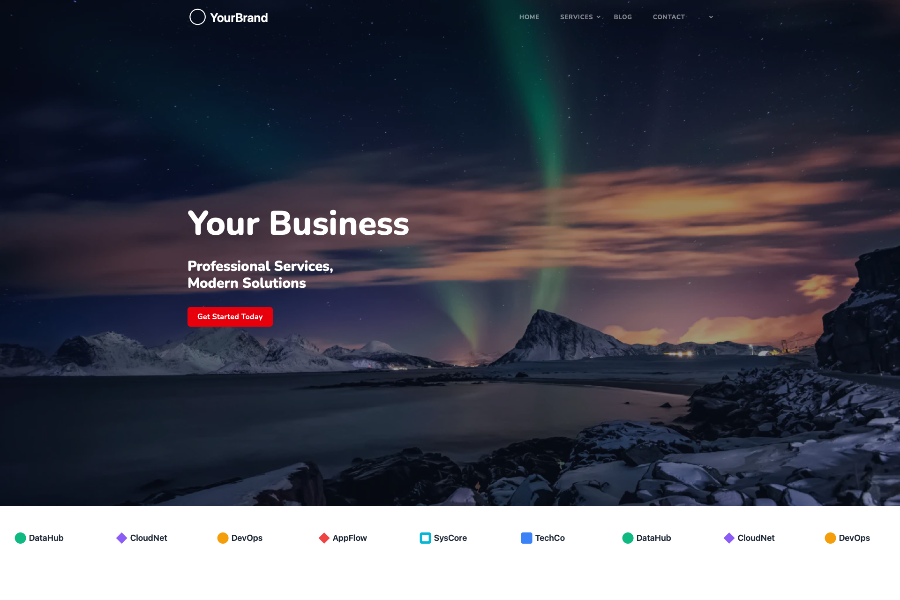
## Features
- **Block-based page builder** — Compose pages from reusable content blocks
- **Multilingual support** — Built-in i18n with English and German translations
- **Responsive design** — Mobile-first with Tailwind CSS
- **SEO optimized** — OpenGraph, Twitter Cards, and semantic markup
- **Service business focused** — Pricing tables, contact sections, and FAQ blocks
- **Clean codebase** — Modular partials and well-organized templates
## Prerequisites
- **Hugo Extended** (v0.120.0 or later) — [Installation guide](https://gohugo.io/installation/)
- **Go** (v1.21 or later) — Required for Hugo Modules — [Installation guide](https://go.dev/doc/install)
No Node.js or npm required — CSS is pre-compiled.
## Installation
### As a Hugo Module (Recommended)
Initialize your site as a Hugo Module (if not already):
```bash
hugo mod init github.com/<your-username>/<your-site>
```
Add the theme to your `hugo.toml` (or `config/_default/hugo.toml`):
```toml
[module]
[[module.imports]]
path = "github.com/Blunix-GmbH/hugo-theme-blunix"
```
Then download the module:
```bash
hugo mod get -u
```
> **Note:** When using Hugo Modules, you do **not** need to set `theme = "..."` in your config. The module import replaces that directive.
### As a Git Submodule
From your Hugo site root:
```bash
git submodule add https://github.com/Blunix-GmbH/hugo-theme-blunix.git themes/hugo-theme-blunix
```
Then activate the theme in your `config.toml` or `config/_default/config.toml`:
```toml
theme = "hugo-theme-blunix"
```
### As a Local Theme Folder (No Modules/Submodules)
Copy or clone the theme directly into your site's `themes/` directory:
```bash
mkdir -p themes
git clone https://github.com/Blunix-GmbH/hugo-theme-blunix.git themes/hugo-theme-blunix
```
Then set the theme in your config:
```toml
theme = "hugo-theme-blunix"
```
### Cloning a Site That Uses This Theme as a Submodule
```bash
git clone --recurse-submodules <your-site-repo>
```
Or if you've already cloned without submodules:
```bash
git submodule update --init --recursive
```
## Configuration
### Basic Configuration
Minimum required in `config/_default/config.toml`:
```toml
baseURL = 'https://example.com/'
languageCode = 'en'
title = 'Your Company Name'
```
### Parameters
Configure site parameters in `config/_default/params.toml`:
```toml
logo = '/images/logo.svg'
footer_logo = '/images/logo-full.svg'
featured_image = 'featured.webp'
[[contact]]
name = "[email protected]"
icon = "fa-solid fa-envelope"
link = "mailto:[email protected]"
[[contact]]
name = "+1 234 567 890"
icon = "fa-solid fa-phone"
link = "tel:+1234567890"
```
### Multilingual Setup
Configure languages in `config/_default/languages.toml`:
```toml
[en]
languageName = "English"
languageCode = "en-us"
contentDir = "content/en"
title = "Your Company"
weight = 1
[de]
languageName = "Deutsch"
languageCode = "de"
contentDir = "content/de"
title = "Ihr Unternehmen"
weight = 2
```
See the `exampleSite/` directory for a complete working example.
## Block-Based Page Layout
Pages are composed from reusable "blocks" defined in front matter. The theme loops through the `blocks` array and renders each block partial.
### How It Works
1. Define blocks in your page's front matter under the `blocks` key
2. Each block must have a `block` field matching a partial name in `layouts/partials/blocks/`
3. Blocks render in the order they appear in the array
4. Additional parameters are passed to the block partial
### Example Page
```yaml
---
title: "Our Services"
description: "Professional consulting services"
blocks:
- block: hero-breadcrumb
title: "Services"
subtitle: "Expert Solutions for Your Business"
background: "/images/services/hero.webp"
breadcrumb: "Services"
- block: text-image
title: "Custom Solutions"
text: "We provide tailored consulting services..."
image:
src: "/images/services/consulting.webp"
alt: "Consulting services"
reverse: false
- block: features-grid
title: "What We Offer"
items:
- icon: "fa-solid fa-server"
title: "Infrastructure"
description: "Scalable server solutions"
- icon: "fa-solid fa-shield"
title: "Security"
description: "Enterprise-grade protection"
- block: cta
title: "Ready to Get Started?"
text: "Contact us today for a consultation"
button:
text: "Get in Touch"
link: "/contact/"
---
```
## Available Blocks
This streamlined theme build includes the following blocks:
- **`hero`** — Full-width hero section with image background
- **`hero-breadcrumb`** — Hero with breadcrumb navigation
- **`banner`** — Simple banner section
- **`about`** — About section with image and text columns
- **`text-image`** — Text alongside image (left/right configurable)
- **`text-image-bg`** — Text with image and section background styling
- **`features-grid`** — Grid of features with icons
- **`process-timeline`** — Process steps timeline
- **`faq`** — Accordion-style FAQ
- **`pricing-tabs`** — Tabbed pricing tables
- **`ethics-accordion`** — Expandable ethics/values section
- **`partners-scroller`** — Scrolling partner logos
- **`contact-standard`** — Contact information section
- **`cta`** — Call-to-action section
## Multilingual Support
The theme includes translation files in `i18n/`:
- `en.yaml` — English
- `de.yaml` — German
Use translations in templates:
```go-html-template
{{ i18n "read_more" }}
{{ i18n "contact_us" }}
```
Add custom translations by extending these files in your site's `i18n/` directory.
## Theme Structure
```
hugo-theme-blunix/
├── archetypes/ # Content templates
│ └── default.md
├── assets/ # Assets for Hugo Pipes processing
│ └── images/ # Theme images (logo, icons)
├── exampleSite/ # Demo site
│ ├── config/
│ └── content/
├── i18n/ # Translation files
│ ├── en.yaml
│ └── de.yaml
├── layouts/
│ ├── _default/ # Default templates
│ │ ├── baseof.html
│ │ ├── single.html
│ │ ├── list.html
│ │ └── _markup/ # Custom render hooks
│ ├── blog/ # Blog-specific templates
│ ├── partials/
│ │ ├── blocks/ # Block components (14 blocks)
│ │ ├── components/ # Reusable UI components
│ │ ├── helpers/ # Helper partials
│ │ ├── _funcs/ # Utility functions
│ │ ├── head.html
│ │ ├── header.html
│ │ └── footer.html
│ └── shortcodes/ # Custom shortcodes
├── static/ # Static assets
│ ├── css/ # Compiled CSS
│ ├── js/ # JavaScript (Alpine.js, Prism.js)
│ ├── fonts/ # Web fonts (Nunito, EB Garamond)
│ ├── libs/ # Third-party libraries
│ └── images/ # Static images
├── go.mod # Hugo Modules definition
├── hugo.toml # Module configuration
├── theme.toml # Theme metadata
└── LICENSE
```
## Updating the Theme
### Hugo Modules
```bash
hugo mod get -u github.com/Blunix-GmbH/hugo-theme-blunix
```
To pin to a specific version:
```bash
hugo mod get github.com/Blunix-GmbH/[email protected]
```
### Git Submodule
```bash
git submodule update --remote --merge themes/hugo-theme-blunix
git add themes/hugo-theme-blunix
git commit -m "Update theme to latest version"
```
## Development
### Running the Example Site
```bash
cd exampleSite
hugo server --themesDir ../..
```
### Production Build
```bash
hugo --minify
```
Output goes to `public/` directory.
## Customization
### Override Templates
To customize a theme template, copy it from the theme's `layouts/` to your site's `layouts/` directory with the same path. Your version will take precedence.
```bash
mkdir -p layouts/partials
cp themes/hugo-theme-blunix/layouts/partials/footer.html layouts/partials/footer.html
```
### Override Styles
To customize styles, copy `static/css/style.css` to your site's `static/css/` directory and modify it. Your version will take precedence.
### Add Custom Blocks
Create new blocks in your site's `layouts/partials/blocks/` directory. They'll be available alongside theme blocks.
## Linux Support
For issues, questions, or contributions, please contact Blunix GmbH or open an issue in the theme repository.
Author information: [Blunix Ansible Role - Apache2](https://github.com/Blunix-GmbH/ansible-role-apache2?tab=readme-ov-file#author-information)
## License
MIT License - See [LICENSE](LICENSE) file for details.
## Credits
Developed and maintained by [Blunix GmbH](https://www.blunix.com)
看看同类模板
对比同技术栈与用途的模板,找到更适合的视觉与内容结构。

hugo-xmin
eXtremely Minimal Hugo theme: about 140 lines of code in total, including HTML and CSS (with no dependencies)
Hugo · 启动器

hugo-theme-gallery
Gallery Theme for Hugo
Hugo · 启动器

reveal-hugo
📽️ Create rich HTML-based presentations with Hugo and Reveal.js
Hugo · 启动器

anatole
Anatole is a minimalistic two-column theme for Hugo.
Hugo · 启动器

hugo-theme-diary
Moments piled up. A Hugo theme ported from SumiMakito/hexo-theme-Journal.
Hugo · 启动器

risotto
A minimalist, responsive hugo theme inspired by terminal ricing aesthetics.
Hugo · 启动器