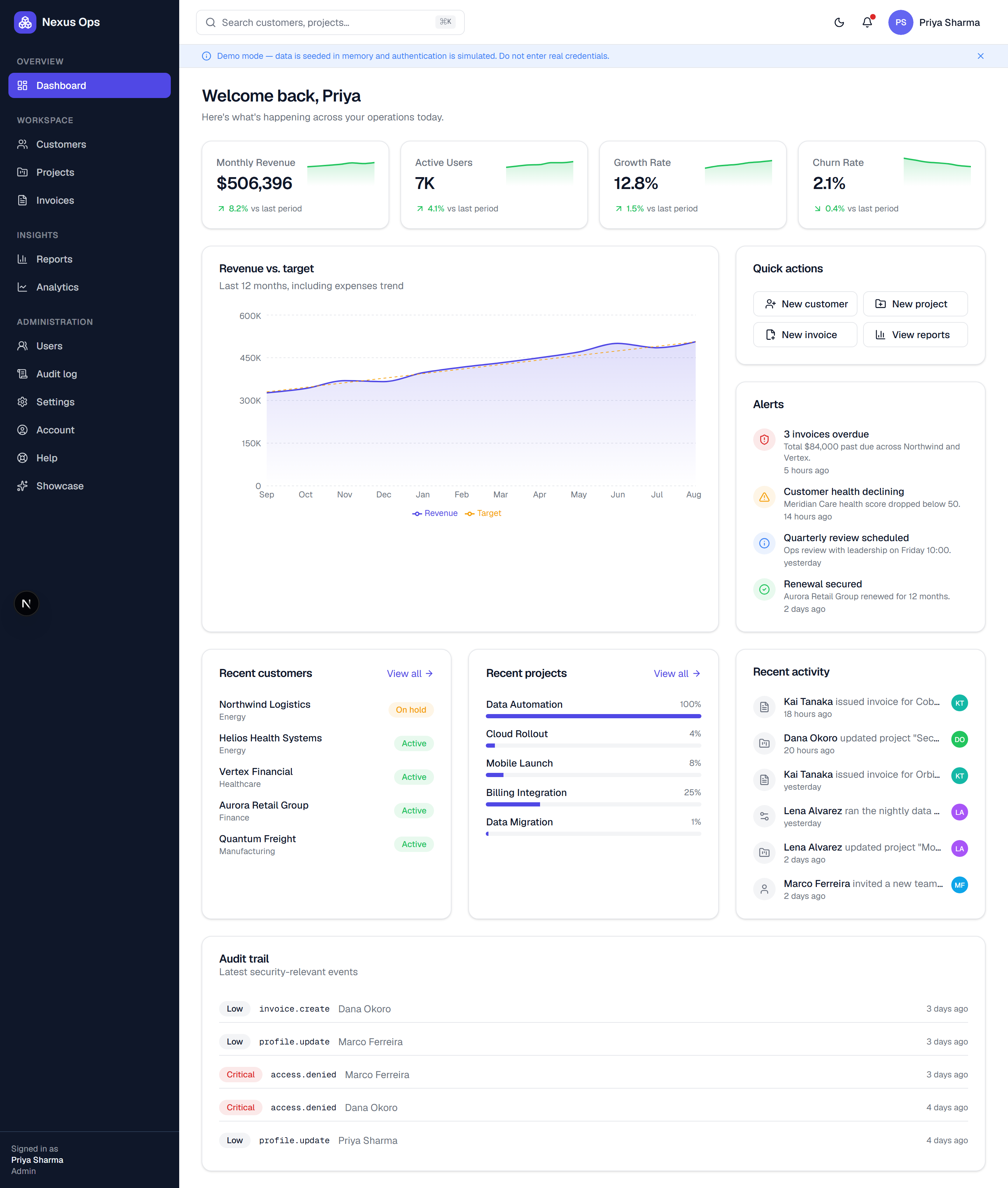
Three-layer RBAC: route, page, and service-level permission control, combined with signed HttpOnly sessions and audit trails
Next.jsReactAdmin dashboardSaaSStarter
saas-dashboard-demo — Next.js Admin dashboard Template
By brathod1432
Nexus Ops is an enterprise SaaS admin demo and reusable starter template built with Next.js and TypeScript. It includes three-layer RBAC, charts, enterprise data tables, a command palette, and an audit log, with simulated data and authentication.
Explore the design
Compare the page layouts and mobile experience. Open any screenshot for a closer look.
Author preview
Author-provided previewTop of page
Preview provided in the project README.
One original preview is available. Open the full image to inspect the design.
Screenshots show visual appearance; interactive behavior may differ.
Recorded 2026-10-01View source
What stands out
A quick read of the recorded project description.
Enterprise data tables: sorting, filtering, search, pagination, bulk actions, column visibility, and CSV export with formula injection protection
Dashboard and charts: KPIs, revenue/user/channel charts, activity stream, and alerts
Command palette (⌘K): fuzzy search for customers/projects/invoices, page navigation, and quick create, constrained by permissions
User and team management: assign roles from /users, with auditing, self-lockout, and last-admin protection
Accessibility and testing: targets WCAG AA, including keyboard navigation, ARIA, reduced motion, and jest-axe and Playwright checks
Template Details
Nexus Ops is an enterprise operations platform admin demo project that can also serve as a starter template for a SaaS admin panel. The project is built with Next.js App Router, React, TypeScript strict mode, Tailwind CSS, shadcn/Radix UI, Zustand, TanStack Query, React Hook Form + Zod, Recharts, and other technologies. The code is organized in layers from UI → hooks → clients → route handlers → services → repositories, making it easy to replace the mock backend.
Features cover dashboard KPIs and revenue/user/channel charts, activity and alerts, enterprise data tables (sorting, filtering, search, pagination, bulk actions, column visibility, CSV export, and formula injection protection), a command palette (⌘K fuzzy search and quick create), user and team role management, an audit log page (search, severity filtering, CSV export), account and settings persistence, and a /showcase theme-switching display. On security, it includes three-layer RBAC at the route, page, and service levels, signed HttpOnly sessions, shared Zod input validation, output encoding, CSP and security response headers, and audit trails. Accessibility targets WCAG AA, including keyboard navigation, focus management, ARIA, and reduced-motion support, with automated checks via jest-axe and Playwright.
The project is explicitly a demo/starter: data is preset in memory and persisted to .data/db.json, authentication is a mock login, and it uses Admin, Manager, User, and Viewer roles with the password password. Real credentials should not be entered. The README states that its authentication and data are not production-grade security, and the security model documentation should be consulted before production use. The repository uses the MIT license, allowing free use, modification, commercial use, and distribution of this version of the code, but third-party assets such as demo images, fonts, and icons require separate license verification, and external services such as domains, hosting, databases, payments, or AI may incur additional charges.
Next.jsAdmin panelSaaSStarter
Is it right for your project?
Use Cases
- As a demo of a SaaS admin management interface, to showcase dashboards, data tables, and permission control
- As an enterprise operations platform starter template, on which the mock backend can be replaced and business modules extended
- For evaluating layered architecture, RBAC, and accessibility implementation under Next.js App Router
- For demonstrating common admin interactions such as the command palette, audit log, and CSV export
- For quickly viewing the effect of switching the same template to different industry themes via /showcase
Suitable For
- Development teams that need to quickly build a SaaS admin prototype
- Frontend developers who want to reference RBAC, auditing, and accessibility implementations
- Individuals or organizations looking for an MIT-licensed admin starter template
- Product or design staff who need to demonstrate enterprise data table and chart interactions
Getting started & customization
Use these recorded setup notes alongside the repository instructions for your chosen version.
- 1
After cloning the repository, run npm ci to install dependencies, then run npm run dev to start the development server (default http://localhost:3000)
- 2
Open /login and use Quick demo sign-in to log in as Admin, Manager, User, or Viewer with the password password. Never enter real credentials
- 3
Demo data is preset in memory and persisted to .data/db.json, and remains after a restart
- 4
Authentication and data are mock implementations and not production-grade security. Before production use, read docs/security-model.md and replace the mock backend
- 5
Third-party assets such as demo images, fonts, and icons must be checked against their respective licenses. External services such as domains, hosting, databases, payments, or AI may incur additional charges
License & source material
Usage conditions & limitations
Free to use · keep license noticeThis listing covers the free version in the public repository under the MIT license; the free scope is the code of this version and does not mean that external services or third-party assets are free.
Must comply with when using
- Free use, modification, commercial use, and distribution of this version of the code are permitted.
- When distributing copies or substantial portions of the code, retain the original author's copyright notice and the full MIT license notice.
- The code is provided as is; warranties and limitations of liability are governed by the original license and applicable law.
Additional costs & items to verify
- The project is in demo mode: data is preset in memory, authentication is a mock login, and it uses Admin, Manager, User, and Viewer roles with the password password. Never enter real credentials.
- The README explicitly states that this is a demo/starter project, that authentication and data are simulated, and that it is not production-grade security. Before production use, read the security model documentation first.
- Demo images, fonts, icons, and other third-party assets must be checked against their respective licenses and cannot be judged solely by the code's MIT license.
- External services such as domains, hosting, databases, payments, or AI may incur additional charges.
View Original Text Basis
Permission is hereby granted, free of charge
Original License Text
**Demo mode:** data is seeded in memory and authentication is simulated. Sign in as Admin, > Manager, User, or Viewer with password `password`. Never enter real credentials.
Original README
https://github.com/brathod1432/saas-dashboard-demo/blob/main/LICENSEhttps://github.com/brathod1432/saas-dashboard-demo/blob/main/README.md**Disclaimer:** this is a demonstration/starter project. Authentication and data are simulated — **not** production security. Review [`docs/security-model.md`](docs/security-model.md) before adapting for production.
Original README
Compiled by DeepSeek based on repository license and README ·2026-10-01. Results only cover the materials read; dependencies, images, fonts, and subsequent term changes are subject to their respective original texts.
Project checks & description sources
Template Information
- Source platforms
- GitHub
- Documentation and maintenance reference score
- Partly documented · 73 / 100
- Technologies
- Next.js · React
- Website type
- Admin dashboard · SaaS · Starter
How this score is calculated
Our heuristic uses license records (up to 30), a demo link (12), a preview (10), stars (15), recorded maintenance (15), description completeness (8), feature records (5) and classification data (5). It is not a code, security or performance test, or a Google score. A link does not establish tested functionality.
What to verify for this project
- Repository update recorded
- 2026-09-28
- Screenshot last checked
- 2026-10-01
No demo link is recorded. Use the repository instructions to evaluate the project locally; the screenshot alone cannot establish interactive behavior.
The catalog identifies Next.js as the primary stack. Check the actual dependency manifest and lockfile for versions and hosting requirements. These notes use recorded metadata, not a code audit or a deployment test.
Use a selection guide →How this description was prepared
AI-assisted description based on catalog records and repository material. Repository authors are not automatically the reviewers of this description.
Automatically checked against source and license rules; no manual editorial review.
Inspect the recorded source material
SHA-256: f48b1f25befc341bd2039e9d2537616add86fc10a526a20ee6de9cb1d6b1d796
2026-10-01T01:15:58.223Z
Source file / repository# Nexus Ops — Enterprise SaaS Dashboard Demo & Starter
[](https://github.com/brathod1432/saas-dashboard-demo/actions/workflows/ci.yml)
[](LICENSE)
[](https://nextjs.org)
[](https://www.typescriptlang.org)
A production-quality **Business Operations Platform** demo that doubles as a reusable SaaS
starter template. Built to show how modern business software _should_ be built —
**security-first, accessible, observable, and production-ready** — not just how it can look.
> **Demo mode:** data is seeded in memory and authentication is simulated. Sign in as Admin,
> Manager, User, or Viewer with password `password`. Never enter real credentials.
## Highlights
- 🔐 **Security-first** — 3-layer RBAC (route + page + service), signed HttpOnly session,
input validation (shared Zod), output encoding, CSP + security headers, audit trail.
- ♿ **Accessible** — WCAG AA target: keyboard nav, focus management, ARIA, reduced motion;
automated jest-axe + Playwright checks.
- 📈 **Real dashboards** — KPIs, revenue/user/channel charts (Recharts), activity, alerts.
- 🗂️ **Enterprise data tables** — sort, filter, search, paginate, bulk actions, column
visibility, CSV export (with formula-injection protection), and per-row view/edit/delete.
- ⌘ **Command palette (⌘K)** — a launcher: fuzzy search customers/projects/invoices, jump to any
page, and quick-create — all permission-aware.
- 👥 **User & team management** — admins assign roles from `/users` (audited, self-lockout &
last-admin guards); demo data **persists across restarts** (`.data/db.json`).
- 🧾 **Exportable audit log** — dedicated `/audit` page with search, severity filter, and CSV
export; **Account & Settings changes actually persist** (and are audited).
- 🧱 **Clean architecture** — UI → hooks → clients → route handlers → services → repositories.
Swap the mock backend for a real one by changing **two layers**.
- 🔭 **Observable** — structured logging, metrics, tracing spans, health checks.
- 🎨 **Re-skinnable** — `/showcase` re-themes the starter into 8 verticals.
## Screenshots
> Captured from the running app. Full set in [`docs/screenshots/`](docs/screenshots).
> Regenerate anytime with `node scripts/capture-screenshots.mjs` (app running).
### Dashboard — KPIs, charts, activity, alerts, audit trail

<table>
<tr>
<td width="50%"><strong>Dashboard — dark mode</strong><br/><img src="docs/screenshots/04-dashboard-dark.png" alt="Dashboard (dark)" /></td>
<td width="50%"><strong>Sign in (with quick demo roles)</strong><br/><img src="docs/screenshots/02-login.png" alt="Login" /></td>
</tr>
<tr>
<td><strong>Customers — enterprise data table</strong><br/><img src="docs/screenshots/05-customers.png" alt="Customers" /></td>
<td><strong>Customer detail</strong><br/><img src="docs/screenshots/06-customer-detail.png" alt="Customer detail" /></td>
</tr>
<tr>
<td><strong>Projects</strong><br/><img src="docs/screenshots/07-projects.png" alt="Projects" /></td>
<td><strong>Invoices</strong><br/><img src="docs/screenshots/08-invoices.png" alt="Invoices" /></td>
</tr>
<tr>
<td><strong>Reports</strong><br/><img src="docs/screenshots/09-reports.png" alt="Reports" /></td>
<td><strong>Analytics</strong><br/><img src="docs/screenshots/10-analytics.png" alt="Analytics" /></td>
</tr>
<tr>
<td><strong>Users & team (role management)</strong><br/><img src="docs/screenshots/13-users.png" alt="Users & team" /></td>
<td><strong>Audit log (filter & CSV export)</strong><br/><img src="docs/screenshots/14-audit.png" alt="Audit log" /></td>
</tr>
<tr>
<td colspan="2"><strong>Settings — RBAC permission matrix</strong><br/><img src="docs/screenshots/11-settings-rbac.png" alt="Settings / RBAC" /></td>
</tr>
<tr>
<td colspan="2"><strong>Portfolio showcase (re-skins)</strong><br/><img src="docs/screenshots/12-showcase.png" alt="Showcase" /></td>
</tr>
<tr>
<td colspan="2"><strong>Landing page</strong><br/><img src="docs/screenshots/01-landing.png" alt="Landing" /></td>
</tr>
</table>
## Tech stack
Next.js 16 (App Router · RSC · Turbopack) · React 19 · TypeScript (strict) · Tailwind CSS v4 ·
shadcn/Radix UI · Zustand · TanStack Query · React Hook Form + Zod · Recharts · Jest + RTL +
jest-axe · Playwright · ESLint + Prettier + Husky.
Every dependency and design source was security- and license-reviewed before use — see
[`docs/security-review.md`](docs/security-review.md) and
[`docs/design-research.md`](docs/design-research.md).
## Quick start
```bash
npm ci
npm run dev # http://localhost:3000
```
Then open `/login` and use **Quick demo sign-in**. Full instructions:
[`docs/setup.md`](docs/setup.md).
## Scripts
`dev` · `build` · `start` · `lint` · `format` · `typecheck` · `test` · `coverage` · `e2e` ·
`audit` (see [`docs/setup.md`](docs/setup.md)).
## Project structure (top level)
```
src/app/ (auth) & (app) route groups, api/ route handlers, landing, layout
src/components/ ui kit, layout, data-table, charts, feature components, auth, forms, shared
src/hooks/ TanStack Query hooks
src/lib/ api (repos/clients/services), auth, rbac, audit, observability, validation, mock
src/proxy.ts route guard (Next 16 "middleware")
docs/ full documentation set
e2e/ Playwright specs
```
## Status
- ✅ Production build passes · ✅ ESLint clean · ✅ `tsc` clean
- ✅ 71 Jest tests · ✅ 59 Playwright E2E tests (Chromium + Firefox green) · ✅ `npm audit`: 0 vulnerabilities
- Core-logic coverage ≈ 87% statements / 79% branches
See the full assessment in [`docs/final-audit.md`](docs/final-audit.md).
## Documentation
| Doc | |
| -------------------------------------------------------------------------------------------------------------------------------------- | ---------------------------------- |
| [Discovery](docs/discovery.md) | Vision, personas, roadmap, risks |
| [Improvements](docs/improvements.md) | User + security improvement report |
| [Architecture](docs/architecture.md) | Layered design & data flow |
| [Design system](docs/design-system.md) | Tokens, components, patterns |
| [Design research](docs/design-research.md) | Vetted design sources |
| [Security model](docs/security-model.md) | Trust boundaries & STRIDE |
| [Security implementation](docs/security-implementation.md) | Concrete controls |
| [Security review](docs/security-review.md) | Dependency vetting |
| [Security audit](docs/security-audit.md) | Findings & risk score |
| [RBAC](docs/rbac.md) | Roles, matrix, enforcement |
| [Observability](docs/observability.md) | Logs, metrics, tracing, health |
| [Testing](docs/testing.md) | Strategy & how to run |
| [Accessibility](docs/accessibility.md) | WCAG AA approach |
| [Performance](docs/performance.md) | Budgets & techniques |
| [Setup](docs/setup.md) · [Deployment](docs/deployment.md) · [Customization](docs/customization.md) · [Roadmap](docs/future-roadmap.md) | Operate & extend |
## Contributing & security
- Contribution guide: [`CONTRIBUTING.md`](CONTRIBUTING.md) · Code of Conduct: [`CODE_OF_CONDUCT.md`](CODE_OF_CONDUCT.md)
- Report vulnerabilities privately: [`SECURITY.md`](SECURITY.md)
## License
Licensed under the [MIT License](LICENSE) © 2026 Brijesh Rathod.
**Disclaimer:** this is a demonstration/starter project. Authentication and data are
simulated — **not** production security. Review [`docs/security-model.md`](docs/security-model.md)
before adapting for production.
Explore similar templates
Compare previews and descriptions within the same stack and category.

Next.js SaaS Starter
The official Next.js SaaS starter template, integrating email/password authentication, Stripe Checkout subscriptions, a dashboard with user/team CRUD, basic Owner/Member RBAC, and activity logging.
Next.js · SaaS

Next.js Commerce
Vercel's officially maintained Next.js App Router ecommerce starter with deep Shopify integration, offering a complete product catalog, cart, and checkout flow. Core logic is modular for swapping backends, and community provider versions exist for BigCommerce, Medusa, and Saleor.
Next.js · E-commerce

Next-js-Boilerplate
A developer-first Next.js 16 starter with Tailwind CSS 4 and TypeScript, supporting both App Router and Page Router.
Next.js · Starter

tailwind-nextjs-starter-blog
A Next.js and Tailwind CSS blog starter template using Contentlayer for Markdown/MDX, with built-in SEO, code highlighting, and tags. It targets personal technical blogs and migration from Jekyll/Hugo to React, and supports one-click Vercel deployment.
Next.js · Blog

next-forge
next-forge is a Turborepo-based Next.js template maintained by Vercel, positioned as a starting point for SaaS products.
Next.js · Starter

SaaS-Boilerplate
SaaS-Boilerplate is an open-source SaaS starter template built with Next.js App Router, React 19, TypeScript, Tailwind CSS, and Shadcn UI.
Next.js · SaaS