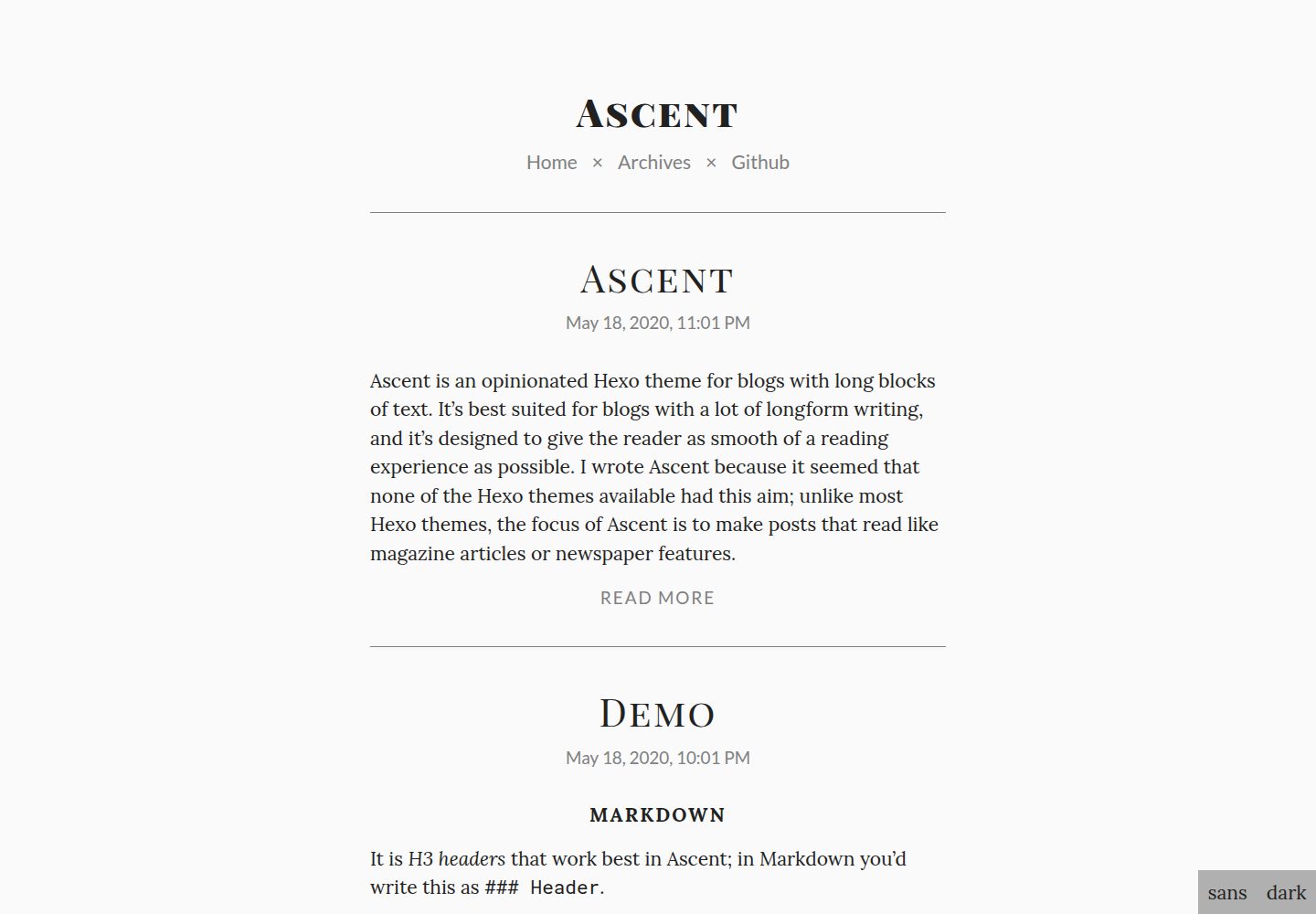
Aimed at long-form blogs, pursuing a magazine or newspaper feature-style reading experience
HexoBlog
hexo-theme-ascent — Hexo Blog Template
By cjquines
Ascent is a Hexo theme for long-form blogs, emphasizing a magazine or newspaper feature-style reading experience, with configuration for menus, RSS, word count, code highlighting, and light/dark and serif/sans-serif toggles.
Explore the design
Compare the page layouts and mobile experience. Open any screenshot for a closer look.
Desktop homepage1 / 2
Desktop captureTop of page
Actual screenshot captured by the server browser.
All pages & views 2
Screenshots show visual appearance; interactive behavior may differ.
Recorded 2026-10-01View source
What stands out
A quick read of the recorded project description.
Header menu links can be customized in the theme configuration
Built-in bottom-right settings panel to toggle between sans-serif and serif, and light and dark
Code block styles and word count display for posts and archive pages can be toggled
Supports RSS, Google Analytics, and IntenseDebate comments through configuration
Uses the MIT license, allowing use, modification, commercial use, and distribution of this version's code
Template Details
Ascent is a Hexo theme designed for long-form blogs. The author felt that most Hexo themes do not prioritize the long-form reading experience, so they created Ascent to make articles read more like magazine articles or newspaper features. The theme is explicitly labeled "opinionated" in the repository, meaning it carries a strong subjective design direction.
The theme provides configuration options through themes/ascent/_config.yml, including custom header menu links, RSS link, homepage "read more" text, favicon path, a bottom-right settings panel (sans-serif/serif, light/dark) toggle, code block style toggle, word count display toggles for posts and archive pages, and enable/account configuration for Google Analytics and IntenseDebate comments. RSS requires installing hexo-generator-feed, and word count requires installing hexo-wordcount.
Installation involves initializing a site with hexo-cli, cloning the repository into themes/ascent, and finally setting theme to ascent in the site's _config.yml. The repository uses the MIT license, and the demo site provides design notes and Markdown format examples.
HexoBlog
Is it right for your project?
Use Cases
- Personal blogs focused on long-form text
- Writing sites that want articles presented in a magazine or newspaper feature layout
- Blogs that need light/dark and serif/sans-serif reading toggles
- Sites using Hexo that want to adjust menus, RSS, and comments via theme configuration
Suitable For
- Bloggers who write long articles and care about reading layout experience
- Developers building static blogs with Hexo
- Site maintainers who need custom header menus, RSS, and comment integration
- Users who accept a theme with a strong design direction and do not seek highly customizable appearance
Getting started & customization
Use these recorded setup notes alongside the repository instructions for your chosen version.
- 1
First run npm install -g hexo-cli and initialize a site with hexo init <site>
- 2
Clone the repository into themes/ascent, then set theme to ascent in the site's _config.yml
- 3
RSS requires installing hexo-generator-feed, and word count requires installing hexo-wordcount
- 4
Google Analytics and IntenseDebate require filling in their respective tracking ID or site Key in the theme configuration
- 5
Third-party assets such as demo images, fonts, and icons must be checked against their respective licenses; the MIT license of the code alone is not sufficient to judge
License & source material
Usage conditions & limitations
Free to use · keep license noticeThis entry covers the free version under the MIT license in the public repository; the free scope is the code of this version and does not mean external services or third-party assets are free.
Must comply with when using
- Free use, modification, commercial use, and distribution of this version's code are permitted.
- When distributing copies or substantial portions of the code, retain the original author's copyright notice and the full MIT license notice.
- The code is provided as is; warranties and limitations of liability are governed by the original license and applicable law.
Additional costs & items to verify
- The RSS feature depends on the external plugin hexo-generator-feed, which must be installed separately before this configuration option can be used.
- The word count feature depends on the external plugin hexo-wordcount, which must be installed separately before it can be enabled.
- Enabling Google Analytics requires providing your own tracking ID; it is an external service and may involve an account and costs.
- Enabling IntenseDebate comments requires providing your own site Key; it is an external third-party service.
- Demo images, fonts, icons, and other third-party assets must be checked against their respective licenses; the MIT license of the code alone is not sufficient to judge.
- External services such as domain, hosting, database, payment, or AI may incur additional charges.
View Original Text Basis
Permission is hereby granted, free of charge
Original License Text
You need to have `hexo-generator-feed` installed, which you can do with `npm install hexo-generator-feed`.
Original README
You need to have `hexo-wordount` installed, which you can do with `npm install hexo-wordcount`.
Original README
Replace `UA-000000000-0` with your Google Analytics tracking ID, which you can find in the Google Analytics code.
Original README
https://github.com/cjquines/hexo-theme-ascent/blob/master/LICENSE.mdhttps://github.com/cjquines/hexo-theme-ascent/blob/master/README.mdReplace `00000000000000000000000000000000` with the IntenseDebate site account, which you can find in Settings > Account > Site Key.
Original README
Compiled by DeepSeek based on repository license and README ·2026-10-01. Results only cover the materials read; dependencies, images, fonts, and subsequent term changes are subject to their respective original texts.
Project checks & description sources
Template Information
- Source platforms
- GitHub
- Documentation and maintenance reference score
- More documented · 87 / 100
- Technologies
- Hexo
- Website type
- Blog
How this score is calculated
Our heuristic uses license records (up to 30), a demo link (12), a preview (10), stars (15), recorded maintenance (15), description completeness (8), feature records (5) and classification data (5). It is not a code, security or performance test, or a Google score. A link does not establish tested functionality.
What to verify for this project
- Repository update recorded
- 2025-11-22
- Screenshot last checked
- 2026-10-01
A demo link is listed. Check it with your own content and viewport sizes; its presence does not confirm that forms, authentication or payments work.
The catalog identifies Hexo as the primary stack. Check the actual dependency manifest and lockfile for versions and hosting requirements. These notes use recorded metadata, not a code audit or a deployment test.
Use a selection guide →How this description was prepared
AI-assisted description based on catalog records and repository material. Repository authors are not automatically the reviewers of this description.
Automatically checked against source and license rules; no manual editorial review.
Inspect the recorded source material
SHA-256: 58de5987fe34602e2b3ebda783110f31caed5869415b361cbbc809b7b8781673
2026-10-01T03:25:33.444Z
Source file / repository# Ascent An opinionated Hexo theme for blogs with long blocks of text. [Demo.](https://cjquines.github.io/hexo-theme-ascent/) [](https://cjquines.github.io/hexo-theme-ascent/) It's best suited for blogs with a lot of longform writing, and it's designed to give the reader as smooth of a reading experience as possible. I wrote Ascent because it seemed that none of the Hexo themes available had this aim; unlike most Hexo themes, the focus of Ascent is to make posts that read like magazine articles or newspaper features. Read more about Ascent design [on the demo](https://cjquines.github.io/hexo-theme-ascent/2020/05/18/Ascent/). See how Ascent formats Markdown [on the demo](https://cjquines.github.io/hexo-theme-ascent/2020/05/18/Demo/). ## Installation ```bash npm install -g hexo-cli hexo init <site> cd <site> git clone https://github.com/cjquines/hexo-theme-ascent themes/ascent ``` Then set your `theme` in `_config.yml` to `ascent`. ## Configuration Here's what can be changed in `themes/ascent/_config.yml`: * `menu`. Header links can be customized by adding more keys inside `menu`: ```yaml menu: Home: / Archives: /archives Github: https://github.com/cjquines ``` * `rss`. Link to the generated RSS. You need to have `hexo-generator-feed` installed, which you can do with `npm install hexo-generator-feed`. * `excerpt_link`. The text of the "read more" link in the home page. * `favicon`. Path to the favicon. * `settings`. Toggles whether the settings (sans-serif/serif, light/dark) appear in the lower-right corner of the screen. * `highlight`. Toggles whether code blocks are styled. Changing this to `false` improves performance by a little bit. * `word_count`. Toggles whether word counts appear before a post, and in the archives. You need to have `hexo-wordount` installed, which you can do with `npm install hexo-wordcount`. * `google_analytics`. The `enable` key toggles whether Google Analytics is turned on. Replace `UA-000000000-0` with your Google Analytics tracking ID, which you can find in the Google Analytics code. * `intensedebate`. The `enable` key toggles whether IntenseDebate comments are turned on. Replace `00000000000000000000000000000000` with the IntenseDebate site account, which you can find in Settings > Account > Site Key.
Explore similar templates
Compare previews and descriptions within the same stack and category.

hexo-theme-matery
hexo-theme-matery is a Material Design, responsive Hexo blog theme with homepage carousel, waterfall post list, timeline archive, word cloud tags, radar chart categories, and an about page.
Hexo · Blog

hexo-theme-cactus
Cactus is a responsive Hexo theme for personal websites and blogs, maintained by probberechts. It offers four color schemes (dark, light, white, classic), configurable navigation, homepage post lists, project lists, social links, and copyright year ranges.
Hexo · Blog

hexo-theme-volantis
Volantis is a blog theme for Hexo, distributed as the npm package hexo-theme-volantis and enabled by setting theme to volantis in the Hexo site's _config.yml. It requires Hexo 7.3+, hexo-cli 4.3+, Node.js 22.x LTS+, and npm 10.x LTS+.
Hexo · Blog

hexo-theme-aurora
Hexo Theme Aurora is a futuristic Hexo blog theme built around aurora gradients and a magazine-style grid layout.
Hexo · Blog

hexo-theme-Claudia
Claudia is a Hexo blog theme focused on a clean look and easy configuration. It automatically follows the device's dark mode and claims a 90+ Lighthouse score.
Hexo · Blog

hexo-theme-A4
hexo-theme-A4 is a minimalist Hexo blog theme that mimics the texture of A4 paper, emphasizing simplicity, small size, and minimal configuration.
Hexo · Blog