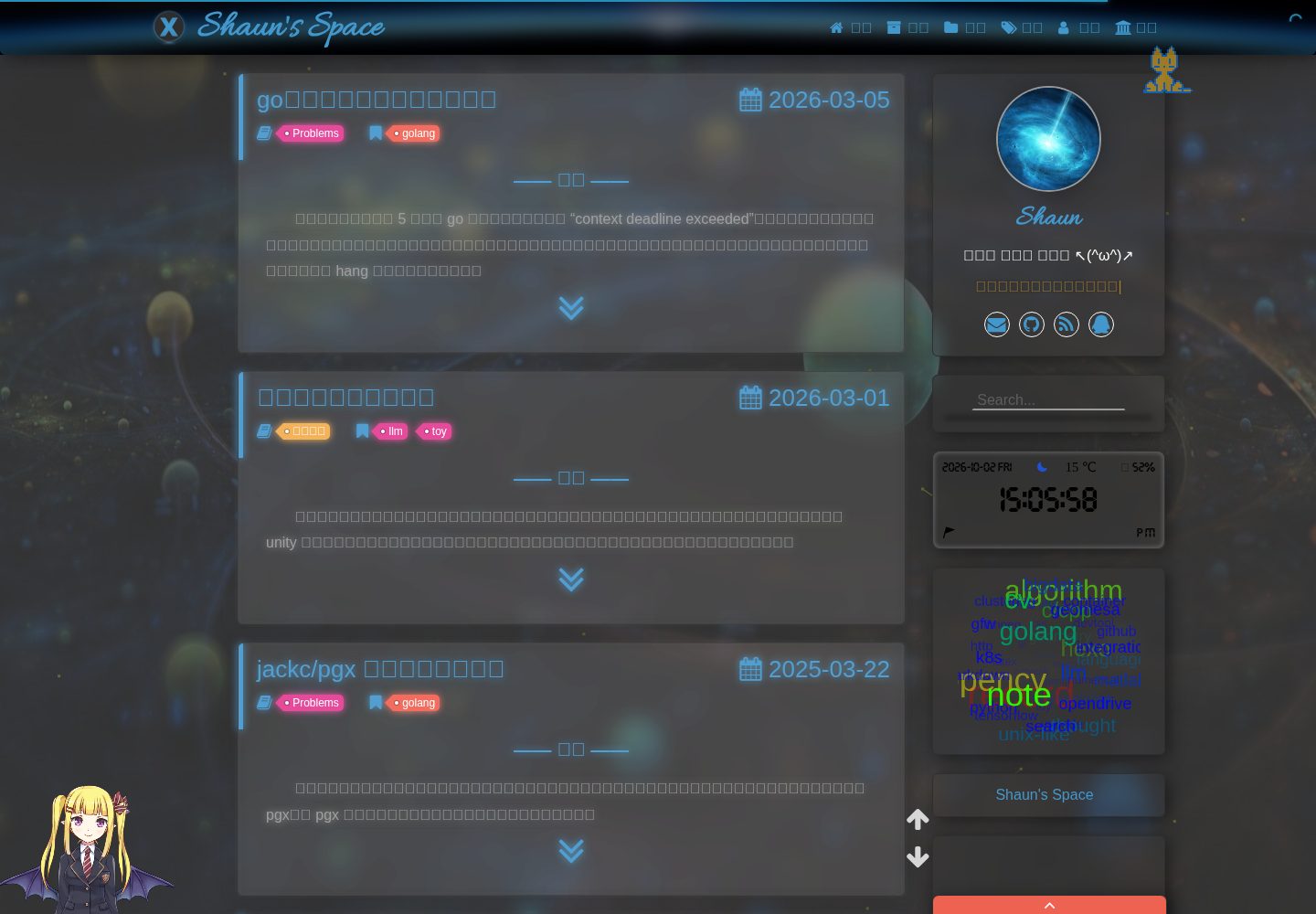
A Hexo blog theme built with Bootstrap4, jQuery3, Stylus, EJS, and other technologies
HexoBlog
hexo-theme-chi — Hexo Blog Template
By cniter
hexo-theme-chi is a personal Hexo blog theme by cniter (Shaun), built with Bootstrap4, jQuery3, Stylus, EJS, and other technologies, open-sourced under the MIT license.
Explore the design
Compare the page layouts and mobile experience. Open any screenshot for a closer look.
Desktop homepage1 / 3
Desktop captureTop of page
Actual screenshot captured by the server browser.
All pages & views 3
Screenshots show visual appearance; interactive behavior may differ.
Recorded 2026-10-02View source
What stands out
A quick read of the recorded project description.
Color scheme references spfk_x, layout references hexo-theme-freemind, and some code comes from these two themes
Animations prioritize CSS, with relatively little JS code
Code highlighting uses Hexo's default style, not replaced with prettify
The README recommends pairing with plugins such as hexo-renderer-pandoc, hexo-generator-feed, hexo-generator-searchdb, hexo-abbrlink, and hexo-all-minifier
Licensed under MIT, allowing free use, modification, commercial use, and distribution of this version's code
Template Details
hexo-theme-chi is a blog theme for Hexo. In the README, the author states that it was originally for personal use and served as a front-end learning project. The color scheme references Shaun's previous theme spfk_x, the layout references hexo-theme-freemind, and some code comes from these two themes.
Technically, the theme involves Bootstrap4, jQuery3, Stylus, EJS, HTML5, CSS3, and ES6. The README records the runtime environment as node-v8.11.1 and Hexo-3 (hexo-cli-1.1.0), with testing on Firefox 60.5.0 esr and Chrome 72.0.3626.109; other browsers were not tested. Animations prioritize CSS, with relatively little JS code. Code highlighting uses Hexo's default style; the author tried replacing it with prettify but found the result unsatisfactory.
Regarding usage limitations, the README explicitly states that no usage documentation is provided for now. The author describes himself as a front-end beginner, notes that various issues may exist in the theme, welcomes issues or forks and clones for self-modification, but does not guarantee that issues will be resolved. Additionally, the author uses an external script to beautify Markdown code blocks; this script sometimes fails to render due to code syntax formatting issues, requiring manual adjustment of the Markdown code format. The README also mentions that px units are not converted to em or rem because the author lacks a higher-resolution monitor and cannot conveniently test display differences.
HexoBlog
Is it right for your project?
Use Cases
- Building a personal blog with Hexo and wanting to change the theme
- Using this theme as a base for secondary development or learning Hexo theme structure
- Referencing its Bootstrap4, Stylus, and EJS approaches for personal front-end practice projects
Suitable For
- Bloggers using Hexo 3 who are willing to troubleshoot issues themselves
- Developers with some front-end background who can modify theme code on their own
- Those who accept that the theme currently has no usage documentation and need to read the source code to get started
Getting started & customization
Use these recorded setup notes alongside the repository instructions for your chosen version.
- 1
The README records the runtime environment as node-v8.11.1 and Hexo-3 (hexo-cli-1.1.0), with testing on Firefox 60.5.0 esr and Chrome 72.0.3626.109; other browsers were not tested
- 2
The theme currently provides no usage documentation; the author suggests opening an issue or forking and cloning to modify it yourself if problems arise
- 3
The README recommends installing hexo-renderer-pandoc (uninstall the default renderer hexo-renderer-marked before installation), hexo-generator-feed, hexo-generator-searchdb, hexo-abbrlink, and hexo-all-minifier
- 4
The author uses an external script to beautify Markdown code blocks; this script sometimes fails to render, requiring manual adjustment of the Markdown code format
- 5
Third-party assets such as demo images, fonts, and icons must be checked against their respective licenses; the MIT license of the code alone is not sufficient to judge
License & source material
Usage conditions & limitations
Free to use · keep license noticeThis entry covers the free version in the public repository under the MIT license; the free scope applies to this version's code and does not mean external services or third-party assets are free.
Must comply with when using
- Free use, modification, commercial use, and distribution of this version's code are permitted.
- When distributing copies or substantial portions of the code, retain the original author's copyright notice and the full MIT license notice.
- The code is provided as is; warranties and liability limitations are governed by the original license and applicable law.
Additional costs & items to verify
- The README explicitly states that the theme currently has no usage documentation; the author positions it as personal use, and users need to read the source code to get started.
- The author states no guarantee of resolving issues raised by users and provides no support or fix guarantee.
- When using the author's external script to beautify Markdown code blocks, if rendering fails, users must manually adjust the code format themselves.
- The theme was only tested on Firefox 60.5.0 esr and Chrome 72.0.3626.109; other browsers were not tested and the author does not plan to test them, so compatibility must be verified by the user.
- Demo images, fonts, icons, and other third-party assets must be checked against their respective licenses; the MIT license of the code alone is not sufficient to judge.
- External services such as domains, hosting, databases, payments, or AI may incur additional charges.
View Original Text Basis
Permission is hereby granted, free of charge
Original License Text
Chi 主题的使用文档暂时就不写了,毕竟这个主题只是 Shaun 个人使用
Original README
Shaun 不保证一定能解决,毕竟水平有限
Original README
需要自己手动调整一下 Markdown 代码格式
Original README
https://github.com/cniter/hexo-theme-chi/blob/master/LICENSEhttps://github.com/cniter/hexo-theme-chi/blob/master/README.md其它浏览器没测过,也不考虑测,有兴趣的童鞋可以自己测自己改
Original README
Compiled by DeepSeek based on repository license and README ·2026-10-02. Results only cover the materials read; dependencies, images, fonts, and subsequent term changes are subject to their respective original texts.
Project checks & description sources
Template Information
- Source platforms
- GitHub
- Documentation and maintenance reference score
- Partly documented · 68 / 100
- Technologies
- Hexo
- Website type
- Blog
How this score is calculated
Our heuristic uses license records (up to 30), a demo link (12), a preview (10), stars (15), recorded maintenance (15), description completeness (8), feature records (5) and classification data (5). It is not a code, security or performance test, or a Google score. A link does not establish tested functionality.
What to verify for this project
- Repository update recorded
- 2019-11-12
- Screenshot last checked
- 2026-10-02
A demo link is listed. Check it with your own content and viewport sizes; its presence does not confirm that forms, authentication or payments work.
The catalog identifies Hexo as the primary stack. Check the actual dependency manifest and lockfile for versions and hosting requirements. These notes use recorded metadata, not a code audit or a deployment test.
Use a selection guide →How this description was prepared
AI-assisted description based on catalog records and repository material. Repository authors are not automatically the reviewers of this description.
Automatically checked against source and license rules; no manual editorial review.
Inspect the recorded source material
SHA-256: 2d449d1e28715badd72deb613c31f56b260e6abe301818ad48f55d12892b5cf0
2026-10-02T15:07:58.459Z
Source file / repository Chi 主题涉及到的技术主要为:Bootstrap4、jQuery3、Stylus、EJS、HTML5、CSS3、ES6等;运行环境为:node-v8.11.1、Hexo-3(hexo-cli-1.1.0)等;测试浏览器为Firefox 60.5.0 esr 和 Chrome 72.0.3626.109,其它浏览器没测过,也不考虑测,有兴趣的童鞋可以自己测自己改。 Chi 主题的配色主要参考 Shaun 原来的主题 spfk_x,排版部分参考了 [**hexo-theme-freemind**](https://github.com/wzpan/hexo-theme-freemind),部分代码也是来自这两个主题。Chi 主题的一些动画实现优先采用 CSS,除了那些无法用 CSS 实现或 Shaun 不知道如何用 CSS 实现的,所以 JS 代码部分不算很多,网页加载速度也勉强能够接受吧。 Chi 主题的代码高亮部分本来想参考 [为hexo博客加入prettify高亮插件](http://jumpbyte.cn/2016/07/02/use-and-install-prettify/) 使用 prettify 替换默认的代码高亮,但使用了之后发现效果不是很好,就还是使用默认的样式了。 Chi 主题的使用文档暂时就不写了,毕竟这个主题只是 Shaun 个人使用(应该也不会有其他人使用了,万一真有人要用却不太会用,欢迎提 issue,以后酌情考虑添加使用文档 🙃),由于 Shaun 只是前端小白,这个主题也只是当学习练手开发,里面肯定会有各种各样的问题,欢迎提 issue 或 fork 或 clone 后自行修改,提 issue 的话,Shaun 不保证一定能解决,毕竟水平有限,当然如果有代码优化想法还望不吝赐教 (。・ω・。)ノ♡ (至于 px 换 em 或 rem 就不用提了,没什么原因,主要是 Shaun 懒,更深层的原因在于 Shaun 手头上还没有更高分辨率的显示器,不知道显示差距有多大,不好进行测试 😓)。 **PS:** Shaun 使用了 [Hexo 博客美化代码块| 梦魇小栈](https://blog.ihoey.com/posts/Hexo/2018-05-27-hexo-code-block.html) 中的脚本对 Markdown 代码部分进行了美化渲染,但是该脚本有时候渲染会出现一些问题,无法进行美化,可能是代码语法格式有错误,这时*需要自己手动调整一下 Markdown 代码格式*。 使用 Chi 主题推荐安装插件: - hexo-renderer-pandoc # 使用pandoc渲染markdown,安装前需卸载默认渲染器hexo-renderer-marked - hexo-generator-feed # RSS订阅 - hexo-generator-searchdb # 本地搜索 - hexo-abbrlink # 文章唯一永久链接 - hexo-all-minifier # 快速压缩优化代码 好了,暂时就写到这里了。
Explore similar templates
Compare previews and descriptions within the same stack and category.

hexo-theme-matery
hexo-theme-matery is a Material Design, responsive Hexo blog theme with homepage carousel, waterfall post list, timeline archive, word cloud tags, radar chart categories, and an about page.
Hexo · Blog

hexo-theme-cactus
Cactus is a responsive Hexo theme for personal websites and blogs, maintained by probberechts. It offers four color schemes (dark, light, white, classic), configurable navigation, homepage post lists, project lists, social links, and copyright year ranges.
Hexo · Blog

hexo-theme-volantis
Volantis is a blog theme for Hexo, distributed as the npm package hexo-theme-volantis and enabled by setting theme to volantis in the Hexo site's _config.yml. It requires Hexo 7.3+, hexo-cli 4.3+, Node.js 22.x LTS+, and npm 10.x LTS+.
Hexo · Blog

hexo-theme-aurora
Hexo Theme Aurora is a futuristic Hexo blog theme built around aurora gradients and a magazine-style grid layout.
Hexo · Blog

hexo-theme-Claudia
Claudia is a Hexo blog theme focused on a clean look and easy configuration. It automatically follows the device's dark mode and claims a 90+ Lighthouse score.
Hexo · Blog

hexo-theme-A4
hexo-theme-A4 is a minimalist Hexo blog theme that mimics the texture of A4 paper, emphasizing simplicity, small size, and minimal configuration.
Hexo · Blog