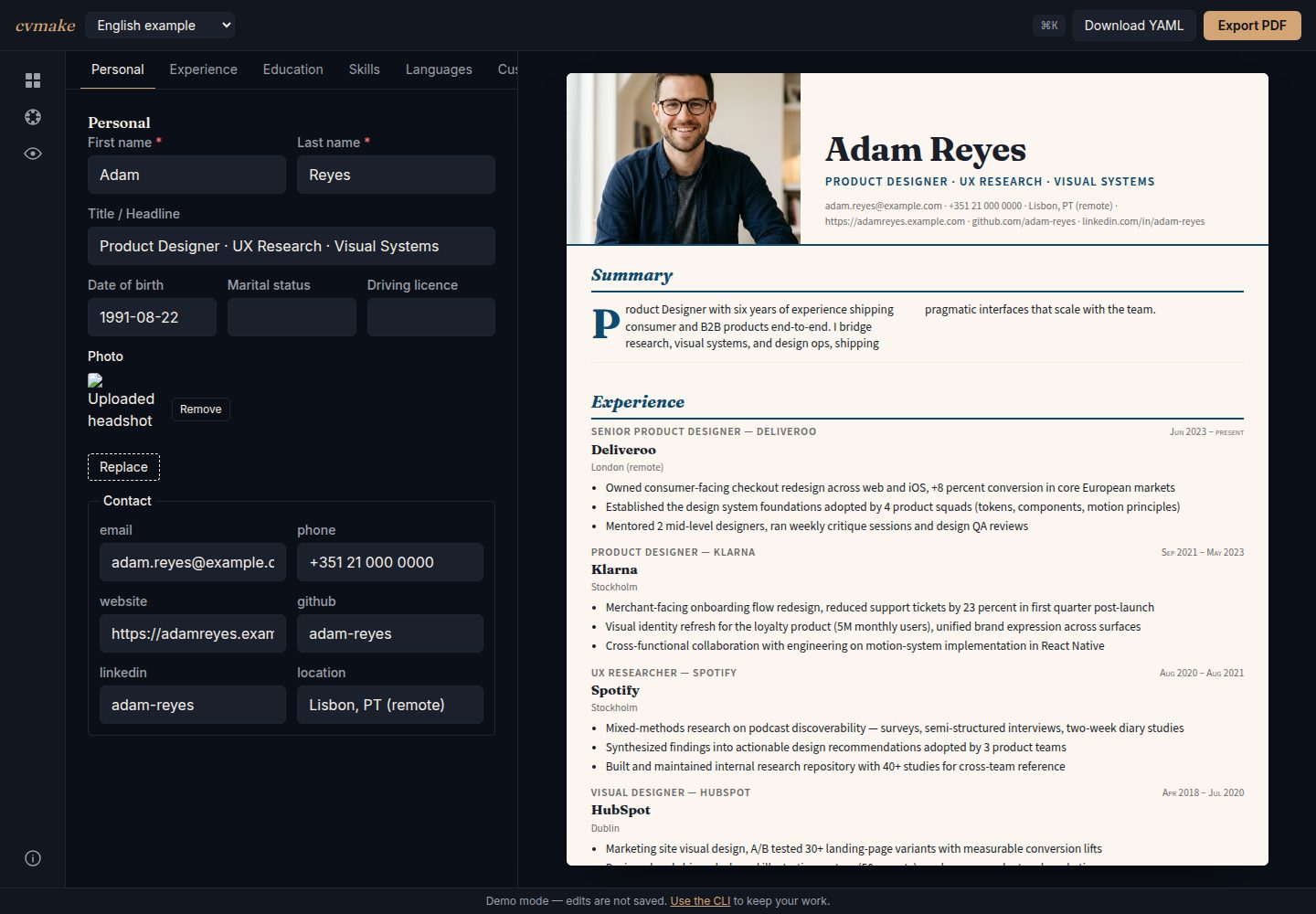
Uses a single YAML file as the resume data source, making git version management and diffs straightforward
Next.jsReactPortfolio
cvmake — Next.js Portfolio Template
By Codevena
cvmake is an open-source resume generation tool that uses a YAML file as its data source, renders it to PDF via a CLI or a browser editor, ships with 12 built-in templates and supports multiple languages.
Explore the design
Compare the page layouts and mobile experience. Open any screenshot for a closer look.
Desktop homepage1 / 2
Desktop captureTop of page
Actual screenshot captured by the server browser.
All pages & views 2
Screenshots show visual appearance; interactive behavior may differ.
Recorded 2026-10-14View source
What stands out
A quick read of the recorded project description.
Ships with 12 built-in templates, each with 2 to 4 color schemes, 34 color schemes in total
Supports multiple languages, allowing cv.de.yaml and cv.en.yaml to be maintained side by side and switched via a CLI argument
Offers two ways to use it: a CLI and a browser-based live editor
Can import a JSON Resume file from jsonresume.org and convert it to YAML
Uses the MIT license, with data kept locally
Template Details
cvmake is a resume generation tool that uses YAML as its data source, with the goal of bringing resumes under version control and supporting multiple templates and multiple language outputs. The README describes the core workflow: use `npx @codevena/cvmake-cli init cv.yaml` to generate an annotated sample YAML, edit it, then run `npx @codevena/cvmake-cli build cv.yaml` to render a PDF; the first build downloads roughly 150 MB of Chromium for high-fidelity PDF rendering. You can also import a JSON Resume file from jsonresume.org to generate YAML. The project provides a browser-based live editor (cveditor.codevena.dev) and a template showcase page (cvmake.codevena.dev).
On the technical stack, the README lists a pnpm 9 workspaces + Turbo monorepo, Zod schema, React 18 + Puppeteer rendering, a Next.js 16 App Router + Tailwind CSS 4 web UI, a Commander 12 CLI, and Vitest, Playwright and pixelmatch visual regression tests. The repository contains 4 published packages: cli, core, schema, templates, and the release process uses npm Trusted Publishing via OIDC.
There are 12 templates in total: academic, bauhaus, classic-serif, corporate, creative-accent, editorial, magazine, modern-minimal, monochrome-dark, noir, swiss, tech-dev, each with 2 to 4 color schemes, 34 in total. The README states that the browser preview and the PDF use the same React components, template CSS and bundled fonts, but the two are not byte-for-byte identical: the preview is a live DOM, while the PDF is a Puppeteer print render, and only the latter paginates.
Limitations and unspecified points: the README provides no description of a hosted service, account system, online storage or collaboration features; it does not describe data import formats other than YAML and JSON Resume; it does not describe a detailed API for template customization or theme development documentation; and it does not describe CLI commands other than init, build, import and list-templates.
Next.jsReactPortfolio
Is it right for your project?
Use Cases
- Developers who want to bring their resume under git version control and maintain and compare changes as text
- Users who need to quickly switch one set of resume content between multiple layout styles for different job applications
- Users who need to maintain multilingual versions of a resume, such as Chinese and English, and export PDFs for each
- Users who already have a JSON Resume file and want to convert it directly to YAML and render it with multiple templates
- Users who want to edit YAML in the browser with live preview of the resume
Suitable For
- Developers and technical practitioners familiar with the command line or YAML
- Job seekers who need to adjust resume layout and content frequently
- Users who want to self-host or generate PDFs locally and prefer not to rely on an online resume service
- Contributors willing to read the source code and fork the schema or templates themselves
Getting started & customization
Use these recorded setup notes alongside the repository instructions for your chosen version.
- 1
Use npx @codevena/cvmake-cli init cv.yaml to generate an annotated sample YAML, edit it, then run npx @codevena/cvmake-cli build cv.yaml to render a PDF
- 2
The first build downloads roughly 150 MB of Chromium for high-fidelity PDF rendering
- 3
To import from JSON Resume, run npx @codevena/cvmake-cli import resume.json cv.yaml
- 4
When cloning the repository to contribute, use pnpm install and pnpm build; sample files are in data/cvs/, and the output PDF defaults to out/cv.pdf
- 5
Use pnpm cvmake list-templates to view all templates and color schemes
License & source material
Usage conditions & limitations
Free to use · keep license noticeThis entry covers the free version in the public repository that uses the MIT license; the free scope is the code of that version and does not mean that external services or third-party assets are free.
Must comply with when using
- Use, modification, commercial use and distribution of this version's code are permitted free of charge.
- When distributing copies or substantial portions of the code, retain the original author's copyright notice and the full MIT license notice.
- The code is provided as is; warranties and limitations of liability are governed by the original license and applicable law.
Additional costs & items to verify
- Demo images, fonts, icons and other third-party assets must be checked against their own licenses and cannot be judged solely by the code's MIT license.
- External services such as domains, hosting, databases, payments or AI may incur separate charges.
- The first build automatically downloads roughly 150 MB of Chromium for high-fidelity PDF rendering, requiring a network connection and additional disk space.
- The release process relies on npm Trusted Publishing via OIDC and does not offer an NPM_TOKEN method, so maintainers must configure a trusted publisher on npm.
- There are constraints on the release steps: pnpm publish does not support OIDC (this repository pins pnpm 9.12.0), and npm pack does not rewrite the workspace:* protocol, so packaging must be done with pnpm and publishing with npm.
View Original Text Basis
Permission is hereby granted, free of charge
Original License Text
(use `--lang de` for German). The first `build` downloads Chromium
Original README
**Authentication is npm Trusted Publishing via OIDC — there is no `NPM_TOKEN`.**
Original README
https://github.com/Codevena/cvmake/blob/main/LICENSEhttps://github.com/Codevena/cvmake/blob/main/README.mdTwo constraints worth knowing before changing the publish step: `pnpm publish`
Original README
Compiled by DeepSeek based on repository license and README ·2026-10-14. Results only cover the materials read; dependencies, images, fonts, and subsequent term changes are subject to their respective original texts.
Project checks & description sources
Template Information
- Source platforms
- GitHub
- Documentation and maintenance reference score
- More documented · 85 / 100
- Technologies
- Next.js · React
- Website type
- Portfolio
How this score is calculated
Our heuristic uses license records (up to 30), a demo link (12), a preview (10), stars (15), recorded maintenance (15), description completeness (8), feature records (5) and classification data (5). It is not a code, security or performance test, or a Google score. A link does not establish tested functionality.
What to verify for this project
- Repository update recorded
- 2026-09-10
- Screenshot last checked
- 2026-10-14
A demo link is listed. Check it with your own content and viewport sizes; its presence does not confirm that forms, authentication or payments work.
The catalog identifies Next.js as the primary stack. Check the actual dependency manifest and lockfile for versions and hosting requirements. These notes use recorded metadata, not a code audit or a deployment test.
Use a selection guide →How this description was prepared
AI-assisted description based on catalog records and repository material. Repository authors are not automatically the reviewers of this description.
Review declaration: codex-user-requested-batch-review-20261015 · 2026-10-15
Inspect the recorded source material
SHA-256: 9f577065799df207b67bff2bed5df29a9284817205cb1b31c79fde0b963a177f
2026-10-14T18:52:35.234Z
Source file / repository# cvmake
> Open-source CV builder. YAML in, PDF out.
[](https://www.npmjs.com/package/@codevena/cvmake-cli)
[](LICENSE)
[](https://github.com/Codevena/cvmake/actions/workflows/ci.yml)


**→ Template showcase: [cvmake.codevena.dev](https://cvmake.codevena.dev) · Live editor: [cveditor.codevena.dev](https://cveditor.codevena.dev)**
<p align="center">
<img src="docs/collage-4templates.png" width="800" alt="One YAML, four templates — classic-serif, swiss, bauhaus, noir all rendered from the same example.en.yaml" />
<br/>
<em>One YAML file. Four templates. Switch by changing one line.</em>
</p>
---
## Showcase
<table width="100%">
<tr>
<td width="25%" align="center"><img src="docs/screenshots/academic.png" width="200" alt="academic"><br/><b>academic</b></td>
<td width="25%" align="center"><img src="docs/screenshots/bauhaus.png" width="200" alt="bauhaus"><br/><b>bauhaus</b></td>
<td width="25%" align="center"><img src="docs/screenshots/classic-serif.png" width="200" alt="classic-serif"><br/><b>classic-serif</b></td>
<td width="25%" align="center"><img src="docs/screenshots/corporate.png" width="200" alt="corporate"><br/><b>corporate</b></td>
</tr>
<tr>
<td width="25%" align="center"><img src="docs/screenshots/creative-accent.png" width="200" alt="creative-accent"><br/><b>creative-accent</b></td>
<td width="25%" align="center"><img src="docs/screenshots/editorial.png" width="200" alt="editorial"><br/><b>editorial</b></td>
<td width="25%" align="center"><img src="docs/screenshots/magazine.png" width="200" alt="magazine"><br/><b>magazine</b></td>
<td width="25%" align="center"><img src="docs/screenshots/modern-minimal.png" width="200" alt="modern-minimal"><br/><b>modern-minimal</b></td>
</tr>
<tr>
<td width="25%" align="center"><img src="docs/screenshots/monochrome-dark.png" width="200" alt="monochrome-dark"><br/><b>monochrome-dark</b></td>
<td width="25%" align="center"><img src="docs/screenshots/noir.png" width="200" alt="noir"><br/><b>noir</b></td>
<td width="25%" align="center"><img src="docs/screenshots/swiss.png" width="200" alt="swiss"><br/><b>swiss</b></td>
<td width="25%" align="center"><img src="docs/screenshots/tech-dev.png" width="200" alt="tech-dev"><br/><b>tech-dev</b></td>
</tr>
</table>
## Why cvmake
You have a CV. You want to keep it in version control, render it to multiple templates,
maintain it in two languages, and not pay $9/month forever for the privilege. cvmake does that.
- **One YAML file is the truth** — diff in git, search with grep, copy between machines.
No Word document mystery formatting.
- **12 polished templates** — academic, bauhaus, classic-serif, corporate, creative-accent,
editorial, magazine, modern-minimal, monochrome-dark, noir, swiss, tech-dev — each with
multiple color palettes. Same content, instant restyle.
- **Multilingual by default** — author `cv.de.yaml` + `cv.en.yaml` side-by-side from one
schema, switch via CLI flag.
- **High-fidelity PDF output** — the browser preview and the PDF run the same React
components, the same template CSS and the same vendored fonts, so what you arrange is
what you get. They are not byte-identical: the preview is a live DOM, the PDF is a
Puppeteer print render, and only the second one paginates.
- **CLI or browser** — `npx @codevena/cvmake-cli build cv.yaml` for terminal users,
[the live editor](https://cveditor.codevena.dev) for everyone else.
- **MIT, no lockin** — your data stays on your machine. Fork the schema, fork a template,
add your own. The project is small enough to actually read.
## Quickstart
### Install + render in one shot
```bash
# 1. Scaffold a commented starter CV (cv.yaml)
npx @codevena/cvmake-cli init cv.yaml
# 2. Edit cv.yaml with your data, then render it
npx @codevena/cvmake-cli build cv.yaml
```
No clone required. `init` drops a ready-to-edit, schema-valid `cv.yaml`
(use `--lang de` for German). The first `build` downloads Chromium
(~150 MB, one-time) which is needed for high-fidelity PDF rendering.
### Already have a JSON Resume?
Convert an existing [jsonresume.org](https://jsonresume.org) file and get all
12 templates instantly:
```bash
npx @codevena/cvmake-cli import resume.json cv.yaml
npx @codevena/cvmake-cli build cv.yaml
```
### Or clone for contribution / customization
```bash
git clone https://github.com/Codevena/cvmake
cd cvmake
pnpm install
pnpm build # builds the workspace packages once
# Copy the example to your local-only CV (cv.*.yaml is gitignored)
cp data/cvs/example.de.yaml data/cvs/cv.de.yaml
# Render a PDF
pnpm cvmake build data/cvs/cv.de.yaml
```
Output PDF lands in `out/cv.pdf` by default.
## Templates
| ID | Style |
|---|---|
| `academic` | Serif, two-column publication-style layout |
| `bauhaus` | Geometric shapes, primary palette, Futura |
| `classic-serif` | Traditional resume with serif typography |
| `corporate` | Restrained corporate single-column |
| `creative-accent` | Colored accent block, modern sans-serif |
| `editorial` | Magazine-style with strong typography |
| `magazine` | Display serif, italic, two-column body — Vogue-style |
| `modern-minimal` | Minimal, lots of whitespace |
| `monochrome-dark` | Dark theme, high contrast |
| `noir` | Cinematic dark, cream serif, gold accent, prose entries |
| `swiss` | Strict grid, Helvetica, red accent — pure information design |
| `tech-dev` | Developer-focused with code-style accents |
Each template ships with two to four color palettes — 34 across the twelve. List them all:
```bash
pnpm cvmake list-templates
```
## Tech Stack
- **Monorepo** — pnpm 9 workspaces + Turbo
- **Schema** — Zod
- **Rendering** — React 18 + Puppeteer (headless Chrome → PDF)
- **Web UI** — Next.js 16 (App Router) + Tailwind CSS 4
- **CLI** — Commander 12
- **Testing** — Vitest, Playwright (e2e), visual regression via pixelmatch
## Releasing
(Maintainers only.) All 4 published packages bump in lockstep:
```bash
pnpm -r --filter "@codevena/cvmake-{cli,core,schema,templates}" \
exec pnpm version <major|minor|patch>
git add -p # review the version bumps
git commit -m "release: vX.Y.Z"
git tag "v$(node -p "require('./apps/cli/package.json').version")"
git push origin main --tags
```
The tag push triggers `.github/workflows/release.yml`, which first verifies on
Node 20 and 22 (build, unit tests, integration tests, and a pack/install smoke
test against the real tarballs), then publishes all 4 packages.
**Authentication is npm Trusted Publishing via OIDC — there is no `NPM_TOKEN`.**
All 4 packages have a trusted publisher configured (verified 2026-09-09). The
settings live at `https://www.npmjs.com/package/<pkg>/access`:
| Field | Value |
|---|---|
| Organisation/User | `Codevena` |
| Repository | `cvmake` |
| Workflow filename | `release.yml` |
| Environment | *(leave empty — this workflow declares none)* |
The publisher must also permit **direct `npm publish`** — a newly created one
defaults to staged publishing, which this workflow does not use. All four
currently permit both `npm publish` and `npm stage publish`.
Two constraints worth knowing before changing the publish step: `pnpm publish`
cannot do OIDC (support landed in pnpm 10; this repo pins 9.12.0), and
`npm pack` does not rewrite the `workspace:*` protocol, which npm then rejects
on the consumer side. The workflow therefore packs with pnpm and publishes the
resulting tarballs with npm — and it packs exactly **once**: the `pack` job
produces the four tarballs, `verify` smoke-tests those files, and `publish`
pushes the same bytes. `scripts/publish-packages.mjs` checks the tag against all
four manifests, validates every supplied tarball (name, version, no leaked
`workspace:` protocol) before publishing anything, and skips packages already in
the registry, so a partial failure is resumed by re-running the workflow for the
same tag. (It can also pack for itself when run locally without `--tarball-dir`.)
## Contributing
See [CONTRIBUTING.md](CONTRIBUTING.md). Bug reports, template ideas, and pull requests welcome.
See [ROADMAP.md](ROADMAP.md) for what's planned and [CHANGELOG.md](CHANGELOG.md) for what has shipped.
## License
MIT — see [LICENSE](LICENSE).
Explore similar templates
Compare previews and descriptions within the same stack and category.

react-resume-template
A personal resume website template for software developers, built with Next.js, React, and TypeScript and styled with Tailwind CSS. Site content is driven by a single data file at /src/data/data.tsx, with types in dataDef.ts and images in src/images/.
Next.js · Portfolio

nxt-lnk
nxt-lnk is a Next.js-based bio link page template that manages personal information and links via BioData.js and LinksData.js, positioned as a self-hosted alternative to Linktree. It groups links by type, supports enabling/disabling individual links, and offers hexagonal or oval avatars.
Next.js · Portfolio

sylph
Sylph is a minimal portfolio and blog template built on Next.js, supporting MDX/Markdown writing, light/dark themes, and automatic OG image generation. It includes sitemap, robots.txt, metadata, and syntax highlighting, with automatic blog timestamps.
Next.js · Portfolio

sleek-portfolio
A modern, responsive portfolio template built with Next.js 15, TypeScript, Tailwind CSS, and Shadcn UI. It includes an MDX blog, project showcase, work experience timeline, and a contact form that receives messages via Telegram Bot.
Next.js · Portfolio

research-website-template
A React + Next.js template for research personal websites, aimed at PhD students and researchers. It centralizes publications, projects, and other content in src/data as arrays of objects, with optional fields automatically generating UI components.
Next.js · Portfolio

shadcn-portfolio
A developer portfolio template built with Next.js 15, shadcn/ui, Tailwind CSS, and Framer Motion, featuring an MDX blog, light and dark modes, responsive design, and SEO meta tags.
Next.js · Portfolio