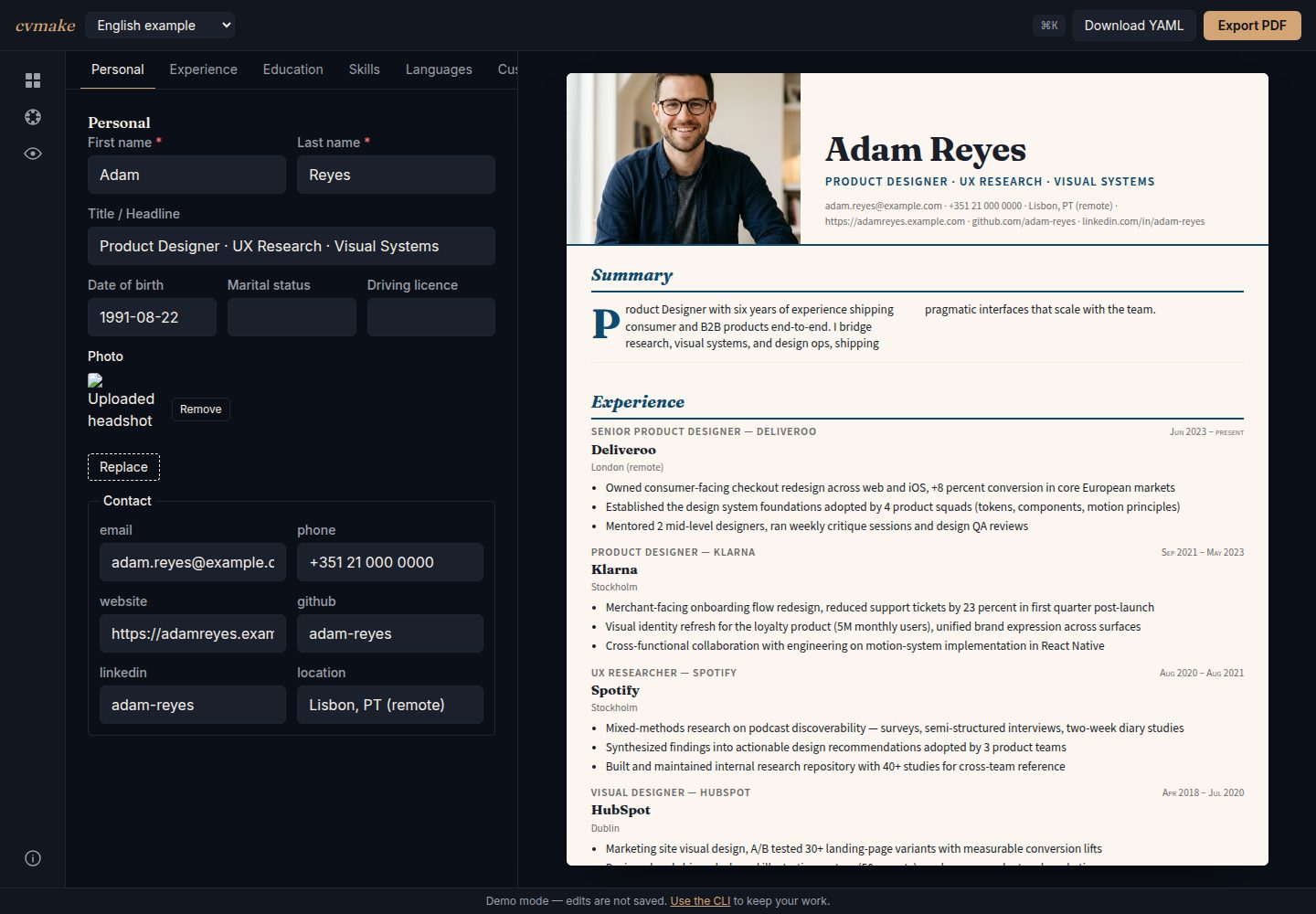
以单个 YAML 文件作为简历数据源,便于用 git 做版本管理和 diff
Next.jsReact作品集
cvmake — Next.js 作品集模板
作者 Codevena
cvmake 是一个开源简历生成工具,以 YAML 文件为数据源,通过 CLI 或浏览器编辑器渲染为 PDF,内置 12 套模板并支持多语言。
看看你的网站会是什么样
浏览真实页面截图,比较内容排版与手机效果。点击下方缩略图切换,放大查看整页细节。
全部页面与视图 2
截图用于了解视觉与布局,交互效果请以实际项目为准。
采集于 2026-10-14查看来源
值得关注的模板亮点
从已有项目资料中,快速了解它的特点。
内置 12 套模板,每套附带 2 至 4 个配色,共 34 个配色方案
支持多语言,可并排维护 cv.de.yaml 与 cv.en.yaml 并通过 CLI 参数切换
提供 CLI 与浏览器实时编辑器两种使用方式
可从 jsonresume.org 的 JSON Resume 文件导入并转换为 YAML
采用 MIT 许可证,数据保留在本地
模板详细介绍
cvmake 是一个以 YAML 为数据源的简历生成工具,目标是把简历纳入版本控制,并支持多模板、多语言输出。README 说明其核心流程是:用 `npx @codevena/cvmake-cli init cv.yaml` 生成带注释的示例 YAML,编辑后执行 `npx @codevena/cvmake-cli build cv.yaml` 渲染 PDF;首次 build 会下载约 150 MB 的 Chromium 用于高保真 PDF 渲染。也可以从 jsonresume.org 的 JSON Resume 文件导入生成 YAML。项目提供浏览器端实时编辑器(cveditor.codevena.dev)和模板展示页(cvmake.codevena.dev)。
技术栈方面,README 列出 pnpm 9 workspaces + Turbo 的 monorepo、Zod schema、React 18 + Puppeteer 渲染、Next.js 16 App Router + Tailwind CSS 4 的 Web UI、Commander 12 的 CLI,以及 Vitest、Playwright 和 pixelmatch 视觉回归测试。仓库包含 4 个发布包:cli、core、schema、templates,发布流程使用 npm Trusted Publishing via OIDC。
模板共 12 套:academic、bauhaus、classic-serif、corporate、creative-accent、editorial、magazine、modern-minimal、monochrome-dark、noir、swiss、tech-dev,每套附带 2 至 4 个配色,合计 34 个。README 说明浏览器预览与 PDF 使用相同的 React 组件、模板 CSS 和内置字体,但两者并非逐字节一致:预览是实时 DOM,PDF 是 Puppeteer 打印渲染,只有后者会分页。
限制与未说明之处:README 未提供托管服务、账号系统、在线存储或协作功能的说明;未说明除 YAML 与 JSON Resume 之外的其他数据导入格式;未说明模板自定义的详细 API 或主题开发文档;未说明 CLI 除 init、build、import、list-templates 之外的其他命令。
Next.jsReact作品集
适合你的项目吗?
适用场景
- 希望把简历纳入 git 版本控制、用文本方式维护和对比修改的开发者
- 需要同一份简历内容快速切换多种排版风格投递不同岗位
- 需要维护中英等多语言版本简历并分别导出 PDF
- 已有 JSON Resume 文件,想直接转换为 YAML 并使用多套模板渲染
- 希望在浏览器中实时编辑 YAML 并预览简历效果
适合人群
- 熟悉命令行或 YAML 的开发者与技术从业者
- 需要频繁调整简历排版和内容的求职者
- 希望自托管或本地生成 PDF、不愿依赖在线简历服务的用户
- 愿意阅读源码并自行 fork schema 或模板的贡献者
上手与定制指南
结合仓库当前版本的说明,按下面的资料检查内容、配置与运行要求。
- 1
使用 npx @codevena/cvmake-cli init cv.yaml 生成带注释的示例 YAML,编辑后执行 npx @codevena/cvmake-cli build cv.yaml 渲染 PDF
- 2
首次 build 会下载约 150 MB 的 Chromium,用于高保真 PDF 渲染
- 3
如需从 JSON Resume 导入,执行 npx @codevena/cvmake-cli import resume.json cv.yaml
- 4
克隆仓库参与开发时使用 pnpm install 和 pnpm build,示例文件位于 data/cvs/,输出 PDF 默认在 out/cv.pdf
- 5
可用 pnpm cvmake list-templates 查看全部模板与配色
授权与来源资料
使用条件与限制
免费使用 · 保留许可声明本次收录的是公开仓库中采用 MIT 许可的免费版本;免费范围为该版本代码,不代表外部服务或第三方素材免费。
使用时需要遵守
- 允许免费使用、修改、商用和分发该版本代码。
- 分发代码副本或实质性部分时,保留原作者版权声明和完整 MIT 许可声明。
- 代码按现状提供;担保与责任限制以原许可证及适用法律为准。
额外费用与待核对事项
- 演示图片、字体、图标及其他第三方素材需按各自许可核对,不能仅凭代码的 MIT 许可判断。
- 域名、托管、数据库、支付或 AI 等外部服务可能另外收费。
- 首次执行 build 时会自动下载约 150 MB 的 Chromium,用于高保真 PDF 渲染,需要网络连接并占用额外磁盘空间。
- 发布流程依赖 npm Trusted Publishing via OIDC,不提供 NPM_TOKEN 方式,维护者需在 npm 上配置受信任发布者。
- 发布步骤存在约束:pnpm publish 不支持 OIDC(本仓库固定 pnpm 9.12.0),且 npm pack 不会重写 workspace:* 协议,因此必须用 pnpm 打包、npm 发布。
查看原文依据
Permission is hereby granted, free of charge
许可证原文
(use `--lang de` for German). The first `build` downloads Chromium
README 原文
**Authentication is npm Trusted Publishing via OIDC — there is no `NPM_TOKEN`.**
README 原文
https://github.com/Codevena/cvmake/blob/main/LICENSEhttps://github.com/Codevena/cvmake/blob/main/README.mdTwo constraints worth knowing before changing the publish step: `pnpm publish`
README 原文
DeepSeek 根据仓库许可证和 README 整理 ·2026-10-14。结果仅覆盖已读取资料,依赖、图片、字体及后续条款变更以各自原文为准。
项目核对记录与介绍依据
模板资料
- 来源平台
- GitHub
- 资料与维护参考分
- 资料较完整 · 85 / 100
- 技术栈
- Next.js · React
- 网站类型
- 作品集
这个分数如何计算
本站按许可资料(最高30分)、演示链接(12分)、预览图(10分)、Star数(15分)、记录的维护时间(15分)、描述完整度(8分)、功能记录(5分)和分类资料(5分)计算。它不是代码、安全或性能测试,也不是 Google 评分;有链接不代表已实测可用。
这个项目需要核对什么
- 记录的仓库更新时间
- 2026-09-10
- 截图检查日期
- 2026-10-14
已收录演示链接。请用你的内容与屏幕尺寸检查;有演示不代表表单、认证或支付已经可用。
目录记录的主要技术栈是 Next.js。请通过依赖清单和锁文件核对实际版本与托管要求。这些说明基于收录资料,不代表代码审计或部署实测。
查看具体选型方法 →介绍的制作与核对状态
介绍由 AI 辅助整理目录与仓库资料。仓库作者不等于这篇介绍的审核者。
审核声明: codex-user-requested-batch-review-20261015 · 2026-10-15
查看当时使用的来源资料
SHA-256: 9f577065799df207b67bff2bed5df29a9284817205cb1b31c79fde0b963a177f
2026-10-14T18:52:35.234Z
来源文件 / 仓库# cvmake
> Open-source CV builder. YAML in, PDF out.
[](https://www.npmjs.com/package/@codevena/cvmake-cli)
[](LICENSE)
[](https://github.com/Codevena/cvmake/actions/workflows/ci.yml)


**→ Template showcase: [cvmake.codevena.dev](https://cvmake.codevena.dev) · Live editor: [cveditor.codevena.dev](https://cveditor.codevena.dev)**
<p align="center">
<img src="docs/collage-4templates.png" width="800" alt="One YAML, four templates — classic-serif, swiss, bauhaus, noir all rendered from the same example.en.yaml" />
<br/>
<em>One YAML file. Four templates. Switch by changing one line.</em>
</p>
---
## Showcase
<table width="100%">
<tr>
<td width="25%" align="center"><img src="docs/screenshots/academic.png" width="200" alt="academic"><br/><b>academic</b></td>
<td width="25%" align="center"><img src="docs/screenshots/bauhaus.png" width="200" alt="bauhaus"><br/><b>bauhaus</b></td>
<td width="25%" align="center"><img src="docs/screenshots/classic-serif.png" width="200" alt="classic-serif"><br/><b>classic-serif</b></td>
<td width="25%" align="center"><img src="docs/screenshots/corporate.png" width="200" alt="corporate"><br/><b>corporate</b></td>
</tr>
<tr>
<td width="25%" align="center"><img src="docs/screenshots/creative-accent.png" width="200" alt="creative-accent"><br/><b>creative-accent</b></td>
<td width="25%" align="center"><img src="docs/screenshots/editorial.png" width="200" alt="editorial"><br/><b>editorial</b></td>
<td width="25%" align="center"><img src="docs/screenshots/magazine.png" width="200" alt="magazine"><br/><b>magazine</b></td>
<td width="25%" align="center"><img src="docs/screenshots/modern-minimal.png" width="200" alt="modern-minimal"><br/><b>modern-minimal</b></td>
</tr>
<tr>
<td width="25%" align="center"><img src="docs/screenshots/monochrome-dark.png" width="200" alt="monochrome-dark"><br/><b>monochrome-dark</b></td>
<td width="25%" align="center"><img src="docs/screenshots/noir.png" width="200" alt="noir"><br/><b>noir</b></td>
<td width="25%" align="center"><img src="docs/screenshots/swiss.png" width="200" alt="swiss"><br/><b>swiss</b></td>
<td width="25%" align="center"><img src="docs/screenshots/tech-dev.png" width="200" alt="tech-dev"><br/><b>tech-dev</b></td>
</tr>
</table>
## Why cvmake
You have a CV. You want to keep it in version control, render it to multiple templates,
maintain it in two languages, and not pay $9/month forever for the privilege. cvmake does that.
- **One YAML file is the truth** — diff in git, search with grep, copy between machines.
No Word document mystery formatting.
- **12 polished templates** — academic, bauhaus, classic-serif, corporate, creative-accent,
editorial, magazine, modern-minimal, monochrome-dark, noir, swiss, tech-dev — each with
multiple color palettes. Same content, instant restyle.
- **Multilingual by default** — author `cv.de.yaml` + `cv.en.yaml` side-by-side from one
schema, switch via CLI flag.
- **High-fidelity PDF output** — the browser preview and the PDF run the same React
components, the same template CSS and the same vendored fonts, so what you arrange is
what you get. They are not byte-identical: the preview is a live DOM, the PDF is a
Puppeteer print render, and only the second one paginates.
- **CLI or browser** — `npx @codevena/cvmake-cli build cv.yaml` for terminal users,
[the live editor](https://cveditor.codevena.dev) for everyone else.
- **MIT, no lockin** — your data stays on your machine. Fork the schema, fork a template,
add your own. The project is small enough to actually read.
## Quickstart
### Install + render in one shot
```bash
# 1. Scaffold a commented starter CV (cv.yaml)
npx @codevena/cvmake-cli init cv.yaml
# 2. Edit cv.yaml with your data, then render it
npx @codevena/cvmake-cli build cv.yaml
```
No clone required. `init` drops a ready-to-edit, schema-valid `cv.yaml`
(use `--lang de` for German). The first `build` downloads Chromium
(~150 MB, one-time) which is needed for high-fidelity PDF rendering.
### Already have a JSON Resume?
Convert an existing [jsonresume.org](https://jsonresume.org) file and get all
12 templates instantly:
```bash
npx @codevena/cvmake-cli import resume.json cv.yaml
npx @codevena/cvmake-cli build cv.yaml
```
### Or clone for contribution / customization
```bash
git clone https://github.com/Codevena/cvmake
cd cvmake
pnpm install
pnpm build # builds the workspace packages once
# Copy the example to your local-only CV (cv.*.yaml is gitignored)
cp data/cvs/example.de.yaml data/cvs/cv.de.yaml
# Render a PDF
pnpm cvmake build data/cvs/cv.de.yaml
```
Output PDF lands in `out/cv.pdf` by default.
## Templates
| ID | Style |
|---|---|
| `academic` | Serif, two-column publication-style layout |
| `bauhaus` | Geometric shapes, primary palette, Futura |
| `classic-serif` | Traditional resume with serif typography |
| `corporate` | Restrained corporate single-column |
| `creative-accent` | Colored accent block, modern sans-serif |
| `editorial` | Magazine-style with strong typography |
| `magazine` | Display serif, italic, two-column body — Vogue-style |
| `modern-minimal` | Minimal, lots of whitespace |
| `monochrome-dark` | Dark theme, high contrast |
| `noir` | Cinematic dark, cream serif, gold accent, prose entries |
| `swiss` | Strict grid, Helvetica, red accent — pure information design |
| `tech-dev` | Developer-focused with code-style accents |
Each template ships with two to four color palettes — 34 across the twelve. List them all:
```bash
pnpm cvmake list-templates
```
## Tech Stack
- **Monorepo** — pnpm 9 workspaces + Turbo
- **Schema** — Zod
- **Rendering** — React 18 + Puppeteer (headless Chrome → PDF)
- **Web UI** — Next.js 16 (App Router) + Tailwind CSS 4
- **CLI** — Commander 12
- **Testing** — Vitest, Playwright (e2e), visual regression via pixelmatch
## Releasing
(Maintainers only.) All 4 published packages bump in lockstep:
```bash
pnpm -r --filter "@codevena/cvmake-{cli,core,schema,templates}" \
exec pnpm version <major|minor|patch>
git add -p # review the version bumps
git commit -m "release: vX.Y.Z"
git tag "v$(node -p "require('./apps/cli/package.json').version")"
git push origin main --tags
```
The tag push triggers `.github/workflows/release.yml`, which first verifies on
Node 20 and 22 (build, unit tests, integration tests, and a pack/install smoke
test against the real tarballs), then publishes all 4 packages.
**Authentication is npm Trusted Publishing via OIDC — there is no `NPM_TOKEN`.**
All 4 packages have a trusted publisher configured (verified 2026-09-09). The
settings live at `https://www.npmjs.com/package/<pkg>/access`:
| Field | Value |
|---|---|
| Organisation/User | `Codevena` |
| Repository | `cvmake` |
| Workflow filename | `release.yml` |
| Environment | *(leave empty — this workflow declares none)* |
The publisher must also permit **direct `npm publish`** — a newly created one
defaults to staged publishing, which this workflow does not use. All four
currently permit both `npm publish` and `npm stage publish`.
Two constraints worth knowing before changing the publish step: `pnpm publish`
cannot do OIDC (support landed in pnpm 10; this repo pins 9.12.0), and
`npm pack` does not rewrite the `workspace:*` protocol, which npm then rejects
on the consumer side. The workflow therefore packs with pnpm and publishes the
resulting tarballs with npm — and it packs exactly **once**: the `pack` job
produces the four tarballs, `verify` smoke-tests those files, and `publish`
pushes the same bytes. `scripts/publish-packages.mjs` checks the tag against all
four manifests, validates every supplied tarball (name, version, no leaked
`workspace:` protocol) before publishing anything, and skips packages already in
the registry, so a partial failure is resumed by re-running the workflow for the
same tag. (It can also pack for itself when run locally without `--tarball-dir`.)
## Contributing
See [CONTRIBUTING.md](CONTRIBUTING.md). Bug reports, template ideas, and pull requests welcome.
See [ROADMAP.md](ROADMAP.md) for what's planned and [CHANGELOG.md](CHANGELOG.md) for what has shipped.
## License
MIT — see [LICENSE](LICENSE).
看看同类模板
对比同技术栈与用途的模板,找到更适合的视觉与内容结构。

react-resume-template
A personal resume website template built with React.js, Typescript, Next.js, and styled with Tailwind css
Next.js · 作品集

nxt-lnk
Custom bio links for creatives who love coding. A perfect custom alternative for linktree, bio and other short…
Next.js · 作品集

sylph
A minimal portfolio template.
Next.js · 作品集

sleek-portfolio
sleek-portfolio 是一个面向开发者个人品牌展示的现代作品集模板,基于 Next.js 15、TypeScript、Tailwind CSS 和 Shadcn UI 构建。
Next.js · 作品集

research-website-template
React + Next.js template for research websites (for PhD students, researchers, etc)
Next.js · 作品集

shadcn-portfolio
shadcn-portfolio 是一个面向开发者的作品集模板,技术栈为 Next.js 15、shadcn/ui、Tailwind CSS 和 Framer Motion。
Next.js · 作品集