
Interactive command line CV: visitors enter commands such as whois, work, education, skills to view corresponding sections
HugoStarter
hugo-theme-terminalcv — Hugo Starter Template
By coolapso
A Hugo-based command line style CV theme that configures personal information and commands via config.yml, with optional blog functionality.
Explore the design
Compare the page layouts and mobile experience. Open any screenshot for a closer look.
Author preview
Author-provided previewTop of page
Preview provided in the project README.
One original preview is available. Open the full image to inspect the design.
Screenshots show visual appearance; interactive behavior may differ.
Recorded 2026-10-02View source
What stands out
A quick read of the recorded project description.
Highly configurable prompt and greeting, including prefix and suffix text, colors, symbols, separators, and multi-line banners
Optional blog feature: list articles with posts/ls, read with cat <filename>, supports images and Hugo shortcodes
Supports less paginated output, command autocompletion, ctrl+d interruption of progress bars, and extra commands such as startx/exit/source/version
Adjust background, text, links, cursor, line thickness, glow, and font via customCSS and static/style.css
Template Details
terminalCV is a Hugo theme that presents a personal resume as a command line terminal interface. Visitors enter commands to view different sections: whois shows personal information, social shows social networks, and work, education, skills, softskills, languages, projects, certifications, publications correspond to work experience, education, skills, soft skills, languages, projects, certifications, and publications respectively, while misc is free text. Social network entries only require a name and URL; the name can be hidden to display only the link.
The theme provides a customizable greeting (supporting multi-line text and banners with independent colors), a configurable prompt (prefix and suffix text, color, symbol, separator, and additional text can all be set individually), and extra commands such as startx, exit, source, and version, where startx and exit are disabled by default and only enabled when a redirect address is provided. Command output can be paginated with less, either globally or per command, and command autocompletion and ctrl+d interruption of progress bars are supported.
The blog feature is toggled by the blog key in params; when enabled, visitors can list articles with posts or ls and read articles with cat <filename>, with support for images and Hugo shortcodes (the README notes this is not fully tested). Appearance can be customized by enabling customCSS in config.yml and editing static/style.css to adjust background color, text color, link color, cursor style and color, line thickness, terminal glow, and font.
Installation involves cloning the repository or adding it as a git submodule into themes/terminalcv, copying exampleSite/config.yml to the site root, and running hugo server. The README recommends not using hugo new site because the theme structure is simpler than typical themes and many auto-generated items are unnecessary.
HugoStarter
Is it right for your project?
Use Cases
- Individual job seekers showcasing their resume and project experience with a terminal-style page
- Developers combining CV and blog into the same Hugo site, browsing in a command line manner
- Personal sites that want to organize articles and information by simulating a file system with commands like ls and cat
Suitable For
- Developers using Hugo and familiar with config.yml configuration
- Job seekers wanting a non-traditional, terminal-style personal resume page
- Personal site authors who need blog functionality alongside a resume
Getting started & customization
Use these recorded setup notes alongside the repository instructions for your chosen version.
- 1
Clone the repository or add it as a git submodule into the themes/terminalcv directory
- 2
Copy exampleSite/config.yml to the site root and modify content and parameters as needed
- 3
The README recommends not using hugo new site because the theme does not need the extra auto-generated structure
- 4
Run hugo server for local preview and hugo for building
- 5
The blog feature requires setting blog: true in params to enable
License & source material
Usage conditions & limitations
Free to use · keep license noticeThis entry covers the free version under the MIT license in the public repository; the free scope is the code of this version and does not imply that external services or third-party assets are free.
Must comply with when using
- Free use, modification, commercial use, and distribution of this version's code are permitted.
- When distributing copies or substantial portions of the code, retain the original author's copyright notice and the full MIT license notice.
- The code is provided as is; warranties and limitations of liability are governed by the original license and applicable law.
Additional costs & items to verify
- The theme depends on the third-party library jquery.terminal, which has its own license; verify its terms before use.
- Generating a favicon requires the external service RealFaviconGenerator, and its generated assets may carry separate license conditions.
- The README provides a Buy Me a Coffee donation link, which is voluntary sponsorship and not a usage restriction.
- Demo images, fonts, icons, and other third-party assets must be checked under their respective licenses and cannot be judged solely by the code's MIT license.
- External services such as domains, hosting, databases, payments, or AI may incur additional charges.
View Original Text Basis
Permission is hereby granted, free of charge
Original License Text
terminalCV makes use [jcubic/jquery.terminal](https://github.com/jcubic/jquery.terminal)
Original README
[RealFaviconGenerator](https://realfavicongenerator.net/) and put the generated files into the static your folder
Original README
https://github.com/coolapso/hugo-theme-terminalcv/blob/main/LICENSEhttps://github.com/coolapso/hugo-theme-terminalcv/blob/main/README.mdIf you like this theme and want to support / contribute in a different way you can always:
Original README
Compiled by DeepSeek based on repository license and README ·2026-10-02. Results only cover the materials read; dependencies, images, fonts, and subsequent term changes are subject to their respective original texts.
Project checks & description sources
Template Information
- Source platforms
- Hugo Themes
- Documentation and maintenance reference score
- More documented · 79 / 100
- Technologies
- Hugo
- Website type
- Starter
How this score is calculated
Our heuristic uses license records (up to 30), a demo link (12), a preview (10), stars (15), recorded maintenance (15), description completeness (8), feature records (5) and classification data (5). It is not a code, security or performance test, or a Google score. A link does not establish tested functionality.
What to verify for this project
- Repository update recorded
- 2026-06-26
- Screenshot last checked
- 2026-10-02
No demo link is recorded. Use the repository instructions to evaluate the project locally; the screenshot alone cannot establish interactive behavior.
The catalog identifies Hugo as the primary stack. Check the actual dependency manifest and lockfile for versions and hosting requirements. These notes use recorded metadata, not a code audit or a deployment test.
Use a selection guide →How this description was prepared
AI-assisted description based on catalog records and repository material. Repository authors are not automatically the reviewers of this description.
Automatically checked against source and license rules; no manual editorial review.
Inspect the recorded source material
SHA-256: b99adee0dde0903c22a9f4b8ca4a3cd76487d3774a107bc8d21b06f0310d5e9c
2026-10-02T18:43:54.192Z
Source file / repository# terminalCV
[](https://github.com/go-semantic-release/semantic-release)
[](https://conventionalcommits.org)


# General Information
An easy to setup and (almost) fully hackable command line style CV theme with blogging capabilities
Live example at: <https://hugoterminal.coolapso.sh>
want something more fancy? checkout my online version that uses a lot of the work from this theme: <https://cv.coolapso.sh>
# Features
- Blogging:
- Toggle support, don't want blog features? just disable them!
- Toggle for \*nixlike ls output
- Support for images
- Supoort for [hugo shortcodes](https://gohugo.iocontent-management/shortcodes/) (not fully tested, but should work!)
- Custom Greeting
- Multi line text is respected
- Separate banner with different color is supported
- Customizable prompt
- Custom before & after prompt text
- Custom before & after prompt colors
- Custom prompt text
- Custom prompt text Color
- custom separator text
- custom separator color
- custom before & after symbols text
- custom before & after symbols colors
- Custom symbols
- Custom symbols color
- Custom extra text
- Custom extra text color
- Multiple sections with individual commands:
- **Whois:** General information about the individual
- **social:** shows social networks
- Any social network is supported, even the ones that don't exist! just provide a name and a URL
- The social network name can be hidden and show only the URL
- **work:** shows work experience information
- **education:** shows education information
- **sklls:** Shows skills information
- **softskills:** shows softskills information
- **languages:** Shows languages skills information
- **projects:** Shows projects information
- **certifications:** Shows certifications information
- **publications:** Shows publications information
- **misc:** Free text
- misc command can be overriden and given another name
- Title can have custom color
- Content can have custom color
- each section have multiple configuration options, see the [config.yml](config.yml) for more details
- Extra commands:
- **startx:** Shows "loading..." progress bar and redirects to another website
- Disabled by default
- only enabled if provided a location to send to
- **exit:** Shows "terminating..." progress bar and redirects to another website
- Disabled by default
- only enabled if provided a location to send to
- **source:** Shows the glider and the theme github repo URL
- Enabled by default
- Can be disabled
- **version:** Shows the website version
- Disabled by default
- only enabled if provided a version parameter
- Less, print commands and posts (if blogging is enabled) output with less
- Global, all commands use less instead of standard output
- Per command, only defined commands use less as output method
- `less <command>`, will output using less instead of standard output
- `less <post>`, will output using less instead of standard output
- Command auto completion
- Cat <post> auto completion
- progression bars can be interrupted by pressing `ctrl+d`
- Favicons
- Bootsequence:
- Option for a custom bootsequence to mimic the boot process of the terminal
- If the parameter is not set, the bootsequence is skipped.
# How to start
This theme is far more simplistic than most themes therefore running `hugo new site` creates a lot of things that are not necessary.
```
mkdir -p myterminalcv/themes
cd myterminalcv
git clone https://github.com/coolapso/hugo-theme-terminalcv themes/terminalcv
cp themes/terminalcv/exampleSite/config.yml .
hugo server
```
Now you can start personalizing it by changing the config.yml and when you are happy just build the site with `hugo`
## Recommended way
If you are using git (which you should be!) for your website and don't want to make any radical changes to the theme itself, it's recommended that you add the theme as a submodule. This way, you can easily get new updates when they are available.
```bash
git submodule add https://github.com/coolapso/hugo-theme-terminalcv.git themes/terminalcv
```
# How to configure
All the content and configuration is done through the [config.yml](config.yml).
you can just copy the existing example file and change it to your liking.
### Custom CSS
To change the default settings for the terminal interface, set the `customCSS` paramter in [config.yml](config.yml) and edit [/static/style.css](/static/style.css) to fit your style.
You can change:
+ Background Color
+ Default Text Color
+ URL Color
+ Cursor Style
+ Cursor Color
+ Line Thickness
+ Terminal Glow
+ Fonts
# Faviconss
[RealFaviconGenerator](https://realfavicongenerator.net/) and put the generated files into the static your folder
# Blog posts
blog post functionalities are enabled/disabled with the `blog` key in the params section
```yaml
params:
blog: true
```
The theme supports blog posts, site visitors can find the posts with the `posts` or `ls` commands, and can view posts with `cat <filename>` to see how it works you can read the [example post](/exampleSite/content/posts/examplepost/index.md).
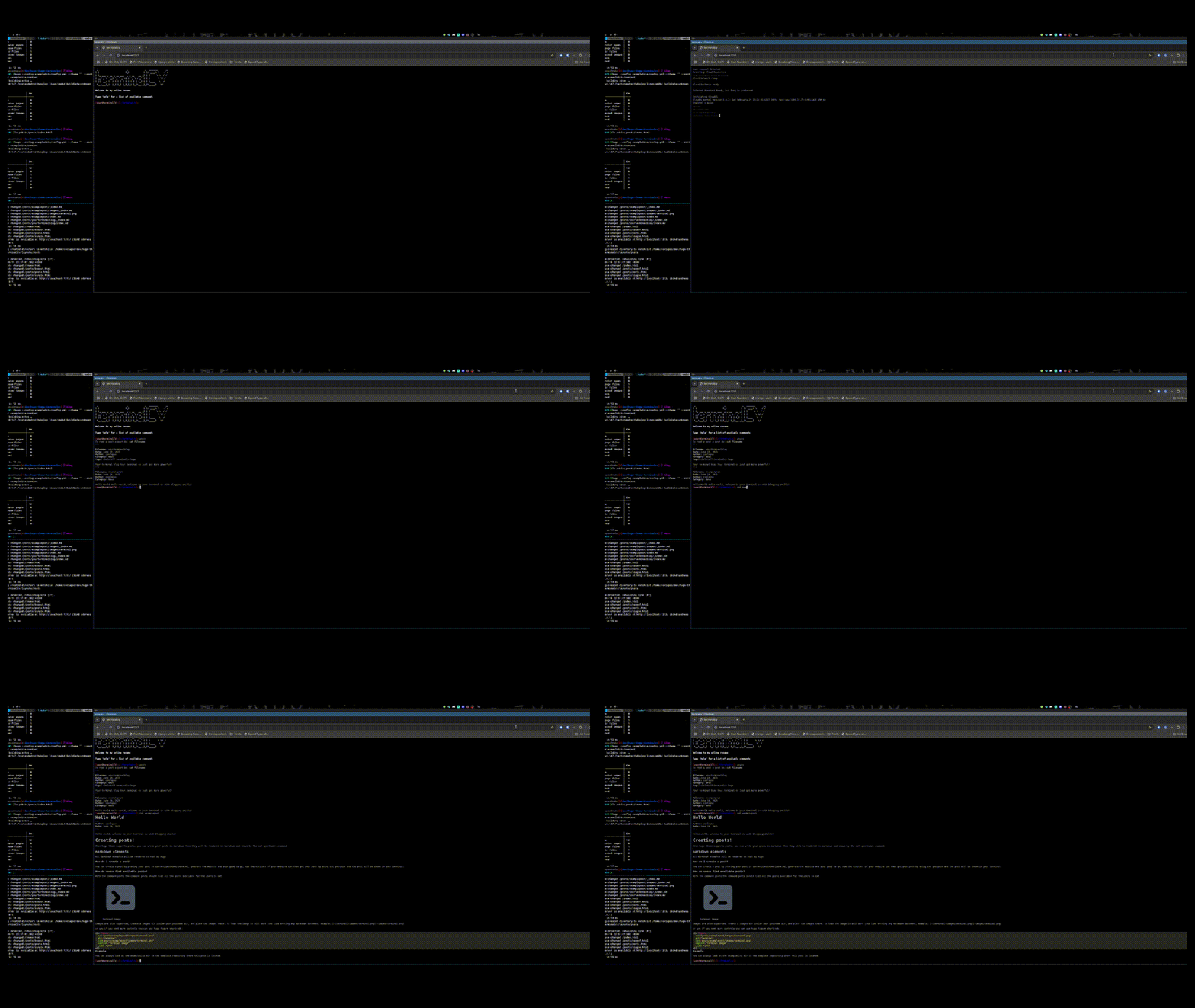
The live demo may not be making use of the blogging capabilities, but you can always see it in action like this:
> [!IMPORTANT]
> Be sure to have hugo installed before proceeding
```
git clone https://github.com/coolapso/hugo-theme-terminalcv
cd hugo-theme-terminalcv
make server
```
Now a demo will be available at <http://localhost:1313>
# Contributions
Improvements and suggestions are always welcome, feel free to open an Issue or Pull Request
If you like this theme and want to support / contribute in a different way you can always:
<a href="https://www.buymeacoffee.com/coolapso" target="_blank">
<img src="https://cdn.buymeacoffee.com/buttons/default-yellow.png" alt="Buy Me A Coffee" style="height: 51px !important;width: 217px !important;" />
</a>
# Development
If you just want to make any changes and be able to test them as you progress, or if you simply just want to test the module wihtou having to create a new hugo website you can just run
```
git clone https://github.com/coolapso/hugo-theme-terminalcv
cd hugo-theme-terminalcv
make server
```
if you don't have make, then you can just run:
```
hugo server --config exampleSite/config.yml --theme ""
```
# jcubic/Jquery.Terminal
terminalCV makes use [jcubic/jquery.terminal](https://github.com/jcubic/jquery.terminal)
# Using this theme?
Let me know and feel free to open a Pull Request and add it to this list:
| link | Description |
| --------------------- | ----------- |
| <https://coolapso.sh> | Simple CV |
Explore similar templates
Compare previews and descriptions within the same stack and category.

hugo-xmin
hugo-xmin is an extremely minimal Hugo theme written by Yihui Xie for template beginners. HTML and CSS total about 140 lines, with no external dependencies, and it uses the MIT license.
Hugo · Starter

hugo-theme-gallery
A Hugo Extended photo gallery theme that organizes images with Page Bundles, automatically generating album lists and gallery pages with a Justified layout and PhotoSwipe lightbox.
Hugo · Starter

reveal-hugo
reveal-hugo is a Hugo theme that converts Markdown content into Reveal.js-based HTML presentations. It supports slide separation with `---`, shortcodes for fragments, slides, sections, notes, Markdown, and MathJax, and organizes content as root or section presentations with order controlled by weight.
Hugo · Starter

anatole
Anatole is a minimalistic two-column Hugo theme ported from farbox-theme-Anatole, featuring dark mode, multilingual and RTL support, and optional portfolio, comments, analytics, KaTeX, and Mermaid integrations. It suits personal blogs, portfolios, or documentation sites built with Hugo.
Hugo · Starter

hugo-theme-diary
A Hugo diary-style theme ported from the Hexo theme Journal, with a grid homepage for essays and daily notes. It supports six languages, dark mode, table-of-contents scroll positioning, reading time, code highlighting, and configurable sidebar, fonts, and colors.
Hugo · Starter

risotto
risotto is a minimalist, responsive Hugo theme inspired by terminal ricing aesthetics. It uses semantic HTML and pure CSS with no JavaScript, and its layout relies on CSS Grid for native responsiveness without manual breakpoints.
Hugo · Starter