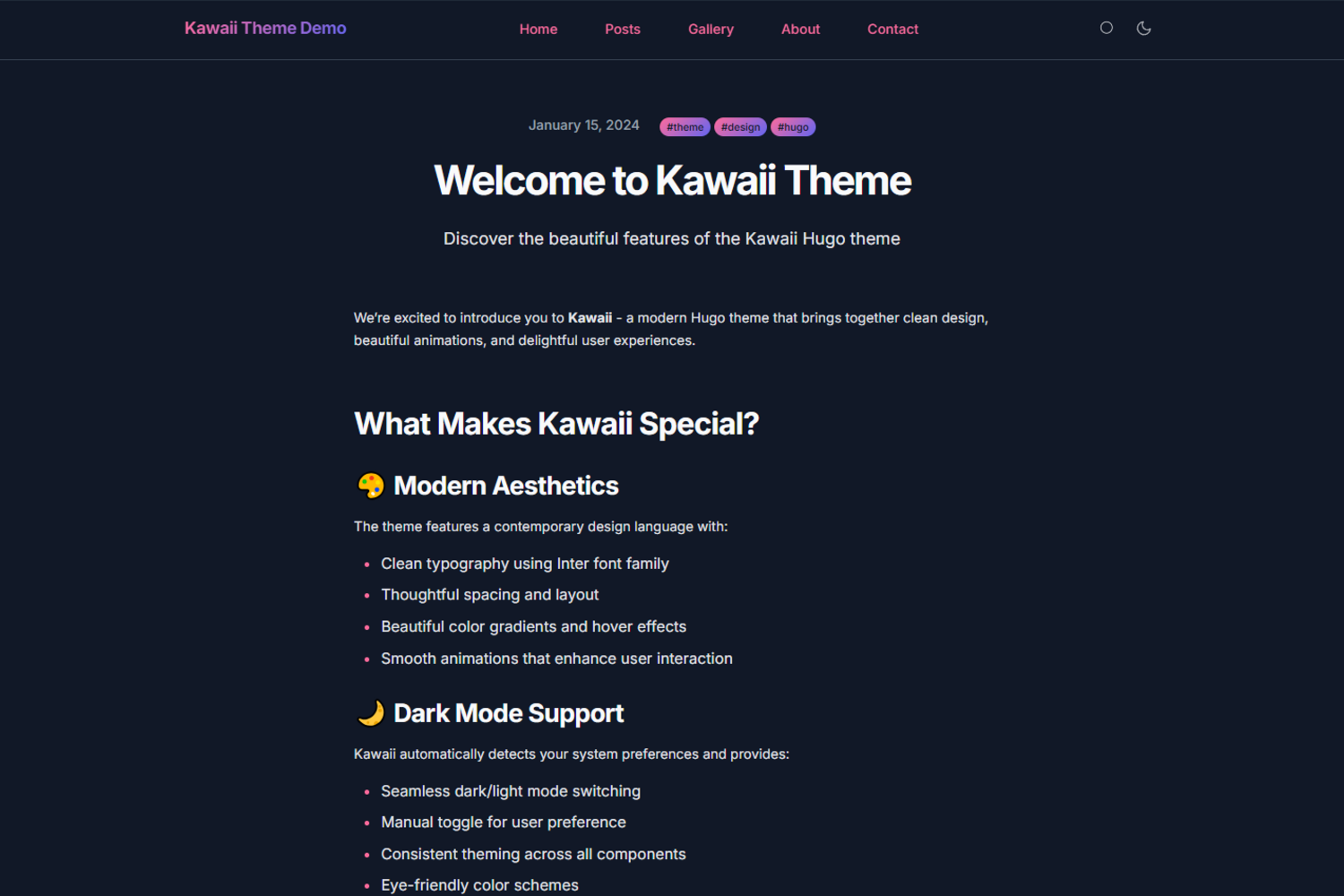
Kawaii visual style with dark mode and global micro-interaction animations
HugoDocumentation
hugo-kawaii — Hugo Documentation Template
By didvc
Hugo theme with a kawaii visual style, including dark mode, client-side search, CSS variable customization, and a complete example site.
Explore the design
Compare the page layouts and mobile experience. Open any screenshot for a closer look.
Overview
Author-provided preview
Explore the available preview. Additional pages have not been captured.
One original preview is available. Open the full image to inspect the design.
Screenshots show visual appearance; interactive behavior may differ.
Recorded 2026-09-30View source
What stands out
A quick read of the recorded project description.
Pure client-side search, no backend service required
Colors, fonts, and layout driven by CSS custom properties for easy overriding
Complete exampleSite included in the repository, usable as a starting template
README available in multiple languages, including Simplified Chinese documentation
Template Details
hugo-kawaii is a Hugo theme with a cute visual style and a clear focus: providing a ready-made look with dark mode, micro-interactions, and animations within Hugo's static site framework. It is not a general-purpose admin panel or content management system, but a theme package organized around blog/documentation sites, with a complete runnable exampleSite included in the repository for direct structural reference.
Content structure follows Hugo's conventional content directory, with templates for the homepage, about page, post list, and post pages; post front matter supports title, date, description, tags, and featured image. Functionally, the README explicitly mentions responsive and mobile-first layout, dark mode that follows the system and can be toggled manually, pure client-side search, accessibility considerations such as keyboard navigation, and colors, fonts, and layout driven by CSS custom properties. These capabilities are configured through params switches and variables in hugo.toml, and social links, navigation menus, and homepage feature blocks are also provided as configuration options. For developers who want to quickly build a personal blog, project documentation, or lightweight content site with a distinctive visual identity, this theme saves the work of writing styles from scratch.
Note that the performance claims in the README (Lighthouse target of 100, CSS and JS under 50KB total, instant load on modern networks) are the theme's target values, not third-party measured results; it is advisable to run your own content through testing before launch. The theme requires Hugo Extended 0.147.0 or higher and installs via Git submodule. Multilingual support (i18n) and more advanced search are still on the roadmap and not yet implemented; browser compatibility is listed as Chrome/Chromium 88+, Firefox 85+, Safari 14+, Edge 88+.
HugoDocumentation
Is it right for your project?
Use Cases
- Personal blog or portfolio site seeking a light, distinctive appearance
- Project documentation or lightweight content site needing dark mode and in-site search
- Hugo users who want visual customization based on an existing theme rather than building from scratch
Suitable For
- Developers using Hugo Extended 0.147.0 or higher
- Teams comfortable installing themes via Git submodule
- Users who prefer adjusting appearance through configuration files and CSS variables
Getting started & customization
Use these recorded setup notes alongside the repository instructions for your chosen version.
- 1
Requires Hugo Extended 0.147.0 or higher; standard Hugo does not meet the requirement
- 2
Add the theme via git submodule and set theme = "kawaii" in hugo.toml
- 3
The Lighthouse 100 score, size, and load time in the README are target values and need independent testing
- 4
Multilingual i18n and enhanced search are still on the roadmap and not included in the current version
- 5
Browser compatibility is as stated in the README; older browsers require independent verification
License & source material
Usage conditions & limitations
Free to use · keep license noticeThis entry covers the free version under the MIT license in the public repository; the free scope applies to that version's code and does not imply that external services or third-party assets are free.
Must comply with when using
- Free use, modification, commercial use, and distribution of this version's code are permitted.
- When distributing copies or substantial portions of the code, retain the original author's copyright notice and the full MIT license notice.
- The code is provided as is; warranties and limitations of liability are governed by the original license and applicable law.
Additional costs & items to verify
- Demo images, fonts, icons, and other third-party assets must be checked against their respective licenses; the code's MIT license alone is not sufficient to determine this.
- External services such as domains, hosting, databases, payments, or AI may incur separate charges.
- Requires Hugo Extended 0.147.0 or higher; standard Hugo does not meet the requirement.
- Multilingual i18n and enhanced search are still on the roadmap and not yet implemented in the current version.
- The Lighthouse 100 score, size, and load time are theme target values, not third-party measured results.
- Browser compatibility is limited; older browsers require independent verification.
- Fonts and icons come from third parties (Inter, JetBrains Mono, Feather Icons) and their licensing must be confirmed separately.
View Original Text Basis
Permission is hereby granted, free of charge
Original License Text
Hugo Extended 0.147.0 or later, and Git to install the theme.
Original README
Planned: multi-language support (i18n), more advanced search, additional color schemes, and further work on animations and performance.
Original README
The theme targets a Lighthouse score of 100 in Performance, Accessibility, Best Practices and SEO. CSS and JavaScript together come to under 50 KB, and pages load in under a second on a modern connection.
Original README
Chrome or Chromium 88+, Firefox 85+, Safari 14+ and Edge 88+.
Original README
https://github.com/didvc/hugo-kawaii/blob/master/LICENSEhttps://github.com/didvc/hugo-kawaii/blob/master/README.mdBuilt on [Hugo](https://gohugo.io/). Typeset in Inter by Rasmus Andersson and JetBrains Mono, with icons from Feather Icons.
Original README
Compiled by DeepSeek based on repository license and README ·2026-09-30. Results only cover the materials read; dependencies, images, fonts, and subsequent term changes are subject to their respective original texts.
Project checks & description sources
Template Information
- Source platforms
- Hugo Themes
- Documentation and maintenance reference score
- More documented · 83 / 100
- Technologies
- Hugo
- Website type
- Documentation
How this score is calculated
Our heuristic uses license records (up to 30), a demo link (12), a preview (10), stars (15), recorded maintenance (15), description completeness (8), feature records (5) and classification data (5). It is not a code, security or performance test, or a Google score. A link does not establish tested functionality.
What to verify for this project
- Repository update recorded
- 2026-09-25
- Screenshot last checked
- 2026-09-30
A demo link is listed. Check it with your own content and viewport sizes; its presence does not confirm that forms, authentication or payments work.
The catalog identifies Hugo as the primary stack. Check the actual dependency manifest and lockfile for versions and hosting requirements. These notes use recorded metadata, not a code audit or a deployment test.
Use a selection guide →How this description was prepared
AI-assisted description based on catalog records and repository material. Repository authors are not automatically the reviewers of this description.
Automatically checked against source and license rules; no manual editorial review.
Inspect the recorded source material
SHA-256: e5218dc3efa3451543cbd24fecc78e1c1c1ec11312ff9709fa6a4cafb2eb9063
2026-09-30T15:58:00.694Z
Source file / repositoryEnglish · [日本語](README-ja.md) · [繁體中文](README-zh-TW.md) · [简体中文](README-zh.md) · [Deutsch](README-de.md) · [Français](README-fr.md) · [Español](README-es.md)
# Kawaii Hugo Theme
A Hugo theme with a kawaii look, a dark mode, and small animations throughout.
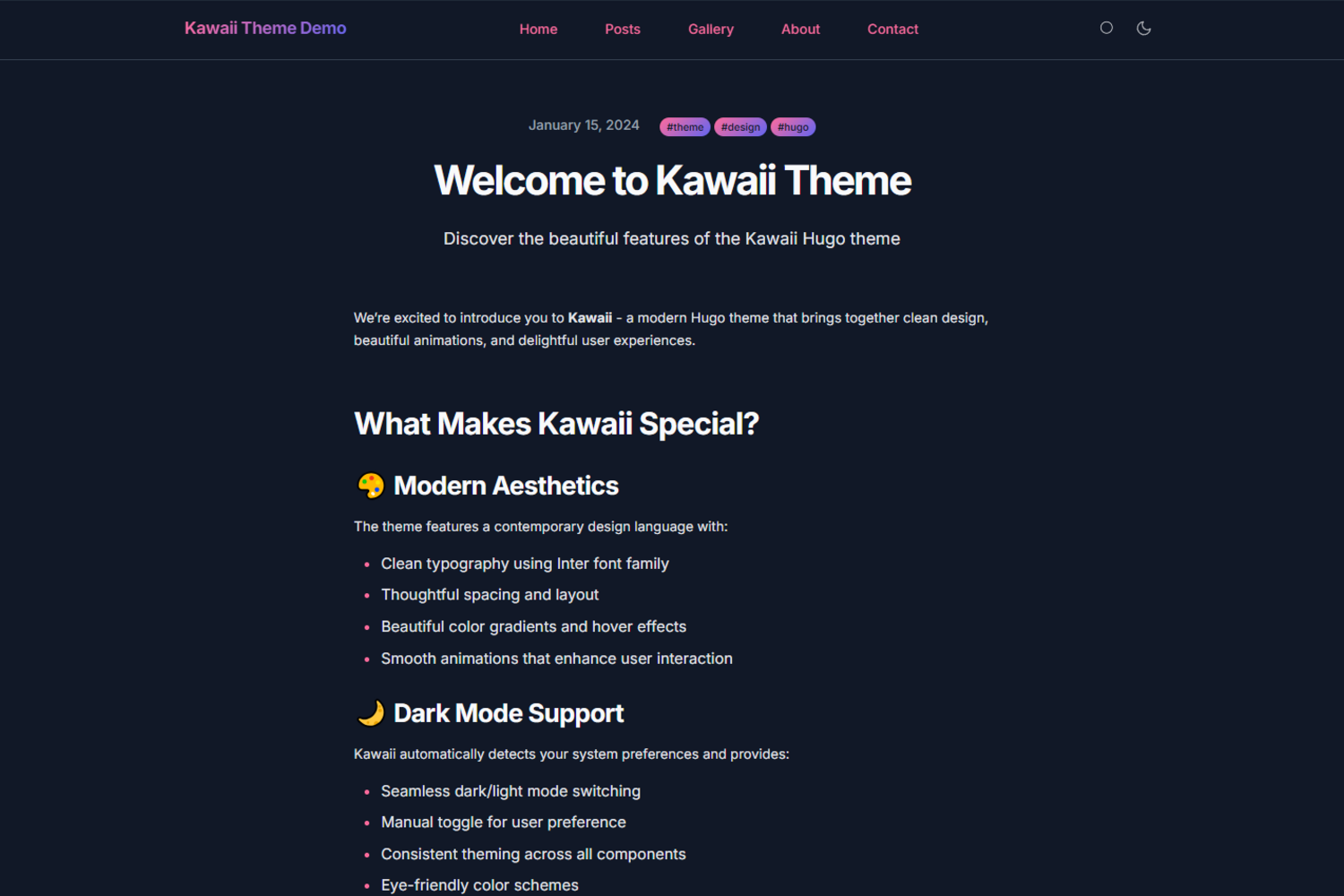
A [live demo](https://didvc.github.io/hugo-kawaii/) shows the theme in use, and the `exampleSite` directory contains a complete working site.


## Features
The layout is responsive and mobile-first, set in clean type with smooth animations and micro-interactions. Dark mode follows the system preference and can also be toggled by hand. Search runs entirely on the client. The markup is built with accessibility in mind, including keyboard navigation, and the theme aims for WCAG compliance. Colors, fonts and layout are driven by CSS custom properties, so they are easy to change, and the repository ships a full example site to start from.
## Quick start
1. Add the theme as a submodule:
```bash
git submodule add https://github.com/didvc/hugo-kawaii.git themes/kawaii
```
2. Set it in your `hugo.toml`:
```toml
theme = "kawaii"
```
3. Start the site:
```bash
hugo server
```
## Requirements
Hugo Extended 0.147.0 or later, and Git to install the theme.
## Configuration
### Basic configuration
```toml
baseURL = "https://yoursite.com"
locale = "en-us"
title = "Your Site Title"
theme = "kawaii"
[params]
description = "Your site description"
author = "Your Name"
# Theme features
theme_toggle = true # Enable dark mode toggle
search = true # Enable search functionality
# Hero section
hero_cta = "Get Started"
hero_cta_link = "posts/"
```
### Social links
```toml
[[params.social]]
name = "github"
url = "https://github.com/yourusername"
[[params.social]]
name = "twitter"
url = "https://twitter.com/yourusername"
```
### Navigation menu
```toml
[menu]
[[menu.main]]
name = "Home"
url = "/"
weight = 10
[[menu.main]]
name = "Posts"
url = "/posts"
weight = 20
```
### Featured sections
```toml
[[params.featured_sections]]
title = "Modern Design"
description = "Clean and beautiful aesthetics"
icon = "✨"
link = "about/"
```
## Customization
### Colors
Override the CSS variables to change the colors:
```css
/* assets/css/custom.css */
:root {
--kawaii-primary: #your-primary-color;
--kawaii-secondary: #your-secondary-color;
--kawaii-accent: #your-accent-color;
}
```
### Fonts
Change the typography through the font variables:
```css
:root {
--kawaii-font-family: 'Your Font', sans-serif;
--kawaii-font-mono: 'Your Mono Font', monospace;
}
```
## Content structure
### Post front matter
```yaml
---
title: "Your Post Title"
date: 2024-01-15T10:00:00Z
description: "Post description for SEO"
tags: ["tag1", "tag2", "tag3"]
featured_image: "/images/featured.jpg"
---
```
### Page structure
```
content/
├── _index.md # Homepage content
├── about/
│ └── _index.md # About page
├── posts/
│ ├── _index.md # Posts listing page
│ ├── post-1.md # Individual posts
│ └── post-2.md
└── contact/
└── _index.md # Contact page
```
## Performance
The theme targets a Lighthouse score of 100 in Performance, Accessibility, Best Practices and SEO. CSS and JavaScript together come to under 50 KB, and pages load in under a second on a modern connection.
## Browser support
Chrome or Chromium 88+, Firefox 85+, Safari 14+ and Edge 88+.
## Contributing
Bug reports and feature requests are welcome through the [bug report](https://github.com/didvc/hugo-kawaii/issues/new?template=bug_report.yml) and [feature request](https://github.com/didvc/hugo-kawaii/issues/new?template=feature_request.yml) templates; ideas can also go to [Discussions](https://github.com/didvc/hugo-kawaii/discussions). For code, fork the repository, work on a feature branch following the existing style, test against the example site, and open a pull request that describes the change. Improvements to the documentation and examples, and write-ups of your own customizations, are just as welcome.
### Development setup
1. Fork and clone the repository:
```bash
git clone https://github.com/didvc/hugo-kawaii.git
cd hugo-kawaii
```
2. Create a test site:
```bash
hugo new site test-site
cd test-site
ln -s ../../../hugo-kawaii themes/kawaii
```
3. Copy the example configuration:
```bash
cp themes/kawaii/exampleSite/hugo.toml .
cp -r themes/kawaii/exampleSite/content .
```
4. Start the development server:
```bash
hugo server --theme kawaii
```
## Roadmap
Planned: multi-language support (i18n), more advanced search, additional color schemes, and further work on animations and performance.
## Support
Usage is covered by this README and the example site. Questions and problems go to [GitHub Issues](https://github.com/didvc/hugo-kawaii/issues) or [GitHub Discussions](https://github.com/didvc/hugo-kawaii/discussions); for general Hugo questions, see the [Hugo forum](https://discourse.gohugo.io/), the [Hugo documentation](https://gohugo.io/documentation/) and the [Hugo themes directory](https://themes.gohugo.io/).
## Credits
Built on [Hugo](https://gohugo.io/). Typeset in Inter by Rasmus Andersson and JetBrains Mono, with icons from Feather Icons.
## License
Released under the [MIT License](LICENSE).
<!-- BEGIN gh-mutual-linking -->
---
### Related projects
- [astro-html-editor](https://github.com/didvc/astro-html-editor): Self-hosted HTML editor with live preview. Astro SSR + plain JavaScript, server-side file persistence.
- [html-bio-generator](https://github.com/didvc/html-bio-generator): A modern, intuitive tool for creating beautiful HTML bio pages with ease. Built with Next.js, TypeScript, and Tailwind CSS. Perfect for developers, freelancers, and content creators.
- [cf-cache-utils](https://github.com/didvc/cf-cache-utils): CLI to warm and inspect Cloudflare edge cache status across all your URLs; no external dependencies, pure Node.js
- [uptime-mon](https://github.com/didvc/uptime-mon): Lightweight single-binary endpoint uptime monitor. Probes HTTP, keyword, ICMP and TCP targets on a schedule, appends results as zstd-compressed InfluxDB line protocol, and reads them back in a terminal UI. No web server, no database, no alerting.
- [didvc](https://github.com/didvc/didvc): Aesthetic Vulpes, Tokyo | a 20s Japanese fox #arts #music #provenance | 2027 Profile README
<!-- END gh-mutual-linking -->
Explore similar templates
Compare previews and descriptions within the same stack and category.

hugo-book
Hugo Book is a Hugo documentation theme that aims to make documentation sites as simple as a plain book. It emphasizes clean, lightweight, mobile-friendly, and zero initial configuration, and comes with an example site that doubles as documentation.
Hugo · Documentation

docsy
Docsy is a Hugo theme for technical documentation sites, governed by the Linux Foundation and licensed under Apache-2.0. It provides simple navigation and site structure for open source project and product documentation.
Hugo · Documentation

hextra
Hextra is a Hugo theme for documentation and blog sites, built on Hugo and Tailwind CSS with design referencing Nextra.
Hugo · Documentation

doks
Doks is a Hugo documentation theme in the Thulite ecosystem, built for long-form reading with a minimal responsive layout and documentation-optimized typography. It includes FlexSearch-powered configurable search, dark/light mode, code syntax highlighting, i18n, multi-version documentation management, and blog pages.
Hugo · Tool Site

lotusdocs
Lotus Docs is a free, MIT-licensed Hugo documentation theme by Colin Wilson, built on Bootstrap 5. It provides responsive documentation layouts, dark mode, i18n, FlexSearch-based static search, Prism.js highlighting, KaTeX, Mermaid, and landing page templates.
Hugo · Documentation
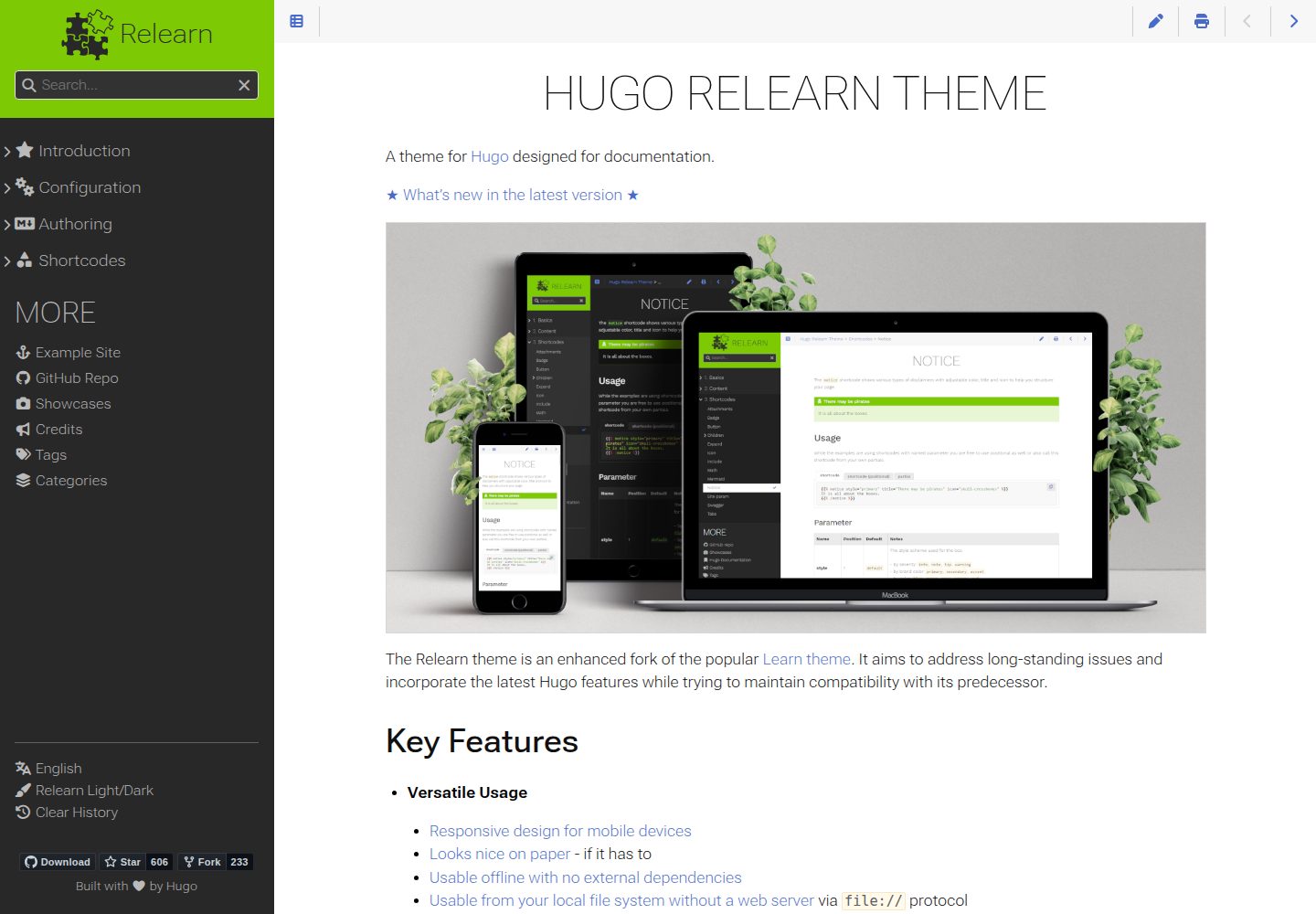
hugo-theme-relearn
Hugo Relearn is an MIT-licensed Hugo theme for documentation sites, forked from the Learn theme and enhanced with newer Hugo features.
Hugo · Documentation