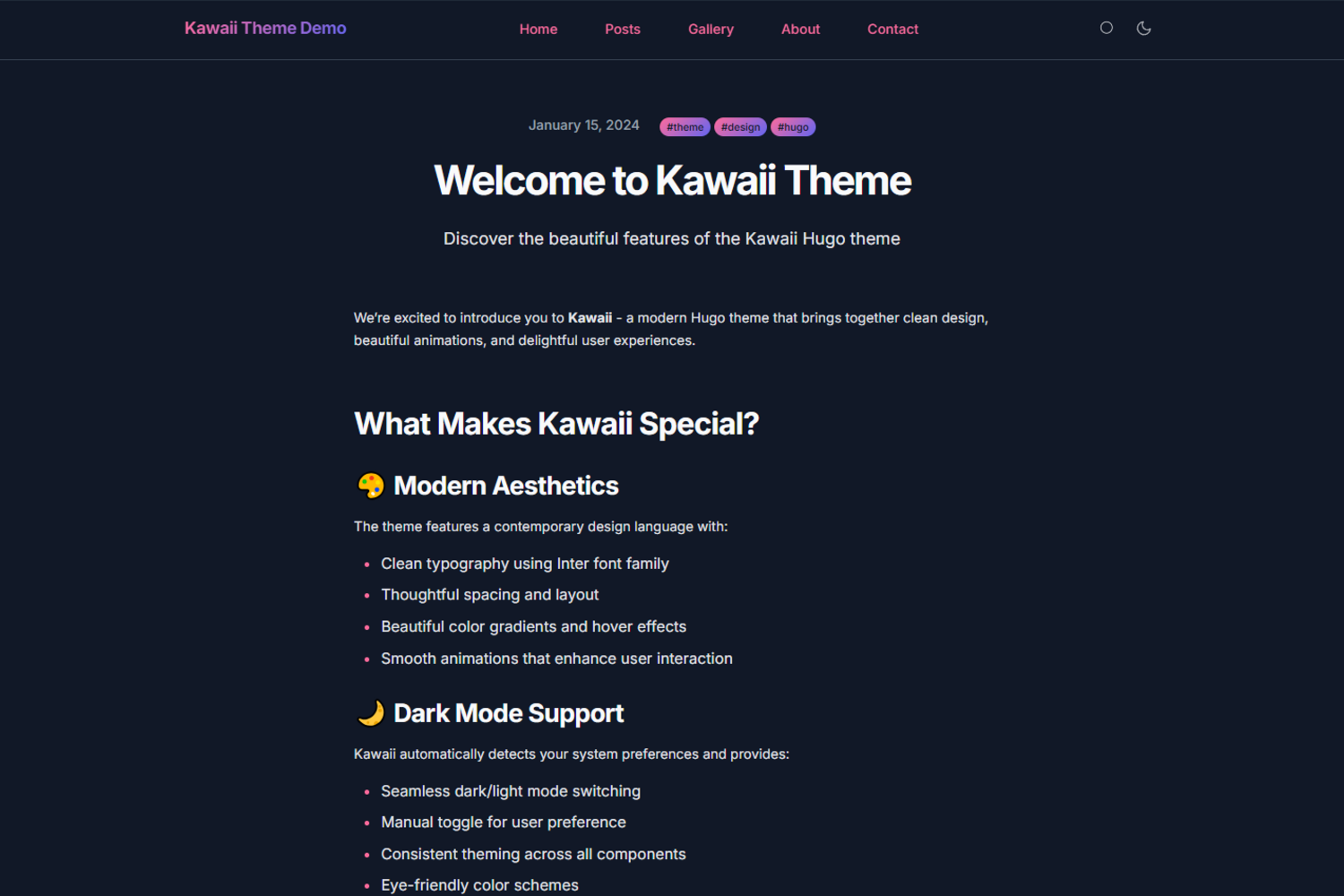
卡哇伊视觉风格,带暗色模式与全局微交互动画
Hugo文档
hugo-kawaii — Hugo 文档模板
作者 didvc
Hugo 卡哇伊风格主题,含暗色模式、客户端搜索与 CSS 变量定制,附完整示例站点。
看看你的网站会是什么样
浏览真实页面截图,比较内容排版与手机效果。点击下方缩略图切换,放大查看整页细节。
目前有 1 张原始预览,可打开完整图片查看设计细节。
截图用于了解视觉与布局,交互效果请以实际项目为准。
采集于 2026-09-30查看来源
值得关注的模板亮点
从已有项目资料中,快速了解它的特点。
纯客户端搜索,无需后端服务
颜色、字体、布局由 CSS 自定义属性驱动,便于覆盖
仓库内含完整 exampleSite,可直接作为起步模板
README 提供多语言版本,含简体中文文档
模板详细介绍
hugo-kawaii 是一个走可爱视觉路线的 Hugo 主题,定位很明确:在 Hugo 的静态站点框架里提供一套带暗色模式、微交互和动画的现成外观。它不是一个通用后台或内容管理系统,而是围绕博客/文档类站点组织的主题包,仓库内附带 exampleSite 完整可运行站点,方便直接对照结构上手。内容结构上采用 Hugo 常规的 content 目录约定,首页、关于、文章列表与文章页各有对应模板,文章 front matter 支持标题、日期、描述、标签和特色图。
功能层面,README 明确提到响应式与移动优先布局、跟随系统并可手动切换的暗色模式、纯客户端搜索、键盘导航等无障碍考虑,以及用 CSS 自定义属性驱动的颜色、字体和布局。这些能力都通过 hugo.toml 中的 params 开关和变量配置,社交链接、导航菜单、首页特色区块也以配置项形式提供。对于想快速搭一个个人博客、项目文档或轻量内容站、又希望视觉上有辨识度的开发者,这个主题省去了从零写样式的工作。
需要留意的是,README 中的性能描述(Lighthouse 目标 100、CSS 与 JS 合计小于 50KB、现代网络下秒开)属于主题的目标值,并非第三方实测结果,上线前建议用自己的内容跑一遍。主题要求 Hugo Extended 0.147.0 或更高版本,安装依赖 Git 子模块。多语言支持(i18n)和更高级的搜索仍在路线图中,尚未实现;浏览器兼容范围标注为 Chrome/Chromium 88+、Firefox 85+、Safari 14+、Edge 88+。
Hugo文档
适合你的项目吗?
适用场景
- 个人博客或作品集站点,希望外观轻快有辨识度
- 项目文档或轻量内容站,需要暗色模式与站内搜索
- Hugo 用户想基于现成主题做视觉定制而非从零开发
适合人群
- 使用 Hugo Extended 0.147.0 及以上版本的开发者
- 接受 Git 子模块方式安装主题的团队
- 偏好通过配置文件与 CSS 变量调整外观的用户
上手与定制指南
结合仓库当前版本的说明,按下面的资料检查内容、配置与运行要求。
- 1
需 Hugo Extended 0.147.0 或更高版本,普通版 Hugo 不满足要求
- 2
通过 git submodule 添加主题并在 hugo.toml 中设置 theme = "kawaii"
- 3
README 中的 Lighthouse 100 分、体积与加载时间均为目标值,需自行实测
- 4
多语言 i18n 与增强搜索仍在路线图中,当前版本未包含
- 5
浏览器兼容范围以 README 标注为准,老旧浏览器需自行验证
授权与来源资料
使用条件与限制
免费使用 · 保留许可声明本次收录的是公开仓库中采用 MIT 许可的免费版本;免费范围为该版本代码,不代表外部服务或第三方素材免费。
使用时需要遵守
- 允许免费使用、修改、商用和分发该版本代码。
- 分发代码副本或实质性部分时,保留原作者版权声明和完整 MIT 许可声明。
- 代码按现状提供;担保与责任限制以原许可证及适用法律为准。
额外费用与待核对事项
- 演示图片、字体、图标及其他第三方素材需按各自许可核对,不能仅凭代码的 MIT 许可判断。
- 域名、托管、数据库、支付或 AI 等外部服务可能另外收费。
- 需要 Hugo Extended 0.147.0 或更高版本,普通版 Hugo 不满足要求。
- 多语言 i18n 与增强搜索仍在路线图中,当前版本尚未实现。
- Lighthouse 100 分、体积与加载时间均为主题目标值,并非第三方实测结果。
- 浏览器兼容范围有限,老旧浏览器需自行验证。
- 字体与图标来自第三方(Inter、JetBrains Mono、Feather Icons),需单独确认其授权。
查看原文依据
Permission is hereby granted, free of charge
许可证原文
Hugo Extended 0.147.0 or later, and Git to install the theme.
README 原文
Planned: multi-language support (i18n), more advanced search, additional color schemes, and further work on animations and performance.
README 原文
The theme targets a Lighthouse score of 100 in Performance, Accessibility, Best Practices and SEO. CSS and JavaScript together come to under 50 KB, and pages load in under a second on a modern connection.
README 原文
Chrome or Chromium 88+, Firefox 85+, Safari 14+ and Edge 88+.
README 原文
https://github.com/didvc/hugo-kawaii/blob/master/LICENSEhttps://github.com/didvc/hugo-kawaii/blob/master/README.mdBuilt on [Hugo](https://gohugo.io/). Typeset in Inter by Rasmus Andersson and JetBrains Mono, with icons from Feather Icons.
README 原文
DeepSeek 根据仓库许可证和 README 整理 ·2026-09-30。结果仅覆盖已读取资料,依赖、图片、字体及后续条款变更以各自原文为准。
项目核对记录与介绍依据
模板资料
- 来源平台
- Hugo Themes
- 资料与维护参考分
- 资料较完整 · 83 / 100
- 技术栈
- Hugo
- 网站类型
- 文档
这个分数如何计算
本站按许可资料(最高30分)、演示链接(12分)、预览图(10分)、Star数(15分)、记录的维护时间(15分)、描述完整度(8分)、功能记录(5分)和分类资料(5分)计算。它不是代码、安全或性能测试,也不是 Google 评分;有链接不代表已实测可用。
这个项目需要核对什么
- 记录的仓库更新时间
- 2026-09-25
- 截图检查日期
- 2026-09-30
已收录演示链接。请用你的内容与屏幕尺寸检查;有演示不代表表单、认证或支付已经可用。
目录记录的主要技术栈是 Hugo。请通过依赖清单和锁文件核对实际版本与托管要求。这些说明基于收录资料,不代表代码审计或部署实测。
查看具体选型方法 →介绍的制作与核对状态
介绍由 AI 辅助整理目录与仓库资料。仓库作者不等于这篇介绍的审核者。
已完成服务器许可规则与 AI 来源核对;未经过人工编辑审核。
查看当时使用的来源资料
SHA-256: e5218dc3efa3451543cbd24fecc78e1c1c1ec11312ff9709fa6a4cafb2eb9063
2026-09-30T15:58:00.694Z
来源文件 / 仓库English · [日本語](README-ja.md) · [繁體中文](README-zh-TW.md) · [简体中文](README-zh.md) · [Deutsch](README-de.md) · [Français](README-fr.md) · [Español](README-es.md)
# Kawaii Hugo Theme
A Hugo theme with a kawaii look, a dark mode, and small animations throughout.
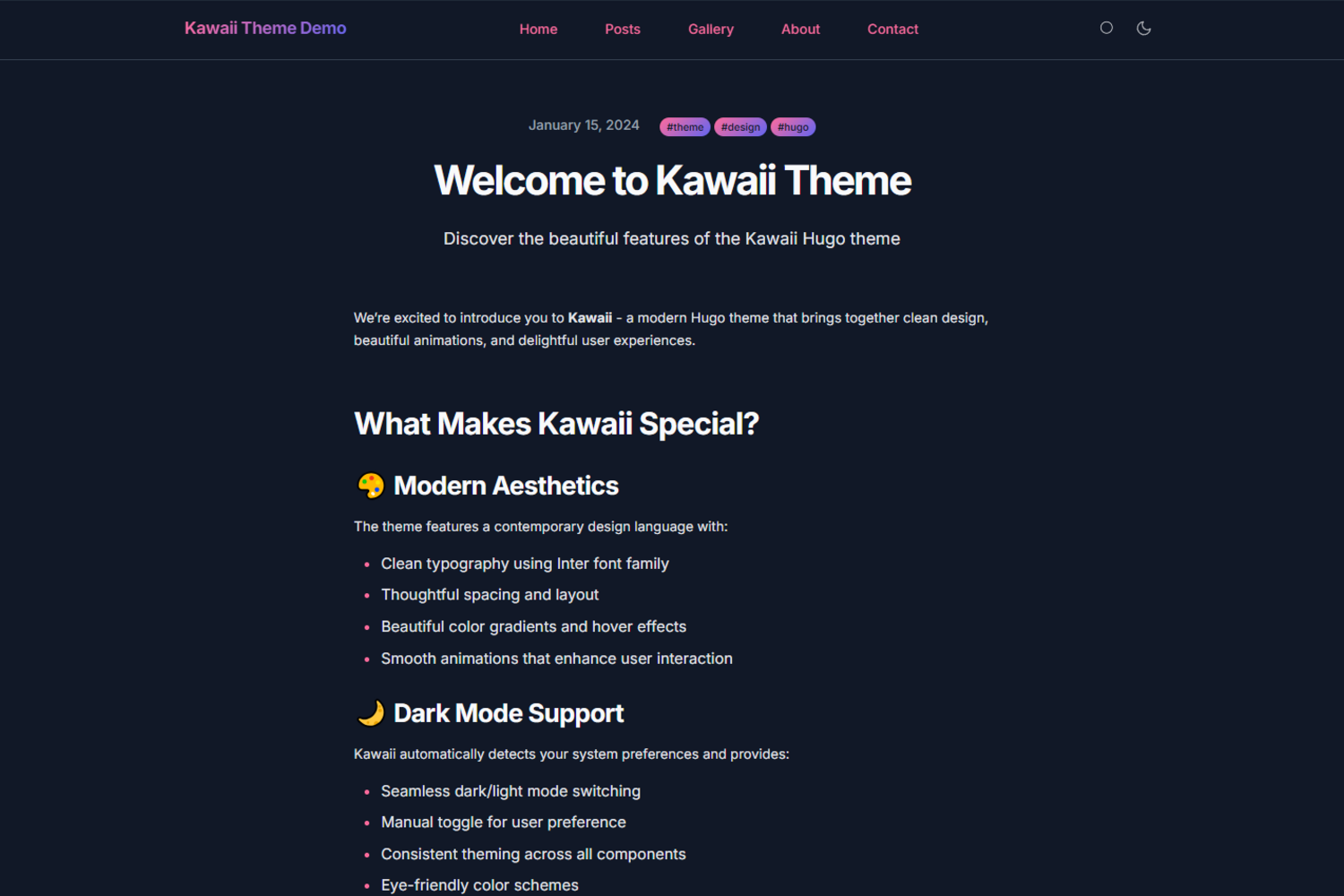
A [live demo](https://didvc.github.io/hugo-kawaii/) shows the theme in use, and the `exampleSite` directory contains a complete working site.


## Features
The layout is responsive and mobile-first, set in clean type with smooth animations and micro-interactions. Dark mode follows the system preference and can also be toggled by hand. Search runs entirely on the client. The markup is built with accessibility in mind, including keyboard navigation, and the theme aims for WCAG compliance. Colors, fonts and layout are driven by CSS custom properties, so they are easy to change, and the repository ships a full example site to start from.
## Quick start
1. Add the theme as a submodule:
```bash
git submodule add https://github.com/didvc/hugo-kawaii.git themes/kawaii
```
2. Set it in your `hugo.toml`:
```toml
theme = "kawaii"
```
3. Start the site:
```bash
hugo server
```
## Requirements
Hugo Extended 0.147.0 or later, and Git to install the theme.
## Configuration
### Basic configuration
```toml
baseURL = "https://yoursite.com"
locale = "en-us"
title = "Your Site Title"
theme = "kawaii"
[params]
description = "Your site description"
author = "Your Name"
# Theme features
theme_toggle = true # Enable dark mode toggle
search = true # Enable search functionality
# Hero section
hero_cta = "Get Started"
hero_cta_link = "posts/"
```
### Social links
```toml
[[params.social]]
name = "github"
url = "https://github.com/yourusername"
[[params.social]]
name = "twitter"
url = "https://twitter.com/yourusername"
```
### Navigation menu
```toml
[menu]
[[menu.main]]
name = "Home"
url = "/"
weight = 10
[[menu.main]]
name = "Posts"
url = "/posts"
weight = 20
```
### Featured sections
```toml
[[params.featured_sections]]
title = "Modern Design"
description = "Clean and beautiful aesthetics"
icon = "✨"
link = "about/"
```
## Customization
### Colors
Override the CSS variables to change the colors:
```css
/* assets/css/custom.css */
:root {
--kawaii-primary: #your-primary-color;
--kawaii-secondary: #your-secondary-color;
--kawaii-accent: #your-accent-color;
}
```
### Fonts
Change the typography through the font variables:
```css
:root {
--kawaii-font-family: 'Your Font', sans-serif;
--kawaii-font-mono: 'Your Mono Font', monospace;
}
```
## Content structure
### Post front matter
```yaml
---
title: "Your Post Title"
date: 2024-01-15T10:00:00Z
description: "Post description for SEO"
tags: ["tag1", "tag2", "tag3"]
featured_image: "/images/featured.jpg"
---
```
### Page structure
```
content/
├── _index.md # Homepage content
├── about/
│ └── _index.md # About page
├── posts/
│ ├── _index.md # Posts listing page
│ ├── post-1.md # Individual posts
│ └── post-2.md
└── contact/
└── _index.md # Contact page
```
## Performance
The theme targets a Lighthouse score of 100 in Performance, Accessibility, Best Practices and SEO. CSS and JavaScript together come to under 50 KB, and pages load in under a second on a modern connection.
## Browser support
Chrome or Chromium 88+, Firefox 85+, Safari 14+ and Edge 88+.
## Contributing
Bug reports and feature requests are welcome through the [bug report](https://github.com/didvc/hugo-kawaii/issues/new?template=bug_report.yml) and [feature request](https://github.com/didvc/hugo-kawaii/issues/new?template=feature_request.yml) templates; ideas can also go to [Discussions](https://github.com/didvc/hugo-kawaii/discussions). For code, fork the repository, work on a feature branch following the existing style, test against the example site, and open a pull request that describes the change. Improvements to the documentation and examples, and write-ups of your own customizations, are just as welcome.
### Development setup
1. Fork and clone the repository:
```bash
git clone https://github.com/didvc/hugo-kawaii.git
cd hugo-kawaii
```
2. Create a test site:
```bash
hugo new site test-site
cd test-site
ln -s ../../../hugo-kawaii themes/kawaii
```
3. Copy the example configuration:
```bash
cp themes/kawaii/exampleSite/hugo.toml .
cp -r themes/kawaii/exampleSite/content .
```
4. Start the development server:
```bash
hugo server --theme kawaii
```
## Roadmap
Planned: multi-language support (i18n), more advanced search, additional color schemes, and further work on animations and performance.
## Support
Usage is covered by this README and the example site. Questions and problems go to [GitHub Issues](https://github.com/didvc/hugo-kawaii/issues) or [GitHub Discussions](https://github.com/didvc/hugo-kawaii/discussions); for general Hugo questions, see the [Hugo forum](https://discourse.gohugo.io/), the [Hugo documentation](https://gohugo.io/documentation/) and the [Hugo themes directory](https://themes.gohugo.io/).
## Credits
Built on [Hugo](https://gohugo.io/). Typeset in Inter by Rasmus Andersson and JetBrains Mono, with icons from Feather Icons.
## License
Released under the [MIT License](LICENSE).
<!-- BEGIN gh-mutual-linking -->
---
### Related projects
- [astro-html-editor](https://github.com/didvc/astro-html-editor): Self-hosted HTML editor with live preview. Astro SSR + plain JavaScript, server-side file persistence.
- [html-bio-generator](https://github.com/didvc/html-bio-generator): A modern, intuitive tool for creating beautiful HTML bio pages with ease. Built with Next.js, TypeScript, and Tailwind CSS. Perfect for developers, freelancers, and content creators.
- [cf-cache-utils](https://github.com/didvc/cf-cache-utils): CLI to warm and inspect Cloudflare edge cache status across all your URLs; no external dependencies, pure Node.js
- [uptime-mon](https://github.com/didvc/uptime-mon): Lightweight single-binary endpoint uptime monitor. Probes HTTP, keyword, ICMP and TCP targets on a schedule, appends results as zstd-compressed InfluxDB line protocol, and reads them back in a terminal UI. No web server, no database, no alerting.
- [didvc](https://github.com/didvc/didvc): Aesthetic Vulpes, Tokyo | a 20s Japanese fox #arts #music #provenance | 2027 Profile README
<!-- END gh-mutual-linking -->
看看同类模板
对比同技术栈与用途的模板,找到更适合的视觉与内容结构。

hugo-book
Hugo Book 是一个面向文档场景的 Hugo 主题,定位很直接:把文档站点做得像一本朴素的书。
Hugo · 文档

docsy
Hugo theme for open source documentation
Hugo · 文档

hextra
Hextra 是一个 Hugo 主题,定位在文档站与博客之间:既提供侧边栏导航、目录、面包屑、分页这类文档站结构,也能承载博客内容。
Hugo · 文档

doks
Doks 是 Thulite 生态下的文档主题,底层是 Hugo 静态站点生成器。 它把重点放在长文阅读体验上:极简且响应式的布局、为文档优化的排版,以及代码块语法高亮,整体更接近技术手册的形态,而不是通用营销页模板。
Hugo · 工具站

lotusdocs
📖 A free, lightweight, modern documentation theme for Hugo
Hugo · 文档
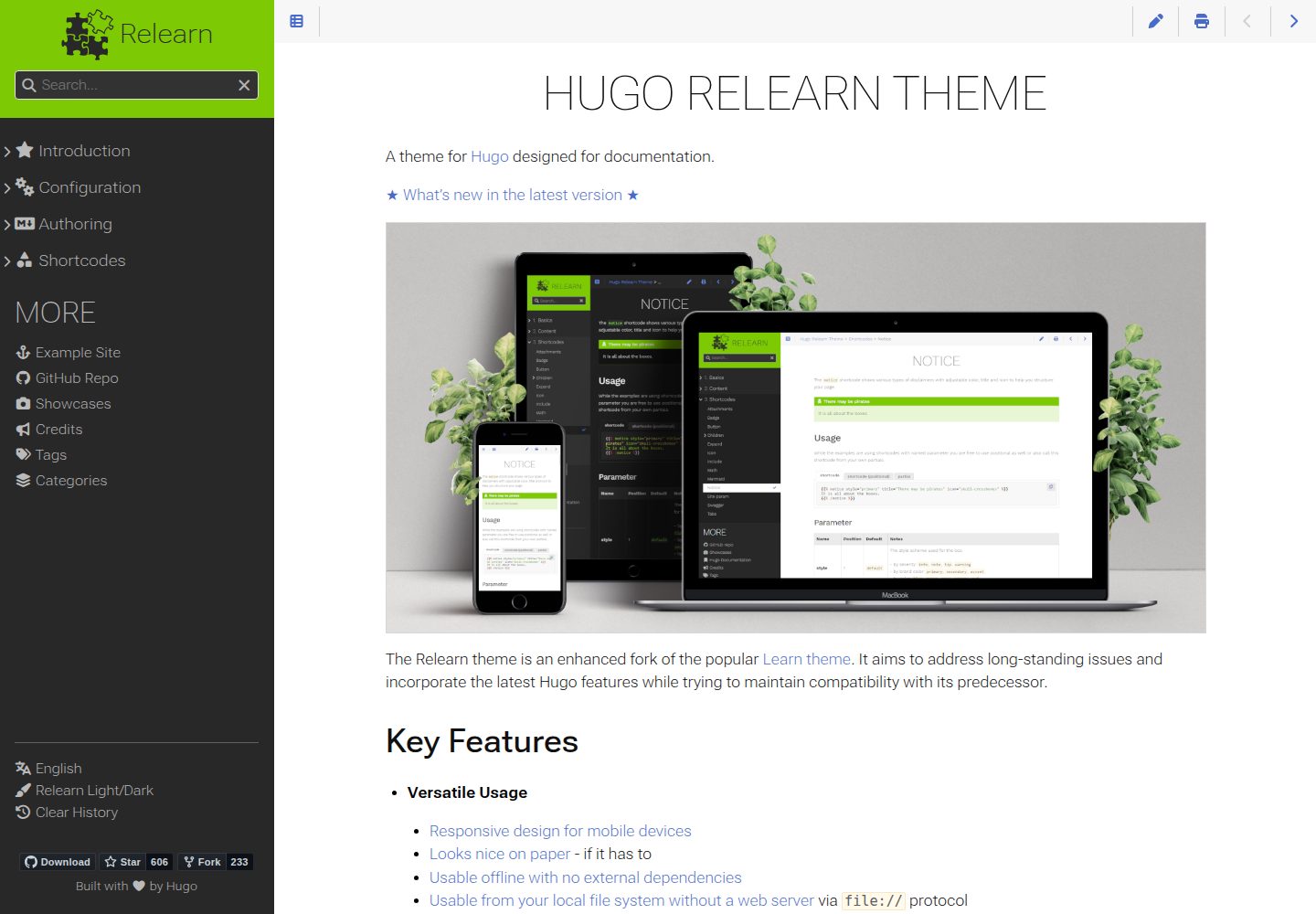
hugo-theme-relearn
A theme for Hugo designed for documentation
Hugo · 文档