
基于 Bootstrap 5 的现代文档布局,支持响应式设计与移动端
HugoHTML文档工具站
lotusdocs — Hugo 文档模板
作者 colinwilson
Lotus Docs 是 Colin Wilson 开发的免费 Hugo 文档主题,基于 Bootstrap 5,提供响应式文档布局、深色模式、多语言、静态搜索与多种部署方式。
看看你的网站会是什么样
浏览真实页面截图,比较内容排版与手机效果。点击下方缩略图切换,放大查看整页细节。
全部页面与视图 3
截图用于了解视觉与布局,交互效果请以实际项目为准。
采集于 2026-10-02查看来源
值得关注的模板亮点
从已有项目资料中,快速了解它的特点。
内置深色模式、多语言(i18n)、可自定义强调色与社交链接
默认启用基于 FlexSearch 的静态搜索,也支持 DocSearch
支持 Prism.js 语法高亮、KaTeX 数学公式与 Mermaid 图表
提供着陆页模板、带图标的文档侧边栏与可选页面目录菜单
可通过 GitHub Pages、GitLab Pages、Vercel、Netlify 或 Cloudflare Pages 部署
模板详细介绍
Lotus Docs 是一个面向 Hugo 的文档站点主题,仓库采用 MIT 许可,演示站点同时作为主题的使用文档。它基于 Bootstrap 5 构建,提供现代文档布局、响应式移动端支持、深色模式、多语言(i18n)、可选的页面目录菜单、带图标的文档侧边栏、可自定义主题强调色以及社交媒体链接。
在内容与交互方面,主题内置着陆页模板,支持 Prism.js 语法高亮、KaTeX 数学公式、Mermaid 图表,以及 PrismJS、Alerts、Tabs、Tables 等自定义 shortcode;搜索方面默认启用基于 FlexSearch 的静态搜索插件,也支持 DocSearch。此外还包含反馈组件、Open Graph 以及 Google Analytics v4 和 Plausible Analytics 分析接入。
安装方式有三种:作为 Hugo Module(推荐)、作为 Git 子模块或本地克隆主题文件。使用前需要 Hugo Extended(最低 0.140.0)、git 和 Go(最低 v1.21),并需将站点初始化为 Hugo Module,因为主题依赖 Hugo Bootstrap Module。README 中给出的配置示例包含启用 Goldmark 的 unsafe 渲染和属性解析等设置。
需要注意,仓库的 MIT 许可覆盖的是该版本代码,演示图片、字体、图标等第三方素材需按各自许可核对;域名、托管等外部服务可能另行收费。README 中提到的 Lighthouse 满分、快速、安全等表述属于项目自述,未在本资料中独立验证。
HugoHTML文档工具站
适合你的项目吗?
适用场景
- 为开源项目或产品搭建结构化的文档站点
- 需要多语言、深色模式和站内搜索的技术文档
- 在文档中展示代码高亮、数学公式或 Mermaid 图表
- 将文档站点部署到 GitHub Pages、Netlify、Vercel 等静态托管平台
适合人群
- 使用 Hugo 并希望快速获得文档主题的开发者
- 需要维护多语言技术文档的团队
- 偏好 Bootstrap 5 样式体系并希望自定义主题外观的用户
上手与定制指南
结合仓库当前版本的说明,按下面的资料检查内容、配置与运行要求。
- 1
需要 Hugo Extended(最低 0.140.0)、git 和 Go(最低 v1.21)
- 2
推荐将站点初始化为 Hugo Module 后以模块方式引入主题,因其依赖 Hugo Bootstrap Module
- 3
也可通过 Git 子模块或本地克隆 themes/lotusdocs 的方式安装
- 4
配置中需按 README 示例设置 module.imports、tableOfContents 及 Goldmark 相关选项
- 5
使用 hugo new docs/example-page.md 创建内容,并用 hugo server -D 本地预览
授权与来源资料
使用条件与限制
免费使用 · 保留许可声明本次收录的是公开仓库中采用 MIT 许可的免费版本;免费范围为该版本代码,不代表外部服务或第三方素材免费。
使用时需要遵守
- 允许免费使用、修改、商用和分发该版本代码。
- 分发代码副本或实质性部分时,保留原作者版权声明和完整 MIT 许可声明。
- 代码按现状提供;担保与责任限制以原许可证及适用法律为准。
额外费用与待核对事项
- 使用该主题需要 Hugo Extended 版本,最低版本为 0.140.0,普通版 Hugo 无法满足要求。
- 构建环境需要安装 git 和 Go(最低 v1.21),否则无法以推荐方式安装和使用该主题。
- 站点必须初始化为 Hugo Module,因为主题依赖 Hugo Bootstrap Module,这限制了非模块化的使用方式。
- 自定义字体依赖 Google Fonts 外部服务,可能涉及第三方服务可用性与隐私合规问题。
- 自定义图标依赖 Google Material Symbols 外部服务,使用前需确认其可用性与许可。
- 可选的 DocSearch 搜索功能依赖 Algolia 外部服务,可能需要申请账号或 API 密钥。
- 分析功能需接入 Google Analytics v4 或 Plausible 等外部服务,通常需要账号和配置。
- 跨浏览器测试依赖 BrowserStack 外部服务,属于第三方付费或需账号的服务。
- 演示图片、字体、图标及其他第三方素材需按各自许可核对,不能仅凭代码的 MIT 许可判断。
- 域名、托管、数据库、支付或 AI 等外部服务可能另外收费。
查看原文依据
Permission is hereby granted, free of charge
许可证原文
Hugo **Extended** (minimum version: 0.140.0)
README 原文
- git - Go (minimum version v1.21)
README 原文
it's necessary to initialize your site as a Hugo Module
README 原文
Custom fonts (via [Google Fonts](https://fonts.google.com/))
README 原文
Custom icons (via [Google Material Symbols](https://fonts.google.com/icons?icon.style=Outlined&icon.set=Material+Symbols))
README 原文
Support for [DocSearch](https://docsearch.algolia.com/)
README 原文
Analytics ([Google Analytics v4](https://analytics.google.com/analytics/web/), [Plausible Analytics](https://plausible.io/))
README 原文
https://github.com/colinwilson/lotusdocs/blob/release/LICENSEhttps://github.com/colinwilson/lotusdocs/blob/release/README.mdCross-browser testing via [BrowserStack](https://browserstack.com)
README 原文
DeepSeek 根据仓库许可证和 README 整理 ·2026-10-02。结果仅覆盖已读取资料,依赖、图片、字体及后续条款变更以各自原文为准。
项目核对记录与介绍依据
模板资料
- 来源平台
- Hugo Themes
- 资料与维护参考分
- 资料较完整 · 96 / 100
- 技术栈
- Hugo · HTML
- 网站类型
- 文档 · 工具站
这个分数如何计算
本站按许可资料(最高30分)、演示链接(12分)、预览图(10分)、Star数(15分)、记录的维护时间(15分)、描述完整度(8分)、功能记录(5分)和分类资料(5分)计算。它不是代码、安全或性能测试,也不是 Google 评分;有链接不代表已实测可用。
这个项目需要核对什么
- 记录的仓库更新时间
- 2026-06-02
- 截图检查日期
- 2026-10-02
已收录演示链接。请用你的内容与屏幕尺寸检查;有演示不代表表单、认证或支付已经可用。
目录记录的主要技术栈是 Hugo。请通过依赖清单和锁文件核对实际版本与托管要求。这些说明基于收录资料,不代表代码审计或部署实测。
查看具体选型方法 →介绍的制作与核对状态
介绍由 AI 辅助整理目录与仓库资料。仓库作者不等于这篇介绍的审核者。
已完成服务器许可规则与 AI 来源核对;未经过人工编辑审核。
查看当时使用的来源资料
SHA-256: 1f69100d894a6af0bac653850c125aec9f8bd539b4e016713c375148f6a06a93
2026-10-02T10:31:43.803Z
来源文件 / 仓库# Lotus Docs
[Lotus Docs](https://lotusdocs.dev) is an easily updated and customisable [Hugo](https://gohugo.io/) theme for building fast, secure, and SEO-friendly documentation sites.
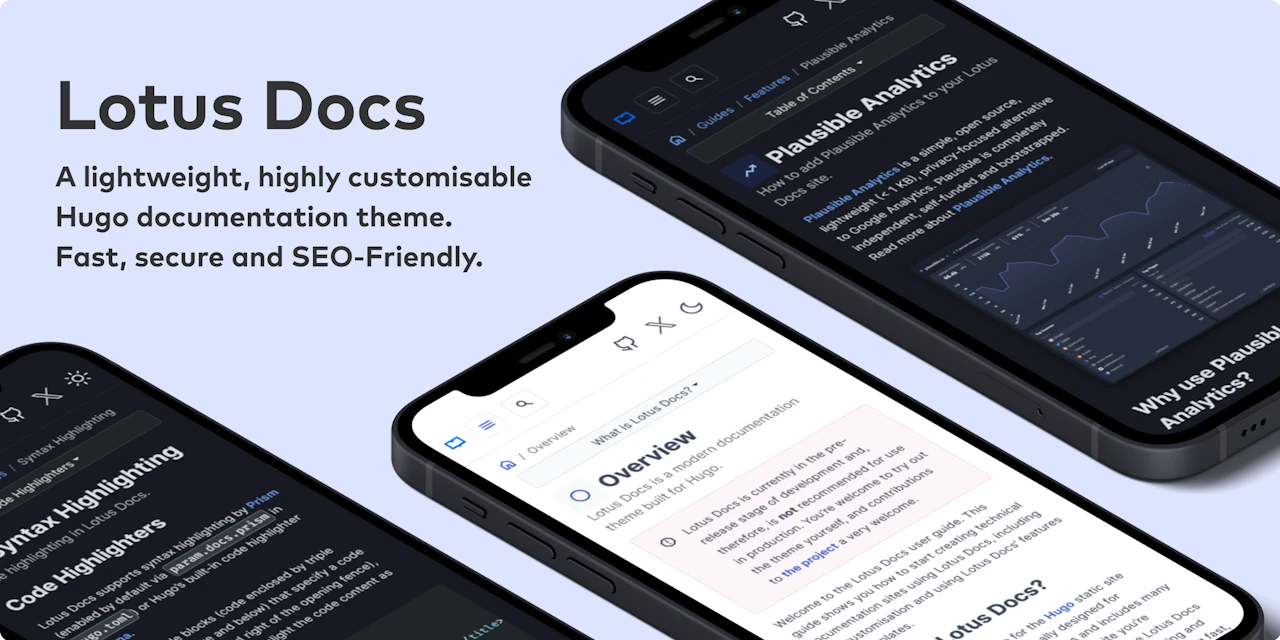
Check out the demo site [https://lotusdocs.dev/docs/](https://lotusdocs.dev/docs/) (also doubles as the documentation guide for Lotus Docs 📖)
## Features
* [x] Modern documentation layout
* [x] Responsive design / Mobile support
* [x] Fast, Accessible and SEO-Friendly (4 x 💯 scores on [Google Lighthouse](https://pagespeed.web.dev/)!)
* [x] Secure by default
* [x] Built on Bootstrap 5
* [x] Deploy on [GitHub Pages](https://lotusdocs.dev/docs/deployment/platforms/github-pages/), [GitLab Pages](https://lotusdocs.dev/docs/deployment/platforms/gitlab-pages/), [Vercel](https://vercel.com/), [Netlify](https://netlify.com), or [Cloudflare Pages](https://pages.cloudflare.com/)
* [x] Multilingual support (i18n)
* [x] Powerful Syntax Highlighting via [Prism.js](https://prismjs.com/)
* [x] Dark Mode
* [x] Custom fonts (via [Google Fonts](https://fonts.google.com/))
* [x] Custom icons (via [Google Material Symbols](https://fonts.google.com/icons?icon.style=Outlined&icon.set=Material+Symbols))
* [x] Landing page template included
* [x] Documentation sidebar menu (with optional icons)
* [x] Table of Contents menu on each page (optional)
* [x] Customisable theme accent colour
* [x] Social media links (Github, Twitter, Instagram etc)
* [x] Static Search plugin option (powered by [FlexSearch](https://github.com/nextapps-de/flexsearch), enabled by default)
* [x] Support for [DocSearch](https://docsearch.algolia.com/)
* [x] Custom shortcodes (PrismJS, Alerts, Tabs, Tables)
* [x] Analytics ([Google Analytics v4](https://analytics.google.com/analytics/web/), [Plausible Analytics](https://plausible.io/))
* [x] Cross-browser testing via [BrowserStack](https://browserstack.com)
* [x] Feedback widget
* [x] Math equations powered by [KaTeX](https://katex.org/)
* [x] [Mermaid](https://mermaid.js.org/) Support
* [x] [Open Graph](https://ogp.me/)
## Getting Started
### Requirements
- Hugo **Extended** (minimum version: 0.140.0)
- git
- Go (minimum version v1.21)
### Initialize your site as a Hugo Module
The Lotus Docs theme makes use of the [Hugo Bootstrap Module](https://github.com/gohugoio/hugo-mod-bootstrap-scss). For this reason, it's necessary to initialize your site as a Hugo Module. If your site isn't already, use the `hugo mod init` command to initialize your site as a Hugo module:
```bash
hugo mod init github.com/<username>/<your-hugo-site-name>
```
### Install Options
The Lotus Docs theme can be installed using one of the following methods:
- As a Hugo Module[^1] (recommended)
- As a Git submodule
- Clone the theme files locally
Prerequisites:
- `contentDir` present in project folder
### Install as a Hugo Module (recommended)
Edit the `hugo.toml` configuration file to include the [Lotus Docs theme](https://github.com/colinwilson/lotusdocs) and the [Hugo Bootstrap module](https://github.com/gohugoio/hugo-mod-bootstrap-scss) as modules:
```toml
baseURL = 'http://example.org/'
languageCode = 'en-us'
title = 'My New Hugo Site'
contentDir = 'content'
enableEmoji = true
[module]
[[module.imports]]
path = "github.com/colinwilson/lotusdocs"
disable = false
[[module.imports]]
path = "github.com/gohugoio/hugo-mod-bootstrap-scss/v5"
disable = false
[markup]
[markup.tableOfContents]
endLevel = 3
startLevel = 1
[markup.goldmark]
[markup.goldmark.renderer]
unsafe = true # https://jdhao.github.io/2019/12/29/hugo_html_not_shown/
[markup.goldmark.parser]
[markup.goldmark.parser.attribute]
block = true
```
### Install as a Git Submodule
From the root of your project run the following `git` commands:
```bash
git init
git submodule add https://github.com/colinwilson/lotusdocs themes/lotusdocs
```
Edit the `hugo.toml` config file:
```toml
baseURL = 'http://example.org/'
languageCode = 'en-us'
title = 'My New Hugo Site'
contentDir = 'content'
enableEmoji = true
[module]
# uncomment line below for temporary local development of module
# or when using a 'theme' as a git submodule
replacements = "github.com/colinwilson/lotusdocs -> lotusdocs"
[[module.imports]]
path = "github.com/colinwilson/lotusdocs"
disable = false
[[module.imports]]
path = "github.com/gohugoio/hugo-mod-bootstrap-scss/v5"
disable = false
[markup]
[markup.tableOfContents]
endLevel = 3
startLevel = 1
[markup.goldmark]
[markup.goldmark.renderer]
unsafe = true # https://jdhao.github.io/2019/12/29/hugo_html_not_shown/
[markup.goldmark.parser]
[markup.goldmark.parser.attribute]
block = true
```
### Install Locally
There may be cases where you prefer to customize and maintain the Lotus Docs theme yourself. In such cases, use `git` to clone the theme into the `themes/lotusdocs` directory:
```bash
git clone https://github.com/colinwilson/lotusdocs themes/lotusdocs
```
Edit the `hugo.toml` config file:
```toml
baseURL = 'http://example.org/'
languageCode = 'en-us'
title = 'My New Hugo Site'
[module]
# uncomment line below for temporary local development of module,
# when using a 'theme' as a git submodule or git cloned files
replacements = "github.com/colinwilson/lotusdocs -> lotusdocs"
[[module.imports]]
path = "github.com/colinwilson/lotusdocs"
disable = false
[[module.imports]]
path = "github.com/gohugoio/hugo-mod-bootstrap-scss/v5"
disable = false
```
## Create New Content
Navigate to the root of your Hugo project and use the `hugo new` command to create a file in the `content/docs` directory:
```shell
hugo new docs/example-page.md
```
This will create a markdown file named `example-page.md` with the following default front matter:
```yaml
---
title: "Example Page"
description: ""
icon: "article"
date: "2023-05-22T00:27:57+01:00"
lastmod: "2023-05-22T00:27:57+01:00"
draft: false
toc: true
weight: 999
---
```
Modify the above front matter options to suit your needs.
## Preview your site locally
Now that you've created some sample content you can preview your new Lotus Docs site using the `huge server` command:
```shell
hugo server -D
```
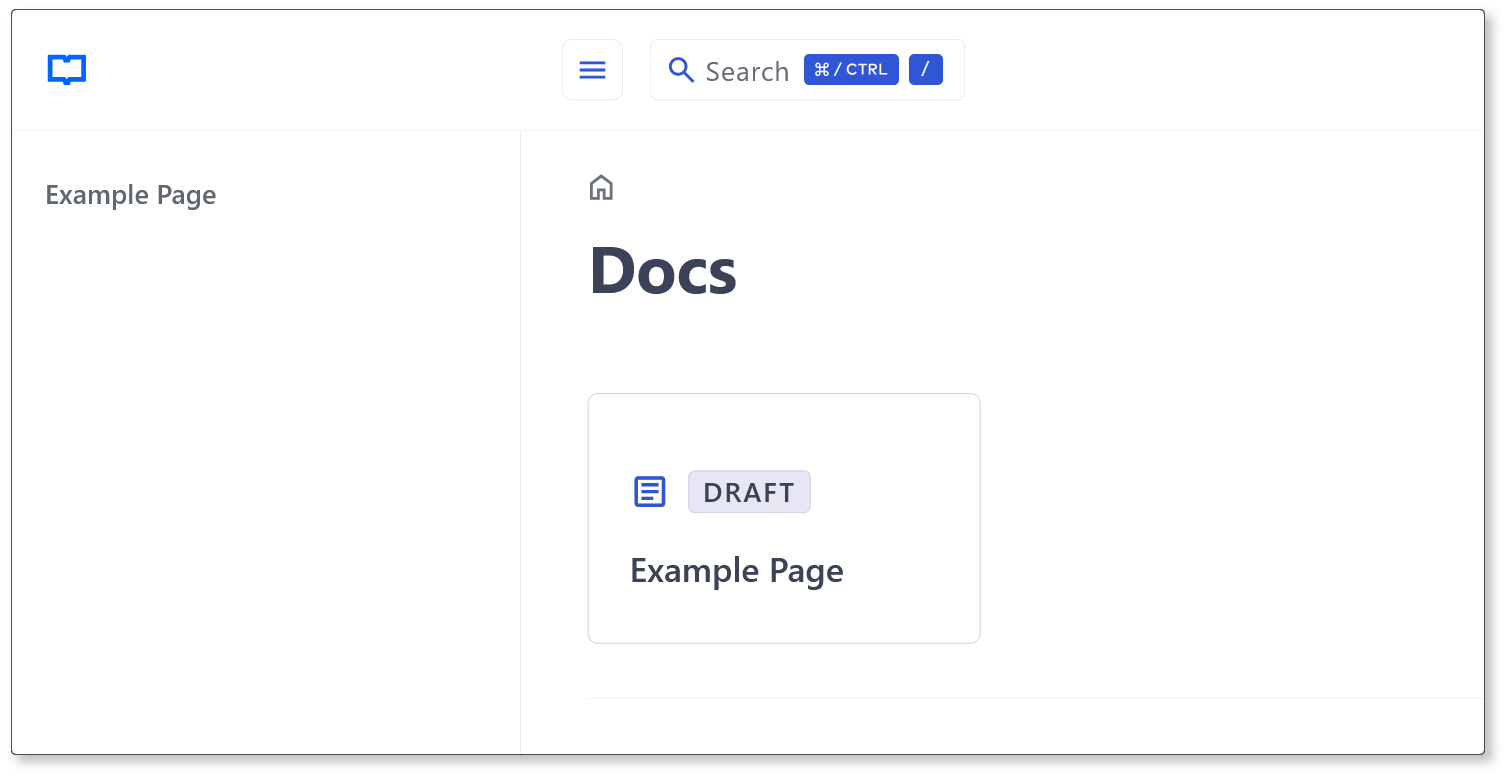
Navigate to `localhost:1313/docs/` and you should see a card link to the **Example Page** created earlier:
## Author
[Colin Wilson](https://github.com/colinwilson)
Copyright © 2022-2025 [Colin Wilson](https://github.com/colinwilson)
[^1]: [Hugo Modules](https://gohugo.io/hugo-modules/)
看看同类模板
对比同技术栈与用途的模板,找到更适合的视觉与内容结构。

hugo-book
Hugo Book 是一个面向文档场景的 Hugo 主题,定位很直接:把文档站点做得像一本朴素的书。
Hugo · 文档

hugo-coder
A minimalist blog theme for hugo.
Hugo · 博客

docsy
Hugo theme for open source documentation
Hugo · 文档

hextra
Hextra 是一个 Hugo 主题,定位在文档站与博客之间:既提供侧边栏导航、目录、面包屑、分页这类文档站结构,也能承载博客内容。
Hugo · 文档

doks
Doks 是 Thulite 生态下的文档主题,底层是 Hugo 静态站点生成器。 它把重点放在长文阅读体验上:极简且响应式的布局、为文档优化的排版,以及代码块语法高亮,整体更接近技术手册的形态,而不是通用营销页模板。
Hugo · 工具站

hugo-theme-introduction
Minimal, single page, smooth-scrolling theme for Hugo static site generator.
Hugo · 作品集