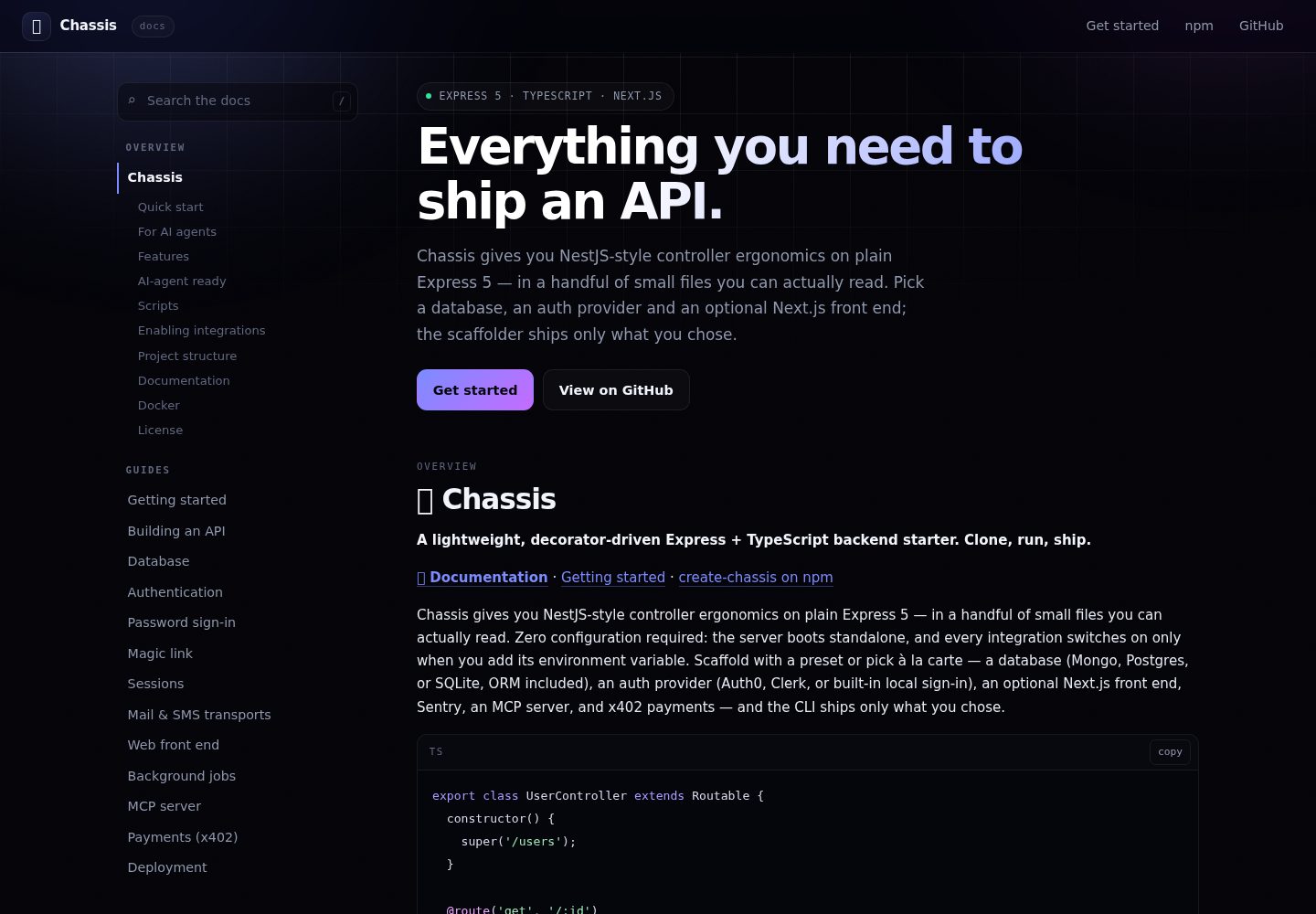
Decorator routing: controllers extend Routable, and methods annotated with @route / @protectedRoute are mounted automatically without manual registration
Next.jsReactStarter
chassis — Next.js Starter Template
By dvd90
Chassis is an Express 5 and TypeScript backend starter that provides NestJS-like controller patterns through decorator routing, with a CLI for selecting database, authentication, frontend, and other integrations on demand.
Explore the design
Compare the page layouts and mobile experience. Open any screenshot for a closer look.
Desktop homepage1 / 2
Desktop captureTop of page
Actual screenshot captured by the server browser.
All pages & views 2
Screenshots show visual appearance; interactive behavior may differ.
Recorded 2026-10-13View source
What stands out
A quick read of the recorded project description.
Unified responses and errors: req.resHandler provides ok, notFound, validation, and other response methods, with AppError paired with centralized error handling
On-demand scaffolding: create-chassis supports presets or item-by-item selection of database, authentication, Next.js frontend, Sentry, MCP, and x402; unselected integrations do not enter dependencies
Integrations dormant by default: MongoDB, Auth0, Sentry, and others are enabled only when their corresponding environment variables are set
Testable application factory: app.ts is a pure factory, and Vitest + supertest can test without a server or database
AI agent support: generated projects include AGENTS.md, CLAUDE.md, llms.txt, and an add-resource skill, plus an npm run verify quality gate
Template Details
Chassis is a lightweight Express + TypeScript backend starter whose core goal is to provide decorator-driven controller patterns in a small number of readable files. Controllers extend Routable, and methods decorated with @route or @protectedRoute are mounted automatically. Responses are returned uniformly through req.resHandler, while errors are thrown with AppError and handled by centralized error handling. Configuration is validated with zod in src/config; the application refuses to start when environment variables are invalid. Each request is assigned a callId that is echoed in responses and logs.
The project provides the create-chassis CLI for scaffolding, supporting presets or on-demand selection of: database and ORM (Mongo, Postgres, or SQLite), authentication method (Auth0, Clerk, or built-in local login), an optional Next.js frontend, Sentry, an MCP server, and x402 payments. Integrations that are not selected do not appear in the generated package.json. All integrations are dormant by default and are enabled only when the corresponding environment variables are set, such as MONGODB_URI, AUTH0_DOMAIN and AUTH0_AUDIENCE, and SENTRY_DSN.
Local login includes three variants: email link, credential form, or a combination of both, sharing the same session layer. In the email link flow, GET requests do not consume the token; redemption is done via POST. Each email also carries a six-digit verification code. The request endpoint returns the same response for any address. Refresh tokens rotate after each use, and replaying a used token revokes the entire session family. The project does not bind to an email or SMS provider; you must integrate one via setMailTransport() or setSmsTransport(), and verifying an address triggers the setOnVerified() hook.
Tests use Vitest and supertest against a pure application factory, with no need to start a server or database. npm run gen <Name> generates controllers and tests wired to the selected ORM (Drizzle or Mongoose). Docker provides a multi-stage build, a non-root production image, and docker-compose for development. The project also includes a GitHub Actions verification pipeline and Renovate dependency updates.
For AI agents, generated projects include AGENTS.md, CLAUDE.md, llms.txt, and an add-resource skill; the CLI's --yes and --bare skip prompts, and prompts are automatically skipped when stdin is not a TTY. npm run verify runs strict TypeScript, ESLint, and tests as a deterministic quality gate.
Next.jsStarter
Is it right for your project?
Use Cases
- Quickly setting up an Express + TypeScript API starting point with decorator routing and a unified response format
- A backend scaffold where database, authentication method, and optional Next.js frontend are chosen according to the project's actual needs
- Backend projects where integrations are off by default and enabled on demand only through environment variables
- A backend codebase prepared for AI coding agents with convention documentation and verification scripts
- API projects that need local login (email link or credential form) without binding to a third-party identity service
Suitable For
- Developers building backend APIs with Express and TypeScript
- Teams that prefer decorator-style controllers and want to reduce manual route registration
- Projects that need to choose database, authentication, and frontend integrations on demand rather than accept a fixed stack
- Teams using AI coding agents in their development workflow and wanting them to follow unified conventions
Getting started & customization
Use these recorded setup notes alongside the repository instructions for your chosen version.
- 1
You can clone the repository and run npm install and npm run dev directly; /status is accessible without a database or environment file
- 2
Using the npm create chassis scaffold is recommended; it supports --yes, --preset, --bare, and on-demand flags such as --db, --auth, and --mcp
- 3
Integrations are enabled by copying .env.example to .env and setting the corresponding variables, such as MONGODB_URI, AUTH0_DOMAIN and AUTH0_AUDIENCE, and SENTRY_DSN
- 4
Local login requires JWT_SECRET; email sending requires binding a provider via setMailTransport(), and when SMTP_URL is not set, emails are written to logs
- 5
For the Docker development environment, run docker compose up --build to start the API and MongoDB
License & source material
Usage conditions & limitations
Free to use · keep license noticeThis entry covers the free version under the MIT license in the public repository; the free scope is the code of that version and does not mean external services or third-party assets are free.
Must comply with when using
- You may use, modify, commercialize, and distribute the code of this version for free.
- When distributing copies or substantial portions of the code, retain the original author's copyright notice and the complete MIT license notice.
- The code is provided as is; warranties and limitations of liability are governed by the original license and applicable law.
Additional costs & items to verify
- Demo images, fonts, icons, and other third-party assets must be checked against their respective licenses; the code's MIT license alone cannot be used to judge them.
- External services such as domains, hosting, databases, payments, or AI may incur separate charges.
- The project itself does not include an email or SMS provider; when using local login's email link or verification code features, you must integrate a third-party email/SMS service yourself via setMailTransport() or setSmsTransport(), which may incur external service costs.
- When SMTP_URL is not set, emails are not actually sent and are only written to logs; to actually deliver email, you must configure SMTP_URL or bind a custom mail transport.
- When using local login, the JWT_SECRET environment variable must be provided, otherwise the related authentication cannot work properly.
- If using a third-party identity provider other than Auth0 or Clerk, you must call setAuthProvider() at startup to inject middleware yourself; the project does not provide out-of-the-box support.
- Enabling Auth0 authentication requires configuring AUTH0_DOMAIN and AUTH0_AUDIENCE and depends on the external Auth0 service, which may involve an account and fees.
- Enabling Sentry error reporting requires configuring SENTRY_DSN and depends on the external Sentry service, which may involve an account and fees.
- Using the MongoDB integration requires providing MONGODB_URI, meaning a usable MongoDB instance (local or externally hosted) is needed; external hosting may incur fees.
- Payment-gated routes depend on the x402 protocol and are an optional integration; enabling it involves external dependencies and costs related to on-chain payments.
View Original Text Basis
Permission is hereby granted, free of charge
Original License Text
Chassis binds no email or SMS provider — bind yours through `setMailTransport()` or `setSmsTransport()`.
Original README
`SMTP_URL` | unset → logs the email
Original README
`JWT_SECRET` | _(required)_
Original README
Using a different IdP? Call `setAuthProvider([...yourMiddleware])` at boot and `@protectedRoute` uses it
Original README
Auth0 | `AUTH0_DOMAIN` + `AUTH0_AUDIENCE` | JWT verification on every `@protectedRoute`
Original README
Sentry | `SENTRY_DSN` | Automatic error reporting from the central error handler
Original README
MongoDB | `MONGODB_URI` | Mongoose connection, readiness check, graceful disconnect
Original README
https://github.com/dvd90/chassis/blob/master/LICENSEhttps://github.com/dvd90/chassis/blob/master/README.md**Payment-gated routes** — `@paidRoute('get', '/report', '$0.01')` via the x402 protocol (opt-in)
Original README
Compiled by DeepSeek based on repository license and README ·2026-10-13. Results only cover the materials read; dependencies, images, fonts, and subsequent term changes are subject to their respective original texts.
Project checks & description sources
Template Information
- Source platforms
- GitHub
- Documentation and maintenance reference score
- More documented · 83 / 100
- Technologies
- Next.js · React
- Website type
- Starter
How this score is calculated
Our heuristic uses license records (up to 30), a demo link (12), a preview (10), stars (15), recorded maintenance (15), description completeness (8), feature records (5) and classification data (5). It is not a code, security or performance test, or a Google score. A link does not establish tested functionality.
What to verify for this project
- Repository update recorded
- 2026-08-07
- Screenshot last checked
- 2026-10-13
A demo link is listed. Check it with your own content and viewport sizes; its presence does not confirm that forms, authentication or payments work.
The catalog identifies Next.js as the primary stack. Check the actual dependency manifest and lockfile for versions and hosting requirements. These notes use recorded metadata, not a code audit or a deployment test.
Use a selection guide →How this description was prepared
AI-assisted description based on catalog records and repository material. Repository authors are not automatically the reviewers of this description.
Review declaration: [email protected] · 2026-10-13
Inspect the recorded source material
SHA-256: fd205d9b0f31f0b31cae1b96dd40209e1e182aa300cf72af7a52c6e75b3d7941
2026-10-13T00:20:05.053Z
Source file / repository# 🏎️ Chassis
**A lightweight, decorator-driven Express + TypeScript backend starter. Clone, run, ship.**
**[📖 Documentation](https://dvd90.github.io/chassis/)** · [Getting started](https://dvd90.github.io/chassis/#getting-started) · [create-chassis on npm](https://www.npmjs.com/package/create-chassis)
Chassis gives you NestJS-style controller ergonomics on plain Express 5 — in a handful of small files you can actually read. Zero configuration required: the server boots standalone, and every integration switches on only when you add its environment variable. Scaffold with a preset or pick à la carte — a database (Mongo, Postgres, or SQLite, ORM included), an auth provider (Auth0, Clerk, or built-in local sign-in), an optional Next.js front end, Sentry, an MCP server, and x402 payments — and the CLI ships only what you chose.
```ts
export class UserController extends Routable {
constructor() {
super('/users');
}
@route('get', '/:id')
async show(req: Request) {
const user = await findUser(req.params.id);
if (!user) throw new AppError(ERROR_CODES.NOT_FOUND, 'User not found');
return req.resHandler.ok(user);
}
@protectedRoute('post', '/', [validate({ body: createUserSchema })])
async create(req: Request) {
return req.resHandler.created(await createUser(req.body));
}
}
```
Export the class from `src/controllers/index.ts` — that's the whole wiring.
## Quick start
```bash
npm create chassis my-api -- --yes # zero prompts: Postgres + JWT + Sentry + Docker
npm create chassis my-app -- --preset fullstack --yes # the same, plus a Next.js front end
npm create chassis my-api # interactive — pick a preset
npm create chassis my-api -- --db postgres --auth jwt --mcp # à la carte
npm create chassis my-api -- --bare # nothing — standalone build
```
Or use the template directly:
```bash
git clone https://github.com/dvd90/chassis.git my-api
cd my-api && npm install && npm run dev
```
That's it — no database, no env file, no accounts needed. Open http://localhost:8000/status.
New here? Follow the **[step-by-step getting-started guide](docs/getting-started.md)** — zero to a tested API in ~10 minutes.
## For AI agents
Every path is non-interactive: `--yes` and `--bare` never prompt, and the CLI
skips prompts automatically whenever stdin isn't a TTY. One command produces a
project that already typechecks, lints and tests green.
- **[llms.txt](https://dvd90.github.io/chassis/llms.txt)** — the project, its
conventions and its docs index, in one fetch
- **[llms-full.txt](https://dvd90.github.io/chassis/llms-full.txt)** — every
documentation page, concatenated
- **[AGENTS.md](AGENTS.md)** — the conventions to follow when writing code in a
Chassis project, and the definition of done
Generated projects carry `AGENTS.md`, `CLAUDE.md`, `llms.txt` and an
`add-resource` skill, so whichever agent opens one writes code that matches the
rest of the codebase rather than fighting it.
## Features
- **TypeScript 6 + Express 5** — strict types, async errors caught automatically
- **Decorator routing** — `@route` / `@protectedRoute` on controller methods, controllers auto-mount
- **Consistent responses** — `req.resHandler.ok() / .notFound() / .validation()` with structured logging
- **Request correlation** — every request gets a `callId` (or propagates `x-call-id`), echoed in responses and logs
- **Typed, validated config** — zod-checked environment via `src/config`; the app refuses to boot on bad config
- **Zod input validation** — `validate({ body, query, params })` middleware with structured 400s
- **Pick-your-stack scaffolder** — presets or à la carte: database + ORM (Mongo/Postgres/SQLite), auth (Auth0/Clerk/local), a Next.js front end, Sentry, MCP, x402 — the CLI prunes everything else so `package.json` carries only what you chose
- **Opt-in integrations** — every module enables by env var, never required
- **Payment-gated routes** — `@paidRoute('get', '/report', '$0.01')` via the x402 protocol (opt-in)
- **Optional Next.js front end** — `--web` adds an App Router app and makes the project an npm-workspaces monorepo (`apps/api` + `apps/web`); the auth provider you picked is wired on both sides
- **MCP server** — expose your API to AI agents as MCP tools (`npm run mcp`, opt-in)
- **Health endpoints** — `/healthz` (liveness) and `/readyz` (readiness, checks enabled integrations)
- **Graceful shutdown** — drains connections and closes integrations on SIGTERM/SIGINT
- **Vitest + supertest** — fast tests against the pure app factory, no server or DB needed
- **DB-aware code generator** — `npm run gen user` scaffolds a controller + test wired to your ORM (Drizzle or Mongoose)
- **Production Docker** — multi-stage build, non-root user, plus docker-compose with your database for dev
- **CI + Renovate** — GitHub Actions verify pipeline and automated dependency updates
- **AI-agent ready** — ships `AGENTS.md`, `CLAUDE.md`, `llms.txt`, and an `add-resource` skill so agents write code that matches the conventions (see below)
## AI-agent ready
Most people scaffolding a backend today have an AI agent in the loop. Chassis is built so that agent-written code reads like hand-written code — because the framework gives agents rails and a verifiable finish line:
- **`AGENTS.md` + `CLAUDE.md`** ship in every project — Claude Code, Cursor, Copilot, and Codex pick them up automatically and follow the conventions (thin controllers, `resHandler` responses, `throw AppError`, config in one place).
- **One obvious place for everything** means agent output converges on the same shape a maintainer would write — that's what keeps it readable.
- **`npm run verify`** (strict TypeScript + ESLint + tests) is a deterministic quality gate agents iterate against until green.
- **`.claude/skills/add-resource`** turns "add a books resource" into one consistent, checklisted operation.
- **`llms.txt`** gives doc-fetching tools a compact map of the conventions.
Nothing to install — it's all in the scaffold. See [AGENTS.md](AGENTS.md).
## Scripts
| Command | What it does |
| --------------------------------- | ------------------------------------------- |
| `npm run dev` | Start with hot reload (tsx watch) |
| `npm test` / `npm run test:watch` | Run the vitest suite |
| `npm run verify` | Typecheck + lint + test (CI runs this) |
| `npm run build` / `npm start` | Compile to `dist/` and run production build |
| `npm run gen <Name>` | Generate a controller + test |
| `npm run lint` / `npm run format` | ESLint / Prettier |
## Enabling integrations
Copy `.env.example` to `.env`. Each integration turns on when its variables are set — and stays completely dormant otherwise:
| Integration | Enable by setting | What you get |
| ----------- | --------------------------------- | --------------------------------------------------------- |
| MongoDB | `MONGODB_URI` | Mongoose connection, readiness check, graceful disconnect |
| Auth0 | `AUTH0_DOMAIN` + `AUTH0_AUDIENCE` | JWT verification on every `@protectedRoute` |
| Sentry | `SENTRY_DSN` | Automatic error reporting from the central error handler |
Using a different IdP? Call `setAuthProvider([...yourMiddleware])` at boot and `@protectedRoute` uses it — see `src/core/auth.ts`.
### Sign in without a third party
Local sign-in ships in three variants — emailed link, the classic credential
form, or both. Run `npm create chassis --help` to see the `--auth` values, or
read [Authentication](docs/guides/authentication.md). Whichever you pick, they
share one session layer.
```
POST /auth/magic/request {email, returnTo?} → 202, identical for every address
GET /auth/magic/:token → confirm page — consumes nothing
POST /auth/magic/redeem {token} → session + redirect
POST /auth/magic/code {email, code} → same, from the other device
POST /auth/refresh | /auth/logout | /auth/revoke-all
```
Four things worth knowing about the emailed-link flow:
- **`GET` never spends a token.** Mail security scanners prefetch links, and a
single-use token burned by a scanner is how this feature usually breaks in
production. Redemption is a `POST`, on a click.
- **Every email carries a six-digit code too**, so someone who asks on a laptop
and reads their mail on a phone can still finish on the laptop.
- **The request endpoint will not tell you who has an account** — same body,
same timing, every address.
- **Refresh tokens rotate on every use**, and replaying a spent one revokes the
whole session family. Sliding `SESSION_IDLE`, hard `SESSION_ABSOLUTE` cap.
| Variable | Default |
| ----------------------------------------- | ----------------------- |
| `JWT_SECRET` | _(required)_ |
| `SESSION_IDLE` / `SESSION_ABSOLUTE` | `30d` / `90d` |
| `MAGIC_TOKEN_TTL` / `MAGIC_CODE_ATTEMPTS` | `15m` / `5` |
| `MAGIC_LINK_BASE_URL` | `http://localhost:8000` |
| `SMTP_URL` | unset → logs the email |
Chassis binds no email or SMS provider — bind yours through `setMailTransport()`
or `setSmsTransport()`. Proving an address fires one hook, `setOnVerified()`,
and that is the whole extension surface: consent and onboarding are yours.
Guides: [magic link](docs/guides/magic-link.md) ·
[sessions](docs/guides/sessions.md) ·
[transports](docs/guides/transports.md)
## Project structure
```
src/
├── config/ # zod-validated env → typed config + feature flags
├── core/ # the framework: Routable, decorators, responses, errors, validation
├── middleware/ # callId correlation, dev request logging
├── integrations/ # opt-in modules: mongo, auth0, sentry
├── controllers/ # your endpoints — exported classes auto-mount
├── __tests__/ # vitest + supertest
├── app.ts # pure app factory (no I/O — trivially testable)
└── server.ts # boot: integrations → listen → graceful shutdown
```
## Documentation
Read them at **[dvd90.github.io/chassis](https://dvd90.github.io/chassis/)** —
searchable, one page. The source lives in [`docs/`](docs/README.md) and the site
is generated from it, so the two can never disagree:
- **[Getting started](docs/getting-started.md)** — step-by-step tutorial
- **Guides** — [building an API](docs/guides/building-an-api.md) · [authentication](docs/guides/authentication.md) · [deployment](docs/guides/deployment.md)
- **Concepts** — [architecture](docs/architecture.md) · [modules & integrations](docs/modules.md)
- **Reference** — [configuration](docs/reference/configuration.md) · [core API](docs/reference/core-api.md) · [CLI & scripts](docs/reference/cli.md)
- **[Maintainers guide](docs/maintainers.md)** — publishing, releases, keeping the template fresh
## Docker
```bash
docker compose up --build # API + MongoDB
docker build -t my-api . # production image only
```
## License
[MIT](LICENSE)
Explore similar templates
Compare previews and descriptions within the same stack and category.

Next.js SaaS Starter
The official Next.js SaaS starter template, integrating email/password authentication, Stripe Checkout subscriptions, a dashboard with user/team CRUD, basic Owner/Member RBAC, and activity logging.
Next.js · SaaS

Next.js Commerce
Vercel's officially maintained Next.js App Router ecommerce starter with deep Shopify integration, offering a complete product catalog, cart, and checkout flow. Core logic is modular for swapping backends, and community provider versions exist for BigCommerce, Medusa, and Saleor.
Next.js · E-commerce

Next-js-Boilerplate
A developer-first Next.js 16 starter with Tailwind CSS 4 and TypeScript, supporting both App Router and Page Router.
Next.js · Starter

tailwind-nextjs-starter-blog
A Next.js and Tailwind CSS blog starter template using Contentlayer for Markdown/MDX, with built-in SEO, code highlighting, and tags. It targets personal technical blogs and migration from Jekyll/Hugo to React, and supports one-click Vercel deployment.
Next.js · Blog

next-forge
next-forge is a Turborepo-based Next.js template maintained by Vercel, positioned as a starting point for SaaS products.
Next.js · Starter

SaaS-Boilerplate
SaaS-Boilerplate is an open-source SaaS starter template built with Next.js App Router, React 19, TypeScript, Tailwind CSS, and Shadcn UI.
Next.js · SaaS