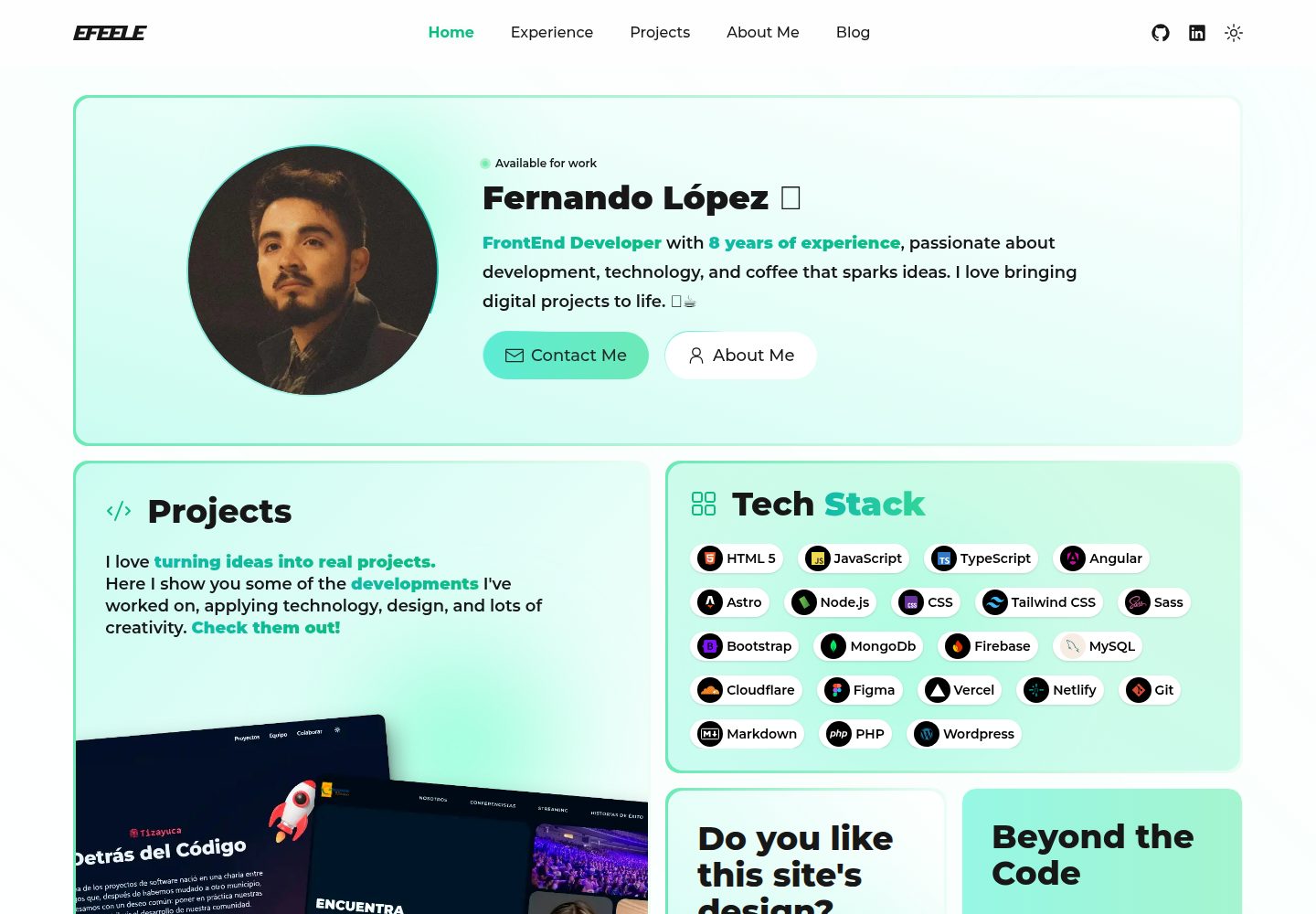
Minimalist visual style with a dark base and mint green accent colors
AstroHTMLPortfolioCorporate Website
NeonMint — Astro Portfolio Template
By EFEELE
NeonMint is a dark-themed portfolio template built with Astro, using mint green accents to highlight content. It is suitable for developers, designers, and digital creatives to build personal portfolios, blogs, and technical landing pages.
Explore the design
Compare the page layouts and mobile experience. Open any screenshot for a closer look.
Desktop homepage1 / 3
Desktop captureTop of page
Actual screenshot captured by the server browser.
All pages & views 3
Screenshots show visual appearance; interactive behavior may differ.
Recorded 2026-10-02View source
What stands out
A quick read of the recorded project description.
Built with Astro, using TailwindCSS for style organization
Pre-built home, about, blog, tag archive, and portfolio project pages
Built-in RSS and robots.txt generation configuration
Provides PWA icons and site.webmanifest configuration
Centralized registration of language and technology icons via languages.ts
Template Details
NeonMint is a portfolio website template for developers, designers, and digital creatives. It uses a dark base with mint green accent colors, keeping the visuals simple and restrained so that content becomes the focus of the page. The template is built with Astro, uses TailwindCSS for style organization, and incorporates Preact for local interactions.
From the directory structure, the template includes pre-built home, about, blog list and article pages, tag and technology-based archive pages, and portfolio project pages, along with generation configuration for RSS and robots.txt. Components are grouped by blog, layout, portfolio, and ui. Icons are stored as SVGs in src/icons, and language and technology tags are registered centrally via src/utils/languages.ts.
The template provides PWA-related icons and a site.webmanifest configuration. The favicon needs to be generated separately and replace the corresponding files in the public directory. The deployment instructions in the README target Vercel by default, while also noting that it can be deployed to any static hosting service.
Regarding usage limitations: the repository is under the MIT license, and the free scope covers only the code of this version itself; third-party assets such as demo images, fonts, and icons need to be checked separately under their respective licenses. External services such as domains, hosting, databases, payments, or AI may incur additional costs.
AstroHTMLPortfolioCorporate Website
Is it right for your project?
Use Cases
- Developers or designers building a personal portfolio website
- A personal blog focused on technical articles
- A personal brand showcase page for digital creatives
- Sites that need to archive content by tags or technology
- Projects intended to be deployed statically to hosting services such as Vercel
Suitable For
- Front-end developers familiar with Astro and TailwindCSS
- Individual creators who need ready-made portfolio and blog structures
- Users who accept a dark minimalist visual style and are willing to replace assets themselves
- Users planning to deploy the site using a static hosting service
Getting started & customization
Use these recorded setup notes alongside the repository instructions for your chosen version.
- 1
Can be created via npm create astro@latest -- --template EFEELE/neonmint, or by cloning the repository and running npm install
- 2
Use npm run dev for development, npm run build for building, and npm run preview for previewing
- 3
When adding a new language or technology, place the SVG icon in src/icons and register it in src/utils/languages.ts
- 4
The favicon needs to be generated separately and replace the icon files in the public directory, and site.webmanifest must be updated accordingly
- 5
The default deployment configuration targets Vercel, but it can also be deployed to other static hosting services
License & source material
Usage conditions & limitations
Free to use · keep license noticeThis entry covers the free version under the MIT license in the public repository; the free scope is the code of this version and does not imply that external services or third-party assets are free.
Must comply with when using
- Free use, modification, commercial use, and distribution of this version's code are permitted.
- When distributing copies or substantial portions of the code, retain the original author's copyright notice and the full MIT license notice.
- The code is provided as is; warranties and limitations of liability are governed by the original license and applicable law.
Additional costs & items to verify
- The default deployment configuration targets Vercel, but it can also be deployed to any static hosting service; using Vercel hosting may be subject to its terms of service and fees.
- The template integrates Vercel Speed Insights analytics; enabling this feature requires using the Vercel platform and may incur additional costs or require an account.
- When adding new language or technology icons, the README suggests obtaining SVG icons from the third-party site SVGL; the license for such assets must be checked independently.
- The favicon needs to be generated using the third-party tool favicon.io and manually replace files in the public directory; use of third-party tools is subject to their own terms.
- Demo images, fonts, icons, and other third-party assets must be checked under their respective licenses and cannot be assumed to be covered solely by the code's MIT license.
- External services such as domains, hosting, databases, payments, or AI may incur additional charges.
View Original Text Basis
Permission is hereby granted, free of charge
Original License Text
The site is configured for deployment on Vercel, but can be deployed to any static hosting service.
Original README
Analytics**: @vercel/speed-insights v1.2.0
Original README
For SVG icons, I recommend using [SVGL](https://svgl.app/)
Original README
https://github.com/EFEELE/NeonMint/blob/main/LICENSEhttps://github.com/EFEELE/NeonMint/blob/main/README.mdyou can generate all the necessary variants using [favicon.io](https://favicon.io/favicon-converter/)
Original README
Compiled by DeepSeek based on repository license and README ·2026-10-02. Results only cover the materials read; dependencies, images, fonts, and subsequent term changes are subject to their respective original texts.
Project checks & description sources
Template Information
- Source platforms
- GitHub
- Documentation and maintenance reference score
- More documented · 96 / 100
- Technologies
- Astro · HTML
- Website type
- Portfolio · Corporate Website
How this score is calculated
Our heuristic uses license records (up to 30), a demo link (12), a preview (10), stars (15), recorded maintenance (15), description completeness (8), feature records (5) and classification data (5). It is not a code, security or performance test, or a Google score. A link does not establish tested functionality.
What to verify for this project
- Repository update recorded
- 2026-07-13
- Screenshot last checked
- 2026-10-02
A demo link is listed. Check it with your own content and viewport sizes; its presence does not confirm that forms, authentication or payments work.
The catalog identifies Astro as the primary stack. Check the actual dependency manifest and lockfile for versions and hosting requirements. These notes use recorded metadata, not a code audit or a deployment test.
Use a selection guide →How this description was prepared
AI-assisted description based on catalog records and repository material. Repository authors are not automatically the reviewers of this description.
Automatically checked against source and license rules; no manual editorial review.
Inspect the recorded source material
SHA-256: 107c5ac805a04ab905fe93ac97484e295cc53935a5dd660f3e562a8bf3e9cf03
2026-10-02T16:50:45.157Z
Source file / repository
# NeonMint Template Documentation

## 🎯 Overview
**NeonMint** is a minimalist and modern template designed for developers and digital creatives. Its dark-toned aesthetic with mint green accents offers a clean, elegant, and functional visual experience, ideal for portfolios, dashboards, or tech landing pages.
## 📁 Project Structure
```bash
└── 📁NeonMint
└── 📁public
├── android-chrome-192x192.png
├── android-chrome-512x512.png
├── apple-touch-icon.png
├── favicon-16x16.png
├── favicon-32x32.png
├── favicon.ico
└── 📁images
├── 📁posts # Post images
└── 📁projects # Project images
└── site.webmanifest # PWA configuration file
└── 📁src
├── 📁components # Reusable UI components
│ ├── 📁blog # Blog components
│ ├── 📁layout # Layout components
│ ├── 📁portfolio # Portfolio components
│ └── 📁ui # UI components
├── 📁icons # Icons (.svg)
├── 📁layouts # Site layouts
│ ├── Layout.astro # Main application layout
│ ├── MarkdownAbout.astro # About-me page layout
│ ├── MarkdownPostLayout.astro # Posts page layout
│ └── ProjectLayout.astro # Projects page layout
├── 📁pages # Site pages
│ ├── about-me.md # About-me page
│ ├── 📁blog # All posts page
│ │ ├── index.astro # Blog home page
│ │ ├── 📁posts # Blog posts
├── │ ├── └── index.astro # All posts page
│ │ ├── 📁tags # Blog tags
│ │ └── 📁techs # Blog technologies
│ ├── index.astro # Home page
│ ├── 📁portfolio
│ │ └── 📁projects # Portfolio projects
│ ├── robots.txt.ts # robots.txt configuration
│ └── rss.xml.js # RSS configuration
├── 📁scripts
│ └── menu.js # Menu script
├── 📁styles
│ └── global.css # Global styles
└── 📁utils
└── languages.ts # Technology tools configuration
├── .gitignore
├── astro.config.mjs
├── package-lock.json
├── package.json
├── README.md
└── tsconfig.json
```
## 🛠️ Technology Stack
- **Framework**: Astro v5.6.1
- **UI Library**: Preact v10.26.2
- **Styling**: TailwindCSS v4.0.8
- **Icons**: astro-icon v1.1.5
- **Syntax Highlighting**: PrismJS v1.30.0
- **Animations**: tailwindcss-animated v2.0.0
- **Analytics**: @vercel/speed-insights v1.2.0
## ✨ Key Features
1. **🚀 Performance Optimized**
- Static site generation
- Partial hydration with Preact
- Optimized images and assets
2. **💻 Modern Development Experience**
- TypeScript support
- Hot module replacement
- ESLint integration
3. **🔍 SEO & Analytics**
- Built-in sitemap generation
- RSS feed support
- Vercel Speed Insights
4. **🎨 Styling & UI**
- TailwindCSS for utility-first styling
- Animated components
- Responsive design
- Dark mode support
## 🚀 Getting Started
1. **📦 Installation**
### 🚀**Astro Installation**
```bash
npm create astro@latest -- --template EFEELE/neonmint
```
or
### 🔧**Manual Installation**
#### Clone Repository
```bash
git clone https://github.com/EFEELE/NeonMint.git
```
#### Install Dependencies
```bash
npm install
```
3. **⚡ Development**
```bash
npm run dev
```
4. **🏗️ Build**
```bash
npm run build
```
5. **👀 Preview**
```bash
npm run preview
```
## ⚙️ Configuration
The project is configured through several key files:
- `astro.config.mjs`: Main Astro configuration
- `tailwind.config.js`: TailwindCSS configuration
- `tsconfig.json`: TypeScript configuration
## 🎨 Customization
### 📄 Adding New Pages
Create new `.astro` files in the `src/pages` directory. The file name will determine the route.
### 🔧 Adding New Languages or Technologies
To incorporate a new programming language or technological tool into the site's capsules, follow these steps:
1. **🖼️ Add the SVG icon**: Place the SVG file of the language or tool in the `src/icons` folder.
> **💡 Recommendation**: For SVG icons, I recommend using [SVGL](https://svgl.app/), an excellent library of high-quality vectors that offers optimized icons for most popular languages and technologies.
2. **📝 Register the language**: Open the `utils/languages.ts` file and add a new entry to the languages object following this format:
```typescript
html: {
name: "HTML 5",
iconName: "html",
},
```
Where:
- `html`: Is the unique identifier for the language
- `name`: Is the name that will be displayed visibly in the interface
- `iconName`: Is the name of the SVG file without the extension (must match exactly with the file name in `src/icons`)
Once these steps are completed, the new language or technology will be available for use in the site's capsules. You can select it when creating or editing projects or posts, and the corresponding icon will be displayed correctly in the interface.
If you encounter any issues during this process, try restarting the development server. In some cases, changes to configuration files or static resources require a restart to be detected correctly.
To verify that the new language has been added correctly, check the list of available technologies in the user interface after restarting the server.
---
### 🧷 Favicon Setup
To customize your site's favicon and web app icons, you can generate all the necessary variants using [favicon.io](https://favicon.io/favicon-converter/). Upload your logo or icon, and the tool will create a full set of optimized files for various devices and platforms.
Place the generated files in the `📂 public` directory as follows:
```bash
📂 public
├── 📄 android-chrome-192x192.png
├── 📄 android-chrome-512x512.png
├── 📄 apple-touch-icon.png
├── 📄 favicon-16x16.png
├── 📄 favicon-32x32.png
├── 📄 favicon.ico
└── 📄 site.webmanifest
```
> 💡 Don’t forget to update the contents of `site.webmanifest` to match your app’s name, description, and theme color for a complete PWA experience.
---
### 🎨 Styling
- Use TailwindCSS classes for styling
- Add custom styles in `src/styles/global.css`
### 🧩 Components
- Create reusable components in `src/components`
- Import icons using `astro-icon`
## 🚀 Deployment
The site is configured for deployment on Vercel, but can be deployed to any static hosting service.
## 🤝 Contributing
1. Fork the repository
2. Create a feature branch
3. Commit your changes
4. Push to the branch
5. Create a Pull Request
## 👥 Contributors
A huge thanks to all the amazing people who have contributed to this project!
Your time, effort, and ideas make this repository better every day. 💚
<a href="https://github.com/EFEELE/NeonMint/graphs/contributors">
<img src="https://contrib.rocks/image?repo=EFEELE/NeonMint" />
</a>
## 📄 License
This project is licensed under the MIT License - see the LICENSE file for details.
Explore similar templates
Compare previews and descriptions within the same stack and category.

astrowind
AstroWind is a free, open-source Astro starter theme using Astro and Tailwind CSS, released under the MIT license.
Astro · Blog

astro-theme-cactus
Astro Cactus is an Astro-based blog and portfolio theme that uses Markdown/MDX content collections to manage posts, notes, and tags, with frontmatter type-checked by a schema.
Astro · Portfolio

astrofy
Astrofy is a free and open-source personal portfolio website template built with Astro and TailwindCSS, with built-in blog, CV timeline, project showcase, store, and RSS feed modules.
Astro · Portfolio

astro-nano
Astro Nano is a static, minimalist portfolio and blog template built with Astro, Tailwind, and TypeScript without frontend frameworks. It includes light/dark themes, animated UI, automatic sitemap and RSS feed generation, and Markdown/MDX support with component imports.
Astro · Portfolio

astro-erudite
astro-erudite is an opinionated, unstyled static blog template built with Astro and native CSS, with no UI or CSS framework and minimal dependencies.
Astro · Portfolio

astro-sphere
Astro Sphere is a static, minimalist portfolio and blog theme maintained by markhorn-dev, built mainly with Astro, Tailwind, and TypeScript, with a small amount of SolidJS for stateful components.
Astro · Portfolio