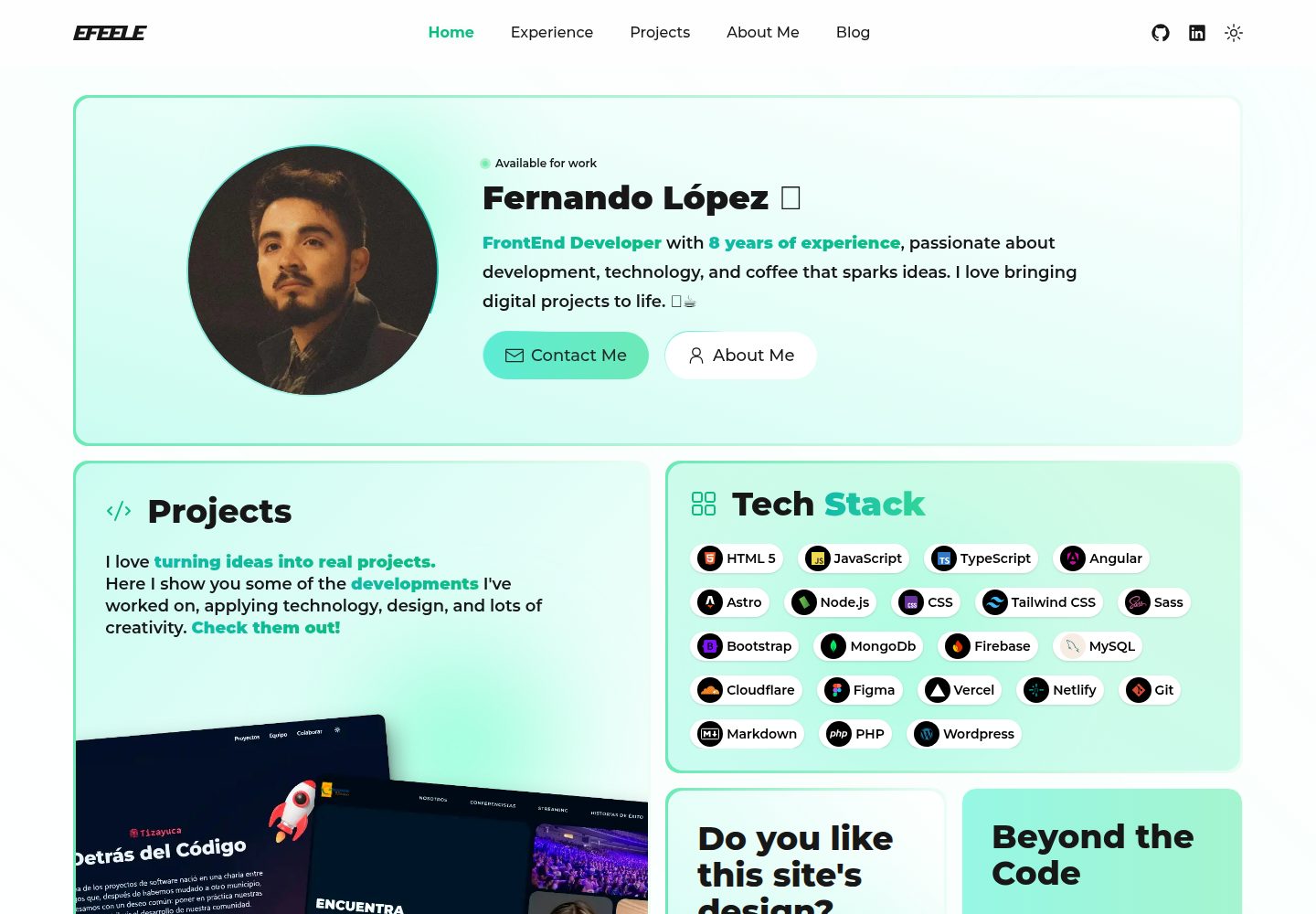
深色基调搭配薄荷绿强调色的极简视觉风格
AstroHTML作品集企业官网
NeonMint — Astro 作品集模板
作者 EFEELE
NeonMint 是一个基于 Astro 的深色系作品集模板,以薄荷绿点缀突出内容,适合开发者、设计师与数字创意工作者搭建个人作品集、博客与技术落地页。
看看你的网站会是什么样
浏览真实页面截图,比较内容排版与手机效果。点击下方缩略图切换,放大查看整页细节。
全部页面与视图 3
截图用于了解视觉与布局,交互效果请以实际项目为准。
采集于 2026-10-02查看来源
值得关注的模板亮点
从已有项目资料中,快速了解它的特点。
基于 Astro 构建,使用 TailwindCSS 组织样式
预置首页、关于页、博客、标签归档与作品集项目页
内置 RSS 与 robots.txt 生成配置
提供 PWA 图标与 site.webmanifest 配置
通过 languages.ts 统一注册语言与技术图标
模板详细介绍
NeonMint 是一个面向开发者、设计师和数字创意工作者的作品集网站模板,采用深色基调搭配薄荷绿强调色,视觉上保持简洁克制,让内容成为页面焦点。模板基于 Astro 构建,使用 TailwindCSS 进行样式组织,并引入 Preact 实现局部交互。
从目录结构看,模板已预置首页、关于页、博客列表与文章页、标签与按技术分类的归档页,以及作品集项目页,并包含 RSS 与 robots.txt 的生成配置。组件按 blog、layout、portfolio、ui 分组,图标以 SVG 形式存放在 src/icons,语言与技术标签通过 src/utils/languages.ts 统一注册。
模板提供 PWA 相关的图标与 site.webmanifest 配置,favicon 需要自行生成并替换 public 目录下的对应文件。README 中给出的部署说明以 Vercel 为默认目标,同时说明可部署到任意静态托管服务。
使用限制方面:仓库采用 MIT 许可,免费范围仅覆盖该版本代码本身;演示图片、字体、图标等第三方素材需按各自许可单独核对。域名、托管、数据库、支付或 AI 等外部服务可能产生额外费用。
AstroHTML作品集企业官网
适合你的项目吗?
适用场景
- 开发者或设计师搭建个人作品集网站
- 以技术文章为主的个人博客
- 数字创意工作者的个人品牌展示页
- 需要按标签或技术分类归档内容的站点
- 希望以静态方式部署到 Vercel 等托管服务的项目
适合人群
- 熟悉 Astro 与 TailwindCSS 的前端开发者
- 需要现成作品集与博客结构的个人创作者
- 接受深色极简视觉风格并愿意自行替换素材的用户
- 计划使用静态托管服务部署站点的用户
上手与定制指南
结合仓库当前版本的说明,按下面的资料检查内容、配置与运行要求。
- 1
可通过 npm create astro@latest -- --template EFEELE/neonmint 创建,或克隆仓库后执行 npm install
- 2
开发使用 npm run dev,构建使用 npm run build,预览使用 npm run preview
- 3
新增语言或技术时,需将 SVG 图标放入 src/icons 并在 src/utils/languages.ts 中注册
- 4
favicon 需自行生成并替换 public 目录下的图标文件,同时更新 site.webmanifest
- 5
默认部署配置面向 Vercel,也可部署到其他静态托管服务
授权与来源资料
使用条件与限制
免费使用 · 保留许可声明本次收录的是公开仓库中采用 MIT 许可的免费版本;免费范围为该版本代码,不代表外部服务或第三方素材免费。
使用时需要遵守
- 允许免费使用、修改、商用和分发该版本代码。
- 分发代码副本或实质性部分时,保留原作者版权声明和完整 MIT 许可声明。
- 代码按现状提供;担保与责任限制以原许可证及适用法律为准。
额外费用与待核对事项
- 默认部署配置面向 Vercel,但也可部署到任意静态托管服务;使用 Vercel 托管可能受其服务条款与费用约束。
- 模板集成 Vercel Speed Insights 分析服务,启用该功能需使用 Vercel 平台并可能产生额外费用或需要账号。
- 新增语言或技术图标时,README 建议从第三方站点 SVGL 获取 SVG 图标,该素材需自行核对许可。
- favicon 需借助第三方工具 favicon.io 生成并自行替换 public 目录文件,第三方工具使用需遵循其自身条款。
- 演示图片、字体、图标及其他第三方素材需按各自许可核对,不能仅凭代码的 MIT 许可判断。
- 域名、托管、数据库、支付或 AI 等外部服务可能另外收费。
查看原文依据
Permission is hereby granted, free of charge
许可证原文
The site is configured for deployment on Vercel, but can be deployed to any static hosting service.
README 原文
Analytics**: @vercel/speed-insights v1.2.0
README 原文
For SVG icons, I recommend using [SVGL](https://svgl.app/)
README 原文
https://github.com/EFEELE/NeonMint/blob/main/LICENSEhttps://github.com/EFEELE/NeonMint/blob/main/README.mdyou can generate all the necessary variants using [favicon.io](https://favicon.io/favicon-converter/)
README 原文
DeepSeek 根据仓库许可证和 README 整理 ·2026-10-02。结果仅覆盖已读取资料,依赖、图片、字体及后续条款变更以各自原文为准。
项目核对记录与介绍依据
模板资料
- 来源平台
- GitHub
- 资料与维护参考分
- 资料较完整 · 96 / 100
- 技术栈
- Astro · HTML
- 网站类型
- 作品集 · 企业官网
这个分数如何计算
本站按许可资料(最高30分)、演示链接(12分)、预览图(10分)、Star数(15分)、记录的维护时间(15分)、描述完整度(8分)、功能记录(5分)和分类资料(5分)计算。它不是代码、安全或性能测试,也不是 Google 评分;有链接不代表已实测可用。
这个项目需要核对什么
- 记录的仓库更新时间
- 2026-07-13
- 截图检查日期
- 2026-10-02
已收录演示链接。请用你的内容与屏幕尺寸检查;有演示不代表表单、认证或支付已经可用。
目录记录的主要技术栈是 Astro。请通过依赖清单和锁文件核对实际版本与托管要求。这些说明基于收录资料,不代表代码审计或部署实测。
查看具体选型方法 →介绍的制作与核对状态
介绍由 AI 辅助整理目录与仓库资料。仓库作者不等于这篇介绍的审核者。
已完成服务器许可规则与 AI 来源核对;未经过人工编辑审核。
查看当时使用的来源资料
SHA-256: 107c5ac805a04ab905fe93ac97484e295cc53935a5dd660f3e562a8bf3e9cf03
2026-10-02T16:50:45.157Z
来源文件 / 仓库
# NeonMint Template Documentation

## 🎯 Overview
**NeonMint** is a minimalist and modern template designed for developers and digital creatives. Its dark-toned aesthetic with mint green accents offers a clean, elegant, and functional visual experience, ideal for portfolios, dashboards, or tech landing pages.
## 📁 Project Structure
```bash
└── 📁NeonMint
└── 📁public
├── android-chrome-192x192.png
├── android-chrome-512x512.png
├── apple-touch-icon.png
├── favicon-16x16.png
├── favicon-32x32.png
├── favicon.ico
└── 📁images
├── 📁posts # Post images
└── 📁projects # Project images
└── site.webmanifest # PWA configuration file
└── 📁src
├── 📁components # Reusable UI components
│ ├── 📁blog # Blog components
│ ├── 📁layout # Layout components
│ ├── 📁portfolio # Portfolio components
│ └── 📁ui # UI components
├── 📁icons # Icons (.svg)
├── 📁layouts # Site layouts
│ ├── Layout.astro # Main application layout
│ ├── MarkdownAbout.astro # About-me page layout
│ ├── MarkdownPostLayout.astro # Posts page layout
│ └── ProjectLayout.astro # Projects page layout
├── 📁pages # Site pages
│ ├── about-me.md # About-me page
│ ├── 📁blog # All posts page
│ │ ├── index.astro # Blog home page
│ │ ├── 📁posts # Blog posts
├── │ ├── └── index.astro # All posts page
│ │ ├── 📁tags # Blog tags
│ │ └── 📁techs # Blog technologies
│ ├── index.astro # Home page
│ ├── 📁portfolio
│ │ └── 📁projects # Portfolio projects
│ ├── robots.txt.ts # robots.txt configuration
│ └── rss.xml.js # RSS configuration
├── 📁scripts
│ └── menu.js # Menu script
├── 📁styles
│ └── global.css # Global styles
└── 📁utils
└── languages.ts # Technology tools configuration
├── .gitignore
├── astro.config.mjs
├── package-lock.json
├── package.json
├── README.md
└── tsconfig.json
```
## 🛠️ Technology Stack
- **Framework**: Astro v5.6.1
- **UI Library**: Preact v10.26.2
- **Styling**: TailwindCSS v4.0.8
- **Icons**: astro-icon v1.1.5
- **Syntax Highlighting**: PrismJS v1.30.0
- **Animations**: tailwindcss-animated v2.0.0
- **Analytics**: @vercel/speed-insights v1.2.0
## ✨ Key Features
1. **🚀 Performance Optimized**
- Static site generation
- Partial hydration with Preact
- Optimized images and assets
2. **💻 Modern Development Experience**
- TypeScript support
- Hot module replacement
- ESLint integration
3. **🔍 SEO & Analytics**
- Built-in sitemap generation
- RSS feed support
- Vercel Speed Insights
4. **🎨 Styling & UI**
- TailwindCSS for utility-first styling
- Animated components
- Responsive design
- Dark mode support
## 🚀 Getting Started
1. **📦 Installation**
### 🚀**Astro Installation**
```bash
npm create astro@latest -- --template EFEELE/neonmint
```
or
### 🔧**Manual Installation**
#### Clone Repository
```bash
git clone https://github.com/EFEELE/NeonMint.git
```
#### Install Dependencies
```bash
npm install
```
3. **⚡ Development**
```bash
npm run dev
```
4. **🏗️ Build**
```bash
npm run build
```
5. **👀 Preview**
```bash
npm run preview
```
## ⚙️ Configuration
The project is configured through several key files:
- `astro.config.mjs`: Main Astro configuration
- `tailwind.config.js`: TailwindCSS configuration
- `tsconfig.json`: TypeScript configuration
## 🎨 Customization
### 📄 Adding New Pages
Create new `.astro` files in the `src/pages` directory. The file name will determine the route.
### 🔧 Adding New Languages or Technologies
To incorporate a new programming language or technological tool into the site's capsules, follow these steps:
1. **🖼️ Add the SVG icon**: Place the SVG file of the language or tool in the `src/icons` folder.
> **💡 Recommendation**: For SVG icons, I recommend using [SVGL](https://svgl.app/), an excellent library of high-quality vectors that offers optimized icons for most popular languages and technologies.
2. **📝 Register the language**: Open the `utils/languages.ts` file and add a new entry to the languages object following this format:
```typescript
html: {
name: "HTML 5",
iconName: "html",
},
```
Where:
- `html`: Is the unique identifier for the language
- `name`: Is the name that will be displayed visibly in the interface
- `iconName`: Is the name of the SVG file without the extension (must match exactly with the file name in `src/icons`)
Once these steps are completed, the new language or technology will be available for use in the site's capsules. You can select it when creating or editing projects or posts, and the corresponding icon will be displayed correctly in the interface.
If you encounter any issues during this process, try restarting the development server. In some cases, changes to configuration files or static resources require a restart to be detected correctly.
To verify that the new language has been added correctly, check the list of available technologies in the user interface after restarting the server.
---
### 🧷 Favicon Setup
To customize your site's favicon and web app icons, you can generate all the necessary variants using [favicon.io](https://favicon.io/favicon-converter/). Upload your logo or icon, and the tool will create a full set of optimized files for various devices and platforms.
Place the generated files in the `📂 public` directory as follows:
```bash
📂 public
├── 📄 android-chrome-192x192.png
├── 📄 android-chrome-512x512.png
├── 📄 apple-touch-icon.png
├── 📄 favicon-16x16.png
├── 📄 favicon-32x32.png
├── 📄 favicon.ico
└── 📄 site.webmanifest
```
> 💡 Don’t forget to update the contents of `site.webmanifest` to match your app’s name, description, and theme color for a complete PWA experience.
---
### 🎨 Styling
- Use TailwindCSS classes for styling
- Add custom styles in `src/styles/global.css`
### 🧩 Components
- Create reusable components in `src/components`
- Import icons using `astro-icon`
## 🚀 Deployment
The site is configured for deployment on Vercel, but can be deployed to any static hosting service.
## 🤝 Contributing
1. Fork the repository
2. Create a feature branch
3. Commit your changes
4. Push to the branch
5. Create a Pull Request
## 👥 Contributors
A huge thanks to all the amazing people who have contributed to this project!
Your time, effort, and ideas make this repository better every day. 💚
<a href="https://github.com/EFEELE/NeonMint/graphs/contributors">
<img src="https://contrib.rocks/image?repo=EFEELE/NeonMint" />
</a>
## 📄 License
This project is licensed under the MIT License - see the LICENSE file for details.
看看同类模板
对比同技术栈与用途的模板,找到更适合的视觉与内容结构。

astrowind
⭕️ AstroWind: A free template using Astro v7 and Tailwind CSS v4. Astro starter theme.
Astro · 博客

astro-theme-cactus
A simple Astro theme. Use it to create your blog or website.
Astro · 作品集

astrofy
Astrofy is a free and open-source template for your Personal Portfolio Website built with Astro and TailwindCS…
Astro · 作品集

astro-nano
Astro Nano is a static, minimalist, lightweight, lightning fast portfolio and blog.
Astro · 作品集

astro-erudite
An opinionated, unstyled static blogging template built with Astro and native CSS.
Astro · 作品集

astro-sphere
Astro Sphere is a static, minimalist, lightweight, lightning fast portfolio and blog.
Astro · 作品集