Google OAuth sign-in, without storing or handling user passwords
Next.jsReactStarter
webapp-template — Next.js Starter Template
By faiyazpilot
A Next.js and Supabase starter template that provides Google sign-in, database RLS role control, and security header configuration, suitable as a starting point for applications that need a real user system.
Explore the design
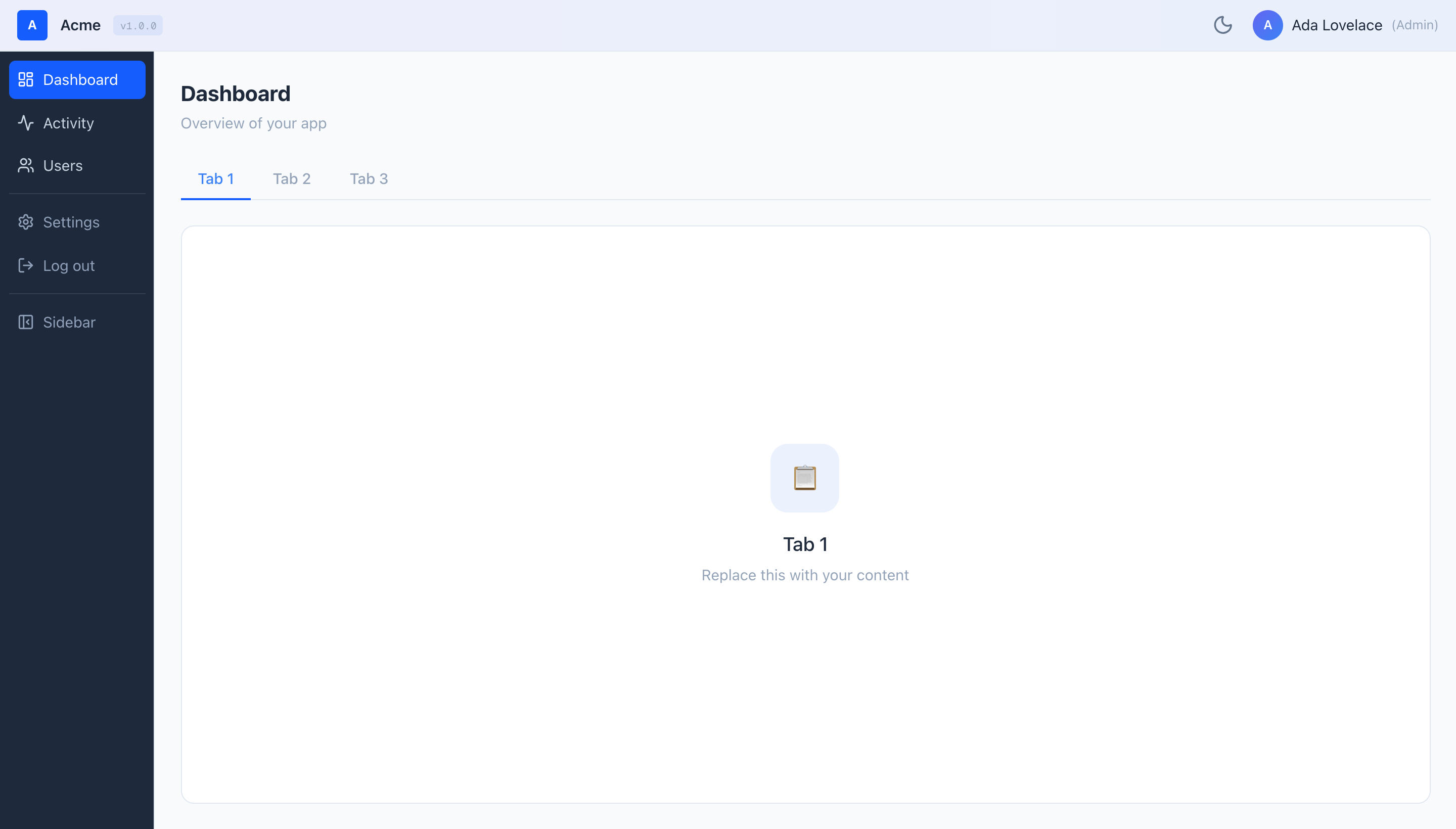
Compare the page layouts and mobile experience. Open any screenshot for a closer look.
Author preview
Author-provided preview
Preview provided in the project README.
One original preview is available. Open the full image to inspect the design.
Screenshots show visual appearance; interactive behavior may differ.
Recorded 2026-09-29View source
What stands out
A quick read of the recorded project description.
Three roles (admin/manager/viewer) enforced at the database layer by Postgres RLS policies
Newly registered users automatically receive the viewer role through a database trigger
Provides an admin user management page with a dropdown to change roles; managers have read-only view
Preconfigured security response headers and Content-Security-Policy, with auth callback protection against open redirects
CI is already integrated, running lint, type checking, tests, and build on every pull request
Template Details
This template is aimed at projects that use AI tools for rapid prototyping but want a real authentication and permissions foundation. It uses the Next.js App Router with TypeScript, Tailwind CSS for styling, Supabase for authentication and database, and is recommended for deployment to Vercel. The core security model has three layers: the browser UI only hides unavailable pages, Next.js middleware checks sign-in status, and Postgres RLS policies actually enforce permission decisions on every read and write. The template does not include a service_role key; the browser side only uses the public anon/publishable key.
Functionally, the template provides Google OAuth sign-in, three roles (admin/manager/viewer), a database trigger that automatically makes new users viewers, an admin user management page, a top bar and collapsible sidebar, light and dark mode, placeholder Dashboard/Activity/Settings pages, security response headers and CSP, an auth callback protected against open redirects, and CI covering lint, type checking, tests, and build.
Before use, you need to prepare your own Google Cloud OAuth credentials, a Supabase project, and a Vercel account, and follow the README's seven steps in order to configure environment variables, run the SQL schema, set the callback URL, and manually promote an admin. The free scope of the template is limited to the MIT-licensed code; external services such as domain, hosting, and database may charge separately; third-party assets such as demo images, fonts, and icons need separate license verification.
Next.jsStarter
Is it right for your project?
Use Cases
- After generating a prototype with AI tools, you need a code foundation with real sign-in and permissions to continue development
- Internal tools or small applications that need to distinguish administrator, manager, and ordinary viewer permissions
- You want to deploy the project to Vercel and manage users and data through Supabase
- As a reference project for learning how Next.js App Router and Supabase RLS work together
Suitable For
- Developers familiar with JavaScript/TypeScript who are willing to configure Google Cloud, Supabase, and Vercel step by step
- Projects that need database-layer role control rather than only hiding buttons on the front end
- Individuals or teams that want to use MIT-licensed code as a starting point for modification and distribution
Getting started & customization
Use these recorded setup notes alongside the repository instructions for your chosen version.
- 1
Requires Node.js 20 or higher; first run npm install to install dependencies
- 2
You need to create a Supabase project and copy the Project URL and anon/publishable key into .env.local
- 3
The authorized redirect URI for Google Cloud OAuth must be Supabase's callback address, not the application's own /auth/callback
- 4
Run supabase-schema.sql in the Supabase SQL Editor to create the app_roles table, RLS policies, is_admin() function, and triggers
- 5
New accounts default to viewer; you need to manually change your own role to admin in the Supabase table editor or via SQL
License & source material
Usage conditions & limitations
Free to use · keep license noticeThis entry covers the free MIT version in the public repository; the free scope is the code of that version and does not mean external services or third-party assets are free.
Must comply with when using
- When using, modifying, or distributing the code, retain the original author's copyright notice and the complete MIT license.
- Free use, modification, and commercial use are allowed, as is distribution of the code; distribution must still include the copyright and license notice.
- The code is provided as is, and the author does not promise warranties or accept liability for use.
Additional costs & items to verify
- Using this template requires registering a Supabase account and creating a project; authentication and database both depend on this external service, and after the free quota is exhausted or the project is paused, payment is required.
- Deploying to an online URL requires a Vercel account; exceeding free bandwidth or build minutes may incur charges.
- The Google sign-in feature requires creating your own Google Cloud project and configuring OAuth credentials; sign-in is not possible before configuration.
- When the Google consent screen is in testing mode, only email addresses listed as test users can sign in; you need to publish the app or add test users one by one.
- Free Supabase projects are paused after one week of inactivity; restoring or long-term use may require a paid plan.
- The template does not include server-side API route examples; integrating third-party services that require secret keys (such as payments, email, or AI) requires implementing server-side calls yourself.
- The template does not implement in-app multi-factor authentication; account security depends entirely on the 2FA settings of the Google account itself.
- Project materials mention optional paid versions or features; this entry only covers the public free code and does not include paid upgrades.
- Demo images, fonts, icons, and other third-party assets need to be checked against their respective licenses and cannot be judged solely by the code's MIT license.
- External services such as domain, hosting, database, payments, or AI may charge separately.
View Original Text Basis
Permission is hereby granted, free of charge
Original License Text
A free **Supabase** account — [supabase.com](https://supabase.com)
Original README
A free **Vercel** account — [vercel.com](https://vercel.com) (only needed for Part 6)
Original README
Go to [console.cloud.google.com](https://console.cloud.google.com) → create a new project
Original README
**Testing mode is fine while it's just you.** Add your own Gmail under **Test users**. Until you publish the app, *only* the emails you list as test users can sign in.
Original README
Project pauses after 1 week of inactivity; paid plan ~$25/month
Original README
**No external API pattern.** There are no Next.js API routes (`/api/`) in the template.
Original README
https://github.com/faiyazpilot/webapp-template/blob/main/LICENSEhttps://github.com/faiyazpilot/webapp-template/blob/main/README.md**No MFA.** Authentication relies entirely on Google OAuth.
Original README
Based on the full MIT license and the repository README · 2026-09-29. Results only cover the materials read; dependencies, images, fonts, and subsequent term changes are subject to their respective original texts.
Project checks & description sources
Template Information
- Source platforms
- GitHub
- Documentation and maintenance reference score
- Partly documented · 68 / 100
- Technologies
- Next.js · React
- Website type
- Starter
How this score is calculated
Our heuristic uses license records (up to 30), a demo link (12), a preview (10), stars (15), recorded maintenance (15), description completeness (8), feature records (5) and classification data (5). It is not a code, security or performance test, or a Google score. A link does not establish tested functionality.
What to verify for this project
- Repository update recorded
- 2026-09-28
- Screenshot last checked
- 2026-09-29
No demo link is recorded. Use the repository instructions to evaluate the project locally; the screenshot alone cannot establish interactive behavior.
The catalog identifies Next.js as the primary stack. Check the actual dependency manifest and lockfile for versions and hosting requirements. These notes use recorded metadata, not a code audit or a deployment test.
Use a selection guide →How this description was prepared
AI-assisted description based on catalog records and repository material. Repository authors are not automatically the reviewers of this description.
Automatically checked against source and license rules; no manual editorial review.
Inspect the recorded source material
SHA-256: 626570032aa71e9cb1a1e2a216a3a6983e3ba5605e792f5ca9e49447e9bf0b48
2026-09-29T01:07:06.321Z
Source file / repository# webapp-template
> AI lets anyone prototype an app in an afternoon. Almost nobody ships a *secure* one. This is the production-grade shell you build your idea on top of.
[](https://github.com/faiyazpilot/webapp-template/actions/workflows/ci.yml)
[](LICENSE)
[](CONTRIBUTING.md)

**Who this is for:**
- You're prototyping with **Claude, Cursor, or v0** and want a real foundation instead of throwaway demo code.
- You need **real login and user roles** — not a fake "logged in as Admin" button that anyone can flip.
- You want to **deploy to a real URL today** and start sharing it.
> **Not a developer?** Read [BLUEPRINT.md](BLUEPRINT.md) instead — it's a step-by-step guide written for non-technical builders, with copy-paste AI prompts for every feature and phase.
---
## What you get
- **Google sign-in** — users log in with their Google account; you never store or handle passwords.
- **Three roles — admin / manager / viewer — enforced by the database (RLS), not just hidden in the UI.** Hiding a button is decoration; the database refusing the write is the actual lock.
- **New sign-ins become `viewer` automatically, via a database trigger** — so the rule holds even if someone bypasses your app and calls the API directly.
- **Admin user-management page** — admins change anyone's role from a dropdown; managers can view the list read-only.
- **App shell** — top bar + collapsible sidebar, ready for your own pages.
- **Light / dark mode** — follows the system setting, with a manual toggle.
- **Dashboard, Activity, and Settings scaffolds** — placeholder pages to replace with your idea.
- **Security headers + Content-Security-Policy** preconfigured.
- **Open-redirect-safe auth callback** — login can only ever send users to a page inside your own app.
- **CI already wired** — lint, type-check, tests, and build run on every pull request.
## Stack
| Layer | Choice |
|---|---|
| Framework | Next.js 16 (App Router) |
| Language | TypeScript |
| Styling | Tailwind CSS v4 |
| Auth + DB | Supabase |
| Hosting | Vercel (recommended) |
| Tests | Vitest |
---
## How the security works
This is the part most AI-built apps get wrong. Read it once — it's the difference between a demo and something you can actually put real users on.
**1. "Wait, the database key is in the browser?"** Yes — on purpose. The key shipped to the browser (Supabase calls it the *anon* or *publishable* key) is like a lobby key card: it gets you to the front desk, but every single row in every table has its own lock on top of it. Those locks are **RLS policies** — rules that live *inside* Postgres and decide who may read or change each row. The all-powerful `service_role` key, which can ignore those locks, **never appears anywhere in this template.**
**2. "What if someone opens DevTools and calls the API directly?"** They can — and the database still says no. Concretely: an attacker copies the public key out of the page and sends a request to the REST API trying to set their own `role` to `admin`. Postgres rejects it. Why? Because role rows can *only* be created by a trusted database trigger, and *only* an existing admin is allowed to change one. The UI hiding the admin page is cosmetic. **The database refusing the write is the security.**
**3. The three layers.** Each does a job; only the last one is load-bearing.
```mermaid
flowchart TD
A[Browser UI<br/>hides pages you can't use<br/><i>cosmetic only</i>] --> B[Next.js middleware<br/>checks you're logged in<br/><i>convenience gate</i>]
B --> C[Postgres RLS policies<br/>checks every read and write<br/><b>the real enforcement</b>]
```
**4. The login flow — and the two callbacks that confuse everyone.**
```mermaid
sequenceDiagram
participant U as You
participant G as Google
participant S as Supabase
participant A as Your app
U->>G: Click "Continue with Google", consent
G->>S: Redirect to https://<ref>.supabase.co/auth/v1/callback
Note over G,S: Supabase's callback — this is the one Google knows about
S->>A: Redirect to https://your-app.com/auth/callback
Note over S,A: Your app's callback — Supabase hands the user over here
A->>U: Land on dashboard
```
> **Two different callbacks exist. Google only ever knows about Supabase's.** This trips up almost everyone during setup — keep it in mind for Part 2.
---
## Set it up (~20 minutes)
**Before you start, create these free accounts (no credit card needed):**
- A **Google account** (you almost certainly have one).
- A free **Supabase** account — [supabase.com](https://supabase.com)
- A free **Vercel** account — [vercel.com](https://vercel.com) (only needed for Part 6)
- **Node.js 20 or newer** installed — check with `node -v`. Get it at [nodejs.org](https://nodejs.org).
Do the parts in order. Each one names the exact buttons and labels you'll click.
### Part 0 — Get the code
1. On the [GitHub repo](https://github.com/faiyazpilot/webapp-template), click the green **Use this template** button → **Create a new repository**. (Or, if you prefer the command line: `git clone https://github.com/faiyazpilot/webapp-template.git`.)
2. Open the folder in your terminal and install dependencies:
```bash
npm install
```
3. You need **Node 20+** for this to work. If `npm install` errors, run `node -v` and upgrade if it's below 20.
### Part 1 — Create a Supabase project
1. Go to [supabase.com](https://supabase.com) → sign in → **New project**.
2. Give it a **Name**, set a **Database Password** (save it somewhere — you won't need it for this template, but you can't see it again), and pick a **Region** near you. Click **Create new project**.
3. Wait ~2 minutes while it provisions.
4. Go to **Project Settings → API**. Copy two values:
- **Project URL** — looks like `https://abcdefgh.supabase.co`
- The **anon** / **publishable** key — Supabase shows one or the other name depending on your project; either way it's the public-safe key meant for browsers.
5. Note your **project ref**: it's the subdomain of your Project URL. In `https://abcdefgh.supabase.co`, the ref is `abcdefgh`. **Write it down — you need it in Part 2.**
### Part 2 — Google Cloud OAuth (take your time here)
<details>
<summary><b>Expand the careful, step-by-step Google setup</b></summary>
This is the fiddliest part. Go slowly and the rest is easy.
1. Go to [console.cloud.google.com](https://console.cloud.google.com) → create a new project (top-left project dropdown → **New Project**).
2. Open the **OAuth consent screen** (newer Google dashboards label this **Google Auth Platform**):
- **Audience:** choose **External**.
- Fill in the **App name**, a **User support email**, and a **Developer contact** email.
- Leave the **scopes** at the defaults — you don't need to add any.
- **Testing mode is fine while it's just you.** Add your own Gmail under **Test users**. Until you publish the app, *only* the emails you list as test users can sign in.
3. Go to **Credentials → Create credentials → OAuth client ID**:
- **Application type:** **Web application**.
- **Authorized JavaScript origins:** add `https://<your-project-ref>.supabase.co`
- **Authorized redirect URIs:** add `https://<your-project-ref>.supabase.co/auth/v1/callback`
> **This is Supabase's callback URL, not your app's.** Your app's `/auth/callback` never goes into Google. Google hands the user to Supabase, and Supabase hands them to your app. Putting `http://localhost:3000/auth/callback` here is the #1 cause of the `redirect_uri_mismatch` error — don't do it.
4. Click **Create** and copy the **Client ID** and **Client secret**.
5. Back in the **Supabase Dashboard → Authentication → Sign In / Providers → Google**: toggle it **on**, paste the **Client ID** and **Client secret**, and click **Save**.
</details>
### Part 3 — Environment variables
1. Make your local config file (it's gitignored, so your keys never get committed):
```bash
cp .env.example .env.local
```
2. Open `.env.local` and paste in the two values from Part 1 (the Project URL and the anon/publishable key).
3. The `NEXT_PUBLIC_` prefix means a value is **visible in the browser on purpose** — that's expected and safe for these two values. ([Here's why](#how-the-security-works).) Never put a secret key behind a `NEXT_PUBLIC_` name.
4. **If `npm run dev` is already running, stop it and restart** — environment values are read at startup.
### Part 4 — Run the database schema
1. In Supabase, go to **SQL Editor → New query**.
2. Open `supabase-schema.sql` from this repo, copy **all** of it, paste it into the editor, and click **Run**.
3. You should see **"Success. No rows returned."**
4. Confirm it worked: go to **Table Editor** — you should now see an `app_roles` table.
This one file sets up everything the security depends on: the `app_roles` table, the RLS policies, the `is_admin()` helper function, and the trigger that gives every new sign-in a `viewer` row automatically.
> **Already ran an older version? Just re-run this file — it upgrades in place** (it drops the old policies and recreates everything safely; your data is untouched).
### Part 5 — Run locally
1. **Before your first login**, go to **Supabase → Authentication → URL Configuration → Redirect URLs** and add:
```
http://localhost:3000/auth/callback
```
2. Start the app:
```bash
npm run dev
```
3. Open [http://localhost:3000](http://localhost:3000), click **Continue with Google**, sign in, and you'll land on the dashboard as a **viewer**.

### Part 6 — Deploy to Vercel
<details>
<summary><b>Expand the deploy + production-URL steps</b></summary>
1. Go to [vercel.com](https://vercel.com) → **Add New… → Project** → **Import** your GitHub repo.
2. Before clicking Deploy, expand **Environment Variables** and add your two values (`NEXT_PUBLIC_SUPABASE_URL` and `NEXT_PUBLIC_SUPABASE_ANON_KEY`). Apply them to **all environments**. **Add them now** — adding them later means a redeploy.
3. Click **Deploy** and wait for it to finish. You'll get a URL like `https://your-app.vercel.app`.
4. Tell Supabase about the new URL — **Supabase → Authentication → URL Configuration**:
- Set **Site URL** to `https://your-app.vercel.app`
- Add `https://your-app.vercel.app/auth/callback` to **Redirect URLs**
- *(Optional)* To let Vercel **preview deployments** log in too, also add a wildcard like `https://your-app-*.vercel.app/auth/callback`.
5. **Custom domain?** Add it in **Vercel → Settings → Domains**, then repeat step 4's Supabase URL additions with your real domain.
> Two things people forget: (a) changing a Vercel env var requires a **redeploy** to take effect, and (b) your Google consent screen is still in **Testing mode**, so only your listed test users can log in until you publish it.
</details>
### Part 7 — Make yourself admin
New accounts start as `viewer`, including yours. Promote yourself one of two ways:
- **Easy way (UI):** Supabase → **Table Editor → `app_roles`** → find your row → change `role` to `admin` → **Save**.
- **SQL way:** Supabase → SQL Editor → run:
```sql
update app_roles set role = 'admin' where email = '[email protected]';
```
Refresh the app and the admin navigation (the **Users** page) appears. It's deliberately manual — there's no automatic "first user becomes admin" rule, which avoids a race where the wrong person could grab admin during signup.
---
## Customizing
| What you want to change | Where |
|---|---|
| App name (top bar, sidebar, login, browser tab) | `.env.local` → `NEXT_PUBLIC_APP_NAME` |
| Sidebar navigation | `navItems` / `adminNavItems` in `src/components/AppShell.tsx` |
| Dashboard tabs | `TABS` in `src/app/dashboard/page.tsx` |
| Theme colors | CSS variables at the top of `src/app/globals.css` — change `--accent`, `--sidebar-bg`, etc. |
| Font | Replace the `Geist` import in `src/app/layout.tsx` with any [Google Font](https://fonts.google.com) |
| Logo | Replace the `{/* Placeholder logo */}` blocks in `AppShell.tsx` and `src/app/login/page.tsx` with `<img src="/logo.png" />` and drop your file in `public/` |
| Favicon | Replace `public/favicon.ico` — convert any PNG at [favicon.io](https://favicon.io) |
| Social card (link preview image) | Replace `public/og.png` with a 1200×630 PNG |
| Page metadata (title, description) | `src/app/layout.tsx` |
| **Add a new page** | Create `src/app/<name>/page.tsx`, add it to `navItems` — the middleware protects it automatically |
| **Add a new table** | Enable RLS + write policies (copy the pattern in `supabase-schema.sql`) before any client code touches it |
> For a complete branding and feature-building walkthrough with AI prompts, see [BLUEPRINT.md](BLUEPRINT.md).
> Using **Claude Code** or **Cursor**? `CLAUDE.md` gives your AI assistant full project context — edit it as your app grows so the AI stays accurate.
## Role system
| Role | Can do |
|---|---|
| **admin** | See everything, *and* change other users' roles |
| **manager** | Read the user list (read-only — no role changes) |
| **viewer** | Dashboard only |
> Enforced in Postgres via RLS — the UI checks are just for niceness. If a viewer hand-crafts an API request to read the user list, Postgres still says no.
Admins manage roles right from the **Users** page (an admin can't change their own role, so you can't accidentally lock yourself out):

## Troubleshooting
| Symptom | Likely cause | Fix |
|---|---|---|
| `redirect_uri_mismatch` from Google | Wrong redirect URI in Google credentials | In Google → Credentials, the redirect URI must be `https://<ref>.supabase.co/auth/v1/callback` — **Supabase's** URL, not your app's. |
| Bounced back to login: "Authentication failed" | Your app's `/auth/callback` isn't allowed in Supabase | Add `http://localhost:3000/auth/callback` (and your prod URL) under Supabase → Authentication → URL Configuration → Redirect URLs. |
| Works locally, but Vercel sends you to `localhost` | Supabase **Site URL** is still localhost | Set Site URL to your `https://your-app.vercel.app` in Supabase → URL Configuration. |
| "App configuration error" | Env vars missing or mistyped | Check `.env.local` (local) or your Vercel env vars, then restart/redeploy. |
| Stuck spinner, or "not set up yet" / "not authorized" | The database schema hasn't been run | Run `supabase-schema.sql` in the Supabase SQL Editor (Part 4). |
| "Access blocked: app not verified", or a second account can't log in | Consent screen is in Testing mode | Add that person under Test users, or publish the consent screen in Google. |
| Changed an env value and nothing happened | `NEXT_PUBLIC_*` values are baked in at start/build time | Restart `npm run dev` locally, or redeploy on Vercel. |
| Users page is empty | You're a viewer, or on an old schema | Only admins/managers see users; promote yourself (Part 7) and re-run the schema. |
| Changed someone's role but their screen is stale | Roles are loaded once, at sign-in | Have them refresh the page (or sign out and back in). |
| Login page never appears / blank screen | Dev server not running, or wrong Node version | Run `npm run dev`; confirm `node -v` is 20 or newer. |
---
## Contributing
PRs welcome — see [CONTRIBUTING.md](CONTRIBUTING.md) and the [Code of Conduct](CODE_OF_CONDUCT.md). Have a question? See [SUPPORT.md](SUPPORT.md).
## Security
Found a vulnerability? See [SECURITY.md](SECURITY.md) — please **don't** open a public issue.
## Free tier limits
| Service | Free limit | What happens after |
|---|---|---|
| Supabase | 2 active projects, 500 MB database, 5 GB bandwidth/month | Project pauses after 1 week of inactivity; paid plan ~$25/month |
| Vercel | 100 GB bandwidth/month, 6,000 build minutes/month | Email warning; rarely an issue for early-stage apps |
| Google OAuth | Unlimited | Consent screen stays in Testing mode until you publish it (only your listed test users can log in until then) |
## Known gaps
Things that are missing and matter — documented here so you're not surprised:
- **No external API pattern.** There are no Next.js API routes (`/api/`) in the template. Any call to a third-party service (Stripe, email, AI APIs) that requires a secret key must go server-side — calling it from the browser exposes the key. Until a worked example lands, see [BLUEPRINT.md § "Connecting to external services"](BLUEPRINT.md#1-connecting-to-external-services-stripe-hubspot-email-apis-ai-apis) for the prompt to use with AI.
- **No data-querying guide.** The two Supabase clients (browser vs. server) are undocumented. There is also a silent failure mode when a database security rule (RLS) blocks a write — it returns an empty array instead of an error. See [BLUEPRINT.md § "Querying your own data"](BLUEPRINT.md#2-querying-your-own-data--the-pattern-and-a-known-trap) for the correct pattern.
- **No MFA.** Authentication relies entirely on Google OAuth. Users who want a second factor should enable 2FA on their Google account. In-app TOTP MFA is not implemented.
## Roadmap
No dates — this is open source with limited maintainer bandwidth. Suggest priorities in [Discussions](https://github.com/faiyazpilot/webapp-template/discussions) or open a PR:
- Worked example: server-side API route calling an external service (e.g. Resend for email).
- Magic-link / passwordless email login alongside Google.
- Audit-log example wired up to the Activity page.
- More OAuth providers (GitHub, Microsoft).
- Real-time data with Supabase channel subscriptions.
## License
[MIT](LICENSE) — free to use, modify, and build on.
Explore similar templates
Compare previews and descriptions within the same stack and category.

Next.js SaaS Starter
The official Next.js SaaS starter template, integrating email/password authentication, Stripe Checkout subscriptions, a dashboard with user/team CRUD, basic Owner/Member RBAC, and activity logging.
Next.js · SaaS

Next.js Commerce
Vercel's officially maintained Next.js App Router ecommerce starter with deep Shopify integration, offering a complete product catalog, cart, and checkout flow. Core logic is modular for swapping backends, and community provider versions exist for BigCommerce, Medusa, and Saleor.
Next.js · E-commerce

Next-js-Boilerplate
A developer-first Next.js 16 starter with Tailwind CSS 4 and TypeScript, supporting both App Router and Page Router.
Next.js · Starter

tailwind-nextjs-starter-blog
A Next.js and Tailwind CSS blog starter template using Contentlayer for Markdown/MDX, with built-in SEO, code highlighting, and tags. It targets personal technical blogs and migration from Jekyll/Hugo to React, and supports one-click Vercel deployment.
Next.js · Blog

next-forge
next-forge is a Turborepo-based Next.js template maintained by Vercel, positioned as a starting point for SaaS products.
Next.js · Starter

SaaS-Boilerplate
SaaS-Boilerplate is an open-source SaaS starter template built with Next.js App Router, React 19, TypeScript, Tailwind CSS, and Shadcn UI.
Next.js · SaaS