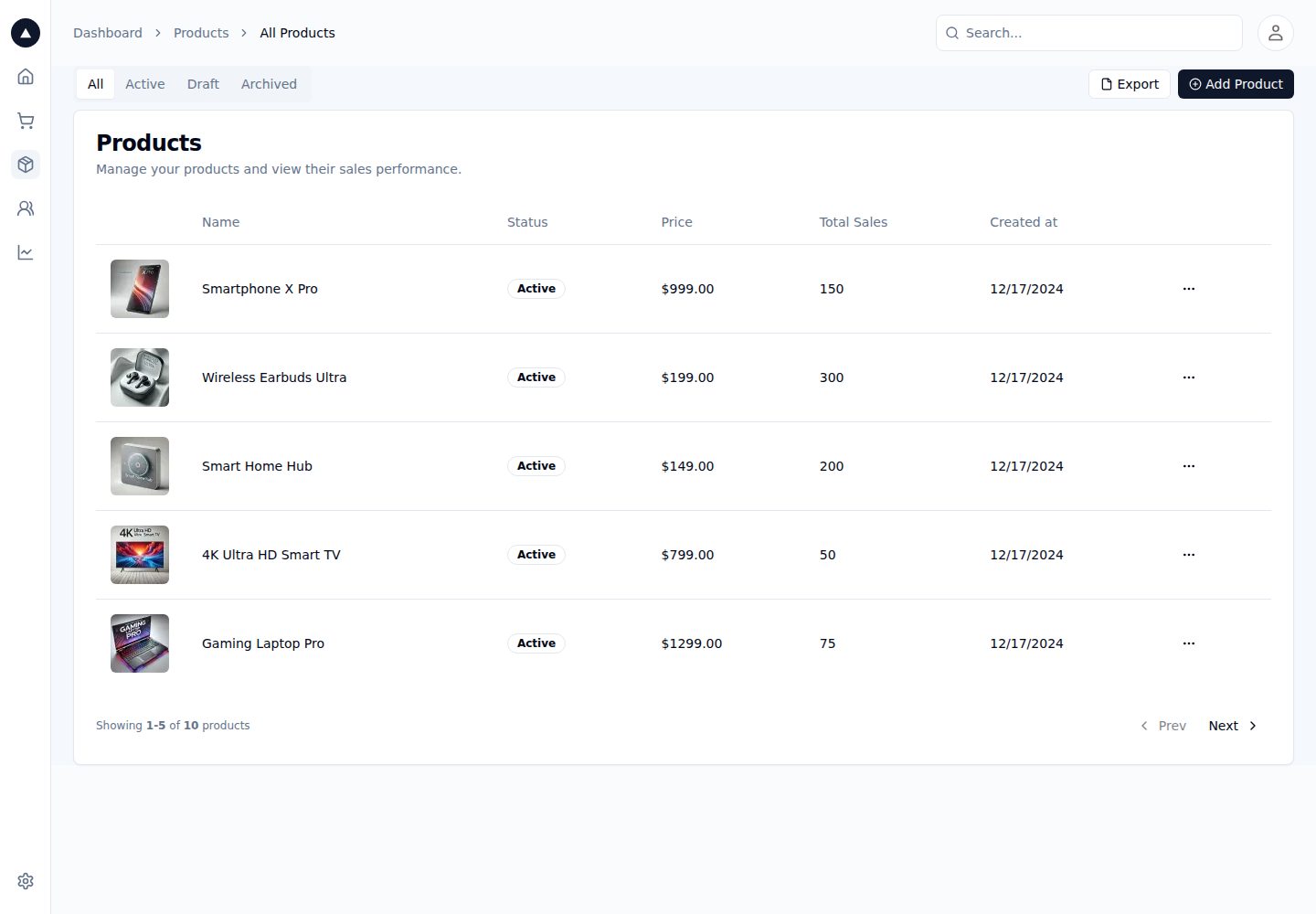
Uses the Next.js App Router; the README states support for enhanced layouts, colocation of components/tests/styles, and component-level data fetching
Next.jsReactAdmin dashboard
nextjs-admin-dashboard-template — Next.js Admin dashboard Template
By ferclaverino
A Next.js App Router-based admin dashboard starter template that integrates Auth.js, Postgres, Tailwind CSS, Shadcn UI, and Vercel Analytics, and provides a product data table schema and seed data endpoint.
Explore the design
Compare the page layouts and mobile experience. Open any screenshot for a closer look.
Desktop homepage1 / 2
Desktop captureTop of page
Actual screenshot captured by the server browser.
All pages & views 2
Screenshots show visual appearance; interactive behavior may differ.
Recorded 2026-10-14View source
What stands out
A quick read of the recorded project description.
The tech stack includes TypeScript, Auth.js, Postgres, Tailwind CSS, Shadcn UI, Vercel Analytics, and Prettier
Provides a products table schema, including a status enum (active, inactive, archived) and fields for price, stock, and available_at
Provides an app/api/seed.ts seed endpoint; after uncommenting, visiting /api/seed writes sample product data
The deployment target is Vercel; deployment prompts you to create a Postgres database and injects environment variables
Template Details
This is an admin dashboard starter template. The README states its tech stack is Next.js (App Router), TypeScript, Auth.js, Postgres, Tailwind CSS, Shadcn UI, Vercel Analytics, and Prettier, with Vercel as the deployment target. The template uses the App Router, and the README mentions support for enhanced layouts, colocation of components and tests/styles, and component-level data fetching.
Before use, you need to create tables in Vercel Postgres according to the schema given in the repository: define a status enum (active, inactive, archived) and a products table (id, image_url, name, status, price, stock, available_at). Then uncomment app/api/seed.ts and visit /api/seed to write sample product data, copy .env.example to .env, and configure a GitHub OAuth app as described in the file.
The README does not provide a page list, route structure, component details, permission model, or further notes on testing and production deployment, so these aspects cannot be confirmed from the available materials.
Next.jsAdmin panel
Is it right for your project?
Use Cases
- When you need a starting point for an admin dashboard with authentication and database integration
- When you want to organize admin pages and components based on the Next.js App Router
- When using Vercel Postgres and needing a product table schema and sample data
- For admin projects that use GitHub OAuth as the login method
Suitable For
- Developers familiar with the Next.js App Router and TypeScript
- Projects planned for deployment to Vercel with Vercel Postgres
- Admin interfaces that need Auth.js authentication and Shadcn UI components
- Product management admin panels that want to start quickly with an existing schema and seed data
Getting started & customization
Use these recorded setup notes alongside the repository instructions for your chosen version.
- 1
Create the status enum and products table in Vercel Postgres according to the schema given in the README
- 2
Uncomment app/api/seed.ts and visit http://localhost:3000/api/seed to write sample product data
- 3
Copy .env.example to .env and configure a GitHub OAuth app as described in the file
- 4
Run npm i -g vercel, vercel link, and vercel env pull to retrieve environment variables
- 5
Run pnpm install and pnpm dev, then access the app at http://localhost:3000
License & source material
Usage conditions & limitations
Free to use · keep license noticeThis entry covers the free version under the MIT license in the public repository; the free scope is the code of that version and does not mean external services or third-party assets are free.
Must comply with when using
- You are allowed to use, modify, commercially use, and distribute the code of this version for free.
- When distributing copies or substantial portions of the code, retain the original author's copyright notice and the full MIT license notice.
- The code is provided as is; warranties and limitations of liability are governed by the original license and applicable law.
Additional costs & items to verify
- Demo images, fonts, icons, and other third-party assets must be checked against their respective licenses and cannot be judged solely by the code's MIT license.
- External services such as domains, hosting, databases, payments, or AI may incur separate charges.
- When deploying to Vercel, you will be prompted to create a new Postgres database, and the required environment variables will be automatically injected into the project, so using this template depends on the Vercel platform and its Postgres service.
- You must manually create the data tables in the Vercel Postgres console according to the schema given in the repository; without completing the table creation, the product data features will not work properly.
- You must manually uncomment app/api/seed.ts and visit /api/seed to write sample product data; seed data is not generated automatically.
- You must copy .env.example to .env and configure a GitHub OAuth app as described in the file, meaning using this template requires you to apply for and configure GitHub OAuth credentials yourself.
- You must globally install the Vercel CLI (npm i -g vercel) and run vercel link and vercel env pull to retrieve environment variables; before use, you need a Vercel account and project association.
View Original Text Basis
Permission is hereby granted, free of charge
Original License Text
During the deployment, Vercel will prompt you to create a new Postgres database. This will add the necessary environment variables to your project.
Original README
Inside the Vercel Postgres dashboard, create a table based on the schema defined in this repository.
Original README
Then, uncomment `app/api/seed.ts` and hit `http://localhost:3000/api/seed` to seed the database with products.
Original README
Next, copy the `.env.example` file to `.env` and update the values. Follow the instructions in the `.env.example` file to set up your GitHub OAuth application.
Original README
https://github.com/ferclaverino/nextjs-admin-dashboard-template/blob/main/LICENSE.mdhttps://github.com/ferclaverino/nextjs-admin-dashboard-template/blob/main/README.mdnpm i -g vercel
Original README
Compiled by DeepSeek based on repository license and README ·2026-10-14. Results only cover the materials read; dependencies, images, fonts, and subsequent term changes are subject to their respective original texts.
Project checks & description sources
Template Information
- Source platforms
- GitHub
- Documentation and maintenance reference score
- Partly documented · 74 / 100
- Technologies
- Next.js · React
- Website type
- Admin dashboard
How this score is calculated
Our heuristic uses license records (up to 30), a demo link (12), a preview (10), stars (15), recorded maintenance (15), description completeness (8), feature records (5) and classification data (5). It is not a code, security or performance test, or a Google score. A link does not establish tested functionality.
What to verify for this project
- Repository update recorded
- 2024-12-18
- Screenshot last checked
- 2026-10-14
A demo link is listed. Check it with your own content and viewport sizes; its presence does not confirm that forms, authentication or payments work.
The catalog identifies Next.js as the primary stack. Check the actual dependency manifest and lockfile for versions and hosting requirements. These notes use recorded metadata, not a code audit or a deployment test.
Use a selection guide →How this description was prepared
AI-assisted description based on catalog records and repository material. Repository authors are not automatically the reviewers of this description.
Review declaration: codex-user-requested-batch-review-20261015 · 2026-10-15
Inspect the recorded source material
SHA-256: 47b83f7d5ff2f1f05300eb51ac6a4263e862b5d3cec03d02a0af3f2804577b72
2026-10-14T04:54:35.619Z
Source file / repository<div align="center"><strong>Next.js 14 Admin Dashboard Template</strong></div>
<div align="center">Built with the Next.js App Router</div>
<br />
<div align="center">
<a href="https://next-admin-dash.vercel.app/">Demo</a>
<span> · </span>
<a href="https://vercel.com/templates/next.js/admin-dashboard-tailwind-postgres-react-nextjs">Clone & Deploy</a>
<span>
</div>
## Overview
This is a starter template using the following stack:
- Framework - [Next.js (App Router)](https://nextjs.org)
- Language - [TypeScript](https://www.typescriptlang.org)
- Auth - [Auth.js](https://authjs.dev)
- Database - [Postgres](https://vercel.com/postgres)
- Deployment - [Vercel](https://vercel.com/docs/concepts/next.js/overview)
- Styling - [Tailwind CSS](https://tailwindcss.com)
- Components - [Shadcn UI](https://ui.shadcn.com/)
- Analytics - [Vercel Analytics](https://vercel.com/analytics)
- Formatting - [Prettier](https://prettier.io)
This template uses the new Next.js App Router. This includes support for enhanced layouts, colocation of components, tests, and styles, component-level data fetching, and more.
## Getting Started
During the deployment, Vercel will prompt you to create a new Postgres database. This will add the necessary environment variables to your project.
Inside the Vercel Postgres dashboard, create a table based on the schema defined in this repository.
```
CREATE TYPE status AS ENUM ('active', 'inactive', 'archived');
CREATE TABLE products (
id SERIAL PRIMARY KEY,
image_url TEXT NOT NULL,
name TEXT NOT NULL,
status status NOT NULL,
price NUMERIC(10, 2) NOT NULL,
stock INTEGER NOT NULL,
available_at TIMESTAMP NOT NULL
);
```
Then, uncomment `app/api/seed.ts` and hit `http://localhost:3000/api/seed` to seed the database with products.
Next, copy the `.env.example` file to `.env` and update the values. Follow the instructions in the `.env.example` file to set up your GitHub OAuth application.
```bash
npm i -g vercel
vercel link
vercel env pull
```
Finally, run the following commands to start the development server:
```
pnpm install
pnpm dev
```
You should now be able to access the application at http://localhost:3000.
Explore similar templates
Compare previews and descriptions within the same stack and category.

next-shadcn-dashboard-starter
An MIT-licensed admin dashboard starter built with Next.js 16, shadcn/ui, Tailwind CSS v4, and TypeScript.
Next.js · Admin dashboard

Studio Admin · Radix UI
Studio Admin is an admin dashboard template built with Next.js 16, TypeScript, Tailwind CSS v4, and Shadcn UI.
Next.js · Admin dashboard

free-nextjs-admin-dashboard
A free, open-source admin dashboard template built on Next.js 16, React 19, TypeScript, and Tailwind CSS v4. It provides a collapsible sidebar, charts, tables, authentication forms, modals, dropdowns, and dark mode, with internationalization and RTL support since version 2.4.0.
Next.js · Admin dashboard

materio-mui-nextjs-admin-template-free
Materio Free is a Next.js admin dashboard template based on App Router and MUI, integrating Tailwind CSS and available in TypeScript and JavaScript versions.
Next.js · Admin dashboard
nextjs-postgres-nextauth-tailwindcss-template
A Vercel-maintained Next.js App Router admin dashboard starter with Auth.js GitHub OAuth, Postgres, Tailwind CSS, and Shadcn UI, plus a sample products table, seed endpoint, and CRUD interface.
Next.js · Admin dashboard

shadcn-dashboard-landing-template
An open-source admin dashboard and marketing landing page template built on shadcn/ui and Tailwind CSS, with both Vite + React and Next.js versions in one repository.
Next.js · Admin dashboard