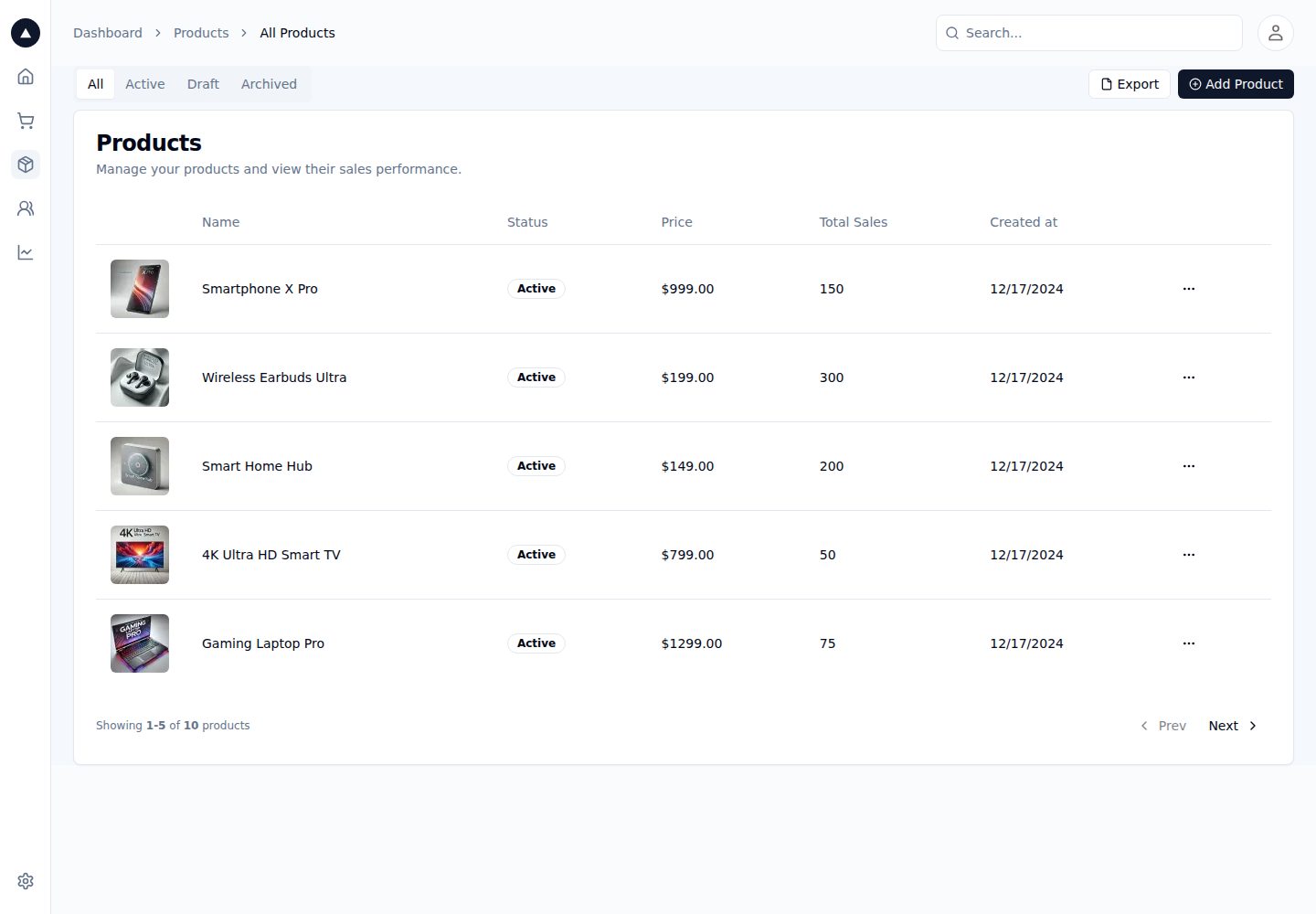
使用 Next.js App Router,README 称支持增强布局、组件/测试/样式就近放置与组件级数据获取
Next.jsReact后台
nextjs-admin-dashboard-template — Next.js 后台模板
作者 ferclaverino
基于 Next.js App Router 的后台管理面板起始模板,集成 Auth.js、Postgres、Tailwind CSS、Shadcn UI 与 Vercel Analytics,并提供商品数据表结构与种子数据接口。
看看你的网站会是什么样
浏览真实页面截图,比较内容排版与手机效果。点击下方缩略图切换,放大查看整页细节。
全部页面与视图 2
截图用于了解视觉与布局,交互效果请以实际项目为准。
采集于 2026-10-14查看来源
值得关注的模板亮点
从已有项目资料中,快速了解它的特点。
技术栈包含 TypeScript、Auth.js、Postgres、Tailwind CSS、Shadcn UI、Vercel Analytics 与 Prettier
提供 products 表 schema,含 status 枚举(active、inactive、archived)及价格、库存、上架时间字段
提供 app/api/seed.ts 种子接口,取消注释后访问 /api/seed 可写入示例商品数据
部署目标为 Vercel,部署时会提示创建 Postgres 数据库并注入环境变量
模板详细介绍
这是一个后台管理面板起始模板,README 说明其技术栈为 Next.js(App Router)、TypeScript、Auth.js、Postgres、Tailwind CSS、Shadcn UI、Vercel Analytics 与 Prettier,部署目标为 Vercel。模板采用 App Router,README 提到它支持增强布局、组件与测试/样式的就近放置、组件级数据获取等能力。
使用前需要在 Vercel Postgres 中按仓库给出的 schema 建表:定义 status 枚举(active、inactive、archived)以及 products 表(id、image_url、name、status、price、stock、available_at)。随后取消 app/api/seed.ts 的注释并访问 /api/seed 写入示例商品数据,再将 .env.example 复制为 .env 并按其中说明配置 GitHub OAuth 应用。
README 未提供页面清单、路由结构、组件细节、权限模型或测试与生产部署的进一步说明,因此这些方面无法从现有资料确认。
Next.js后台
适合你的项目吗?
适用场景
- 需要一个带认证与数据库接入的后台管理面板起点时
- 希望基于 Next.js App Router 组织后台页面与组件时
- 使用 Vercel Postgres 并需要商品表结构与示例数据时
- 使用 GitHub OAuth 作为登录方式的后台项目
适合人群
- 熟悉 Next.js App Router 与 TypeScript 的开发者
- 计划部署到 Vercel 并使用 Vercel Postgres 的项目
- 需要 Auth.js 认证与 Shadcn UI 组件的后台界面
- 希望以现成 schema 和种子数据快速起步的商品管理类后台
上手与定制指南
结合仓库当前版本的说明,按下面的资料检查内容、配置与运行要求。
- 1
在 Vercel Postgres 中按 README 给出的 schema 创建 status 枚举与 products 表
- 2
取消 app/api/seed.ts 的注释并访问 http://localhost:3000/api/seed 写入示例商品数据
- 3
将 .env.example 复制为 .env,并按文件内说明配置 GitHub OAuth 应用
- 4
执行 npm i -g vercel、vercel link、vercel env pull 拉取环境变量
- 5
运行 pnpm install 与 pnpm dev,然后在 http://localhost:3000 访问应用
授权与来源资料
使用条件与限制
免费使用 · 保留许可声明本次收录的是公开仓库中采用 MIT 许可的免费版本;免费范围为该版本代码,不代表外部服务或第三方素材免费。
使用时需要遵守
- 允许免费使用、修改、商用和分发该版本代码。
- 分发代码副本或实质性部分时,保留原作者版权声明和完整 MIT 许可声明。
- 代码按现状提供;担保与责任限制以原许可证及适用法律为准。
额外费用与待核对事项
- 演示图片、字体、图标及其他第三方素材需按各自许可核对,不能仅凭代码的 MIT 许可判断。
- 域名、托管、数据库、支付或 AI 等外部服务可能另外收费。
- 部署到 Vercel 时会被提示创建新的 Postgres 数据库,并自动向项目注入所需环境变量,因此使用该模板需依赖 Vercel 平台及其 Postgres 服务。
- 需在 Vercel Postgres 控制台中按仓库给出的 schema 手动创建数据表,未完成建表则无法正常使用商品数据功能。
- 需手动取消 app/api/seed.ts 的注释并访问 /api/seed 才能写入示例商品数据,种子数据不会自动生成。
- 需将 .env.example 复制为 .env 并按其中说明配置 GitHub OAuth 应用,即使用该模板需要自行申请并配置 GitHub OAuth 凭据。
- 需全局安装 Vercel CLI(npm i -g vercel)并执行 vercel link、vercel env pull 来拉取环境变量,使用前需具备 Vercel 账号与项目关联。
查看原文依据
Permission is hereby granted, free of charge
许可证原文
During the deployment, Vercel will prompt you to create a new Postgres database. This will add the necessary environment variables to your project.
README 原文
Inside the Vercel Postgres dashboard, create a table based on the schema defined in this repository.
README 原文
Then, uncomment `app/api/seed.ts` and hit `http://localhost:3000/api/seed` to seed the database with products.
README 原文
Next, copy the `.env.example` file to `.env` and update the values. Follow the instructions in the `.env.example` file to set up your GitHub OAuth application.
README 原文
https://github.com/ferclaverino/nextjs-admin-dashboard-template/blob/main/LICENSE.mdhttps://github.com/ferclaverino/nextjs-admin-dashboard-template/blob/main/README.mdnpm i -g vercel
README 原文
DeepSeek 根据仓库许可证和 README 整理 ·2026-10-14。结果仅覆盖已读取资料,依赖、图片、字体及后续条款变更以各自原文为准。
项目核对记录与介绍依据
模板资料
- 来源平台
- GitHub
- 资料与维护参考分
- 资料一般 · 74 / 100
- 技术栈
- Next.js · React
- 网站类型
- 后台
这个分数如何计算
本站按许可资料(最高30分)、演示链接(12分)、预览图(10分)、Star数(15分)、记录的维护时间(15分)、描述完整度(8分)、功能记录(5分)和分类资料(5分)计算。它不是代码、安全或性能测试,也不是 Google 评分;有链接不代表已实测可用。
这个项目需要核对什么
- 记录的仓库更新时间
- 2024-12-18
- 截图检查日期
- 2026-10-14
已收录演示链接。请用你的内容与屏幕尺寸检查;有演示不代表表单、认证或支付已经可用。
目录记录的主要技术栈是 Next.js。请通过依赖清单和锁文件核对实际版本与托管要求。这些说明基于收录资料,不代表代码审计或部署实测。
查看具体选型方法 →介绍的制作与核对状态
介绍由 AI 辅助整理目录与仓库资料。仓库作者不等于这篇介绍的审核者。
审核声明: codex-user-requested-batch-review-20261015 · 2026-10-15
查看当时使用的来源资料
SHA-256: 47b83f7d5ff2f1f05300eb51ac6a4263e862b5d3cec03d02a0af3f2804577b72
2026-10-14T04:54:35.619Z
来源文件 / 仓库<div align="center"><strong>Next.js 14 Admin Dashboard Template</strong></div>
<div align="center">Built with the Next.js App Router</div>
<br />
<div align="center">
<a href="https://next-admin-dash.vercel.app/">Demo</a>
<span> · </span>
<a href="https://vercel.com/templates/next.js/admin-dashboard-tailwind-postgres-react-nextjs">Clone & Deploy</a>
<span>
</div>
## Overview
This is a starter template using the following stack:
- Framework - [Next.js (App Router)](https://nextjs.org)
- Language - [TypeScript](https://www.typescriptlang.org)
- Auth - [Auth.js](https://authjs.dev)
- Database - [Postgres](https://vercel.com/postgres)
- Deployment - [Vercel](https://vercel.com/docs/concepts/next.js/overview)
- Styling - [Tailwind CSS](https://tailwindcss.com)
- Components - [Shadcn UI](https://ui.shadcn.com/)
- Analytics - [Vercel Analytics](https://vercel.com/analytics)
- Formatting - [Prettier](https://prettier.io)
This template uses the new Next.js App Router. This includes support for enhanced layouts, colocation of components, tests, and styles, component-level data fetching, and more.
## Getting Started
During the deployment, Vercel will prompt you to create a new Postgres database. This will add the necessary environment variables to your project.
Inside the Vercel Postgres dashboard, create a table based on the schema defined in this repository.
```
CREATE TYPE status AS ENUM ('active', 'inactive', 'archived');
CREATE TABLE products (
id SERIAL PRIMARY KEY,
image_url TEXT NOT NULL,
name TEXT NOT NULL,
status status NOT NULL,
price NUMERIC(10, 2) NOT NULL,
stock INTEGER NOT NULL,
available_at TIMESTAMP NOT NULL
);
```
Then, uncomment `app/api/seed.ts` and hit `http://localhost:3000/api/seed` to seed the database with products.
Next, copy the `.env.example` file to `.env` and update the values. Follow the instructions in the `.env.example` file to set up your GitHub OAuth application.
```bash
npm i -g vercel
vercel link
vercel env pull
```
Finally, run the following commands to start the development server:
```
pnpm install
pnpm dev
```
You should now be able to access the application at http://localhost:3000.
看看同类模板
对比同技术栈与用途的模板,找到更适合的视觉与内容结构。

next-shadcn-dashboard-starter
Free, open source, AI-friendly admin dashboard template built with Next.js 16, shadcn/ui, Tailwind CSS, and Ty…
Next.js · 后台

Studio Admin · Radix UI
Modern Admin Dashboard Template built with Shadcn UI and Next.js 16
Next.js · 后台

free-nextjs-admin-dashboard
TailAdmin is a Next.js and Tailwind CSS free, open-source admin dashboard template. Provides developers with t…
Next.js · 后台

materio-mui-nextjs-admin-template-free
An enterprise-grade Next.js admin dashboard template. Made with developer experience first: Next.js v14 (App R…
Next.js · 后台
nextjs-postgres-nextauth-tailwindcss-template
Admin dashboard template.
Next.js · 后台

shadcn-dashboard-landing-template
Accelerate your development with a sleek, open-source admin dashboard and landing page built on Vite-React, Ne…
Next.js · 后台