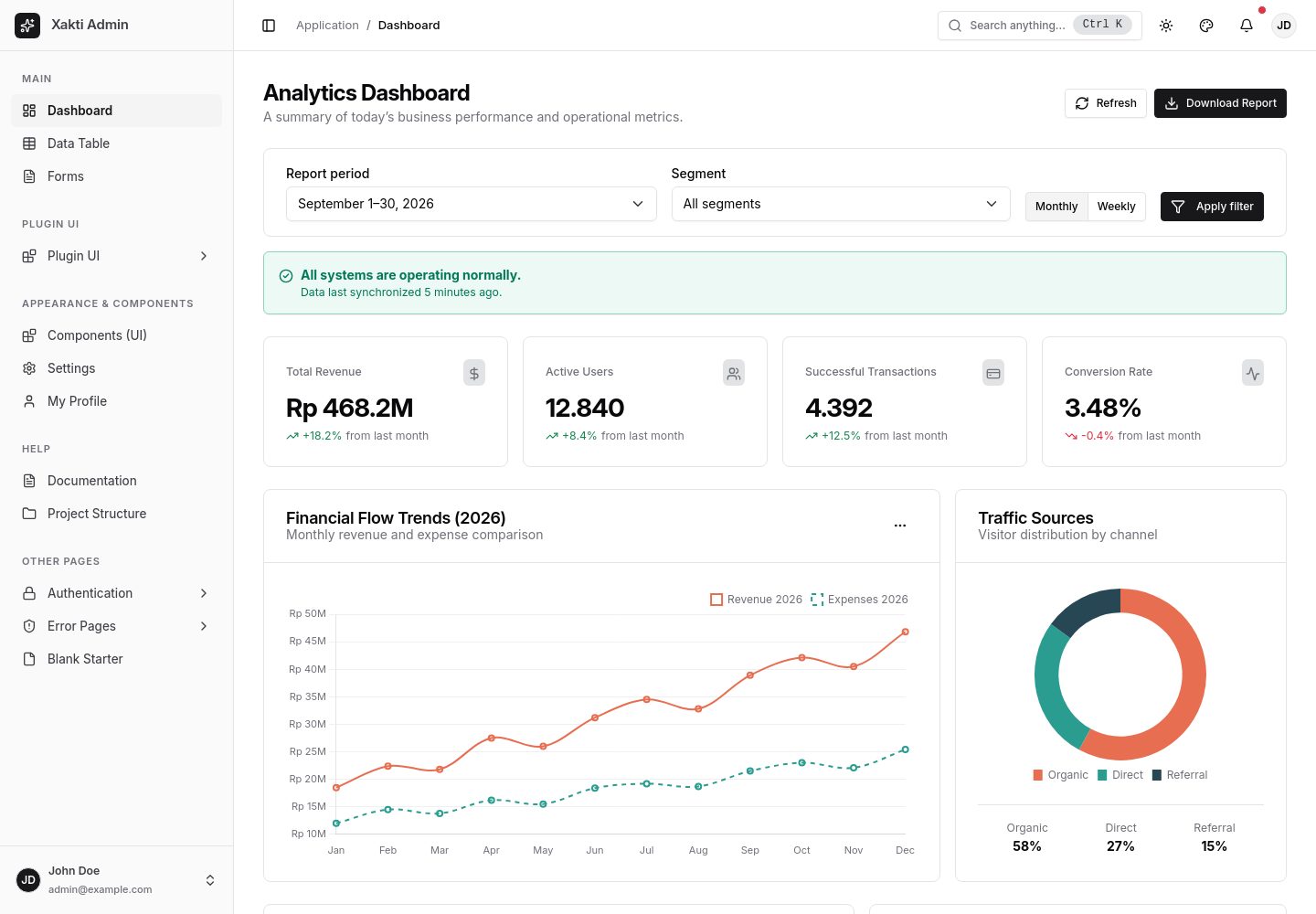
Retains standard Bootstrap class names and achieves a shadcn/ui-style appearance through CSS variables and overrides
HTMLAdmin dashboard
xakti-admin-template — HTML Admin dashboard Template
By fhdjg
A pure HTML admin dashboard template built on Bootstrap 5.3, featuring a shadcn/ui-style appearance with built-in sidebar color theming, light and dark modes, data tables, and a command palette.
Explore the design
Compare the page layouts and mobile experience. Open any screenshot for a closer look.
Desktop homepage1 / 3
Desktop captureTop of page
Actual screenshot captured by the server browser.
All pages & views 3
Screenshots show visual appearance; interactive behavior may differ.
Recorded 2026-09-30View source
What stands out
A quick read of the recorded project description.
Sidebar colors support 10 presets and a custom color picker, with automatic WCAG 2.1 AA contrast calculation
Light/dark/system-following themes based on data-bs-theme, with settings stored in localStorage and applied before rendering
Vanilla JavaScript data table supports instant search, multi-column sorting, pagination, and bulk row selection
Built-in Ctrl+K command palette and Ctrl+B sidebar collapse shortcuts
Bootstrap, Chart.js, the Inter font, and 74 Lucide icons are all hosted locally, with no external CDN dependencies
Template Details
Xakti Admin Template is an admin interface template written in pure HTML, CSS, and vanilla JavaScript, with no runtime dependencies on React, Vue, jQuery, or Tailwind. Its core approach is to retain standard Bootstrap class names (such as .btn, .card, .table, .form-control, .navbar) and achieve a shadcn/ui-style visual appearance through CSS variables and overrides, so existing Bootstrap markup does not need to be rewritten. The template includes sidebar color customization with 10 presets and a custom color picker, and automatically calculates WCAG 2.1 AA text contrast. Light and dark themes are implemented via Bootstrap 5.3's data-bs-theme, with settings saved in localStorage and applied before CSS rendering to reduce theme flicker.
The repository includes static pages such as dashboard, data tables, forms, component library, settings, profile, blank page, login/register/forgot password, and 403/404/500 error pages. For assets, Bootstrap, Chart.js, the Inter font, and Lucide icons are all hosted locally; pages run via app.bundle.js and can be opened directly with the file:// protocol or hosted with a Python, PHP, or Node static server. The template also provides a public window.XaktiAdmin API for controlling theme, sidebar state, sidebar colors, and Toast notifications.
Regarding usage limitations, this template is a static front-end interface and does not include backend logic, a database, or authentication implementation. Plugins such as DataTables, Summernote, and Select2 only provide a style integration layer; plugin assets must be installed separately according to their respective documentation. Licenses for third-party assets such as demo images, fonts, and icons must be verified separately and cannot be determined solely from the code's MIT license.
HTMLAdmin panel
Is it right for your project?
Use Cases
- Projects that need to keep Bootstrap class names while achieving a shadcn/ui-style admin interface
- Rapidly building admin page prototypes or demo sites as static HTML
- Data management interfaces that need switchable light/dark themes and customizable sidebar colors
- Admin projects that provide a unified visual style for plugins such as DataTables, Summernote, and Select2
Suitable For
- Front-end developers using a pure HTML/CSS/JavaScript stack
- Individual or team projects that need a lightweight admin template with no build step
- Developers who want to adjust the admin appearance without rewriting Bootstrap markup
- Scenarios that need a static admin interface for internal tools or demo environments
Getting started & customization
Use these recorded setup notes alongside the repository instructions for your chosen version.
- 1
No npm install or build step is required; you can double-click index.html to run it via the file:// protocol
- 2
You can also enter the frontend directory and start a local static server with python3 -m http.server 8080, php -S localhost:8080, or npx serve .
- 3
The default sidebar color scheme can be set via the data-xa-sidebar-theme attribute on the <html> tag, or by modifying CSS variables in assets/css/tokens.css
- 4
Plugin assets such as DataTables, Summernote, and Select2 must be installed locally according to their respective documentation, and plugin CSS should be included after Bootstrap and the template CSS
- 5
Licenses for third-party assets such as demo images, fonts, and icons must be verified separately; external hosting or services may incur additional costs
License & source material
Usage conditions & limitations
Free to use · keep license noticeThis listing covers the free MIT version in the public repository; the free scope applies to that version's code and does not mean external services or third-party assets are free.
Must comply with when using
- When using, modifying, or distributing the code, retain the original author's copyright notice and the complete MIT license.
- Free use, modification, and commercial use are permitted, as is distribution of the code; distribution must still include the copyright and license notice.
- The code is provided as is, and the author does not promise warranties or accept liability for use.
Additional costs & items to verify
- Plugins such as DataTables, Summernote, and Select2 only provide a style integration layer; the plugin assets themselves must be installed separately according to their respective documentation, and the template does not include the full functionality of these plugins.
- When using the plugin integration styles, you must install the corresponding plugin assets yourself according to the plugin's official documentation; the template does not include these third-party plugin files.
- The template is a pure static front-end interface and does not include backend logic, a database, or authentication implementation; it only provides front-end pages and interactions.
- Demo images, fonts, icons, and other third-party assets must be verified under their respective licenses and cannot be determined solely from the code's MIT license.
- External services such as domains, hosting, databases, payments, or AI may incur additional charges.
View Original Text Basis
Permission is hereby granted, free of charge
Original License Text
The template provides optional styling layers in `assets/css/plugin-integrations.css`
Original README
Install plugin assets locally according to their respective documentation
Original README
https://github.com/fhdjg/xakti-admin-template/blob/main/LICENSEhttps://github.com/fhdjg/xakti-admin-template/blob/main/README.mdNo `npm install` or build step is required to run this template
Original README
Based on the full MIT license and the repository README · 2026-09-30. Results only cover the materials read; dependencies, images, fonts, and subsequent term changes are subject to their respective original texts.
Project checks & description sources
Template Information
- Source platforms
- GitHub
- Documentation and maintenance reference score
- More documented · 80 / 100
- Technologies
- HTML
- Website type
- Admin dashboard
How this score is calculated
Our heuristic uses license records (up to 30), a demo link (12), a preview (10), stars (15), recorded maintenance (15), description completeness (8), feature records (5) and classification data (5). It is not a code, security or performance test, or a Google score. A link does not establish tested functionality.
What to verify for this project
- Repository update recorded
- 2026-09-29
- Screenshot last checked
- 2026-09-30
A demo link is listed. Check it with your own content and viewport sizes; its presence does not confirm that forms, authentication or payments work.
The catalog identifies HTML as the primary stack. Check the actual dependency manifest and lockfile for versions and hosting requirements. These notes use recorded metadata, not a code audit or a deployment test.
Use a selection guide →How this description was prepared
AI-assisted description based on catalog records and repository material. Repository authors are not automatically the reviewers of this description.
Automatically checked against source and license rules; no manual editorial review.
Inspect the recorded source material
SHA-256: 621f9fc1687473d8a91d531132a93f3e9091e630f62ecad3ad0c62ccc25f2b0f
2026-09-30T01:09:41.883Z
Source file / repository# Xakti Admin Dashboard Template
> **Modern admin dashboard template built on Bootstrap 5.3.x with a clean, minimalist shadcn/ui aesthetic.**
> Pure HTML, CSS, and Js without runtime framework dependencies (React, Vue, jQuery, Tailwind).
**English** | [Bahasa Indonesia](README.id.md)
---
## 🌟 Key Features
- **Core Principle:** *Class names = Standard Bootstrap, Appearance = shadcn/ui*.
You continue using standard Bootstrap classes (`.btn`, `.btn-primary`, `.card`, `.table`, `.form-control`, `.navbar`, etc.). All visual styling is achieved via CSS variables and overrides without breaking Bootstrap's official markup.
- **Sidebar Color Customization (Flagship Feature):**
Change sidebar colors instantly without affecting the main content area. Includes **10 Built-in Presets** and a **Custom Color Picker** with automated WCAG 2.1 AA text contrast calculation (contrast ratio ≥ 4.5:1).
- **Dark / Light / System Mode:**
Powered by native Bootstrap 5.3 `data-bs-theme`, saved in `localStorage`, and applied before CSS rendering to eliminate flash of unstyled theme (FOUC).
- **High-Performance Vanilla JS Data Table:**
Instant search, multi-column sorting (text, numbers, dates), dynamic pagination, and bulk row selection capable of handling thousands of rows smoothly (< 100ms).
- **Command Palette (`Ctrl+K` / `Cmd+K`):**
Quick search for page navigation and template action shortcuts.
- **Fast Sidebar Collapse (`Ctrl+B` / `Cmd+B`):**
Supports compact icon-only mode (3.5rem) on desktop and native offcanvas drawer on mobile / touch displays.
- **100% Self-Hosted & Zero External Dependencies:**
Bootstrap 5.3.3, Chart.js 4.4.8, Inter variable woff2 font, and 74 Lucide SVG icons are bundled locally inside the repository.
---
## 🚀 Getting Started
No `npm install` or build step is required to run this template:
### Option A: Open Directly (`file://` Protocol)
Double-click `index.html` in your file explorer (Finder / File Explorer) with any modern web browser. All production pages load the non-module `assets/js/app.bundle.js` bundle, so it runs immediately without local CORS module restrictions.
### Option B: Using a Local Static Server
If you prefer running through a local development server (e.g., Python, PHP, or Node):
```bash
# Navigate to the frontend directory
cd frontend
# Using Python 3
python3 -m http.server 8080
# Using PHP
php -S localhost:8080
# Using Node (npx serve)
npx serve .
```
Open your browser at `http://localhost:8080`.
---
## 🎨 3 Ways to Customize Sidebar Colors
### 1. Via User Interface (Theme Customizer)
Click the palette icon button (`palette`) on the top-right navbar. Choose one of the 10 presets (Light, Dark, Zinc, Slate, Blue, Indigo, Violet, Emerald, Rose, Amber) or pick any color using the color picker. Settings are saved automatically in `localStorage`.
### 2. Via HTML Attribute
Set the default preset on the root `<html>` tag of your HTML document:
```html
<html lang="en" data-bs-theme="light" data-xa-sidebar-theme="emerald">
```
### 3. Via CSS Variables (`assets/css/tokens.css`)
Modify or declare custom sidebar tokens directly in your CSS:
```css
:root {
--sidebar-bg: #064e3b;
--sidebar-fg: #d1fae5;
--sidebar-muted-fg: #6ee7b7;
--sidebar-accent-bg: #065f46;
--sidebar-accent-fg: #ffffff;
--sidebar-border: #065f46;
--sidebar-ring: #34d399;
}
```
---
## 📁 Directory Structure
```
frontend/
├── index.html # Analytics Dashboard page
├── documentation.html # Architecture and development guide
├── project-structure.html # Folder structure and CSS/JS asset sizes
├── pages/
│ ├── data-table.html # Interactive Data Table page
│ ├── forms.html # Comprehensive Form Elements & Validation
│ ├── components.html # Component Gallery & Living Style Guide
│ ├── settings.html # Account & System Settings
│ ├── profile.html # User Profile page
│ ├── blank.html # Blank Starter template
│ ├── auth/
│ │ ├── login.html # Sign In page
│ │ ├── register.html # Sign Up page
│ │ └── forgot-password.html# Forgot Password page
│ └── errors/
│ ├── 403.html # 403 Forbidden error page
│ ├── 404.html # 404 Not Found error page
│ └── 500.html # 500 Internal Server Error page
├── assets/
│ ├── css/
│ │ ├── tokens.css # Design tokens, sidebar presets & accents
│ │ ├── theme.css # Bootstrap variable mappings & overrides
│ │ ├── layout.css # App shell, responsive sidebar & topbar
│ │ ├── components.css # Extensions: btn-ghost, btn-icon, avatar, empty state
│ │ ├── app.css # Entry @import file
│ │ └── app.min.css # Minified bundle loaded by pages (36.31 KB)
│ ├── js/
│ │ ├── app.js # Modular ES Module entrypoint
│ │ ├── app.bundle.js # Standalone bundle compatible with file:// (43.42 KB)
│ │ ├── modules/
│ │ │ ├── theme.js # Theme mode, accent color, and radius controller
│ │ │ ├── sidebar.js # Collapse/expand, mobile offcanvas, Ctrl+B shortcut
│ │ │ ├── sidebar-theme.js# Presets, color picker, auto-contrast, export/import
│ │ │ ├── datatable.js # Search, sorting, and pagination engine
│ │ │ ├── toast.js # Modern toast notification helper
│ │ │ ├── command.js # Command palette modal dialog (Ctrl+K)
│ │ │ └── charts.js # Adaptive Chart.js integration
│ │ └── utils/
│ │ ├── storage.js # Safe localStorage wrapper
│ │ └── color.js # WCAG AA contrast calculation utility
│ ├── vendor/
│ │ ├── bootstrap/ # Local Bootstrap 5.3.3 CSS & JS bundle
│ │ └── chartjs/ # Local Chart.js 4.4.8
│ ├── fonts/ # Local Inter variable woff2 font
│ └── icons/ # Local Lucide SVG sprite (74 icons)
├── CHANGELOG.md
├── LICENSE
├── README.id.md # Indonesian documentation
└── README.md # English documentation
```
> Project specifications and rules are located one level above the application directory in [`../docs/`](../docs/). For complete details and file sizes, visit [`project-structure.html`](project-structure.html).
---
## ⌨️ Keyboard Shortcuts
| Shortcut | Action |
|---|---|
| `Ctrl + B` / `Cmd + B` | Toggle / collapse desktop sidebar navigation |
| `Ctrl + K` / `Cmd + K` | Open quick search (Command Palette) |
| `Escape` | Close modal dialogs, offcanvas panels, or search dialog |
---
## 💻 Public JavaScript API (`window.XaktiAdmin`)
You can control all template functionality programmatically via the browser console or your custom scripts:
```javascript
// Manage appearance theme
XaktiAdmin.theme.set('dark'); // 'light' | 'dark' | 'system'
XaktiAdmin.theme.setAccent('blue'); // 'zinc' | 'blue' | 'green' | 'orange' | 'rose' | 'violet'
XaktiAdmin.theme.setRadius('0.5'); // '0' | '0.3' | '0.5' | '0.75' | '1'
// Manage sidebar state
XaktiAdmin.sidebar.toggle();
XaktiAdmin.sidebar.expand();
XaktiAdmin.sidebar.collapse();
// Manage sidebar colors
XaktiAdmin.sidebarTheme.apply('emerald'); // Preset ID
XaktiAdmin.sidebarTheme.setColor('#0f172a'); // Custom color with auto-contrast
XaktiAdmin.sidebarTheme.reset(); // Reset to defaults
// Display Toast notifications
XaktiAdmin.toast.show({
title: 'Changes Saved',
message: 'Your profile settings have been updated successfully.',
variant: 'success', // 'default' | 'success' | 'danger'
delay: 4000
});
```
---
## 📦 Key Asset Sizes
Current file sizes in the repository (subject to minor updates as assets evolve):
| Asset | Size |
|---|---:|
| CSS sources (`assets/css/*.css`) | 85.01 KB |
| `assets/css/app.min.css` (loaded by served pages) | 36.31 KB |
| Modular JavaScript (`app.js`, `modules/`, `utils/`) | 43.10 KB |
| `assets/js/app.bundle.js` | 43.42 KB |
For individual file breakdowns, see [Project Structure](project-structure.html).
---
## 📚 Documentation & Reference Pages
- [Template Architecture & Guide](documentation.html)
- [Project Structure & Asset Sizes](project-structure.html)
- [UI Component Gallery](pages/components.html)
- [Plugin Integration Examples](pages/plugin-examples.html)
---
## 🔌 UI Plugin Integrations
The template provides optional styling layers in `assets/css/plugin-integrations.css` (also included in `app.min.css`) for:
- **DataTables Bootstrap 5** — toolbars, inputs, pagination, and table states.
- **Summernote** — editor frame, toolbar, content area, and status bar.
- **Select2** — selection container, dropdown menus, option highlighting, search inputs, and focus ring.
Install plugin assets locally according to their respective documentation, then include the plugin CSS after Bootstrap and Xakti Admin CSS. No CDN requests or jQuery dependencies are forced into the core template. View working visual demos at [`pages/plugin-examples.html`](pages/plugin-examples.html) and under the **Plugin UI** section in the sidebar.
---
## ☕ Support Development
If Xakti Admin helps your workflow, consider supporting its development:
- [☕ Buy Me a Coffee](https://www.buymeacoffee.com/nayfos)
- [💝 Saweria](https://saweria.co/nayfos)
- [💜 GitHub Sponsors](https://github.com/sponsors/fhdjg)
---
## 📄 License
Distributed under the [MIT](LICENSE) license. Feel free to use it for personal, institutional, or commercial projects.
Explore similar templates
Compare previews and descriptions within the same stack and category.

gentelella
Gentelella v4 is a free, open-source admin dashboard template maintained by Colorlib, built with vanilla JavaScript, SCSS, and Vite 8 without Bootstrap or jQuery.
HTML · Admin dashboard

coreui-free-bootstrap-admin-template
A free Bootstrap admin template maintained by CoreUI, built on CoreUI's own UI component library. It provides compiled HTML pages and Pug template source code, covering dashboards, authentication, forms, components, icons, and error pages.
HTML · Admin dashboard

dashboards
A collection of responsive dashboard HTML templates open-sourced by Keen IO, built on CSS Grid, offering multiple prebuilt admin data interface layouts.
HTML · Admin dashboard

SB Admin 2
SB Admin 2 is a classic Bootstrap admin template from Start Bootstrap, offering dashboards, charts, tables, and common management pages.
HTML · Admin dashboard

Adminator-admin-dashboard
Adminator 4 is a vanilla HTML, CSS and JavaScript admin dashboard template with a CSS-variable token design system, built-in light and dark themes, no jQuery or Bootstrap dependency, and 18 pages covering dashboards, mail, calendar, charts, forms, tables and error pages.
HTML · Admin dashboard

SB Admin
SB Admin is a lightweight, open-source Bootstrap admin template from Start Bootstrap. It offers a sidebar-and-top-bar layout with data tables, forms, and stat cards, plus responsive design.
HTML · Admin dashboard