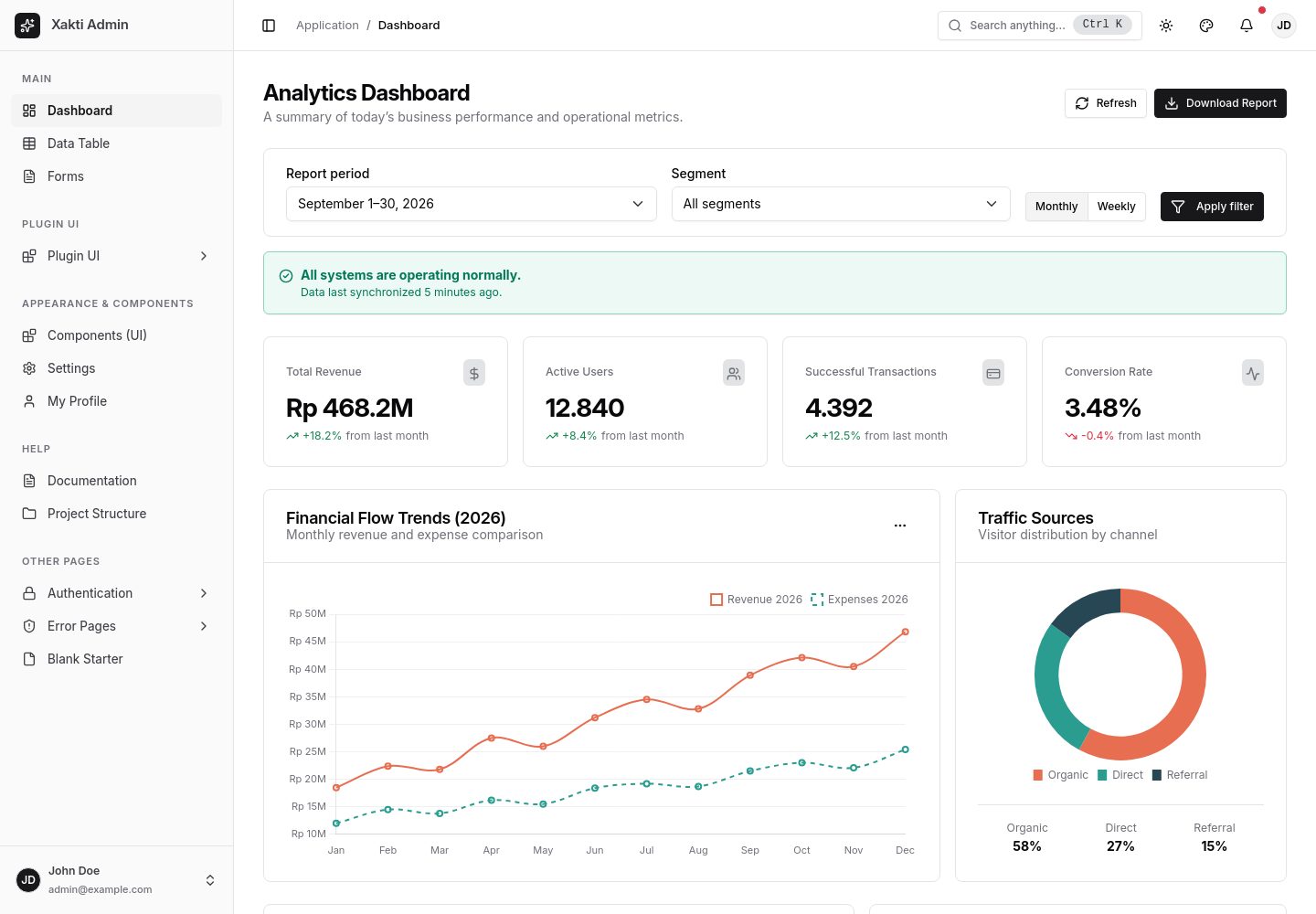
保留标准 Bootstrap 类名,通过 CSS 变量与覆盖实现 shadcn/ui 风格外观
HTML后台
xakti-admin-template — HTML 后台模板
作者 fhdjg
基于 Bootstrap 5.3 构建的纯 HTML 后台管理模板,采用 shadcn/ui 风格外观,内置侧边栏配色、明暗主题、数据表格与命令面板等模块。
看看你的网站会是什么样
浏览真实页面截图,比较内容排版与手机效果。点击下方缩略图切换,放大查看整页细节。
全部页面与视图 3
截图用于了解视觉与布局,交互效果请以实际项目为准。
采集于 2026-09-30查看来源
值得关注的模板亮点
从已有项目资料中,快速了解它的特点。
侧边栏配色支持 10 种预设与自定义取色器,并自动计算 WCAG 2.1 AA 对比度
基于 data-bs-theme 的明暗/跟随系统主题,设置存入 localStorage 并在渲染前应用
原生 JavaScript 数据表格支持即时搜索、多列排序、分页与批量行选择
内置 Ctrl+K 命令面板与 Ctrl+B 侧边栏折叠快捷键
Bootstrap、Chart.js、Inter 字体和 74 个 Lucide 图标均本地托管,无外部 CDN 依赖
模板详细介绍
Xakti Admin Template 是一个以纯 HTML、CSS 和原生 JavaScript 编写的后台管理界面模板,不依赖 React、Vue、jQuery 或 Tailwind 等运行时框架。它的核心思路是保留标准 Bootstrap 类名(如 .btn、.card、.table、.form-control、.navbar),通过 CSS 变量和覆盖层实现 shadcn/ui 风格的视觉外观,因此原有 Bootstrap 标记无需改写。模板自带侧边栏配色定制功能,提供 10 种预设和自定义取色器,并自动计算 WCAG 2.1 AA 文本对比度;明暗主题基于 Bootstrap 5.3 的 data-bs-theme 实现,设置保存在 localStorage 中,并在 CSS 渲染前应用以减少主题闪烁。
仓库内包含仪表盘、数据表格、表单、组件库、设置、个人资料、空白页、登录/注册/忘记密码以及 403/404/500 错误页等静态页面。资产方面,Bootstrap、Chart.js、Inter 字体和 Lucide 图标均本地存放,页面通过 app.bundle.js 运行,可直接以 file:// 协议打开,也可用 Python、PHP 或 Node 静态服务器托管。模板还提供 window.XaktiAdmin 公开 API,用于控制主题、侧边栏状态、侧边栏配色和 Toast 通知。
使用限制方面,该模板是前端静态界面,不包含后端逻辑、数据库或身份验证实现;DataTables、Summernote、Select2 等插件仅提供样式集成层,插件资源需按各自文档另行安装。演示图片、字体、图标等第三方素材的许可需单独核对,不能仅凭代码的 MIT 许可判断。
HTML后台
适合你的项目吗?
适用场景
- 需要沿用 Bootstrap 类名但希望获得 shadcn/ui 风格后台界面的项目
- 以静态 HTML 方式快速搭建管理后台页面原型或演示站点
- 需要可切换明暗主题、可定制侧边栏配色的数据管理界面
- 为 DataTables、Summernote、Select2 等插件提供统一视觉样式的后台项目
适合人群
- 使用纯 HTML/CSS/JavaScript 技术栈的前端开发者
- 需要轻量级、无构建步骤后台模板的个人或团队项目
- 希望在不改写 Bootstrap 标记的前提下调整后台外观的开发者
- 需要静态管理界面用于内部工具或演示环境的场景
上手与定制指南
结合仓库当前版本的说明,按下面的资料检查内容、配置与运行要求。
- 1
无需 npm install 或构建步骤,可直接双击 index.html 以 file:// 协议运行
- 2
也可进入 frontend 目录,用 python3 -m http.server 8080、php -S localhost:8080 或 npx serve . 启动本地静态服务器
- 3
侧边栏默认配色可通过 <html> 标签的 data-xa-sidebar-theme 属性设置,或在 assets/css/tokens.css 中修改 CSS 变量
- 4
DataTables、Summernote、Select2 等插件资源需按各自文档本地安装,并将插件 CSS 放在 Bootstrap 与模板 CSS 之后引入
- 5
演示图片、字体、图标等第三方素材需单独核对许可,外部托管或服务可能产生额外费用
授权与来源资料
使用条件与限制
免费使用 · 保留许可声明本次收录的是公开仓库中的免费 MIT 版本;免费范围为该版本代码,不代表外部服务或第三方素材免费。
使用时需要遵守
- 使用、修改或分发代码时,保留原作者版权声明和完整 MIT 许可证。
- 允许免费使用、修改及商用,也允许分发代码;分发时仍需随附版权与许可声明。
- 代码按现状提供,作者不承诺担保或承担使用责任。
额外费用与待核对事项
- DataTables、Summernote、Select2 等插件仅提供样式集成层,插件本身的资源需按各自文档另行安装,模板不包含这些插件的完整功能。
- 使用插件集成样式时,需自行按插件官方文档安装对应插件资源,模板不附带这些第三方插件文件。
- 模板为纯静态前端界面,不包含后端逻辑、数据库或身份验证实现,仅提供前端页面与交互。
- 演示图片、字体、图标及其他第三方素材需按各自许可核对,不能仅凭代码的 MIT 许可判断。
- 域名、托管、数据库、支付或 AI 等外部服务可能另外收费。
查看原文依据
Permission is hereby granted, free of charge
许可证原文
The template provides optional styling layers in `assets/css/plugin-integrations.css`
README 原文
Install plugin assets locally according to their respective documentation
README 原文
https://github.com/fhdjg/xakti-admin-template/blob/main/LICENSEhttps://github.com/fhdjg/xakti-admin-template/blob/main/README.mdNo `npm install` or build step is required to run this template
README 原文
依据完整 MIT 许可证与仓库 README 核对 · 2026-09-30。结果仅覆盖已读取资料,依赖、图片、字体及后续条款变更以各自原文为准。
项目核对记录与介绍依据
模板资料
- 来源平台
- GitHub
- 资料与维护参考分
- 资料较完整 · 80 / 100
- 技术栈
- HTML
- 网站类型
- 后台
这个分数如何计算
本站按许可资料(最高30分)、演示链接(12分)、预览图(10分)、Star数(15分)、记录的维护时间(15分)、描述完整度(8分)、功能记录(5分)和分类资料(5分)计算。它不是代码、安全或性能测试,也不是 Google 评分;有链接不代表已实测可用。
这个项目需要核对什么
- 记录的仓库更新时间
- 2026-09-29
- 截图检查日期
- 2026-09-30
已收录演示链接。请用你的内容与屏幕尺寸检查;有演示不代表表单、认证或支付已经可用。
目录记录的主要技术栈是 HTML。请通过依赖清单和锁文件核对实际版本与托管要求。这些说明基于收录资料,不代表代码审计或部署实测。
查看具体选型方法 →介绍的制作与核对状态
介绍由 AI 辅助整理目录与仓库资料。仓库作者不等于这篇介绍的审核者。
已完成服务器许可规则与 AI 来源核对;未经过人工编辑审核。
查看当时使用的来源资料
SHA-256: 621f9fc1687473d8a91d531132a93f3e9091e630f62ecad3ad0c62ccc25f2b0f
2026-09-30T01:09:41.883Z
来源文件 / 仓库# Xakti Admin Dashboard Template
> **Modern admin dashboard template built on Bootstrap 5.3.x with a clean, minimalist shadcn/ui aesthetic.**
> Pure HTML, CSS, and Js without runtime framework dependencies (React, Vue, jQuery, Tailwind).
**English** | [Bahasa Indonesia](README.id.md)
---
## 🌟 Key Features
- **Core Principle:** *Class names = Standard Bootstrap, Appearance = shadcn/ui*.
You continue using standard Bootstrap classes (`.btn`, `.btn-primary`, `.card`, `.table`, `.form-control`, `.navbar`, etc.). All visual styling is achieved via CSS variables and overrides without breaking Bootstrap's official markup.
- **Sidebar Color Customization (Flagship Feature):**
Change sidebar colors instantly without affecting the main content area. Includes **10 Built-in Presets** and a **Custom Color Picker** with automated WCAG 2.1 AA text contrast calculation (contrast ratio ≥ 4.5:1).
- **Dark / Light / System Mode:**
Powered by native Bootstrap 5.3 `data-bs-theme`, saved in `localStorage`, and applied before CSS rendering to eliminate flash of unstyled theme (FOUC).
- **High-Performance Vanilla JS Data Table:**
Instant search, multi-column sorting (text, numbers, dates), dynamic pagination, and bulk row selection capable of handling thousands of rows smoothly (< 100ms).
- **Command Palette (`Ctrl+K` / `Cmd+K`):**
Quick search for page navigation and template action shortcuts.
- **Fast Sidebar Collapse (`Ctrl+B` / `Cmd+B`):**
Supports compact icon-only mode (3.5rem) on desktop and native offcanvas drawer on mobile / touch displays.
- **100% Self-Hosted & Zero External Dependencies:**
Bootstrap 5.3.3, Chart.js 4.4.8, Inter variable woff2 font, and 74 Lucide SVG icons are bundled locally inside the repository.
---
## 🚀 Getting Started
No `npm install` or build step is required to run this template:
### Option A: Open Directly (`file://` Protocol)
Double-click `index.html` in your file explorer (Finder / File Explorer) with any modern web browser. All production pages load the non-module `assets/js/app.bundle.js` bundle, so it runs immediately without local CORS module restrictions.
### Option B: Using a Local Static Server
If you prefer running through a local development server (e.g., Python, PHP, or Node):
```bash
# Navigate to the frontend directory
cd frontend
# Using Python 3
python3 -m http.server 8080
# Using PHP
php -S localhost:8080
# Using Node (npx serve)
npx serve .
```
Open your browser at `http://localhost:8080`.
---
## 🎨 3 Ways to Customize Sidebar Colors
### 1. Via User Interface (Theme Customizer)
Click the palette icon button (`palette`) on the top-right navbar. Choose one of the 10 presets (Light, Dark, Zinc, Slate, Blue, Indigo, Violet, Emerald, Rose, Amber) or pick any color using the color picker. Settings are saved automatically in `localStorage`.
### 2. Via HTML Attribute
Set the default preset on the root `<html>` tag of your HTML document:
```html
<html lang="en" data-bs-theme="light" data-xa-sidebar-theme="emerald">
```
### 3. Via CSS Variables (`assets/css/tokens.css`)
Modify or declare custom sidebar tokens directly in your CSS:
```css
:root {
--sidebar-bg: #064e3b;
--sidebar-fg: #d1fae5;
--sidebar-muted-fg: #6ee7b7;
--sidebar-accent-bg: #065f46;
--sidebar-accent-fg: #ffffff;
--sidebar-border: #065f46;
--sidebar-ring: #34d399;
}
```
---
## 📁 Directory Structure
```
frontend/
├── index.html # Analytics Dashboard page
├── documentation.html # Architecture and development guide
├── project-structure.html # Folder structure and CSS/JS asset sizes
├── pages/
│ ├── data-table.html # Interactive Data Table page
│ ├── forms.html # Comprehensive Form Elements & Validation
│ ├── components.html # Component Gallery & Living Style Guide
│ ├── settings.html # Account & System Settings
│ ├── profile.html # User Profile page
│ ├── blank.html # Blank Starter template
│ ├── auth/
│ │ ├── login.html # Sign In page
│ │ ├── register.html # Sign Up page
│ │ └── forgot-password.html# Forgot Password page
│ └── errors/
│ ├── 403.html # 403 Forbidden error page
│ ├── 404.html # 404 Not Found error page
│ └── 500.html # 500 Internal Server Error page
├── assets/
│ ├── css/
│ │ ├── tokens.css # Design tokens, sidebar presets & accents
│ │ ├── theme.css # Bootstrap variable mappings & overrides
│ │ ├── layout.css # App shell, responsive sidebar & topbar
│ │ ├── components.css # Extensions: btn-ghost, btn-icon, avatar, empty state
│ │ ├── app.css # Entry @import file
│ │ └── app.min.css # Minified bundle loaded by pages (36.31 KB)
│ ├── js/
│ │ ├── app.js # Modular ES Module entrypoint
│ │ ├── app.bundle.js # Standalone bundle compatible with file:// (43.42 KB)
│ │ ├── modules/
│ │ │ ├── theme.js # Theme mode, accent color, and radius controller
│ │ │ ├── sidebar.js # Collapse/expand, mobile offcanvas, Ctrl+B shortcut
│ │ │ ├── sidebar-theme.js# Presets, color picker, auto-contrast, export/import
│ │ │ ├── datatable.js # Search, sorting, and pagination engine
│ │ │ ├── toast.js # Modern toast notification helper
│ │ │ ├── command.js # Command palette modal dialog (Ctrl+K)
│ │ │ └── charts.js # Adaptive Chart.js integration
│ │ └── utils/
│ │ ├── storage.js # Safe localStorage wrapper
│ │ └── color.js # WCAG AA contrast calculation utility
│ ├── vendor/
│ │ ├── bootstrap/ # Local Bootstrap 5.3.3 CSS & JS bundle
│ │ └── chartjs/ # Local Chart.js 4.4.8
│ ├── fonts/ # Local Inter variable woff2 font
│ └── icons/ # Local Lucide SVG sprite (74 icons)
├── CHANGELOG.md
├── LICENSE
├── README.id.md # Indonesian documentation
└── README.md # English documentation
```
> Project specifications and rules are located one level above the application directory in [`../docs/`](../docs/). For complete details and file sizes, visit [`project-structure.html`](project-structure.html).
---
## ⌨️ Keyboard Shortcuts
| Shortcut | Action |
|---|---|
| `Ctrl + B` / `Cmd + B` | Toggle / collapse desktop sidebar navigation |
| `Ctrl + K` / `Cmd + K` | Open quick search (Command Palette) |
| `Escape` | Close modal dialogs, offcanvas panels, or search dialog |
---
## 💻 Public JavaScript API (`window.XaktiAdmin`)
You can control all template functionality programmatically via the browser console or your custom scripts:
```javascript
// Manage appearance theme
XaktiAdmin.theme.set('dark'); // 'light' | 'dark' | 'system'
XaktiAdmin.theme.setAccent('blue'); // 'zinc' | 'blue' | 'green' | 'orange' | 'rose' | 'violet'
XaktiAdmin.theme.setRadius('0.5'); // '0' | '0.3' | '0.5' | '0.75' | '1'
// Manage sidebar state
XaktiAdmin.sidebar.toggle();
XaktiAdmin.sidebar.expand();
XaktiAdmin.sidebar.collapse();
// Manage sidebar colors
XaktiAdmin.sidebarTheme.apply('emerald'); // Preset ID
XaktiAdmin.sidebarTheme.setColor('#0f172a'); // Custom color with auto-contrast
XaktiAdmin.sidebarTheme.reset(); // Reset to defaults
// Display Toast notifications
XaktiAdmin.toast.show({
title: 'Changes Saved',
message: 'Your profile settings have been updated successfully.',
variant: 'success', // 'default' | 'success' | 'danger'
delay: 4000
});
```
---
## 📦 Key Asset Sizes
Current file sizes in the repository (subject to minor updates as assets evolve):
| Asset | Size |
|---|---:|
| CSS sources (`assets/css/*.css`) | 85.01 KB |
| `assets/css/app.min.css` (loaded by served pages) | 36.31 KB |
| Modular JavaScript (`app.js`, `modules/`, `utils/`) | 43.10 KB |
| `assets/js/app.bundle.js` | 43.42 KB |
For individual file breakdowns, see [Project Structure](project-structure.html).
---
## 📚 Documentation & Reference Pages
- [Template Architecture & Guide](documentation.html)
- [Project Structure & Asset Sizes](project-structure.html)
- [UI Component Gallery](pages/components.html)
- [Plugin Integration Examples](pages/plugin-examples.html)
---
## 🔌 UI Plugin Integrations
The template provides optional styling layers in `assets/css/plugin-integrations.css` (also included in `app.min.css`) for:
- **DataTables Bootstrap 5** — toolbars, inputs, pagination, and table states.
- **Summernote** — editor frame, toolbar, content area, and status bar.
- **Select2** — selection container, dropdown menus, option highlighting, search inputs, and focus ring.
Install plugin assets locally according to their respective documentation, then include the plugin CSS after Bootstrap and Xakti Admin CSS. No CDN requests or jQuery dependencies are forced into the core template. View working visual demos at [`pages/plugin-examples.html`](pages/plugin-examples.html) and under the **Plugin UI** section in the sidebar.
---
## ☕ Support Development
If Xakti Admin helps your workflow, consider supporting its development:
- [☕ Buy Me a Coffee](https://www.buymeacoffee.com/nayfos)
- [💝 Saweria](https://saweria.co/nayfos)
- [💜 GitHub Sponsors](https://github.com/sponsors/fhdjg)
---
## 📄 License
Distributed under the [MIT](LICENSE) license. Feel free to use it for personal, institutional, or commercial projects.
看看同类模板
对比同技术栈与用途的模板,找到更适合的视觉与内容结构。

gentelella
Free admin dashboard template — vanilla JS, SCSS, Vite 8. No Bootstrap, no jQuery.
HTML · 后台

coreui-free-bootstrap-admin-template
Free Bootstrap Admin & Dashboard Template Built for AI-Assisted Development
HTML · 后台

dashboards
Responsive dashboard templates 📊✨
HTML · 后台

SB Admin 2
SB Admin 2 是 Start Bootstrap 推出的开源后台模板,基于 Bootstrap 构建,整体风格偏向经典管理界面。
HTML · 后台

Adminator-admin-dashboard
Adminator is easy to use and well design admin dashboard template with dark mode for web apps, websites, servi…
HTML · 后台

SB Admin
SB Admin 是 Start Bootstrap 推出的开源后台管理模板,基于 Bootstrap 构建,定位是简洁、实用的管理界面。
HTML · 后台