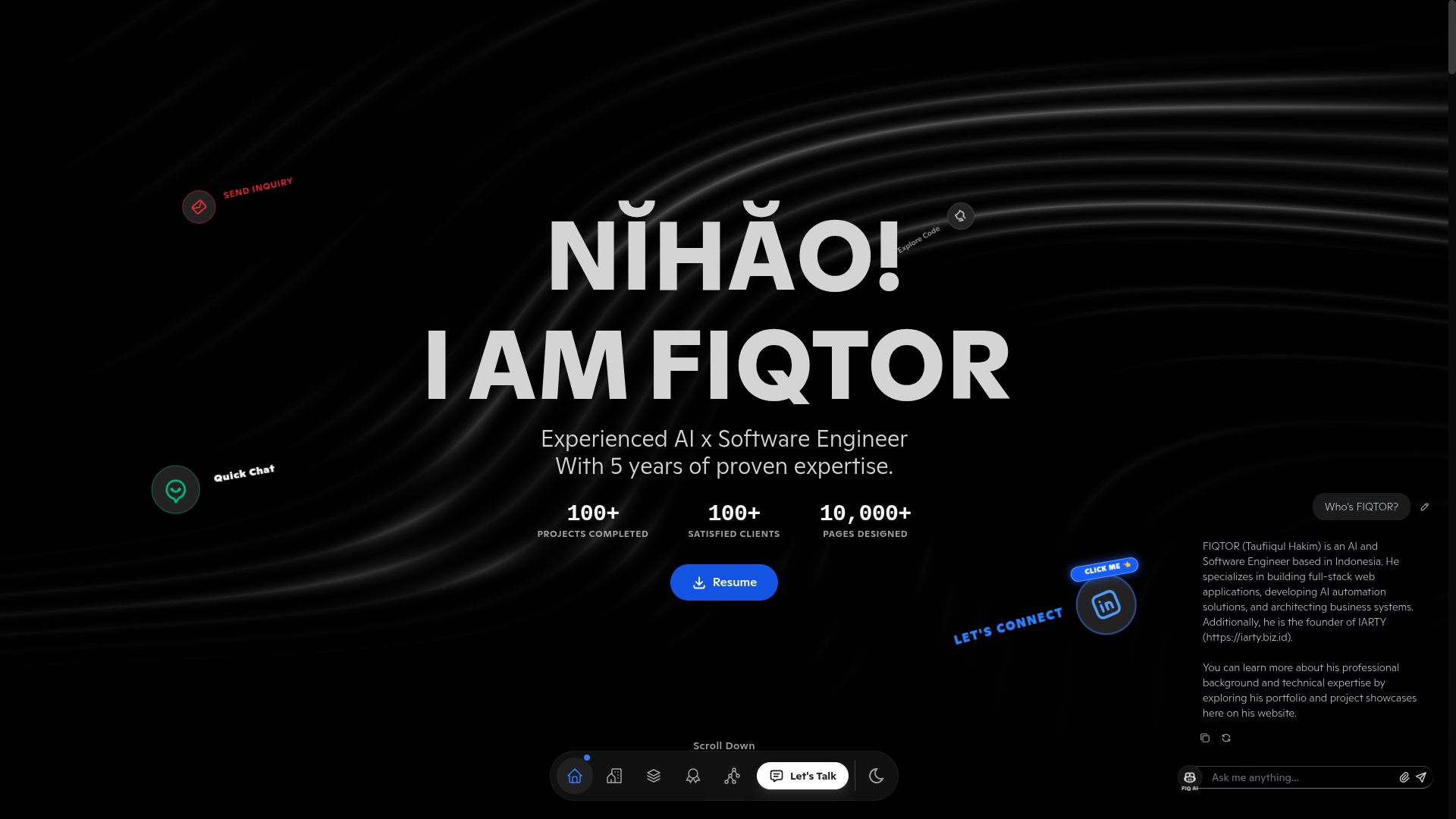
Umbrella repository organizes frontend and backend via Git submodules; frontend/ and backend/ are independent
ViteReactPortfolio
fiqtor.com-create-your-own — Vite Portfolio Template
By FIQTOR
A full-stack personal portfolio template with a React and Vite frontend and a Node.js and Express backend. The repository organizes frontend and backend code via Git submodules and provides an AI chatbot, contact form, GitHub and WakaTime stats, and project and certification displays.
Explore the design
Compare the page layouts and mobile experience. Open any screenshot for a closer look.
Author preview
Author-provided preview
Preview provided in the project README.
One original preview is available. Open the full image to inspect the design.
Screenshots show visual appearance; interactive behavior may differ.
Recorded 2026-10-06View source
What stands out
A quick read of the recorded project description.
AI assistant supports voice dictation, file attachments, streaming replies, and copy/regenerate
Contact form sends via WhatsApp Business API and falls back to SMTP email on failure
Displays GitHub contribution graphs and WakaTime coding activity
Includes sections for projects, career timeline, certifications, skills, services, and multi-language resume
Content and brand information are centralized in configuration files and environment variables, with no need to modify components
Template Details
This is a full-stack template for building a personal portfolio website. The repository itself is an umbrella repository and does not contain application code; instead, it references two separate repositories via Git submodules: frontend/ points to the React + Vite frontend, and backend/ points to the Node.js + Express API. The frontend handles page presentation and content organization, while the backend provides APIs for the AI chatbot, contact form, GitHub and WakaTime stats, and more.
The pages and modules included in the template are: project showcase, career timeline, certifications, skills, services, multi-language resume, and a classic linktree-style page. The AI assistant supports voice dictation, file attachments, streaming replies, and copy/regenerate actions; the contact form sends notifications via the WhatsApp Business API and falls back to SMTP email on failure. GitHub contribution graphs and WakaTime coding activity are fetched via backend APIs.
Content customization: personal and brand information is placed in frontend/src/config/Identity.ts and a few VITE_* environment variables; portfolio content (projects, certifications, career history) is placed in frontend/src/data/*.ts; page head metadata is generated at build time by src/config/Head.ts. Backend identity and social information is configured in backend/src/config/identity.js.
Usage limitations: the repository is under the MIT license, and you may use, modify, commercialize, and distribute this version of the code for free, but you must retain the copyright and license notice. Third-party assets such as demo images, fonts, and icons require separate license verification. External services such as domains, hosting, databases, and AI services may incur costs. Environment variables prefixed with VITE_ are included in the public browser bundle and must not contain secrets.
ViteReactPortfolio
Is it right for your project?
Use Cases
- Build a personal portfolio website to showcase projects, career history, and certifications in one place
- Integrate an AI assistant into a personal site to answer visitor questions about you
- Receive contact form submissions from visitors via WhatsApp or email
- Display GitHub contributions and WakaTime coding stats on a personal homepage
- Use as a reference project for learning the React + Vite and Node.js + Express full-stack structure
Suitable For
- Frontend or full-stack developers who need to quickly build a personal portfolio
- Developers who want to showcase GitHub and WakaTime data
- Job seekers who need a multi-language resume and career timeline display
- Users who want to freely modify and distribute the code under the MIT license
Getting started & customization
Use these recorded setup notes alongside the repository instructions for your chosen version.
- 1
When cloning, use --recurse-submodules or run git submodule update --init --recursive afterward, otherwise the backend/ and frontend/ directories will be empty
- 2
Run npm install separately in the backend and frontend directories, and copy .env.example to .env in each to fill in configuration
- 3
The backend requires Node.js v20 or higher and configuration of environment variables such as the Gemini API Key and SMTP
- 4
Environment variables prefixed with VITE_ are included in the public browser bundle and must not contain real secrets
- 5
Third-party assets such as demo images, fonts, and icons require separate license verification, and external services may incur costs
License & source material
Usage conditions & limitations
Free to use · keep license noticeThis listing covers the free version of the public repository under the MIT license; the free scope is the code of this version and does not mean external services or third-party assets are free.
Must comply with when using
- You may use, modify, commercialize, and distribute this version of the code for free.
- When distributing copies or substantial portions of the code, retain the original author's copyright notice and the complete MIT license notice.
- The code is provided as is; warranties and limitations of liability are governed by the original license and applicable law.
Additional costs & items to verify
- Demo images, fonts, icons, and other third-party assets must be checked against their respective licenses and cannot be judged solely by the code's MIT license.
- External services such as domains, hosting, databases, payments, or AI may incur additional charges.
- The repository itself does not contain application code; it only references two independent frontend and backend repositories via Git submodules. When using it, you must recursively clone the submodules, otherwise the backend/ and frontend/ directories will be empty.
- You must clone with --recurse-submodules or run git submodule update --init --recursive afterward, otherwise you will not get runnable frontend and backend code.
- Environment variables starting with VITE_ are bundled into the public browser code; storing real secrets such as API keys or private tokens in them is prohibited.
- The AI chat feature depends on a Google Gemini API Key, which you must apply for and configure yourself; this is an external service.
- The contact form email fallback depends on Gmail SMTP, which requires a Gmail account and an app-specific password.
- The contact form's WhatsApp notifications require configuring a Meta WhatsApp Cloud API account and access token, which is an external service.
- Displaying GitHub contribution stats requires providing a GitHub username and access token.
- Displaying WakaTime coding stats requires providing a WakaTime API key.
- Enabling reCAPTCHA requires applying for a site key in the Google reCAPTCHA console.
- The deployment configuration targets Vercel, and using that platform for hosting may incur costs.
- Demo assets such as images, resume PDFs, and icons included in the template must be replaced by you, and their licenses require separate verification.
- The frontend and backend are independent repositories; changes must first be committed and pushed within their respective submodules, then the pointer must be committed in the umbrella repository, otherwise the changes will not take effect.
View Original Text Basis
Permission is hereby granted, free of charge
Original License Text
This repository contains **no application code of its own** — it's an **umbrella (meta) repo** that stitches together two independent repositories via **Git submodules**:
Original README
Because `backend/` and `frontend/` are Git submodules, clone recursively (or init them after cloning):
Original README
Any variable starting with `VITE_` is embedded into the **public browser bundle**. Never put true secrets (API secrets, private tokens) in a `VITE_` variable.
Original README
`GEMINI_API_KEY` | ✅ | Google Gemini key — https://aistudio.google.com/app/apikey
Original README
`EMAIL_PASSWORD` | ✅ | Gmail **App Password** — https://myaccount.google.com/apppasswords
Original README
**WhatsApp / Meta** | ⬜ | `APP_ID`, `APP_SECRET`, `RECIPIENT_WAID`, `VERSION`, `PHONE_NUMBER_ID`, `ACCESS_TOKEN`
Original README
`GITHUB_USERNAME`, `GITHUB_TOKEN` — https://github.com/settings/tokens
Original README
`WAKATIME_APP_SECRET` — https://wakatime.com/settings/api
Original README
`VITE_RECAPTCHA_SITE_KEY` | ⬜ | reCAPTCHA **site** key — https://www.google.com/recaptcha/admin
Original README
Both apps are configured for **Vercel** (`vercel.json` included in each folder).
Original README
Also replace the assets in `frontend/public/`:
Original README
https://github.com/FIQTOR/fiqtor.com-create-your-own/blob/master/LICENSEhttps://github.com/FIQTOR/fiqtor.com-create-your-own/blob/master/README.md`backend/` and `frontend/` each have their **own** `.git`, remote, branches and history.
Original README
Compiled by DeepSeek based on repository license and README ·2026-10-06. Results only cover the materials read; dependencies, images, fonts, and subsequent term changes are subject to their respective original texts.
Project checks & description sources
Template Information
- Source platforms
- GitHub
- Documentation and maintenance reference score
- More documented · 88 / 100
- Technologies
- Vite · React
- Website type
- Portfolio
How this score is calculated
Our heuristic uses license records (up to 30), a demo link (12), a preview (10), stars (15), recorded maintenance (15), description completeness (8), feature records (5) and classification data (5). It is not a code, security or performance test, or a Google score. A link does not establish tested functionality.
What to verify for this project
- Repository update recorded
- 2026-10-06
- Screenshot last checked
- 2026-10-06
A demo link is listed. Check it with your own content and viewport sizes; its presence does not confirm that forms, authentication or payments work.
The catalog identifies Vite as the primary stack. Check the actual dependency manifest and lockfile for versions and hosting requirements. These notes use recorded metadata, not a code audit or a deployment test.
Use a selection guide →How this description was prepared
AI-assisted description based on catalog records and repository material. Repository authors are not automatically the reviewers of this description.
Review declaration: [email protected] · 2026-10-07
Inspect the recorded source material
SHA-256: f264918c430d9c5246eeef3c96c7ddd55016e274eba3dea41ddcd9d3d5d8eeb9
2026-10-06T14:44:57.222Z
Source file / repository<div align="center">
# 🚀 Personal Portfolio Website
**A modern, full-stack personal portfolio template** — built with React 19 + Vite (frontend) and Node.js + Express (backend).
AI chatbot · Contact form (WhatsApp + Email) · GitHub & WakaTime stats · Certifications · Projects · Career timeline · Multi-language resume
> 📦 **This repo uses Git submodules.** `backend/` and `frontend/` are **separate Git repositories** referenced here as [submodules](#-submodules). See [Submodules](#-submodules) for how to clone and work with them.
</div>
<img src="/img/thumbnail.png" alt="thumbnail.png">
---
## 📑 Table of Contents
- [Features](#-features)
- [Tech Stack](#-tech-stack)
- [Project Structure](#-project-structure)
- [Submodules](#-submodules)
- [Prerequisites](#-prerequisites)
- [Installation](#-installation)
- [Configuration](#-configuration)
- [Backend Environment Variables](#backend-environment-variables-backendenv)
- [Frontend Environment Variables](#frontend-environment-variables-frontendenv)
- [Customizing Your Portfolio Content](#customizing-your-portfolio-content)
- [Running the Project](#-running-the-project)
- [Available Scripts](#-available-scripts)
- [Testing & CI](#-testing--ci)
- [API Endpoints](#-api-endpoints)
- [Deployment](#-deployment)
- [Security Notes](#-security-notes)
- [Troubleshooting](#-troubleshooting)
- [License](#-license)
---
## ✨ Features
- 🤖 **AI Assistant** — Context-aware chatbot (Google Gemini / Groq) that answers questions about you. Supports **voice dictation** (Web Speech API → types straight into the composer), **file attachments** (Image / Video / Document via a type picker, max 4.5MB), streaming replies, and copy/regenerate actions.
- 📬 **Contact Form** — Sends notifications via WhatsApp Business API with automatic Email (SMTP) fallback.
- 📊 **Live Stats** — GitHub contribution graph and WakaTime coding activity.
- 🎨 **Modern UI** — Tailwind CSS v4, Framer Motion animations, dark/light theme, 3D & Lottie effects.
- 🗂️ **Portfolio Sections** — Projects, career timeline, certifications, skills, services.
- 💰 **Crypto Widget** — Static BTC/ETH/SOL prices served by the backend (no third-party API key to leak).
- 🔍 **SEO Ready** — Structured data (JSON-LD), OpenGraph, Twitter cards, sitemap, robots.
- 🌐 **Fully Configurable** — Personal/brand data lives in `frontend/src/config/Identity.ts` (code) and a few `VITE_*` env vars (no editing components needed).
- 📱 **Responsive** — Mobile-first design with a classic linktree page.
- 🧩 **Reusable Template** — Clean, easy-to-navigate structure; a "Portfolio template" link in the footer points to [`fiqtor.com-create-your-own`](https://github.com/FIQTOR/fiqtor.com-create-your-own).
---
## 🛠 Tech Stack
| Layer | Technology |
| ---------- | ---------------------------------------------------------------------------------------------- |
| **Frontend** | React 19, TypeScript, Vite, Tailwind CSS v4, Framer Motion, React Router, react-helmet-async |
| **Backend** | Node.js 20, Express, Axios, Nodemailer, Helmet, express-rate-limit |
| **AI** | `@google/genai` (Gemini), `groq-sdk` (Groq) |
| **Services** | WhatsApp Cloud API, Gmail SMTP, GitHub GraphQL, WakaTime, reCAPTCHA |
| **Deploy** | Vercel (frontend + backend) |
---
## 📂 Project Structure
```
personal-website/ # 📦 umbrella repo (this one — holds only .gitmodules + docs)
├── .gitmodules # defines backend/ and frontend/ as submodules
├── README.md
├── AGENTS.md
│
├── backend/ # 🔗 git submodule → FIQTOR/api.fiqtor
│ ├── index.js # 🚀 server entry point
│ ├── src/
│ │ ├── config/ # CORS + static identity/crypto/social data
│ │ ├── controllers/ # ai, contact, github, wakatime controllers
│ │ ├── middleware/ # rate limiter, logger, error handler
│ │ ├── services/ # contact, github, wakatime, crypto, social services
│ │ └── routes/ # index (aggregator) + per-feature route files
│ ├── .env.example # backend env template
│ └── vercel.json
│
└── frontend/ # 🔗 git submodule → FIQTOR/fiqtor.com
├── public/ # static assets (images, pdf, favicon)
│ ├── img/ # project/company images
│ └── pdf/ # resume files
│ # sitemap.xml + robots.txt are GENERATED at build time (not stored here)
├── src/
│ ├── components/ # shared UI components (Navbar, Footer, AIHelper…)
│ ├── config/ # ⚙️ Identity.ts (code-based branding), Head, Metadata, Github/Wakatime
│ ├── context/ # React contexts (theme, container, welcome)
│ ├── data/ # 📝 YOUR CONTENT: projects, career, certificates…
│ ├── layouts/ # layout wrappers
│ ├── modules/ # feature modules — e.g. modules/home/{sections,components}, modules/contact/components
│ ├── pages/ # route pages (file-based routing)
│ ├── App.tsx # app shell
│ └── main.tsx # entry point
├── index.html # minimal shell (head injected at build from src/config/Head.ts)
├── vite.config.ts # includes htmlHeadPlugin (head + sitemap + robots)
└── .env.example # frontend env template
```
> 💡 **Key idea:** Personal/brand data → **env vars** (`.env`). Portfolio content (projects, certificates, career) → **`src/data/*.ts`**. The `<head>` metadata is generated at build time from **`src/config/Head.ts`**.
>
> 🔗 **`backend/` and `frontend/` are Git submodules** — each is its own repository with its own history and remotes. This umbrella repo only pins *which commit* of each to use. See [Submodules](#-submodules).
---
## 🔗 Submodules
This repository contains **no application code of its own** — it's an **umbrella (meta) repo** that stitches together two independent repositories via **Git submodules**:
| Submodule | Repository | Purpose |
| ------------ | --------------------------------------- | -------------------------------- |
| `backend/` | `https://github.com/FIQTOR/api.fiqtor` | Node.js + Express API |
| `frontend/` | `https://github.com/FIQTOR/fiqtor.com` | React 19 + Vite web app |
The mapping lives in [`.gitmodules`](.gitmodules):
```ini
[submodule "backend"]
path = backend
url = https://github.com/FIQTOR/api.fiqtor
[submodule "frontend"]
path = frontend
url = https://github.com/FIQTOR/fiqtor.com
```
**What this means in practice:**
- The umbrella repo stores only a **pointer** (commit SHA) to each submodule — not the files themselves.
- `backend/` and `frontend/` each have their **own** `.git`, remote, branches and history.
- Committing in the umbrella repo records the **current SHA** of each submodule (a "gitlink").
- CI/CD and Vercel import each submodule folder as its own project (see [Deployment](#-deployment)).
### Cloning with submodules
```bash
# Option A — clone everything in one go
git clone --recurse-submodules https://github.com/FIQTOR/fiqtor.com-create-your-own.git
cd fiqtor.com-create-your-own
# Option B — already cloned without submodules?
git submodule update --init --recursive
```
### Common submodule commands
```bash
# Check status / pinned commits
git submodule status
# Pull the latest commit for every submodule
git submodule update --remote --merge
# Update a single submodule
git submodule update --remote backend
# Run a git command inside a submodule
git -C frontend status
# Switch all submodules to the commit the umbrella repo pins
git submodule update --init --recursive
```
> ⚠️ **Edits inside a submodule are committed in the submodule's own repo first**, then the umbrella repo commits the new pointer. Pushing the umbrella repo alone does **not** push submodule commits.
---
## ✅ Prerequisites
Make sure you have installed:
- [Node.js](https://nodejs.org/) **v20.x or higher** (required by backend `engines`)
- [npm](https://www.npmjs.com/) (comes with Node) — or `pnpm` / `yarn`
- [Git](https://git-scm.com/)
---
## 📦 Installation
### 1. Clone the repository **with submodules**
Because `backend/` and `frontend/` are Git submodules, clone recursively (or init them after cloning):
```bash
# recommended — pulls the umbrella repo + both submodules
git clone --recurse-submodules https://github.com/<your-username>/personal-website.git
cd personal-website
# already cloned without them? fetch the submodule commits:
git submodule update --init --recursive
```
> ❓ If `backend/` or `frontend/` are empty after cloning, run `git submodule update --init --recursive`. See [Submodules](#-submodules).
### 2. Install backend dependencies
```bash
cd backend
npm install
```
### 3. Install frontend dependencies
```bash
cd ../frontend
npm install
```
### 4. Create environment files
Copy the example files and fill in your own values (see [Configuration](#-configuration)):
```bash
# Backend
cd ../backend
cp .env.example .env
# Frontend
cd ../frontend
cp .env.example .env
```
---
## ⚙️ Configuration
All configuration is done through environment variables. **Never commit your real `.env` files** — they are already excluded in `.gitignore`.
- **Backend** → `backend/.env`
- **Frontend** → `frontend/.env`
> ⚠️ Any variable starting with `VITE_` is embedded into the **public browser bundle**. Never put true secrets (API secrets, private tokens) in a `VITE_` variable. Branding/identity is code-based in `frontend/src/config/Identity.ts`; backend identity/social in `backend/src/config/identity.js`.
### Backend Environment Variables (`backend/.env`)
| Variable | Required | Description |
| ----------------------- | :------: | --------------------------------------------------------------------------- |
| `NODE_ENV` | ✅ | `development` or `production` |
| `APP_PORT` | ✅ | Server port (default `4000`) |
| `FRONTEND_HOST` | ✅ | Allowed CORS origin(s), e.g. `http://localhost:5173` |
| **AI** | | |
| `GEMINI_API_KEY` | ✅ | Google Gemini key — https://aistudio.google.com/app/apikey |
| `GROQ_API_KEY` | ⬜ | Groq key (optional) — https://console.groq.com/keys |
| **Identity / Social** | — | **Not env** → code in `backend/src/config/identity.js` (brand, owner, company, social URLs) |
| **Email / SMTP** | | |
| `EMAIL_HOST` | ✅ | SMTP host, e.g. `smtp.googlemail.com` |
| `EMAIL_PORT` | ✅ | SMTP port, e.g. `465` |
| `EMAIL_USERNAME` | ✅ | SMTP username (your Gmail) |
| `EMAIL_PASSWORD` | ✅ | Gmail **App Password** — https://myaccount.google.com/apppasswords |
| `EMAIL_RECIPIENT` | ✅ | Email that receives contact form submissions |
| `EMAIL_BUSINESS` | ⬜ | Optional public business email |
| **WhatsApp / Meta** | ⬜ | `APP_ID`, `APP_SECRET`, `RECIPIENT_WAID`, `VERSION`, `PHONE_NUMBER_ID`, `ACCESS_TOKEN` |
| **GitHub** | ⬜ | `GITHUB_USERNAME`, `GITHUB_TOKEN` — https://github.com/settings/tokens |
| **WakaTime** | ⬜ | `WAKATIME_APP_SECRET` — https://wakatime.com/settings/api |
| `WAKATIME_TIMEOUT_MS` | ⬜ | Request timeout in ms (default `8000`) |
| `WAKATIME_MAX_RETRIES` | ⬜ | Retries on transient errors (default `2`) |
| `WAKATIME_CACHE_TTL_MS` | ⬜ | Cache TTL in ms (default `300000` = 5 min) |
> 💡 **AI identity & social URLs are code-based** — `backend/src/config/identity.js` (not secrets, so kept out of `.env`).
> 💡 **Crypto & social stats are static** — no env vars, no third-party API. Edit `backend/src/config/crypto.js` and `backend/src/config/social.js` and restart the server.
### Frontend Environment Variables (`frontend/.env`)
Only a few values remain in env — identity/branding moved into code (`frontend/src/config/Identity.ts`).
| Variable | Required | Description |
| ------------------------- | :------: | ----------------------------------------------------------------- |
| `VITE_DOMAIN` | ⬜ | Optional site-origin override (defaults to `SITE_ORIGIN` in `src/config/Identity.ts`) |
| `VITE_API_BASE_URL` | ✅ | Backend API URL, e.g. `http://localhost:4000/api` |
| `VITE_RECAPTCHA_SITE_KEY` | ⬜ | reCAPTCHA **site** key — https://www.google.com/recaptcha/admin |
| `VITE_ENABLE_AI` | ⬜ | `TRUE` / `FALSE` to toggle AI features |
> 📌 **Branding, owner identity, contact, social URLs, resume paths, company brand, site origin and GA ID** are code in [`frontend/src/config/Identity.ts`](frontend/src/config/Identity.ts). Integration usernames live in `src/config/Github.ts` and `src/config/Wakatime.ts` (social handles come from `SOCIAL_LINKS` in `Identity.ts`). **No `VITE_*` API keys exist.**
### Customizing Your Portfolio Content
Beyond env vars, edit these files in `frontend/src/data/` to replace the sample content with your own:
| File | What it controls |
| ------------------ | ----------------------------------------------------------- |
| `projects.ts` | Project portfolio (title, image, description, links, tags) |
| `career.ts` | Work experience timeline |
| `certificate.ts` | Certificates, awards & credentials |
| `skills.ts` | Skill icons & stack |
| `services.ts` | Services offered |
| `menu.ts` | Navigation menu items |
| `social.ts` | Social links (wired to `Identity.ts`) |
| `icons.tsx` | Custom SVG icon components |
> 📄 **`index.html` `<head>` metadata** (title, meta, OpenGraph, Twitter, JSON-LD, Google Analytics) is **generated at build time** from [`src/config/Head.ts`](frontend/src/config/Head.ts) via the `htmlHeadPlugin` in [`vite.config.ts`](frontend/vite.config.ts). You don't edit `index.html` directly — change the values in `Head.ts` (they read from the same `VITE_*` env vars), and the correct tags are injected automatically for both dev and production builds. This guarantees crawlers that don't run JavaScript still see accurate metadata.
> 🗺️ **`sitemap.xml` and `robots.txt` are also generated at build time** from `VITE_DOMAIN` (see `renderSitemap` / `renderRobots` in `Head.ts`) — no static files to maintain, no hardcoded domain in the repo. They are emitted to `dist/` on build and served automatically by the dev server.
> 🔑 **Google / Bing site-verification files** (e.g. `google*.html`, `BingSiteAuth.xml`) are intentionally **not** included — add your own verification file to `frontend/public/` after cloning if you need search-console verification.
Also replace the assets in `frontend/public/`:
- `img/projects/*` — project thumbnails
- `img/career/*` — company logos
- `img/certificate/*` — certificate images
- `pdf/*` — your resume files (update the paths in `frontend/src/config/Identity.ts` → `RESUME` to match your file names)
- `icon.webp`, `favicon.ico` — your logo/favicon
> `sitemap.xml` and `robots.txt` are **generated automatically** — do not add them to `public/`.
---
## ▶️ Running the Project
You need **two terminals** — one for backend, one for frontend.
**Terminal 1 — Backend:**
```bash
cd backend
npm run dev # nodemon, auto-reload
# or
npm start # production mode
```
Backend runs at **http://localhost:4000**
**Terminal 2 — Frontend:**
```bash
cd frontend
npm run dev
```
Frontend runs at **http://localhost:5173**
Open http://localhost:5173 in your browser. 🎉
---
## 📜 Available Scripts
### Frontend (`frontend/`)
| Command | Description |
| ------------------- | ------------------------------------------ |
| `npm run dev` | Start dev server with HMR |
| `npm run build` | Type-check + build for production |
| `npm run preview` | Preview the production build locally |
| `npm run lint` | Run ESLint |
| `npm test` | Run unit tests (Vitest, run once) |
| `npm run test:watch` | Run tests in watch mode |
### Backend (`backend/`)
| Command | Description |
| --------------- | ------------------------------------ |
| `npm run dev` | Start with nodemon (auto-reload) |
| `npm start` | Start the server |
| `npm test` | Run unit tests (Vitest, run once) |
| `npm run test:watch` | Run tests in watch mode |
---
## 🧪 Testing & CI
Both repos ship with **Vitest** unit tests and a **GitHub Actions** CI workflow.
- **Frontend** (`frontend/`) — `src/**/*.{test,spec}.{ts,tsx}`, jsdom + Testing Library.
Covers the Kanban store hook and pure utils.
- **Backend** (`backend/`) — `tests/**/*.test.js`, Node env + supertest.
Covers routes/rate limiting (against `src/app.js`), the AI controller control
flow, and the contact service WhatsApp → Email fallback.
- **CI** — each repo has `.github/workflows/ci.yml`. Frontend runs
lint → typecheck → test → build; backend runs install → test. The frontend
build injects placeholder `VITE_*` values so the head/sitemap plugin works.
> The Express app is built in `backend/src/app.js` (separate from `index.js`)
> so tests can exercise it via supertest without binding a port.
---
## 🔌 API Endpoints
All endpoints are served under `/api` (backend base URL), except `/health` and `/v1/public/*`.
| Method | Endpoint | Description |
| -------- | ------------------------------------- | ------------------------------------ |
| `GET` | `/health` | Health check (uptime) |
| `POST` | `/api/v1/ai/generate` | AI chat completion |
| `POST` | `/api/v1/contact/send` | Contact form (WhatsApp → Email) |
| `GET` | `/api/v1/github/contributions` | GitHub contribution stats |
| `GET` | `/api/v1/wakatime` | WakaTime coding stats |
| `GET` | `/api/v1/crypto` | Static BTC/ETH/SOL prices |
| `GET` | `/api/v1/social/stats` | Static TikTok/Instagram stats |
| `GET` | `/v1/public/stats` | Public social stats (same static data) |
---
## 🚢 Deployment
Both apps are configured for **Vercel** (`vercel.json` included in each folder).
> 🔗 **Submodule note:** `backend/` and `frontend/` are separate Git repos ([submodules](#-submodules)). Deploy each by importing its own repository (or the submodule path) as its own Vercel project — Vercel needs access to that repo, not just the umbrella one.
### Backend
1. Import the `backend/` folder (repo `FIQTOR/api.fiqtor`) as a Vercel project.
2. Add all backend env vars in **Settings → Environment Variables**.
3. Set `FRONTEND_HOST` to your production frontend URL (for CORS).
4. Deploy.
### Frontend
1. Import the `frontend/` folder as a Vercel project.
2. Add all `VITE_*` env vars in **Settings → Environment Variables**.
3. Set `VITE_DOMAIN` to your production domain and `VITE_API_BASE_URL` to your deployed backend URL.
4. Deploy.
> The frontend `vercel.json` rewrites all routes to `/index.html` (SPA routing), while keeping `sitemap.xml` and `robots.txt` intact.
---
## 🔒 Security Notes
- ❌ **Never commit `.env`** — real env files are ignored via `.gitignore`. Only `.env.example` is committed.
- 🔑 **Rotate secrets** if they were ever committed to git. Purge history with [`git filter-repo`](https://github.com/newren/git-filter-repo) or [BFG](https://rtyley.github.io/bfg-repo-cleaner/) and force-push.
- 🧾 Any `VITE_*` value is **public** (shipped to the browser). Keep secrets server-side only.
- 🔐 **No third-party API keys ship to the client.** Crypto prices and social stats are served by the backend as static data; integration usernames live in `src/config/*.ts`. If you ever switch to a live provider, proxy it through the backend — never expose the key via `VITE_*`.
- 🚫 **No secrets, tokens, personal data, or verification files are committed to this repo** — everything sensitive lives in `.env` (gitignored). The only `.env` tracked is `.env.example` (placeholders).
- 🛡️ The backend uses Helmet, HPP, rate limiting, and CORS — keep these enabled in production.
- **Per-endpoint limits:** a broad global limiter, a lighter `statsLimiter` for the external-API read endpoints (GitHub/WakaTime), a `contactLimiter` for the form, and an `aiLimiter` **plus** a daily `aiDailyLimiter` quota on `/api/v1/ai/generate` (cost control). Limits live in `backend/src/middleware/rate-limiter.js`.
- 📧 **Email & DNS security (SPF, DKIM, DMARC, MTA-STS, HSTS, subdomains):** see [`docs/SECURITY-EMAIL-DNS.md`](docs/SECURITY-EMAIL-DNS.md) for the Cloudflare records and rollout steps.
---
## 🧰 Troubleshooting
| Problem | Fix |
| ------------------------------------ | --------------------------------------------------------------------------------------- |
| `Cannot find module './src/...'` | Ensure all controller/service/route files exist under `backend/src/`. |
| CORS error in browser | Set `FRONTEND_HOST` in `backend/.env` to your frontend origin. |
| AI not responding | Verify `GEMINI_API_KEY` (backend) and `VITE_API_BASE_URL` (frontend). |
| Contact form fails | Check `EMAIL_*` / WhatsApp vars; the backend falls back to email if WhatsApp fails. |
| `.env` values not applying | Restart the dev server (env vars are read on startup). |
| GitHub/WakaTime stats empty | Set the relevant tokens/usernames in `backend/.env`. |
| WakaTime times out (ETIMEDOUT) | Network/IPv6 issue — the service already retries + caches. Tune via `WAKATIME_TIMEOUT_MS`, `WAKATIME_MAX_RETRIES`, `WAKATIME_CACHE_TTL_MS` in `backend/.env`. |
| Sitemap/robots show wrong domain | Set `VITE_DOMAIN` in `frontend/.env` and rebuild — they are generated from it. |
| Horizontal scroll appears after load | Decorative full-bleed elements overflow the viewport. A global `overflow-x: clip` guard in `frontend/src/index.css` prevents it — avoid `w-screen` / `100vw` (use `w-full`). |
| Page width shifts / jumps on scroll-lock | `html { scrollbar-gutter: stable }` reserves the scrollbar space so locking scroll (e.g. AI panel open) never changes layout width. |
| `backend/` / `frontend/` folders empty after clone | They are submodules — run `git submodule update --init --recursive`. |
| Submodule shows `-` (uninitialized) | `git submodule update --init --recursive` (or `git submodule update --remote backend` to pull latest). |
| Submodule points to old commit | `git submodule update --remote --merge`, then commit the new pointer in the umbrella repo. |
| Pushed umbrella repo but `backend` changes missing | Commit & push inside the submodule first (`git -C backend push`), then commit the pointer here. |
---
## 📄 License
ISC — free to use as a template. Attribution appreciated but not required.
---
<div align="center">
**Built with ❤️ — happy coding!**
</div>
Explore similar templates
Compare previews and descriptions within the same stack and category.

Resumify
Resumify is a browser-based resume builder built with React, TypeScript, and Vite.
Vite · Portfolio

showlit
Showlit is a personal website template built with React, Vite, TypeScript, Tailwind CSS, and shadcn/ui.
Vite · Portfolio

folium
A developer portfolio template built with Vite, React, TypeScript, and Tailwind CSS.
Vite · Portfolio

kurizu-discord
A personal portfolio website built with React and Vite that mimics the Discord desktop app, organizing projects, skills, and experience into customizable channels, threads, a member list, and emoji reactions.
Vite · Portfolio

about-me-personal-portfolio-website-template
AboutMe is a free personal website template built with Bootstrap and Vite, released under the MIT license. It provides a single-page index.html with organized src directories for images, JavaScript, and SCSS, along with npm scripts for development and build.
Vite · Portfolio
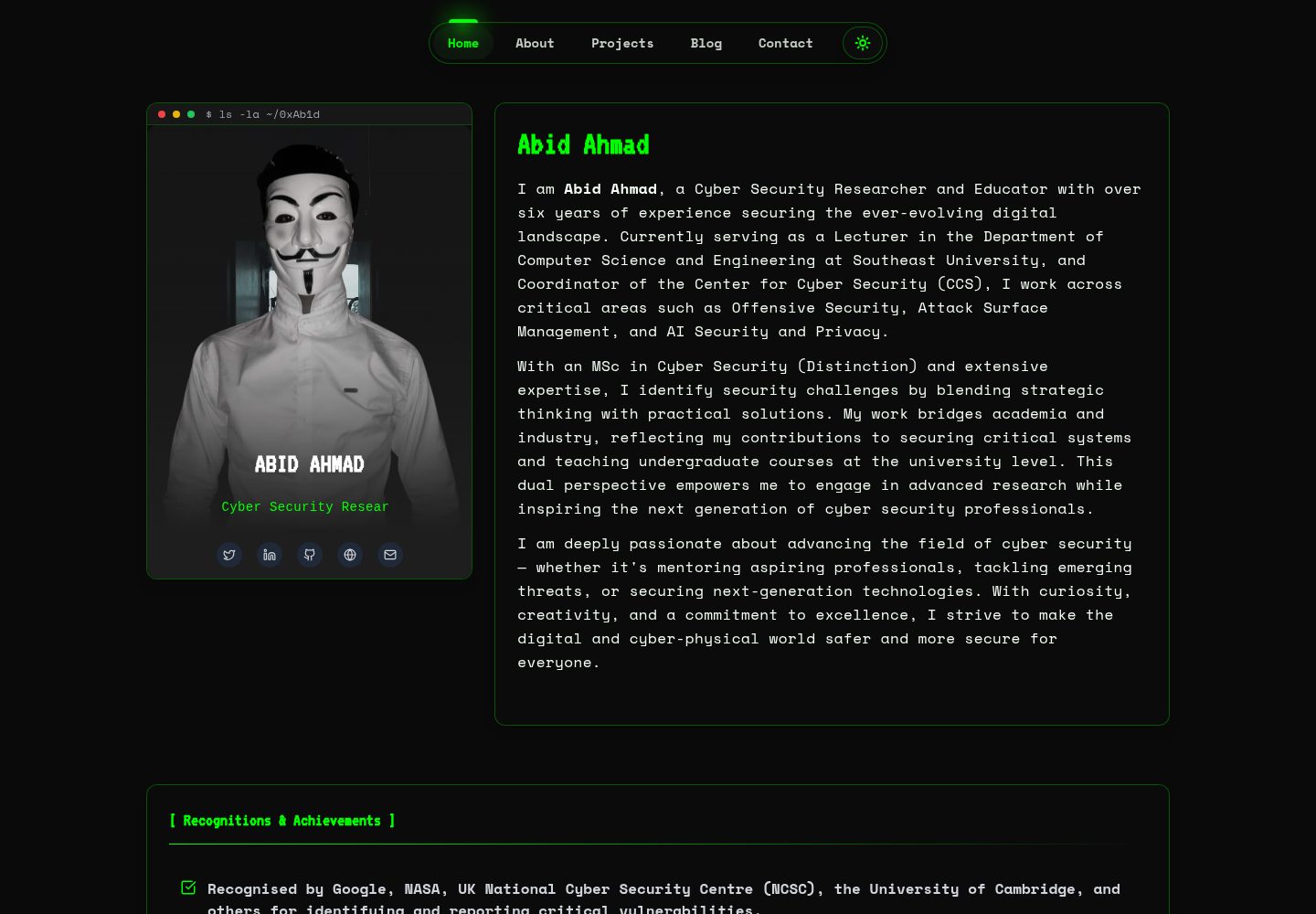
HackFolio
HackFolio is a hacker-style personal portfolio template for ethical hackers, penetration testers, bug bounty hunters, red teamers, and cybersecurity professionals.
Vite · Portfolio