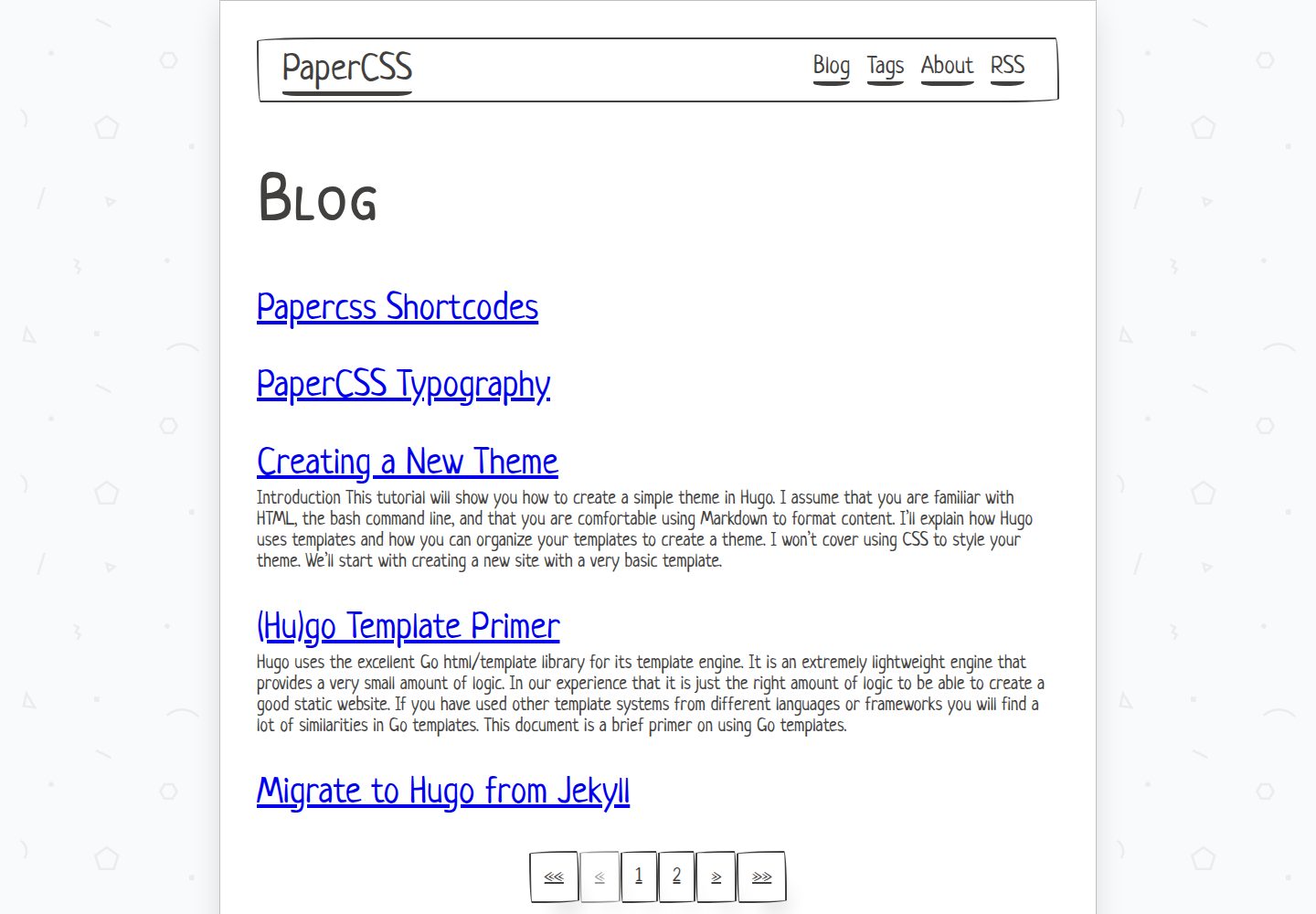
Built with PaperCSS, presenting an informal hand-drawn, paper-textured visual style
HugoPortfolioStarter
portfolio-papercss-hugo-theme — Hugo Portfolio Template
By fu4303
A portfolio and blog theme built on Hugo and PaperCSS, featuring a hand-drawn paper aesthetic, with support for shortcodes, a table of contents, and summary toggles.
Explore the design
Compare the page layouts and mobile experience. Open any screenshot for a closer look.
Desktop homepage1 / 3
Desktop captureTop of page
Actual screenshot captured by the server browser.
All pages & views 3
Screenshots show visual appearance; interactive behavior may differ.
Recorded 2026-10-05View source
What stands out
A quick read of the recorded project description.
Covers both portfolio and blog content, with the homepage listing posts and showing summaries
Automatically generates a table of contents when an article has two or more second-level headings, which can be disabled with toc: false
Homepage summaries can be disabled per post with show_summary: false
Includes a set of shortcodes, with the full list on the demo site's papercss-shortcodes page
Requires Hugo 0.81.0 or later and is installed and updated via git submodule
Template Details
This is a Hugo theme built with PaperCSS, which its author describes as a "less formal" CSS framework, giving the overall look a hand-drawn, paper-like feel. The theme covers both portfolio and blog content types: the homepage lists blog posts with each post's summary, and article pages automatically generate a table of contents when they contain two or more second-level headings.
The theme requires Hugo 0.81.0 or later and is installed into the site's themes directory via git submodule; updates use git submodule update --remote --merge. Configuration is copied from config.yaml in exampleSite and then modified; the example site can be started under themes/papercss-hugo-theme/exampleSite with hugo server --themesDir ../...
At the content level, several toggles are available: setting toc to false in front matter disables the automatic table of contents for a given blog post, and setting show_summary to false keeps that post's summary out of the homepage list. The theme also includes a set of shortcodes, with the full list on the demo site's papercss-shortcodes page. Icons must be generated separately with RealFaviconGenerator and placed in the static directory.
The repository uses the MIT license, so this version's code may be used, modified, used commercially, and distributed for free; when distributing, the copyright notice and license notice must be retained. Third-party assets such as demo images, fonts, and icons must be checked separately for licensing.
HugoPortfolioStarter
Is it right for your project?
Use Cases
- Building an article-based personal portfolio site with a blog using Hugo
- Display pages that need a hand-drawn, paper style rather than a generic corporate look
- Wanting articles to generate a table of contents automatically and to control summary display per post
- Needing shortcodes to organize the various content blocks shown on the demo site
Suitable For
- Users familiar with basic Hugo concepts who can edit config.yaml and front matter
- Personal sites that accept the PaperCSS hand-drawn style and do not seek a conventional business look
- Projects whose main content type is blog posts and that also need portfolio pages
Getting started & customization
Use these recorded setup notes alongside the repository instructions for your chosen version.
- 1
Hugo version must be 0.81.0 or later; install the corresponding binary locally first
- 2
Run git submodule add https://github.com/zwbetz-gh/papercss-hugo-theme.git themes/papercss-hugo-theme in the site root to complete installation
- 3
Copy config.yaml from exampleSite to the site and modify as needed
- 4
Run hugo server --themesDir ../.. under themes/papercss-hugo-theme/exampleSite to preview the example site
- 5
The favicon must be generated separately and placed in the static directory; third-party assets such as demo images, fonts, and icons must be checked separately for licensing
License & source material
Usage conditions & limitations
Free to use · keep license noticeThis entry covers the free version under the MIT license in the public repository; the free scope is this version's code and does not mean external services or third-party assets are free.
Must comply with when using
- This version's code may be used, modified, used commercially, and distributed for free.
- When distributing copies or substantial portions of the code, retain the original author's copyright notice and the full MIT license notice.
- The code is provided as is; warranties and limitations of liability are governed by the original license and applicable law.
Additional costs & items to verify
- Demo images, fonts, icons, and other third-party assets must be checked under their respective licenses and cannot be judged solely by the code's MIT license.
- External services such as domains, hosting, databases, payments, or AI may incur separate charges.
- Using this theme requires Hugo 0.81.0 or later installed locally; lower versions cannot build the site properly.
- Installation is done by cloning the theme into the site's themes directory via git submodule, which requires a git environment and keeping the submodule in sync.
- The favicon must be generated with the external service RealFaviconGenerator and the generated files placed in the static directory, which is an external tool dependency.
- For issues not covered by the documentation, the official guidance is to ask on the Hugo forum rather than the project providing its own support channel.
View Original Text Basis
Permission is hereby granted, free of charge
Original License Text
Hugo version `0.81.0` or higher is required.
Original README
git submodule add https://github.com/zwbetz-gh/papercss-hugo-theme.git themes/papercss-hugo-theme
Original README
Upload your image to [RealFaviconGenerator](https://realfavicongenerator.net/) then copy-paste the generated favicon files under `static`.
Original README
https://github.com/fu4303/portfolio-papercss-hugo-theme/blob/master/LICENSEhttps://github.com/fu4303/portfolio-papercss-hugo-theme/blob/master/README.mdthen visit the [Hugo forum](https://discourse.gohugo.io/).
Original README
Compiled by DeepSeek based on repository license and README ·2026-10-05. Results only cover the materials read; dependencies, images, fonts, and subsequent term changes are subject to their respective original texts.
Project checks & description sources
Template Information
- Source platforms
- GitHub
- Documentation and maintenance reference score
- Partly documented · 70 / 100
- Technologies
- Hugo
- Website type
- Portfolio · Starter
How this score is calculated
Our heuristic uses license records (up to 30), a demo link (12), a preview (10), stars (15), recorded maintenance (15), description completeness (8), feature records (5) and classification data (5). It is not a code, security or performance test, or a Google score. A link does not establish tested functionality.
What to verify for this project
- Repository update recorded
- 2021-07-21
- Screenshot last checked
- 2026-10-05
A demo link is listed. Check it with your own content and viewport sizes; its presence does not confirm that forms, authentication or payments work.
The catalog identifies Hugo as the primary stack. Check the actual dependency manifest and lockfile for versions and hosting requirements. These notes use recorded metadata, not a code audit or a deployment test.
Use a selection guide →How this description was prepared
AI-assisted description based on catalog records and repository material. Repository authors are not automatically the reviewers of this description.
Review declaration: [email protected] · 2026-10-06
Inspect the recorded source material
SHA-256: dd9ff6f95ac3d28b4d53c1f9b99800682c70ea16db837a23cffab4feb91f21dc
2026-10-05T18:07:42.696Z
Source file / repository# PaperCSS [](https://app.netlify.com/sites/papercss-hugo-theme/deploys) A Hugo theme made with PaperCSS, the less formal CSS framework. ## Table of contents - [Demo](#demo) - [Minimum Hugo version](#minimum-hugo-version) - [Installation](#installation) - [Updating](#updating) - [Run example site](#run-example-site) - [Configuration](#configuration) - [Favicons](#favicons) - [Shortcodes](#shortcodes) - [Disable toc for a blog post](#disable-toc-for-a-blog-post) - [Disable summary for a blog post](#disable-summary-for-a-blog-post) - [Getting help](#getting-help) - [Credits](#credits) ## Demo https://papercss-hugo-theme.netlify.com/ ## Minimum Hugo version Hugo version `0.81.0` or higher is required. View the [Hugo releases](https://github.com/gohugoio/hugo/releases) and download the binary for your OS. ## Installation From the root of your site: ``` git submodule add https://github.com/zwbetz-gh/papercss-hugo-theme.git themes/papercss-hugo-theme ``` ## Updating From the root of your site: ``` git submodule update --remote --merge ``` ## Run example site From the root of `themes/papercss-hugo-theme/exampleSite`: ``` hugo server --themesDir ../.. ``` ## Configuration Copy `config.yaml` from the [`exampleSite`](https://github.com/zwbetz-gh/papercss-hugo-theme/tree/master/exampleSite), then edit as desired. ## Favicons Upload your image to [RealFaviconGenerator](https://realfavicongenerator.net/) then copy-paste the generated favicon files under `static`. ## Shortcodes See the [full list of supported shortcodes](https://papercss-hugo-theme.netlify.com/papercss-shortcodes/). ## Disable toc for a blog post Blog posts that have two or more subheadings (`<h2>`s) automatically get a table of contents. To disable this set `toc` to `false`. For example: ``` --- title: "My page with a few headings" toc: false --- ``` ## Disable summary for a blog post The homepage blog post listing shows a summary for each post. To disable this for an individual post set `show_summary` to `false`. For example: ``` --- title: "My page with some stellar content" show_summary: false --- ``` ## Getting help If you run into an issue that isn't answered by this documentation or the [`exampleSite`](https://github.com/zwbetz-gh/papercss-hugo-theme/tree/master/exampleSite), then visit the [Hugo forum](https://discourse.gohugo.io/). The folks there are helpful and friendly. **Before** asking your question, be sure to read the [requesting help guidelines](https://discourse.gohugo.io/t/requesting-help/9132). ## Credits Thank you to [Rhyne Vlaservich](https://www.vlaservich.com/) for creating [PaperCSS](https://www.getpapercss.com/), and all the [contributors](https://github.com/papercss/papercss/graphs/contributors).
Explore similar templates
Compare previews and descriptions within the same stack and category.

hugo-PaperMod
A fast, clean, responsive Hugo theme for blogs and lightweight portfolios, with three layout modes (Regular, Home-Info, Profile), automatic and manual light/dark themes, Fuse.js client-side search, multilingual support, and built-in Open Graph, Twitter Cards, and Schema.org data.
Hugo · Portfolio

Congo
Congo is a minimal Hugo content theme built on Tailwind CSS 3.0, designed for blogs, portfolios, and lightweight content sites. It offers multiple homepage layouts, customizable dark mode, multilingual support including RTL, and built-in client-side search, Mermaid, Chart.js, and KaTeX.
Hugo · Blog

toha
Toha is a Hugo theme for personal portfolios, featuring a minimalist, responsive design with configurable homepage sections such as about, experience timeline, and achievements gallery.
Hugo · Portfolio

hugo-profile
hugo-profile is a mobile-first Hugo theme for personal portfolios and blogs, with multilingual support, light/dark themes, categories and tags, Google Analytics, Disqus comments, and Formspree contact forms.
Hugo · Portfolio

hugo-xmin
hugo-xmin is an extremely minimal Hugo theme written by Yihui Xie for template beginners. HTML and CSS total about 140 lines, with no external dependencies, and it uses the MIT license.
Hugo · Starter

hugo-theme-gallery
A Hugo Extended photo gallery theme that organizes images with Page Bundles, automatically generating album lists and gallery pages with a Justified layout and PhotoSwipe lightbox.
Hugo · Starter