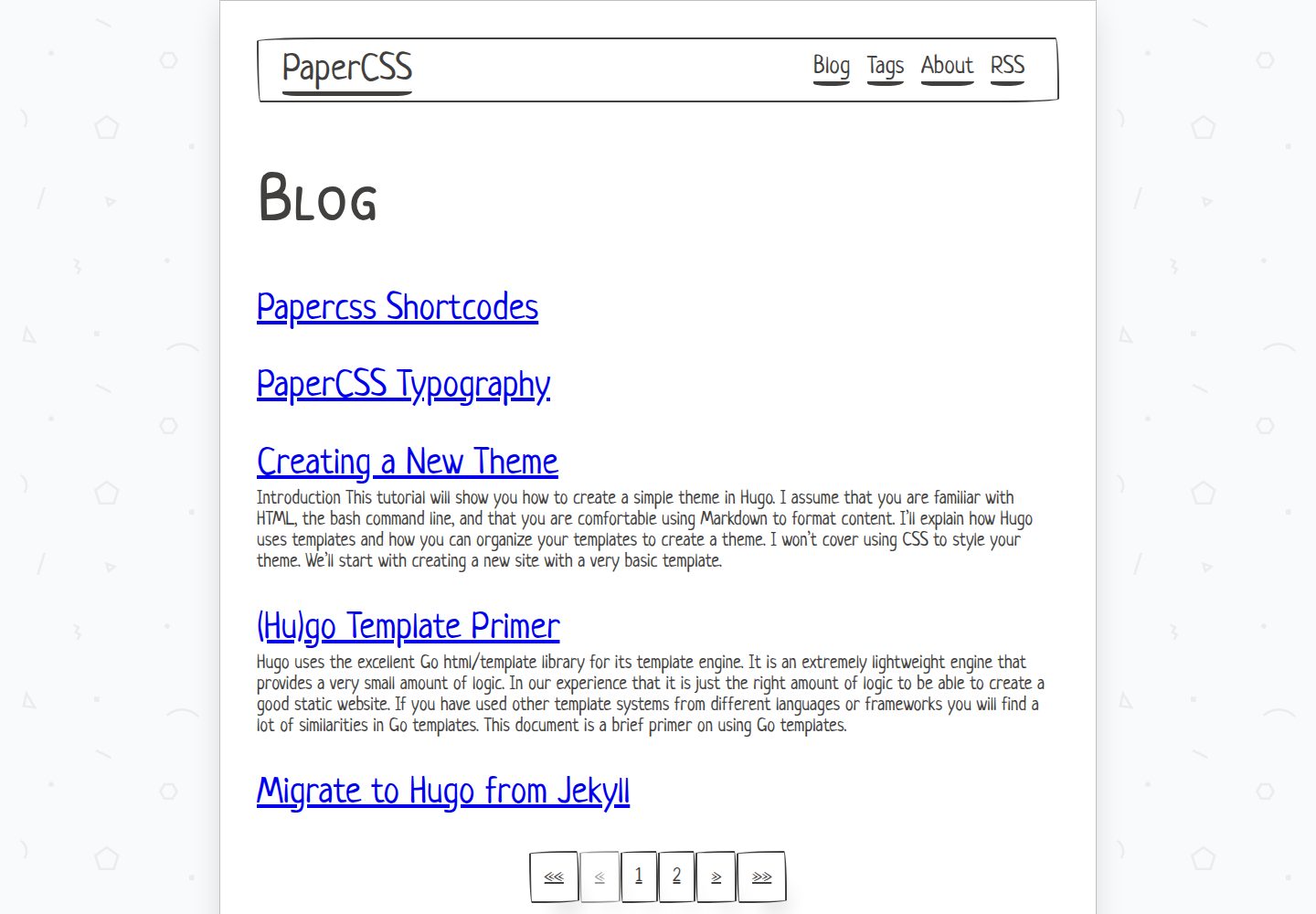
使用 PaperCSS 构建,呈现手绘、纸张质感的不正式视觉风格
Hugo作品集启动器
portfolio-papercss-hugo-theme — Hugo 作品集模板
作者 fu4303
基于 Hugo 与 PaperCSS 的作品集与博客主题,采用手绘纸张风格,支持短代码、目录与摘要开关。
看看你的网站会是什么样
浏览真实页面截图,比较内容排版与手机效果。点击下方缩略图切换,放大查看整页细节。
全部页面与视图 3
截图用于了解视觉与布局,交互效果请以实际项目为准。
采集于 2026-10-05查看来源
值得关注的模板亮点
从已有项目资料中,快速了解它的特点。
同时覆盖作品集与博客内容,首页列出文章并显示摘要
文章含两个及以上二级标题时自动生成目录,可用 toc: false 关闭
首页摘要可按文章用 show_summary: false 单独关闭
内置一组短代码,完整列表见演示站点的 papercss-shortcodes 页面
要求 Hugo 0.81.0 或更高版本,通过 git submodule 安装与更新
模板详细介绍
这是一个用 PaperCSS 构建的 Hugo 主题,PaperCSS 被其作者描述为「不那么正式」的 CSS 框架,因此整体视觉偏向手绘、纸张质感。主题同时具备作品集与博客两类内容形态:首页提供博客文章列表并显示每篇摘要,文章页在包含两个及以上二级标题时自动生成目录。
主题要求 Hugo 0.81.0 或更高版本,通过 git submodule 方式安装到站点的 themes 目录,更新时使用 git submodule update --remote --merge。配置从 exampleSite 中的 config.yaml 复制后修改,示例站点可在 themes/papercss-hugo-theme/exampleSite 下用 hugo server --themesDir ../.. 启动。
内容层面提供若干可调开关:在 front matter 中把 toc 设为 false 可关闭某篇博客的自动目录,把 show_summary 设为 false 可让该文章不出现在首页列表的摘要中。主题还内置一组短代码,完整列表见演示站点的 papercss-shortcodes 页面。图标需自行用 RealFaviconGenerator 生成后放入 static 目录。
仓库采用 MIT 许可,可免费使用、修改、商用与分发该版本代码,分发时需保留版权声明与许可声明;演示图片、字体、图标等第三方素材需单独核对许可。
Hugo作品集启动器
适合你的项目吗?
适用场景
- 用 Hugo 搭建带博客的文章型个人作品集站点
- 需要手绘、纸张风格而非通用企业风的展示页面
- 希望文章自动生成目录、并可按篇控制摘要显示
- 需要短代码来组织演示站点中展示的各类内容块
适合人群
- 熟悉 Hugo 基本概念、能编辑 config.yaml 与 front matter 的使用者
- 接受 PaperCSS 手绘风格、不追求常规商务视觉的个人站点
- 以博客文章为主要内容形态、同时需要作品集页面的项目
上手与定制指南
结合仓库当前版本的说明,按下面的资料检查内容、配置与运行要求。
- 1
Hugo 版本需为 0.81.0 或更高,先在本地安装对应二进制
- 2
在站点根目录执行 git submodule add https://github.com/zwbetz-gh/papercss-hugo-theme.git themes/papercss-hugo-theme 完成安装
- 3
复制 exampleSite 中的 config.yaml 到站点并按需修改
- 4
在 themes/papercss-hugo-theme/exampleSite 下运行 hugo server --themesDir ../.. 可预览示例站点
- 5
favicon 需自行生成后放入 static 目录;演示图片、字体、图标等第三方素材需单独核对许可
授权与来源资料
使用条件与限制
免费使用 · 保留许可声明本次收录的是公开仓库中采用 MIT 许可的免费版本;免费范围为该版本代码,不代表外部服务或第三方素材免费。
使用时需要遵守
- 允许免费使用、修改、商用和分发该版本代码。
- 分发代码副本或实质性部分时,保留原作者版权声明和完整 MIT 许可声明。
- 代码按现状提供;担保与责任限制以原许可证及适用法律为准。
额外费用与待核对事项
- 演示图片、字体、图标及其他第三方素材需按各自许可核对,不能仅凭代码的 MIT 许可判断。
- 域名、托管、数据库、支付或 AI 等外部服务可能另外收费。
- 使用该主题要求本地安装 Hugo 0.81.0 或更高版本,低于此版本无法正常构建站点。
- 安装方式为通过 git submodule 将主题克隆到站点的 themes 目录,需具备 git 环境并保持子模块同步。
- favicon 需借助外部服务 RealFaviconGenerator 生成,再把生成文件放入 static 目录,属于外部工具依赖。
- 遇到文档未覆盖的问题时,官方指引是前往 Hugo 论坛求助,而非项目自身提供支持渠道。
查看原文依据
Permission is hereby granted, free of charge
许可证原文
Hugo version `0.81.0` or higher is required.
README 原文
git submodule add https://github.com/zwbetz-gh/papercss-hugo-theme.git themes/papercss-hugo-theme
README 原文
Upload your image to [RealFaviconGenerator](https://realfavicongenerator.net/) then copy-paste the generated favicon files under `static`.
README 原文
https://github.com/fu4303/portfolio-papercss-hugo-theme/blob/master/LICENSEhttps://github.com/fu4303/portfolio-papercss-hugo-theme/blob/master/README.mdthen visit the [Hugo forum](https://discourse.gohugo.io/).
README 原文
DeepSeek 根据仓库许可证和 README 整理 ·2026-10-05。结果仅覆盖已读取资料,依赖、图片、字体及后续条款变更以各自原文为准。
项目核对记录与介绍依据
模板资料
- 来源平台
- GitHub
- 资料与维护参考分
- 资料一般 · 70 / 100
- 技术栈
- Hugo
- 网站类型
- 作品集 · 启动器
这个分数如何计算
本站按许可资料(最高30分)、演示链接(12分)、预览图(10分)、Star数(15分)、记录的维护时间(15分)、描述完整度(8分)、功能记录(5分)和分类资料(5分)计算。它不是代码、安全或性能测试,也不是 Google 评分;有链接不代表已实测可用。
这个项目需要核对什么
- 记录的仓库更新时间
- 2021-07-21
- 截图检查日期
- 2026-10-05
已收录演示链接。请用你的内容与屏幕尺寸检查;有演示不代表表单、认证或支付已经可用。
目录记录的主要技术栈是 Hugo。请通过依赖清单和锁文件核对实际版本与托管要求。这些说明基于收录资料,不代表代码审计或部署实测。
查看具体选型方法 →介绍的制作与核对状态
介绍由 AI 辅助整理目录与仓库资料。仓库作者不等于这篇介绍的审核者。
审核声明: [email protected] · 2026-10-06
查看当时使用的来源资料
SHA-256: dd9ff6f95ac3d28b4d53c1f9b99800682c70ea16db837a23cffab4feb91f21dc
2026-10-05T18:07:42.696Z
来源文件 / 仓库# PaperCSS [](https://app.netlify.com/sites/papercss-hugo-theme/deploys) A Hugo theme made with PaperCSS, the less formal CSS framework. ## Table of contents - [Demo](#demo) - [Minimum Hugo version](#minimum-hugo-version) - [Installation](#installation) - [Updating](#updating) - [Run example site](#run-example-site) - [Configuration](#configuration) - [Favicons](#favicons) - [Shortcodes](#shortcodes) - [Disable toc for a blog post](#disable-toc-for-a-blog-post) - [Disable summary for a blog post](#disable-summary-for-a-blog-post) - [Getting help](#getting-help) - [Credits](#credits) ## Demo https://papercss-hugo-theme.netlify.com/ ## Minimum Hugo version Hugo version `0.81.0` or higher is required. View the [Hugo releases](https://github.com/gohugoio/hugo/releases) and download the binary for your OS. ## Installation From the root of your site: ``` git submodule add https://github.com/zwbetz-gh/papercss-hugo-theme.git themes/papercss-hugo-theme ``` ## Updating From the root of your site: ``` git submodule update --remote --merge ``` ## Run example site From the root of `themes/papercss-hugo-theme/exampleSite`: ``` hugo server --themesDir ../.. ``` ## Configuration Copy `config.yaml` from the [`exampleSite`](https://github.com/zwbetz-gh/papercss-hugo-theme/tree/master/exampleSite), then edit as desired. ## Favicons Upload your image to [RealFaviconGenerator](https://realfavicongenerator.net/) then copy-paste the generated favicon files under `static`. ## Shortcodes See the [full list of supported shortcodes](https://papercss-hugo-theme.netlify.com/papercss-shortcodes/). ## Disable toc for a blog post Blog posts that have two or more subheadings (`<h2>`s) automatically get a table of contents. To disable this set `toc` to `false`. For example: ``` --- title: "My page with a few headings" toc: false --- ``` ## Disable summary for a blog post The homepage blog post listing shows a summary for each post. To disable this for an individual post set `show_summary` to `false`. For example: ``` --- title: "My page with some stellar content" show_summary: false --- ``` ## Getting help If you run into an issue that isn't answered by this documentation or the [`exampleSite`](https://github.com/zwbetz-gh/papercss-hugo-theme/tree/master/exampleSite), then visit the [Hugo forum](https://discourse.gohugo.io/). The folks there are helpful and friendly. **Before** asking your question, be sure to read the [requesting help guidelines](https://discourse.gohugo.io/t/requesting-help/9132). ## Credits Thank you to [Rhyne Vlaservich](https://www.vlaservich.com/) for creating [PaperCSS](https://www.getpapercss.com/), and all the [contributors](https://github.com/papercss/papercss/graphs/contributors).
看看同类模板
对比同技术栈与用途的模板,找到更适合的视觉与内容结构。

hugo-PaperMod
PaperMod 是 Hugo 生态里知名度较高的主题之一,定位很明确:给博客和轻量作品集站点提供一套干净、响应式的阅读界面。
Hugo · 作品集

Congo
Congo 是一款为 Hugo 设计的现代内容主题,核心定位是让内容本身成为页面焦点。 它基于 Tailwind CSS 3.0 构建,整体布局完全响应式,视觉风格干净且克制,没有多余装饰。
Hugo · 博客

toha
Toha 是一款面向个人作品集场景的 Hugo 主题,以极简设计和响应式布局为核心,适合用来搭建个人主页、作品展示或技术博客。
Hugo · 作品集

hugo-profile
A highly customizable and mobile first Hugo template for personal portfolio and blog.
Hugo · 作品集

hugo-xmin
eXtremely Minimal Hugo theme: about 140 lines of code in total, including HTML and CSS (with no dependencies)
Hugo · 启动器

hugo-theme-gallery
Gallery Theme for Hugo
Hugo · 启动器