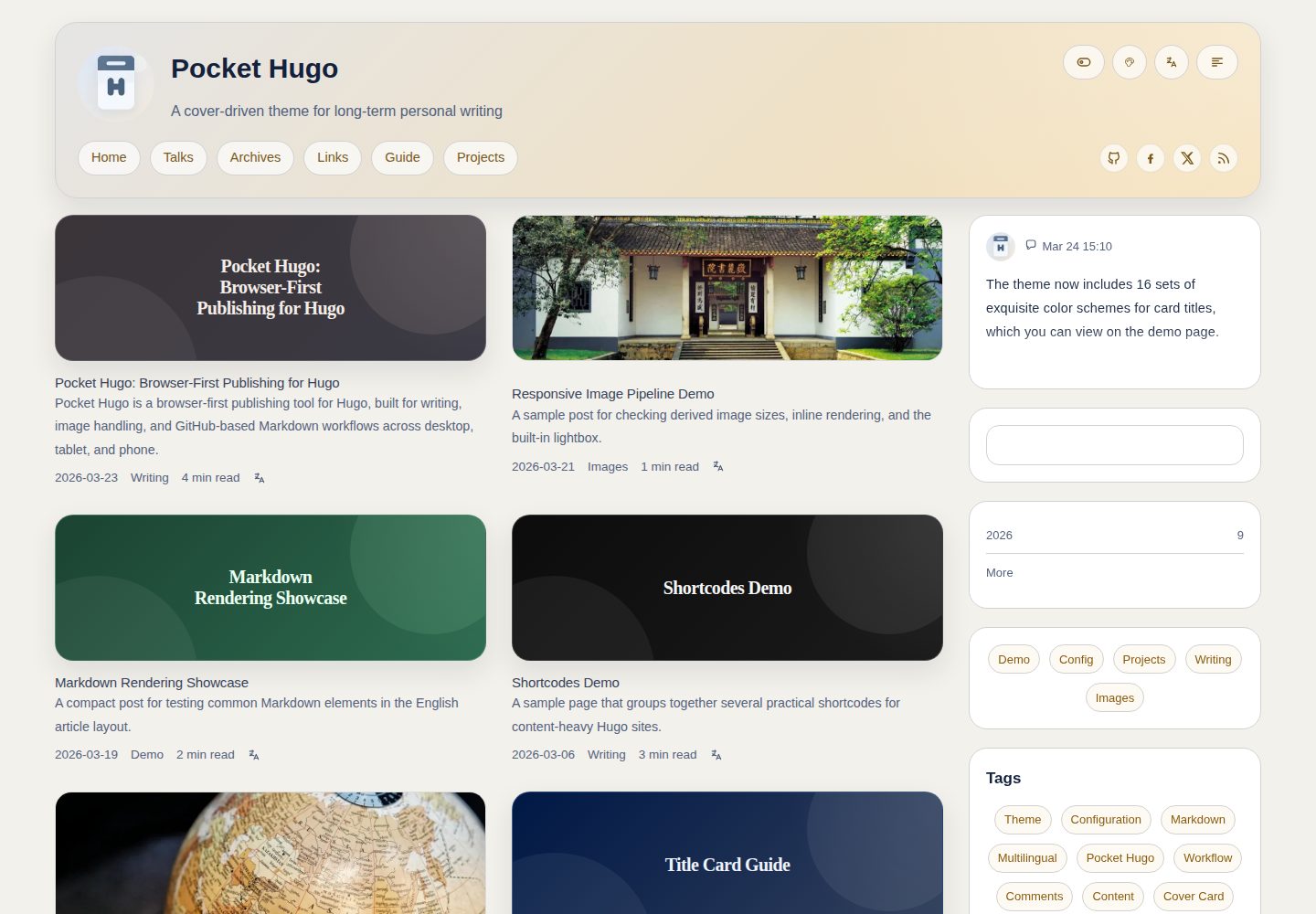
Multilingual publishing: supports translation links, canonical and hreflang metadata
HugoStarter
pocket-hugo-theme — Hugo Starter Template
By h2dcc
Pocket Hugo Theme is a Hugo theme for multilingual personal blogs, emphasizing content-first typography, suitable for long-form articles, essays, social notes, and talk records.
Explore the design
Compare the page layouts and mobile experience. Open any screenshot for a closer look.
Desktop homepage1 / 3
Desktop captureTop of page
Actual screenshot captured by the server browser.
All pages & views 3
Screenshots show visual appearance; interactive behavior may differ.
Recorded 2026-10-03View source
What stands out
A quick read of the recorded project description.
Cover-first card layout: homepage, categories, and article pages are designed around cover images
Local search: optional inclusion of full text in the index
Talks page and feed output: includes homepage widget and independent RSS / JSON output
Optional comments: supports Giscus or Twikoo
Multiple built-in color schemes with visitor-side switching, and list width options for single or two columns
Template Details
Pocket Hugo Theme is developed by h2dcc, licensed under MIT, and built on Hugo Extended. The theme takes a "calm, content-first" design approach, suitable for personal blogs, bilingual articles, social notes, and long-form writing. It can be used with Pocket Hugo or as a standalone Hugo theme.
In terms of features, the theme provides multilingual publishing support, including translation links, canonical and hreflang metadata; cover-first card layouts for the homepage, categories, and article pages; built-in local search with optional full-text indexing; a talks page and homepage widget, with independent RSS / JSON output; a friend links shortcode supporting local or remote images; optional comments via Giscus or Twikoo. Additionally, there are configurable widget title visibility, article summaries, backlinks, table of contents, reading time, and a back-to-top button, multiple built-in color schemes with visitor-side color switching, list width presets (single-column / two-column), as well as inline image height strategies and theme-aware image brightness settings. The repository includes an example site covering multilingual pages, shortcodes, content adapters, talks feeds, and image settings.
Usage limitations: The theme requires Hugo Extended >= 0.149.0, with development and testing environments on 0.157.x and 0.158.x. The free scope is limited to the MIT-licensed version of the code; demo images, fonts, icons, and other third-party assets must be checked against their respective licenses, and external services such as domains and hosting may incur additional charges.
HugoLauncher
Is it right for your project?
Use Cases
- Building a multilingual personal blog to publish bilingual articles and long-form writing
- Recording social notes, link sharing, and lightweight updates
- Organizing talks and event records and outputting independent feeds
- Configuring reading aids such as cover cards, table of contents, reading time, and back-to-top for personal sites
Suitable For
- Developers or writers using Hugo Extended who want to quickly start a personal blog
- Personal sites requiring multilingual publishing and translation links
- Long-form writers who prefer cover-driven, content-first typography
- Sites looking to replace third-party search services with local search
Getting started & customization
Use these recorded setup notes alongside the repository instructions for your chosen version.
- 1
Requires Hugo Extended >= 0.149.0; development and testing environments are 0.157.x and 0.158.x
- 2
Add the theme to themes/pocket-hugo-theme via git submodule, and set theme = "pocket-hugo-theme" in the site configuration
- 3
Run hugo server --source exampleSite --themesDir ../.. to preview the example site locally
- 4
The repository provides example configurations with English and Chinese comments, as well as a Chinese documentation file README.zh-CN.md
- 5
Demo images, fonts, icons, and other third-party assets must be checked separately against their respective licenses
License & source material
Usage conditions & limitations
Free to use · keep license noticeThis entry covers the free version under the MIT license in the public repository; the free scope is limited to that version of the code and does not imply that external services or third-party assets are free.
Must comply with when using
- Free use, modification, commercial use, and distribution of this version of the code are permitted.
- When distributing copies or substantial portions of the code, retain the original author's copyright notice and the full MIT license notice.
- The code is provided as is; warranties and limitations of liability are governed by the original license and applicable law.
Additional costs & items to verify
- Using this theme requires Hugo Extended 0.149.0 or higher; standard Hugo is not supported.
- Development and testing environments are Hugo Extended 0.157.x and 0.158.x; other versions are not verified.
- Comment functionality is optional; enabling Giscus or Twikoo depends on the corresponding third-party comment services.
- Using Twikoo comments requires deploying the service yourself and providing the envId address.
- If custom font extension points reference remote resources such as Google Fonts, you are responsible for the external service dependency.
- The theme is optimized for personal publishing scenarios and is not suitable for large portal-style homepages.
- Demo images, fonts, icons, and other third-party assets must be checked against their respective licenses; they cannot be judged solely by the code's MIT license.
- External services such as domains, hosting, databases, payments, or AI may incur additional charges.
View Original Text Basis
Permission is hereby granted, free of charge
Original License Text
Hugo Extended `>= 0.149.0`
Original README
Development and testing environment: Hugo Extended `0.157.x` and `0.158.x`
Original README
Optional Giscus or Twikoo comments
Original README
# envId = "https://your-service.example.com"
Original README
for remote font links such as Google Fonts or self-hosted font loaders
Original README
https://github.com/h2dcc/pocket-hugo-theme/blob/master/LICENSEhttps://github.com/h2dcc/pocket-hugo-theme/blob/master/README.mdThe theme is optimized for personal publishing rather than large portal homepages.
Original README
Compiled by DeepSeek based on repository license and README ·2026-10-03. Results only cover the materials read; dependencies, images, fonts, and subsequent term changes are subject to their respective original texts.
Project checks & description sources
Template Information
- Source platforms
- Hugo Themes
- Documentation and maintenance reference score
- More documented · 83 / 100
- Technologies
- Hugo
- Website type
- Starter
How this score is calculated
Our heuristic uses license records (up to 30), a demo link (12), a preview (10), stars (15), recorded maintenance (15), description completeness (8), feature records (5) and classification data (5). It is not a code, security or performance test, or a Google score. A link does not establish tested functionality.
What to verify for this project
- Repository update recorded
- 2026-08-27
- Screenshot last checked
- 2026-10-03
A demo link is listed. Check it with your own content and viewport sizes; its presence does not confirm that forms, authentication or payments work.
The catalog identifies Hugo as the primary stack. Check the actual dependency manifest and lockfile for versions and hosting requirements. These notes use recorded metadata, not a code audit or a deployment test.
Use a selection guide →How this description was prepared
AI-assisted description based on catalog records and repository material. Repository authors are not automatically the reviewers of this description.
Review declaration: [email protected] · 2026-10-04
Inspect the recorded source material
SHA-256: bf3aa0eb904828f408aeee6d1de2d0009f47030ed13ae1e7ff700c4bb5961561
2026-10-03T13:44:33.150Z
Source file / repository# Pocket Hugo Theme
A calm, content-first Hugo theme for multilingual blogs, long-form writing, talks, links, and cover-driven reading.
`pocket-hugo-theme` is designed to pair naturally with [Pocket Hugo](https://github.com/h2dcc/pocket-hugo), but it also works as a standalone Hugo theme for personal sites that value readable typography, lightweight publishing, and flexible theme configuration.
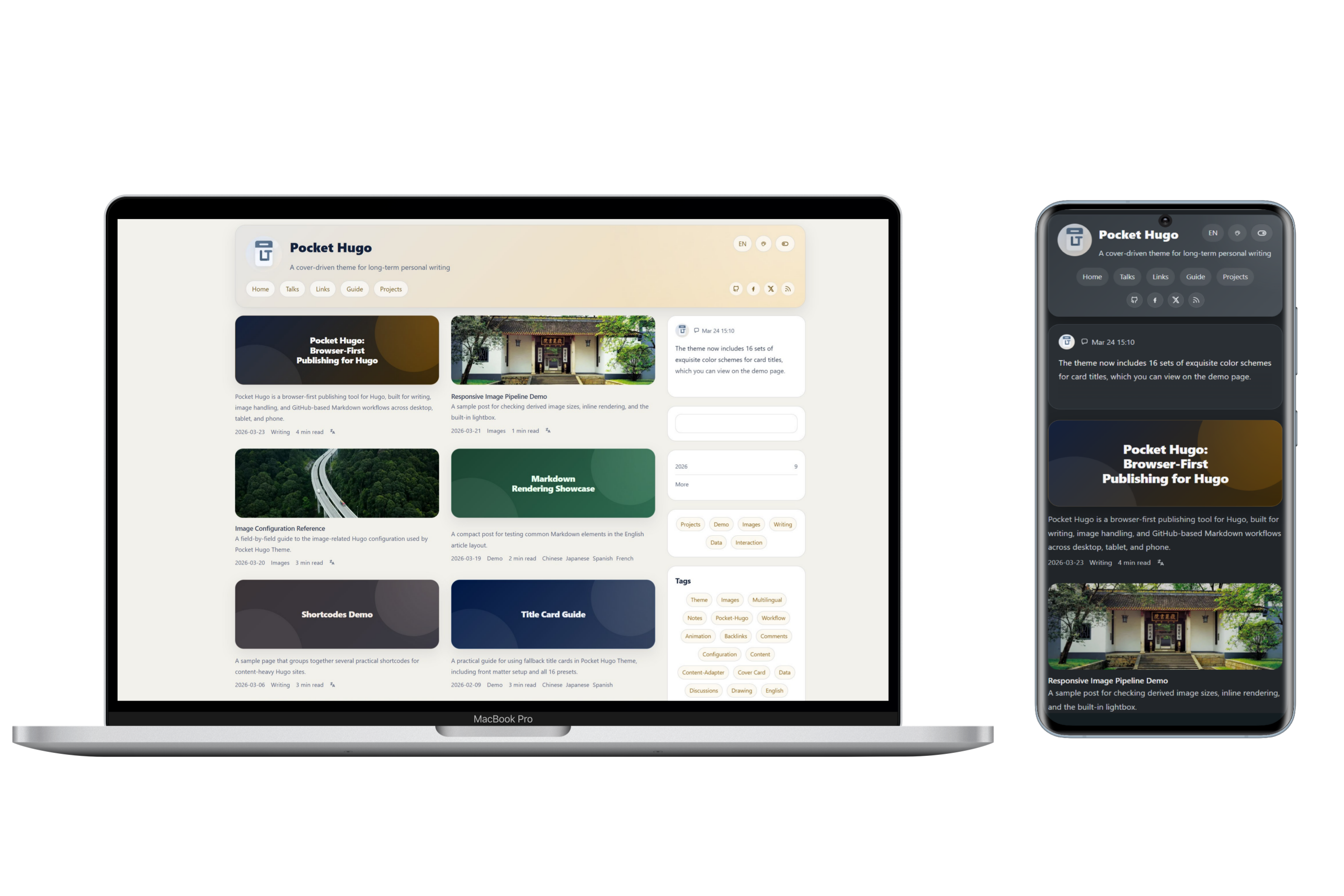
## Features
- Multilingual publishing with translation links, canonical handling, and `hreflang` metadata
- Cover-first article cards with homepage, taxonomy, and article layouts tuned for personal blogs
- Local search with optional full-text indexing
- Talks page with homepage widget support and standalone RSS / JSON outputs
- Friend links shortcode with local or remote images
- Optional Giscus or Twikoo comments
- Configurable widget title visibility, article summaries, backlinks, TOC, reading time, and back-to-top button
- Multiple built-in color palettes plus optional visitor-side palette switching
- Configurable list width presets for single-column and double-column homepage/list layouts
- Configurable inline image height strategy and theme-aware image brightness settings
- Example site covering multilingual pages, shortcodes, content adapters, talks feeds, and image settings
## Requirements
- Hugo Extended `>= 0.149.0`
- Development and testing environment: Hugo Extended `0.157.x` and `0.158.x`
## Installation
```bash
git submodule add https://github.com/h2dcc/pocket-hugo-theme.git themes/pocket-hugo-theme
```
```toml
theme = "pocket-hugo-theme"
```
## Quick Start
Run the bundled example site locally:
```bash
hugo server --source exampleSite --themesDir ../..
```
The repository includes:
- `exampleSite/hugo.toml`: English-commented example configuration
- `exampleSite/hugo.zh-cn.toml`: Chinese-commented example configuration
- `README.zh-CN.md`: Chinese introduction and configuration notes
## Core Configuration
A typical site-level setup may look like this:
```toml
[params]
favicon = "/img/logo-default.svg"
appleTouchIcon = "/img/avatar.webp"
summaryLength = 0
articleWords = false
backToTop = false
viewTransitions = false
[params.search]
provider = "local"
fullText = false
[params.article]
showSummary = true
backlinks = true
backlinksLimit = 5
toc = true
readingTime = true
[params.layout]
listMode = "double"
[params.colorScheme]
toggle = true
default = "auto"
preset = "morandi-mist"
showPicker = true
```
## Layout Options
`[params.layout]`
- `listMode = "double"`
- Use the wider homepage/list layout (`1320px`) and enable the double-column list presentation on large screens.
- `listMode = "single"`
- Use the more compact homepage/list layout (`1080px`) for a calmer single-column reading rhythm.
## Built-in Color Palettes
`[params.colorScheme]`
- `toggle`
- Show or hide the light/dark mode switch in the header.
- `default`
- `auto`, `light`, or `dark`.
- `preset`
- Choose the default palette.
- `showPicker`
- Show or hide the visitor-side palette picker in the header.
Available presets:
- `golden-summer-fields`
- `soft-pastel-shades`
- `black-gold-elegance`
- `fresh-greens`
- `light-steel`
- `deep-sea-blue`
- `morandi-mist`
- `monochrome-core`
Example:
```toml
[params.colorScheme]
toggle = true
default = "auto"
preset = "deep-sea-blue"
showPicker = true
```
## Minimal View (Bear-style)
A minimal, Bear-Blog-like stylesheet (`assets/css/min.css`) is bundled with the theme and can be toggled directly on the page - no rebuild or manual CSS swap required.
`[params.minMode]`
- `enabled`
- Whether to show the "Minimal" toggle button in the header. Defaults to `true`.
- `default`
- Whether the minimal view is enabled on first visit. Defaults to `false` (regular theme).
The visitor's choice is stored in `localStorage` (key `PocketMinMode`) and restored automatically on the next visit. The minimal view borrows the original site's warm cocoa palette and typography: narrow single column, hidden sidebar, title + date post list, dotted-link article content, and the original chroma code palette.
Example:
```toml
[params.minMode]
enabled = true
default = false
```
## Search Options
`[params.search]`
- `provider`
- Currently `local`.
- `fullText`
- `false`: search title, description, slug, categories, and tags only.
- `true`: include full article text in the local search index.
## SEO Options
`[params.seo]`
- `tagline`
- Optional site tagline used by SEO title patterns.
- `homeDescription`
- Homepage meta description used by search engines and social previews.
- `descriptionLength`
- Maximum length used when truncating SEO descriptions.
- `separator`
- Separator string used by title templates.
`[params.seo.title]`
- `home`
- `post`
- `page`
- `group`
- `archive`
Available placeholders:
- `[site_name]`
- `[tagline]`
- `[separator]`
- `[post_title]`
- `[page_title]`
- `[group_title]`
- `[archive_title]`
Example:
```toml
[params.seo]
tagline = "A cover-driven theme for long-term personal writing"
homeDescription = "Pocket Hugo Theme is a multilingual, cover-driven Hugo theme for long-form writing and calm publishing."
descriptionLength = 180
separator = " · "
[params.seo.title]
home = "[site_name]"
post = "[post_title][separator][site_name]"
page = "[page_title][separator][site_name]"
group = "[group_title][separator][site_name]"
archive = "[archive_title][separator][site_name]"
```
## Article List and Summary Options
`[params.article]`
- `showListSummary`
- Control whether article cards render summaries below the title/meta row.
- This affects homepage, archives, taxonomy pages, and other list/card views.
- `showPageDescription`
- Control whether the single article/page view renders `.Description` below the title.
- This is separate from card excerpts.
- `showSummary`
- Legacy alias for `showListSummary`.
- Still supported for compatibility, but new configs should prefer `showListSummary`.
- `backlinks`
- Enable backlinks on article pages.
- `backlinksLimit`
- Limit the number of backlink items shown.
- `toc`
- Enable the article table of contents.
- `readingTime`
- Show reading time metadata.
`[params]`
- `summaryLength`
- Control how long generated list summaries should be.
- `summaryLength = 0` means “do not truncate automatically and show the full summary”, not “hide summaries”.
## Image Settings
### Cover Images
`[params.images.cover]`
- `useFill`
- Whether homepage/list covers should use Hugo `Fill` cropping.
- Set to `false` to preserve the original image instead of generating a cropped cover.
- `cardFill`
- Hugo `Fill` spec for homepage and normal list cards.
- `taxonomyFill`
- Hugo `Fill` spec for taxonomy cards.
- `openGraphVariant`
- Variant used for `og:image` and `twitter:image`.
- Usually `card` for a cropped social image, or `single` for the uncropped article cover.
- `useDefault`
- `listTitle`
- Whether generated gradient cards on homepage, taxonomy, archive, and other list pages show the outer title.
- This site-level switch only affects generated gradient cards, not normal image covers.
- `fallbackMode`
- Fallback cover mode when the current post or page does not define one.
- Use `image` for a normal default image, or `gradient` for a generated title card.
- `openGraphUseDefault`
- When the page has no own image, still use `default` as `og:image` / `twitter:image`.
- `defaultMode`
- Legacy alias kept for backward compatibility.
- `default`
- Local path or remote URL for the fallback cover image when `fallbackMode = "image"`.
Example:
```toml
[params.images.cover]
useFill = true
cardFill = "640x300 Center q85"
taxonomyFill = "640x300 Center q85"
openGraphVariant = "card"
useDefault = true
fallbackMode = "gradient"
openGraphUseDefault = true
default = "/img/default-cover.webp"
```
### Per-page Title Cards
You can force a generated title card from front matter even when the page has an `image`.
Simple form:
```yaml
coverCard: "a"
```
- `a` to `h`: the 8 light presets
- `A` to `H`: the 8 dark presets
- any other value: automatic random preset
When `coverCard` is set, the generated title card takes priority over `image`.
To hide the repeated outer title for a single page:
```yaml
listTitle: false
```
- On list pages, this hides the outer card title.
- On single pages, if the page is using a generated title card, it also hides the separate page title block.
If you do nothing, the theme can still generate a fallback title card automatically when:
- `params.images.cover.useDefault = true`
- `params.images.cover.fallbackMode = "gradient"`
### Inline Content Images
`[params.images.content]`
- `enableMaxHeight`
- Enable or disable max-height control for inline article images.
- `limitHeight`
- When `true`, use one shared height on all breakpoints.
- `unifiedMaxHeight`
- Shared height used when `limitHeight = true`.
- `mobileMaxHeight`
- `tabletMaxHeight`
- `desktopMaxHeight`
- Per-breakpoint max-height values used when `limitHeight = false`.
- `fullWidthFit`
- `object-fit` strategy for full-width inline images, such as `cover` or `contain`.
Example:
```toml
[params.images.content]
enableMaxHeight = true
limitHeight = false
unifiedMaxHeight = "320px"
mobileMaxHeight = "160px"
tabletMaxHeight = "250px"
desktopMaxHeight = "350px"
fullWidthFit = "cover"
```
### Image Brightness by Theme
`[params.images.brightness]`
- `light`
- CSS `brightness()` value for images in light mode.
- `dark`
- CSS `brightness()` value for images in dark mode.
Example:
```toml
[params.images.brightness]
light = "1"
dark = "0.92"
```
### Hugo Image Pipeline
`[params.images.pipeline]`
- `responsive`
- Enable responsive derived images.
- `format`
- Output format such as `webp`.
- `quality`
- Image quality.
- `coverWidths`
- Generated widths for cover images.
- `contentWidths`
- Generated widths for inline content images.
## Comments
The theme supports three optional comment providers:
- `giscus`
- `twikoo`
- `custom`
Example:
```toml
[params.comments]
enabled = false
provider = "giscus"
[params.comments.giscus]
mapping = "pathname"
theme = "preferred_color_scheme"
[params.comments.twikoo]
# envId = "https://your-service.example.com"
```
## Custom Extension Partials
The theme includes three no-op partials you can override in your own site project without editing the theme itself:
- `layouts/partials/custom/fonts.html`
- for remote font links such as Google Fonts or self-hosted font loaders
- `layouts/partials/custom/css.html`
- for loading a custom stylesheet after the theme CSS
- `layouts/partials/custom/comments.html`
- for integrating a custom comment provider when `provider = "custom"`
These are intended as stable extension points for site-specific customization.
Minimal examples:
```html
<!-- layouts/partials/custom/fonts.html -->
<link rel="preconnect" href="https://fonts.googleapis.com">
<link rel="preconnect" href="https://fonts.gstatic.com" crossorigin>
<link href="https://fonts.googleapis.com/css2?family=IBM+Plex+Sans:wght@400;500;700&display=swap" rel="stylesheet">
```
```html
<!-- layouts/partials/custom/css.html -->
<link rel="stylesheet" href="{{ "css/custom.css" | relURL }}">
```
```css
/* static/css/custom.css */
:root {
--content-width: 1180px;
}
```
```toml
[params.comments]
enabled = true
provider = "custom"
```
```html
<!-- layouts/partials/custom/comments.html -->
<div id="custom-comments"></div>
<script src="https://example.com/comments.js" defer></script>
```
## Talks and Lightweight Publishing
The theme includes a dedicated talks page layout and homepage widget pattern for lightweight updates.
- Talks pages can output standalone RSS and JSON feeds.
- The homepage widget can reuse the first talk item.
- This works especially well with Pocket Hugo's timeline-style quick publishing flow.
## Example Site Coverage
The bundled `exampleSite/` demonstrates:
- multilingual menus and translation links
- article pages, talks, links, and about pages
- title-card fallback behavior and all 16 title-card presets
- shortcodes
- content adapters
- image configuration reference pages
- comment provider examples
- palette switching and layout configuration
## Repository Layout
- `theme.toml`: Hugo theme metadata
- `hugo.toml`: minimum Hugo version for the theme itself
- `images/`: theme preview assets
- `exampleSite/`: runnable demo site
## Notes
- The theme is optimized for personal publishing rather than large portal homepages.
- If you use Pocket Hugo, this theme is intended to be its recommended presentation layer.
- For Chinese users, see [README.zh-CN.md](README.zh-CN.md).
Explore similar templates
Compare previews and descriptions within the same stack and category.

hugo-xmin
hugo-xmin is an extremely minimal Hugo theme written by Yihui Xie for template beginners. HTML and CSS total about 140 lines, with no external dependencies, and it uses the MIT license.
Hugo · Starter

hugo-theme-gallery
A Hugo Extended photo gallery theme that organizes images with Page Bundles, automatically generating album lists and gallery pages with a Justified layout and PhotoSwipe lightbox.
Hugo · Starter

reveal-hugo
reveal-hugo is a Hugo theme that converts Markdown content into Reveal.js-based HTML presentations. It supports slide separation with `---`, shortcodes for fragments, slides, sections, notes, Markdown, and MathJax, and organizes content as root or section presentations with order controlled by weight.
Hugo · Starter

anatole
Anatole is a minimalistic two-column Hugo theme ported from farbox-theme-Anatole, featuring dark mode, multilingual and RTL support, and optional portfolio, comments, analytics, KaTeX, and Mermaid integrations. It suits personal blogs, portfolios, or documentation sites built with Hugo.
Hugo · Starter

hugo-theme-diary
A Hugo diary-style theme ported from the Hexo theme Journal, with a grid homepage for essays and daily notes. It supports six languages, dark mode, table-of-contents scroll positioning, reading time, code highlighting, and configurable sidebar, fonts, and colors.
Hugo · Starter

risotto
risotto is a minimalist, responsive Hugo theme inspired by terminal ricing aesthetics. It uses semantic HTML and pure CSS with no JavaScript, and its layout relies on CSS Grid for native responsiveness without manual breakpoints.
Hugo · Starter