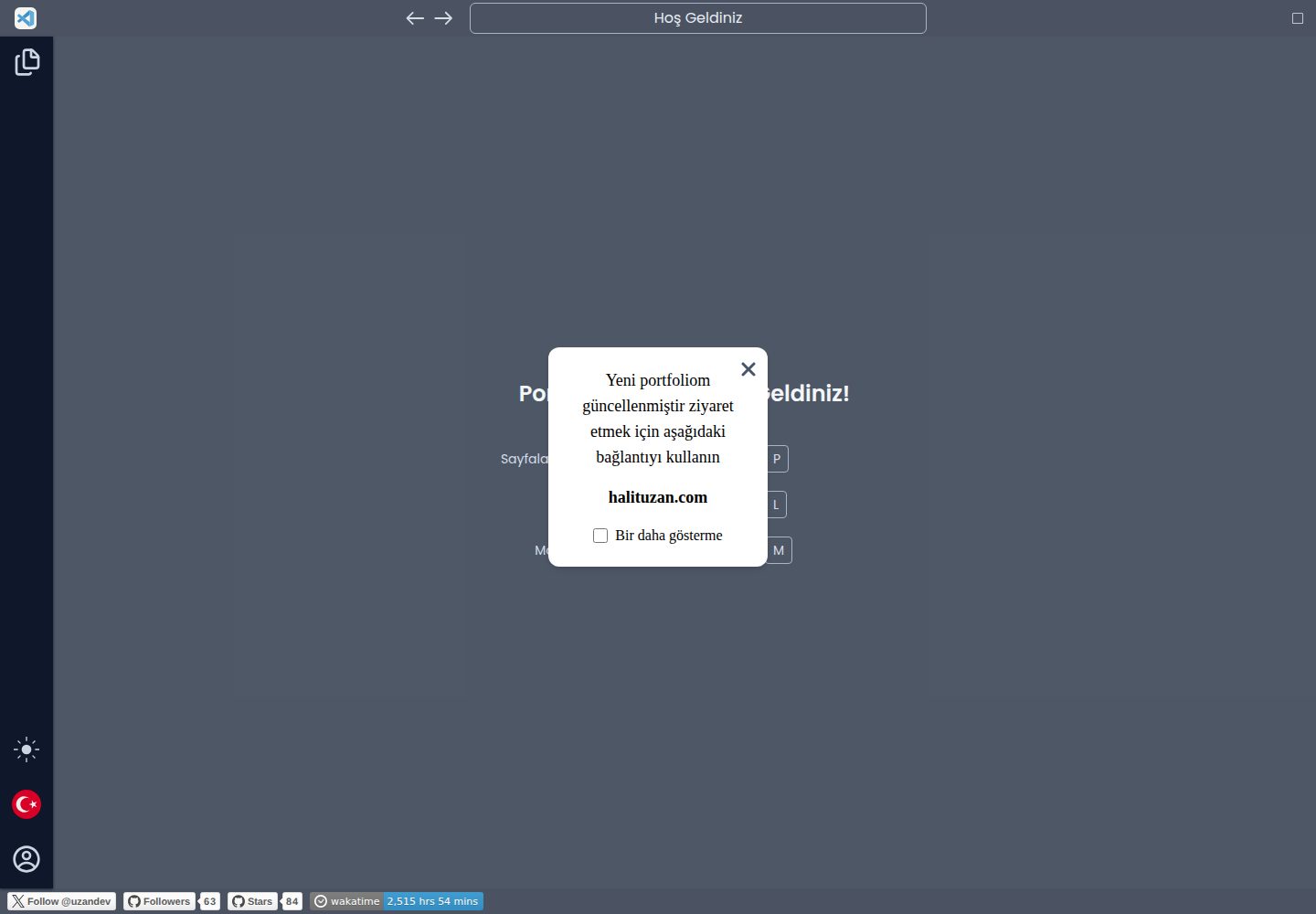
Developer portfolio layout with a VS Code editor interface as its visual theme
Next.jsReactHTMLPortfolio
VS-Code-NextJS-Portfolio — Next.js Portfolio Template
By halituzan
A developer portfolio template with a VS Code editor interface as its visual theme, built on Next.js and React, with content written statically and support for Turkish and English language switching.
Explore the design
Compare the page layouts and mobile experience. Open any screenshot for a closer look.
Desktop homepage1 / 2
Desktop captureTop of page
Actual screenshot captured by the server browser.
All pages & views 2
Screenshots show visual appearance; interactive behavior may differ.
Recorded 2026-10-02View source
What stands out
A quick read of the recorded project description.
Built with Next.js and React; the README states it was created using Next.js 14.2.3
Provides Turkish and English through i18n, with language files as JSON under public/locales
Content is written statically in the code, with no database connection
Config.tsx centrally manages personal information, social links, work experience, and portfolio projects
tailwind.config.ts defines 6 color variables each for dark and light modes, using the slate color scheme by default
Template Details
This is a software developer portfolio website template that uses the VS Code editor interface as its visual framework. The page structure, sidebar, and content area mimic a code editor to present personal information, skills, work experience, and portfolio projects. The project is built with Next.js and React, and the README states that it was created using Next.js version 14.2.3.
The template does not connect to a database; all displayed content is written statically in the code. The author plans to migrate the information to a database structure in a future version, but the current version still requires data to be provided statically.
For multilingual support, the template provides Turkish and English through i18n, with language files stored as JSON files in language-specific directories under public/locales. The README explicitly states that infrastructure for RTL languages such as Arabic is not currently supported and that users need to fork and optimize the language themselves.
Configuration is centralized in Config.tsx and tailwind.config.ts: the former controls the default mode, About page keyword highlighting, skill categories and icons, personal information, social links, work experience, and portfolio projects; the latter defines 6 color variables each for dark and light modes, using the slate color scheme by default. For further customization beyond the work experience or portfolio fields, the corresponding page component files must be modified.
Next.jsReactHTMLPortfolio
Is it right for your project?
Use Cases
- Software developers building a personal portfolio website to showcase skills, work experience, and projects
- Developer personal sites that need Turkish and English language switching
- Resume or portfolio pages that use a code editor interface as their visual style
- As a starting point for practice or further development with Next.js and React projects
Suitable For
- Developers familiar with Next.js and React who can directly modify code and configuration files
- Personal portfolios that accept static content and do not currently need a backend or database
- Developers who need to present in both Turkish and English
- Developers who want to present personal information in a VS Code interface style
Getting started & customization
Use these recorded setup notes alongside the repository instructions for your chosen version.
- 1
Place language files under public/locales in language-specific directories and register the resources in app/Configs/i18n.tsx
- 2
Configure personal information, social links, work experience, and portfolio projects in Config.tsx, following the template's field structure
- 3
Define dark and light mode color variables in tailwind.config.ts; the slate color scheme is used by default
- 4
To display Wakatime work hours, set NEXT_PUBLIC_WAKATIME_API_KEY in .env
- 5
Footer social badges must be modified manually in app/Layout/Footer.tsx
License & source material
Usage conditions & limitations
Free to use · keep license noticeThis entry covers the free version under the MIT license in the public repository; the free scope is the code of this version and does not mean that external services or third-party assets are free.
Must comply with when using
- Free use, modification, commercial use, and distribution of this version's code are permitted.
- When distributing copies or substantial portions of the code, retain the original author's copyright notice and the full MIT license notice.
- The code is provided as is; warranties and limitations of liability are governed by the original license and applicable law.
Additional costs & items to verify
- To display the Wakatime work hours badge on the page, you must register a Wakatime account and obtain an API key, then write it to NEXT_PUBLIC_WAKATIME_API_KEY in .env; without configuration, the badge cannot be displayed.
- The template currently does not provide support for RTL right-to-left languages such as Arabic; only Turkish and English are built in. For RTL languages, you need to fork and modify it yourself.
- Skill icons must use icon names from the Iconify icon library; icons from other sources cannot be used arbitrarily.
- Work experience fields must follow the template's established structure; for customization beyond the template, you must directly modify the source code of the WorkHistory.tsx component.
- Portfolio project fields must follow the template's established structure; for customization beyond the template, you must directly modify the source code of the Portfolio.tsx component.
- Footer social badges cannot be modified through configuration files; you must manually edit the source code of the app/Layout/Footer.tsx component.
- Demo images, fonts, icons, and other third-party assets must be checked against their respective licenses; they cannot be judged solely by the code's MIT license.
- External services such as domains, hosting, databases, payments, or AI may incur additional charges.
View Original Text Basis
Permission is hereby granted, free of charge
Original License Text
you must add your wakatime api key to your .env file
Original README
The infrastructure for RTL languages such as Arabic is not currently available.
Original README
For icons you should use the [Iconify](https://icon-sets.iconify.design/) Library.
Original README
It's important to stick to the template here. If you want to do more customization. You will need to make changes to the *app/Components/Main/Pages/WorkHistory.tsx* file.
Original README
It's important to stick to the template here. If you want to do more customization. You will need to make changes to the *app/Components/Main/Pages/Portfolio.tsx* file.
Original README
https://github.com/halituzan/VS-Code-NextJS-Portfolio/blob/main/LICENSEhttps://github.com/halituzan/VS-Code-NextJS-Portfolio/blob/main/README.mdFor social media badges in the footer component, you must manually change them within the component.
Original README
Compiled by DeepSeek based on repository license and README ·2026-10-02. Results only cover the materials read; dependencies, images, fonts, and subsequent term changes are subject to their respective original texts.
Project checks & description sources
Template Information
- Source platforms
- GitHub
- Documentation and maintenance reference score
- More documented · 92 / 100
- Technologies
- Next.js · React · HTML
- Website type
- Portfolio
How this score is calculated
Our heuristic uses license records (up to 30), a demo link (12), a preview (10), stars (15), recorded maintenance (15), description completeness (8), feature records (5) and classification data (5). It is not a code, security or performance test, or a Google score. A link does not establish tested functionality.
What to verify for this project
- Repository update recorded
- 2026-09-20
- Screenshot last checked
- 2026-10-02
A demo link is listed. Check it with your own content and viewport sizes; its presence does not confirm that forms, authentication or payments work.
The catalog identifies Next.js as the primary stack. Check the actual dependency manifest and lockfile for versions and hosting requirements. These notes use recorded metadata, not a code audit or a deployment test.
Use a selection guide →How this description was prepared
AI-assisted description based on catalog records and repository material. Repository authors are not automatically the reviewers of this description.
Automatically checked against source and license rules; no manual editorial review.
Inspect the recorded source material
SHA-256: 6e9f11dd0fb26162075aae1da908fe42fff75f95e123ab3ed8d68da057f8152c
2026-10-02T10:39:28.464Z
Source file / repository

# VS Code Template NextJS Portfolio
It is a software developer portfolio site designed based on the VS Code editor. Created with Next.js 14.2.3 Version. Information is added statically inside. There is no database connection.
## 1. Language Configuration
Multi-language configuration has been added to the theme with i18n. There are two different languages available: Turkish and English. In addition to these languages, you can also add your own languages. The infrastructure for RTL languages such as Arabic is not currently available. However, you can also do your own language optimization by forking. I am waiting for your support for RTL languages.
Configuring the language configuration is very easy. While you can separate language files for each of your components, you can also provide this control from a single file.
### Language Files
You should keep your language files under public/locales. Like the "en" folder for English and the "tr" folder for Turkish. Language files must be in JSON format, but you can shape them according to your wishes. It is set like this by default.
Example:
```
// public/locales/tr/skills.json
{
"title.software": "Yazılım Teknolojileri",
"title.ui": "UI ve CSS Kütüphaneleri",
"title.design": "Tasarım Programları"
}
// public/locales/en/skills.json
{
"title.software": "Software Technologies",
"title.ui": "UI And CSS Libraries",
"title.design": "Design Programs"
}
```
Configuration i18n: In order to use your language files throughout the project, you need to configure your i18n.tsx file.
```
// app/Configs/i18n.tsx
import trSkills from "../../public/locales/tr/skills.json";
import enSkills from "../../public/locales/en/skills.json";
const defaultLang = "tr";
const resources = {
tr: {skills: trSkills},
en: {skills: enSkills}
};
const initLanguage = () => {
i18n.use(initReactI18next).init({
compatibilityJSON: "v3",
lng: window.localStorage.getItem("lng") ?? defaultLang,
fallbackLng: window.localStorage.getItem("lng") ?? defaultLang,
resources,
interpolation: {
escapeValue: false,
},
});
};
export default { initLanguage };
```
After completing the configuration, you can use the code example below to use throughout the project.
```
// app/Components/Main/Pages/Skills.tsx
// Other imports...
import { useTranslation } from "react-i18next";
const Skills = (props: Props) => {
const { t } = useTranslation("skills");
return (
<div className='w-full p-5 h-[calc(100vh-107px)] overflow-auto'>
<h2>{t("title.software")}</h2>
// Other codes...
)}
export default Skills;
```
## 2. Configuration of General Information
I tried to control this information from a single area by keeping some basic information in the Config file, and I tried to control this information dynamically from a single point by adding it to the language configuration.
I plan to increase the dynamism by inserting this information into the database structure during version updates, but for now, this information should be provided statically.
### Config.tsx Configuration
Various information is written in our config file. The information you write in the relevant fields in this file goes to the places where it should be among the codes. Various options are also presented in this file.
Via this file:
- You can determine which is the default mode of your site.
- On the About page, you can let us know which keywords should be highlighted in your description section.
- For the Skills page, you can categorize your skills according to which field you have and give them the icons you want. For icons you should use the [Iconify](https://icon-sets.iconify.design/) Library.
- You must add information about yourself in the Information field.
- You can add your social media links from the social area.
- You can add your work history from the workHistories field. It's important to stick to the template here. If you want to do more customization. You will need to make changes to the *app/Components/Main/Pages/WorkHistory.tsx* file.
- You can add the projects in your portfolio from the portfolio field. It's important to stick to the template here. If you want to do more customization. You will need to make changes to the *app/Components/Main/Pages/Portfolio.tsx* file.
## 3. Color Configuration
For the color scheme, you can specify the colors for dark mode and light mode. You should use these codes and the color scheme in the *tailwind.config.ts* file. 6 colors were selected for dark mode and 6 colors for light mode. The selected codes were taken from the tailwindcss color scheme, but you can add any color codes you want here. The theme has slate codes by default.
Sample code template:
```
// tailwind.config.ts
import type { Config } from "tailwindcss";
const config: Config = {
content: [
"./pages/**/*.{js,ts,jsx,tsx,mdx}",
"./app/**/*.{js,ts,jsx,tsx,mdx}",
],
theme: {
extend: {
colors: {
dark1: "#020617", // slate-950
dark2: "#0f172a", // slate-900
dark3: "#1e293b", // slate-800
dark4: "#334155", // slate-700
dark5: "#475569", // slate-600
dark6: "#64748b", // slate-500
light1: "#cbd5e1", // slate-400
light2: "#e2e8f0", // slate-300
light3: "#e2e8f0", // slate-200
light4: "#f1f5f9", // slate-100
light5: "#f8fafc", // slate-50
light6: "#ffffff", // white
},
},
},
plugins: [],
};
export default config;
```
## 4. Wakatime Badge
If you want your [Wakatime](https://wakatime.com/) working hours to be visible, you must add your wakatime api key to your .env file. The env.example file was created for this.
```
// .env
NEXT_PUBLIC_WAKATIME_API_KEY=YOUR_WAKATIME_API_KEY
```
For social media badges in the footer component, you must manually change them within the component.
path: *app/Layout/Footer.tsx*
Explore similar templates
Compare previews and descriptions within the same stack and category.

react-resume-template
A personal resume website template for software developers, built with Next.js, React, and TypeScript and styled with Tailwind CSS. Site content is driven by a single data file at /src/data/data.tsx, with types in dataDef.ts and images in src/images/.
Next.js · Portfolio

nxt-lnk
nxt-lnk is a Next.js-based bio link page template that manages personal information and links via BioData.js and LinksData.js, positioned as a self-hosted alternative to Linktree. It groups links by type, supports enabling/disabling individual links, and offers hexagonal or oval avatars.
Next.js · Portfolio

sylph
Sylph is a minimal portfolio and blog template built on Next.js, supporting MDX/Markdown writing, light/dark themes, and automatic OG image generation. It includes sitemap, robots.txt, metadata, and syntax highlighting, with automatic blog timestamps.
Next.js · Portfolio

sleek-portfolio
A modern, responsive portfolio template built with Next.js 15, TypeScript, Tailwind CSS, and Shadcn UI. It includes an MDX blog, project showcase, work experience timeline, and a contact form that receives messages via Telegram Bot.
Next.js · Portfolio

research-website-template
A React + Next.js template for research personal websites, aimed at PhD students and researchers. It centralizes publications, projects, and other content in src/data as arrays of objects, with optional fields automatically generating UI components.
Next.js · Portfolio

shadcn-portfolio
A developer portfolio template built with Next.js 15, shadcn/ui, Tailwind CSS, and Framer Motion, featuring an MDX blog, light and dark modes, responsive design, and SEO meta tags.
Next.js · Portfolio