Astro-based personal website theme that also provides a GitHub Pages starter template you can copy directly
AstroPortfolio
hangfolio — Astro Portfolio Template
By hangfolio
hangfolio is an Astro personal website theme and GitHub Pages template for researchers and engineers. Publish by copying the template repository and editing site.yaml and the content/ directory in the browser; updates arrive as Dependabot pull requests.
Explore the design
Compare the page layouts and mobile experience. Open any screenshot for a closer look.
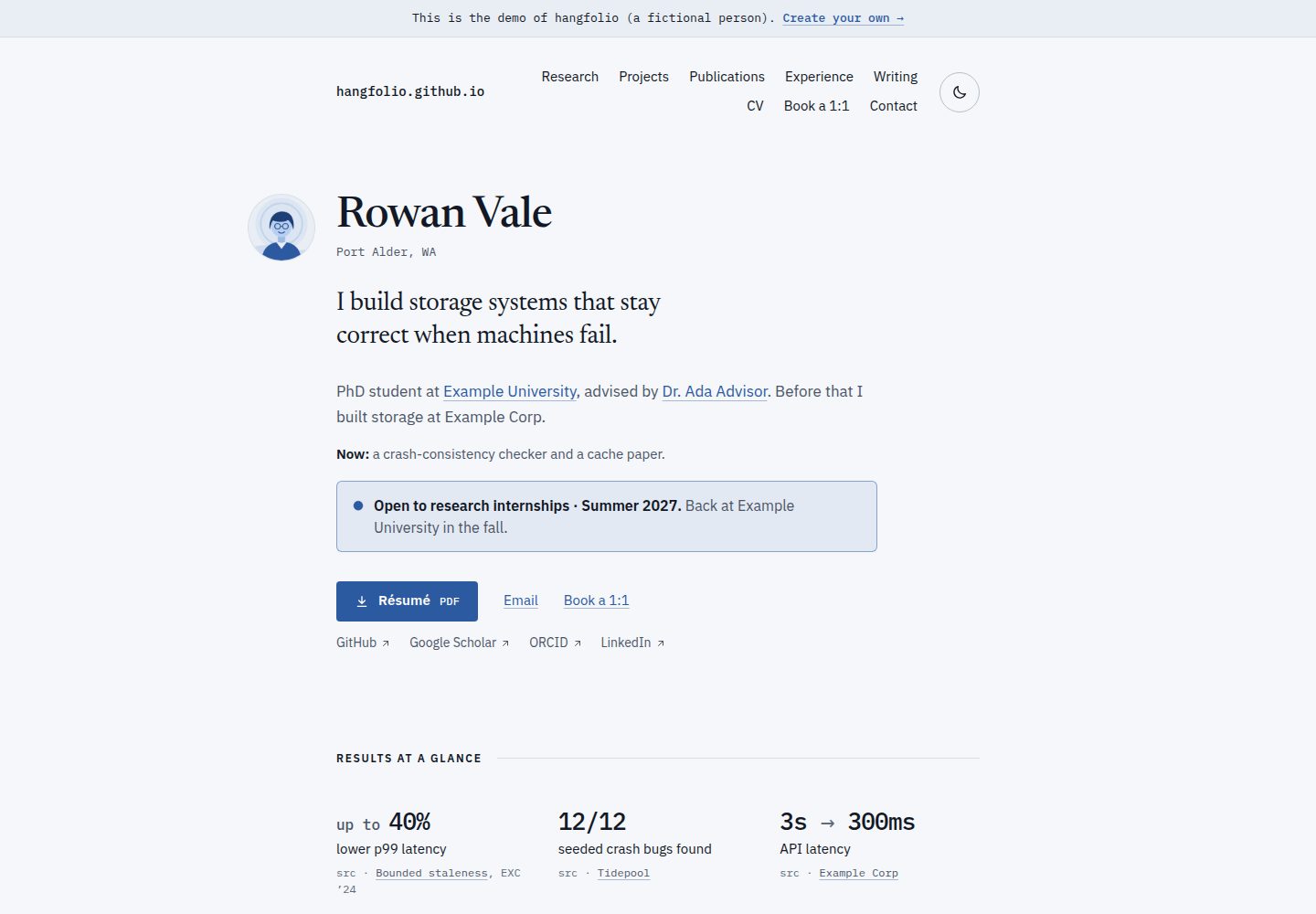
Desktop homepage1 / 3
Desktop captureTop of page
Actual screenshot captured by the server browser.
All pages & views 3
Screenshots show visual appearance; interactive behavior may differ.
Recorded 2026-10-05View source
What stands out
A quick read of the recorded project description.
Edit site.yaml and the content/ directory in GitHub's browser editor; commits automatically check, build, and publish
The site detects its own address, supporting username.github.io, subpaths, and custom domains
Supports pasting BibTeX to generate a paper list, underlines your name in the author list, and gives each paper a link and BibTeX
Light and dark themes follow the system setting and provide a toggle; text meets WCAG AA contrast in both themes
When a build fails, it shows the file, line number, and fix, and the site remains at the last successful build
Template Details
hangfolio is a personal website theme for researchers and engineers, built on Astro and also provided as a GitHub Pages template. To use it, copy the starter template repository on GitHub, then edit site.yaml (name, tagline, role, affiliation, email, links, and so on) and the content/ directory in GitHub's built-in editor. Each commit triggers checks, a build, and a publish workflow, with no local environment setup or manual site URL entry required. The site detects its own address automatically, so username.github.io, username.github.io/any-name/, and custom domains all work.
Content is organized results-first: the page opens with name, role, and main achievements, followed by projects, papers, experience, updates, and articles; empty sections are hidden automatically. The site supports light and dark themes, follows the visitor's system setting, and provides a toggle; text meets WCAG AA contrast in both themes. The papers section accepts BibTeX pasted from Google Scholar or a reference manager, underlines your name in the author list, and gives each paper its own link and BibTeX.
For error handling, when configuration or content is invalid the run stops and shows the offending file, line number, and how to fix it directly in the commit, while the site remains at the last successful build. Updates arrive via Dependabot pull requests: when a new version is available, your site is built first, and after it passes you click to merge.
Unlike Jekyll sites such as academicpages and al-folio, the hangfolio theme is an npm package, and the repository keeps only your settings, content, and a few connector files; updates arrive as pull requests rather than by merging upstream repository changes. The README also notes that hangfolio is newer and has fewer features, while al-folio has more features (such as Jupyter and distill articles, a CV page, and more) along with a longer history and a larger community.
The repository itself is the engine part, containing the hangfolio npm package (packages/theme), the starter template, shared deployment workflows, test fixtures, and documentation. The code is MIT licensed; the starter's example content is CC0 1.0 public domain, and the content on your own site belongs to you.
AstroPortfolio
Is it right for your project?
Use Cases
- Researchers publishing a personal homepage with papers, projects, and experience on GitHub Pages
- Engineers building a personal portfolio site that puts results and projects first
- Users unfamiliar with local build processes maintaining a website by editing configuration and content in the browser
- Migrating an existing personal site from academicpages or al-folio
- Publishing a personal academic or engineering homepage with a custom domain
Suitable For
- Researchers who want to host a personal homepage for free on GitHub Pages
- Engineers who need to show papers, projects, and experience and prefer a results-first layout
- Users who do not want to install a local build environment and prefer to edit content directly on GitHub
- Users who accept theme updates delivered as Dependabot pull requests
Getting started & customization
Use these recorded setup notes alongside the repository instructions for your chosen version.
- 1
Create a repository from the GitHub template: use username.github.io as the repository name for a root-path site; other names correspond to the username.github.io/<name>/ subpath
- 2
In the repository's Settings → Pages, set Source to GitHub Actions
- 3
Edit site.yaml to fill in name, tagline, role, affiliation, email, and links
- 4
Maintain projects, papers, experience, updates, and articles in the content/ directory; empty sections are hidden automatically
- 5
For papers, paste BibTeX from Google Scholar or a reference manager
License & source material
Usage conditions & limitations
Free to use · keep license noticeThis entry covers the free version in the public repository under the MIT license; the free scope is that version's code and does not mean external services or third-party assets are free.
Must comply with when using
- You may use, modify, commercialize, and distribute this version's code for free.
- When distributing copies or substantial portions of the code, retain the original author's copyright notice and the full MIT license notice.
- The code is provided as is; warranties and limitations of liability are governed by the original license and applicable law.
Additional costs & items to verify
- Demo images, fonts, icons, and other third-party assets must be checked against their own licenses; the code's MIT license alone is not sufficient to judge them.
- External services such as domains, hosting, databases, payments, or AI may incur separate charges.
- Site publishing depends on GitHub Pages and requires setting Source to GitHub Actions in the repository's Settings → Pages, which is an external platform service requirement.
- Theme updates depend on GitHub's Dependabot feature and require using that service in a GitHub repository environment.
- When creating the site repository, it must remain Public; private repositories do not work with this template workflow.
- The starter's example content is under the CC0 1.0 public domain license, which differs from the code's MIT license and is separately licensed example material.
View Original Text Basis
Permission is hereby granted, free of charge
Original License Text
**Turn on GitHub Pages.** **Settings → Pages**, then set **Source** to **GitHub Actions**.
Original README
**Monthly one-click updates.** Dependabot opens a pull request when there's a new version.
Original README
Keep it **Public** and click **Create repository**.
Original README
https://github.com/hangfolio/hangfolio/blob/main/LICENSEhttps://github.com/hangfolio/hangfolio/blob/main/README.mdThe starter's example content is public domain (CC0 1.0), and the content of your own site belongs to you.
Original README
Compiled by DeepSeek based on repository license and README ·2026-10-05. Results only cover the materials read; dependencies, images, fonts, and subsequent term changes are subject to their respective original texts.
Project checks & description sources
Template Information
- Source platforms
- GitHub
- Documentation and maintenance reference score
- More documented · 80 / 100
- Technologies
- Astro
- Website type
- Portfolio
How this score is calculated
Our heuristic uses license records (up to 30), a demo link (12), a preview (10), stars (15), recorded maintenance (15), description completeness (8), feature records (5) and classification data (5). It is not a code, security or performance test, or a Google score. A link does not establish tested functionality.
What to verify for this project
- Repository update recorded
- 2026-10-05
- Screenshot last checked
- 2026-10-05
A demo link is listed. Check it with your own content and viewport sizes; its presence does not confirm that forms, authentication or payments work.
The catalog identifies Astro as the primary stack. Check the actual dependency manifest and lockfile for versions and hosting requirements. These notes use recorded metadata, not a code audit or a deployment test.
Use a selection guide →How this description was prepared
AI-assisted description based on catalog records and repository material. Repository authors are not automatically the reviewers of this description.
Review declaration: [email protected] · 2026-10-05
Inspect the recorded source material
SHA-256: e81275a7a9eb8a76b75b4a577c72bc5adc5781982cf846cffad9811dfbeb6d3e
2026-10-05T06:41:45.495Z
Source file / repository# hangfolio **A personal website for researchers and engineers, live on GitHub Pages in about 10 minutes, all in the browser.** ## [**Create your site →**](https://github.com/new?template_owner=hangfolio&template_name=starter&owner=%40me&visibility=public) **[See the live demo](https://hangfolio.github.io/starter/)** · [Docs](docs/README.md) · [Help in Discussions](https://github.com/hangfolio/hangfolio/discussions) You copy a template, edit one settings file and a `content/` folder in GitHub's own editor, and every commit is checked, built and published for you. Nothing to install, no URLs to type. ## What you get - **Results first.** Your name, role and headline results open the page, then projects, papers, experience, news and posts. Sections you leave empty disappear. - **Light and dark.** The site follows each visitor's system setting and has a toggle. Text meets WCAG AA contrast in both themes. - **Publications from a pasted BibTeX.** Paste from Google Scholar or your reference manager. Your name is underlined in every author list, and each paper gets its links and its BibTeX. - **Clear error messages.** A mistake stops the run with the file, the line and the fix, shown on the line itself in your commit. Your live site stays as it was until a run succeeds. - **Works at any GitHub Pages address:** `username.github.io`, `username.github.io/any-name/` or your own domain. The site finds its own address, so there's no URL to set. - **Monthly one-click updates.** Dependabot opens a pull request when there's a new version. It builds your site first; if it's green, you click **Merge pull request**. ## Your site in 5 steps 1. **Create your copy.** Click [Create your site](https://github.com/new?template_owner=hangfolio&template_name=starter&owner=%40me&visibility=public). 2. **Name it.** `<username>.github.io` for `https://<username>.github.io/`, or any other name for `https://<username>.github.io/<name>/`. Keep it **Public** and click **Create repository**. 3. **Turn on GitHub Pages.** **Settings → Pages**, then set **Source** to **GitHub Actions**. 4. **Make it yours.** Edit `site.yaml` (name, tagline, role, affiliation, email, links) and commit. 5. **Open your site.** About 2 minutes later, the **Deploy site** run links to it. The [starter's README](starter/README.md#your-site-in-5-steps) has every step with the exact buttons, and it comes with your copy. It also covers moving from an existing `username.github.io` site. ## How it compares - [academicpages](https://github.com/academicpages/academicpages.github.io) and [al-folio](https://github.com/alshedivat/al-folio) are Jekyll sites you copy whole, theme included. hangfolio's theme is an npm package, so your repository holds only your settings, your content and a few small connector files. - Updating academicpages or al-folio means merging the upstream repository's changes into your copy. hangfolio's updates arrive as a Dependabot pull request that builds your own site before you merge it. - Both have years of use and large communities, and al-folio has many more features (Jupyter and distill posts, a CV page and more). hangfolio is new and does less: a results-first design, BibTeX publications, and checks that explain themselves to people who don't build websites. ## Docs - [Quickstart](docs/quickstart.md): the 5 steps in detail - [Editing your site](docs/editing.md) and the [site.yaml reference](docs/site-yaml.md) - [Publications](docs/publications.md): BibTeX, Google Scholar, extras - [Custom domain](docs/custom-domain.md), [Updating](docs/updating.md), [Customizing](docs/customizing.md), [Local preview](docs/local-preview.md) - [Moving an existing site](docs/existing-site.md) from academicpages or al-folio - [Troubleshooting](docs/troubleshooting.md): every message code, and GitHub Pages problems - [FAQ](docs/faq.md) ## Contributing This repository is the engine: the `hangfolio` npm package (`packages/theme`), the starter template (`starter/`), the shared deploy workflows every site calls, test fixtures and the docs. Questions about your own site go to [Discussions](https://github.com/hangfolio/hangfolio/discussions); bugs go to [issues](https://github.com/hangfolio/hangfolio/issues/new/choose). Code changes are welcome: see [CONTRIBUTING.md](CONTRIBUTING.md). Please report security problems privately, as [SECURITY.md](SECURITY.md) describes. ## License MIT; see [LICENSE](LICENSE). The starter's example content is public domain (CC0 1.0), and the content of your own site belongs to you. Built by Harris Ahmad.
Explore similar templates
Compare previews and descriptions within the same stack and category.

astro-theme-cactus
Astro Cactus is an Astro-based blog and portfolio theme that uses Markdown/MDX content collections to manage posts, notes, and tags, with frontmatter type-checked by a schema.
Astro · Portfolio

astrofy
Astrofy is a free and open-source personal portfolio website template built with Astro and TailwindCSS, with built-in blog, CV timeline, project showcase, store, and RSS feed modules.
Astro · Portfolio

astro-nano
Astro Nano is a static, minimalist portfolio and blog template built with Astro, Tailwind, and TypeScript without frontend frameworks. It includes light/dark themes, animated UI, automatic sitemap and RSS feed generation, and Markdown/MDX support with component imports.
Astro · Portfolio

astro-erudite
astro-erudite is an opinionated, unstyled static blog template built with Astro and native CSS, with no UI or CSS framework and minimal dependencies.
Astro · Portfolio

astro-sphere
Astro Sphere is a static, minimalist portfolio and blog theme maintained by markhorn-dev, built mainly with Astro, Tailwind, and TypeScript, with a small amount of SolidJS for stateful components.
Astro · Portfolio

astro-micro
Astro Micro is a framework-free blog and portfolio theme for Astro, forked from Astro Nano. It adds Pagefind search and Giscus comments while retaining type safety, sitemap, RSS, Markdown and MDX support, and TailwindCSS with system, light, and dark themes.
Astro · Portfolio