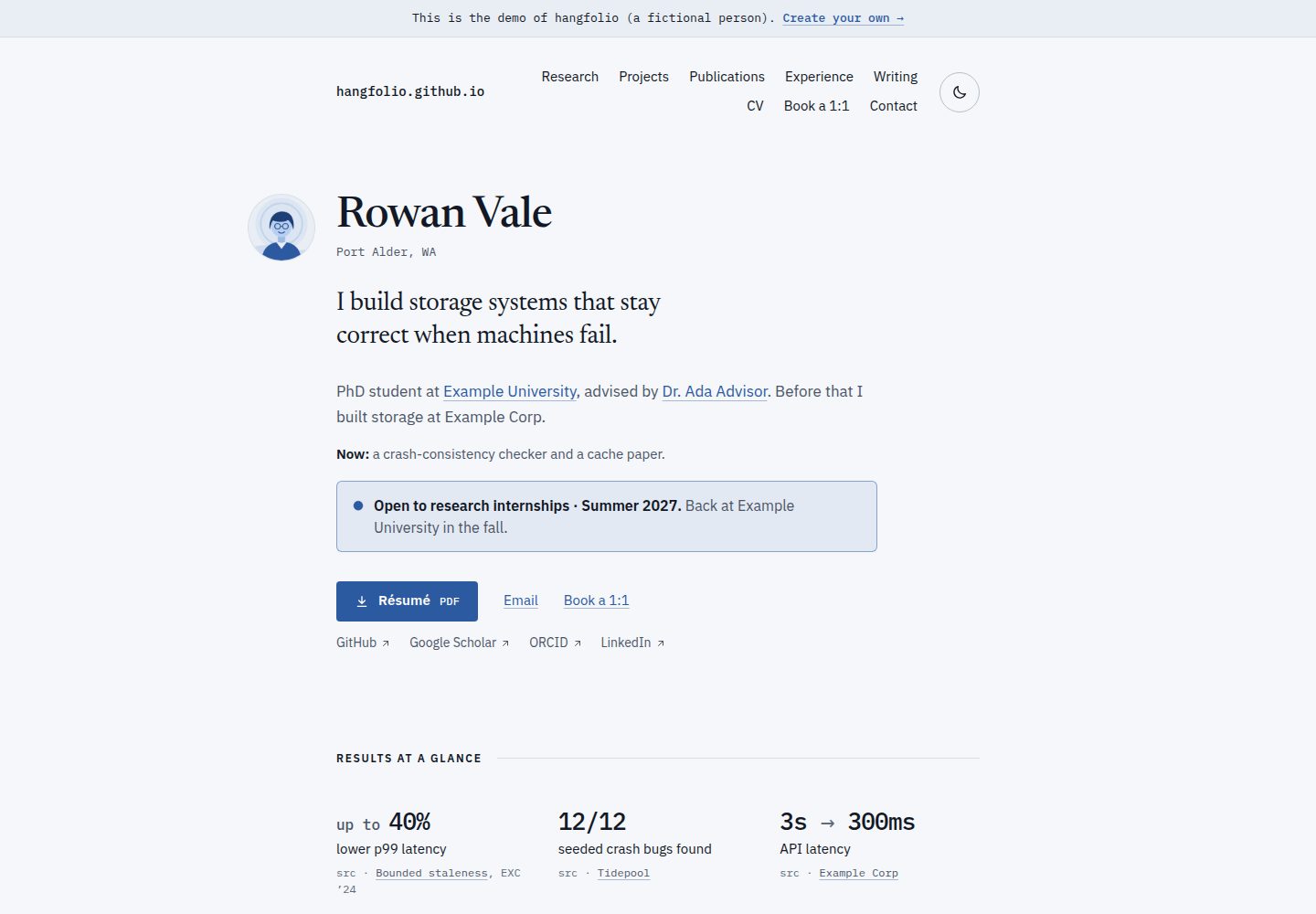
基于 Astro 的个人网站主题,同时提供可直接复制的 GitHub Pages starter 模板
Astro作品集
hangfolio — Astro 作品集模板
作者 hangfolio
hangfolio 是一个面向研究人员和工程师的 Astro 个人网站主题与 GitHub Pages 模板,通过复制模板仓库、在浏览器中编辑 site.yaml 和 content/ 目录即可发布,更新以 Dependabot 拉取请求的形式提供。
看看你的网站会是什么样
浏览真实页面截图,比较内容排版与手机效果。点击下方缩略图切换,放大查看整页细节。
全部页面与视图 3
截图用于了解视觉与布局,交互效果请以实际项目为准。
采集于 2026-10-05查看来源
值得关注的模板亮点
从已有项目资料中,快速了解它的特点。
在 GitHub 浏览器编辑器中修改 site.yaml 与 content/ 目录,提交后自动检查、构建并发布
站点自动识别自身地址,支持 username.github.io、子路径和自定义域名
支持粘贴 BibTeX 生成论文列表,作者列表中为本人姓名加下划线,每篇论文带链接与 BibTeX
浅色与深色主题跟随系统设置并提供切换,两种主题下文本满足 WCAG AA 对比度
构建出错时显示文件、行号和修复方式,站点保持上一次成功构建的状态
模板详细介绍
hangfolio 是一个面向研究人员和工程师的个人网站主题,基于 Astro 构建,同时提供 GitHub Pages 模板。它的使用方式是在 GitHub 上复制 starter 模板仓库,然后在 GitHub 自带的编辑器里修改 site.yaml(姓名、标语、角色、所属机构、邮箱、链接等)和 content/ 目录,每次提交都会触发检查、构建与发布流程,无需本地安装环境或手动填写站点 URL。站点会自动识别自身地址,因此 username.github.io、username.github.io/any-name/ 以及自定义域名都能工作。
内容组织以结果优先:页面开头呈现姓名、角色和主要成果,之后依次是项目、论文、经历、动态和文章;留空的区块会自动隐藏。站点支持浅色与深色主题,跟随访问者的系统设置并提供切换开关,两种主题下文本均满足 WCAG AA 对比度。论文部分支持粘贴来自 Google Scholar 或文献管理器的 BibTeX,作者列表中会为你的名字加下划线,每篇论文带有自己的链接和 BibTeX。
错误处理方面,配置或内容出错时运行会中止,并在提交中直接显示出错文件、行号和修复方式,站点保持上一次成功构建的状态。更新通过 Dependabot 拉取请求进行:有新版本时会先构建你的站点,通过后再由你点击合并。
与 academicpages、al-folio 等 Jekyll 站点不同,hangfolio 的主题是一个 npm 包,仓库中只保留你的设置、内容和少量连接文件;更新以拉取请求形式到达,而不是合并上游仓库的改动。README 也说明 hangfolio 较新、功能较少,al-folio 则拥有更多功能(如 Jupyter 和 distill 文章、CV 页面等)和更长的使用历史与更大的社区。
仓库本身是引擎部分,包含 hangfolio npm 包(packages/theme)、starter 模板、共享部署工作流、测试夹具和文档。代码采用 MIT 许可;starter 的示例内容为 CC0 1.0 公有领域,你自己站点的内容归你所有。
Astro作品集
适合你的项目吗?
适用场景
- 研究人员在 GitHub Pages 上发布包含论文、项目和经历的个人主页
- 工程师搭建以成果和项目为先的个人作品集站点
- 不熟悉本地构建流程的用户通过浏览器编辑配置和内容来维护网站
- 从 academicpages 或 al-folio 迁移已有个人站点
- 使用自定义域名发布个人学术或工程主页
适合人群
- 希望用 GitHub Pages 免费托管个人主页的研究人员
- 需要展示论文、项目与经历并偏好结果优先布局的工程师
- 不想在本地安装构建环境、希望直接在 GitHub 上编辑内容的用户
- 接受以 Dependabot 拉取请求方式更新主题的用户
上手与定制指南
结合仓库当前版本的说明,按下面的资料检查内容、配置与运行要求。
- 1
通过 GitHub 模板创建仓库:使用 username.github.io 作为仓库名可获得根路径站点,其他名称则对应 username.github.io/<name>/ 子路径
- 2
在仓库 Settings → Pages 中将 Source 设置为 GitHub Actions
- 3
编辑 site.yaml 填写姓名、标语、角色、所属机构、邮箱和链接
- 4
在 content/ 目录中维护项目、论文、经历、动态和文章等内容,留空的区块会自动隐藏
- 5
论文内容可粘贴来自 Google Scholar 或文献管理器的 BibTeX
授权与来源资料
使用条件与限制
免费使用 · 保留许可声明本次收录的是公开仓库中采用 MIT 许可的免费版本;免费范围为该版本代码,不代表外部服务或第三方素材免费。
使用时需要遵守
- 允许免费使用、修改、商用和分发该版本代码。
- 分发代码副本或实质性部分时,保留原作者版权声明和完整 MIT 许可声明。
- 代码按现状提供;担保与责任限制以原许可证及适用法律为准。
额外费用与待核对事项
- 演示图片、字体、图标及其他第三方素材需按各自许可核对,不能仅凭代码的 MIT 许可判断。
- 域名、托管、数据库、支付或 AI 等外部服务可能另外收费。
- 站点发布依赖 GitHub Pages,需在仓库 Settings → Pages 中将 Source 设为 GitHub Actions,属于外部平台服务要求。
- 主题更新依赖 GitHub 的 Dependabot 功能,需在 GitHub 仓库环境中使用该服务。
- 创建站点仓库时需保持为 Public(公开),私有仓库不适用于该模板流程。
- starter 示例内容采用 CC0 1.0 公有领域许可,与代码的 MIT 许可不同,属单独许可的示例资产。
查看原文依据
Permission is hereby granted, free of charge
许可证原文
**Turn on GitHub Pages.** **Settings → Pages**, then set **Source** to **GitHub Actions**.
README 原文
**Monthly one-click updates.** Dependabot opens a pull request when there's a new version.
README 原文
Keep it **Public** and click **Create repository**.
README 原文
https://github.com/hangfolio/hangfolio/blob/main/LICENSEhttps://github.com/hangfolio/hangfolio/blob/main/README.mdThe starter's example content is public domain (CC0 1.0), and the content of your own site belongs to you.
README 原文
DeepSeek 根据仓库许可证和 README 整理 ·2026-10-05。结果仅覆盖已读取资料,依赖、图片、字体及后续条款变更以各自原文为准。
项目核对记录与介绍依据
模板资料
- 来源平台
- GitHub
- 资料与维护参考分
- 资料较完整 · 80 / 100
- 技术栈
- Astro
- 网站类型
- 作品集
这个分数如何计算
本站按许可资料(最高30分)、演示链接(12分)、预览图(10分)、Star数(15分)、记录的维护时间(15分)、描述完整度(8分)、功能记录(5分)和分类资料(5分)计算。它不是代码、安全或性能测试,也不是 Google 评分;有链接不代表已实测可用。
这个项目需要核对什么
- 记录的仓库更新时间
- 2026-10-05
- 截图检查日期
- 2026-10-05
已收录演示链接。请用你的内容与屏幕尺寸检查;有演示不代表表单、认证或支付已经可用。
目录记录的主要技术栈是 Astro。请通过依赖清单和锁文件核对实际版本与托管要求。这些说明基于收录资料,不代表代码审计或部署实测。
查看具体选型方法 →介绍的制作与核对状态
介绍由 AI 辅助整理目录与仓库资料。仓库作者不等于这篇介绍的审核者。
审核声明: [email protected] · 2026-10-05
查看当时使用的来源资料
SHA-256: e81275a7a9eb8a76b75b4a577c72bc5adc5781982cf846cffad9811dfbeb6d3e
2026-10-05T06:41:45.495Z
来源文件 / 仓库# hangfolio **A personal website for researchers and engineers, live on GitHub Pages in about 10 minutes, all in the browser.** ## [**Create your site →**](https://github.com/new?template_owner=hangfolio&template_name=starter&owner=%40me&visibility=public) **[See the live demo](https://hangfolio.github.io/starter/)** · [Docs](docs/README.md) · [Help in Discussions](https://github.com/hangfolio/hangfolio/discussions) You copy a template, edit one settings file and a `content/` folder in GitHub's own editor, and every commit is checked, built and published for you. Nothing to install, no URLs to type. ## What you get - **Results first.** Your name, role and headline results open the page, then projects, papers, experience, news and posts. Sections you leave empty disappear. - **Light and dark.** The site follows each visitor's system setting and has a toggle. Text meets WCAG AA contrast in both themes. - **Publications from a pasted BibTeX.** Paste from Google Scholar or your reference manager. Your name is underlined in every author list, and each paper gets its links and its BibTeX. - **Clear error messages.** A mistake stops the run with the file, the line and the fix, shown on the line itself in your commit. Your live site stays as it was until a run succeeds. - **Works at any GitHub Pages address:** `username.github.io`, `username.github.io/any-name/` or your own domain. The site finds its own address, so there's no URL to set. - **Monthly one-click updates.** Dependabot opens a pull request when there's a new version. It builds your site first; if it's green, you click **Merge pull request**. ## Your site in 5 steps 1. **Create your copy.** Click [Create your site](https://github.com/new?template_owner=hangfolio&template_name=starter&owner=%40me&visibility=public). 2. **Name it.** `<username>.github.io` for `https://<username>.github.io/`, or any other name for `https://<username>.github.io/<name>/`. Keep it **Public** and click **Create repository**. 3. **Turn on GitHub Pages.** **Settings → Pages**, then set **Source** to **GitHub Actions**. 4. **Make it yours.** Edit `site.yaml` (name, tagline, role, affiliation, email, links) and commit. 5. **Open your site.** About 2 minutes later, the **Deploy site** run links to it. The [starter's README](starter/README.md#your-site-in-5-steps) has every step with the exact buttons, and it comes with your copy. It also covers moving from an existing `username.github.io` site. ## How it compares - [academicpages](https://github.com/academicpages/academicpages.github.io) and [al-folio](https://github.com/alshedivat/al-folio) are Jekyll sites you copy whole, theme included. hangfolio's theme is an npm package, so your repository holds only your settings, your content and a few small connector files. - Updating academicpages or al-folio means merging the upstream repository's changes into your copy. hangfolio's updates arrive as a Dependabot pull request that builds your own site before you merge it. - Both have years of use and large communities, and al-folio has many more features (Jupyter and distill posts, a CV page and more). hangfolio is new and does less: a results-first design, BibTeX publications, and checks that explain themselves to people who don't build websites. ## Docs - [Quickstart](docs/quickstart.md): the 5 steps in detail - [Editing your site](docs/editing.md) and the [site.yaml reference](docs/site-yaml.md) - [Publications](docs/publications.md): BibTeX, Google Scholar, extras - [Custom domain](docs/custom-domain.md), [Updating](docs/updating.md), [Customizing](docs/customizing.md), [Local preview](docs/local-preview.md) - [Moving an existing site](docs/existing-site.md) from academicpages or al-folio - [Troubleshooting](docs/troubleshooting.md): every message code, and GitHub Pages problems - [FAQ](docs/faq.md) ## Contributing This repository is the engine: the `hangfolio` npm package (`packages/theme`), the starter template (`starter/`), the shared deploy workflows every site calls, test fixtures and the docs. Questions about your own site go to [Discussions](https://github.com/hangfolio/hangfolio/discussions); bugs go to [issues](https://github.com/hangfolio/hangfolio/issues/new/choose). Code changes are welcome: see [CONTRIBUTING.md](CONTRIBUTING.md). Please report security problems privately, as [SECURITY.md](SECURITY.md) describes. ## License MIT; see [LICENSE](LICENSE). The starter's example content is public domain (CC0 1.0), and the content of your own site belongs to you. Built by Harris Ahmad.
看看同类模板
对比同技术栈与用途的模板,找到更适合的视觉与内容结构。

astro-theme-cactus
A simple Astro theme. Use it to create your blog or website.
Astro · 作品集

astrofy
Astrofy is a free and open-source template for your Personal Portfolio Website built with Astro and TailwindCS…
Astro · 作品集

astro-nano
Astro Nano is a static, minimalist, lightweight, lightning fast portfolio and blog.
Astro · 作品集

astro-erudite
An opinionated, unstyled static blogging template built with Astro and native CSS.
Astro · 作品集

astro-sphere
Astro Sphere is a static, minimalist, lightweight, lightning fast portfolio and blog.
Astro · 作品集

astro-micro
Blog theme for Astro with search and comments built-in. Zero frameworks.
Astro · 作品集