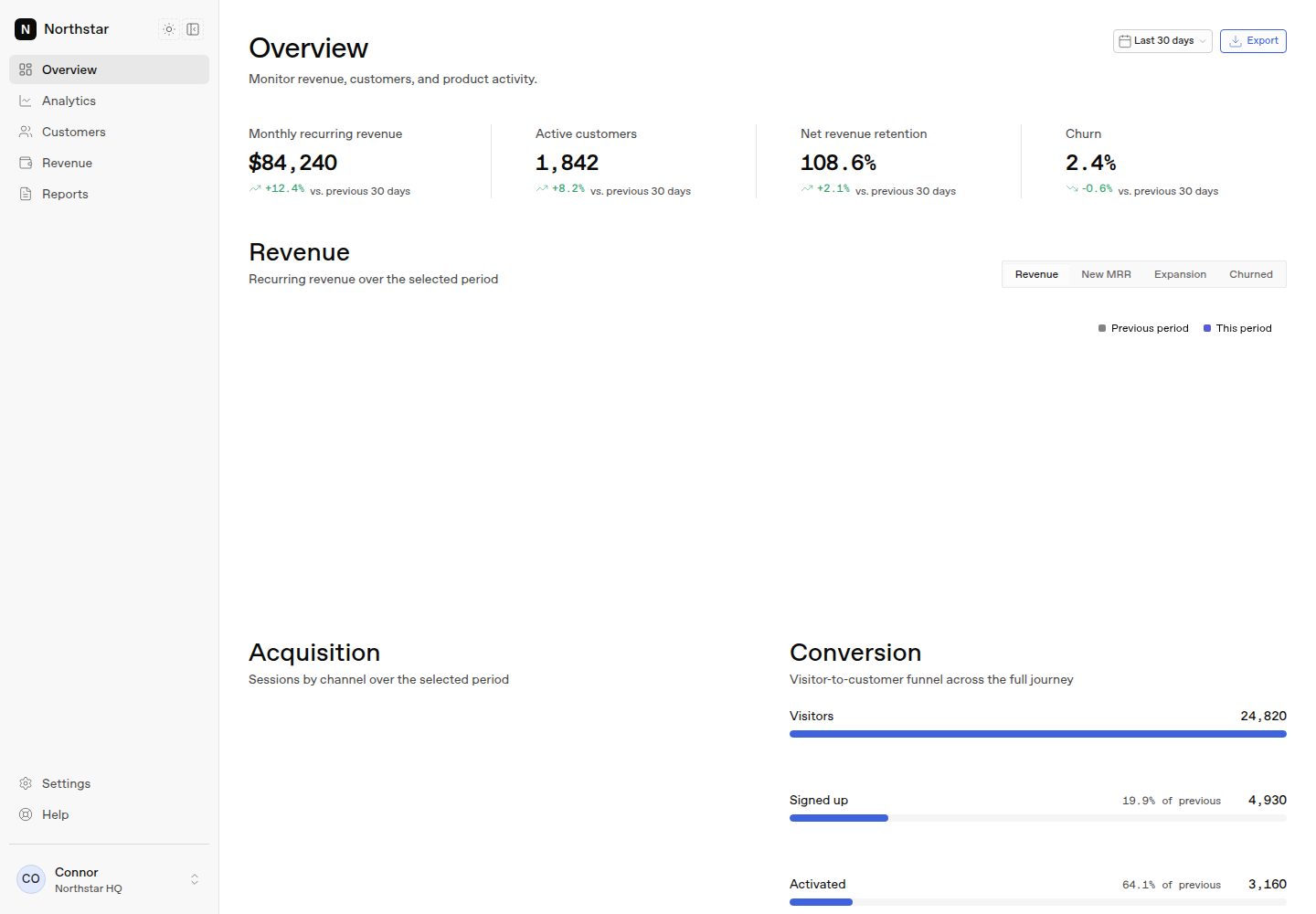
Includes a complete Overview page: a KPI metric strip, a revenue area chart, an acquisition bar chart, a conversion funnel, a cohort retention heatmap, a filterable and sortable customer data table, and an activity feed.
Next.jsReactAdmin dashboard
honestui-dashboard — Next.js Admin dashboard Template
By honestui
Northstar is a SaaS analytics dashboard template built on the Next.js App Router, featuring a complete Overview page that uses HonestUI components and charts, with typed static mock data and no database, authentication, or API keys required.
Explore the design
Compare the page layouts and mobile experience. Open any screenshot for a closer look.
Desktop homepage1 / 2
Desktop captureTop of page
Actual screenshot captured by the server browser.
All pages & views 2
Screenshots show visual appearance; interactive behavior may differ.
Recorded 2026-10-14View source
What stands out
A quick read of the recorded project description.
Uses typed static mock data, centralized in lib/dashboard/data.ts with type definitions in lib/dashboard/types.ts, requiring no database, authentication, or API keys.
Built-in route-level loading skeletons, error boundaries, chart empty/error states, a responsive sidebar with mobile Sheet navigation, and a flicker-free dark mode toggle.
Design tokens come from HonestUI's --hui-* custom properties, with chart colors, spacing, corner radii, and typography uniformly controlled by the token system.
Offers three ways to use it: as a GitHub template, one-click deployment to Vercel, or adding the entire dashboard as a HonestUI registry block to an existing app via the shadcn command.
Template Details
Northstar is a free, ready-to-run Next.js analytics dashboard template built with HonestUI. It provides a complete Overview page covering a KPI metric strip, a revenue area chart with metric toggling, an acquisition bar chart, a conversion funnel, a cohort retention heatmap, a filterable and sortable customer data table, and an activity feed. All data is typed, deterministic static mock data stored in lib/dashboard/data.ts, with type definitions in lib/dashboard/types.ts, and no database, authentication, or API keys are involved. The template includes route-level loading skeletons, error boundaries, chart empty/error states, a responsive sidebar with mobile Sheet navigation, and a flicker-free dark mode toggle. Routes in the sidebar such as Analytics, Customers, Revenue, Reports, and Settings render placeholder content only; the Overview page is the complete implementation available for reference. On the technical stack, the README states that it uses the Next.js App Router with React Server Components, TypeScript, and Tailwind CSS 4, mapped to HonestUI design tokens; charts use ECharts through HonestUI chart components. The README does not provide specific framework version numbers, performance data, or detailed production deployment instructions.
Next.jsReactAdmin
Is it right for your project?
Use Cases
- Quickly building a front-end interface prototype for a SaaS analytics dashboard for demos or internal review.
- Serving as a reference implementation for learning Next.js App Router, React Server Components, and HonestUI component integration.
- Replacing the static data in lib/dashboard/data.ts to connect to real data sources and reuse the existing page blocks.
- Adding the dashboard as a shadcn block to an existing Next.js project to supplement analytics pages.
Suitable For
- Next.js developers who need a ready-made analytics dashboard interface and want to avoid building from scratch.
- Teams that want to see how HonestUI components and charts are combined in a real page.
- Product and design staff who need to quickly demo a SaaS metrics dashboard without relying on backend services.
Getting started & customization
Use these recorded setup notes alongside the repository instructions for your chosen version.
- 1
Using as a GitHub template: click Use this template to create a repository, then run git clone, npm install, npm run dev; opening http://localhost:3000 redirects to /dashboard.
- 2
One-click deployment: use the Vercel deploy button in the README to clone the repository to a GitHub account and deploy to Vercel.
- 3
Adding to an existing app: run npx shadcn@latest add @honestui/analytics-dashboard to install the entire dashboard block.
- 4
Running npm run verify checks the registry snapshot, lint, TypeScript, and the production build.
- 5
The README does not provide environment variable, database, or authentication configuration instructions, because the template itself does not depend on these services.
License & source material
Usage conditions & limitations
Free to use · keep license noticeThis entry covers the free version under the MIT license in the public repository; the free scope is the code of this version and does not mean external services or third-party assets are free.
Must comply with when using
- Free use, modification, commercial use, and distribution of this version's code are permitted.
- When distributing copies or substantial portions of the code, retain the original author's copyright notice and the full MIT license notice.
- The code is provided as is; warranties and limitations of liability are governed by the original license and applicable law.
Additional costs & items to verify
- Demo images, fonts, icons, and other third-party assets must be checked against their respective licenses and cannot be judged solely by the code's MIT license.
- External services such as domains, hosting, databases, payments, or AI may incur separate charges.
View Original Text Basis
https://github.com/honestui/honestui-dashboard/blob/main/LICENSEhttps://github.com/honestui/honestui-dashboard/blob/main/README.mdPermission is hereby granted, free of charge
Original License Text
Compiled by DeepSeek based on repository license and README ·2026-10-14. Results only cover the materials read; dependencies, images, fonts, and subsequent term changes are subject to their respective original texts.
Project checks & description sources
Template Information
- Source platforms
- GitHub
- Documentation and maintenance reference score
- More documented · 88 / 100
- Technologies
- Next.js · React
- Website type
- Admin dashboard
How this score is calculated
Our heuristic uses license records (up to 30), a demo link (12), a preview (10), stars (15), recorded maintenance (15), description completeness (8), feature records (5) and classification data (5). It is not a code, security or performance test, or a Google score. A link does not establish tested functionality.
What to verify for this project
- Repository update recorded
- 2026-09-02
- Screenshot last checked
- 2026-10-14
A demo link is listed. Check it with your own content and viewport sizes; its presence does not confirm that forms, authentication or payments work.
The catalog identifies Next.js as the primary stack. Check the actual dependency manifest and lockfile for versions and hosting requirements. These notes use recorded metadata, not a code audit or a deployment test.
Use a selection guide →How this description was prepared
AI-assisted description based on catalog records and repository material. Repository authors are not automatically the reviewers of this description.
Review declaration: codex-user-requested-batch-review-20261015 · 2026-10-15
Inspect the recorded source material
SHA-256: 5ce35672762f8c08803b4cfcf5f4040ad295a97ded4beffdd293803fa0c425cb
2026-10-14T23:03:51.415Z
Source file / repository<div align="center"> # Northstar — SaaS Analytics Dashboard **A free, production-quality Next.js analytics dashboard template. Built with [HonestUI](https://honestui.com).** Revenue trends, acquisition, a conversion funnel, cohort retention, a filterable customer table, and recent activity — one polished Overview page wired to typed, deterministic mock data. No database, no auth, no API keys. Clone it and it runs. [](https://vercel.com/new/clone?repository-url=https%3A%2F%2Fgithub.com%2Fhonestui%2Fhonestui-dashboard&project-name=northstar-dashboard&repository-name=honestui-dashboard) [](LICENSE)     <details> <summary><strong>Dark mode</strong></summary>  </details> </div> ## Get started Three ways to use this, pick one: **1. Use it as a GitHub template** — click [**Use this template**](https://github.com/honestui/honestui-dashboard/generate) to create your own repo, then: ```bash git clone https://github.com/<you>/<your-repo>.git cd <your-repo> npm install npm run dev ``` Open [http://localhost:3000](http://localhost:3000) — it redirects to `/dashboard`. **2. Deploy it first, code later** — the [one-click deploy](https://vercel.com/new/clone?repository-url=https%3A%2F%2Fgithub.com%2Fhonestui%2Fhonestui-dashboard&project-name=northstar-dashboard&repository-name=honestui-dashboard) clones the repo to your GitHub account and puts it live on Vercel in about a minute. **3. Add the dashboard to an existing app** — the whole dashboard (pages, sections, data layer) is also distributed as a [shadcn](https://ui.shadcn.com) block from the HonestUI registry: ```bash npx shadcn@latest add @honestui/analytics-dashboard ``` ## What's inside - **A complete Overview page** — KPI strip, revenue area chart with metric tabs, acquisition bar chart, conversion funnel, cohort retention heatmap, a filterable/sortable customer data table, and an activity feed. - **Real app plumbing** — route-level loading skeletons, an error boundary, empty/error chart states, responsive sidebar + mobile sheet navigation, and a flash-free dark mode toggle. - **Typed mock data** — every series, customer, and event lives in `lib/dashboard/data.ts` with shapes in `lib/dashboard/types.ts`. Swap in real data access and the sections keep working. - **No second design system** — chart colors, spacing, radii, and typography all come from the HonestUI token system (`--hui-*` custom properties) in `styles/`. ## Stack - Next.js (App Router) + React Server Components - TypeScript - Tailwind CSS 4 mapped onto HonestUI tokens - HonestUI copied components (`components/ui/`) and package collections (`honestui/charts`, `honestui/icons`) - ECharts via the HonestUI chart components - Static typed mock data — no database, auth, or API ```bash npm run verify ``` checks the registry snapshot, lint, TypeScript, and a production build. ## How HonestUI is used HonestUI has two delivery models, and this starter intentionally uses both: - **Copied components** live in `components/ui/` (Button, Card, Badge, Tabs, Select, Sheet, Table, Data Table, Empty, Skeleton, Avatar, Dropdown Menu, Toggle Group, …). They are application code you own — the dashboard imports them directly rather than recreating primitives. - **Package collections** stay as imports: charts come from `honestui/charts` (AreaChart, BarChart, Heatmap) with `honestui/charts.css` loaded once in `app/globals.css`, and icons come from `honestui/icons`. Dark mode uses the existing theme mechanism: `data-theme` on `<html>` for tokens plus the `dark` class for Tailwind variants and chart themes — see `components/dashboard/theme-toggle.tsx`. One ordering detail worth knowing: `honestui/charts.css` is imported **before** `tailwindcss` in `app/globals.css`, and the cascade layer order is declared at the top of that file. Both sheets are Tailwind-compiled, so whoever declares layers first wins. ## Make it yours | To change… | Edit… | | --- | --- | | Dashboard data | `lib/dashboard/data.ts` (series, customers, activity), `lib/dashboard/types.ts` (shapes), `lib/dashboard/format.ts` (formatting) | | Sections | `components/dashboard/` — one file per section; the page composes them in `app/(app)/dashboard/page.tsx` | | App shell | Sidebar, mobile navigation, theme toggle, and account menu in `components/dashboard/`; navigation items in `components/dashboard/nav.ts` | | Charts | Configured inline in each section via the HonestUI `ChartConfig` (per-theme color arrays using `--hui-color-viz-*` tokens) | | Theme values | `styles/` holds the HonestUI foundation; `app/globals.css` maps Tailwind theme variables onto it | | Loading / error states | `app/(app)/dashboard/loading.tsx`, `app/(app)/dashboard/error.tsx`, and `components/dashboard/chart-states.tsx` | The sidebar's other routes (Analytics, Customers, Revenue, Reports, Settings) render an intentional placeholder — the Overview page is the reference implementation to copy from. Add more HonestUI components any time: ```bash npx honestui@latest add <component> ``` `registry.snapshot.json` records the exact public registry entries installed in this starter. ## HonestUI - [honestui.com](https://honestui.com) — components, charts, shaders, icons - [honestui.com/docs](https://honestui.com/docs) - [github.com/honestui/honestui](https://github.com/honestui/honestui) ## License [MIT](LICENSE) — use it for anything, no attribution required.
Explore similar templates
Compare previews and descriptions within the same stack and category.

next-shadcn-dashboard-starter
An MIT-licensed admin dashboard starter built with Next.js 16, shadcn/ui, Tailwind CSS v4, and TypeScript.
Next.js · Admin dashboard

Studio Admin · Radix UI
Studio Admin is an admin dashboard template built with Next.js 16, TypeScript, Tailwind CSS v4, and Shadcn UI.
Next.js · Admin dashboard

free-nextjs-admin-dashboard
A free, open-source admin dashboard template built on Next.js 16, React 19, TypeScript, and Tailwind CSS v4. It provides a collapsible sidebar, charts, tables, authentication forms, modals, dropdowns, and dark mode, with internationalization and RTL support since version 2.4.0.
Next.js · Admin dashboard

materio-mui-nextjs-admin-template-free
Materio Free is a Next.js admin dashboard template based on App Router and MUI, integrating Tailwind CSS and available in TypeScript and JavaScript versions.
Next.js · Admin dashboard
nextjs-postgres-nextauth-tailwindcss-template
A Vercel-maintained Next.js App Router admin dashboard starter with Auth.js GitHub OAuth, Postgres, Tailwind CSS, and Shadcn UI, plus a sample products table, seed endpoint, and CRUD interface.
Next.js · Admin dashboard

shadcn-dashboard-landing-template
An open-source admin dashboard and marketing landing page template built on shadcn/ui and Tailwind CSS, with both Vite + React and Next.js versions in one repository.
Next.js · Admin dashboard