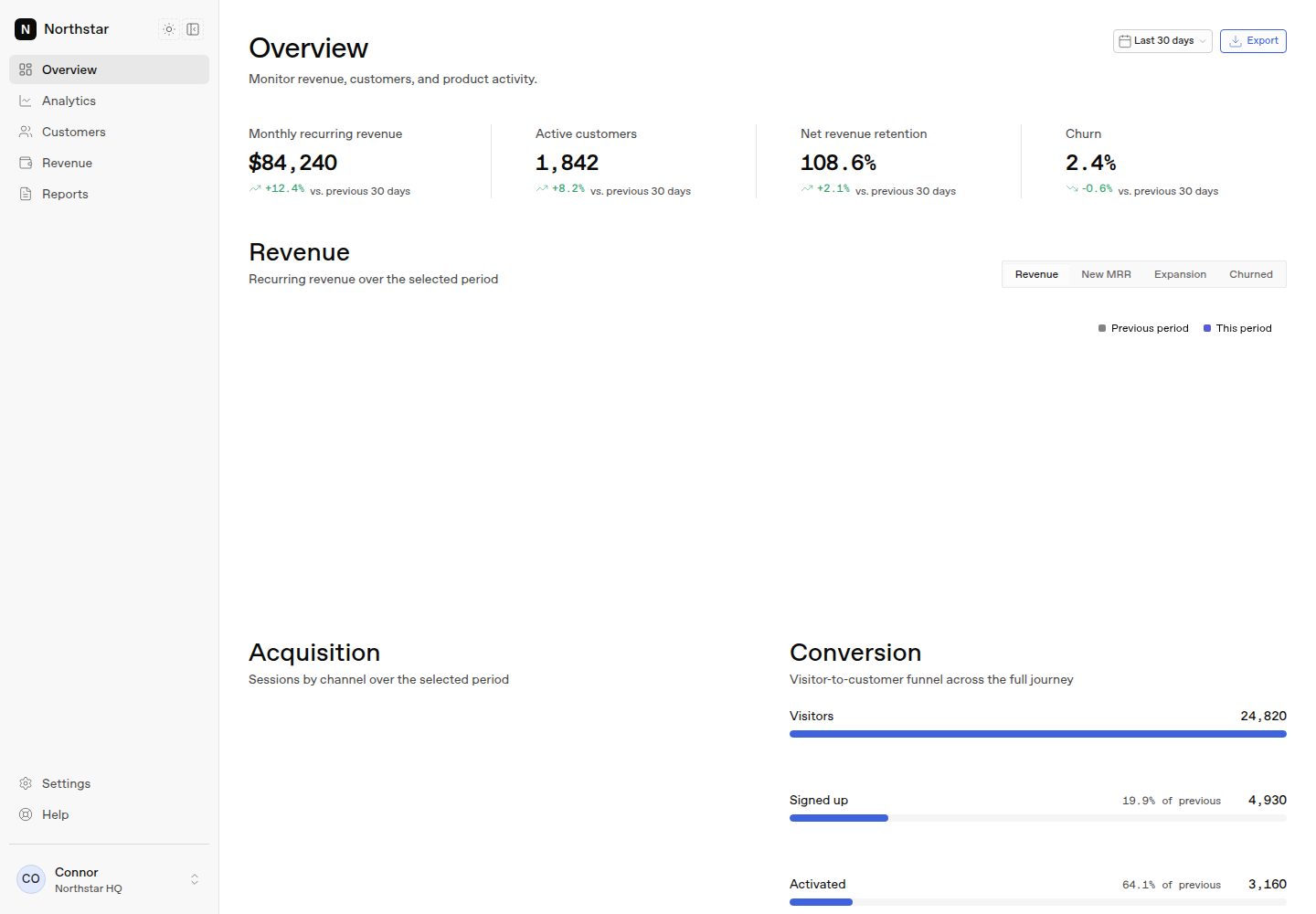
包含完整的 Overview 页面:KPI 指标条、收入面积图、获客柱状图、转化漏斗、群组留存热力图、可筛选排序的客户数据表与活动流。
Next.jsReact后台
honestui-dashboard — Next.js 后台模板
作者 honestui
Northstar 是一个基于 Next.js App Router 的 SaaS 分析仪表盘模板,包含一个完整的 Overview 页面,使用 HonestUI 组件与图表,数据为类型化静态 mock,无需数据库、认证或 API 密钥。
看看你的网站会是什么样
浏览真实页面截图,比较内容排版与手机效果。点击下方缩略图切换,放大查看整页细节。
全部页面与视图 2
截图用于了解视觉与布局,交互效果请以实际项目为准。
采集于 2026-10-14查看来源
值得关注的模板亮点
从已有项目资料中,快速了解它的特点。
使用类型化静态 mock 数据,集中在 lib/dashboard/data.ts,类型定义在 lib/dashboard/types.ts,无需数据库、认证或 API 密钥。
内置路由级加载骨架、错误边界、图表空/错误状态、响应式侧边栏与移动端 Sheet 导航,以及无闪烁深色模式切换。
设计令牌来自 HonestUI 的 --hui-* 自定义属性,图表颜色、间距、圆角与字体统一由令牌系统控制。
提供三种使用方式:作为 GitHub 模板、一键部署到 Vercel,或通过 shadcn 命令将整个仪表盘作为 HonestUI 注册表区块添加到现有应用。
模板详细介绍
Northstar 是一个免费、可直接运行的 Next.js 分析仪表盘模板,由 HonestUI 构建。它提供一个完整的 Overview 页面,涵盖 KPI 指标条、带指标切换的收入面积图、获客柱状图、转化漏斗、群组留存热力图、可筛选排序的客户数据表以及活动流。所有数据均为类型化、确定性的静态 mock,存放在 lib/dashboard/data.ts 中,类型定义在 lib/dashboard/types.ts,不涉及数据库、认证或 API 密钥。模板包含路由级加载骨架、错误边界、图表空/错误状态、响应式侧边栏与移动端 Sheet 导航,以及无闪烁的深色模式切换。侧边栏中的 Analytics、Customers、Revenue、Reports、Settings 等路由仅渲染占位内容,Overview 页面是可供参考的完整实现。技术栈方面,README 说明使用 Next.js App Router 与 React Server Components、TypeScript、Tailwind CSS 4,并映射到 HonestUI 设计令牌;图表通过 HonestUI 图表组件使用 ECharts。README 未提供具体框架版本号、性能数据或生产环境部署的详细说明。
Next.jsReact后台
适合你的项目吗?
适用场景
- 快速搭建 SaaS 分析仪表盘的前端界面原型,用于演示或内部评审。
- 作为学习 Next.js App Router、React Server Components 与 HonestUI 组件集成的参考实现。
- 通过替换 lib/dashboard/data.ts 中的静态数据,对接真实数据源并复用现有页面区块。
- 将仪表盘作为 shadcn 区块添加到已有 Next.js 项目中,补充分析页面。
适合人群
- 需要现成分析仪表盘界面、希望避免从零搭建的 Next.js 开发者。
- 希望参考 HonestUI 组件与图表在真实页面中如何组合使用的团队。
- 需要快速演示 SaaS 指标看板、且不依赖后端服务的产品与设计人员。
上手与定制指南
结合仓库当前版本的说明,按下面的资料检查内容、配置与运行要求。
- 1
作为 GitHub 模板使用:点击 Use this template 创建仓库,然后执行 git clone、npm install、npm run dev,打开 http://localhost:3000 会重定向到 /dashboard。
- 2
一键部署:通过 README 中的 Vercel 部署按钮将仓库克隆到 GitHub 账户并部署到 Vercel。
- 3
添加到现有应用:运行 npx shadcn@latest add @honestui/analytics-dashboard 安装整个仪表盘区块。
- 4
运行 npm run verify 可检查注册表快照、lint、TypeScript 与生产构建。
- 5
README 未提供环境变量、数据库或认证配置说明,因为模板本身不依赖这些服务。
授权与来源资料
使用条件与限制
免费使用 · 保留许可声明本次收录的是公开仓库中采用 MIT 许可的免费版本;免费范围为该版本代码,不代表外部服务或第三方素材免费。
使用时需要遵守
- 允许免费使用、修改、商用和分发该版本代码。
- 分发代码副本或实质性部分时,保留原作者版权声明和完整 MIT 许可声明。
- 代码按现状提供;担保与责任限制以原许可证及适用法律为准。
额外费用与待核对事项
- 演示图片、字体、图标及其他第三方素材需按各自许可核对,不能仅凭代码的 MIT 许可判断。
- 域名、托管、数据库、支付或 AI 等外部服务可能另外收费。
查看原文依据
https://github.com/honestui/honestui-dashboard/blob/main/LICENSEhttps://github.com/honestui/honestui-dashboard/blob/main/README.mdPermission is hereby granted, free of charge
许可证原文
DeepSeek 根据仓库许可证和 README 整理 ·2026-10-14。结果仅覆盖已读取资料,依赖、图片、字体及后续条款变更以各自原文为准。
项目核对记录与介绍依据
模板资料
- 来源平台
- GitHub
- 资料与维护参考分
- 资料较完整 · 88 / 100
- 技术栈
- Next.js · React
- 网站类型
- 后台
这个分数如何计算
本站按许可资料(最高30分)、演示链接(12分)、预览图(10分)、Star数(15分)、记录的维护时间(15分)、描述完整度(8分)、功能记录(5分)和分类资料(5分)计算。它不是代码、安全或性能测试,也不是 Google 评分;有链接不代表已实测可用。
这个项目需要核对什么
- 记录的仓库更新时间
- 2026-09-02
- 截图检查日期
- 2026-10-14
已收录演示链接。请用你的内容与屏幕尺寸检查;有演示不代表表单、认证或支付已经可用。
目录记录的主要技术栈是 Next.js。请通过依赖清单和锁文件核对实际版本与托管要求。这些说明基于收录资料,不代表代码审计或部署实测。
查看具体选型方法 →介绍的制作与核对状态
介绍由 AI 辅助整理目录与仓库资料。仓库作者不等于这篇介绍的审核者。
审核声明: codex-user-requested-batch-review-20261015 · 2026-10-15
查看当时使用的来源资料
SHA-256: 5ce35672762f8c08803b4cfcf5f4040ad295a97ded4beffdd293803fa0c425cb
2026-10-14T23:03:51.415Z
来源文件 / 仓库<div align="center"> # Northstar — SaaS Analytics Dashboard **A free, production-quality Next.js analytics dashboard template. Built with [HonestUI](https://honestui.com).** Revenue trends, acquisition, a conversion funnel, cohort retention, a filterable customer table, and recent activity — one polished Overview page wired to typed, deterministic mock data. No database, no auth, no API keys. Clone it and it runs. [](https://vercel.com/new/clone?repository-url=https%3A%2F%2Fgithub.com%2Fhonestui%2Fhonestui-dashboard&project-name=northstar-dashboard&repository-name=honestui-dashboard) [](LICENSE)     <details> <summary><strong>Dark mode</strong></summary>  </details> </div> ## Get started Three ways to use this, pick one: **1. Use it as a GitHub template** — click [**Use this template**](https://github.com/honestui/honestui-dashboard/generate) to create your own repo, then: ```bash git clone https://github.com/<you>/<your-repo>.git cd <your-repo> npm install npm run dev ``` Open [http://localhost:3000](http://localhost:3000) — it redirects to `/dashboard`. **2. Deploy it first, code later** — the [one-click deploy](https://vercel.com/new/clone?repository-url=https%3A%2F%2Fgithub.com%2Fhonestui%2Fhonestui-dashboard&project-name=northstar-dashboard&repository-name=honestui-dashboard) clones the repo to your GitHub account and puts it live on Vercel in about a minute. **3. Add the dashboard to an existing app** — the whole dashboard (pages, sections, data layer) is also distributed as a [shadcn](https://ui.shadcn.com) block from the HonestUI registry: ```bash npx shadcn@latest add @honestui/analytics-dashboard ``` ## What's inside - **A complete Overview page** — KPI strip, revenue area chart with metric tabs, acquisition bar chart, conversion funnel, cohort retention heatmap, a filterable/sortable customer data table, and an activity feed. - **Real app plumbing** — route-level loading skeletons, an error boundary, empty/error chart states, responsive sidebar + mobile sheet navigation, and a flash-free dark mode toggle. - **Typed mock data** — every series, customer, and event lives in `lib/dashboard/data.ts` with shapes in `lib/dashboard/types.ts`. Swap in real data access and the sections keep working. - **No second design system** — chart colors, spacing, radii, and typography all come from the HonestUI token system (`--hui-*` custom properties) in `styles/`. ## Stack - Next.js (App Router) + React Server Components - TypeScript - Tailwind CSS 4 mapped onto HonestUI tokens - HonestUI copied components (`components/ui/`) and package collections (`honestui/charts`, `honestui/icons`) - ECharts via the HonestUI chart components - Static typed mock data — no database, auth, or API ```bash npm run verify ``` checks the registry snapshot, lint, TypeScript, and a production build. ## How HonestUI is used HonestUI has two delivery models, and this starter intentionally uses both: - **Copied components** live in `components/ui/` (Button, Card, Badge, Tabs, Select, Sheet, Table, Data Table, Empty, Skeleton, Avatar, Dropdown Menu, Toggle Group, …). They are application code you own — the dashboard imports them directly rather than recreating primitives. - **Package collections** stay as imports: charts come from `honestui/charts` (AreaChart, BarChart, Heatmap) with `honestui/charts.css` loaded once in `app/globals.css`, and icons come from `honestui/icons`. Dark mode uses the existing theme mechanism: `data-theme` on `<html>` for tokens plus the `dark` class for Tailwind variants and chart themes — see `components/dashboard/theme-toggle.tsx`. One ordering detail worth knowing: `honestui/charts.css` is imported **before** `tailwindcss` in `app/globals.css`, and the cascade layer order is declared at the top of that file. Both sheets are Tailwind-compiled, so whoever declares layers first wins. ## Make it yours | To change… | Edit… | | --- | --- | | Dashboard data | `lib/dashboard/data.ts` (series, customers, activity), `lib/dashboard/types.ts` (shapes), `lib/dashboard/format.ts` (formatting) | | Sections | `components/dashboard/` — one file per section; the page composes them in `app/(app)/dashboard/page.tsx` | | App shell | Sidebar, mobile navigation, theme toggle, and account menu in `components/dashboard/`; navigation items in `components/dashboard/nav.ts` | | Charts | Configured inline in each section via the HonestUI `ChartConfig` (per-theme color arrays using `--hui-color-viz-*` tokens) | | Theme values | `styles/` holds the HonestUI foundation; `app/globals.css` maps Tailwind theme variables onto it | | Loading / error states | `app/(app)/dashboard/loading.tsx`, `app/(app)/dashboard/error.tsx`, and `components/dashboard/chart-states.tsx` | The sidebar's other routes (Analytics, Customers, Revenue, Reports, Settings) render an intentional placeholder — the Overview page is the reference implementation to copy from. Add more HonestUI components any time: ```bash npx honestui@latest add <component> ``` `registry.snapshot.json` records the exact public registry entries installed in this starter. ## HonestUI - [honestui.com](https://honestui.com) — components, charts, shaders, icons - [honestui.com/docs](https://honestui.com/docs) - [github.com/honestui/honestui](https://github.com/honestui/honestui) ## License [MIT](LICENSE) — use it for anything, no attribution required.
看看同类模板
对比同技术栈与用途的模板,找到更适合的视觉与内容结构。

next-shadcn-dashboard-starter
Free, open source, AI-friendly admin dashboard template built with Next.js 16, shadcn/ui, Tailwind CSS, and Ty…
Next.js · 后台

Studio Admin · Radix UI
Modern Admin Dashboard Template built with Shadcn UI and Next.js 16
Next.js · 后台

free-nextjs-admin-dashboard
TailAdmin is a Next.js and Tailwind CSS free, open-source admin dashboard template. Provides developers with t…
Next.js · 后台

materio-mui-nextjs-admin-template-free
An enterprise-grade Next.js admin dashboard template. Made with developer experience first: Next.js v14 (App R…
Next.js · 后台
nextjs-postgres-nextauth-tailwindcss-template
Admin dashboard template.
Next.js · 后台

shadcn-dashboard-landing-template
Accelerate your development with a sleek, open-source admin dashboard and landing page built on Vite-React, Ne…
Next.js · 后台